Skip to content
DevMeme
4091 of 7435
The 'Ancient Knowledge' of a Senior Engineer
DevCommunities Post #4462, on Jun 16, 2022 in TG

The 'Ancient Knowledge' of a Senior Engineer

Why is this DevCommunities meme funny?

Level 1: Little Space, Big Problem

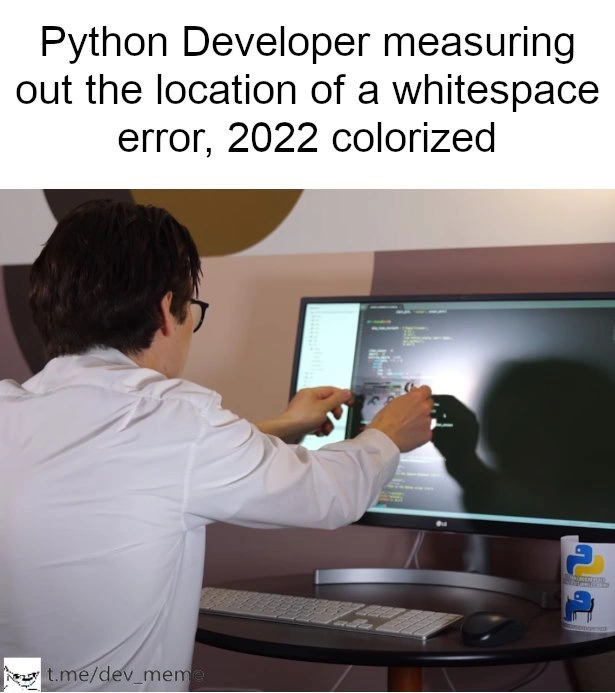
Imagine you’re stacking building blocks to make a wall, and every block needs to line up perfectly. If one block is just a tiny bit out of line, the whole wall wobbles or falls apart. Now picture a builder holding up a ruler (or a super fancy measuring tool) to find that one misaligned block because it’s so hard to see with just eyes. This meme is like that, but with writing computer instructions instead of blocks. In Python (a programming language), the way you line up your code is super important – one extra space (a tiny blank gap) can mess everything up, kind of like that misaligned block making the wall collapse. The programmer in the picture is doing something funny: he’s using a measuring tool on his screen to check the spacing of his code, because somewhere a teeny tiny extra gap is causing his program to break. It’s silly because normally you’d never literally measure your screen, but it shows how even a small mistake (like a single space character) can cause a big problem in coding. The joke makes us laugh because we’ve all felt like that builder looking for the one small thing that’s wrong, and sometimes it feels like you’d need a microscope (or calipers!) to find it!

Level 2: Where’s the Space?

Let’s break down the scenario for those newer to Python or coding: In Python, indentation (the spacing at the beginning of a line) is part of the program’s grammar. This is pretty unique – in many other languages, spaces or tabs at the start of a line don’t matter to the compiler or interpreter. But in Python, they matter a lot. We use indentation to group code into blocks. For example, after a function definition like def my_func():, the next lines of code need to be indented (usually by 4 spaces) to show they are part of that function. If one of those lines has a different indent (even by one space), Python gets confused about what block that line belongs to. The result is an IndentationError – basically Python’s way of saying “I can’t figure out your code structure because the indents don’t line up as expected.”

Now, whitespace error generally means any bug caused by an incorrect space or tab. Commonly in Python this is an indentation issue. Picture writing a list of steps and accidentally shifting one step a bit to the left or right – suddenly the sequence is out of whack. That’s what happens in code. One line started with 3 spaces while others had 4, so Python throws up its hands: “This doesn’t match up!” A related problem is mixing tabs and spaces. Tabs and spaces both create indents, but they’re actually different characters. If you use a tab on one line and spaces on another, Python can’t reliably measure the indent distance (a tab might visually equal 4 or 8 spaces depending on settings, but Python expects consistency). In Python 3, the interpreter will refuse to run and give a specific TabError: inconsistent use of tabs and spaces in indentation if it detects that mix.

So why the calipers in the meme? Calipers are a precise measuring tool, often used in engineering or labs to measure tiny distances very accurately (like fractions of a millimeter). The joke here is that the developer is treating the screen like a piece of hardware that needs measuring to locate an almost imperceptible difference. Essentially, he’s measuring the code’s indent gaps on the monitor. Of course, no one really does this (we hope!). In reality, if a Python dev suspects an invisible space causing problems, they might do things like turning on “show whitespace” in their editor – this displays little dots or symbols where spaces and tabs are, so you can literally see every space. They might also use a linter. A linter is a tool that checks your code for issues, including formatting problems. A Python linter (like Flake8 or Pylint) often will catch indent issues or at least tell you “hey, there’s something off on this line’s indentation.” However, in the meme scenario, the text suggests the linter “inexplicably miss” the issue. Perhaps the linter wasn’t run, or wasn’t configured to flag that particular problem, leaving our poor developer to manually hunt for the error.

We’ve also got a few visual cues reinforcing the joke: the ultra-wide monitor with color-coded Python code and the Python logo on the coffee mug. The wide monitor suggests maybe the developer is looking at a lot of code (or just likes a big display, which many programmers do for comfort). The Python-themed mug is a fun detail saying “yep, this is definitely about Python” (plus, every programmer fueled by debugging woes likely has a coffee or tea by their side!). The colored code on screen indicates a code editor or IDE doing syntax highlighting – something beginners might not realize is actually super helpful for spotting errors. Sometimes a mis-indented line will highlight differently or just visually look off alignment when you have those indent guidelines on.

If you’re a newcomer who’s run into this, you know it’s frustrating. Your code might be, say, a few dozen lines, everything seems fine and then running it gives an error pointing to a line and saying “IndentationError: unexpected indent” or “unindent does not match any outer indentation level”. Initially, you might be baffled – “Huh? But I indented properly!” It often boils down to one tiny inconsistency. Manual error localization (as tagged in the context) is a fancy way of saying “finding exactly where in the code the error is.” In this case, manually locating which line has the wrong whitespace. The meme exaggerates that manual search by equipping the coder with a physical tool – implying he’s going over the codebase with microscope-level attention.

For a junior developer, a common strategy to fix this is to re-indent the code around where the error is. For example, you might highlight a block of code and press Tab or Shift+Tab uniformly to reset indentation or use your editor’s “format” command. A sneaky situation is when a non-printable character sneaks in – say you copied code from a website and it included a weird whitespace symbol. Those are impossible to see normally. Enabling “show invisibles” in an editor will reveal things like for newlines or · for spaces, and that can immediately show, “Oh! That line starts with a different indent.” Many beginner-friendly IDEs (like IDLE or PyCharm with default settings) will also automatically fix indentation or at least give a pretty clear hint.

So essentially, “Where’s the space?” is the newbie question and the meme’s answer is a humorous “If you can’t see it, measure it!” It captures that sometimes debugging is less about hardcore algorithms and more about painstakingly checking every character. Yes, even something as trivial as an extra space can bring your program to a halt. The categories “Bugs” and “Debugging_Troubleshooting” really shine through here: this is the simplest form of a software bug – a character in the wrong place – and troubleshooting it can feel like finding a needle in a haystack. But once you know what to look for (and with a bit of experience), you’ll develop a sixth sense for these issues. Soon enough, you’ll join other developers in sharing a laugh about the one time you practically went cross-eyed counting spaces on your screen to fix a Python code error!

Level 3: Tabs vs Spaces Saga

For experienced devs, this meme hits home because it blends a mundane coding headache with an over-the-top solution. The humor comes from the extreme exaggeration: a Python developer in a lab coat holding actual calipers against the screen to find a whitespace error. It’s the perfect satire of those hair-pulling debugging sessions where the bug turns out to be something ridiculously small. If you’ve ever spent an afternoon yelling “Where is that missing space?!” at your code, this image is your life in comic form.

The meme text frames it as a historical reenactment – “2022 colorized” – jokingly treating the hunt for a missing whitespace like a moment worthy of archival footage. It’s a tongue-in-cheek way to say: Behold, the great Python Indentation Bug Hunt of our time! In reality, every Python programmer, at least once, has faced the dreaded IndentationError or its sneaky cousin TabError. Maybe you copied some code from Stack Overflow and suddenly nothing works, only to discover one line had a tab instead of spaces. Visually, everything looked aligned, but Python under the hood was fuming, “Mixing tabs and spaces, are we? I’m not running this!” This is the classic tabs vs spaces saga – an almost legendary holy war in programming culture. Seasoned developers know it well: entire flame wars on forums have been fought over whether to use tabs or spaces for indentation. Python took a definitive stance (PEP 8 says “Spaces are the preferred indentation method”), and if you violate that by accident, Python will let you know.

Beyond the tabs vs spaces issue, the meme nails the broader experience of debugging frustration. There’s a shared, slightly traumatized recognition: “Oh, I’ve been that person tracing through code letter-by-letter to find the one character that’s off.” It’s funny because it’s true – we laugh to keep from crying. In large codebases or even just a rushed late-night coding session, it’s shockingly easy for a single whitespace bug to slip in. Perhaps you indented one line with 3 spaces instead of 4, or an autoformatter glitched out, or you hit the spacebar one time too many. The code might be 99.9% correct, but that 0.1% misalignment brings everything crashing down. It’s the ultimate example of “small bug, big headache.” And let’s face it, these bugs have a sense of timing – they often reveal themselves right before a deadline or during a live demo, as if the Universe of Bugs has a cruel sense of humor.

In practice, when this happens, veteran devs have a whole arsenal of tactics (short of actual calipers… usually). You might enable “visible whitespace” mode in your text editor, turning those spaces into tiny dots or dashes. Or run git diff --check which flags trailing whitespace and indent issues. Or use a linter like flake8/pylint which typically will point out “inconsistent indentation”. Some IDEs even show faint vertical guide lines that must line up perfectly across indented blocks – a lifesaver for the indentation OCD we all develop. In worst-case scenarios, developers might resort to printing out the file with special commands to reveal hidden characters. For example, using a tool to dump the ASCII codes of each character, just to find that one rogue 0x0A or non-breaking space lurking. It’s the digital equivalent of dusting for fingerprints.

So why do seasoned programmers find this meme so ridiculously relatable? Because it encapsulates the absurdity of debugging something that has no visible manifestation. It’s like being a detective at a crime scene where the culprit is literally invisible. You feel a mix of annoyance and determination: “I know it’s just a tiny space… but where?!” We’ve all had that moment squinting at code, aligning cursors on each line, maybe copying the code into a fresh file to see if it magically fixes the indentation. The guy in the meme with the lab coat and exact measuring tool is a comedic exaggeration of our inner perfectionist. It pokes fun at how, in software development, sometimes you end up going to engineering extremes (almost literally measuring pixels) to solve what is essentially a language quirk.

And the Python coffee mug in the image? That adds a nice touch of community in-joke. Python developers often wear the significance of whitespace as a badge of pride (and sometimes pain). Over the years, countless jokes, comics, and even horror stories have been shared about the infamous “invisible syntax error”. Seasoned devs recall early days when they first encountered it, perhaps incredulous: “Wait, my code broke because of… a space?!” It’s a rite of passage. Eventually, you learn to respect the whitespace. You set up your editor to automatically strip trailing spaces and use consistent indentation. You might even join one side of the tabs-vs-spaces debate with religious fervor. But no matter how experienced you are, once in a blue moon, a whitespace bug can still sneak by – and in that moment, you too might feel the temptation to grab a pair of calipers (or at least a ruler) and double-check that monitor, just in case your eyes are deceiving you. The meme tickles that memory and shared understanding: that in programming, even microscopic details can lead to epic troubleshooting adventures.

Level 4: Significant Whitespace

Python’s use of significant whitespace (the off-side rule) means the indentation of your code isn’t just for pretty formatting – it is the code’s structure. Under the hood, the Python interpreter’s lexer transforms changes in indentation into special INDENT and DEDENT tokens, which the parser uses to determine code blocks (like which lines belong inside a function or an if-statement). In a language like C++ or Java, braces { } or keywords (begin/end) explicitly mark these blocks, but Python’s elegant design chooses indentation as the delimiter. This makes code visually cleaner but introduces a unique fragility: a single misplaced space or tab can break the code’s syntax.

When the Python parser encounters an indentation level it doesn’t expect – for example, one line indented 3 spaces while the previous was 4 – it throws an IndentationError (or a TabError if it detects a mix of tab and space characters). These errors stem from the formal grammar rules Python follows. Every time you indent further, the lexer emits an INDENT token; when you dedent (un-indent) back, it emits a DEDENT token. The counts of these invisible tokens must exactly balance out in a valid block structure. A stray space is like an unaccounted micro-unit in this token stream, violating the expected LALR(1) parsing state of the Python grammar. In simpler terms, that extra space is a unexpected symbol that doesn’t fit the pattern the parser was building, so it stops cold and complains.

What makes this particularly devilish is that whitespace is invisible. A human reader might not immediately see the difference between 4 vs 3 spaces, or a tab vs spaces – the code might look perfectly aligned while the interpreter sees chaos. For example, consider this tiny snippet which would raise an error:

def greet():
    print("Hello")      # 4 spaces indentation here
   print("World")       # 3 spaces indentation here – subtle but fatal

At a glance, both print lines above appear at “the same” indent level, but the second line actually has one space fewer. The Python interpreter treats that as an improper dedent: the greet() function’s block wasn’t closed properly, so it’s confused where the function body ends. This may result in an error like IndentationError: unindent does not match any outer indentation level. A similar issue happens if you mix tabs and spaces – e.g., one line uses a tab character (which visually might align to 8 spaces in your editor) and another uses actual spaces. Python 3 forbids that mix outright, throwing a TabError to save you from a potentially undetectable alignment issue. The underlying point is that the language’s lexical analysis stage is treating whitespace as first-class syntax. One rogue whitespace character is like a single broken component in a circuit: tiny and hard to spot, but it breaks the entire system’s logic flow.

Interestingly, this “indentation as syntax” approach has roots in academic language design. It’s known as the off-side rule, originating in languages like ISWIM and Miranda, and later adopted by Haskell and Python. The idea is to enforce readability: code that is indented clearly reflects logical structure. The design trade-off is that it demands precision. The meme comically exaggerates a scenario where, to meet that precision, a developer resorts to literal physical measurement – as if the code’s layout were a piece of hardware requiring calibration with calipers. It’s poking fun at how something as theoretically abstract as lexical parsing can lead to very tangible frustration: you’re measuring your screen like a machinist, hunting down a 0.2 millimeter discrepancy that represents a very real syntax bug.

From a tooling perspective, modern Python developers have linters and IDE features to catch these issues. A good linter will flag inconsistent indentation or invisible characters (like a non-breaking space accidentally copied in). Many editors can be configured to display whitespace symbols (· for spaces, for tabs) or to automatically convert tabs to spaces, reducing the chance of a hidden mix-up. Yet, as the meme jokes, sometimes these safeguards “inexplicably miss” the problem – perhaps the linter was turned off, or it didn’t run on that file, or the issue was a non-standard invisible character that the tool didn’t flag. In such unlucky cases, developers truly feel like they’re doing low-level forensics on their code. The meme’s absurd image of using calipers on an ultra-wide monitor is a humorous metaphor for that deep-tech debugging: delving into binary or ASCII code points of the file to find that one uninvited whitespace character that’s breaking everything. It’s a lighthearted nod to the deep technical truth that in Python, what you don’t see (a space) can hurt you – leading even the most seasoned engineers to act like precision engineers when debugging an indentation bug.

Description

This meme features the 'Sacred Texts' meme format from Star Wars. A character is looking at a collection of ancient, glowing books. The books are labeled 'A Stack Overflow answer from 2011 that fixes a critical production bug.' This meme is a humorous take on the surprising longevity and relevance of old, seemingly outdated information in the tech world. For senior engineers, it’s a nod to the fact that sometimes the best solution to a modern problem is hidden in a decade-old forum post, and the importance of knowing how to find that needle in the digital haystack

Comments

11
Anonymous ★ Top Pick The difference between a junior and a senior dev is that a junior reads the docs, while a senior knows which 12-year-old Stack Overflow answer has the one-line hack that actually works
  1. Anonymous ★ Top Pick

    The difference between a junior and a senior dev is that a junior reads the docs, while a senior knows which 12-year-old Stack Overflow answer has the one-line hack that actually works

  2. Anonymous

    Because apparently `flake8` doesn’t ship with a micrometer mode for rogue tabs

  3. Anonymous

    After 20 years in the industry, I've seen teams implement linters, formatters, and pre-commit hooks, yet here we are in 2022 still debugging Python indentation with rulers - proving that no amount of tooling can fix the fundamental disconnect between 'it looks right' and 'the interpreter disagrees'

  4. Anonymous

    This perfectly captures the Python developer's descent into madness when a single misplaced space causes an IndentationError. After the third time running the linter, checking your .editorconfig, verifying your IDE's tab settings, and still getting 'expected an indented block,' you start questioning whether your monitor's pixel alignment is off. The real tragedy? This developer is probably using spaces, but their coworker who touched the file last was using tabs with a different width setting. Welcome to Python, where the whitespace is not just significant - it's existential

  5. Anonymous

    When even pylint ghosts you, nothing debugs Python indents like a steady finger and 4K resolution

  6. Anonymous

    Python’s real consensus algorithm is Black plus pre-commit - until a Byzantine tab sneaks in via Slack and turns an IndentationError into a sev‑2, hence the calipers

  7. Anonymous

    Build fails on E101, so the staff engineer adds whitespace observability - calipers as the tracing backend - until EditorConfig finally lands in the monorepo

  8. @chupasaurus 4y

    Maybe I should write "Linters for dummies" 🤔

  9. Deleted Account 4y

    programmers are also humans

  10. @denis_klyuev 4y

    he took imperial system ruler, that's why it doesn't work #usa

  11. @MrZarei 4y

    😂😂👌

Use J and K for navigation