Holiday procrastination: Python Christmas tree edition
Why is this Languages meme funny?
Level 1: Press Enter for Magic
Imagine you have a little machine that can draw a Christmas tree whenever you press a button. A programmer basically turned the computer into that kind of machine. They wrote a set of instructions telling the computer how to draw a Christmas tree using only text symbols and colors. So when it runs, you see a colorful Christmas tree made of characters (like stars ★, circles ⭕, and other little shapes) appear on the screen. Every time you press the Enter key, the computer draws another tree with a different mix of ornaments, almost as if it’s decorating a new tree each time just for you. It feels a bit like magic: you tap a key and poof! a new tree pops up. It’s funny and heartwarming because it shows the computer being used in a playful, creative way – not just for work or numbers, but to spread a bit of holiday cheer in a geeky style.
Level 2: Painting with Print()
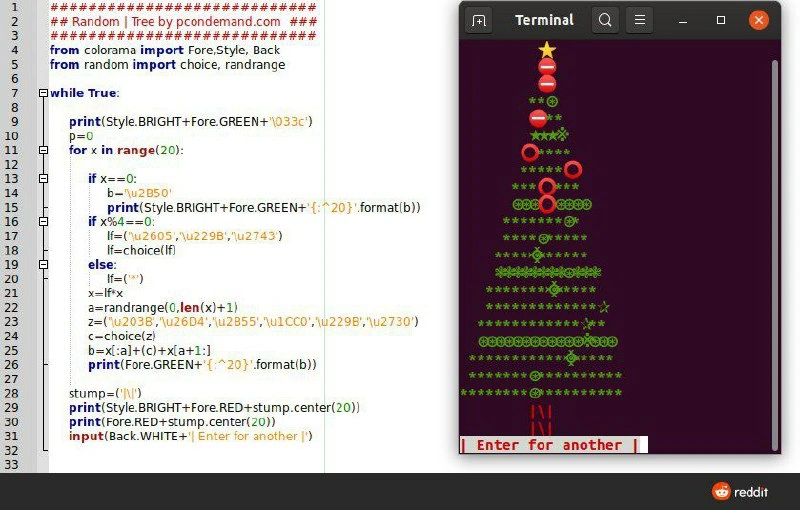
Now let’s explain this in a more straightforward way, as if to a newer developer or someone getting into coding. This meme is about a short Python program that draws a Christmas tree using text characters in a terminal window. The left side of the image shows the Python code in a text editor (with line numbers and colorful syntax highlighting). The right side shows the program’s output in a terminal (basically the text-only screen where you run commands). What’s happening is the programmer taught the computer how to “draw” a tree with text, and each time you ask for a new one (by pressing Enter), it draws a fresh tree with random decorations. It’s a fun little program that brings some holiday spirit to the command line.
Let’s break down the key parts of the code and output:
Python script basics: Python is a programming language known for being beginner-friendly yet powerful. Here it’s used to quickly create a visual effect. The script has a loop that says
while True:which in plain English means “do the following forever.” Inside that loop, the code prints out lines that form the shape of a Christmas tree and then waits for user input. Specifically, it uses theinput()function to pause and display a prompt saying “Press Enter for another” (meaning another tree). When you actually press the Enter key,input()returns and the loop iterates, causing the next tree to print. This looping mechanism is why the title says it spawns endless trees – theoretically, it will keep drawing a new tree every time you hit Enter, without stopping on its own. (Of course, you can stop it by pressingCtrl+Cto break the program, but there’s no built-in limit in the code itself.)ASCII art tree: The tree you see in the terminal is a form of ASCII art – making pictures out of text characters. Here the tree’s foliage is made of characters like asterisks (
*), lowercase letter “o” (as little round ornaments), maybe@symbols and other punctuation arranged in rows. The very top has a star symbol (instead of, say, an asterisk) to really look like a star on a Christmas tree. The code achieves the tree shape by printing the first row with 1 character (the star) centered, the next row with maybe 2-3 characters, then more, increasing the width each time to form a triangle. It uses Python’s string formatting to center each row to keep the tree symmetrical. For example, the code snippet shows something like"{:^20}".format(b)– this centers the stringbwithin 20 spaces. Similarly,stump.center(20)centers the"[]"trunk at the bottom. The end result is that all those lines stack up nicely into a recognizable pine tree shape! It’s the same idea as those classic beginner programming exercises where you print a pyramid of*characters, just taken to a festive level.Colorful output with Colorama: Usually, when you print text in a terminal, it’s just the default color (white or gray text on a black background). This script, however, uses an extra Python library called Colorama to add color to the text. That’s why the tree is green, the ornaments are red, and the star is yellow. In the code,
Fore.GREENis used before printing branch lines, so those characters appear green.Fore.REDis used for printing the ornaments and the stump, so they appear red. There’s alsoStyle.BRIGHTwhich makes the colors bright (kind of like bold). So essentially, the programmer is controlling the text color output: printing green letters for leaves, red symbols for baubles, etc., to make the ASCII art more visually appealing – almost like coloring in a drawing. Colorama takes care of sending the right commands to the terminal to change text colors (it works on Windows, Mac, Linux, so it’s a convenient tool for this). The background of the prompt “Enter for another |” is white with red text – that’s achieved withBack.WHITEandFore.REDaround that string when printing the input prompt. It makes the prompt look like a highlighted button, indicating to the user that the program is waiting for them to press Enter.Random decorations: The tree isn’t the same every time you generate it. The code uses Python’s
randommodule (choiceandrandrange) to change up the decorations. For instance, it has a list of Unicode symbols (stars, snowflakes, circles, etc.) and it will randomly pick one to place on certain branches. So one time you run it, your tree might have a ❄ snowflake on one branch and a ★ star on another; the next time, those might be different symbols or in different spots. This randomness mimics how real Christmas trees can be decorated differently each time. It’s a small example of using randomness in programming to create variety. If you’re a newer coder, it’s neat to seerandom.choice(some_list)being used to grab a random element – in this case, choosing a random ornament design to put on the tree.
In the screenshot’s setup, the developer likely wrote this code in a code editor (you can see the nicely formatted Python code on the left with comments and imports at the top). Then they ran the script in a terminal on the right. The GNOME Terminal (with a dark purple background here) is showing what happens when the script runs. The bottom of that terminal shows the prompt: “Enter for another |” in reversed colors. That text is actually generated by the program to prompt the user. After printing the tree, the program calls input() which displays that text and waits. The user can hit Enter (submitting an empty input, basically just a newline) which then allows the while True loop to continue and print the next tree. It’s an interactive program: it produces one tree, then pauses for your input, then produces the next, and so on. If you never press Enter, it just sits there showing the last tree and the prompt. Press Enter, boom – another tree appears right below the previous one (or the screen might scroll if the terminal isn’t cleared).
To put it simply, this Python program is doing something fun and lighthearted. It’s not calculating invoices or managing servers; it’s just making a terminal art illustration. This is the kind of project you might do for a programming contest, a holiday hackathon, or just to make your fellow coders smile. For someone learning to code, it’s a great example of combining basic concepts: loops (to repeat actions and build multiple lines of output), conditionals (to place the star on top or decide where ornaments go), text formatting (to shape the output), and a bit of library use (Colorama for colors, random for unpredictability). Seeing it all result in a festive ASCII picture is rewarding because it shows how coding isn’t only about serious applications—it can also be creative and fun. In the world of tech humor and little coding jokes, printing an ASCII Christmas tree in the terminal is a tradition of sorts (there have been many similar scripts shared over the years). This one just happens to be extra colorful and interactive. All together, this program creates a piece of terminal art using Python – a lively little text Christmas tree displayed right in your console. It’s the perfect example of holiday coding fun – using code creatively to celebrate the season.
Level 3: Deck the Shell with Code
This meme showcases a small Python script turning a plain CLI session into a festive light show of text. On the left, we see code in an editor, and on the right, the corresponding GNOME Terminal output: a fully decorated ASCII Christmas tree rendered in bright colors. The developer behind this script is clearly engaging in some holiday coding fun, using code not for serious business logic but to literally “deck the halls” of their terminal window with seasonal charm.
The Python code uses an infinite loop (while True:) to continuously generate new trees on demand. Each time you press Enter at the prompt "Enter for another |", the script springs into action and prints a brand-new tree. It’s an endless supply of digital evergreens because the loop never breaks – a daring but deliberate choice. In production code, an infinite loop without a break might be a nightmare (the kind of bug a seasoned dev fears at 3 AM), but here it’s the intended behavior. It’s an interactive loop that only advances when the user hits Enter, a neat trick to produce random ornament generation one tree at a time.
One of the key ingredients is the colorama module – noted by the from colorama import Fore, Style, Back at the top. Colorama is a handy Python library for adding color to terminal output. Under the hood it manages ANSI escape codes for coloring text (which can be cumbersome to handle manually) and ensures colors work on all platforms. This script uses Fore.GREEN for green text (the tree branches), Fore.RED for red (the ornaments and the tree stump), and Style.BRIGHT to make those colors extra vibrant. The ASCII art is thus not just monochrome characters, but a lively display of colored text. The bright yellow star at the treetop, for example, likely comes from printing a special Unicode star character with a yellow color code. It’s as if the code hung multi-colored lights on a text-based tree.
Speaking of symbols, the code isn’t limited to just the basic * and o characters. It imports Unicode symbols like \u2B50, \u2605, \u2743 and others. These are Unicode code points for various star shapes and snowflakes (way beyond the old 127-character ASCII set). By including these, the tree can have an actual star (★) or snowflake (❃) ornament, not just an ASCII approximation. This elevates the ASCII Christmas tree from the retro monochrome art we did on green-screen terminals to a modern, Unicode-enabled, colorful piece of Python terminal art. Text-based art has leveled up: we have a whole palette of characters to decorate our command line now.
Look at the structure: the tree is printed as a pyramid of text lines. The code likely does something like for x in range(20): to build ~20 rows, each row being one level of the tree. For each row x, it decides what to print:
- Top of the tree: If
x == 0, that’s the very top. The code setsb = '\u2B50'(which is a star symbol) and prints it centered. Theprint(Style.BRIGHT + Fore.GREEN + "{:^20}".format(b))suggests they format the star into the center of a 20-character wide line. The result is a yellow star shining at the apex of the tree, perfectly centered. - Branches with ornaments: For the leafy parts (
x > 0), the script prints green characters that form the branch shape. It uses characters like*,@, parentheses()etc., repeated to the appropriate length for that row. Then it randomly swaps in some ornaments. There’s anif x % 4 == 0:condition visible – perhaps at every 4th row it decides to place a special ornament. The code useschoice([...])to pick a random symbol from a list of Unicode decorations (stars, circles, snowflakes). This means on some rows, one of the green characters gets replaced by a colored ornament symbol. One run might put a red bauble (⭕) or a snowflake ❄ on that row; the next run might choose a different ornament or position. This randomness ensures each tree has a unique pattern, like algorithmic tinsel draped differently every time. - Tree trunk: At the bottom, the code defines
stump = "[]". It prints this in red (Fore.RED) and centers it as well (stump.center(20)) so that the trunk appears directly below the tree, looking like a little red pot or stand. In the terminal output, you see that red[]acting as the tree’s base. It’s a small detail, but it grounds the tree visually and comically says, “here’s a pot holding up your terminal Christmas tree.”
The result is a neatly formatted, colorful tree shape in the terminal. All the spacing is handled by centering and formatting, so the tree doesn’t lean to one side. Python’s string formatting ({:^20}) and methods like .center(20) take care of padding each line with the right number of spaces. Any experienced dev who has tried to print text in a aligned shape will appreciate this – it’s much easier than manually counting spaces for each line. The code is concise (roughly 40 lines as shown) but packs in a lot of cleverness: it uses external libraries, Unicode art, randomization, and formatted output, all in a few dozen lines.
From a seasoned developer’s perspective, this little script is a delightful break from the usual grind of production code. It highlights creative use of everyday tools:
- The IDE/editor on the left (with line numbers and syntax highlighting) shows the code structure clearly. It’s straightforward code—no complex design patterns or frameworks, just a loop, some
ifconditions, and print statements. A senior dev knows that sometimes the simplest scripts can bring the most joy. In this case, the code’s simplicity is part of the charm. - The terminal on the right demonstrates the power of plain text. We often use terminals for serious things like running servers, deploying code, or tailing logs. Here it’s transformed into a canvas for art and humor. This kind of terminal humor is a proud tradition among programmers. It harkens back to the days of ASCII demos and text-mode games. Many of us have memories of making simple text graphics when we first learned to code (like printing a triangle of stars, or using ASCII characters to draw shapes). Seeing it done with holiday flair and color adds a nostalgic yet fresh twist. It’s the command line having a bit of fun.
The humor and appeal of this meme come from that contrast between the mundane and the whimsical. On one hand, you have the terminal — usually a place of monochrome seriousness — suddenly teeming with bright colors and a Christmas tree made of text. It’s an unexpected use of technology, and that surprise is delightful. It resonates with developers because it exemplifies the developer humor ethos: doing something playful and geeky just because you can. There’s no practical reason to generate endless ASCII Christmas trees in a shell, except to make people smile. And in the programming community, that’s reason enough! Around the holidays, it’s common to see posts like this as a way of saying “Happy Holidays” in coder style. Instead of a greeting card, you get a GitHub gist or a meme showing off a festive script. In late 2020 when this was posted, a lot of us were remote and craving some cheer, and lo and behold, someone shared a bit of joy through Python code.
In summary, at the expert level we see this as a clever, heartwarming hack. It combines knowledge of Python’s capabilities (text handling, Unicode, libraries) with a sense of fun. The colorama module is used like a box of Christmas lights for the terminal. The random generator is the unpredictable friend who decorates the tree differently each time. And the programmer orchestrating it all is essentially saying, “Look, I can make my computer do a little holiday show!” It’s both technically neat and endearingly silly. That mix makes the meme memorable — it celebrates the creative whimsy that coding enables, especially in a communal, nerdy environment. Any programmer who’s spent time in the shell can appreciate how cool it is to see a terminal normally filled with dull logs suddenly light up with a colorful ASCII Christmas tree. It’s the kind of thing that makes you grin and maybe even inspire you to run the code and watch your own terminal get festive. After all, why should only our living rooms have Christmas trees? Our terminals deserve some holiday spirit too!
Description
A split-screen image showcasing a fun developer project. On the left side, there is a Python script with syntax highlighting. The code uses the 'colorama' and 'random' libraries to generate a Christmas tree. Key elements include a 'while True' loop, a loop 'for x in range(20)', and print statements with Unicode characters and color codes to build the tree structure. On the right side, an Ubuntu-style terminal window displays the script's output: a colorful, festive Christmas tree rendered with ASCII and Unicode characters. A yellow star sits at the top, followed by green branches made of asterisks and other symbols, decorated with red circles as ornaments. At the bottom of the terminal is a prompt: 'Enter for another'. This image represents a classic example of a fun, non-work-related coding exercise that programmers often create, especially around the holidays, to showcase their skills or simply procrastinate creatively

Comments
16Comment deleted
The only thing more random than the ornament placement is the critical production bug that's going to page you an hour after you commit this
Our festive Python job runs `while True`, streaming ANSI trees to stdout; CloudWatch logs every snowflake, so by New Year the bill will look like a Yule log - only it’s the one on fire
Finally, a Christmas tree that won't have merge conflicts, memory leaks, or require a post-mortem when it falls over - though it still manages to consume 100% CPU when someone holds down Enter
Ah yes, the annual ritual of every developer: spending 2 hours writing a Python script to generate a Christmas tree in the terminal instead of just buying a real one. Bonus points for using colorama to make it 'production-ready' with proper ANSI escape sequences. The while True loop ensures infinite holiday cheer - or at least until you Ctrl+C out of your festive recursion. Nothing says 'I understand systems programming' quite like rendering Unicode ornaments at 60fps in a TTY. Ship it to prod on December 24th at 11:59 PM, obviously
Only green build we shipped this quarter is a Colorama while True printing a Unicode Christmas tree; the red ornaments are flaky tests, and “Enter for another” is our CI strategy
Branches merge flawlessly here - no Git conflicts, just pure print harmony
Festive until the container’s locale falls back to C and those UTF-8 ornaments render double‑width; suddenly your nicely centered tree looks like a split‑brain cluster
Why is python code always so damn ugly Comment deleted
Rubyn't Comment deleted
Because this was written by somebody who didn't write it to be pretty and didn't run it through any formatter. Show me a language where you can't write ugly code Comment deleted
Assembly Comment deleted
No, First Show me good looking python code because that thing is a damn myth Comment deleted
Kočka leze dírou Comment deleted
kurva Comment deleted
Dobrý večer soudruhu. Also Thomas the tank engine instagram filter, i approve that Comment deleted
Yes, i know Comment deleted