Skip to content
DevMeme
1608 of 7435
The Evolution of Programming Challenges
Languages Post #1797, on Jul 23, 2020 in TG

The Evolution of Programming Challenges

Why is this Languages meme funny?

Level 1: Baking vs Burning Donuts

Imagine two people in different times making donuts to symbolize their coding skills:

  • The first person (in the past) is like a master chef who doesn’t just bake a delicious donut from scratch, but even writes the recipe in a fancy donut shape on paper. It’s as if their instructions for making the donut are arranged in a circle that looks just like a donut. This shows how amazingly skilled and creative they are – they can do a really hard task (baking from raw ingredients) and make it artistic too. This is our big strong dog (Buff Doge) in the meme: a super capable programmer who did something very impressive.

  • The second person (nowadays) is like a new cook who has a much easier job – say, they just need to warm up a pre-made donut in the oven – but they still mess it up and burn the donut because they forgot a simple step (like setting the right temperature or using the timer). This is our little dog (Cheems) in the meme: a struggling newer programmer. The new cook’s mistake is small and basic, but it ruins the donut. In coding terms, that’s the “indentation error” – just a tiny formatting mistake, but it stops the whole program from working, which is really frustrating for the new person.

Now, put these two side by side in your mind: On one side, an expert doing a hard thing perfectly (and even artfully). On the other side, a beginner messing up an easy thing. It’s like saying: “Wow, grandpa could build an entire toy castle from wooden blocks without instructions, and here I am unable to put together a LEGO piece because I didn’t align it right.” It’s an exaggerated comparison meant to be funny. We’re joking that the old masters were almost superhuman, while the new folks can be hilariously clueless about the basics.

So the meme makes us laugh by showing a big contrast: The old programmer’s “donut code” was super advanced and cool, but the new programmer’s issue is super simple (an indentation problem) and they’re whining about it. It’s like praising the old times and poking a bit of fun at ourselves today. Even if it’s not literally true for everyone, the picture of the two dogs – one proud and strong, one small and complaining – gets the point across instantly in a goofy way. In essence, it’s saying: In the old days, making software was like crafting something amazing by hand. Today, even with easy tools, we sometimes can’t get it right. That’s the joke!

Level 2: ASCII Art & Indentation

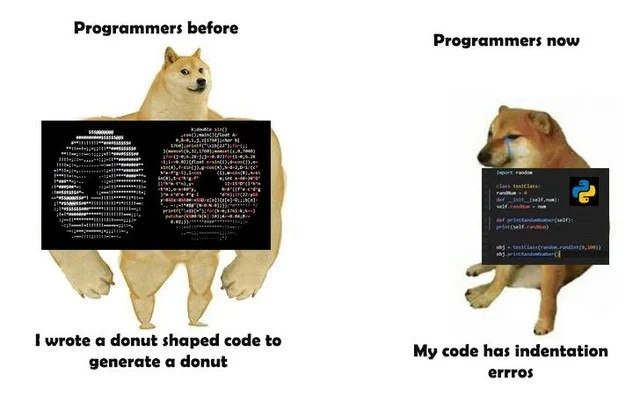
In this meme, the left panel shows a “programmer before” – an old-school coder doing something extraordinary – and the right panel shows a “programmer now” – a modern coder struggling with something basic. The big dog on the left (Buff Doge) represents how programmers used to be or at least the romanticized vision of them, and the small dog on the right (Cheems) represents programmers today. Let’s break down the specifics:

  • ASCII donut code (left side): The left image has Buff Doge with a screenshot of code that, when you look at it from a distance, forms two donut shapes made out of text characters. ASCII art means creating pictures using the characters from the keyboard (like letters, numbers, punctuation). Here, the text of the code itself is arranged in circles (rings) so that it looks like a pair of donuts. That’s not something you normally do when writing code – it’s done here as a clever trick. The caption says, “I wrote a donut shaped code to generate a donut.” This suggests two things:

    1. The shape of the code on screen is literally like a donut (two round outlines), which is a fun visual gag.
    2. The purpose of the code is to generate a donut, likely meaning it produces a donut shape output (probably prints an ASCII art donut or even a rotating donut in text when you run it).

    So the programmer not only made their code output a donut, but they even formatted the code to look like one. This is an example of extreme creativity and skill (and maybe showing off a bit). It harks back to older times or niche corners of programming culture where people did a lot of low-level programming and had fun with tricks. For instance, there’s a famous small C program that prints a spinning donut in the terminal using just math – many developers saw it as a cool demo. That kind of code requires solid understanding of math (like trigonometry for circles) and getting the computer to print characters at just the right time. It’s definitely not a typical business application; it’s more like a stunt or a puzzle that programmers would do for fun or to prove their prowess. In terms of programmer evolution, the meme implies that “back then” programmers were hardcore enough to do all that by themselves.

  • Python indentation error (right side): The right image has Cheems (the smaller dog) holding a simpler piece of code in what looks like a modern code editor (the black box with colored text and a Python logo 🐍). The code is written in Python, which you can tell from the import random at the top and the use of def to define a function. Python is a high-level, easy-to-read programming language. However, Python has a quirk: it uses indentation (leading spaces or tabs at the start of a line) to define code blocks. That means the amount of space before a line of code is part of the syntax. For example, in a Python function or loop, you must indent the lines that belong inside it. If those lines aren’t indented correctly, Python doesn’t know how to group the code and throws an error. The error in question is an IndentationError – basically Python complaining: “Hey, something’s wrong with the spaces at the beginning of your lines.”

    The caption under Cheems says, “My code has indentation errros.” (The misspelling “errros” with an extra ‘r’ is intentionally mimicking how Cheems “talks” in meme culture – he often speaks in a slightly goofy, impaired way with typos or extra letters, which accentuates his hapless character. It’s like he’s so upset or clueless he can’t even spell errors.) This line represents a very common beginner problem: the poor programmer’s code isn’t working because of a simple indentation mistake, and they’re frustrated. Maybe they used a mix of tabs and spaces, or they forgot to indent a line after a def or an if statement. In Python, even one space off can cause an error, which is something that surprises people coming from other languages. In languages like C, Java, or JavaScript, whitespace (spaces, new lines) typically doesn’t matter much – you use braces {} or other keywords to mark blocks of code, and you could indent however you like for readability. But in Python, consistent indentation is mandatory. So for example:

    def greet():
    print("Hello")
    

    The above will cause an IndentationError in Python because the line print("Hello") isn’t indented under the def greet(): line. The correct version needs a space or a tab in front of print("Hello"):

    def greet():
        print("Hello")
    

    Now, print("Hello") is indented to show it’s inside the function. If you mix up tabs and spaces or have an extra space somewhere, Python will also complain. It’s basically a syntax bug – a bug (error) in the structure of the code, not in the logic. For experienced folks, it’s a facepalm moment; for beginners, it can be puzzling until they learn the rule.

    So Cheems holding a Python snippet and whining about indentation errors is a scene many new developers can relate to. Maybe they copied some code from the internet and the indentations didn’t copy correctly, or they didn’t realize you can’t indent randomly. It highlights a pitfall specific to the Python language – you have to get those spaces right! The irony here (and why it’s funny when contrasted with the left side) is that this is a really simple mistake in the grand scheme of coding. It’s not an algorithm problem, not a complex bug, just a formatting issue. It’s basically a newbie error.

Now, tying the two sides together: The meme is juxtaposing the glory days of hardcore programming (left) with the seemingly trivial problems of modern programming (right). It’s saying, “Programmers used to do insanely difficult things like create a donut from nothing but code, and now programmers get stuck because of a few spaces.” This is an exaggeration meant to make us laugh – reality is of course more nuanced. But it’s poking fun at how the challenges have changed. Older languages were unforgiving in other ways (you had to manage memory, optimize for slow CPUs, etc.), whereas newer languages remove a lot of that pain but introduce new kinds of gotchas (like whitespace significance or environment configuration issues).

Also, let’s decode the meme characters quickly:

  • Doge (Buff Doge) is the muscular dog on the left. Doge is a Shiba Inu dog from a famous meme; Buff Doge is a variant used to depict someone or something strong, capable, and impressive (often in a past or idealized context).
  • Cheems is the dog on the right, a smaller Shiba Inu with a kind of nervous or sad look. Cheems in memes often represents someone who is weaker, making mistakes, or not as good as the Buff Doge. Cheems also often speaks with spelling mistakes or extra letters (for example, calling himself “Cheems” instead of “Cheese” in one meme, which is how he got that name). So here Cheems stands in for the modern programmer who is comparatively inept or struggling.

The Buff Doge vs Cheems format is a popular meme template for any "then vs now" or "expectation vs reality" joke. In developer humor, it’s been used to contrast things like old programmers vs new programmers, low-level vs high-level, etc. It leverages those characters to immediately convey who is the expert and who is the novice in the scenario.

So, summarizing:

  • Left: Old-school programmer (Buff Doge) wrote an insanely complex and creative piece of code (even the code’s shape is a donut!) to generate a donut output. This implies a master-level achievement and deep knowledge of coding (especially in C or languages where you manage everything manually). It’s showing off a kind of antique programming prowess.
  • Right: Modern programmer (Cheems) wrote a short Python script but can’t get it to run due to an IndentationError, basically a small formatting mistake. This implies a novice-level struggle and a lack of understanding of a fundamental Python rule. It’s highlighting a silly coding mistake that newbies often make.

The humor and the message: Coding has become more accessible (you can do a lot with a few lines in Python, no need to do complex math for basic tasks), but that doesn’t mean programmers today are always “better” – they just face different problems. In fact, here it looks like code quality has regressed: the new code has an error that would be trivial to fix if the person knew how, whereas the old code, albeit crazy-looking, actually accomplished something. It’s an exaggeration that plays on the pride of veteran programmers and the relatable foibles of beginners. In reality, each generation has its strengths, but it’s fun to jokingly say, “Look how far we’ve fallen – from ASCII donuts to indent errors!”

Level 3: Wizardry vs Whitespace Woes

From a seasoned developer’s perspective, this meme humorously pits old-school coding wizardry against the new-school syntax struggles. The left side (Programmers “before”) embodies an almost mythical era of programming: when developers needed a deep understanding of algorithms and computer architecture to make magic happen. It recalls the days when writing clever C code or even assembly routines was a point of pride. Many experienced engineers remember or have heard of legendary code exercises like generating a spinning ASCII donut or coding a fully working game in just 256 bytes. These feats were both a flex of skill and born of necessity – early programmers often had limited resources (no fancy libraries or gigabytes of memory), so they learned to squeeze performance and creativity out of every byte. The Buff Doge’s donut-shaped code is a prime example of that can-do attitude: the programmer not only solved a complex graphical problem from scratch but even had the confidence (and humor) to format the source code as an ASCII art donut. It’s an extreme form of CodeQuality bragging, where "quality" is measured in wow-factor and creativity rather than readability. The code is dense, cryptic, but brilliant – perhaps similar in spirit to the one-liners and obfuscated code from programming contests. Long-time developers nod knowingly at this because it satirizes our anecdotes of “back in my day, we coded on the metal!” The Buff Doge’s smug expression and muscular physique perfectly represent that nostalgic ideal: the programmer as a powerhouse who could craft entire graphical demos with nothing but math and code, mastering everything from memory management to trigonometry. It taps into an industry pattern where older generations sometimes perceive newer ones as having it easier but knowing less of the “hard stuff.” The programmer evolution from Buff Doge to Cheems here is portrayed as almost a regression in skill (a tongue-in-cheek exaggeration, of course).

On the right side, “Programmers now” hits home for anyone who’s mentored juniors or remembers their own beginner bloopers. Cheems is struggling with a very common bug in modern scripting – a Python IndentationError. The code snippet in Cheems’ paw is short and relatively basic (it seems to import random, define a class NameGen, with a simple function using random.choice – nothing nearly as intricate as generating a donut). And yet, our poor Cheems is whining, “My code has indentation errros.” The typo “errros” itself is a classic Cheems touch, a meme convention to indicate ineptitude or a meek voice. It’s as if Cheems is so flustered by the error, he can’t even spell it right. This hilariously encapsulates the kind of CodingMistakes that plague new programmers: small syntax issues that cause outsized frustration. Any Python developer (even experienced ones, if they’re honest) has at least once been stumped by why their code won’t run, only to realize there was a stray space or a tab character hidden somewhere. The humor here plays on shared experiences: we all know the face-palming moment of finding out the bug wasn’t a complex logic error, but just bad indentation.

The juxtaposition is what makes it DeveloperHumor gold. On one side, we have an image of near-superhuman coding prowess – arguably inefficient in a real project, but undeniably impressive. On the other, we have a painfully mundane error that even non-programmers might understand (“you didn’t line up your code right, so the computer got confused”). It’s essentially highlighting a perceived decline in hands-on skills. The meme suggests that “before, programmers could do low-level magic; now, we struggle with high-level basics.” It’s exaggeration for comedic effect, of course. Realistically, today’s programmers tackle different challenges (scalability, user experience, huge frameworks) that aren’t as visually showy as ASCII art, and earlier programmers also made silly mistakes. But the kernel of truth—and why seasoned devs smirk—is that modern high-level languages like Python have abstracted away so much complexity that a developer can get by with less understanding of what’s under the hood. The downside is, when something goes wrong, it’s often an almost ridiculous issue like indentation or environment setup, which the Buff Doge generation finds trivial or even self-inflicted.

This speaks to code quality and training as well: Older practices placed a huge emphasis on precision. If you were writing in C or machine code, a single character error could crash the program or produce gibberish on screen, so you learned to be meticulous. Python, by design, pushes for clean syntax (by making indentation meaningful), but it also means a newcomer who isn’t careful about consistent spaces will hit a wall immediately. In a way, Python’s strict whitespace is an attempt to enforce quality (consistent style) — yet it ironically becomes a source of bugs for those not habituated to it. Many of us have seen a newbie’s code where mixing tabs and spaces caused mysterious problems. It’s a rite of passage in Python learning to configure your editor to “replace tabs with spaces” and to use a linter to catch misaligned blocks. Seasoned devs might chuckle remembering how a simple tab character once broke their build. The BugsInSoftware may have changed form (from wild pointer memory corruption in C to indentation errors in Python), but the frustration feels just as real when you’re in the moment.

The meme also touches on the shift in what’s considered a “wow” coding accomplishment. In the past, printing a floating donut on a terminal would make you a legend in your computer club. Now, that kind of low-level trick isn’t usually needed day-to-day — instead, using a high-level library, you can generate complex visuals or spin up an app with far less effort. Yet here we are, struggling with an errant indent. The before_vs_now format exaggerates this contrast to comedic effect. Experienced programmers find it funny (and perhaps a bit cathartic) because it plays into the imposter syndrome in reverse: instead of “I can’t do what others can,” it’s “Wow, our predecessors did crazy stuff… and here I am Googling ‘Python indentation error unexpected indent’.” It pokes fun at ourselves and our occasional over-reliance on easy tooling. It’s the kind of joke you crack after spending an hour fixing a YAML spacing issue or a misaligned Python block – “I bet the folks who coded on punch cards are rolling their eyes at me now.”

In real-world scenarios, this may remind senior developers of code reviews or mentorship sessions. Imagine a veteran engineer recalling how in the ’80s they squeezed an entire graphics demo into 512 bytes, while the new hire’s first pull request fails CI because of a mixed-tab indentation error. It’s both amusing and a gentle lesson in humility and progress: tools evolve, focus shifts, but every generation of programmers has its gotchas. The Language itself can be an equalizer – no matter how high-level and user-friendly it becomes, you still have to respect its rules. Python makes many things easier than low-level C, but it introduces its own non-negotiable: consistent whitespace. And if you don’t pay attention, even the Cheems-est of bugs will bite you.

Ultimately, the meme’s humor comes from that whiplash of complexity: one moment we’re reminiscing about god-tier coding tricks (the kind that would get million upvotes on r/codinghorror for sheer audacity), and the next, we’re brought back to the silly reality of everyday programming errors (the kind that populate r/ProgrammerHumor threads with screenshots of SyntaxError). It’s an affectionate roast of both eras. The experienced dev laughs because they’ve lived both sides: they’ve attempted mind-bending projects and they've facepalmed at an IndentationError. The novice laughs (albeit a bit nervously) because they recognize themselves in Cheems, and they might look up that donut code in awe. The meme captures a truth about programmer evolution: the tools get mightier, the abstractions get higher – but we’re all only human, and sometimes we trip over a space character.

Level 4: Trigonometric Torus Trick

At the deepest technical level, this meme contrasts a feat of algorithmic artistry with a trivial syntactic snag. The Buff Doge’s code is essentially an ASCII donut algorithm – a compact program that uses mathematical formulas to render a 3D torus (donut shape) in text. To achieve those two ring-shaped donut images, the code likely employs parametric equations of a torus and clever 3D projection math. For example, a torus centered at the origin can be described by equations like:

$$ x(\theta,\phi) = (R + r\cos\theta)\cos\phi,\ y(\theta,\phi) = (R + r\cos\theta)\sin\phi,\ z(\theta,\phi) = r\sin\theta, $$

where $\theta$ and $\phi$ are angles sweeping the donut’s tube and circle, and $R$ and $r$ are the big and small radius. A program can loop through $\theta$ and $\phi$ values, compute $(x,y,z)$ points on the donut surface, and project them onto a 2D plane. The dense ANSI-colored source code on Buff Doge likely encodes such calculations (with sin and cos operations) and prints characters at the appropriate screen coordinates. Advanced versions even simulate lighting: computing a surface normal vector at each point and a dot product with a light direction to choose ASCII shading (. vs * vs @, etc.). In short, it’s a trigonometric tour de force packed into code – a known demo scene trick where the math and bitwise ops work in concert to plot a rotating donut. Notably, that code’s text is arranged visually as donut shapes. This means the programmer carefully formatted and aligned the source code characters themselves so that, when seen from afar, the code block literally looks like two donuts. It’s a double-layered code art: the code’s output is a donut, and the code’s layout is also a donut. Achieving this requires total mastery over whitespace and symbols: in languages like C or C++, whitespace is mostly ignored by the compiler, giving the developer freedom to artistically arrange the code without breaking functionality. This creative coding tradition harks back to things like the International Obfuscated C Code Contest, where guru programmers wrote seemingly indecipherable or artfully formatted code that still ran correctly. It’s both a showcase of extreme code skill and a tongue-in-cheek exercise in poor CodeQuality (since no sane project would want code shaped like pastries in production). The Buff Doge code is essentially a virtuoso performance – squeezing graphics out of pure text and math, a proud demonstration that “I understand the machine so well, I can make it draw a donut with code shaped as a donut.”

Contrast that with the Cheems panel’s technical underpinnings: the indentation error in a Python snippet. This is a far more humble (but instantly familiar) technical issue. In modern Python, white space isn’t just for pretty formatting – it’s part of the language’s grammar. The Python parser uses indentation levels to determine where code blocks start and end (instead of curly braces {} or keywords like BEGIN/END). Under the hood, when the Python interpreter reads a source file, it inserts special INDENT and DEDENT tokens whenever the indentation increases or decreases. For example, after a line like def func(): the next line is expected to be indented (one level deeper) to indicate the function body. If it’s not, that’s a syntax error (IndentationError: expected an indented block). Conversely, an unexpected indent (too many spaces or a stray tab where it’s not needed) also throws an IndentationError. This strict layout rule is designed for human readability – enforcing consistent code blocks – but it can frustrate newcomers. A single space or tab misplacement can break the entire program’s execution. The error “indentation errros” (besides the meme’s deliberate misspelling) indicates Python couldn’t parse the code structure because the indents didn’t line up. Unlike Buff Doge’s language (likely C, C++, or another free-form language where whitespace has no effect on execution), Python will refuse to run if your spacing is off. This reflects a fundamental design trade-off in programming language theory: Python opts for significant whitespace to encourage clean visuals and reduce punctuation, leveraging the human eye’s penchant for indentation to delineate scope. It’s a high-level language convenience that spares us from {} clutter, but at the cost of making invisible characters (spaces, tabs) semantically important. A seasoned developer knows that mixing a tab and spaces in Python can produce a subtle bug that’s hard to spot because they look the same. Such BugsInSoftware are so common that many Python IDEs and linters flag inconsistent indentation immediately. In summary, the Buff Doge panel involves hardcore low-level algorithmics (manual math, ASCII plotting, careless of whitespace beyond visual fun) while the Cheems panel highlights a high-level language pitfall (the interpreter’s strict enforcement of indentation). The juxtaposition of these two technical contexts – one an elegant mathematical hack, the other a mundane formatting goof – is what makes the meme technically rich and amusing.

Description

A 'Swole Doge vs. Cheems' meme format comparing programmers of the past to those of the present. On the left, under the label 'Programmers before', a muscular Swole Doge proudly displays a black screen with the famous 'donut.c' source code - a complex C program that generates an ASCII spinning donut and is itself shaped like a donut. The caption below reads, 'I wrote a donut shaped code to generate a donut'. On the right, under 'Programmers now', a small, sad Cheems holds a simple Python script with the Python logo. The caption reads, 'My code has indentation errros'. The meme humorously contrasts the perceived mastery and ingenuity of past programmers, who created complex, artistic code with low-level languages, with the perceived struggles of modern programmers who sometimes stumble on basic syntax rules in high-level languages like Python. For senior developers, it's a nostalgic joke about the shift in programming paradigms and the different kinds of problems developers face today versus a few decades ago
Comments

7
Anonymous ★ Top Pick The old guard wrestled with pointers and memory alignment to create ASCII art. The new guard wrestles with the YAML linter. I guess you could say it's just a different kind of abstract art
  1. Anonymous ★ Top Pick

    The old guard wrestled with pointers and memory alignment to create ASCII art. The new guard wrestles with the YAML linter. I guess you could say it's just a different kind of abstract art

  2. Anonymous

    We used to hand-roll fixed-point cosine tables to spin a 1 KB ASCII donut; now CI blocks the merge because Black found a tab before a space in a 40 MB Python container that just prints “🍩”

  3. Anonymous

    We went from developers who could implement a graphics pipeline in assembly to developers who need a linter to tell them their YAML is invalid because they used tabs instead of spaces in their Kubernetes manifests

  4. Anonymous

    The irony is palpable: we went from engineers who could render 3D graphics in ASCII using trigonometry and frame buffers to developers who can't remember if it's four spaces or a tab. But let's be honest - the 'donut.c' programmer probably spent three weeks debugging a segfault, while the modern dev will have that indentation error fixed by their IDE's auto-formatter before they even finish their coffee. We've traded raw computational wizardry for actually shipping products, and somehow both generations still spend most of their time on Stack Overflow

  5. Anonymous

    We used to hand-roll trig to render ASCII donuts; now the 3 a.m. page is caused by one tab in a Python migration - apparently at scale, whitespace has a bigger blast radius than algorithms

  6. Anonymous

    From sculpting donuts in C source to Python's whitespace sculpting our sanity

  7. Anonymous

    We went from fixed-point math to render a torus in 80x24 to postmortems where the root cause is mixed tabs and spaces in __init__.py

Use J and K for navigation