Critique of a 'Privacy Focused' App's Flawed Logic
Why is this Security meme funny?
Level 1: Diary Without a Lock
Imagine you have a diary where you write all your secret thoughts. You brag to your friend, “Don’t worry, I never show my diary to anyone, so it’s totally private!” You keep it in your room and never send it anywhere else. Sounds safe, right? But here’s the catch: you didn’t put a lock on your diary. It’s just a regular notebook on your desk. One day, your sneaky sibling or a friend walks into your room, picks up the diary, and starts reading it. 😱 All your secrets are right there, plain as day, because although you never shared the diary with anyone, you also never locked it to stop someone from reading it if they found it.
In this meme, the app is like that diary. The app makers said, “We won’t send your data to the internet (we won’t share your diary).” But they didn’t encrypt or protect the data on your phone (they left the diary wide open on the table). The funny/scary cat is basically you when you suddenly realize, “Oh no, anyone who gets hold of the phone (comes into the room) can read everything!” It’s the shock of discovering that just hiding something (keeping it local) isn’t the same as locking it up safe (encrypting it). The meme jokes that calling this “privacy-focused” is silly – it’s like calling a diary private because you don’t show it to others, even though you leave it unlocked. The poor cat’s face says it all: this isn’t the privacy I thought I was getting!
Level 2: Unlocked Secrets
This meme is pointing out, in a humorous way, what happens when an app claims to be super private but actually isn’t doing something basic like encrypting your data. Let’s break down what’s going on:
- The top part of the meme has green
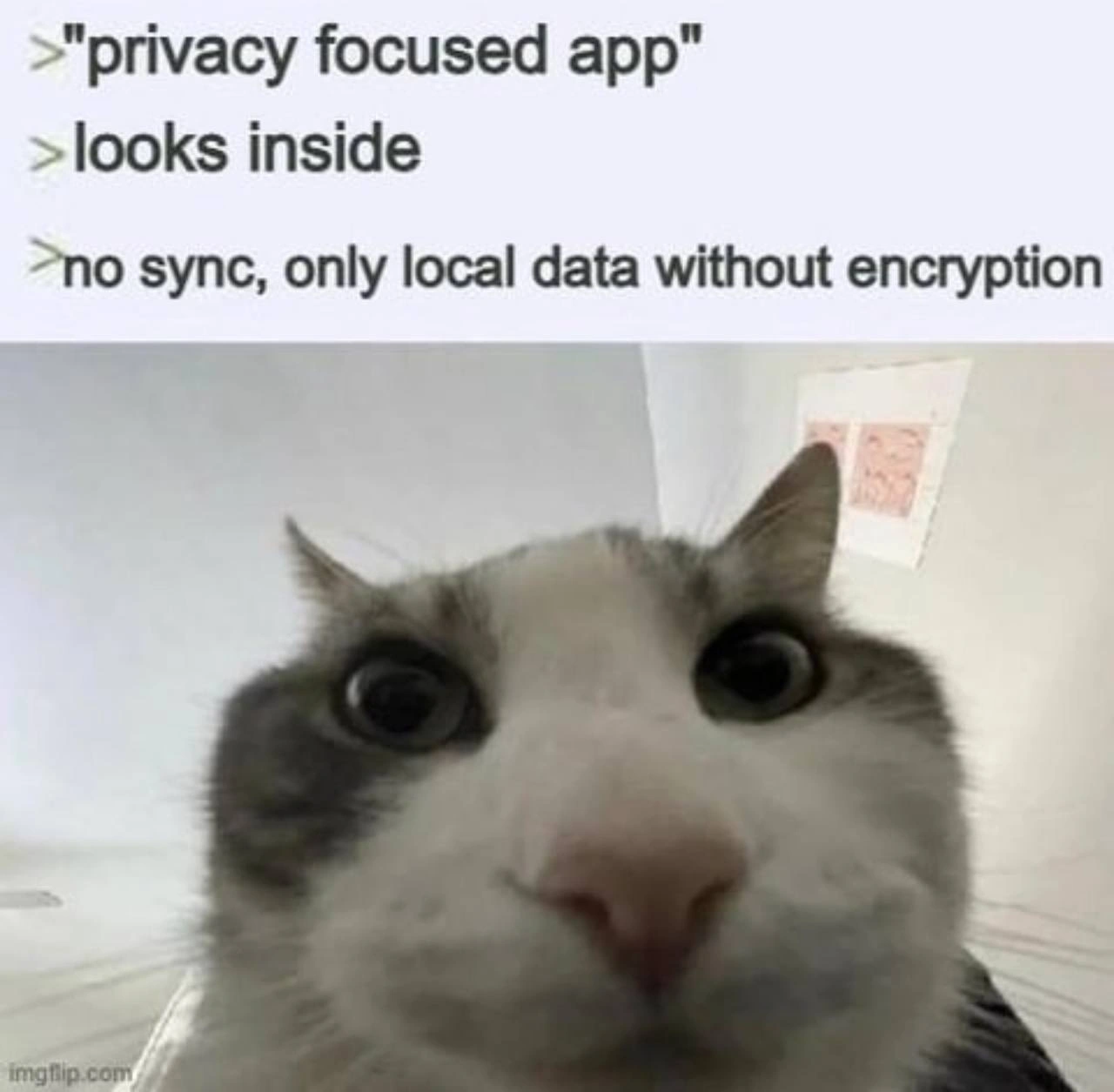
>quote-style text, which reads like an internet joke format. It says:>"privacy focused app"– someone (probably the app’s marketing) calling it a “privacy focused app.”> looks inside– meaning the person decides to check what’s actually happening under the hood.> no sync, only local data without encryption– this is what the person finds: the app doesn’t sync (no cloud backup), it keeps data only on the device, and it doesn’t encrypt the data on the device.
So, basically: The app brags it’s privacy-focused. You investigate, and discover their idea of privacy is “we don’t send your stuff to the cloud.” But you also discover they didn’t lock or protect the data on your phone at all (no encryption). It’s like opening a box that’s labeled “Top Secret,” only to find the papers inside are just lying there for anyone to read.
Now, why is that a problem? A few key terms here:
- No sync / only local data: This means any information you put into the app stays on your phone only. It isn’t copied to any server, and you can’t access it from another device or through a web login. On the surface, that sounds good for privacy because it reduces who can see or handle your data (no company servers, no internet transfer). For example, imagine a journal app that saves all your entries on your phone and doesn’t upload them anywhere – no one else (in theory) has those files, only you.
- Without encryption: Encryption is basically scrambling data using a secret key or password so that no one can understand it without that key. If data is not encrypted (we call that “plaintext”), it means it’s stored normally – anyone who opens the file can read it. In our journal example, if the app doesn’t encrypt, then your entries might just be stored as regular text in a file or database on the phone. If someone gets a hold of that file, they can read your entries easily because nothing is hiding or scrambling the text.
So the meme is exposing a gotcha: Yes, the app keeps your data on the phone (yay, it’s not on some remote server) – but the app developer didn’t take the next step of protecting that data on the phone with encryption. It’s like saying, “We won’t send your diary through the mail, we promise,” and then leaving the diary on a park bench. Sure, it’s not sent to anyone else, but it’s also not secure where it lies.
The bottom part of the meme is a picture of a cat in a car, looking absolutely shocked and alarmed (big round eyes, ears back). That cat represents the reaction of a user or developer who just discovered the truth about this app. It’s the “Oh no… this isn’t actually safe!” realization face. Maybe the user initially felt good that their data wasn’t online, but now they’re imagining what happens if someone finds their phone or hacks into it. That shocked cat is basically thinking: “Wait, all my private info is just sitting there, completely unlocked?”
This scenario is a common theme in Security vs. Usability discussions. To truly secure data, an app might ask you to do extra things – like set up a strong password, or it might slow down features because it has to encrypt/decrypt data. That can be a bit less convenient (that’s the usability side). Some app makers, unfortunately, choose the easy route: they won’t add any extra steps or encryption (making the app simple to use, or simpler to build) and then claim it’s for your privacy because nothing leaves your device. In reality, they’ve left your data unprotected against other kinds of threats.
Think about your phone: If someone steals it, or if you install a malicious app by accident, or even if you send the phone in for repairs without thoroughly wiping it, unencrypted data can be taken. A truly privacy-focused design would say: “We don’t send your data to the cloud and we lock it down on your device with encryption.” This one only did the first half. So the meme is taking a jab at those mobile_app_privacy_claims that sound good until you “look inside” and see the implementation is lacking.
In simpler terms, this meme is a joke about marketing_vs_reality. The company markets “privacy!” but in reality, it’s like they just kept everything in one place (your phone) and didn’t even put a lock on that place. It calls out the unencrypted_local_storage practice: storing user data on a device without any encryption. Among developers and security folks, that’s known to be risky. It’s essentially a Sensitive Data Exposure risk waiting to happen – if the phone is compromised, all that data is immediately readable.
The humor here is a bit on the dark side: we’re laughing (and cringing) at how the app developers thought they solved privacy concerns by eliminating cloud features, yet they overlooked a very basic security measure. The cat’s exaggerated shock is how we feel when we encounter that kind of oversight. In summary, the meme in plain language is saying: “This app claims to protect your privacy, but all it really did was not use the internet – it didn’t actually protect your data on your phone, so your secrets aren’t safe!” And that realization is both funny (because of how absurd it is) and scary – hence the cat looking like it just saw a disaster unfold.
Level 3: Encryption Not Included
For experienced developers and security-conscious folks, this meme hits on a painfully familiar scenario. An app advertises itself as a "privacy-focused app," implying it keeps your data safe from prying eyes. But when you inspect its behavior (or read the fine print), you discover the grand privacy feature is simply “no cloud sync” – all data stays on the device. And then comes the kicker: it’s stored without encryption. This is the moment you facepalm, or, like the cat in the bottom panel, stare in wide-eyed shock. Essentially, the company traded one risk (data in the cloud) for another, even bigger risk (data on the phone in plain sight). It’s a classic case of marketing vs. reality: the marketing says “We respect your privacy – your data never leaves your phone!” but the reality is that the data is just one curious USB cable or malicious app away from being stolen in readable form.
From a senior engineer’s perspective, this design demonstrates a misunderstanding of the SecurityVsUsability trade-off – and ends up failing at both. By disabling sync, they hurt usability (no backup, no multi-device access, inconvenient user experience), yet by not implementing local encryption, they didn’t actually improve security. It’s the worst of both worlds: users lose convenience and gain no real safety. If anything, it creates a false sense of security. A user might think, “My data isn’t on a server, so it must be safe,” while in reality if someone gains access to the phone (stolen device, or an malware that reads files), that data is there for the taking. SensitiveDataExposure is the term that comes to mind – the app basically leaves sensitive info exposed on the device. Any pentester or security audit would flag unencrypted local storage of personal data as a serious vulnerability. In an OWASP Mobile Security checklist, this is a big no-no.
We’ve seen this pattern before. For example, imagine a "secure" diary or notes app that proudly doesn’t use the internet at all. Then you go digging in the app’s files and find a plain SQLite database or .txt file with all your secret notes in plain text. 📝🔍 One misplaced file explorer or a simple phone backup extraction, and voila – all the “secrets” are laid bare. The meme’s top text "> 'privacy focused app' ... > looks inside ... > no sync, only local data without encryption" reads like a mini story. It mimics the experience of a developer or savvy user thinking “Oh cool, let’s see how they achieve privacy,” then peeking under the hood and realizing “...Wait, they just didn’t build a server and didn’t encrypt anything?!” – cue the shocked cat reaction. That cat with pinned-back ears and bulging eyes is basically us seasoned devs screaming internally: “You did what with the data?!”
Why is this so alarming? Because keeping data local is only half of a privacy solution. Yes, you reduce the risk of server-side leaks or man-in-the-middle attacks if nothing is sent over the network. But you must compensate by protecting the data on the client side. The standard practice is to apply DataEncryption on the device – like locking the data in a safe – usually with a key derived from the user’s credentials or the device’s secure hardware enclave. Here, encryption was left out of the design entirely – akin to selling a high-tech safe but forgetting to include a lock. It’s absolutely PrivacyHumor in the darkest sense: “Your data is super private – we don’t even see it. Oh, by the way, it’s stored as plain text on your phone, good luck!”
To illustrate how trivial the difference is, consider a snippet of pseudo-code for saving a sensitive note in a hypothetical app:
// The app's "privacy-focused" approach (in reality, just storing plaintext):
const userSecret = "My super private note";
localStorage.setItem("user_note", userSecret);
// Data is now saved in plain text on the device storage.
// What a truly secure approach might do instead:
const encryptedNote = encrypt(userSecret, userDerivedKey);
localStorage.setItem("user_note", encryptedNote);
// Data is encrypted; even if someone accesses the file, it's gibberish without the key.
In the first case, userSecret is written directly to local storage. Anyone with file access (another app with permissions, a person who steals the phone, etc.) can read it effortlessly. In the second case, encrypt() is used (with a key known only to the user or device) to scramble the note before saving – so an intruder would see only meaningless characters unless they somehow also obtain the key. The meme is poking fun at developers who chose approach #1 but still want a pat on the back for being “privacy heroes.”
An experienced dev or security engineer can almost hear the conversation that led to this: Product Manager: “We need to market this as secure and private. No user data on our servers!” Developer: “Sure, we’ll just save everything locally.” Security Engineer (if they had one): “…And you’ll implement encryption, right?” Developer: “Nah, it’s fine, the data stays on the phone. Ship it!” – Facepalm. The result is an app that technically doesn’t send your data anywhere (so they can claim “we’re not snooping!”), but also doesn’t protect that data in any meaningful way. If that phone ever gets lost, stolen, or infected with malware, all those “private” details could spill out instantly.
In summary, this meme resonates with developers who know that privacy isn’t just about where data lives, but how it’s protected. The “privacy-focused” app described gives a false sense of safety. The humor (and horror) comes from that gap between expectation and reality – and the cat’s aghast expression says it all: you trusted this app with your private data, and it left the data unlocked on your phone. It’s a cheeky reminder: privacy without proper security is just an illusion.
Level 4: Threat Model? What Threat Model?
At the deepest technical level, this meme highlights a fundamental security design failure: ignoring the full threat model. A truly privacy-focused app must secure data both in transit and at rest. Here, the app proudly avoids network transmission (no cloud sync), but then leaves all your sensitive data sitting on the device in plaintext. In security theory, this is basically privacy by obscurity – assuming data is safe just because it isn’t sent out. Any seasoned security engineer will tell you that security by obscurity is a false hope. The correct approach is cryptographic protection: data should be encrypted whether it’s on a server or on your phone, so that even if someone gains access, they can’t read it without the key.
This is a textbook threat model mismatch. The developers protected against one threat (network interception or server breach) but ignored another, often more likely threat: local compromise. Modern cryptography offers robust algorithms (like AES-256 for symmetric encryption) that could easily encrypt the data on the phone. With encryption, the data at rest becomes cipher-text (unreadable noise) without the proper key, preserving DataPrivacy even if the physical device is accessed. But in this scenario, there’s no such safeguard – the app’s idea of "privacy" stops at “we don’t upload your data,” as if that alone solves every privacy concern.
From a cryptography perspective, plaintext storage of sensitive information is practically a sin. It means the app didn’t utilize any cryptographic primitive – no symmetric key encryption, no hashing of secrets, nothing. The confidentiality leg of the classic CIA triad (Confidentiality, Integrity, Availability) is left unaddressed. They reduced the network attack surface, sure, but expanded the physical attack surface to 100%: anyone or anything that can peek into the phone’s storage (through malware, device theft, or even through OS-level access) can read the data with zero effort. Security researchers often talk about "evil maid" attacks (a scenario where an attacker has physical access to your device while you’re not looking). Storing data unencrypted is basically inviting the “evil maid” in. In formal terms, the app fails to ensure encryption at rest, a critical component of end-to-end security in privacy-focused design.
It’s ironic because implementing strong encryption on modern devices isn’t even that hard or slow – CPUs have dedicated instructions for it, and mobile OSes provide keychain services and encryption APIs. There’s negligible performance overhead for doing the right thing. Yet, here the developers either didn’t understand the importance or consciously decided to skip it, perhaps assuming the phone’s default lock screen or filesystem encryption was enough. But relying solely on a device PIN or OS-level full-disk encryption is risky, especially if the data is stored in an app-accessible area: once the phone is unlocked, that unencrypted_local_storage is an open book. In summary, the meme is pointing out a cryptographic fail: the app’s privacy promise is a sham because it neglects core security principles. The cat’s wild-eyed look of alarm in the image perfectly captures the reaction of a security engineer discovering that a so-called secure app hasn’t even bothered to encrypt the data it claims to guard. Because who needs actual crypto when you have marketing, right? 😼
Description
A two-part meme format. The top section contains three lines of green text, styled after 4chan's greentext stories: '>"privacy focused app"', '>looks inside', '>no sync, only local data without encryption'. The bottom section features a popular reaction image of a cat with white and grey fur, shot with a wide-angle lens held very close to its face, causing a distorted, intense stare directly at the viewer. A small watermark for 'imgflip.com' is visible in the bottom-left corner. The meme satirizes applications that claim to prioritize user privacy but implement it in a simplistic and insecure manner. Instead of using robust end-to-end encryption for data synchronization, the app simply avoids syncing altogether and stores user data locally in plaintext. This approach is a lazy shortcut that provides a false sense of security, as the data is vulnerable if the device is ever lost, stolen, or accessed by unauthorized individuals. The cat's confrontational gaze represents the silent, judgmental reaction of a tech-savvy user or developer who sees through this poor security practice masquerading as a privacy feature
Comments
35Comment deleted
That app's privacy model is just localhost with a 'please_dont_steal_this.json' policy file
Sure, the app doesn’t phone home - but any intern with adb shell can read your diary faster than DBeaver on a mis-indexed table
Ah yes, the classic 'privacy-focused' app that treats encryption like optional DLC - because nothing says 'we value your privacy' quite like storing your data in plaintext next to your browser's autocomplete history. At least they're transparent about it... once you decompile the APK and check the SQLite schema
Ah yes, the classic 'privacy-focused' app that stores your data locally without encryption - because nothing says 'we respect your privacy' quite like leaving your sensitive information in plaintext for any malware, forensics tool, or curious sysadmin to read. It's like putting a 'Private - Do Not Enter' sign on a doorway with no door. At least with cloud sync, the data breach happens on someone else's infrastructure
Local-only without encryption: trusting filesystem perms more than proper crypto since forever
Calling local plaintext "privacy" is like calling a shell script "orchestration" - the only key management is "don’t lose your phone."
Marketing calls it ‘privacy‑first’; the security review calls it ‘no backend plus a plaintext SQLite file’ - aka E2C: easy‑to‑copy
Short story of how I lost over a year's worth of Joplin notes on mobile (by default notes are NOT exported to a local backup and the app does NOT retain its data in phone backups) Comment deleted
appropriate app name Comment deleted
Imagine not having a backup and a backup of that backup smh 🙄 Comment deleted
if you need privacy, local data is obvious choice. if you cant trust your local environment, well, you f*cked and encryption does not make any sense there. Comment deleted
with whom? Comment deleted
well, not always. it makes sense to have password on your "homework" folder if your younger sibling has access to your pc, for instance. but for security, yes, encryption for local-only files is usually bullshit Comment deleted
Not really if you use TPM Comment deleted
Then its a mitigation in case of infection Comment deleted
If your home PC is stolen with all your "local" data in plaintext, it may become a trouble well beyond simply restoring your data from backup on a new computer. Comment deleted
Issue is they didn't add sync because they didn't have the budget. Not because its a privacy focused company. In the next update they will mandate cloud storage. 99% of outcomes Comment deleted
Otherwise your statement would suggest ASLR is bullshit too Comment deleted
Lmfao Comment deleted
source? Comment deleted
https://youtu.be/wTl4vEednkQ?si=UnwOvIqBfR6MnS4f TPM is security theater Comment deleted
Isn't this why on CPU TPM2 is better? Comment deleted
Idk if 2 fixes these problems, I just know that on my machines I only trust LUKS encryption with a long password and encrypted boot partition Comment deleted
why encrypted boot partition? Comment deleted
Mostly "why not" Comment deleted
fair Comment deleted
Why yes? Assuming you enter password at the bootloader stage it does not really protect anything. Bootloader can be tampered as much as the kernel images. And it gives you much fewer options on verifying integrity of the system, using hardware tokens, etc. Comment deleted
isn't this what privacy focused means? Comment deleted
No, this means "We dont yet have the money to track you, but we promise in the next update" but right now we need to pump up users with promises we wont keep in the future Comment deleted
Trust Comment deleted
me Comment deleted
> export available only in proprietary format Comment deleted
just store your data in good old floppy disk. Youngsters dont even know how to use them Comment deleted
At that point you may want to have minimal kernel+initrd that verifies signatures on the actual boot images and uses kexec to load them. I think Heads does that. Comment deleted
For that I prefer to put the LUKS header on removable device. Can't guess passwords when the key information is gone. Comment deleted