Skip to content
DevMeme
1114 of 7435
The Infinite Interpretations of 'Press Any Key'
DevCommunities Post #1248, on Apr 3, 2020 in TG

The Infinite Interpretations of 'Press Any Key'

Why is this DevCommunities meme funny?

Level 1: Not That Button!

Imagine your video game says, “Press any button to continue.” You’re supposed to tap one of the buttons on your game controller, right? But your silly friend takes it too literally: instead of the controller, they press the power button on the console and the whole game shuts off! 😲 Oops. The instruction meant “press any of the normal buttons to go on,” but it wasn’t super clear. It’s funny (and a little frustrating) because you both knew what should happen, yet your friend did something completely unexpected by following the words exactly. This meme is just like that: a computer said “press any key,” and people jokingly tried every kind of key or button except the one that would actually work. It’s making fun of a simple misunderstanding, and it makes us laugh because we can totally picture it happening.

Level 2: Where's the "Any" Key?

If you’re a newer developer or just starting with the command line, the phrase “Press any key to continue” might be a bit confusing at first. Let’s break down what’s going on in this meme in simpler terms.

The situation: In a text-based program or terminal (think of the black screen where you type commands), you might see a message like “Press any key to continue…” when the program is paused and waiting. This just means press any one of the keys on your keyboard to proceed. It doesn’t matter which key – it could be a letter, a number, or the space bar – the program will take any single key press as the signal to continue. Importantly, there is no specific key labeled "Any" on the keyboard. That’s just a figure of speech. (This has confused some people so much that “Where is the any key?” became a famous tech joke!)

What each panel shows:

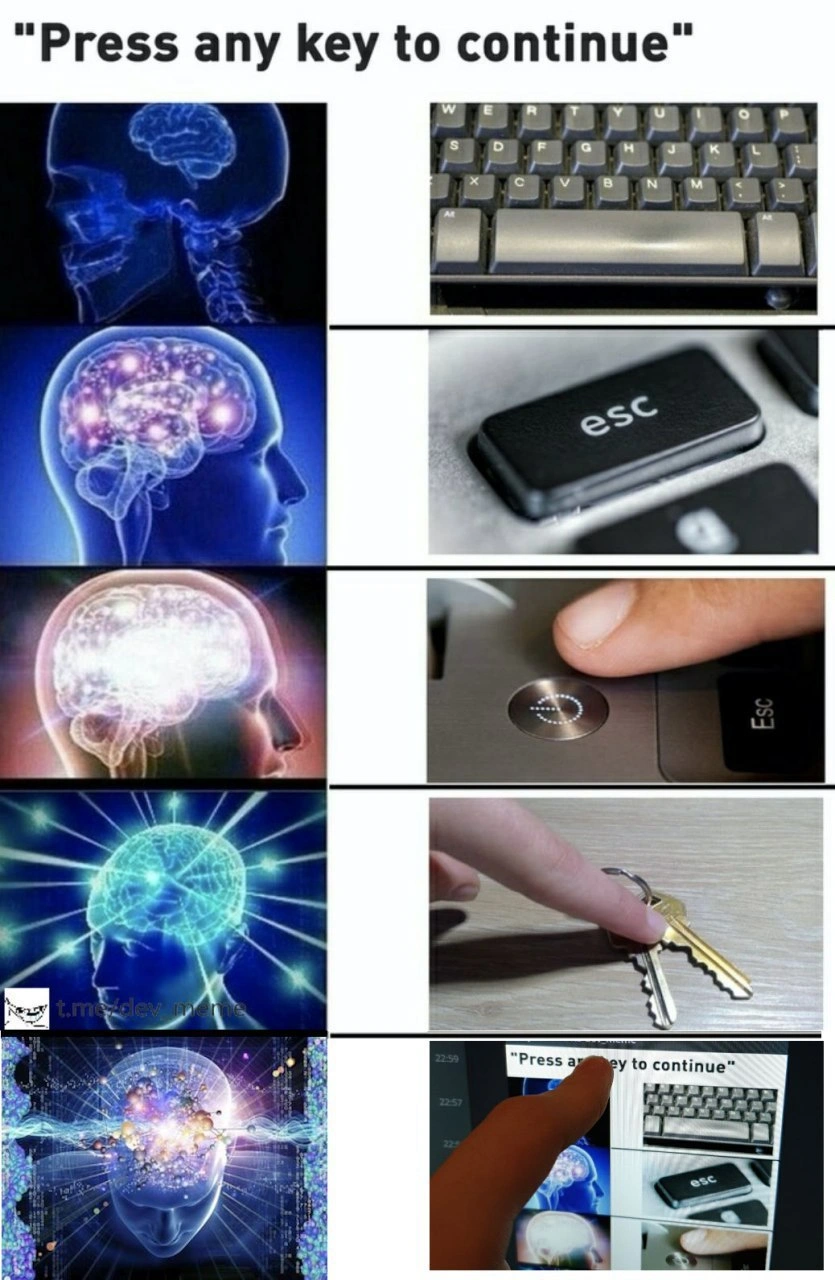
  1. In the first image, someone presses a normal keyboard key – exactly what you’re supposed to do. The program would continue like normal. Easy peasy.
  2. In the second image, the person presses the Esc key. Esc stands for "Escape" and usually it’s a key used to cancel or close things. Pressing Esc in response to "press any key" is a cheeky choice because it’s kind of the opposite of continuing. But in many programs, it would still count as a key press and thus still continue the process. It’s ironic, but it works.
  3. In the third image, the person pushes the computer’s power button. This is not a keyboard key at all. It’s the button that turns the computer on or off. If you press that, you’ll likely shut down the PC or put it to sleep – definitely not the result you want. The program wouldn’t continue; the whole computer would probably turn off! This panel jokes about taking the instruction too literally by pressing any button you see, even one that’s completely wrong for the task.
  4. The fourth image shows a finger pressing an actual metal house key against the laptop. This is a play on the word "key." On a keyboard you have keys (the buttons you press to type), and in your pocket you have keys (for doors). They share the name but obviously a house key can’t be "pressed" to send a signal to the computer. This part of the meme is pure silliness – no one would actually do this – it’s just making fun of the wording. It’s saying, “Oh, you meant any key? Maybe I’ll use this door key!”
  5. The fifth image goes one step further into meta humor. Meta means it’s referring to itself. Here, the person is tapping a phone screen that has a screenshot of the meme on it. In other words, they’re trying to press the "Press any key" message inside the image itself. Of course, doing that has zero effect on the real program – it’s like trying to press a photograph of a keyboard. This final scene is there to be over-the-top and self-referential, essentially making fun of the meme itself in the last panel. It’s the meme winking at you.

Why it’s funny to developers: This meme highlights a simple but important part of UX/UI (user experience/user interface) design: wording matters! The instruction “Press any key” is short and common, but if taken overly literally it can confuse people. There are actual anecdotes of new computer users hesitating because they’re looking for an "Any" key that doesn’t exist. Developers find this funny now because it seems obvious in hindsight – we’ve all learned that "any key" just means pick a button, any button. The meme exaggerates the misunderstanding: each panel shows a more outlandishly literal interpretation of that instruction, which is ridiculous if you know how computers work.

It’s also a bit of inside humor about the command line life. When you spend a lot of time with terminals and commands, you encounter quirky messages like this. The developer community has turned those little quirks into jokes over the years. So, if you’re new to coding, don’t worry if you didn’t get it at first – now you know! The next time you see “Press any key to continue,” you’ll remember this meme and chuckle (and hopefully press something sensible like the space bar, not the power button!).

Level 3: Pressing Boundaries

"Press any key to continue"

Seasoned developers instantly recognize this classic, ambiguous prompt. It's a staple of the CLI (Command-Line Interface) experience and a longstanding inside joke in tech culture. The meme cleverly escalates literal interpretations of Press any key using the popular galaxy brain format, where each tier shows a more "enlightened" (and increasingly absurd) idea:

  • A regular keyboard key – The straightforward approach the program actually expects. The user hits a normal key (like Enter or the spacebar) on their keyboard, and the terminal obediently continues. Simple, correct, nothing to see here.
  • The "Esc" key – Already getting cheeky. Escape usually means cancel or quit, so choosing Esc to "continue" is a tongue-in-cheek move. Technically, if the prompt truly accepts any key, even Esc will work, but there's an irony in using the one key that generally means "abort" to fulfill a "continue" prompt. It’s a small subversive twist that makes experienced devs smirk.
  • The PC's power button – Now the brain is literally glowing with mischief. The power button isn’t a keyboard key at all; it sends a hardware signal to shut down or sleep the computer. Pressing it would likely terminate the program (and your session) rather than continue it. This highlights the UX flaw: any key should mean any key on the keyboard, but a literal-minded user might think any button on the computer counts. This is where a developer facepalms at how misleading that instruction was from a UX standpoint. It's a perfect example of a tiny wording slip (UX copy gone wrong) leading to big confusion.
  • A physical house key – Here the meme goes full pun. We call door openers "keys" too, so someone ultra-literal might humorously try to press a metal house key against the computer. Of course, a house key has zero effect on a program waiting for keyboard input – it's the wrong kind of "key" entirely. This panel lampoons the phrasing even more, taking the words wildly out of context. It's a pure physical key gag yelling, "You said any key, so how about this one?"
  • A smartphone screenshot of the meme – The final tier is pure meta. The user is now pressing a picture of the prompt on a touchscreen. This self-referential gag (essentially a meta joke about the meme itself) suggests an almost philosophical level of understanding: pressing the concept of "Press any key to continue." It’s hilariously useless – tapping an image on your phone obviously won’t make your PC program continue – but it parodies the idea of thinking so far outside the box that you've left reality. The brain in this last image is transcending the universe, implying this idea is the ultimate galaxy-brain move (while actually being the most outlandishly unhelpful).

This escalating galaxy brain meme format is popular in developer humor because it visually frames our tendency to overthink and riff on instructions. Each panel is a bigger joke than the last. The setup is a familiar scenario: some script or tool prints the classic "Press any key to continue..." message (common in old batch files or installer wizards as a pause). The punchline is imagining what a user might do if they take that prompt way too literally. It playfully jabs at both sides: the user who doesn’t get the clue, and the programmer who wrote such a vague instruction in the first place.

Inside joke alert: Many of us recall the legendary tech support anecdote (and the famous Simpsons gag) where a bewildered user asks, "Where's the 'Any' key?" Yes, this actually became enough of a trope that it's part of developer folklore. Newcomers sometimes literally search their keyboard for an "Any" key. This meme builds on that classic misunderstanding and cranks it up through five levels of TerminalHumor. By the time we get to the house key and the meme-within-a-meme, the escalation has turned a simple misunderstanding into an absurdist comedy sketch.

From a UX/UI perspective, this meme is a miniature lesson in why wording matters. A seemingly trivial prompt can lead to wild interpretations if phrased poorly. Developers and technical writers learned long ago that clarity is key (pun intended). For example, a better prompt might say, "Press any key on the keyboard to proceed." But where’s the fun in that? Part of what makes this scenario funny is that the original phrasing is so terse and non-specific. It's a remnant of an earlier computing era and has a nostalgic charm for programmers. In fact, even today if you use the PAUSE command in a Windows batch script, you'll get that exact "Press any key to continue . . ." message. It's ingrained in computing culture.

Ultimately, the humor resonates because it captures a truth about the developer experience (DX): we spend our lives instructing computers with precise syntax, yet here the computer’s instruction to us was imprecise, and chaos (or comedy) ensued. Seasoned devs laugh because we remember being confused by things like this, or watching someone mash the wrong key in confusion. It’s a gentle reminder that in tech, if something can be misunderstood, it will be misunderstood – and then turned into an inside joke. This meme takes that idea to an absurd extreme, celebrating the quirky, literal-minded fun that is so much a part of DeveloperHumor and the culture of the command line.

Description

A five-panel 'Expanding Brain' meme satirizing the literal-mindedness of developers when faced with the simple prompt, 'Press any key to continue'. The left column shows images of a brain with increasing levels of cosmic energy and enlightenment. The right column shows corresponding actions. It begins with the most basic interpretation (a normal brain scan next to a keyboard's space bar), escalates to less common choices like the 'esc' key and the computer's power button, then moves to a literal interpretation (pressing a physical house key against the desk), and culminates in the most meta, 'galaxy brain' action: a finger physically touching the word 'key' within the on-screen text prompt itself. A watermark is visible in the fourth panel. This meme humorously captures the developer tendency to overanalyze instructions and find edge cases, turning a straightforward prompt into a philosophical exercise in defining 'any' and 'key'
Comments

7
Anonymous ★ Top Pick The prompt says 'Press any key to continue,' but it never specifies the keymap. A true senior engineer would pipe /dev/random into the input stream to find the one key that actually crashes the program
  1. Anonymous ★ Top Pick

    The prompt says 'Press any key to continue,' but it never specifies the keymap. A true senior engineer would pipe /dev/random into the input stream to find the one key that actually crashes the program

  2. Anonymous

    CLI says “Press any key to continue”; junior taps Space, mid-level hits Esc, SRE cycles the box, and the principal engineer just rips out the blocking prompt and ships a --no-interactive flag

  3. Anonymous

    After 20 years in tech, I've realized 'Press any key to continue' is actually a subtle psychological test to identify who will blindly follow instructions versus who will spend 3 hours writing a script to determine the optimal key based on entropy, wear patterns, and keyboard latency - only to discover the interrupt handler accepts literally anything including the coffee mug you just placed on the numpad

  4. Anonymous

    This meme perfectly captures the evolution of a senior engineer's problem-solving approach: from following conventions (spacebar), to finding elegant exits (ESC), to nuclear options (power button), to absurdist literalism (physical keys), and finally achieving enlightenment through meta-recursion. It's the technical debt of humor - each layer compounds until you're pointing at a screen showing someone pointing at a screen, which is basically how we all feel debugging production issues at 3 AM while our monitoring tools monitor the monitoring tools

  5. Anonymous

    “Press any key to continue” is a seniority test: space = optimism, Esc = rollback reflex, power = DR, car keys = air‑gap, and the enlightened one taps the screenshot of the prompt and induces recursion until the UI deadlocks

  6. Anonymous

    Classic CLI UX flaw: 'read -p "Press any key"' hangs until you disassemble the hardware

  7. Anonymous

    “Press any key to continue” is just a blocking read on stdin; seniors escalate from Esc to the power button, press their house keys on the way out, then open a PR adding --non-interactive

Use J and K for navigation