Power Rangers Combine Worst Gaming Post-Processing Effects Into Megazord
Why is this GameDev meme funny?
Level 1: Too Many Toppings
Imagine you’re making an ice cream sundae. You have all these toppings: chocolate syrup, sprinkles, gummy bears, marshmallows, hot fudge, caramel, and more. It might sound fun to use all of them, right? But if you dump every single topping onto one bowl, the sundae turns into a gross, confusing mush that doesn’t even taste good anymore. You can’t tell what’s what, and you kind of ruin the ice cream underneath.
This meme is laughing at a similar idea, but with video game graphics. Game makers have lots of special visual tricks (like making the corners dark, adding blur when things move, putting shiny glares on lights, etc.) — think of those like the “toppings” for a game’s look. If you use one or two thoughtfully, it can make the game look cooler, just like a bit of chocolate syrup or a few sprinkles can make ice cream yummier. But if you use everything all at once, the game’s screen just becomes a big mess (in the meme it’s called “pure noise”). It’s hard to see anything clearly, and it’s not fun to play anymore — basically the game equivalent of that overloaded sundae no one wants to eat.
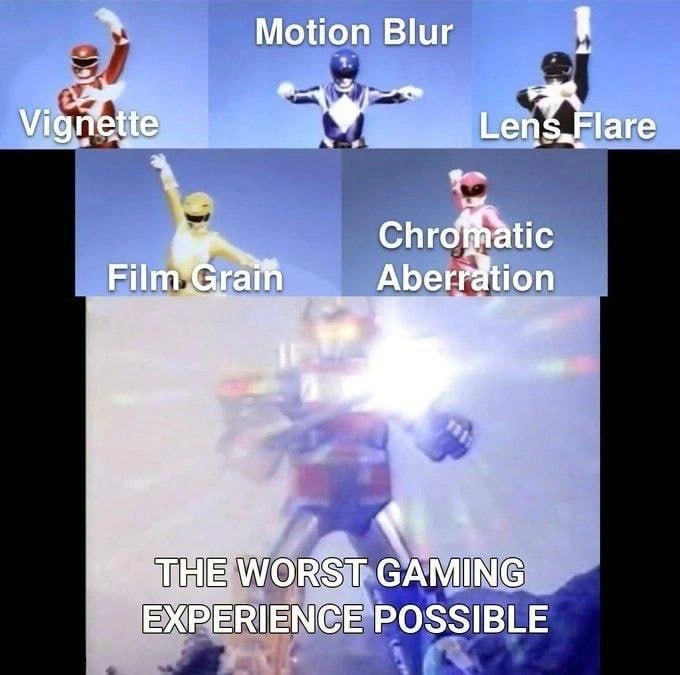
So, the joke is saying: too much of a good thing is a bad thing. It’s funny because we all know the temptation of “more = better” and how badly that can turn out. Just like a kid piling on every art supply and ending up with a muddy picture, some game developers might pile on every graphic effect and end up with a really ugly, hard-to-play game. The meme uses the Power Rangers (each with a label of an effect) coming together, which normally would form something awesome, but here it forms the worst game experience ever. In simple terms: if you try to make a game look super cool by turning on ALL the effects, you might accidentally make it look and feel terrible. Sometimes, less is more!
Level 2: Meet the Filter Rangers
Let’s dial it down and explain what’s going on for those newer to game development. Modern games often use post-processing effects – think of them like Instagram filters for your game’s graphics. After the game renders the 3D world, it applies these filters to change the look or mood of the final image. The meme shows five common filters (our “Filter Rangers”) and jokes that using all of them at max settings gives you a terrible result. Here’s who these “Rangers” are and what they do in a game, one by one:
- Vignette: This effect darkens or shades the corners of the screen. It’s as if the edges of the image fade to black. Games use it to make scenes feel more focused or cinematic (your attention is drawn to the center). If overdone, the game can look like you’re peeking through a small hole or wearing a scuba mask.
- Motion Blur: This makes moving objects or camera motions look blurred, similar to how a fast-moving car looks smeared in a photo. It can make movement feel smoother and convey speed. If overdone, everything looks constantly blurry – imagine turning quickly and the whole scene becomes a smeary mess. Many players turn this off so their view stays sharp.
- Lens Flare: Ever pointed a camera at the sun and seen those bright halos or streaks? That’s lens flare. In games, lens flare simulates those glowy rings and flashes when you look at bright lights (like the sun or explosions) to give a movie-like feel. If overdone, you get blinding flashes and weird artifacts on the screen frequently, which can be really distracting (and unrealistic if you’re supposed to be looking through a character’s eyes, not a camera lens).
- Film Grain: Think of old movies or VHS tapes where the picture isn’t perfectly smooth – there’s a kind of tiny static or graininess over it. That’s film grain. Games sometimes add a subtle grain to make the visuals feel gritty or nostalgic. If overdone, the game’s image looks noisy, like your monitor is covered in sand or your graphics are always a bit dirty. Fine details become hard to see.
- Chromatic Aberration: This one’s a fancy term from photography. It’s when a lens causes colors to misalign a bit, so you see a slight red/green/blue outline on objects (particularly at the edges of the frame). Some games add this to feel more “real” or to mimic an old camera effect. If overdone, the whole screen gets a colored fringe and things look out of focus – sort of like you’re watching a 3D movie without the 3D glasses on (not pleasant!).
Now, using one or two of these effects subtly can enhance a game’s atmosphere. For example, a slight vignette can make a horror game spookier by darkening the periphery, or a touch of motion blur can make racing games feel faster. Graphics and multimedia processing techniques like these are tools – in the right amount, they improve the player experience. But the meme jokes about the worst-case scenario: all the tools used at once, to the max. It’s the equivalent of a painter mixing every color on the palette; you’d expect a vibrant painting, but you end up with a muddy brown blob. Here, instead of a beautiful game, you get a screen full of visual noise.
Why is it “the worst gaming experience possible”? Two big reasons are visual clarity and performance:
- Visual Clarity: Games are meant to be seen and played. If you have too much motion blur, grain, and other effects, you can’t see the game world clearly. It’s like putting five filters on a photo – you lose the details. In a game, that might mean you literally can’t tell what you’re looking at: Is that an enemy or just a smudge? Did I see movement or was it the grain flickering? It’s frustrating for the player.
- Performance (Frame Rate): All these effects make the computer or console work harder. Games display images many times per second (frames per second, FPS). The more effects per frame, the more calculations the graphics card has to do for each image. Turn everything on, and the frame rate might drop (the game feels choppy or sluggish). Imagine trying to play when every second the game can barely draw a few frames – it’s not fun. Players care about performance, so performance optimization often involves turning off or toning down these effects, especially on older hardware.
The meme falls under TechHumor because it exaggerates something game developers know well: defaulting to all the “cool” graphics settings without restraint is a newbie mistake. It’s a bit like a new chef tossing every spice into a soup. Experienced devs (and players) know to fine-tune settings to find the right balance. The Power Rangers imagery is a playful way to label each effect as a hero on its own, then show that when all five team up without coordination, they ironically become a villain to the user experience. The tags like GameDevelopment, GraphicsProgramming, and PerformanceIssues all hint at this insider knowledge – you learn quickly in game dev that more effects isn’t always better.
So if you’re a newer developer: yes, these effects are fun to play with, but use them strategically. The meme’s over-the-top final panel is basically a warning of what not to do: don’t blindly stack every post-processing filter to max and expect your game to look awesome. Instead, aim for clarity and player comfort first, then add a bit of style in ways that serve the game’s design. Remember, the goal is a good player experience, not just a pretty screenshot that runs at 5 FPS!
Level 3: Morphin into Noise
The meme mashes up Power Rangers with a post-processing effects joke: each Ranger represents a different graphics filter (Vignette, Motion Blur, Lens Flare, Film Grain, Chromatic Aberration). Individually, these effects can add cinematic flair, but when our “Filter Rangers” combine forces, the result is a Megazord of visual overkill. The bottom panel shows the catastrophic fusion of all five effects activated at once – an over-bright, blurry smear of colors – aptly labeled "THE WORST GAMING EXPERIENCE POSSIBLE." This pokes fun at a common GameDev folly: turning on every shiny post-processing option in a GameEngine just because you can.
From a senior graphics developer’s perspective, the humor comes from recognizing how over-engineering the visuals ruins both clarity and performance. Each filter is a full-screen shader pass in the rendering pipeline. Stack them all, and you’ve got a shader_pipeline_overload on your hands. The GPU has to redo the entire screen for every filter, pushing the poor graphics card to its limits. The meme exaggerates this by cranking everything to eleven, implying the game’s frame rate would tank into single digits (hello fps_drop!), all while the screen devolves into “pure noise.” Seasoned devs have seen this: a junior dev or over-zealous designer enabling every screen-space effect default in Unity/Unreal to make the game look “next-gen,” only to end up with a muddy, unplayable mess. It’s the classic visual_clarity_vs_style trade-off taken to absurd extremes.
Let’s break down why this strikes a chord:
- Vignette (Red Ranger) darkens the screen edges to draw focus center. Nice for mood, but too much and players feel like they’re peering through a tunnel.
- Motion Blur (Blue Ranger) simulates camera blur on movement. A touch can smooth low frame rates, but at high intensity it just smears everything. (Pro tip: many gamers immediately disable this for clear vision.)
- Lens Flare (Black Ranger) adds those flashy light streaks and orbs when facing bright lights, mimicking real camera lens artifacts. Overuse it, and every little torch or UI element blasts your eyes like a supernova (J.J. Abrams, anyone?).
- Film Grain (Yellow Ranger) overlays tiny random noise to emulate old film cameras. It can add gritty atmosphere, but too much and your 4K game suddenly looks like a 1920s newsreel – not exactly the fidelity upgrade you hoped for.
- Chromatic Aberration (Pink Ranger) offsets color channels (red/green/blue) slightly, causing rainbow fringes on edges. It’s meant to imitate a cheap camera lens or VCR vibe. Crank it up and the whole screen looks like a distorted VHS tape, undermining the “immersive realism” it was supposed to enhance.
When these five combine, the final image is practically abstract art: darkened periphery (vignette) + smeared motion trails + blinding glares + dancing grain + rainbow fringes = visual chaos. The meme satirically calls it the worst gaming experience because no sane player would enjoy a game that looks like an over-exposed, shaky 8mm film out of focus. The UXFailures here are evident: important details (like enemies or UI text) get obscured by effects; the player’s eyes fatigue from constant blur and flicker; and any sense of depth or spatial awareness is lost in the noise. In essence, the meme is a cautionary wink: just because your engine offers 100 post-processing sliders doesn’t mean you should dime-out every single one.
Graphics veterans also chuckle at the PerformanceIssues implied. All these filters take a toll on the frame buffer and GPU: multiple full-screen pixel passes mean more memory bandwidth and shader computations. It’s like forcing the GPU to run five mini Photoshop filters on every frame of the game. The result? Your cutting-edge game now runs like a slideshow. (Imagine a FPS drop so bad that even the motion blur can’t hide the stutter!) There’s a hint of overEngineering humor: game engines often showcase these effects in demos to look impressive, but shipping a game with everything maxed out is just asking for trouble. It’s the engine equivalent of adding features for features’ sake at the cost of core functionality – a trap in software development at large. As any experienced dev would tell you, less is more when it comes to post-processing: pick the one or two effects that actually improve the scene and tone the rest way down. This meme exaggerates the opposite scenario, and that absurdity is what gets a knowing laugh.
To put it in perspective, a senior dev might recall war stories of tuning graphics settings: “We had a build where the art director loved the ‘cinematic look,’ so every filter was on. The console’s GPU nearly melted and QA complained they got motion-sick from the blur. We ended up ditching half the effects to make the game playable.” The Power Rangers analogy nails it – each effect alone is a powerful tool (a hero in its own right), but if you summon all the powers at once without restraint, you create a monster instead of a masterpiece. In technical terms, the meme underscores a fundamental lesson in GraphicsProgramming: balancing visual effects and PerformanceOptimization. The coolest shader trick means nothing if it turns your scene into an indecipherable, laggy soup. As fun as it is to enable every filter (like a kid in a candy store of shaders), experienced devs know that restraint and thoughtful configuration win the day. The meme’s hyperbolic final panel is basically a giant “Don’t do this” sign for anyone working on game visuals.
// Pseudo-code: enabling the entire post-processing stack (not recommended!)
Frame frame = RenderScene();
frame = ApplyVignette(frame, intensity: 1.0); // corners darken
frame = ApplyMotionBlur(frame, shutterAngle: 360); // everything smears
frame = ApplyLensFlare(frame, lensArtifacts: true); // big bloom & streaks
frame = ApplyFilmGrain(frame, grainStrength: 100); // add heavy noise
frame = ApplyChromaticAberration(frame, offset: 5); // color fringing
Display(frame); // Result: a "cinematic" mess. GPU cries, players cry.
In summary, the meme resonates because it exaggerates a truth: too many visual effects can transform a high-fidelity game into a blurry, laggy nightmare. It’s a light-hearted jab at our tendency to go overboard with tech that’s supposed to make games look better, but can just as easily make them look (and play) far worse. The TechHumor here is both in the absurd image of “Filter Rangers” posing heroically and in the underlying reality every graphics programmer knows: restraint and clarity beat gratuitous eye-candy every time.
Description
A meme using the Power Rangers Megazord formation template. Five individual Power Rangers are shown at the top: Red Ranger labeled 'Vignette', Blue Ranger labeled 'Motion Blur', Black Ranger labeled 'Lens Flare', Yellow Ranger labeled 'Film Grain', and Pink Ranger labeled 'Chromatic Aberration'. When they combine (the Megazord explosion scene at the bottom), the result is labeled 'THE WORST GAMING EXPERIENCE POSSIBLE'. The meme satirizes how games stack multiple post-processing effects that individually are annoying but combined create an unplayable visual nightmare
Comments
19Comment deleted
Game devs spent 6 months implementing cinematic post-processing effects, and the first thing every gamer does is spend 6 minutes turning them all off. fps > aesthetics, always
This is what happens when the graphics programmer's feature branch gets a 'LGTM' from the marketing department without a single engineer reviewing it
Nothing says ‘AAA polish’ like turning the post-process stack into a Denial-of-Service attack on your own GPU
The real boss fight isn't the final enemy - it's trying to maintain 60 FPS while the art director discovers the post-processing effects panel and decides your game needs 'cinematic realism' achieved through simulating every optical defect known to photography since 1850
When the graphics engineer enables every post-processing effect in the pipeline 'just to see what happens' and discovers why we have quality presets
Post-processing stack maxed out: turning 60 FPS Rangers into a GPU-melting artifact parade
The AAA “Cinematic” preset is five extra screen‑space passes after TAA, a 30 ms frame‑time tax, and a hidden .ini flag called bEnableVisualObfuscation=true
unpopular opinion but add depth of field too. idk why people like that shit Comment deleted
50/50, I sometimes like it in cutscenes/directed portions, but in open-world and multiplayer titles it is either meaningless or bad Comment deleted
some sdr luts are debatable too Comment deleted
Bf3? Comment deleted
The (un)holy Unreal Engine united for this Comment deleted
Battlefield 1, 3, 4, 5, 6, 2042? Comment deleted
Default unity project in a nutshell, except they also go for color grading Comment deleted
Return old style forward rendering with MSAA, honestly, modern solutions is absolutely shit compared to MSAA Comment deleted
There is a motion blur that doesn't suck, called high FPS on high refresh rate display Comment deleted
Insomniac's Spider-Man games be like: Comment deleted
Unpopular opinion but I like motion blur for racing/driving games. Sense of speed is really lacking without it Comment deleted
I like motion blur everywhere But on lowest possible level Interested to see an unicum (probably a mutant) who loves medium or high levels 🙂 Comment deleted