Skip to content
DevMeme
6452 of 7435
World Before PNG Was Invented in 1996 Had No Transparency Support
Graphics Post #7073, on Aug 23, 2025 in TG

World Before PNG Was Invented in 1996 Had No Transparency Support

Why is this Graphics meme funny?

Level 1: Stickers with Borders

Imagine you’re making a collage with cut-out pictures from a magazine. But here’s the catch: you’re not allowed to use scissors properly. Every picture you cut out has to remain a full square piece of paper. So even if you only want the picture of a car, you also have to keep the big white square around it. You glue the car onto your collage, white square and all. Then you add a cut-out person – but oops, they’re also on a white rectangle of paper. Soon, your collage background is covered by all these white rectangles from the paper remnants, and it looks like a messy patchwork. You can’t see the nice colored poster board behind them because each picture’s white square blocks it out. It looks pretty funny and not very neat, right?

That’s exactly the situation this meme is joking about, but with computer images. Before a certain “special” kind of image (called a PNG) was invented, every picture on the computer was like a sticker with a solid white border or square around it. If you put that picture on a different background, you’d always see its white square outline. People just accepted that things would look a bit awkward. When PNGs came along, it was like finally getting sharp scissors: suddenly we could cut out the pictures properly – no more white squares – and stick them on whatever background we wanted, and it looked natural. The meme is funny because it shows how silly the world looked when all our digital stickers still had their white paper backing attached. It’s like a before-and-after joke: before 1996, every picture had a white box; after 1996, we could peel those boxes off. And everyone who works with computers and graphics is very glad we can!

Level 2: White Background Woes

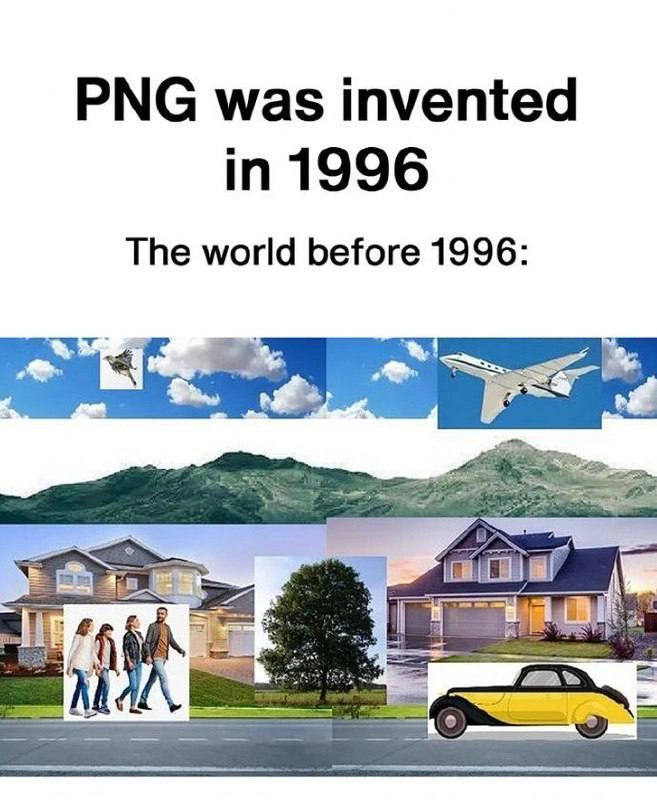
Let’s break down why this meme is funny, especially if you haven’t lived through the 90s web. The text says “PNG was invented in 1996” and shows a chaotic collage labeled “The world before 1996.” It’s full of pictures (a plane, mountains, houses, people, a car) each pasted on a scene but with glaring white boxes around them. What’s going on?

In simple terms, older image data formats like GIF and BMP didn’t support transparency. Transparency means you can see through parts of an image, so whatever is behind it can show through. Modern formats like PNG allow images to have transparent backgrounds. For example, a company logo in PNG format can be placed on a webpage of any color, and only the logo itself is visible – the rest is fully transparent. But before PNG, if you tried the same with a GIF or BMP, any “background” area of the image would just show up as a solid block (often white or another color). The result: your nice logo or clipart was always in a rectangle of solid color, like a sticker that hasn’t had its background cut out.

In the meme’s image, all those white rectangles around objects illustrate what early web developers dealt with. If you had a picture of a tree and you wanted to put it on a scenic background, the tree image would also include its original white square backdrop. Unless your webpage was also white, that square would stick out like a sore thumb. Webpages in the 90s often looked patchy because of this – you’d see a beautiful custom background with white boxes around every icon or photo. It was unprofessional-looking, but it was the limitation of the tech at the time.

Now, what exactly is PNG and why 1996? PNG (Portable Network Graphics) is an image format that came to save the day. Introduced in 1996, PNG supports alpha_channel transparency. An alpha channel is basically an extra layer in the image data that tells which parts of the image are opaque, which are fully transparent, and everything in between. Think of it like a special stencil or mask: it’s as if alongside your picture you have a grayscale silhouette – white parts of that silhouette are solid, black parts are see-through, and gray is semi-transparent. This means PNG can smoothly blend the edges of an image into any background. By contrast, older formats had no such mask, or only a very simplistic one.

For instance:

  • BMP (Bitmap) – a very basic image file format – has no transparency at all. Every pixel is saved as a specific color. If a BMP image of a car has a white background, those white pixels are part of the image and will always display as white.
  • GIF (Graphics Interchange Format) – an early web format – could designate one color as “transparent.” That helped a bit: if you made the background color unique (say bright pink) and set that as transparent, the image would have a cut-out shape. But GIF transparency is either on or off (no partial see-through). Edges could look jagged because there was no smooth blending; a pixel was either 100% opaque or gone.
  • PNG – the hero of this meme – allows partial transparency. Each pixel in a PNG can have an opacity value from 0% (fully transparent) to 100% (fully opaque) and anything in between. This is why PNG images can have nice smooth edges or soft shadows that seamlessly overlay on top of any background color or image.

Now imagine you’re a junior web developer in 2025 (or even just a casual meme browser) seeing this collage. You’ve likely used PNGs or even more modern formats (like WebP or SVG) without a second thought – transparency just works. You drag an image into your HTML, and if it’s a PNG with a transparent background, it floats nicely wherever you put it. This meme is showing you how absurd things looked before that was possible. It’s as if someone tried to make a Photoshop montage but didn’t know how to remove the white background from each layer. It looks silly and wrong – and that’s exactly the joke. TechNostalgia kicks in when experienced devs recall that this “silly wrong collage” was our daily reality on the early web. And for newer devs, it’s an eye-opener: we actually had to deal with that? Yes, we did, and we’re glad those days are over!

A relatable newbie scenario: imagine you’re tasked with updating an old website and you find an ancient company logo file from 1995. It’s a JPEG/GIF, and when you insert it on the site’s modern dark background, it sits in a glaring white box. You might think “Who forgot to remove the background?” The answer might be: nobody forgot – the format simply couldn’t handle it. This meme is basically the dev community laughing together about how far image handling has come. It’s labeled TechHumor and MemeCulture because it turns a dry topic (image file formats) into a visual gag anyone in web development can chuckle at. And by tagging RelatableDeveloperExperience, we acknowledge that yes – messing with awkward image backgrounds used to be part of the job!

Level 3: Opaque Past, Transparent Future

Before PNG with its fancy 8-bit alpha channel became a thing in 1996, every digital image was a completely opaque rectangle – no exceptions. This meme’s surreal collage of planes, clouds, houses, and people each boxed in white is a spot-on parody of the pre_png_era of web graphics. Back then, an image file couldn’t natively represent “holes” or transparency. If you scanned a logo or saved a sprite, the result was literally a solid block of pixels (often with a default white or black background) because formats like BMP (Windows Bitmap) and early GIFs had no alpha transparency. The phrase “carried its own white background payload” humorously emphasizes how every object dragged along a white canvas behind it, whether you wanted it or not. It’s as if early image formats came with an unwanted free gift – a chunky white rectangle framing your graphic, proudly photobombing every design.

For veteran engineers who survived the 90s, this hits a nostalgic nerve. We remember painstakingly crafting websites where every icon and logo looked like a Polaroid slapped onto a colored page. Why? Because the only widely supported web image formats were GIF (circa 1987) and JPEG (circa 1992). JPEG was great for photos but didn’t support transparency at all (and still doesn’t – your JPEG either shows a pixel or doesn’t, there’s no in-between). GIF, on the other hand, was limited to 256 colors but did offer a crude form of transparency: you could pick one color in the image’s palette to turn “see-through.” This was a hacky workaround – essentially a single-bit mask. If you had a GIF with a white background, you could declare white as the transparent color, and voila, the white would disappear… sort of. In practice, this often produced jagged halos or weirdly dithered edges. Anyone who dabbled in gif_palette_hacks knows the pain: if your image’s edges were anti-aliased (smoothed) against white, converting white to transparent left behind ghostly light pixels. Your “transparent” image ended up with a white fringe whenever placed on a non-white webpage. It was like trying to key out a green screen that wasn’t uniformly green – the result was anything but clean.

The meme’s collage with obvious white boxes around each element is exactly how things looked if you naively overlaid images in the early web. Web designers either had to embrace the chaos or get extremely crafty. Many just gave up and made their page backgrounds white, effectively camouflaging the image’s rectangle. This is one reason so many 90s sites had that plain white (or gray) background – it wasn’t just stark minimalism; it was a practical choice to hide image borders. Others attempted more labor-intensive solutions. I fondly recall hand-trimming white pixels in MS Paint or early Photoshop, erasing backgrounds manually pixel by pixel like an arts-and-crafts project. Some tools supported masking, where you’d use a second bitmap as an alpha mask – but that was advanced voodoo at the time and not standard on the web. A few audacious souls would employ applets or browser-specific filters (looking at you, early IE) to fake transparency. Most of us, however, just lived with the white rectangles and called it “good enough.”

Everything changed when PNG landed on the scene. Portable Network Graphics (PNG) was invented in 1996 and it felt like a superpower unlocked. All of a sudden, images could have true transparency – not just an all-or-nothing mask, but a full alpha channel allowing partial transparency. This meant you could have smooth translucent edges and soft drop shadows that blended into any background. No more sacrificing one of your 256 colors for “see-through” magic; PNG was a truecolor (24-bit) format with an extra 8 bits for alpha, supporting 16.7 million colors and 256 levels of transparency per pixel. The impact on front-end aesthetics was revolutionary. We could layer images without ugly rectangles, achieving composites that actually looked professional. The meme’s tagline “PNG was invented in 1996” is a nod to how pivotal that year was for designers and developers. It’s poking fun at how tech_history pivoted on something as seemingly mundane as a file format revision. Honestly, entire website design trends were enabled by that one change. Think of all the WebDevelopment possibilities: icons with rounded corners, irregularly shaped images, logos that gracefully sit on top of backgrounds – none of that was truly feasible before. The meme resonates because it reminds us that behind today’s sleek transparent logos and modern UI assets lies the memory of cutting out images with virtual scissors and cursing at legacy_web_graphics. It’s a shared industry in-joke: “Remember when every graphic came with free white luggage?” – we do, and we don’t miss it one bit!

Description

A meme with the title 'PNG was invented in 1996' followed by 'The world before 1996:' showing a collage of images where every photo has visible rectangular borders with no transparency -- a fighter jet, a private airplane, houses, a group of people, a mountain landscape, a tree, and a vintage car all appear as rectangular cutouts pasted onto backgrounds with harsh white/mismatched edges. The joke plays on the fact that PNG (Portable Network Graphics) format supports transparency (alpha channel), so the meme imagines that before PNG existed, the real world also couldn't have transparency, resulting in everything looking like poorly composited clipart

Comments

19
Anonymous ★ Top Pick Before PNG, the world ran on JPEG -- which explains why everything in the 90s looked like it had compression artifacts, including people's fashion choices
  1. Anonymous ★ Top Pick

    Before PNG, the world ran on JPEG -- which explains why everything in the 90s looked like it had compression artifacts, including people's fashion choices

  2. Anonymous

    Remember life before PNG? Every image was like a modal dialog you couldn't click away, permanently blocking a piece of the background

  3. Anonymous

    Remember painstakingly flood-filling the white pixels around the company logo? PNG was the original "remove background" button - just 15 years before Figma made it cool

  4. Anonymous

    Ah yes, the dark ages when we had to choose between GIF's 1-bit transparency that looked like it was cut with safety scissors, or JPEG's 'what is transparency?' approach - and don't even get me started on trying to explain to clients why their logo had a white box around it on colored backgrounds

  5. Anonymous

    Ah yes, 1996 - the year we finally stopped living in a world of checkered backgrounds. Before PNG's alpha channel transparency, web developers had two choices: GIF's single-bit transparency that made everything look like it was cut out with safety scissors, or JPEG's complete inability to be transparent at all. This meme perfectly captures the absurdist reality that senior engineers remember: spending hours creating pixel-perfect transparency masks, only to have them render with jagged edges that would make a 8-bit sprite blush. PNG didn't just give us transparency - it gave us 256 levels of 'maybe visible,' which is coincidentally the same number of levels of technical debt in that legacy image processing pipeline you've been meaning to refactor since 2003

  6. Anonymous

    Pre‑PNG you either matched the page hex or shipped a logo in a white coffin - then IE6 made us haul in pngfix.htc and DXImageTransform just to fake 8‑bit alpha

  7. Anonymous

    Pre-PNG, 'transparent logo' meant choosing a matte and praying; post-PNG, it meant debugging IE6's AlphaImageLoader - progress just rotated the hacks

  8. Anonymous

    Pre-PNG JPEGs: where quantization errors turned wireframes into abstract art stakeholders swore was 'good enough'

  9. @Glebasya777 10mo

    Some old programs and games usually had one color (purple, blue) in place of transparency for images

    1. @nwordtech 10mo

      256 color images had 1 color in pallete that was transparent also

      1. @Glebasya777 10mo

        I'm playing Deadly Rooms of Death, and you can import custom images where C0C0C0 hex code is used for transparency

    2. @ownedbywuigi 10mo

      purple is still used often in modern built in Windows apps for transparency

  10. @SergeKras 10mo

    слабенько

    1. dev_meme 10mo

      Please, keep all chatting around devmeme in English 🙏

      1. @RiedleroD 10mo

        oop, didn't see this until now

  11. @RiedleroD 10mo

    I will note: gif supports transparency

  12. @VolkovCoppermine 10mo

    What about GIF in gorgeous 255 colors + transparent one?

  13. @Johnny_bit 10mo

    Well, it's obvious why purple = transparent. Purple is sneaky. Have you seen a purple ork? no. that's how sneaky it is.

  14. @f0cu53d 10mo

    Slabenko

Use J and K for navigation