Baby's First Words Are Password Validation Rules
Why is this Security meme funny?
Level 1: A Name with a Number
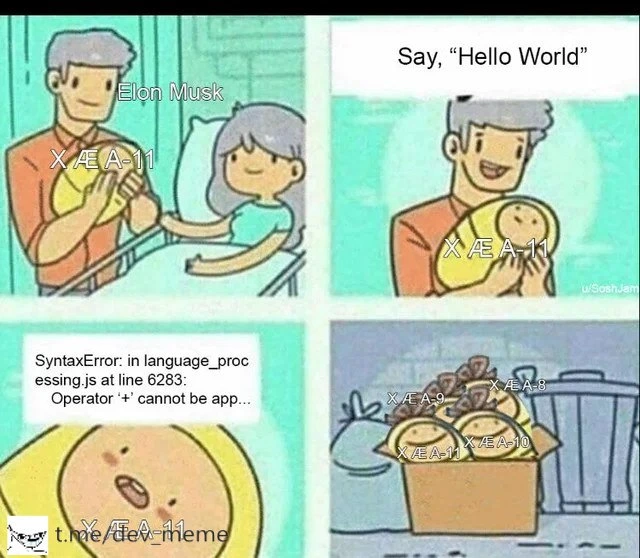
Imagine you’re learning to speak, and when you try to say your name, a robot voice interrupts: “ERROR! Name not good enough. Please include a funny symbol and a number in it!” 🤖 That’s what’s happening in this silly comic. A baby is about to say his first word, and everyone expects something like “Mama” or “Dada.” But suddenly, a rule pops up that says the baby’s name needs to have special stuff — like @ or # and a number — just like a super-secret password. So the baby ends up with a really weird name: “X Æ A-12.” It’s funny because no parent would actually want to follow a rule like that for a baby’s name!
Think of it like this: what if your teacher said your name isn’t allowed unless it has a number and a symbol in it? 💥 For example, little Alice is told she must now be called “Al!ce1” to be accepted. Sounds crazy, right? We all know names are usually simple — maybe just letters, sometimes a hyphen or an apostrophe if it’s fancy. They definitely don’t usually have random symbols or numbers. So this comic makes us laugh by showing a ridiculous rule that would never exist in real life. It’s poking fun at how computers sometimes ask us for things in a very strict way. The final joke with X Æ A-12 is extra funny because that was the unusual name of a famous person’s baby (Elon Musk’s son). It’s like the comic is saying: “See, here’s a baby who actually got a name with a bunch of crazy characters!”
The core of the joke is that making up unnecessary rules can lead to absurd outcomes. Everyone can feel how silly it is to force a baby’s first word to include a number and symbol. It reminds us in simple terms: don’t over-complicate things that should be easy. In real life, your name is your name — no password-style requirements needed! So the meme makes people laugh and nod, because it’s a goofy way to show why overly strict rules are just… well, childishly wrong.
Level 2: Form Field Fails
Let’s break down the joke in simpler terms. This meme is about a frontend input form (like the kind you fill out on a website) that has ridiculously strict rules for the “Name” field. Normally, when you enter your name on a sign-up form, the site might check it for basic validity (like “don’t leave it empty” or “please use letters only”). But here, the comic imagines a name field acting like a password field with crazy requirements. The error message says the name is invalid and must include at least one special symbol, one letter, and one numeral. Those kinds of rules are what we usually see for making a strong password (for security), not for a person’s name! 🤨
In the first panels, a baby is trying to say his first word, and a parent is excitedly waiting to hear it – a classic cute moment. But the twist is, instead of “Mama” or “Dada,” we suddenly see a computer-like error pop up before the baby can finish speaking. It’s as if the baby’s first word is being treated like an online form input that didn’t meet some strict criteria. The poor little guy gets a message essentially saying “Error: your name isn’t complex enough, try again!” This is a UX failure (user experience failure) because it’s a totally frustrating and nonsensical rule for that situation. We expect name fields to be easy – you should be able to just type your name. Imagine your name is Anna and a website tells you “Name invalid, add a number and symbol” – you’d be pretty confused, right? That’s exactly the crazy scenario the meme is mocking.
Now, why is this funny specifically to developers and IT folks? Because we deal with input validation rules all the time, and we’ve seen how they can be overzealous or poorly implemented. There’s even a famous saying in software circles: “There are only two hard things in Computer Science: cache invalidation, naming things, and off-by-one errors.” 😅 (It’s a joke about how we even get the count of hard things wrong.) Naming things here usually refers to how hard it is to come up with good names for variables, functions, or products. But this meme spins it literally – even naming a baby becomes “hard” due to silly rules! It resonates with any programmer who’s spent hours debugging why a user’s input was rejected. For example, a new developer might not realize that people have hyphens or apostrophes in their names and write a validation rule that says “only letters allowed.” That would break for a last name like O’Neil or Anne-Marie. This meme takes that to the extreme by saying “not only are symbols allowed, they are required!” – which no real registration form would ever do (one hopes!).
The punchline comes in the last panel, where the baby’s name is shown as X Æ A-12. If that looks oddly specific or familiar, it’s because it’s referencing Elon Musk’s baby. Around the time this meme was posted (May 2020), Elon Musk and the artist Grimes had a baby boy whom they named “X Æ A-12”. Yes, that’s the actual name they announced – it contains the letter X, the symbol Æ (a Nordic ligature often pronounced like “Ash”), and the number 12. 😮 It was the talk of the internet for a while, because it’s not a name you see every day. The meme jokes that maybe the only reason a baby would end up with a name like that is because some form forced it by rejecting normal names! In other words, baby Musk’s name conveniently has a special character and a number, exactly as if he were satisfying a strict form. The meme even places Elon Musk’s photo next to the baby, implying he’s the “parent” in the comic who got this wild result. It’s a playful jab at both absurd form rules and the real-life unusual name choice.
For a junior developer or someone new to UX, the lesson here is about context-appropriate validation. Input validation means checking user input to ensure it meets certain criteria before accepting it. This is important for things like passwords (to ensure security) or emails (to ensure they have an @ sign, etc.). But those rules have to make sense for the field in question. A name_field_validation should be lenient and accommodate real names from different cultures (and yes, occasionally very unique names). When validation rules are too strict or just plain wrong for the context, it leads to UXFailures like this meme illustrates. Users can’t get past a form or feel frustrated because “the system” is telling them their real name is invalid. That’s a terrible user experience. In development, we joke about these things because we’ve been on the receiving end of confused bug reports: “Your form won’t accept my name ‘Zoë’” or “I can’t type my son’s name O’Brian, the apostrophe is blocked.” It’s embarrassing for the site and annoying for the user. So the meme is a comical reminder: don’t treat every input like a password – a baby’s name shouldn’t need military-grade encryption!
Level 3: Regex Overkill
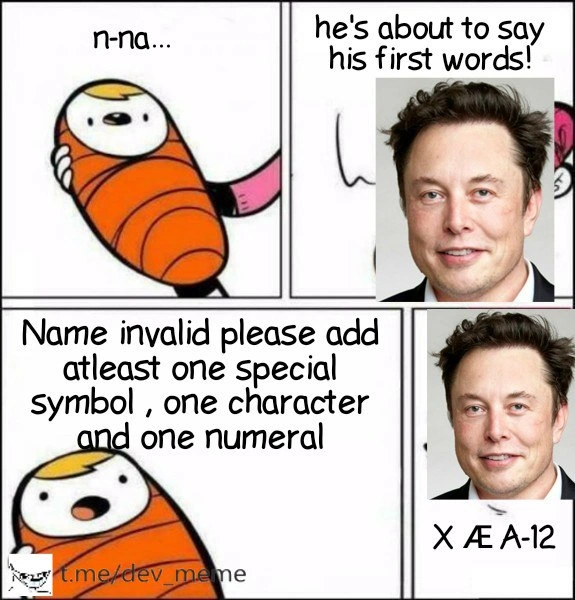
In this four-panel comic, a baby attempts to say his first word (“n-na…”), an adult excitedly waits (“he’s about to say his first words!”), but then an unexpected error message pops up: “Name invalid please add at least one special symbol, one character and one numeral.” This overzealous validation prompt mimics the strict rules we normally see for passwords — definitely not something you'd expect for a person’s name field. The absurdity is immediately clear to developers: it's a classic UXFailure where input rules don't fit the context at all.
For seasoned developers, this hits close to home. We've all encountered InputValidation gone wrong on the frontend. Perhaps a well-intentioned dev copy-pasted a password policy regex into the name field logic without thinking. The result? A form that rejects perfectly normal names unless they look like a strong password. It's an anti-pattern in UXDesign and DeveloperExperience: a one-size-fits-all validation rule applied where it doesn’t belong. Under the hood, the code might have looked like this:
// Using a password-like validation pattern mistakenly on a name field:
const namePattern = /^(?=.*[A-Za-z])(?=.*\d)(?=.*\W).+$/;
// Regex requires at least one letter, one digit, and one special symbol
if (!namePattern.test(babyName)) {
throw new Error("Name invalid: please add at least one letter, one number, and one symbol");
}
Here the regex (?=.*[A-Za-z])(?=.*\d)(?=.*\W) ensures the input contains at least one letter, one digit, and one non-alphanumeric symbol. That might be great for enforcing a complex password, but it's utterly ridiculous for a child's name! There’s a running joke that naming things is one of the hardest problems in programming (right up there with cache invalidation and off-by-one errors). In this case, the difficulty is self-inflicted by the UI. The meme exaggerates that pain: it’s as if the baby is forced to treat his name like a 16-character Wi-Fi password, complete with symbols and numbers, just to satisfy some absurd rule.
This joke also nods to the classic list of falsehoods programmers believe about names. Experienced devs know these pitfalls all too well:
- “Names contain only letters.” In reality, people’s names often include spaces, hyphens (e.g. Mary-Jane), apostrophes (O’Connor), or even non-Latin characters (Søren, 李).
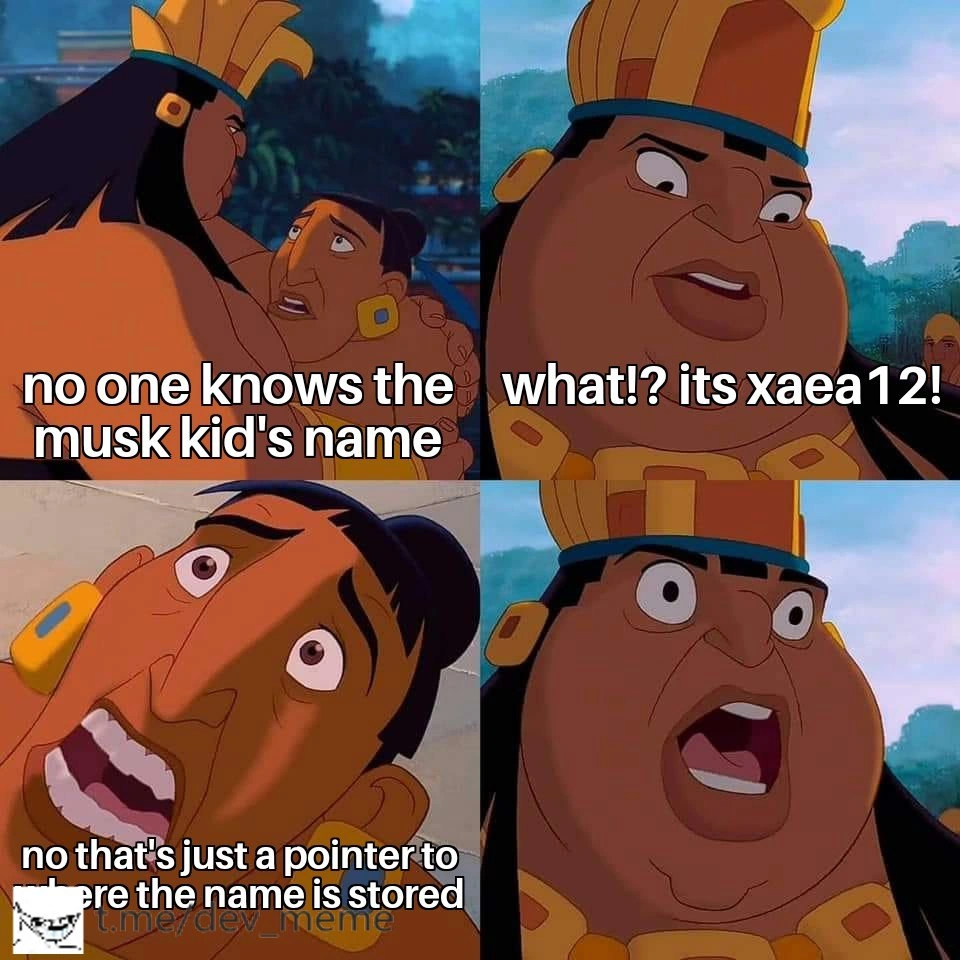
- “No real name has numbers or weird symbols.” Untrue — some cultures and modern names might include numerals or accented characters, and we literally have Elon Musk’s child named X Æ A-12 as proof.
- “All names fit a simple First Last format.” Many folks have multiple middle names, single names, or mononyms. Rigid forms that assume a fixed pattern cause real frustration.
Time and again, software breaks because someone's human name didn't fit a programmer’s narrow regex. We've seen registration forms freaking out over a last name like “Ng” being too short, or throwing errors at José because of the accent. Normally, sites err by over-restricting name fields (forbidding any special characters and thus rejecting valid names). This meme hilariously flips the scenario: instead of forbidding special characters, it demands them, turning a benign situation into a surreal one. The baby’s tentative “n-na…” is treated like invalid input, so in the final panel he blurts out X Æ A-12 — a string that reads like it finally satisfied the regex.
The choice of X Æ A-12 is no random gibberish; it’s a direct reference to tech celebrity Elon Musk’s baby name that was making headlines in May 2020. The meme cleverly uses Musk’s face to drive the joke home. Elon and musician Grimes really named their newborn X Æ A-12 (pronounced somewhat like "Ex Ash A Twelve"), a name containing a capital letter X, an unusual character Æ, and the number 12. In other words, it inadvertently already looks like it meets this crazy form rule! This punchline blends real-world absurdity with developer humor. (Fun fact: California’s state input rules — yes, real-life name regulations! — actually forced them to alter the name to “X Æ A-Xii” since numerals weren’t allowed on a birth certificate. Even the legal system has validation constraints.)
Ultimately, the meme highlights how crucial it is to align validation rules with reality. An overly strict frontend rule like this doesn’t make software more secure or user-friendly — it just frustrates people (or in this case, baffled babies 🍼). It’s a lighthearted reminder that good UX/UI design means asking “Does this rule make sense here?” A name field isn’t a password field, and treating it like one is as silly as it sounds. Senior devs chuckle because they’ve encountered these pain points before, and the solution is clear: trust real-world use cases over arbitrary patterns. When we fail to do so, we get situations so absurd that even a baby’s first word turns into a UX punchline.
Description
A four-panel comic meme satirizing password complexity rules through the naming of Elon Musk's child. In the first panel, a cartoon baby in an orange swaddle begins to speak, saying 'n-na...'. The second panel shows a hopeful Elon Musk with the caption, 'he's about to say his first words!'. The third panel shows the baby speaking a full sentence: 'Name invalid please add atleast one special symbol, one character and one numeral,' which is a typical password validation error message. The final panel displays Elon Musk's face again, this time with the name 'X Æ A-12' written below, implying this name satisfies the baby's 'requirements'. The meme humorously connects the unconventional celebrity baby name to the often-frustrating complexity requirements for creating secure passwords. A watermark for 't.me/dev_meme' is visible in the bottom left corner
Comments
7Comment deleted
I showed this to my lead and he said our new hire password policy is now just 'Must be unpronounceable by a human under 18 months old.'
Security pasted the NIST password regex into the “first name” field - now every newborn is registered as v1.0.0-alpha+XÆA-12
When your regex for name validation is so strict it rejects "John Smith" but would happily accept "X Æ A-12" because at least it meets the complexity requirements
This perfectly captures the eternal struggle between overzealous regex validation patterns and the real world. We've all written that `^(?=.*[A-Z])(?=.*[0-9])(?=.*[!@#$%])` monstrosity, but Elon took it literally and applied it to his kid's birth certificate. Turns out when you treat human names like password fields, you get X Æ A-12. The real kicker? His validation would probably still fail because Æ isn't in most character class definitions, proving once again that 'Falsehoods Programmers Believe About Names' is the most underrated technical document ever written
Password rules on the First Name field: congrats, you’ve just learned how ICU, LDAP, and CSV all disagree about “X Æ A-12”
When your auth regex rejects even Elon's kid - proof legacy password policies outlive common sense
We reused the password regex for first_name - security signed off, and so did 30% of our users during signup