Skip to content
DevMeme
1370 of 7435
Elon Musk's Guide to Naming and Passwords
Security Post #1543, on May 8, 2020 in TG

Elon Musk's Guide to Naming and Passwords

Why is this Security meme funny?

Level 1: Opposite Day Password

Imagine you have a secret code to unlock your toy box. A bad idea would be using something easy like your dog’s name – anyone who knows you could guess that. This meme jokes about doing the opposite: instead of using your child’s name as the secret, you make a really crazy hard secret and give it as the child’s name! 😂 It’s like if your favorite superhero said, “Don’t hide the key under the doormat,” and you replied, “Okay, I’ll hide the doormat on the key!” It’s a silly backwards trick. Normally, you pick a password based on something in your life (like a name you love). But here they suggest you base something in your life (your baby’s name) on a random password. It’s funny because nobody would actually call their kid “Xy$#42!” just to remember a login – that’s so extreme! The humor makes us smile and also think: maybe we shouldn’t use super simple passwords. After all, if naming a baby “Password123” sounds ridiculous, maybe using “Password123” for your email is pretty silly too, right? So the joke teaches a little lesson: keep your passwords strong and secret… without going as far as changing your poor kid’s name!

Level 2: Password 101 – Family Edition

Let’s break this down in simpler terms. In computer security, a password is like the key to your house: it should be secret and hard for strangers to guess. Weak passwords are ones that are easy to figure out – common words, names, or patterns (think "password123" or your child’s name + birthday). Using your child’s name as a password is a classic no-no in security awareness training, because hackers often try obvious personal details first. This type of hacking, called a dictionary attack, is when a computer rapidly tries many common words and names from a list (a “dictionary”) to see if any unlock your account. Since children’s names (or pets’ names, etc.) are so widely used, they’re usually on the first-page of that attacker dictionary. It’s like a burglar quickly trying the front door with the 100 most common key shapes – if yours is one of those, he’s in without breaking a sweat.

Security experts promote security best practices for creating passwords: use a mix of letters (uppercase & lowercase), numbers, and symbols; make it long; avoid real words or anything connected to your personal life. Basically, make it random. The problem? Random passwords like hQ7$z!P9Y might be super secure, but they’re also super hard to remember! This is the age-old security vs usability trade-off. “Usability” means how easy something is for a person to use. Here, an easy-to-use password (like Ethan2015 for your son Ethan born in 2015) scores high on usability (you’ll never forget it) but low on security (an attacker could guess it in minutes). A hard-to-guess password (like Xy$5Rt9&^) is high on security but low on usability (you might forget that instantly or need to write it down — which is another security risk!).

Now, the meme jokingly suggests a wild workaround: naming your child after your password. In other words, first come up with a gibberish, hard-to-guess word – something no one would ever associate with you – and then make that your kid’s name so that it becomes memorable. 😂 This flips the normal situation on its head. Usually, people take something meaningful (child’s name) and make it their password. Instead, here you take a meaningless secure password and make it super meaningful (by giving it to your kid). The result? You will remember that random string because hey, it’s your child’s name! And technically that password (now also a name) isn’t going to be in any attacker’s list of common words or known names… at least not until they realize what you’ve done. It’s a parody of a creative workaround – not a serious suggestion! – highlighting how desperate or absurd things could get if we strictly followed security rules in daily life.

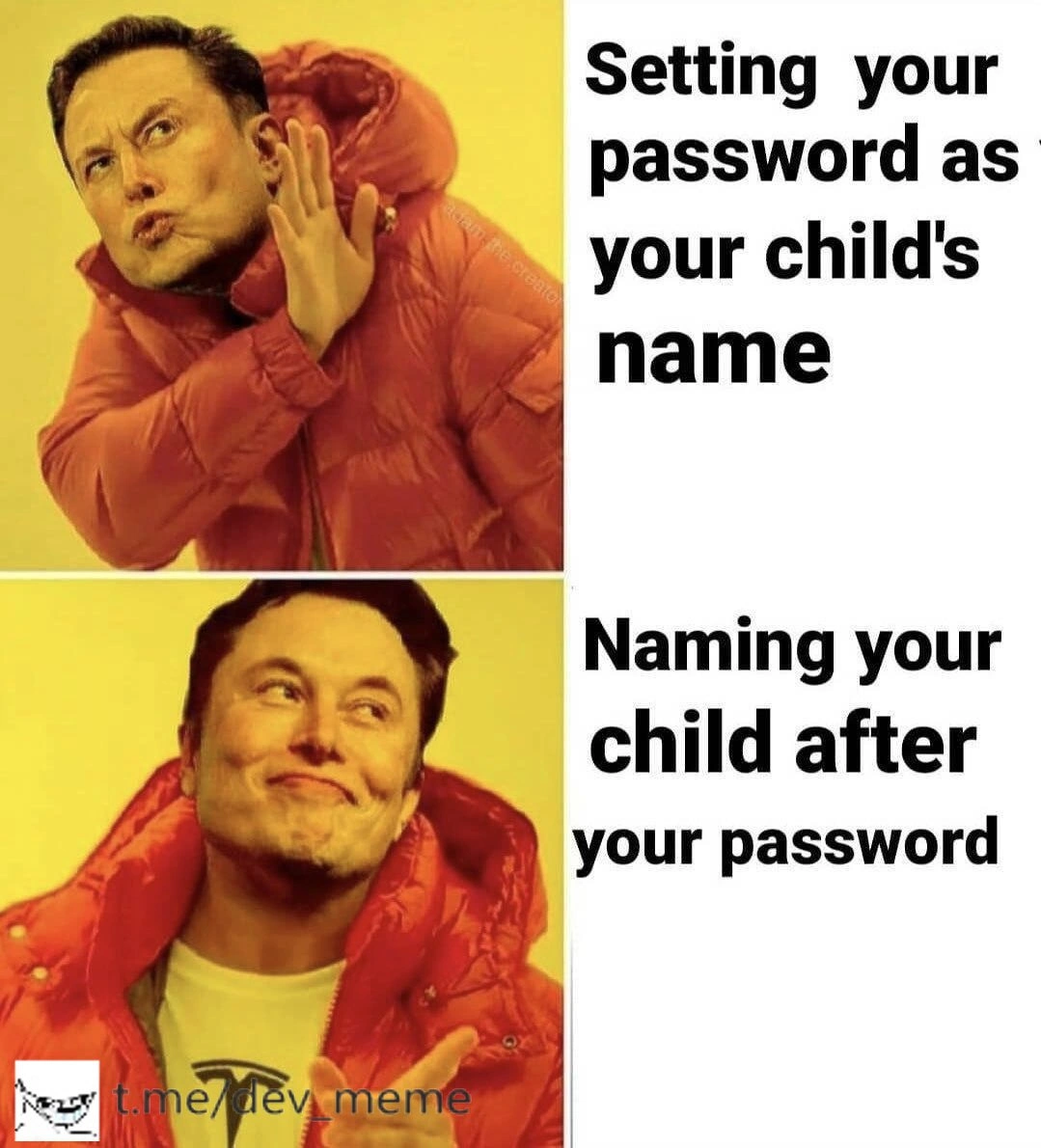
To a junior developer or someone new to security, this meme is a lighthearted lesson in password hygiene (i.e., good password habits). It emphasizes why “Setting your password as your child's name” is rejected (Drake’s “no” face): it’s an example of bad credential management because it’s too predictable. Meanwhile the “yes” panel (Drake smiling) with “Naming your child after your password” is the joke solution that technically avoids the first mistake. It’s essentially saying: If you can’t make your password as special as your child, make your child as random as your password! Of course, in real life we have much saner solutions: for instance, using a password manager. A password manager is like a secure vault app that remembers all those complex passwords for you, so you can use strong unique passwords everywhere without having to memorize each one. Another solution is using a passphrase – a sequence of random words (like “correct horse battery staple” famously suggested by an XKCD comic) – which is easier to remember but still hard to guess. The meme isn’t seriously advocating to literally name your baby “R0bustP@55w0rd”; it’s using absurdity to make a point about how not to be lazy with security. In terms of security awareness, it definitely gets the message across in a memorable way!

Also worth noting is the meme format itself – the Drakeposting two-panel style. This format comes from a popular music video where rapper Drake first rejects something in one frame and then approves something else in the next. It’s become an iconic template on the internet for showing preferences. Here, the top panel text “Setting your password as your child’s name” is something Drake (with his hand out) is saying “nope” to. The bottom panel “Naming your child after your password” is presented as the cooler, thumbs-up idea (with Drake pointing approvingly). The twist is that the meme creator may have replaced Drake’s face with someone else’s face to add another layer to the joke. Around early 2020, Elon Musk had a baby named X Æ A-12, which looks like a random code. Many joked that Elon’s baby name was like a computer password. By subtly referencing that (using Musk’s image in Drake’s pose), the meme merges a timely pop-culture tech joke with the classic password advice. But even without knowing the Elon connection, the meme stands on its own: it’s a funny comparison that anyone who’s dealt with passwords can chuckle at.

In summary, the meme’s lesson at this level: don’t use obvious things like your kid’s name as a password – that’s as good as giving a thief a master key. And while no one expects you to go to the ridiculous length of renaming your family members to strengthen your logins, it’s humorously illustrating just how important truly random passwords are. So important that, in joke-land, even your family naming conventions would play second fiddle to account security! The takeaway for someone new to this? Strong passwords matter, and if you ever forget that, just remember this meme and maybe grin at the thought of little baby “QX!d9@” crawling around. You’ll never look at password creation the same way again, which is exactly the point of using humor in security education.

Level 3: Hacker Style Parenting

For the seasoned developer or security engineer, the humor here lands with a knowing grin. We’ve all encountered those frustratingly weak passwords“let me guess, your password is your kid’s first name and birthyear?” 🙄 It’s a classic security vs usability dilemma: humans pick passwords they can remember, and what’s more memorable than family names? But those convenience-driven choices make authentication systems notoriously vulnerable. This meme takes that well-worn warning ("Don’t set your password as your child's name") and gives it a creative workaround spin so over-the-top it’s hilarious: “Fine, then I’ll just name my child after my super-strong password instead!” It’s the kind of true hacker style lateral thinking that senior devs joke about after too many password expiration emails. Instead of obeying the spirit of security advice, the protagonist obeys the letter of it in the most literal (and insane) way possible. Security best practices say “don’t use dictionary words or personal info.” Okay – solution: make your personal info indistinguishable from a random password. Technically correct? Sure. Socially and practically absurd? Absolutely. 😂

This two-panel Drake format (a.k.a. drake_posting) expertly contrasts bad practice vs. absurd "good" practice. In the top panel, Drake (with a face swap, more on that in a second) rejects the common mistake: using an easily guessable name as a password. In the bottom, he’s all smiles endorsing the outlandish alternative: using a secure password so seriously that you institutionalize it as your offspring’s name. It pokes fun at the extremes one might go for the sake of password hygiene. Seasoned devs have likely sat through countless security trainings and security awareness programs drilling "Never use personal info, use random passwords or a password manager." After a while, gallows humor sets in. This meme is that little rebellious joke at the end of the training deck – “Alright, you want random? I’ll give you random – I'll randomize my life!” It’s a humorous exaggeration of how security folks sometimes wish users would behave: treating strong passwords as so sacred that they’d name their kid “Xo49$AcQ” if that’s what it took to remember it.

There’s an extra layer here that industry folks in mid-2020 would catch. The meme features Drake’s iconic pose, but the face is (or originally was) superimposed with a certain tech billionaire’s grin – a nod to Elon Musk, who famously gave his child an unconventional name X Æ A-12 that looks like a keyboard smash. At the time of this post (May 2020), Musk’s baby name was headline news and the subject of countless jokes (“Did they roll face on the keyboard?”, “Is that even pronounceable?”). By using Musk’s face, the meme creator winks at this real-world example of naming convention humor: Elon basically did “name his child after a password” (or a serial number). The dev community couldn’t resist comparing that to our ongoing crusade against weak passwords. It’s like the meme is saying: Even the guy sending rockets to space has a kid named like an auto-generated password – what’s your excuse for using admin123? The shared laughter comes from a place of collective exasperation. We know users (and even some coworkers) often do the easiest but most insecure thing, like naming passwords after their kids. We also know how absurd the opposite extreme is. By exaggerating the solution to naming your kid after the password, the meme highlights the ridiculousness of the original practice. It’s a classic tech inside-joke acknowledging that yes, forcing humans to choose good passwords is so difficult we might as well start naming babies things like "CorrectBatteryStaple$".

On a more serious note (that even the humor can’t hide from seniors), this scenario embodies the cat-and-mouse game between security policies and human behavior. Mandate complex 12-character passwords with symbols? Users will either write them on sticky notes (🙈) or reuse one they can’t forget (like a child’s name with some tweaks). Force regular password changes? People increment a number or swap one letter – basically security theater. Here, the “hacker parent” complied in an unexpected way: they ensured they’ll never forget that complex password, because they’ll be calling it out loud for years. Problem solved, right? Except… they’ve also potentially given away the password to everyone who hears little P@$$w0rd! being called on the playground! This irony isn’t lost on experienced devs: making security convenient often reintroduces vulnerabilities in another form. The meme’s absurdity is a playful reminder that solutions can’t be purely technical or purely policy – they have to account for the human element. Otherwise you get outcomes as crazy as this one.

To sum up the senior perspective: it’s funny because it’s almost a clever compliance with the rules we preach, taken to a ludicrous extreme. It lampoons the idea that if users won’t stop using personal names as passwords, maybe we just change the paradigm and make their personal names secure. It’s the kind of joke you’d crack in the IT department after discovering yet another Post-It note on someone’s monitor with "Tommy1998" scribbled on it. Instead of scolding, you’d quip: “Next time just name your kid GX5%ftQ and you’ll be fine.” Everyone chuckles, recognizing that eternal tension between security best practices and actual human behavior. The Drake format delivers this punchline perfectly: bad idea? nope – ridiculously OTT idea? yup! The result is a meme that’s both a satire of poor password habits and a nerdy inside-joke about how far is too far when blending security into real life.

Table: Trade-off Breakdown
Just to drive the comparison home, here’s how the two approaches stack up:

Approach Security Level Memorability Side Effects
Password = child's name Low 🔓 (predictable; in dictionaries) Easy 😌 (you already know it) None for family (common practice)
Child's name = strong password High 🔐 (random; not guessable) Decent 🤔 (you’ll never forget junior’s name) Kid grows up named X?!3Qr 😬 (socially awkward)

(🔓 = weak security, 🔐 = strong security; 😌 = low effort, 🤔 = some effort; 😬 = potential issues)

We can see the security vs usability trade-off inverted here. The first approach is user-friendly but weak on security. The second is super secure (that password isn’t getting cracked!) but achieves memorability by offloading the “remembering” onto a living human’s identity, with obvious side effects. That’s what makes it so comical and fascinating to discuss in dev circles.

Level 4: Brute Force vs Birth Certificate

At the most technical layer, this meme highlights a password entropy hack that flips conventional authentication wisdom. In security terms, using your child’s name as your password is vulnerable to a dictionary attack – attackers precompile lists of common names, dates, and words to guess weak passwords quickly. A typical first-name like "Oliver" or "Sophia" provides very low entropy (little randomness), making it a sitting duck for cracking tools. Normally, best practices in credential management demand high-entropy secrets: long, random combinations of letters, numbers, and symbols that are hard to predict. Such strong passwords exponentially increase the search space hackers must cover. For example, a random 8-character password using uppercase, lowercase, digits, and symbols has on the order of $10^{15}$ possibilities, compared to perhaps $10^4$ common first names – a dramatic difference in complexity! In theory, naming your child after a truly random password injects that high entropy into a place hackers wouldn't think to look: the birth certificate. It’s like outsmarting a brute-force algorithm by making the “word” it’s trying to guess completely unique in the universe.

From a cryptographic standpoint, this is a tongue-in-cheek way of sidestepping the classic human weakness in authentication: predictable secrets. Security professionals often talk about “something you know” (like a password) being the weakest link when it’s based on personal info easily found via social engineering. Child names, pet names, birthdays – these are low-hanging fruit for attackers armed with OSINT (Open Source INTelligence) tools scanning your social media. The meme’s “solution” is absurd but theoretically intriguing: if you must tie your password to personal info, then alter the personal info itself to be unguessable. It’s an extreme form of security through uniqueness—ensuring the secret isn’t in any wordlist or rainbow table because you literally invented a new “word” as your kid’s name. In practice, of course, this would backfire spectacularly: the moment you announce baby J%x9Z!a4 to the world, that random string becomes a known identifier for you, possibly ending up in the attacker’s dictionary anyway. Plus, using such a name in daily life (and eventually the public record) essentially broadcasts your once-secret password to everyone who meets your child. Theoretically uncrackable by brute force? Perhaps. But ironically not a recommended security protocol since it collides with the reality of human life (and probably violates a few naming conventions at City Hall!). This comedic scenario underscores the constant push-pull in security engineering between raw algorithmic strength (high entropy secrets) and the very human context in which those secrets operate.

Description

A two-panel meme using the Drake Hotline Bling format, but with Elon Musk's face. In the top panel, Musk has a look of disapproval and is making a 'no' gesture with his hand, next to the text 'Setting your password as your child's name'. In the bottom panel, he has a smug, approving smile and is pointing, next to the text 'Naming your child after your password'. This meme humorously references the notoriously complex and unusual name of Elon Musk's child, X Æ A-12, suggesting it resembles a strong, secure password. The joke is a commentary on password security best practices, flipping the common bad habit of using simple, personal information for passwords on its head. A watermark for 't.me/dev_meme' is visible in the bottom left corner
Comments

7
Anonymous ★ Top Pick The best passwords are like Elon Musk's child's name: they break most validation rules, require a tutorial to pronounce, and are guaranteed to be unique
  1. Anonymous ★ Top Pick

    The best passwords are like Elon Musk's child's name: they break most validation rules, require a tutorial to pronounce, and are guaranteed to be unique

  2. Anonymous

    Seems genius until the CISO enforces 90-day rotations - my third kid, Tr0ub4dor&3_v3, is already tired of the legal paperwork

  3. Anonymous

    Finally, a valid reason to explain why my kid is named "'; DROP TABLE users;--" at the playground

  4. Anonymous

    This is the security equivalent of 'works on my machine' - technically solving the problem by redefining the requirements. Instead of remembering a complex password like 'Tr0ub4dor&3!xK9#mQ', just name your kid that and tell HR it's a traditional family name. Bonus points: when your password expires every 90 days per corporate policy, you can just have another child. It's not a security vulnerability, it's aggressive family planning with built-in MFA - Multiple Family Authentication

  5. Anonymous

    Both yield identical entropy: zero, since family details populate every social engineering rainbow table

  6. Anonymous

    We finally solved password reuse: name the kid a 24‑char random, and when compliance still enforces 90‑day rotation, just open a name-change PR with HR

  7. Anonymous

    Architect move: name the kid to satisfy the Okta password regex - if security enforces a rotation, we just file a legal name change

Use J and K for navigation