Operating System User Philosophies: User, Admin, or Unwilling Developer
Why is this OperatingSystems meme funny?
Level 1: Ready, Set, Build!
Imagine three kids playing with different ride-on toys:
The first kid gets a bicycle with training wheels. It’s safe and stable, and they can’t tip over easily. They just hop on and pedal. Everything is taken care of so they won’t get hurt, but they also can’t go super fast or do anything crazy. It’s like someone is always watching to make sure they’re safe.
The second kid gets a regular bicycle with no training wheels. Now they have a lot more freedom – they can go faster and turn wherever they want – but they have to balance on their own. There’s no one stopping them from going off a ramp except their own caution. They have more fun maybe, but if they’re not careful they could fall or crash because there’s nothing holding them upright anymore.
The third kid is just handed a box of bicycle parts and tools and told, “Go ahead, build your bike first.” This kid has total freedom to make the bike however they want, maybe even add extra wheels or a cool horn, but they’ve got to know how to put it together. They’ll spend time figuring out what each piece does and how to use the tools. Once they get it built, they can ride it, but even then they’re the ones who will have to fix it if the chain comes loose or the tire goes flat.
Now, why is this scenario funny or enlightening? Because each kid’s situation is so different! The first kid is being protected (everything’s easy but limited), the second kid is empowered but risky (they can do a lot but could get hurt), and the third kid is basically turned into a little engineer (they have to do a lot of work themselves before enjoying the ride). We find it humorous because we expect a kid to just be able to ride a bike, not to build one from scratch! The contrast is silly and extreme.
This is just like how different computers (operating systems) treat the person using them. Some computers are like that first bike – they keep things easy and won’t let you mess up stuff. Others are like the second bike – they let you do more, but you have to be careful. And the last is like those DIY bike parts – it gives you all the freedom, but you need to know what you’re doing. It’s funny and kind of cool once you see the parallel: it’s showing how one system holds your hand, another gives you the car keys, and the last one says “here are the keys and the engine parts, good luck!” The huge difference in responsibility and freedom between the three makes us laugh, because it’s like going from being a passenger to a driver to a mechanic-driver hybrid. The meme exaggerates to make it obvious, and that surprise – realizing “Whoa, they really expect a lot from that last person!” – is what gives it a smile-worthy punchline.
Level 2: Users, Admins, Penguins
Let’s break down the technical terms and ideas behind this meme in simpler terms, focusing on what each part means:
User (on MacOS): In computing, a “user” is the regular account you log in with, which has limited permissions. On MacOS, when they say “you are user,” they mean the system treats you as a normal user by default. MacOS is a type of Unix-based operating system (built on Darwin, with a UNIX core), so it has the concept of a root user (the all-powerful account) but it keeps that hidden. Most people using a Mac don’t operate as root day-to-day; instead, they have a user account that must ask for permission (usually by entering a password) to do something advanced like installing software to system folders or changing critical settings. This is a safety feature – it prevents accidental damage. For example, if you try to delete an important system file on a Mac, it will stop you because “Hey, you’re just a user, you shouldn’t touch that.” This meme panel is poking fun at how macOS is somewhat protective or even restrictive: it’s like the OS always assumes you’re not a developer or sysadmin and wants to keep you in the user-space (the safe area where you run apps, surf the web, etc., but don’t mess with the OS internals). MacOS is known for a great developer experience for many (it has a built-in Unix terminal, and tools like Homebrew to install packages), but compared to Windows or Linux, it often abstracts away the low-level stuff. So in short, on MacOS you operate as a standard user and need special approval to do system-level things. The Finder icon in the meme represents Mac’s friendly face – a reminder that Mac wants computing to feel user-friendly and approachable, sometimes at the cost of hiding the nuts and bolts.
Admin (on Windows): An Administrator (admin) account on a computer has the ability to make system-wide changes, install programs, edit system files – basically do anything on the system. On Windows, especially older versions, the person using the PC often ends up being an Administrator all the time. Windows has a long history from the days of Windows 95/98 (which didn’t even have true separate users) to Windows XP where, by default, your account had admin privileges. Being an admin is convenient because you rarely see “Access Denied” – you can install that game or tweak a setting without the system stopping you. But it’s also risky: if you run a bad program as admin, it can harm your whole system (since you gave it the keys). The meme says “In Windows, you are admin” implying that Windows users are effectively always in charge with high privileges. Modern Windows (Windows 10, Windows 11, and since Vista) introduced User Account Control (UAC) which means even if you are an admin, you run apps in a lower mode until something needs elevation – then you get a prompt “Do you want to allow this app to make changes?”. Many users just click yes, effectively acting as admin anyway. The Windows logo in the meme reminds us of that OS. The culture on Windows historically didn’t discourage using an admin account, whereas on Unix-like systems (Mac/Linux) it’s normal to use a limited user and only temporarily elevate. When the meme says Windows users are admin, it’s partly referencing how many Windows folks used to run everything as Administrator by default. So on Windows, being an admin is common, meaning the system often trusts you to know what you’re doing (and will let you mess up things if you’re not careful). It’s a bit like always driving with the “warning off” – powerful but potentially dangerous if misused.
“Literally Developer” (on Linux): Now, Linux. Linux is an open-source operating system known for giving the user a lot of control. Typically on a Linux system, you have a regular user account (which you use day-to-day) and a separate root account that has full power. You normally don’t log in as root (that’s even disabled on many distros by default); instead you use
sudo(which stands for “super user do”) before commands that need elevated privileges. But beyond just the account permissions, using Linux often means doing things manually and using the command-line terminal. The meme phrase “you are literally f*ing developer” (pardon the language) means that on Linux, you’re basically treated like a software developer or computer expert by the system. It’s expected that you’ll edit configuration files, run terminal commands, maybe compile programs from source code. For instance, installing software on Linux might involve using a package manager in the terminal (e.g.,sudo apt install vimon Ubuntu) or even compiling it yourself with makefiles if it’s not available pre-packaged. This is very different from, say, double-clicking a.exeinstaller on Windows or using the App Store on Mac. In Linux, if something goes wrong, you dig into log files or forums to fix it. That’s why the meme jokes that in Linux you’re a developer: even if you’re just a user, you end up doing developer-like tasks. The Tux penguin (Linux’s mascot) is shown to reinforce that we’re talking about Linux here. People often say Linux has a steeper learning curve – because it doesn’t hide the complexity. The upside is you have full control; the downside is you need to know (or learn) what you’re doing. So on Linux, you operate like a developer or system administrator of your own machine. The system provides tons of power and flexibility, but expects you to be knowledgeable.
Now, why is this funny or interesting? It’s comparing the user roles and experiences in each OS in a tongue-in-cheek way. Each line exaggerates the truth a bit to make a point:
- MacOS keeps you as a normal user in day-to-day use. This can sometimes make a Mac user feel a bit restricted (for example, you might see messages like “macOS cannot verify this app – are you sure you want to open it?” or be asked for a password when moving an app to the Applications folder). It’s like the OS is saying “I’ll handle it, you just click the buttons.” This is generally good for casual users and even for developers who just want things to work with minimal fuss.
- Windows letting you be Admin outright is convenient but has a culture behind it: Windows power users often toggle settings, install and uninstall programs frequently, maybe edit the Windows Registry for tweaks, etc. Being admin all the time is like having full access to the machine’s guts whenever you want. The meme reflects a stereotype that Windows folks run everything in admin mode (sometimes jokingly referred to as “God Mode” on Windows). It’s partly true – a lot of Windows guides start with “Open an elevated Command Prompt…” because many tasks assume you can run as admin.
- Linux treating you as a developer means if you choose to use Linux (especially a non-user-friendly distro), you’ve basically signed up to be the mechanic of your system. Need a new program? You might compile it. Something not working after an update? You might read community forums or documentation (that’s the RTFM attitude: Read The Fine Manual). It’s empowering because you can change anything – the source code of most Linux tools is available, after all – but it’s also more work. The meme’s use of the f-word expresses a kind of mock frustration: “Literally a developer, seriously?!” – as in, Linux expects a lot from its user.
The context tags listed (like root_privileges_vs_sudo, privilege_escalation_culture, sysadmin_culture_clash, linux_rtfm_mindset) all relate to this:
- Root privileges vs sudo: On Unix-like systems (macOS and Linux), root is the superuser. On Linux, best practice is to use
sudowhen you need root privileges temporarily rather than logging in as root. On Windows, the equivalent concept is being an Administrator. The meme’s Windows part implies you’re basically root (admin) by default on Windows, whereas on Linux you use sudo as needed, but you’re expected to know how and when to use it. - Privilege escalation culture: This means how each system approaches giving a user more power. MacOS has a cautious culture (escalate only when absolutely needed, and do it through user-friendly prompts). Windows historically had a pretty lax culture (everyone ran as admin, now moderated by UAC prompts which many ignore). Linux’s culture expects the user to handle privilege escalation knowingly (via command line, editing
/etc/sudoersif needed to configure who can sudo, etc.). The meme exaggerates these: Mac – hardly escalated; Windows – always escalated; Linux – you basically live in escalated mode (or know how to jump in and out of it frequently). - Sysadmin culture clash: A sysadmin is a system administrator – someone who manages computers/servers. Mac sysadmins, Windows sysadmins, and Linux sysadmins often have different approaches and tools. The meme plays on the stereotypes: Mac is for creative or development work but with Apple’s tight control, Windows is corporate IT’s domain with Active Directory and admin rights, Linux is the realm of open-source geeks who compile kernels and use command-line for everything. There’s a bit of a culture clash because each group values different things (ease of use vs configurability vs control). The meme frames it humorously as if the everyday user on each system embodies those extremes.
- Linux RTFM mindset: This is the idea that Linux users often have to Read The Fine Manual (RTFM) – basically, figure things out from documentation or forums. Linux doesn’t always provide glossy, intuitive GUI tools for everything; sometimes the answer is “open the manual page for that command and learn how it works.” The meme’s Linux line implies that using Linux will basically force you to learn and do technical things (i.e., turn you into a “developer” type who reads manuals and writes code/scripts).
So, taken together, the meme is explaining a kind of progression or difference in operating system user roles:
- On MacOS, you’re mostly a consumer of what the OS provides (with the OS shielding you from complexity).
- On Windows, you’re a power user/admin, toggling a lot yourself (with the OS allowing it but maybe not holding your hand).
- On Linux, you’re basically the engineer, responsible for both using and assembling/tuning the system (with the OS giving you full control, and assuming you’ll learn whatever you need to).
Each panel of the meme uses an icon to drive the point: Finder’s smiling face = a friendly user experience; Windows flag = giving you admin power (like the Windows motto “Your potential, our passion” turned into “your machine, your rules”); Tux the penguin = the mascot of Linux, symbolizing the open-source developer playground.
For a junior developer or someone new to these concepts, it’s a humorous introduction to how different systems expect different levels of expertise. If you’ve only used Windows and suddenly try Linux, you might be shocked that nothing is done for you automatically – you have to, for example, use the terminal to install your graphics drivers. Conversely, someone used to Linux might find MacOS limiting because you can’t easily tweak certain system settings without disabling protections. And someone from MacOS might find Windows a bit wild-west with all those admin permissions and .exe files from random sources.
The meme is essentially an exaggeration, but one that points to real Developer Experience differences:
- MacOS DX: Generally straightforward for standard development (has Unix tools, but also heavy GUI), however many things are abstracted. Great for focusing on coding without worrying about OS maintenance – until you hit a roadblock where “the system is doing something magic behind the scenes” and you have to dig into Apple’s way of doing things.
- Windows DX: Lots of IDEs and tools are built for Windows, and you have the freedom to configure the system heavily (especially with admin rights). You might run into needing to tweak environment variables, registry, or fight with things like PATH settings. Windows tries to make those accessible via UI, but historically it’s been a bit messy. Many Windows devs inadvertently become partial sysadmins (managing IIS servers, adjusting firewall settings, etc.) because the ecosystem needs it.
- Linux DX: Highly customizable and scriptable – practically everything is transparent (you can open config files to see how things work). But it expects you to put the pieces together. It’s common for a Linux developer to write shell scripts to automate setup, to build software from source, or to use git and other tools heavily. Linux is actually the choice for many servers, so developers learn it to deploy apps. The learning curve can make a newcomer feel like they have to become an expert quickly – hence the joke that even using Linux makes you a developer by necessity.
In conclusion (and to connect it back to the meme’s phrasing):
MacOS = “you are user” (lowest day-to-day privileges, OS holds the reins)
Windows = “you are admin” (higher privileges by default, user holds the reins but at their own risk)
Linux = “you are developer” (you basically have to take the reins apart and rebuild them!).
Each statement is a playful jab at the operating system’s typical user privilege level and the kind of person that OS expects you to be. It’s funny to developers because it rings true when we reflect on our experiences with each platform. We’ve felt like naive users on a Mac, like all-powerful (sometimes reckless) admins on Windows, and like command-line developers on Linux doing everything from writing scripts to tweaking system parameters. The meme exaggerates each to make the contrast obvious and humorous.
Level 3: From Sandbox to Shell
Operating systems come with very different philosophies about user privileges, and this meme hilariously contrasts those cultures. It’s highlighting a three-step privilege hierarchy across macOS, Windows, and Linux – and any seasoned developer or sysadmin has felt the differences. The humor lands because it’s too true: on Mac you’re kept in a cozy sandbox as a normal user, on Windows you’re often running around with Admin rights, and on Linux you basically unleash “root” powers and are expected to handle everything via the terminal. It’s riffing on the longstanding OS culture wars and each system’s assumed developer experience (DX):
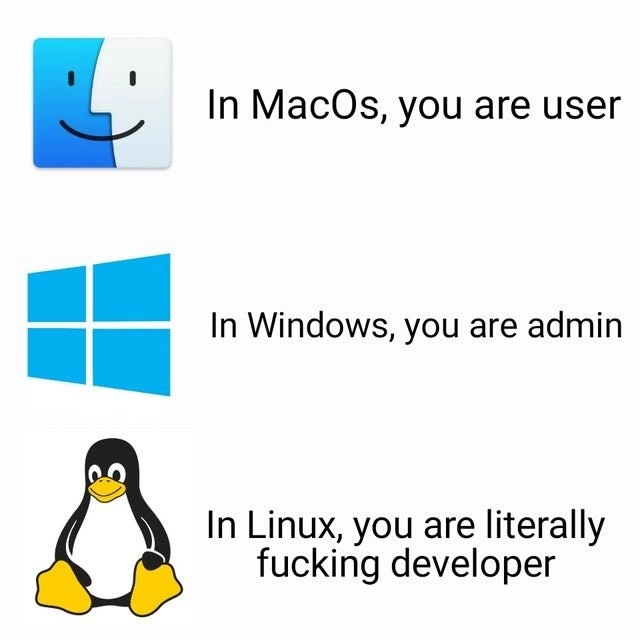
macOS – You Are “Just a User”: The top panel shows the friendly Mac Finder icon with the text “In MacOS, you are user.” Apple’s platform is famous for its polished, locked-down approach. By default on a Mac, you operate as a standard user with limited system access. Sure, your Mac account might be in the admin group, but macOS still sandboxes a lot of system areas. Try tinkering with core files or installing apps from outside the App Store – macOS will prompt for a password or outright refuse because of Gatekeeper and System Integrity Protection (SIP). Apple really doesn’t want you poking under the hood; they’ve essentially put up baby gates around the system internals. This is great for stability and security (no accidentally deleting critical files), but it also means as a developer you’re sometimes fighting the OS just to do power-user things. Mac culture is like, “We’ll handle the low-level stuff, you just enjoy the GUI.” Serious Mac users often joke that they have to “sudo their way out of jail” – using the
sudocommand in the Terminal to temporarily get root privileges – whenever they want to do something Apple didn’t intend. In short, macOS keeps you feeling like a user in a protected playground: the system holds your hand, which is both comforting and a bit patronizing.Windows – You’re the Admin (Whether You Like It or Not): The middle panel with the Windows logo and “In Windows, you are admin” jabs at how Windows historically treats its users. On Windows, especially in the past, the first account you create is often an Administrator by default – meaning you have the keys to the kingdom from day one. Back in the Windows XP days, running as a limited user was so painful (many apps wouldn’t even run unless you were admin) that people gave up on least-privilege and just cruised around as full admins all the time. This was basically like browsing the web as a superuser, which led to, well, every piece of malware installing itself freely. Microsoft introduced User Account Control (UAC) in Windows Vista/7 to nag users with “Allow this app to make changes?” dialogs, but we all know half the folks just reflexively click Yes. The culture on Windows became: if something doesn’t work, try running it as admin. Need to edit the registry or a system config? Sure, why not – you’re admin! This meme is poking fun at that: Windows enthusiasts are often effectively living as admins 24/7, wearing a cape of privileges for even mundane tasks. It’s empowering (you can install drivers, games, tweak settings at will) but also dangerous – the OS will let you shoot yourself in the foot. The Developer Experience on Windows can ironically involve a lot of GUI-based configuration running with elevated rights, like opening
regeditor turning off services, which seasoned devs know can be a double-edged sword. The meme exaggerates it as, “In Windows, you are admin,” hinting that Windows users love having that god-mode feeling, even if it’s arguably a security nightmare. This line gets a knowing laugh from anyone who’s cleaned up a badly infected Windows PC – nine times out of ten, the user was running as full admin and basically invited the chaos. Windows gives you enough rope to lasso the moon or hang yourself, depending on your skill.Linux – Welcome to Full-Stack Penguin Mode: The bottom panel, featuring Tux the Linux penguin and the not-so-subtle caption “In Linux, you are literally f**king developer,” cranks the joke to max. Linux culture is hardcore: the system assumes you know what you’re doing (or are eager to learn the hard way). There’s a famous Linux mantra “RTFM” (Read The Fine Manual) that captures how Linux expects users to self-educate instead of being handheld. On a typical Linux distro, you start as a limited user as well – you can’t, say, modify system files or install software without elevating – but here’s the catch: you are the one expected to elevate yourself and act as your own admin. This usually means popping open a terminal and using
sudo(super-user do) to run commands as root (the all-powerful superuser in Unix/Linux). Essentially, the line is saying that on Linux, every user is treated like a developer or sysadmin who’s ready to dive in. The OS isn’t going to coddle you with pretty dialogs; if you want something, you compile it from source, configure it via text files, and fix it when it breaks. It’s “full-stack” in the sense that a Linux user often ends up dealing with everything from kernel modules up to application code. Ever had to recompile a Wi-Fi driver or sift through amakefilejust to get your hardware working? Linux veterans have – and they wear those scars proudly (or grumble about them in dark humor, which is exactly what this meme does). The phrase “full-stack penguin mode” is a tongue-in-cheek way to say: on Linux, you’re not just using the computer, you’re developing and customizing the whole darn machine to your will. It’s the opposite of plug-and-play; it’s more like plug, pray, and play with config files. This resonates with developers because Linux is often seen as the OS for real engineering adults: no training wheels, pure freedom, and responsibility. The meme uses the expletive for emphasis – Linux will throw you in the deep end and say “swim, developer!” If macOS is a padded playground and Windows is a busy workshop with loose safety rules, Linux is an open wilderness. You’re free to do anything – literally anything – because the system assumes you have the knowledge (or the willingness to learn) to handle it. That’s terrifying and exhilarating at the same time, which is exactly why this meme’s punchline lands so well among tech folks. We laugh because we’ve lived it: “Haha, yep, first time I installed Linux I ended up basically programming my OS to get simple things working.” It’s funny ’cause it’s true – the privilege escalation culture on Linux is basically “go fix it yourself.” The shared pain and pride in that experience is what unites the Linux nerds and amuses everyone else.
In summary, this meme exaggerates each operating system’s user role to highlight a real cultural gap. MacOS keeps the user at arm’s length from dangerous system internals. Windows hands the user admin powers like candy. Linux expects the user to be a power-user/engineer by default. It’s a comedic take on the sysadmin culture clash: Apple’s polished walled garden vs. Microsoft’s half-guarded kingdom vs. the FOSS (Free and Open-Source Software) wild west of Linux. Anyone who’s hopped between these OSes can relate to the jarring transition – it’s like each has a different definition of “okay, now you’re in charge.” The meme strikes a chord because yeah, after dealing with locked-down Mac preferences, or a Windows UAC pop-up asking again for permission, or a Linux terminal yelling “Permission Denied” until you sudo, you realize each system is a unique world. The punchline with the penguin just takes it to the extreme: Linux isn’t just making you an admin, it’s making you the developer of your own environment. Seasoned developers chuckle at that idea – partly because they know it’s true and partly because, deep down, they’re proud of surviving in full-stack penguin mode.
# Illustrative "privilege" scenarios on each OS (with some tongue-in-cheek commentary):
# MacOS: Even simple system tweaks often ask for credentials
$ sudo dseditgroup -o edit -a "$USER" -t user _lpadmin
# (Want to manage printers? macOS insists on an admin password for even that.)
# Windows: Many tools practically require Administrator privileges
C:\> powercfg /SETACVALUEINDEX SCHEME_CURRENT SUB_PROCESSOR PROCTHROTTLEMAX 75
# (Tweaking CPU settings via command-line - likely run in an Admin Command Prompt.)
# Linux: Routine operations assume you're comfortable elevating in the shell
$ sudo vim /etc/ssh/sshd_config
# (Editing a critical config file directly - on Linux, this is normal "user" behavior!)
Above, we see how each system’s user roles differ. On macOS, the sudo example shows that even to configure printer permissions you must temporarily become root – it’s tightly controlled. On Windows, the powercfg command would typically be run as admin (Windows will prompt or error if you’re not) – regular users often run command shells as Administrator by default to avoid such roadblocks. And on Linux, editing an SSH daemon config with vim under sudo is just a Tuesday afternoon; no GUI, no Wizard – you are the wizard. These examples reflect why the meme is funny: things that are hidden or discouraged on one OS are everyday tasks on another.
Now, the culture war aspect: Mac, Windows, and Linux communities have long poked fun at each other. Mac users boast “It just works,” Windows folks tout convenience and compatibility, Linux geeks pride themselves on control and openness. This meme plays right into those stereotypes with a dash of truth. The Mac panel implies Mac users are a bit sheltered (you’re a user, not an admin – Apple’s in charge under the hood). The Windows panel implies Windows users run around with scissors – I mean, admin rights – because historically that’s been the norm (leading to the joke that on Windows, the solution to every problem is to reinstall or edit the registry as admin). And the Linux panel implies Linux users are basically doing hardcore development and sysadmin tasks by default (there’s a reason the joke says “literally f***ing developer” – many new Linux users find themselves learning shell scripting, editing dotfiles, and reading manuals like a junior programmer on day one).
For a senior engineer, this meme hits on the unspoken understanding of these environments. It’s not literally saying every Mac user is non-technical or every Windows user logs in as Administrator or that every Linux user writes kernel code daily – it’s exaggerating to make a point. The point is: Linux expects a higher baseline of technical involvement than either Mac or Windows. As an experienced developer, you chuckle because you know the feeling of switching into “Linux mode,” where googling error messages and tweaking config files is routine – a stark contrast to the comparatively hands-off experience on a Mac. You’ve also seen the consequences of Windows’ admin-everywhere culture: the privilege escalation free-for-all that made Windows boxes so notoriously easy to infect or break (“Oh, you ran that shady .exe as Admin? Bold move…”). And you appreciate Apple’s approach of strict privilege separation – until it’s 3 AM and you’re trying to debug a production issue on your Mac and System Preferences won’t let you change a network setting without clicking a lock icon and typing your password again.
Ultimately, the meme’s humor comes from shared experience and hyperbole. It’s funny because each part is grounded in reality: macOS does baby-proof many dangerous actions, Windows users do often wield admin rights like it’s nothing, and Linux absolutely turns you into a part-time developer/sysadmin. The “full-stack penguin mode” quip encapsulates that when you’re on Linux, you’re working at all levels – and if something breaks, congratulations, tag you’re IT to fix it. Seasoned devs laugh with a mix of pride and exasperation, recalling times they’ve lived each of these roles. The cynical undertone – “user, admin, and then whatever Linux is (basically a crazy developer)” – speaks to how computing environments can shape our behavior. In a way, it’s also a rite-of-passage joke: truly “serious engineers eventually learn to live in a terminal,” as the description says. The meme just states it more bluntly: on Linux you become one of those people writing makefiles by hand and loving (or cursing) every minute of it. And if you’ve been there, it’s impossible not to smirk at this depiction of “user, admin, full-stack penguin.”
Description
A three-panel meme that humorously contrasts the user experience philosophies of major operating systems. The first panel shows the Apple macOS Finder logo with the text 'In MacOs, you are user'. The second panel displays the Microsoft Windows logo and states 'In Windows, you are admin'. The final panel features Tux, the Linux penguin mascot, with the punchline: 'In Linux, you are literally fucking developer'. This meme captures the classic stereotypes of each OS. macOS is presented as a polished, user-friendly but restrictive environment. Windows is known for historically granting administrator privileges more freely, giving the user more control but also more responsibility. Linux, with its open-source, highly customizable, and command-line-centric nature, is famously depicted as requiring the user to take on the role of a developer just to configure and maintain the system, whether they want to or not

Comments
83Comment deleted
macOS is a walled garden, Windows is a suburban neighborhood with an optional HOA, and Linux is being handed a shovel and the deed to a plot of land
Sure, Linux makes you a "developer" - right up until you `chmod -R 777 /` and learn why stack traces are called that
The real joke is that in Linux, you're not just a developer - you're also the QA team, the sysadmin, the package maintainer, and the person who has to explain to your non-technical friends why your audio stopped working after a kernel update
This perfectly captures the OS privilege hierarchy: macOS treats you like a guest at a dinner party who needs permission to use the bathroom, Windows gives you the house keys but still calls the landlord for major decisions, and Linux hands you the blueprints, a sledgehammer, and says 'good luck, you're the architect now.' It's the difference between 'sudo make me a sandwich,' being told you can't, versus compiling your own sandwich from source while simultaneously rewriting the recipe in assembly
macOS treats you like a tenant, Windows assumes you’re facilities, and Linux hands you the deed - plus a pager for when the boiler (kernel) panics
macOS: SIP says no; Windows: UAC asks twice; Linux: sudo assumes yes - congrats, your laptop is now prod and you’re on-call
Linux turns every developer into a reluctant SRE - one 'sudo rm -rf /' away from enlightenment or enlightenment
Ubuntu or Debian? Comment deleted
arch linux Comment deleted
btw Comment deleted
Gentoo user: I feel seen. Comment deleted
windows ameliorated user: i don't Comment deleted
gentoo's nice Comment deleted
arch has lots of nice guys. Comment deleted
s/u/a/ Comment deleted
? Comment deleted
go learn sed Comment deleted
no thanks, don't need it rn Comment deleted
xDDD Comment deleted
what about lfs user?) Comment deleted
well, he's not a user, he's usually a masochist Comment deleted
why?) in some prod envs its a good idea. also its a good tutorial Comment deleted
1) that's an absolute pain in the *** to maintain 2) yeah, it is. but it's not so delightful to actually use, not install it. Comment deleted
no its not pain) Comment deleted
I'm assuming you don't mean the popular game life for speed. Comment deleted
Linus From Scratch Comment deleted
nice, thanks for meme Comment deleted
A meme from 20 years ago. Comment deleted
It's amazing how people don't realise that Ubuntu is the best OS for elderly people. My elders do not bother me with problems for 15+ years. The only reason to reinstall Ubuntu is dead PC being replaced with a new laptop. Comment deleted
only if you can disable those nasty "update now or die" popups Comment deleted
I just set for silent auto-update Comment deleted
not a good idea mate Comment deleted
🤷♂ works fine for 3rd year in a row, no problems found. Comment deleted
I had ubuntu budgie running for a custom emulation PC for my little bro - it broke after half a year while updating from 19.10 to 20.04 or somthing. It forced some new DM onto me which lutris didn't like. Comment deleted
and of course all of my configuration for the previous DM was just gone Comment deleted
I had once such experience, but it was so long I don't even remember what it was. Anyway—OS must be a commodity and be treated like so. Just don't forget to handle your data to Google or pay for some crypto private storage Comment deleted
cause it suxx) Comment deleted
ubuntu is pretty bad, but good enough if you want entry-level linux Comment deleted
And because of shitty snap package maintained by canonical your system breaks without you even knowing what happened Comment deleted
if u want use linux, start from lfs and "THE DESIGN OF THE UNIX OPERATING SYSTEM" by Maurice J. Bach, and not this crap with so fucking much custom bash scripts. its dead not born Comment deleted
that's the attitude with which you drive people away from linux Comment deleted
so they mousehands and no need linux Comment deleted
Linux is not a f****ng shop no need to drive people into it Comment deleted
yes need because otherwise, we'll never get good software support from money-driven companies. Comment deleted
Ha ha ha Comment deleted
ibm laughting on u Comment deleted
ibm? Comment deleted
yes Comment deleted
why ibm specifically? Comment deleted
redhat, ibm, centos Comment deleted
Unix is a hacky pile of crap but that's exactly why it's so popular Comment deleted
Unix is a hacky pile of crap, but damn, I don't wanna see the windows codebase. Comment deleted
Windows fixes some unix problems Comment deleted
like what Comment deleted
Crappy syscalls Comment deleted
bro, you seen windows syscalls? Comment deleted
see it! and get ur eyes bleeeeed Comment deleted
I have been hearing about Fedora Silverblue Comment deleted
LOL, I switched to Ubuntu from Fedora back in the day. Now I am working from MacBook pro (corporate lappy.) Anyway I am addept of APT and a RPM hater (so not intrested in RPM based distros apriori.) Comment deleted
Actually Fedora Silverblue uses Flatpaks and if you seriously wanted to use an rpm, you would need to use some separate command which is heavily discouraged and it would rebuild your system Comment deleted
lets fight))) Comment deleted
sudo killall sm1Ly Comment deleted
system: sudo not found. Comment deleted
You see? This kinda things you fight with LFS but not in Ubuntu 😆. Comment deleted
well I don't have sudo either – I use opendoas Comment deleted
Black is the new orange, doas is the new sudo. 🤷♂️ Do not keep a track of the fasion matters since I’ve tried JS in 2016. Comment deleted
It's not fashion per se, I just like to use the newest software so I can report bugs to the devs sooner. Comment deleted
That’s totally fine, I did it too. Just most of the time I am on the corporate machines, and companies do not like to try untested things. Comment deleted
understandable Comment deleted
Just don't allow updates for prerelease Comment deleted
u looks like mousehand man, not console man Comment deleted
I use a touchpad, but ok. I do like my shortcuts and console tricks though. Comment deleted
Please join our group Comment deleted
t.me/devs_chat Comment deleted
google for the last changes in world) Comment deleted
oh nuts Comment deleted
Love Mac os and Windows for games Comment deleted
So what do you love Mac os for Comment deleted
this is, sadly, an outdated oic Comment deleted
In Windows Russian Edition you are “Администратор”, btw Comment deleted
I'm using Linux and for working, and for gaming (through SteamPlay and Lutris) without any problems, and absolutley no need on Windows What I'm doing wrong? Comment deleted
Yeah, I've heard about it, but mosly works fine. I'm playing CS:GO, WoT, UT3, etc. without problems. A lot of people are playing GTA online using wine+dxvk, too. The trouble seems like exception, not the rule Comment deleted
Yeah, you are right about Valorant. I've just read, that this issue are in progress, they are implementing more functions of NT kernel's API to be able to launch apps like that advanced anti-cheat systems. Possibly it will be resolved in win 6.x.x version Comment deleted