Skip to content
DevMeme
1205 of 7435
The Miracle of a Successful First Compile
OpenSource Post #1340, on Apr 20, 2020 in TG

The Miracle of a Successful First Compile

Why is this OpenSource meme funny?

Level 1: Finally, It Works

Imagine you’ve been trying to build a really big and complicated LEGO castle for days. Every time you thought you were done, you’d realize a crucial piece was missing or in the wrong place, and the whole thing wouldn’t stand up. So you’d go hunting for that missing brick under your bed, or swap out a piece that didn’t fit right, over and over. You get a bit frustrated each time it collapses, right? But you don’t give up. You keep fixing one little thing after another. Then one magical moment, you press the last piece in, step back, and the entire castle stands tall and perfect without falling apart. How would you feel? You’d probably jump up, throw your arms in the air, and yell “YES!” loud enough for the whole house to hear. That’s exactly the feeling this meme shows. The people in the picture are celebrating like crazy because something difficult was finally completed successfully. It might look funny to everyone else (why are they so excited?), but when you’ve worked really hard on something and it finally comes together, it’s a huge joy. It’s like winning a big game or finishing a tough puzzle. In this case, the “puzzle” was getting a huge piece of software to finally work on the computer. The moment it works without any problems, it’s pure happiness — the kind where you shout, people clap, and you feel on top of the world, even if you’re just sitting in a chair with a big grin on your face.

Level 2: Missing Headers & Dependencies

So, what’s going on here in simpler terms? The meme is highlighting how compiling code — especially someone else’s large open-source code — can be a surprisingly hard task. Compiling means turning the human-readable source code (the text that programmers write) into an actual program that a computer can run. This is done by a tool called a compiler (for example, gcc for C/C++ code or javac for Java). When everything needed is in place, you run a build command (like make or npm run build or a similar command) and the code is supposed to go through translation and get packaged into an executable or library. But here’s the catch: big projects often depend on many other pieces of software, called dependencies. These dependencies could be external libraries (reusable code written by others) or particular tools or versions of languages. If any single one of those pieces is missing or the wrong version, the compiler will hit an error and stop.

Imagine you’re trying to bake a complex cake and the recipe calls for 10 ingredients — if you’re missing even one spice or use sugar instead of salt by mistake (yikes!), the recipe could flop. In programming, if the code calls for a file or library that isn’t where it expects, you get a “file not found” or “undefined reference” error. The meme text “Compiles open source project successfully” implies the person finally got through the whole recipe with zero errors. That’s a big deal because normally, the first few times you try to compile a huge open source project, you do encounter errors — often lots of them. These can be scary red error messages in the terminal that basically say “I can’t find X” or “Y doesn’t match what was expected.” For a newcomer or junior dev, seeing dozens of errors flash by is overwhelming. But often those errors have a common cause, like one missing dependency causing a chain-reaction of complaints. Seasoned devs learn to read through the noise and find the root cause.

Let’s break down a typical scenario: you download a large open source project’s code to your computer because you want to run it or contribute to it. The project might have a list of prerequisites — say it needs Python installed, plus a graphics library, plus a specific database, etc. If you miss even one of those, the build might fail. For example, a C++ project might need the OpenSSL library for security. If you don’t have the OpenSSL headers on your system, when you compile, the compiler will throw an error when it hits the line #include <openssl/ssl.h> because it has no idea where to find that file. It might look like this:

$ make
... 
fatal error: openssl/ssl.h: No such file or directory    // The compiler couldn't find the OpenSSL header file
 #include <openssl/ssl.h> 
          ^~~~~~~~~~~~~~~ 
compilation terminated.

In plain terms, that error is telling you “I needed a file named ssl.h from the openssl folder, but it’s not here.” To fix it, you’d install the missing OpenSSL development package or point the build to the right location. So you do that, try again… and then maybe next it complains about another library or a version mismatch somewhere else (for instance, “expected libXYZ version 2.5, but found 2.4”). These missing headers and mismatched versions are the “dependency nightmares” mentioned – you solve one and another pops up, like whack-a-mole. This frustrating loop is what developers humorously call Dependency Hell. It’s the hell of “I need A to get B to work, but to get A, I need C, and oh C conflicts with D that I already have…”.

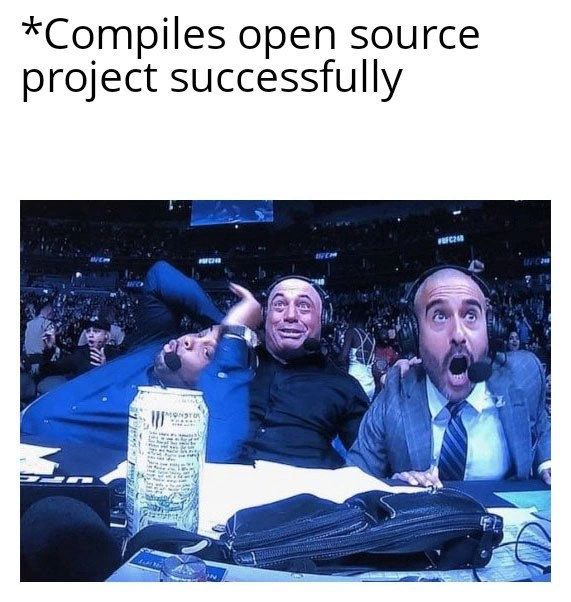
Now, about the meme image: it shows three sports commentators looking absolutely shocked and excited. One is flailing his arms, another is halfway out of his seat, and the third has a classic jaw-drop face. They’re reacting as if something incredible just happened in the game they’re watching. In our context, the game is the code compilation. The text at the top “Compiles open source project successfully” sets the scene – it’s like a stage direction describing what the developer just did. The joke is that something as mundane-sounding as “it compiled” is being treated like a last-second win in a sports final. But any programmer who has fought with a stubborn build process can relate to that huge surge of excitement and relief when the build finally goes through. It’s as if an entire stadium of fans is cheering for you at your desk. The commentators’ over-the-top astonishment mirrors how a developer might feel internally: “No errors? It’s done? I don’t believe it – this is AMAZING!”

Also, notice the props on the commentators’ desk: there’s a tall can of an energy drink in front of them, plus some notebooks and tangled headset cables. This is a fun detail because it’s common developer lore that caffeine (coffee, energy drinks, take-your-pick) is fuel for long coding or debugging sessions. That tall can could very well represent the energy drinks or coffee cups that kept the developer going through countless build failures. The messy desk with notes and cables resembles a coder’s workspace filled with scribbled error logs, Stack Overflow printouts, and peripheral devices. And behind them is a whole crowd in a stadium, which humorously symbolizes maybe the whole developer community silently rooting for this build to succeed, or just the magnitude of the moment. In reality, of course, it’s usually just the programmer alone (or maybe with a teammate) who cares — but in that moment of success, it feels like winning in front of a cheering crowd.

In simpler terms: building an open source project is like following instructions to assemble a very complex machine. The build system (like a recipe or instruction manual) has to put all the parts together in the right way. Continuous Integration (CI) systems on platforms like GitHub try to automate this by rebuilding projects from scratch on clean machines to verify everything is documented. But when you do it on your own machine, there might be subtle differences. Perhaps your compiler is newer and complains about stuff the old one didn’t, or you have a different version of a library installed. Each difference can trigger an error. Over time, as a junior dev, you learn tricks to navigate these issues: read error messages carefully (they often hint at what’s missing), check the project’s documentation or issues (chances are someone else had the same problem), install needed packages via your package manager (like apt, yum, brew, etc.), and re-run the build. It’s a bit of detective work combined with trial and error. When at long last the compiler finishes and prints something like “Build successful” or “Finished: 0 errors, 0 warnings”, you feel like you just conquered a mountain. That’s why the meme shows such ecstatic faces — it’s poking fun at how something seemingly straightforward (just getting the code to compile) can turn into a herculean effort, worthy of a victory lap. And trust me, after you experience this, you’ll never again take a clean compile for granted!

Level 3: Escape from Dependency Hell

Why do seasoned developers chuckle knowingly at this meme? Because it hits on a tale as old as open source: wrestling a colossal codebase into compiling on your own machine. The humor comes from the sheer disproportionate jubilation depicted – these sports commentators look like they just saw a last-second championship-winning play. And for a dev who’s been stuck in Dependency Hell, finally seeing a clean compile is a championship moment! The caption “Compiles open source project successfully” immediately evokes memories of painstakingly chasing down build errors in a big project. Picture a developer at 3 AM, eyes glazed and an energy drink (like that giant can on the meme desk) in hand, repeatedly running make or mvn compile or npm build or whatever the toolchain, only to hit error after error. Senior engineers have all been that person hunched over the terminal, muttering “just one more try…” with each failure.

This meme nails a specific flavor of CodingPain: when you clone a promising FOSS (Free and Open-Source Software) repository—maybe a cool new engine or an ambitious library—and discover that building it is a quest of its own. The open source ethos gives you freedom to tweak and compile the code, but it often comes at the cost of endless yak-shaving: installing missing packages, upgrading/downgrading compilers, editing configuration files, and scouring README docs for clues. The “massive” part of the project implies lots of moving parts, which increases the odds that something will go sideways. Perhaps the code relies on a specific version of a library that isn’t obvious; perhaps your environment is just slightly different from the maintainer’s; often it’s a chain reaction of small mismatches. There’s an entire trope in development called “it works on my machine” – and nowhere is this more painfully exemplified than trying to build someone else’s large project on your machine. Each time an outside developer attempts it, they effectively become an impromptu build engineer, reconstructing the precise conditions needed.

The image choice – those hyped sports announcers – brilliantly exaggerates how devs feel internally. A senior dev knows that a green build (no errors) is normally just table stakes, not a final victory. But when it’s a stranger’s sprawling codebase that you’ve been struggling with for hours or days? Hitting successful_compilation can legit feel like winning a title fight. The three commentators in the meme are Joe Rogan and buddies known for explosive reactions during UFC matches. In the coding context, imagine them narrating the drama of your build process like it’s a prize fight:

Announcer 1: “He’s pulling in the last library… will it link?!”
Announcer 2 (jumping up): “No errors! No errors! Unbelievable, folks – he’s done it!”
Announcer 3 (astonished): “After 37 failed attempts, the build succeeds at the buzzer! The crowd is on their feet!”

That’s exactly the vibe: an announcer_reaction_meme for a triumphant_build. We’ve all had mini-celebrations like this, perhaps not with an actual roaring stadium, but certainly an internal fist pump and maybe a victory tweet. The cluttered desk in the image – energy drink, notes, cables – mirrors a dev’s battlefield after a long compile-debug session. The energy drink is practically a dev’s potion for endurance while navigating DependencyHell, that infernal place where one missing package leads you to install another, which conflicts with something else, prompting you to update a different thing, and so on. Each “missing header” error or undefined reference is like a mini-boss fight on the way to the final boss: a successful compile. Those commentators are basically us, the moment the final boss goes down.

The industry in-joke is that setting up a large project is often far more difficult than writing a “Hello World.” There are legendary tales (and Stack Overflow questions by the thousands) about projects that “almost compiled” until one obscure dependency dragged it down. For instance, you might need the OpenSSL library for encryption features; if you don’t have the right dev package installed, the build will fail complaining it can’t find openssl/ssl.h. Then you install OpenSSL, only to hit the next missing piece, say a particular image library, and so on. Senior devs have rituals for this: read the documentation and prerequisites carefully, use containerization or a tool like Docker to simulate the maintainer’s environment, or run the project’s CI scripts locally if possible. But often, even with all that, something in your system’s configuration differs (maybe you have a newer compiler that’s stricter, or an older library), and you’re back to chasing cryptic compiler errors. The CompilingCode aspect isn’t glamorous – compile errors can be obtuse and intimidating. One missing semicolon could cascade into dozens of errors; one incompatible library version could produce pages of linker failures. Getting BuildAutomation to a point where it just runs to completion can feel like taming a wild beast.

The meme also underscores a truth: developers routinely celebrate small victories that outsiders might find absurd. Non-dev friend walks by: “Why are you literally cheering that something ‘compiled’? Isn’t it supposed to?” A dev can only shake their head and reply: “You have no idea… this is nothing short of a miracle.” It’s funny because it’s true – the baseline expectation (code compiles) becomes a moment for confetti when you’ve been burned by it failing a million times. This shared catharsis over a successful_compilation is bonding for those in tech. It’s a tongue-in-cheek reminder of the BuildSystems_CICD struggles behind every seemingly simple “git clone and build” instruction. In a world of continuous integration where every pull request is automatically compiled and tested, we still often face the “But will it work on my machine?” conundrum. When it finally does, the relief is insanely disproportionate to the task — and that’s exactly why this meme elicits knowing laughs from programmers. We’ve all worn that stunned, ecstatic commentator expression while alone at our desk, seeing our once-error-riddled build log turn green at last.

Level 4: The Build Graph Gauntlet

At the most granular level, a “massive open source project” build is essentially a complex dependency graph coming to life. Each source file, library, and module forms a node in a directed acyclic graph (DAG) that the build system must traverse in the correct order. Compiling such a project without errors means every single dependency in that graph was satisfied — a bit like solving a gigantic system of equations where every variable (library, header, resource) has been resolved consistently. It’s a triumph of consistency in a sea of potential chaos. Underneath the hood, tools like Make, CMake, or Bazel break the project into hundreds or thousands of compilation units, scheduling them with parallel job graphs and caching mechanisms. The fact that any large codebase compiles at all is backed by serious theory: topological sorting of build steps, file timestamp dependency checks, and heuristics to avoid the dreaded “full rebuild from scratch” unless absolutely necessary. Resolving all the needed libraries can even resemble an NP-complete search problem; modern package managers sometimes invoke SAT solvers to figure out a set of library versions that satisfy all constraints. When you manually juggle library versions and paths, you’re basically acting as a human SAT solver for your machine’s configuration! No wonder it feels like running an algorithmic gauntlet. Compilers themselves are marvels of software engineering — translating human-readable code through lexing, parsing into an AST (Abstract Syntax Tree), optimizing, and then emitting machine code. For a huge codebase, the compiler pipeline runs this process for each source file and then hands off to the linker, which must resolve every reference across the entire program. A single missing definition or an unresolved symbol, and the linker will throw up its hands in defeat. The academic truth here is that ensuring a program compiles is about achieving a state where a large set of logical constraints (all function calls match definitions, all data types and interfaces align) is perfectly satisfied. In theoretical computer science terms, it’s akin to satisfying all clauses of a very complex boolean formula — one false clause (like a missing header or mismatched type) and the whole formula (build) is unsolvable. Given this delicate balance, the exuberant reaction in the meme isn’t just comedy – it’s basically a celebration of reaching a computational fixpoint where code, build system, and environment are finally in harmony. And truth be told, seeing “Build: 0 errors, 0 warnings” on a project of this magnitude does feel like witnessing a rare cosmic event in the developer universe!

Description

A two-part meme. The top section contains the text '*Compiles open source project successfully*'. The bottom section is a popular reaction image of UFC commentators, including Joe Rogan, looking absolutely shocked, amazed, and ecstatic during a live event. The humor comes from the relatable and often painful experience developers have when trying to build open-source projects from source. Due to complex dependencies, environment-specific configurations, and outdated documentation, it's extremely rare for a compilation to succeed on the first attempt. The commentators' over-the-top reaction perfectly captures the developer's feeling of pure disbelief and joy when a `./configure && make && make install` sequence works flawlessly without any errors

Comments

7
Anonymous ★ Top Pick The feeling when an open-source project compiles on the first try is second only to finding out the bug wasn't in your code, but in the language's compiler itself
  1. Anonymous ★ Top Pick

    The feeling when an open-source project compiles on the first try is second only to finding out the bug wasn't in your code, but in the language's compiler itself

  2. Anonymous

    The open-source monolith finally compiled; quick, snapshot the Docker layer, archive ~/.cache/pkg-config, and note the lunar phase - because reproducibility stops where LD_LIBRARY_PATH starts

  3. Anonymous

    Successfully compiling that 2019 Rust project with 47 transitive dependencies is the closest I've come to understanding how lottery winners feel, except they don't have to explain to their manager why it took three days to add a JSON parser

  4. Anonymous

    The three stages of successfully compiling an open source project: denial (checking if you're in the right directory), shock (re-running 'make' to confirm it wasn't a fluke), and existential crisis (realizing you now have no excuse not to actually contribute to the project)

  5. Anonymous

    ./configure && make && make install - no sudo, no ghosts of unmet deps. True maintainer nirvana

  6. Anonymous

    That rare moment when the C++ ABI, pkg-config, Homebrew, and your PATH form a quorum - reproducible build observed in the wild

  7. Anonymous

    OSS repo compiles on first try? Snapshot the container, pin the graph, and never upgrade glibc - whatever pkg-config magic just aligned isn’t reproducible

Use J and K for navigation