
Skip to content
DevMeme
5098 of 7435
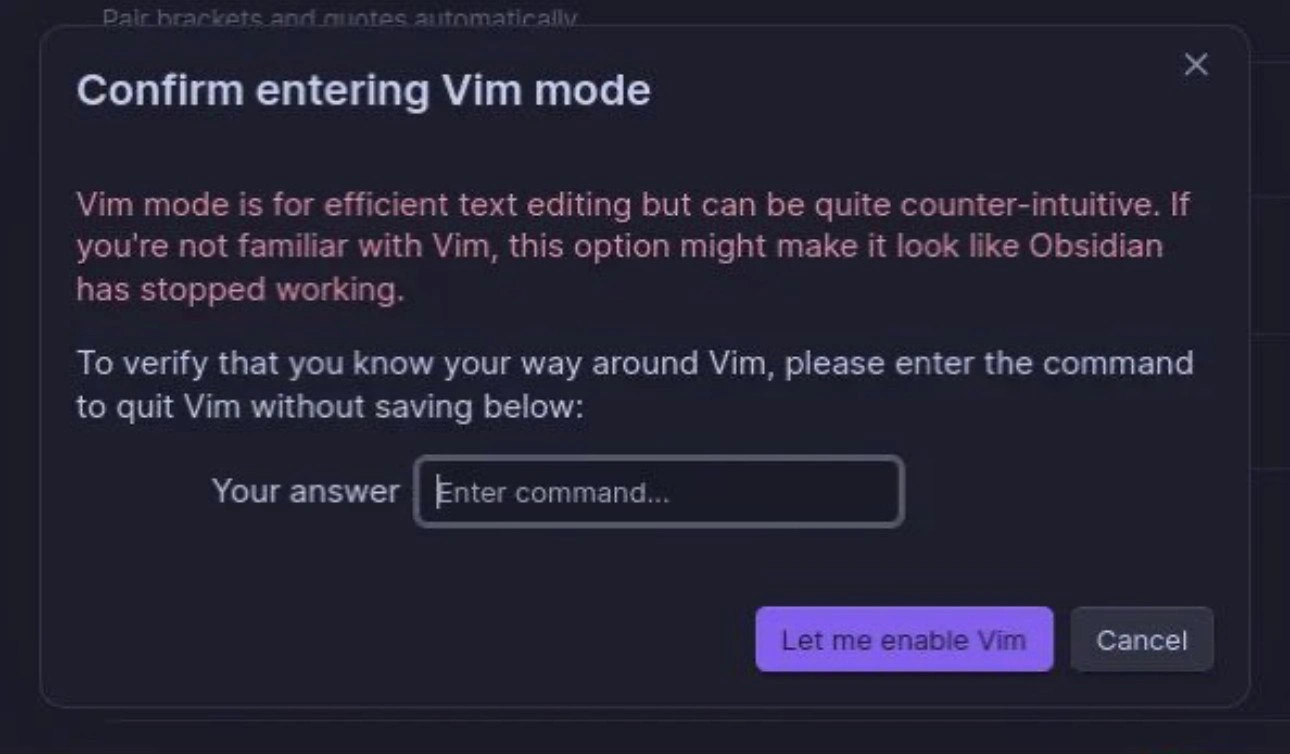
The Vim Mode Entry Exam
IDEs Editors Post #5581, on Oct 16, 2023 in TG

The Vim Mode Entry Exam

Why is this IDEs Editors meme funny?

Level 1: Secret Exit Club

Imagine you have a super-cool toy car that can zoom around really fast. But there’s a catch: it doesn’t have a normal stop button. Instead, to stop the car you have to press a special sequence of buttons – basically a secret trick. Now, if you gave this turbo toy to someone who doesn’t know the trick, they’d drive it and then panic because they wouldn’t know how to make it stop! They might even think the toy is broken when it just keeps zooming.

Now let’s say, before you turn on the toy’s fastest mode, a big sign pops up asking, “Hey, do you actually know how to stop the car? If yes, prove it by telling me the secret shutdown code.” It sounds silly, right? But it’s also kind of smart and funny: the toy is making sure you won’t get stuck unable to stop it. In our meme, the computer program is doing the same thing. Vim is like that speedy toy with a hidden brake. The little window is basically the program saying, “This mode is powerful but weird. Do you know the magic word to get out of it? If not, maybe don’t turn it on!” It’s funny because usually computers don’t quiz you like a club bouncer checking a secret password. But for those of us who remember being trapped and not knowing how to quit, it feels like a friendly tease: only those who know the secret handshake get to play!

Level 2: Modal Confusion 101

Let’s break down what’s going on for those newer to the joke. Vim is a powerful text editor popular among programmers. It’s old-school and runs in the terminal (text-only, no mouse needed). Vim is modal, meaning it has different modes for different purposes. For example, in Normal mode, your keystrokes are commands (pressing j moves down, x deletes a character, etc.), whereas in Insert mode, those same keys will input actual text. If you don’t realize this, Vim can feel completely unintuitive. You might open Vim and try to type, but nothing happens or strange things occur—making you think the program is unresponsive. That’s why Obsidian’s warning says Vim mode might make it look like the app froze. It’s warning about modal keybindings confusion: you need to know which mode you’re in.

The meme dialog specifically asks for “the command to quit Vim without saving.” In Vim, quitting the editor is not done with a simple X button or File > Exit menu like in most apps or modern IDEs and text editors. Instead, you issue a command. The command :q means “quit”, and adding ! (as :q!) means “quit and don’t save my changes.” This is the fail-safe for when you’ve messed something up or just want to exit without keeping your edits. If you forget to add the ! when there are unsaved changes, Vim will refuse to quit, which often surprises newcomers. The dialog is essentially testing if you know to type :q! (colon, q, exclamation point) – the quintessential how_to_exit_vim lesson. If you enter the correct command in that input field, it proves you’re familiar enough with Vim’s quirks to handle Vim mode. It’s like a mini pop-quiz: “No cheating – show me you know the escape route!”

Why would Obsidian even have Vim mode? Obsidian is a note-taking app, but many developers use it for writing notes or documentation, and they love having the same keyboard shortcuts they use in code editors. This can turn a simple notes app into a pseudo-IDE experience. That’s part of DevExperience customization – making every tool feel like “home” with your preferred keybindings. However, the downside (the DX pitfalls mentioned) is that less experienced users might toggle this feature without realizing what they’re in for. Suddenly, their note editor stops responding to keys normally, and they’re bewildered. It’s a bit like a beginner driver turning on manual stick-shift mode without knowing how to use the clutch – things can stall quickly! Hence the need for a comical “are you sure?” check.

For context, the struggle to exit Vim is so common that a Stack Overflow question titled “How do I exit the Vim editor?” became legendary, garnering millions of views. It’s practically a rite of passage for new programmers to learn this. Many of us remember our first time: perhaps you typed vim to edit a file, did something, and then... couldn’t close the program. You might have tried common tricks like Ctrl+C (which usually cancels a process, but in Vim it might just beep at you) or hitting the Escape key a hundred times. Some people even close the entire terminal window or reboot the computer out of desperation! Eventually, someone tells you or you search online and find out about :q! or its sibling :wq (which saves and quits). It’s such a universal newbie experience that it became a meme in itself.

Now, about EditorWars: that’s a lighthearted term for the debates over which editor is the best. Historically, it was Vim vs Emacs in the granddaddy editor showdown (each with fervent fans and steep learning curves). Nowadays, you’ll also hear debates like Vim vs VSCode, or whether using Vim keybindings makes you more efficient. These debates are usually in good fun (with lots of jokes and memes), and this dialog plays into that culture. It’s as if Obsidian is cheekily siding with Vim power-users, saying “we only want the elites who know Vim here.” Of course, in reality, it’s probably just a prank or a very explicit warning for user experience reasons.

To visualize what happens in Vim and why it’s confusing, here’s a quick example of a typical Vim session workflow:

# You open a file in Vim. By default, you're in Normal mode:
i                # press "i" to enter Insert mode so you can start editing text
Hello Vim!       # you type this in Insert mode, and it appears in the file
<Esc>            # press Escape to leave Insert mode - now you're back in Normal mode
:q!<Enter>       # in Normal mode, type colon, q, exclamation, then Enter. This quits without saving.

In the above session:

  • i put you into Insert mode (so the letters you type become content).
  • Hello Vim! is the text you added.
  • <Esc> is the Escape key to get back to Normal mode (where keystrokes are commands).
  • :q! is the command to quit without saving changes. (You see : puts Vim in command-line mode at the bottom, then q! is the quit command, and pressing Enter executes it.)

If you know these steps, Vim is actually quite straightforward to exit. But if you don’t, you might sit there wondering why nothing happens when you click or why typing “quit” just inserts the word "quit" into your file! That disconnect is exactly what this meme targets. It’s packaging a little modal_dialog_warning with humor: “Prove you know the secret exit command or hit Cancel now.”

So in summary, the image is funny to developers because it references a very real learning hurdle. It’s doing so in a tongue-in-cheek way, blending a real user experience concern (protecting users from a confusing feature) with an in-joke challenge. The CodingHumor here is strong – if you know, you know! And if you don’t, well... the app literally stops you from proceeding until you learn, which is comedy gold in the programming world.

Level 3: Rite of :q!

At first glance, this confirm_vim_mode dialog is a hilarious gatekeeper for the initiated. It's not every day your software challenges you with a pop quiz before enabling a feature! Here, Obsidian (a normally non-code note-taking app) asks for the sacred incantation to quit Vim without saving – effectively demanding you prove you know how to escape the very editor you're about to enable. Why is this so funny to seasoned developers? Because how_to_exit_vim has been a running joke and shared trauma in programming circles for decades.

This meme satirizes the DeveloperExperience_DX trade-off of powerful tools: Vim mode offers insanely efficient text editing via vim_keybindings, but at the cost of a steep learning curve. The dialog’s magenta warning isn’t exaggerating – if you don’t grok modal editing, turning this on will make Obsidian feel broken. (Ever seen a newbie panic when keystrokes don’t produce letters on screen? Yup, classic DeveloperPainPoints.) The text “it might make it look like Obsidian has stopped working” is both a warning and a punchline. Every developer who’s been stuck in Vim’s clutches chuckles at that, recalling frantic attempts to exit the seemingly frozen editor.

On a deeper level, this pokes fun at EditorWars culture and a bit of gatekeeping. Vim enthusiasts are proud of their mastery over arcane key combos. It’s as if the Obsidian plugin is saying, “We only let true Vim adepts enter this realm – prove your worth by typing :q!.” 😈 In the real world, no GUI asks you to solve a riddle to toggle a setting, but here it underscores just how counter-intuitive Vim can be for newcomers. It’s a playful jab at the IDEs_Editors debate: Vim users often install Vim-emulation even in modern IDEs to boost efficiency; this dialog imagines that ideology taken to an extreme UX decision.

There’s also an element of shared veteran humor: almost every programmer has a war story of being stuck in Vim (perhaps via an unexpected git commit in the terminal launching Vim). Many of us only escaped after yelling “Esc : q!” like a magic spell (or, let’s be honest, googling it). This “confirm before enable” feels like a tongue-in-cheek modal_dialog_warning — a UI dark pattern turned into a joke. It’s basically saying, “Look, if you don’t already know the secret handshake (or in this case, the quit command), you’re not ready for this mode.” By referencing the infamous :q! rite-of-passage, the meme resonates strongly with developers’ collective memory. We laugh because we’ve all been that person desperately trying to exit Vim, and we secretly love that this dialog would have saved our past selves from that fate.

Description

A screenshot of a confirmation dialog from a software application, likely the note-taking app Obsidian, which has a dark theme. The modal is titled 'Confirm entering Vim mode.' The text explains that Vim is a powerful but counter-intuitive editor and warns that enabling it might make the application appear to have stopped working. To prevent this, the dialog presents a challenge: 'To verify that you know your way around Vim, please enter the command to quit Vim without saving below:'. Below this text is an input field labeled 'Your answer' for the user to type the command. The humor lies in the well-known difficulty beginners face when trying to exit the Vim editor, a shared experience and running joke within the developer community. This UI feature acts as a clever gatekeeper, ensuring the user has fundamental Vim knowledge before enabling a mode they might not be able to escape from


Comments

56
Anonymous ★ Top Pick This is the developer equivalent of a bouncer asking you to name three of the band's songs before letting you into the concert
  1. Anonymous ★ Top Pick

    This is the developer equivalent of a bouncer asking you to name three of the band's songs before letting you into the concert

  2. Anonymous

    New pipeline rule: tests green and coverage 95% isn’t enough - deploys stay red until someone exits Vim without googling, finally giving SOC 2 a control that actually terrifies seniors

  3. Anonymous

    Finally, a CAPTCHA that actually proves you're not a junior developer

  4. Anonymous

    Obsidian's Vim mode confirmation is the software equivalent of 'if you have to ask, you can't afford it' - except instead of price, it's measuring whether you've experienced the existential dread of being trapped in Vim at 2 AM, frantically Googling 'how to exit vim' while your unsaved work mocks you. The real power move? They're not even asking for :wq - they want :q! specifically, filtering out the cautious souls who still believe in saving their work. This is UX design as hazing ritual: 'Prove you've earned your scars before we let you collect more.'

  5. Anonymous

    Can we put the same gate in front of kubectl --context=prod; if ESC :q! isn’t muscle memory, you shouldn’t be anywhere near sharp modes

  6. Anonymous

    Obsidian gatekeeps Vim like a bouncer at a modal editing speakeasy: no :q!, no entry - keeping arrow-key tourists forever in insert mode purgatory

  7. Anonymous

    Obsidian gating Vim mode behind “:q!” is the most honest onboarding I’ve seen - SSO as in Single Sign‑Off; if you can’t quit Vim, you shouldn’t be allowed to enter it

  8. @Aqualon 2y

    ZZ

    1. @CcxCZ 2y

      That saves though

  9. @Aqualon 2y

    а ты смелый

    1. @sylfn 2y

      please use english in this chat or add a translation

  10. @Sp1cyP3pp3r 2y

    8=D

  11. @Aqualon 2y

    netrw is pretty straightforward imo

  12. @Aqualon 2y

    and idk if you had telescope or some other fuzzyfind plugin, but usually that was the way i opened file i wanted in jetbrains ide

  13. @Aqualon 2y

    and you can also have tabs in vim like any other ide

  14. @Aqualon 2y

    It is indeed uncomfortable as hell for first week or two, but honestly i don't feel any urge to go back after three weeks of using it

    1. @casKd_dev 2y

      this

  15. Deleted Account 2y

    I'm currently using VSCodium + vim plugin rn because I'm too stupid to write lua configurations

  16. @Aqualon 2y

    and netrw is directory listing system built in vim, looks like this

  17. @Araalith 2y

    Guaranteed exit from Vim is to use killall -9 vim from a different console.

    1. @kkhaniffff 2y

      just unplug the power supply at this point

  18. @CcxCZ 2y

    :!kill -9 $PPID

  19. @CcxCZ 2y

    Try maybe first without enabling every weird feature and plugin first? That tends to be way less confusing. :-] Try vimtutor for the barest essentials and then https://github.com/dahu/LearnVim Some like making a paper cheatsheet with commands you use to quickly reference until you memorize them. Others just grab something like https://rumorscity.com/wp-content/uploads/2014/08/10-Best-VIM-Cheat-Sheet-03.jpg and/or https://www.john-gentile.com/kb/tools-techniques/vim-shortcuts.png

  20. @CcxCZ 2y

    Really 80% of the magic is knowing how to use the built-in :help :-D Joining #vim on libera.chat also helps.

    1. @callofvoid0 2y

      the second command looks happy

      1. @CcxCZ 2y

        :Ni!

  21. @CcxCZ 2y

    vimtutor all one command. It might be a separate package, it might be installed with regular vim, depends on your distro. Not sure how are things on Neovim side, it used to be way more experimental / move fast and break things / fix it yourself. It's probably settled now but still I'd advise starting with vanilla.

  22. @hotsadboi 2y

    i remember this popup when trying out obsidian, god. the only thing this vim mode does is adds hjkl shortcut for arrows and even that doesn't work right (cursor's horizontal position sometimes gets messed up when moving vertically). but "hey look we made a funny confirmation menu don't you guys love memes haha?"

  23. Deleted Account 2y

    Cd to dir of project open neovim press ctrl + n

    1. Deleted Account 2y

      Tho im to retarded and new linux user still dont know how to install auto complete and something like intellisense for neovim

      1. @CcxCZ 2y

        Scripts defining "omnicomplete" functionality usually come with a syntax file. :h ins-comp for that. Tho personally I'm mostly satisfied with CTRL-N keyword completion for most stuff.

        1. Deleted Account 2y

          Ty

  24. @ZgGPuo8dZef58K6hxxGVj3Z2 2y

    The program knew in advance it would be executed

  25. @NoCountryForOldBuffet 2y

    There’s no need to learn vim over VScode unless your main barriers to productivity are either environment (you jump from server to server a lot and don’t have a good way to keep configs up to date between them and a mouse doesn’t help) or you’re finding that navigating your code takes up a lot of your brainpower. If you program at a normal pace and scale in your own local environments then learning Vim doesn’t solve a problem that you actually have (though it’s fun and can be rewarding on its own if you’re that kind of person).

    1. @thisisluxion 2y

      it allows me to operate a bit faster and it's much more customizable, it's worth it in my opinion

  26. @NoCountryForOldBuffet 2y

    It’s definitely useful when you don’t expect much control over your environment. I need to be able to work across loads of different servers owned/managed by different groups across my org for my job. Where and whether anything is mounted or installed isn’t up to me, so being confident I can edit anywhere without begging to install or allow VScode is useful to me.

  27. @NoCountryForOldBuffet 2y

    Sure, nano would be sufficient too, but at that point I’m just gonna say “I like using Vim more” lol

    1. @RiedleroD 2y

      isn't that what the choice of IDE is ultimately about? What feels best for you? I mean I use kate and I've heard of literally nobody else using it and it's a huge hassle, but at least it's less annoying than vscode (and all the other IDEs that try to think for me), more powerful than nano (which I still use in terminal situations) and less of a hassle to learn (I'll never learn vim)

      1. @sylfn 2y

        i've used kate until i switched to vim on my main device

        1. @RiedleroD 2y

          noted, I now know me and one other person who ever used kate

      2. @NoCountryForOldBuffet 2y

        Right, it’s about meeting your needs and balancing your wants. I need to be able to work in multiple environments that I don’t manage, that limits my options a lot. I want to be able to do quick navigation and robust refactoring, so I use Vim over nano. If there was an obviously best editor everyone would use it. I was just making the case that it’s worth it for me (and people in similar positions to me) to know Vim, nothing more

      3. @CcxCZ 2y

        Kate works well enough, though at that point why not run whole KDevelop? Not that I intend to push IDEs. I'm not really into them myself - I treat unix as my IDE with tmux for windowing and vim or vis as capable editors but not much more. Being able to parse file:line:column from error messages certainly helps though.

        1. @RiedleroD 2y

          I have no idea what the difference is, that's why

          1. @RiedleroD 2y

            also I'm not really missing any features I think. just the LSPs are sometimes a bit bitchy

            1. @CcxCZ 2y

              I didn't know they had LSP support. It's been quite a while I've used it. Fair enough I guess.

          2. @CcxCZ 2y

            Some extra fancy stuff on top. Version control integration. CMake integration. #define interpolation. Some templating. Stuff like that. Not strictly C/C++ only but that certainly is a focus of KDE folks.

            1. @ColonelPhantom 2y

              Kate has Git integration and it can deal with most fancy c++ features using clangd

            2. @RiedleroD 2y

              kate has all of that too (via plugins that are shipped with it) though I turned cmake and ctags off.

              1. @CcxCZ 2y

                I see. I guess they reintegrated a lot of it back.

                1. @RiedleroD 2y

                  looks like it. I wonder why they even distinguish between kate and kdevelop

          3. @CcxCZ 2y

            https://docs.kde.org/stable5/en/kdevelop/kdevelop/exploring-source-code.html probably gives a good idea though these screenshots seem fairly old

  28. @NoCountryForOldBuffet 2y

    Fwiw I really like Helix as an improved Vim with great out of the box features, it’s what I use for my personal editing at home.

  29. @megapro17 2y

    sudo rm -f /sbin/vim

    1. @Araalith 2y

      sudo ln -sf /usr/bin/nano /usr/bin/vim

  30. @aboyko1 2y

    Why do you even need to code with that speed using vim-like editors? What you're trying to do? Code some C++ script while police is chasing you on the car?

  31. @sylfn 2y

    I used :o filename or vim filename before I found :[tab]e command

Use J and K for navigation
