Skip to content
DevMeme
1901 of 7435
A Completely Normal 'npm install' Log
PackageManagement Post #2111, on Sep 30, 2020 in TG

A Completely Normal 'npm install' Log

Why is this PackageManagement meme funny?

Level 1: Careful What You Wish For

Imagine you ask for a simple toy, but instead of just the toy, a huge box arrives at your door. You open it and out pours tons of random pieces and notes. There are dozens of instruction sheets (some even in languages you can’t read, like a magical Elvish language from a fairy tale). There’s a big red warning label saying something went wrong — but then a small note taped next to it saying “don’t worry, it’s fine, keep going.” You also find a thank-you card from the toy maker, and even a letter where the toy maker kindly asks, “Hey, can you spare some money to support us?” Somewhere in that mountain of stuff, unbelievably, there’s even a marriage proposal letter that has nothing to do with the toy! In the end, you dig through everything and discover that along with the toy you wanted, the box included a thousand other little toys you never asked for, and a report claiming “oh, by the way, a bunch of these pieces might be broken or unsafe.” You’d probably feel overwhelmed and a bit bewildered, right? All you wanted was one simple thing, but you got an entire chaotic package instead. That’s exactly the feeling this joke is capturing: a small request turning into an avalanche of surprises, warnings, and “gifts” that nobody asked for.

Level 2: One Install to Fetch Them All

Let’s break down what’s going on here in simpler terms. npm (which originally stood for Node Package Manager) is a tool that developers use to manage packages (reusable bundles of code) for Node.js, the JavaScript runtime. When a developer runs npm install, they’re usually trying to add a library to their project. That library isn’t standalone — it often depends on other libraries, which are called dependencies. And those may have their own dependencies (we call these transitive dependencies). Very quickly, a simple request for one library can pull in dozens or even hundreds of packages. All those packages get downloaded into your project’s node_modules folder. This is super convenient (you don’t have to write all that code yourself!), but it can also create a dependency sprawl where your project’s code is a tiny slice and the rest is third-party code.

Now, npm is quite chatty when it’s doing its job. It will print out messages to the terminal to let you know what’s happening. For example, if a package has a minor problem or a suggestion, npm will output a warning (often prefaced with the word “WARN”). Warnings are like yellow flags: not fatal, but something to be aware of. The meme shows a stack of “WARN” lines — implying that during the install, npm threw a bunch of warnings. In the Node ecosystem, it’s common to see warnings about things like deprecated packages (meaning a package you’re installing is outdated or will stop working in the future) or unmet peer dependencies (meaning you might need to manually install another library to make everything work perfectly). These warnings can be confusing, especially to newer developers. You might think, “Uh oh, something went wrong!” But often the installation still succeeds; the warnings are just letting you know about potential issues or recommendations.

Then there’s the “ERROR but don’t worry about it” line. Normally, an error is a red flag that something failed. But in npm’s case, there are scenarios where errors can happen that don’t actually stop the install process. How is that possible? One common case is optional dependencies. Some packages include an extra dependency that’s optional — say, a tool that only works on Linux, so on Windows it’s not needed. If you install on an incompatible system, npm might try to build that optional component, hit an error, and then essentially say, “Well, never mind, that part isn’t essential, moving on.” It literally might output an error message followed by something like “(optional) Not compatible. Skipping...”. This can be really confusing if you don’t know it’s optional — you see the scary red text, but at the end npm says “added X packages” like everything is okay. The meme jokingly captures that whiplash by explicitly saying the error is “but don’t worry about it.” As a developer, over time you learn which errors matter and which ones you can ignore, but initially it’s very odd to ignore an error at all!

The tweet also mocks some messages that aren’t technical at all, like “thank you!” and “plea for donation.” Why would those ever show up in your terminal? Well, some open-source project maintainers (the people who write and maintain these packages) use the install process as an opportunity to communicate with users. You might see a message like “Thank you for installing lodash or a prompt to star a GitHub repository. There’s also a growing trend to ask for support or funding. For instance, when you install a popular package, it might display a note: “Please consider donating to support this project: https://opencollective.example...” This is because many of these packages are free to use but take a lot of effort to maintain, so the authors are hoping some users chip in financially. Npm itself even provides a command npm fund that lists all your dependencies that have declared a funding URL. So “plea for donation” in the meme is riffing on that reality. It’s exaggerating a bit (you won’t usually get a personal plea every time you install something), but the idea of maintainers asking for help is very real. The “maintainer looking for job ;)” quip is a humorous extension — suggesting one of the messages you see during install is a maintainer half-jokingly advertising their availability for work. While you won’t literally see a job ad in npm output, it’s poking at the fact that many maintainers do this work for free and might wish someone would hire them for all their effort!

The line “warning in Elvish” is pure humor. It implies one of the warnings is written in some fantastical language (Elvish, from Lord of the Rings). Of course, npm doesn’t actually print Elvish. This is the meme’s way of saying some warnings feel like they’re in another language — in other words, totally incomprehensible. A new developer can definitely feel that way: you run an install and get messages that just look like gibberish or jargon you’ve never seen. It might as well be Elvish for how much you understand it. So, this part of the joke reassures us that yes, you’re not alone if those warnings look like magic runes to you. Even experienced devs sometimes scratch their heads at a particularly weird npm message.

Finally, the meme concludes with two huge numbers: “added 2540950582 packages” and “found 1029402984 vulnerabilities.” This is a playful send-up of the summary npm prints after installing and auditing packages. When npm says “added 254 packages,” that’s the count of new packages it brought into your project (including all the dependencies of the dependencies). It also might say something like “found 12 vulnerabilities,” which comes from an automatic security audit of those packages. A vulnerability in this context means a known security flaw in a specific version of a package. Npm checks a database of known issues and alerts you if any of the libraries you just installed have reported vulnerabilities (like a version of a dependency that could be exploited by hackers under certain conditions). Seeing a non-zero vulnerability count is extremely common — not every package is perfectly up-to-date with security fixes. But the numbers are usually in the single or double digits (and many of those might be low severity). The meme blows it up to literal billions to make fun of how it feels. When you’re new, seeing even “found 12 vulnerabilities” can be alarming — “Did I just introduce 12 holes in my app?!” The joke here is that after installing, you’ve got a comically huge number of issues, implying the whole thing is swiss cheese. In reality, if npm reports vulnerabilities, the advice is to run npm audit or npm audit fix which will try to update those to safer versions. But the sad truth is that it’s hard to have a Node project with zero vulnerabilities in its dependency tree at any given moment, because the ecosystem moves fast and new issues get discovered all the time. So devs have kind of come to expect that there will be some vulnerabilities listed after an install — hopefully not a billion though!

In summary, this meme is all about the developer experience of dealing with lots of dependencies in Node.js. A simple command like npm install might sound like “just add this one thing,” but under the hood it’s fetching many modules, each potentially with their own quirks. The result can be information overload: warnings you don’t know how to fix, errors that aren’t really errors, thank-you notes and funding pleas from maintainers, and a scary security report at the end. It’s relatable developer humor because anyone who’s set up a project or pulled an open-source project from GitHub and run npm install has likely seen a smaller-scale version of this and thought, “Yikes, what did I just get myself into?” Yet, this is also normal in modern web development, and we learn to live with it (and use tools to manage it). The tweet just pushes each aspect to an extreme for comic effect — essentially laughing at the fact that our beloved tools can be a bit extra sometimes.

Level 3: Avalanche of Dependencies

Seasoned developers reading this tweet will likely smirk in pain. It’s the npm install experience: what should be a simple one-command operation often unleashes a torrent of text, cryptic warnings, pleas from maintainers, and a final tally of more packages and security issues than you bargained for. The meme is a Twitter screenshot parodying the typical output of Node’s package manager, npm, when installing dependencies. Each line in the exaggerated output corresponds to a real phenomenon in the Node.js ecosystem (just dialed up to absurd levels):

  • Endless Warnings (WARN WARN WARN): NPM is notorious for spitting out warnings for all sorts of minor issues. These might be deprecation notices (“X is deprecated, use Y”), optional module build failures, or peer dependency mismatches. In real life, seeing a few yellow WARN lines scroll by during an install is common. The meme exaggerates this by showing nothing but “WARN” repeatedly, capturing that feeling of warning fatigue where the console is flooded with cautionary messages. Experienced devs joke that they’ve learned to ignore most of these, as if the package manager is crying wolf on every run.

  • An obtuse warning message: The tweet lists “obtuse warning”, poking fun at how some warnings are worded so cryptically that they might as well be written in a foreign language. In practice, you’ll encounter vague messages like “Warning: package X has unmet peer dependency Y >= 2.0 < 3.0” — which, to a newcomer, feels inscrutable. The meme calls it out: an obtuse warning is one you read five times and still go “huh?”. It highlights how Developer Experience (DX) can suffer when tools output messages that only library maintainers fully understand.

  • Repeated “install” steps: The parody output intermixes the word install multiple times (like “install … done … install …”). This mirrors how running npm install often involves installing many sub-dependencies in sequence. NPM might print messages as it fetches each package, so the screen fills with a litany of installation logs. It can feel like it’s installing the internet, one module at a time. The repetition in the meme mocks that drawn-out process.

  • “ERROR but don’t worry about it”: This line satirizes a common scenario where an error appears during installation, often in red text, but turns out to be non-fatal. For example, a package might have an optional dependency (like a native module for performance) that fails to compile on your system — so npm prints an error about it. However, since it’s optional, npm continues the install and might even note that it’s okay to ignore that error. The meme’s “don’t worry about it” is a tongue-in-cheek take on npm basically saying “Error (but hey, it’s fine 🙃).” It’s funny because in any other context an error is bad, but here the tool itself is like “carry on, nothing to see here,” leaving developers perplexed. Veteran devs have seen everything at 3 AM, including errors you’re supposed to ignore, so this line gets a knowing chuckle.

  • Gratitude and Donation Pleas (“thank you!” / plea for donation): After the wall of warnings and errors, npm often prints a friendly “added X packages” summary or a thank-you message from a library. Certain popular packages print custom post-install messages — sometimes a cheerful “Thank you for using [library]! 🌟” to brighten your day. The “plea for donation” in the meme riffs on a real issue: many open-source maintainers struggle to fund their projects. In recent years, some packages (or npm itself via the npm fund command) will inform you that “X packages are looking for funding” or include a link to donate. The meme imagines this going overboard: you install a package and suddenly there’s essentially a Kickstarter campaign in your terminal. “Maintainer looking for job ;)” pushes this further into dark humor — hinting that the person who wrote one of your dependencies might be job-hunting (perhaps because maintaining open-source doesn’t pay the bills). It’s a satirical nod to the real open-source sustainability problem: the tools we rely on often are maintained by volunteers, one broken coffee maker away from disaster.

  • “Warning in Elvish”: This delightful absurdity jokes that one of the warnings might as well be in Elvish (the language from Lord of the Rings) — in other words, completely inscrutable to mere mortals. It’s poking fun at how some tooling output can feel like an arcane script. There’s no actual npm feature that prints Elvish runes on your screen (not yet, anyway!), but there have been instances of quirky Easter eggs or bizarre error messages in dev tools. This line amplifies the sense of “I have no clue what this warning means” to the point of needing a fantasy linguist to decipher it. It adds a nerdy twist (because who but developers would joke about Elvish?) and underlines the tooling overload developers experience — the messages may as well be magic runes for all the clarity they provide.

  • Miscellaneous Gobbledygook: The meme mentions “gobbledygook” and even a “marriage proposal”. These are hyperbolic for comedic effect, implying that npm’s output is so excessive and random that literally anything could be in there — maybe even nonsensical machine output or someone’s personal message. It’s a playful exaggeration of how installation logs sometimes include stray debug info or strange statements. (There’s an infamously whimsical package manager message in Yarn that prints a yarn emoji 🧶 or a mention of “snowflakes”… so hey, a marriage proposal isn’t that far-fetched in joke-land.) This tongue-in-cheek addition also conveys the exasperation developers feel: “By the time it finished, I half expected a marriage proposal to pop out of the console.”

  • Millions of Packages and Vulnerabilities: The punchline comes at the end: “added 2540950582 packages, found 1029402984 vulnerabilities.” This is a clear parody of the final output from npm (or npm audit). In reality, after an install npm might say something like “added 214 packages and audited 1050 packages, found 12 vulnerabilities (5 moderate, 7 high)”. The meme blows those numbers up to impossible heights (2.5 billion packages? 1.0 billion vulnerabilities!) as an absurdist reflection of how it feels when you install one library and it drags in a huge portion of the Node ecosystem with it. This is referencing dependency sprawl: modern JavaScript projects often rely on dozens or hundreds of tiny packages (transitive dependencies of dependencies of dependencies...). It’s not literally billions, but it can be shockingly high — and it’s a running joke that doing npm install even for a simple project seems to download half of npmjs.com. More sobering is the security aspect: “found 1029402984 vulnerabilities” riffs on npm’s security audit feature, which reports known vulnerabilities in your dependency tree. Developers often see a big list of warnings about vulnerabilities — some critical, many moderate. The exaggeration implies “yep, basically your project is a house of cards with a million security holes.” This satirizes both the genuine concern of security vulnerabilities in open-source packages and the reality that the audit output can be so large and dire that many devs feel overwhelmed or numb to it. (If everything has 1000+ vulnerabilities, where do you even start?) It’s a pointed commentary on supply-chain security: pulling in so many packages means inheriting a lot of potential risks, and keeping all those updated and patched is non-trivial.

In essence, this meme resonates with developers because it encapsulates the chaotic developer experience of modern JavaScript package management in a humorous nutshell. The Node ecosystem’s strength — thousands of easily shareable packages — is also its weakness, leading to what we jokingly call “dependency hell”. Everyone who has run npm install on a legacy project and watched pages of warnings fly by, or audited a project only to find a laundry list of vulnerabilities, can relate. It’s funny because it’s true: our toolchains help us move fast, but they also bombard us with noise. The tweet exaggerates it to comedic extremes (Elvish! proposals! billions!), but each element is rooted in a real gripe. From the package maintainer pleas (a reflection of open-source funding woes) to the flood of warnings (indicating technical debt and backwards-compat hacks) and the staggering number of dependencies (hello node_modules folder that contains the universe), the meme nails a core developer truth.

For senior devs, there’s also a bittersweet historical nod here. We remember incidents like the left-pad fiasco in 2016, where removing one 11-line package (yes, literally 11 lines of code) broke thousands of builds, highlighting how one tiny dependency can have a massive ripple effect. That event was a wake-up call about the fragility of stacking hundreds of micro-dependencies. This meme carries that subtext: our modern apps stand on the shoulders of countless packages, each of which might carry its own baggage of warnings and woes. Yet, we keep adding “just one more package” because that’s the easiest way to get things done in the JavaScript world. The humor comes with a side of resigned laughter: the absurdity is funny, but we’re also kind of laughing at ourselves for living with this reality.

Description

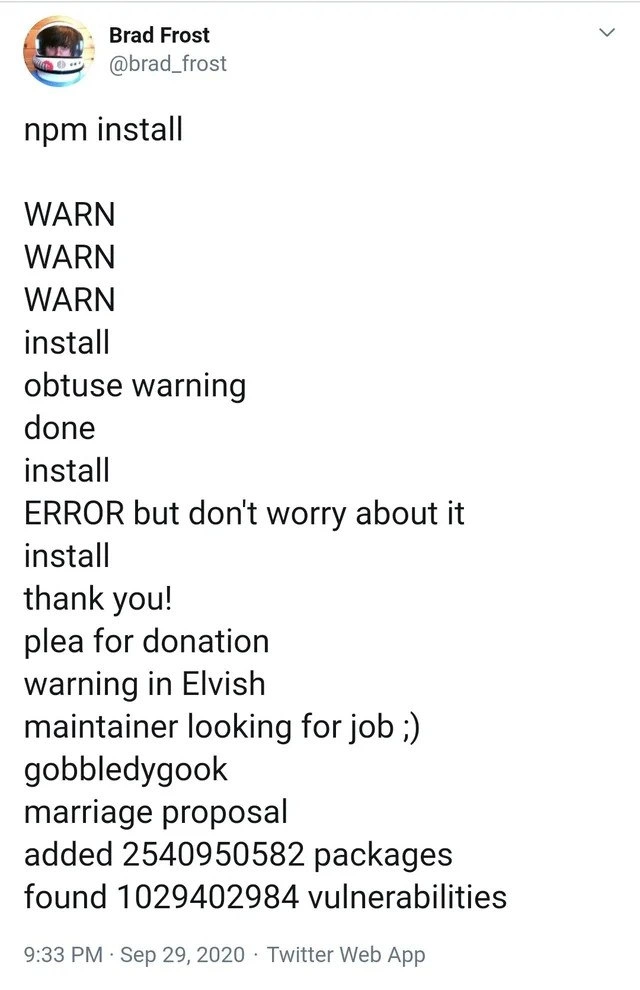
A screenshot of a tweet from Brad Frost (@brad_frost) that humorously exaggerates the verbose and often chaotic output of the 'npm install' command. The tweet starts with 'npm install' and then lists a fictional sequence of log messages. These messages begin with plausible items like 'WARN' and 'install', but quickly descend into absurdity with lines like 'ERROR but don't worry about it', 'plea for donation', 'warning in Elvish', 'maintainer looking for job ;)', 'marriage proposal', and finally concludes with 'added 2540950582 packages' and 'found 1029402984 vulnerabilities'. This is a satirical take on the real experience of using npm, which is known for its lengthy dependency trees, numerous warnings, funding messages from maintainers, and security vulnerability reports. For senior developers, it's a deeply relatable joke about the complexity and sometimes comical nature of modern frontend package management
Comments

7
Anonymous ★ Top Pick I run 'npm install' and then go for a coffee. Not because it's slow, but to give the maintainers time to update their résumés based on the post-install messages
  1. Anonymous ★ Top Pick

    I run 'npm install' and then go for a coffee. Not because it's slow, but to give the maintainers time to update their résumés based on the post-install messages

  2. Anonymous

    Ran ‘npm install’ to add one date-picker; now the SBOM is 8,000 pages, the CISO’s pager won’t stop, and the vulnerability scanner is suddenly fluent in Elvish

  3. Anonymous

    The real horror isn't the 1 billion vulnerabilities - it's knowing that 'ERROR but don't worry about it' is actually how we've been shipping to production for years, and the marriage proposal is still less commitment than maintaining a left-pad dependency

  4. Anonymous

    This perfectly captures the npm experience: you run one command and suddenly you're maintaining a dependency graph larger than the Linux kernel, ignoring more vulnerabilities than a CISO's nightmare, and reading maintainer pleas in Tolkien's Elvish. The real kicker? Those 2.5 billion packages are just to render a button with rounded corners. At least the marriage proposal is a nice touch - after all, you're already committed to this relationship for the long haul, and the divorce (migration) would cost more than staying together

  5. Anonymous

    npm install: where stdout doubles as LinkedIn, Patreon, and a CVE feed - courtesy of a single caret in package.json

  6. Anonymous

    npm install: Adding 254M packages with 1B vulns - because in prod, transitive deps are the real monorepo

  7. Anonymous

    npm install: the only build step that doubles as a security audit, a GoFundMe, and a job board - and then exits 0 like nothing happened

Use J and K for navigation