Skip to content
DevMeme
4297 of 7435
The Emotional Rollercoaster of a Seemingly Simple Bug Fix
Bugs Post #4696, on Jul 28, 2022 in TG

The Emotional Rollercoaster of a Seemingly Simple Bug Fix

Why is this Bugs meme funny?

Level 1: Less Is More

Imagine you have two friends who want to remember stuff from class. One friend carries a single small notebook. Whenever he learns something, he scribbles it down in plain words. That’s it – one notebook, simple notes. The other friend has a whole kit – five notebooks for different subjects, sticky notes in every color, a filing cabinet of flashcards, and a special box to collect articles. He spends hours setting up a super complicated system to organize every tidbit of information. But here’s the funny part: by the time he’s done color-coding and filing, he’s exhausted and hasn’t actually reviewed any of his notes! Meanwhile, the first friend just opens his little notebook to study and then goes out to play. In the end, both friends wanted to remember what they learned, but the one who kept it simple did it with no stress, while the other got lost in overthinking. The meme is laughing at this idea – that sometimes doing something in the plain, simple way (like just writing in Apple Notes) is actually the smartest move, whereas making it super fancy just makes things hard for yourself. It’s saying, don’t overcomplicate things – often, less is more when you just need to get the job done.

Level 2: Tooling Tangle

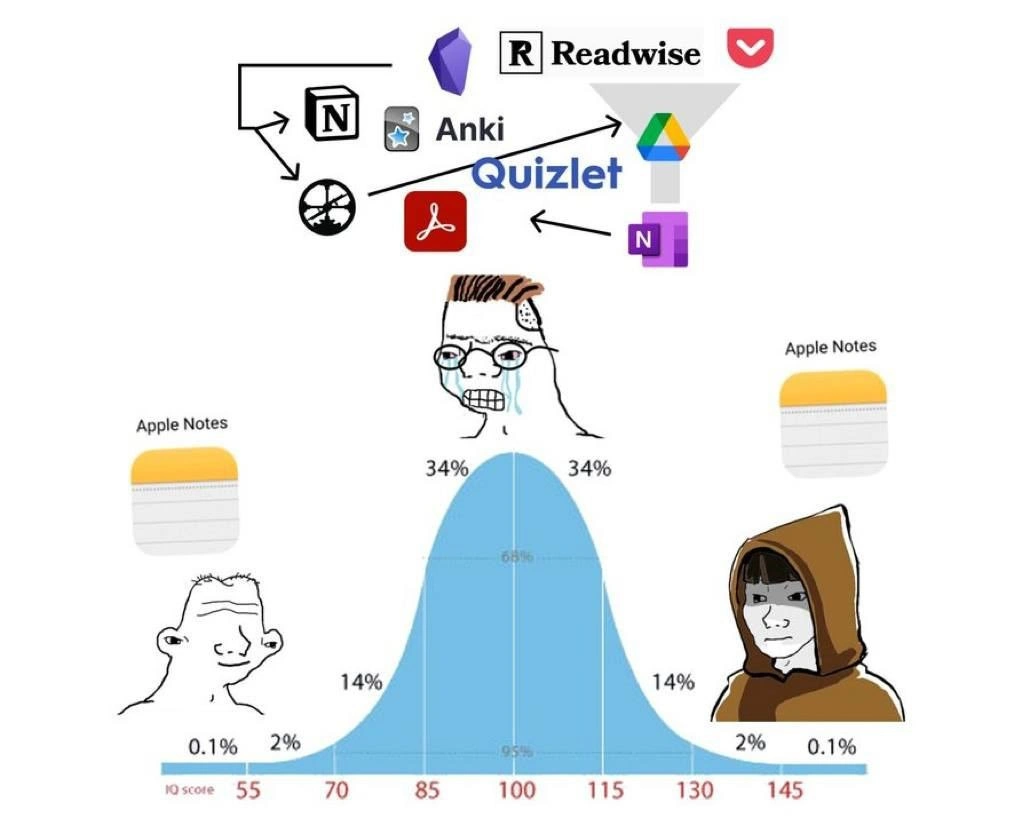
Let’s break down the tangled productivity stack shown in the meme, and why it’s both impressive and absurd. The crying Wojak in the middle has surrounded himself with a swarm of productivity and note-taking logos, each representing a tool in his over-engineered workflow:

  • Apple Notes – Apple’s built-in note-taking app (the icon with a yellow top). It’s very simple: just text notes, checklists, maybe an image or two. No complex databases or flashcards – basically a digital notepad. The meme shows that both the “low IQ” and “high IQ” characters use this. It’s the baseline solution for note-taking: easy, always there, and requires no setup.
  • Notion – The black/white square icon with an "N". Notion is an all-in-one workspace app where you can create pages, databases, wikis, to-dos, etc. It’s beloved by many developers and students for organizing projects and knowledge. In the meme, Notion is part of the convoluted workflow, likely serving as a central knowledge base where everything gets collected and tagged. The arrow indicates information flows into or out of Notion to other tools. A new dev might think, “I’ll store all my notes and code snippets in Notion with tags and relations for easy reference.” But maintaining that can become a job in itself.
  • Obsidian – Represented by the purple crystal icon. Obsidian is a markdown note-taking app that creates a graph of interlinked notes. It’s great for building a personal wiki or what’s called a Zettelkasten (a fancy term for a linked note system or “second brain”). Obsidian users make connections between ideas by hyperlinking notes, generating a web-like map of knowledge. In the meme, Obsidian is another tool in the mix, suggesting our overwhelmed friend is also cross-linking notes for future enlightenment. Setting it up might involve plugins, graph view customizations, and more complexity.
  • Readwise – The black "R" on white logo. Readwise is a service that imports highlights from things you read (ebooks, PDFs, web articles) and periodically resurfaces them so you actually remember/ use them. Many people pipe their Readwise highlights into other apps (like Notion or Obsidian) automatically. Here it likely represents that our note-taker is saving important quotes or snippets from articles to incorporate into his notes. It’s another layer of automation in recalling information.
  • Pocket – The red logo that looks like a shield or pocket with a tick (actually a bookmark icon). Pocket is a “read-it-later” app. You see an article online, you save it to Pocket to read when you have time. It syncs across devices. In a complex workflow, someone might save articles to Pocket, then export highlights via Readwise to Notion, etc. The meme includes Pocket to show this person isn’t just writing notes, he’s also funneling external content from the web into his system.
  • Anki – The icon with a blue star and "Anki". Anki is a popular open-source flashcard program that uses spaced repetition (a learning technique where you review information at increasing intervals to help you remember long-term). Developers sometimes put programming facts, language syntax, or interview prep questions into Anki decks to drill them. If our overwhelmed mid-tier dev is using Anki, it means he’s turning his notes into flashcards to memorize them. That’s a commitment: every time he writes down a note, he might create a Q&A card for future self-quizzing. Powerful, but it adds a huge maintenance burden. Forget to review your Anki cards for a week, and you face a mountain of due cards – cue the tears.
  • Quizlet – Shown as the blue “Quizlet” text. Quizlet is another flashcard and study platform, often used by students for test prep. It’s similar to Anki but more user-friendly and web-based. If both Anki and Quizlet are in the image, it’s possibly exaggerating that he’s even redundant about his flashcards, or it's just listing alternative tools. Either way, it’s more complexity in trying to memorize knowledge rather than just referencing it when needed.
  • Microsoft OneNote – The purple “N” icon. OneNote is a note-taking program from Microsoft Office, popular in academic and corporate settings. It lets you create rich notebooks with sections and pages (like digital binders). The presence of OneNote suggests the mid-curve person hasn’t settled on one note app – he’s literally using multiple note apps simultaneously (Notion, Obsidian, OneNote, Apple Notes?!). Maybe different content lives in different apps, which sounds chaotic but is not unheard of when you keep trying new shiny tools and never consolidate.
  • PDF icon – There’s a red Adobe Acrobat PDF logo shown. This likely represents all the PDF documents (manuals, research papers, e-books) the person is also collecting. Perhaps he downloads reference PDFs and stores them in a structured way. It’s another data source feeding into the knowledge trove. Keeping track of PDFs might involve tagging them, managing a library, or uploading them to some drive or reference manager.
  • Funnel into Google Drive – At the top, a funnel graphic feeding into the Google Drive icon (the triangular yellow-green-blue logo). This implies he has an automated process to archive or sync everything into Google Drive. Maybe all notes, articles, and flashcards ultimately get backed up or centralized in a Google Drive folder. It’s the final catch-all repository. This is both amusing and relatable – some devs script backups or use Zapier/IFTTT to connect these services together. The funnel suggests a one-way ingestion: all those tools pour data into Drive. It’s like he’s saying, “Don’t worry, I have a backup of everything, just in case!” which adds yet another layer to maintain.

All these pieces form the tangle of tools. For a junior developer or someone new to this joke, imagine the effort required to wire these together. You’d sign up for each service, learn its features, possibly pay for some, then write glue code or use integration services to make them talk. The meme’s central (85-100 IQ) character likely thought using every specialized tool would make him a hyper-efficient knowledge guru. Instead, he’s drowning in complexity: he has to remember how and when to use each app, fix broken integrations, and continuously groom this system. It’s as if he built a tiny enterprise knowledge management system just for himself. This is why we call it knowledge_overengineering – it’s far more complicated than necessary for personal use.

The bell_curve_distribution at the bottom with percentages (0.1%, 2%, 14%, etc.) is a classic way to label IQ or skill levels in a population. The meme leverages this to categorize three archetypes:

  • The low_iq_high_iq_meme format shows the characters at the edges (0.1% genius and 0.1%... let’s say “simpleton”) both have the same solution (Apple Notes). The leftmost Wojak has a goofy, blissfully ignorant smile – he just uses the default Notes app without a second thought. The rightmost Wojak is depicted as a hooded, enlightened figure (sometimes called “Gigachad” or galaxy brain Wojak in meme culture) – he has possibly tried everything and come to the enlightened conclusion that Apple Notes is all he needs. Both end up at “Apple Notes” but for different reasons: one out of ignorance, one out of wisdom.
  • The middle Wojak (labeled at the 34% area of the curve, around IQ 100) is the average developer who’s smart enough to seek better solutions, but not yet wise enough to realize the cost of complexity. He’s drawn with nerdy glasses, a furrowed brow, and tears – clearly stressed. He represents many of us in the thick of ToolingOverload, who feel that managing the system has become as hard as the work it was supposed to simplify.

For a newer developer or student, the takeaway here is: be careful about overloading on ProductivityTools. Each of those apps (Notion, Obsidian, Anki, etc.) is powerful on its own and can genuinely help manage information or learning – but each one has a learning curve and overhead. It’s easy to assume that the “pro” developers have ultra-refined systems, so you try to imitate that by adopting every tool you hear about. In reality, DeveloperProductivity often comes from finding a few simple techniques that work for you and sticking with them. The meme humorously exaggerates one person using all the things at once. The result? He ends up spending more time on the workflow than on the actual development or learning. The Apple Notes users, by contrast, just jot down what they need and move on. No fuss. It’s a joke with a gentle lesson: if you find yourself spending more time organizing your notes than using them, you might have fallen into the productivity stack trap. Sometimes the simplest solution — a single text file, a basic notes app, a pen and paper even — is the most effective. After all, the point of notes is to help you remember or organize quickly, not to win an award for the most complex system.

Level 3: The Productivity Paradox

At the high end of complexity, this meme highlights a productivity paradox familiar to experienced developers: sometimes the more you optimize your workflow with fancy tools, the less productive you actually become. The image cleverly uses the IQ bell curve meme to satirize how devs handle note-taking and knowledge management. On the far left (low IQ) and far right (high IQ), we see the same solution – just using Apple Notes, a dead-simple note-taking app. Meanwhile, the stressed mid-curve developer has constructed an elaborate Rube Goldberg knowledge pipeline with a dozen productivity apps (Notion, Obsidian, Anki, etc.), and he’s in tears because his over-engineered system is a nightmare to maintain. This is humorous because it rings true: we’ve all seen (or been) that developer who spends more time tweaking their note-taking system than writing actual code.

The joke resonates on multiple levels of developer experience. Senior engineers recognize this as a form of over-engineering in personal productivity. It’s the same anti-pattern we avoid in software design – adding needless complexity – now applied to a note-taking workflow. The poor mid-IQ Wojak is essentially treating his personal notes like a production-grade system: capturing every article, every code snippet, every idea in a complex productivity stack spanning half a dozen services. He’s got a tool for every task: one for reading web content, one for flashcards, one for highlights, one for cloud storage, etc. In theory, it’s a comprehensive “second brain.” In practice, it’s tooling overload. The meme humorously suggests that the truly enlightened devs (the hooded high-IQ figure) realize that a simple, single tool – even something as basic as Apple’s Notes app – can be the most efficient solution. It’s a play on the old KISS principle (Keep It Simple, Stupid): the highest wisdom is sometimes to not overthink and avoid knowledge overengineering.

Why is this funny to those in the know? Because it’s painfully relatable. Many developers have gone down the rabbit hole of ProductivityTools and KnowledgeManagement hacks. Perhaps you started by organizing a neat Notion workspace for your project notes. Then you discovered Obsidian and thought, “I should link all my notes in a graph!” Next, you heard about spaced repetition for memory, so you set up Anki flashcards or Quizlet cards for everything you learn. You saved articles to Pocket, highlighted them with Readwise, funneled all that into a Notion database or dumped it on Google Drive for backup. Before you know it, you’ve built a whole note_taking_workflow pipeline that rivals a startup’s tech stack! It’s entertaining because it’s true – devs love Tooling and automation, so much that we often create extra work for ourselves automating the wrong things. The mid-curve character’s tears are the punchline: he’s overwhelmed by the maintenance of this elaborate system (sync errors, format incompatibilities, remembering to actually use it) and probably hasn’t written any new code or notes in ages. Meanwhile, the so-called “simpletons” at both ends quietly get things done with a single, no-fuss tool like Apple Notes. The DeveloperHumor hits home: sometimes the genius move is realizing you don’t need a complex solution for a simple problem.

Importantly, this meme also pokes fun at a kind of developer procrastination. Setting up the ultimate knowledge management system can be a form of productive procrastination – it feels like you’re working, but you might just be avoiding the messy work of actually coding or truly learning. Veteran devs chuckle because they’ve seen this pattern in teams too: endless process and tool tweaks that yield marginal benefit. It’s reminiscent of yak shaving, where you end up doing a ton of ancillary tasks (shaving the yak) that were never the original goal. Here, the original goal was “remember what I learn” or “organize my notes.” The mid-level dev’s solution was to integrate every app under the sun, essentially over-optimizing his workflow to the point of diminishing returns. The high-IQ sage represents the wisdom that less is more— just write things down simply and get back to real work. The humor is that the extremes (naively simple and profoundly wise) converge on the same answer, implying a cyclical truth: after trying all the complexity, you often return to simplicity. This is a gentle jab at our DeveloperExperience (DX) obsession: you can chase the perfect DX with the latest tools, or you can just use what works and actually be productive.

Description

This meme uses the three-panel 'Panik/Kalm/Panik' format to depict the emotional journey of a developer fixing a production bug. In the first panel, the character is in a state of 'Panik', with the caption 'A critical bug is reported in production.' In the second panel, the character is 'Kalm', with the caption 'You find a simple one-line fix.' In the final panel, the character is back to 'Panik', and the caption reads, 'The one-line fix causes 1,000 unit tests to fail.' This meme perfectly captures the fleeting sense of relief and subsequent wave of despair that many developers experience when a seemingly easy fix has widespread, unintended consequences. It's a humorous and relatable take on the interconnectedness of complex systems and the dangers of making assumptions


Comments

7
Anonymous ★ Top Pick The one-line fix is the Schrödinger's cat of programming: until you run the tests, it is both a brilliant solution and a career-ending disaster
  1. Anonymous ★ Top Pick

    The one-line fix is the Schrödinger's cat of programming: until you run the tests, it is both a brilliant solution and a career-ending disaster

  2. Anonymous

    Spent a week wiring Notion → Obsidian → Anki → Google Drive through webhooks and a DIY Kafka topic; the principal engineer glanced over, typed “Apple Notes,” and said, “Congrats, you’ve just discovered the monolith with zero eventual-consistency bugs.”

  3. Anonymous

    The senior engineer who spent three sprints building a "knowledge management system" with webhooks between seven different tools just discovered their most productive colleague has been using a text file named "stuff.txt" since 2003

  4. Anonymous

    The real 10x engineer move is realizing that after evaluating Notion, Obsidian, Roam Research, Logseq, Anki, RemNote, and building a custom Zettelkasten with bidirectional linking in Emacs org-mode, the optimal note-taking system was the default app that syncs instantly and doesn't require a weekend to configure - because the best productivity system is the one you actually use instead of endlessly optimizing

  5. Anonymous

    After a quarter wiring Notion→Readwise→Pocket→Anki→Obsidian→Drive→OneNote, I learned the integration surface area is O(n²) and the lowest p99 retrieval latency is Spotlight → Apple Notes

  6. Anonymous

    Middle-of-curve engineers design a microservice architecture for memory - Notion ingest, Readwise ETL, Obsidian index, Anki replication - then debug sync all week; the extremes ship a monolith called Apple Notes

  7. Anonymous

    Midwits chain Notion→Anki→Quizlet like a brittle microservices saga; architects just grep Apple Notes and ship

Use J and K for navigation