When refreshing the browser was your entire deployment pipeline in PHP days
Why is this WebDev meme funny?
Level 1: Plug and Play
Imagine you have a video game. In the old days, you’d just plug in the game cartridge and start playing immediately – no waiting at all. It was instant fun. Now think about a modern video game: you often have to install the game, wait for a system update, maybe watch a loading screen or two before you can actually play. It takes a lot more steps before you get to the fun part. This meme is joking that making websites used to be like that easy old game: you changed something and saw it working right away (just like plugging in and playing). Today, making a website feels more like the new game: you have to go through a whole complicated process and wait a bit before you see it working. The old way was super simple and gave you results quickly, while the new way, though it eventually works and can do more cool things, can make you feel impatient or frustrated because it’s not as instant. In other words, the meme is laughing about how building web pages used to be as easy as flipping a switch, and now it’s become more like assembling a complex machine before you can even turn the light on. It’s funny because everyone loves when things are simple and quick – and when they remember the “good old days,” they can’t help but smile (and maybe scream a little on the inside) at how much has changed.
Level 2: Edit, Save, Refresh
In the “PHP days,” web development had a very direct cycle: edit the code, save the file, and refresh your web browser to see the result. PHP is a server-side scripting language, which means the code runs on the web server. Each time you loaded a page, the server would execute the PHP code and then send the resulting HTML to your browser. So if you changed something in index.php and reloaded the page, you instantly saw that change reflected on the site. This quick turnaround was the hallmark of the php_refresh_workflow. There was no separate build process step – the server’s PHP interpreter handled everything on the fly. That’s why they joke that refreshing the browser was the “entire deployment pipeline.” In a simple setup, deploying could be as easy as copying a file to the server and hitting refresh. The “pipeline” (normally a series of steps to take code changes live) was effectively just one step. It gave developers immediate gratification: write code and see it run right away.
By contrast, modern web projects often require a build or compilation step before you can even run the app. The meme mentions tools like transpilers and bundlers, which are common in today’s JavaScript-heavy development stack. If those terms are new, here’s what they mean in plain terms:
- Transpiler: A tool that converts source code from one form to another. For example, a transpiler like Babel can take next-generation JavaScript or another language like TypeScript and output equivalent browser-friendly JavaScript (since not all browsers understand the latest JS or TS). It’s like a translator for code.
- Bundler: A tool (Webpack, Parcel, etc.) that takes all your separate code files (JavaScript modules, CSS, images) and bundles them into a few files. Browsers then have fewer files to load, which is faster for users. Think of it as packing your many little scripts into one suitcase for the journey to the browser.
- Hot-reload server: This is a development web server that automatically refreshes the page (or injects updated code) whenever you save changes. For instance, when you run
npm starton a React app, it launches a local server that does instant_browser_reload whenever you edit and save a component. Hot-reload gives developers a near-real-time preview of changes, so they don’t have to manually hit refresh each time. It tries to bring back that fast feedback loop developers had in simpler setups.
All these tools are part of what we now call a build pipeline or deployment pipeline. A pipeline is just a structured process that code goes through from development to production. In modern practice, a deployment pipeline might include steps like: run automated tests, transpile the code, bundle it, maybe compile other assets, then deploy to a server or container. This pipeline is great for catching errors and optimizing the app, but it means there’s a delay between writing code and seeing it live. Developers new to the field (and juniors learning the ropes) quickly notice the difference: if you started learning with just basic HTML/PHP, it felt immediate. But when you move to a full-stack JavaScript framework, suddenly you have to wait for build and deal with tools configuration. That can be jarring!
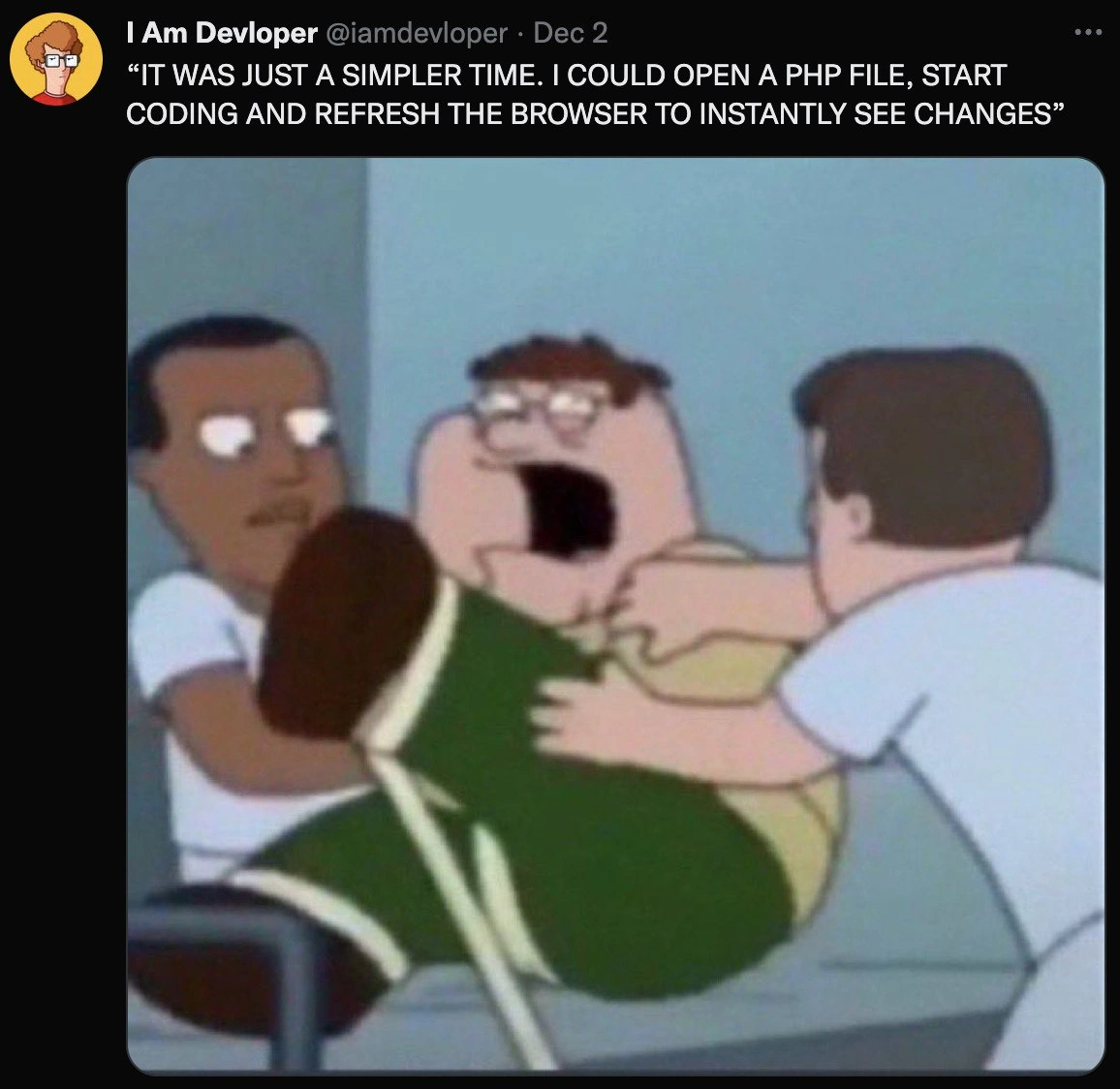
The meme’s image is from Family Guy, featuring the character Peter Griffin screaming while being rushed on a hospital gurney. This is a goofy dramatic scene used here to symbolize a developer’s freak-out. Why that image? It exaggerates the feeling of panic or overwhelm a coder might get when something that used to be simple now feels ridiculously complicated. It’s as if the developer is shouting, “Why is this so painful now?!” The attendant characters pushing the gurney could represent the modern tools and processes dragging the developer along whether he likes it or not. One attendant’s face is blurred out – that’s just part of the meme format or an artifact of the screenshot, but it adds to the chaotic vibe. Overall, the combination of the tweet text and the cartoon still creates a relatable developer experience joke. Even if you haven’t seen that exact Family Guy episode, you get the emotion: Peter (the developer) is panicked, just as a dev might be when a simple code change requires battling a complex system.
In short, this meme contrasts a simpler web stack of the past with today’s layered approach. “Legacy” here refers to older technology like a PHP-based site – it might be old-school, but it was straightforward to work with. Modern setups are more powerful and scalable, but they come with build steps and deployment processes that can fray a developer’s nerves. The tweet being screenshotted (a common meme style in tech circles) underscores the point in plain words, and the image drives home the emotional reaction. It’s a fun way of saying: web development used to feel like a quick edit-and-go, and sometimes we really miss that simplicity!
Level 3: When F5 Was DevOps
Back in the early PHP era of WebDev, deploying code felt almost too easy by today’s standards. The tweet in the meme shouts (literally, in all-caps) that it "was just a simpler time" when a developer could edit a PHP file, hit refresh in the browser, and instantly see the changes. No compilation, no pipeline, no waiting. This nostalgic cry hits experienced engineers right in the DeveloperNostalgia. It’s poking fun at how complicated the modern deployment pipeline has become compared to the PHP days. In those days your entire “CI/CD process” was basically saving the file and reloading the page – a far cry from the elaborate Continuous Integration/Continuous Delivery setups we wrestle with now.
“IT WAS JUST A SIMPLER TIME. I COULD OPEN A PHP FILE, START CODING AND REFRESH THE BROWSER TO INSTANTLY SEE CHANGES”
– Tweet by @iamdevloper, emphatically recalling the PHP refresh workflow
In that simpler_web_stack era, a typical website ran on a LAMP stack (Linux, Apache, MySQL, PHP). You’d write server-side PHP code mixed with HTML, upload or save the file in your server’s www directory, and voilà – the next browser refresh showed the updated page. The phrase “refreshing the browser was your entire deployment pipeline” is only slight exaggeration: often there really were no build scripts, no transpilers, no containerization. If you wanted to test a change, you just edited the code and pressed F5 (the browser refresh key). The new code executed immediately on the server and you saw results on the client side right away. DeveloperExperience (DX) was all about instant feedback. In production, some cowboy coders even edited files directly on the server via FTP or Vim; a quick refresh and users got the update. Dangerous? Sure. But straightforward and fast. The meme taps into that TechNostalgia for a time when web development felt like a quick edit-and-play turnaround, no build pipeline or deployment orchestration needed.
Now contrast that with today’s WebDevelopment reality: we have transpilers, bundlers, package managers, dependency graphs, and entire DevOps teams – all just to serve a web page that might say “Hello World.” Modern frontend frameworks (React, Angular, Vue, etc.) and complex backend services have introduced layers of tooling between writing code and seeing it run. For example, you might write JavaScript in JSX or TypeScript (which browsers don’t natively understand) – so you need a transpiler like Babel or TypeScript compiler to convert it. You split your code into dozens of modules and files – so you need a bundler like Webpack or Rollup to smash them into a few optimized scripts. You want the browser to update automatically when you change something – so you spin up a hot-reload server or use HMR (Hot Module Replacement) to push updates. Each of these steps is powerful, but they add delay and complexity. The meme humorously suggests that we’ve built all this fancy machinery to almost get back the convenience we once had by default with PHP’s instant browser reload.
The Family Guy image of Peter Griffin on a gurney, screaming in panic, perfectly dramatizes a developer’s distress in the face of today’s tangled deploy processes. It’s like the modern developer (Peter) being wheeled into the ER, freaking out about why something as simple as seeing their code run has turned into an ordeal. One attendant’s face is even blurred out – a comically absurd detail – much like how faceless and opaque some pipeline errors feel when your build breaks and you’re panicking. The whole scene exaggerates the emotional trauma of dealing with slow build times or broken deploy scripts. It’s a relatableDeveloperExperience for anyone who has waited 10 minutes for a Webpack build or fought with a Jenkins CI error at 3 AM. The meme format itself – a tweet overlay meme combining a tweeted quote with a reaction image – is a staple of DeveloperHumor. Here the tweet carries the nostalgic setup, and the cartoon still delivers the punchline through exaggerated coding life agony.
Seasoned devs chuckle (or maybe groan) at this because we’ve seen both sides: the LegacyCode simplicity of PHP scripts, and the modern “ship a feature” slog involving Git pipelines, testing containers, and deploy queues. The humor bites especially if you’ve ever said, “It worked on my machine, why do I need all these stages to deploy?” It underscores an industry truth: as applications grew more complex and user expectations rose, we traded simplicity for scalability and maintainability – but we also made our day-to-day workflow more convoluted. The image of Peter Griffin screaming is basically every engineer internally screaming when a one-line change involves updating 5 config files, waiting on npm install to finish, and praying the CI/CD doesn’t fail. Pepperidge Farm remembers those simpler times, and so do veteran coders. This meme gets its laugh (and cringe) from that contrast: CodingLife used to feel like a quick joyride; now it sometimes feels like being strapped to a gurney holding on for dear life while the deployment pipeline takes you for a ride.
Description
The image is a screenshot of a tweet by “I Am Devloper @iamdevloper” dated Dec 2. The tweet text, rendered in white all-caps on a black Twitter interface, reads: “IT WAS JUST A SIMPLER TIME. I COULD OPEN A PHP FILE, START CODING AND REFRESH THE BROWSER TO INSTANTLY SEE CHANGES”. Below the tweet, a blurry cartoon still from Family Guy shows Peter Griffin being rushed on a gurney; his mouth is wide open in panic, one attendant’s face is pixel-blurred on the left, and another attendant pushes from the right. Peter wears a yellow shirt and green pants with a white stripe against a dull hospital background. The juxtaposition humorously dramatizes a developer’s distress over modern build pipelines compared to the effortless “edit-and-refresh” PHP workflow, evoking nostalgia among web engineers who now wrangle transpilers, bundlers, and hot-reload servers
Comments
44Comment deleted
2005: Ctrl-S, F5, coffee. 2025: terraform apply → docker build → push to ECR → helm upgrade → ArgoCD sync → wait for Prometheus SLOs, all to change a typo in alt text. Progress, they said
Meanwhile, your junior dev just spent 3 days debugging a webpack config issue that turned out to be a missing comma in a JSON file buried 47 layers deep in node_modules - but hey, at least we have tree-shaking now!
Ah yes, the PHP era - when your entire CI/CD pipeline was Ctrl+S, Alt+Tab, F5. Now we need Docker, Kubernetes, three different config files, a build step that takes longer than the feature implementation, and a PhD in webpack to change a button color. Progress is watching your 'instant feedback' turn into 'compiling... 47 modules transformed' while you contemplate your life choices and wonder if that COBOL job posting is still open
Modern DX: 12 services, HMR that forgets CSS, and a 30‑second 'npm run dev' - all to emulate what F5 on index.php did deterministically
PHP's native hot reload: Ctrl+S, F5, done. Modern stacks: Sacrifice node_modules to the bundler gods for 30-second gratification
PHP era: F5 was CI/CD; today a one-line change needs Docker, Helm, a service mesh quorum, and three cache purges - and Chrome still serves the stale bundle
I miss it so much Comment deleted
Why can't you do it now? Comment deleted
why would you open php file in 2022 :) Comment deleted
Laravel Comment deleted
is that some furry-related slang ? Comment deleted
I wonder if it can be considered Also which language is considered furry-language? Comment deleted
anything that sounds like a furry-related thing is furry-language Comment deleted
Well that's a framework, not a furry-related thing (sadly) Comment deleted
Rust Comment deleted
Almost forgot Comment deleted
Php is alive and well, maybe even More then before Comment deleted
I wrote my website in php, so I can confirm. Comment deleted
Exactly... It still receiving good updates with lots of good changes (if you look at php change log you will notice it's getting so much better with each update...) It's still well and pretty much alive... Comment deleted
its easier than coding a whole new backend Comment deleted
What is so hard to code a backend? Comment deleted
have you tried writing api with c++ ? Comment deleted
Who the fuck writes api with c++ for god sake Comment deleted
I tried once Comment deleted
This is how people become php developers Comment deleted
I tried this after knowing php Comment deleted
wtf Comment deleted
Socket with regex(for http analyzing) and json Comment deleted
https://youtu.be/TggJiOG9mzc Comment deleted
Won't it automatically refresh and show changes with node watch? Comment deleted
hmr ⚡ Comment deleted
tbh i literally do that for my life Comment deleted
now virtually every website uses 1000 proprietary Javascript libraries... I have to use a proxy that wgets file content and sends them to me on mail as to not run any propietary software on my machine... Comment deleted
touch grass bro Comment deleted
Touching grass won't make you money silly Comment deleted
neither will wgeting html files Comment deleted
Proprietary JavaScript? 🤔 Comment deleted
Simply — Java script Comment deleted
quit this social network, the server is proprietary Comment deleted
telegram isn't a website, so it doesn't count ;) Comment deleted
lol Comment deleted
at least touching grass is great for one's health and using wget is not Comment deleted
And it's fast and backward compatible enough. Comment deleted
But that's more of a femboy language Comment deleted