Skip to content
DevMeme
2837 of 7435
Neofetch on Nokia N900: embedded Linux CLI nostalgia on vintage slide-out phone
EmbeddedSystems Post #3132, on May 19, 2021 in TG

Neofetch on Nokia N900: embedded Linux CLI nostalgia on vintage slide-out phone

Why is this EmbeddedSystems meme funny?

Level 1: Old Phone, New Tricks

Imagine you found an old smartphone in your drawer – one with a little keyboard that slides out. Instead of throwing it away, you decide to give it a new life. You install a tiny version of the same kind of software that runs on laptops and servers (that’s Linux). Now this old phone is acting like a small computer, showing text on the screen that tells you all about itself.

It’s a bit like taking a dusty old toy robot and reprogramming it to do a new dance. The phone was never meant to run this new software, so it’s kind of funny and cool that it actually works. On the screen, there’s even a fun little picture made of text characters (like art made out of keyboard symbols) and a list of what’s inside the phone – kind of like the phone introducing itself: “Hi, I’m Nokia N900, I have a 600 MHz brain and 256 MB of memory!”.

The person who did this is clearly very proud and happy, kind of how you feel when you manage to get an old toy working again. The glowing green keyboard behind the phone and the techy drawing under it make it look like a scene from a science project. The joke or fun of this picture is really in the surprise: Who knew an old phone could do that? It makes people smile because it shows that with some skill and effort, even outdated gadgets can learn new tricks.

Level 2: Pocket Terminal Throwback

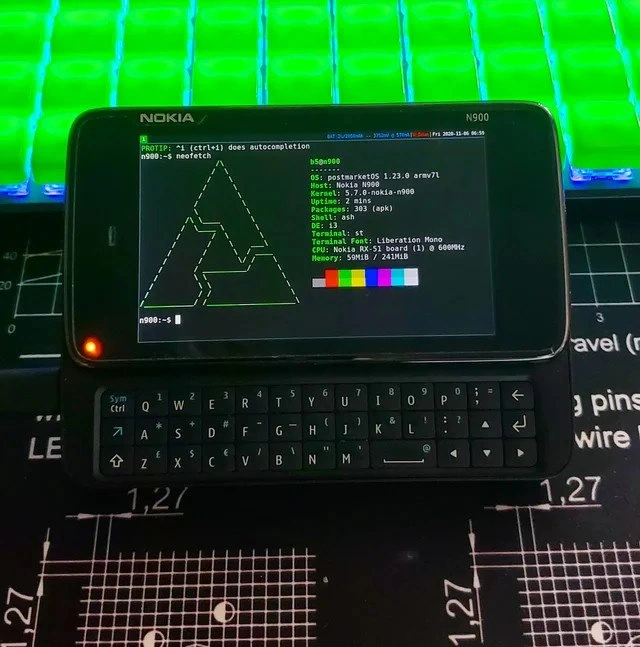
What’s going on here? We have an old smartphone – the Nokia N900 – running a full Linux command line interface. The N900 was a phone released around 2009 that was famous among geeks for having a slide-out QWERTY keyboard and running a Nokia-modified Linux OS called Maemo. In this image, someone has replaced the original software with postmarketOS, a modern Linux distribution for mobile devices. The screen shows the output of a tool named Neofetch, which prints out system information in the terminal alongside a cool ASCII art logo. Essentially, it’s showing off the phone’s tech specs (like OS version, kernel, CPU, memory) in a hacker-friendly way.

Let’s break down the details one by one:

  • Nokia N900: This is the device in the picture – a chunky old phone with a slide-out keyboard. Back in the day, it was the hacker’s phone because it ran a real Linux-based OS. Think of it as a tiny computer that could also make calls. Seeing it now is a dose of nostalgia – it’s like spotting a vintage gadget that was ahead of its time.
  • postmarketOS 1.23.0 (armv7l): postmarketOS is a Linux operating system you can install on smartphones (especially those that are no longer supported by their manufacturers). The “armv7l” part indicates the CPU architecture – an older 32-bit ARM processor. This OS is based on Alpine Linux (that’s why the package manager is apk and not the Android kind of “apk” – pure coincidence in naming). The goal of postmarketOS is to give old phones a Linux life for years, instead of them collecting dust.
  • Kernel 5.7.0-nokia-n900: The kernel is the core of the operating system – version 5.7.0 is quite recent relative to this meme’s date (2021). The fact that it says “nokia-n900” means this kernel was compiled or configured specifically for the N900’s hardware. Getting a modern kernel to run on an eleven-year-old phone is a big achievement and shows active community support. It ensures the phone’s hardware (like its CPU, camera, keyboard, etc.) works with the new OS.
  • Neofetch output: Neofetch is a popular CLI tool among tech enthusiasts that prints out system info with a bit of style. In the output, you can see details:
    • OS: postmarketOS 1.23.0 armv7l – as discussed, the operating system and architecture.
    • Host: Nokia N900 – identifies the device model.
    • Uptime: 3 mins – the system has been up (running) for only three minutes, meaning it probably just booted up recently (likely for this demonstration).
    • Packages: 339 (apk) – there are 339 software packages installed via Alpine’s package manager (apk). This number being low tells us the system is minimal, with only essential programs installed.
    • Shell: dash – the shell is the program that interprets your commands in the terminal. dash is a lightweight shell (smaller than the typical Bash shell), often used in embedded or resource-limited environments because it uses less memory.
    • DE: l3 – “DE” stands for Desktop Environment. Here it’s showing l3, which isn’t a common desktop environment like GNOME or KDE. It could be a very minimal interface or window manager. Possibly, it indicates the device is using something extremely lightweight (or even just a command-line with minimal GUI).
    • Terminal: st – this indicates the terminal emulator program. st is a simple, efficient terminal program from the suckless tools (known for ultra-minimalist software). This choice again emphasizes that the user kept things lightweight.
    • Terminal Font: Liberation Mono – the font used in the terminal is Liberation Mono, a clean monospaced font. That’s a nice aesthetic choice to make text easily readable on the small screen.
    • CPU: Nokia RX-51 board (1) @ 600 MHz – The N900’s processor is being identified. “RX-51” is the board name of the N900. It’s a single-core CPU running at 600 MHz – by today’s standards, incredibly slow, but for 2009 it was decent for a phone. Highlighting this spec is part of the fun: this tiny underpowered device is running a modern OS against the odds.
    • Memory: 50 MiB / 241 MiB – This shows that out of ~241 MiB (megabytes) of RAM total, only 50 MiB is currently used. The N900 has about 256 MB of RAM in total. 50 MB usage is impressively low; it means the system is currently very idle or has only basic services running. It underlines how lean the setup is (no heavy graphical stuff eating memory).
    • The row of 8 colored blocks – Neofetch often prints a palette of the terminal’s colors to show off the color theme. It’s mostly decorative. Here, it’s also a testament that even on this phone, the terminal supports color output properly. The colors pop nicely on the N900’s screen.
  • “PROTIP: ^I does autocompletion” – This line at the top of the terminal is likely a custom message or part of a login script. It’s telling the user that pressing Ctrl + I acts as the Tab key for autocompletion. On a normal PC keyboard, you press the Tab key to auto-complete commands or file names in the terminal. The N900’s small keyboard might not have a dedicated Tab key, so the tip is saying: hey, if you need Tab, use the Ctrl+I shortcut. This is a quirky little detail that reveals the hands-on nature of using a phone as a Linux terminal – you adapt to the hardware limitations with clever workarounds.
  • Slide-out keyboard and landscape screen: Because the N900’s keyboard slides out, the screen is in a wide (landscape) orientation, which is perfect for a terminal view. This is a big reason the N900 was beloved by CLI fans – you can actually see a lot of text and type comfortably, compared to tiny on-screen keyboards.
  • Background and vibe: The device is sitting on what looks like a printed circuit board blueprint mat (the kind of desk mat used when working with electronics). In the background, there’s a neon-green glowing mechanical keyboard. These surroundings give off a hacker/maker vibe. It’s like the person behind this is saying, “I love tech and tinkering.” The bright green backlight is almost cyberpunk – it’s the stereotypical “coder’s cave” lighting. All this paints a picture: this project was done by someone who’s really into computing gadgets and isn’t afraid to get their hands dirty with custom hardware/software setups.

For a junior developer or someone newer to this scene, the meme is basically celebrating a DIY project: running a full Linux on an old phone. It’s showing the intersection of MobileDevelopment and classic Linux CommandLineInterface culture. The humor or feel-good factor comes from the sheer geekiness of it. It’s not making fun of a bug or an error – instead, it’s joyously showing off a hack.

Why is that cool or funny? Because normally, phones run their own operating systems (Android, iOS, or in the N900’s case originally Maemo) and they hide all the Linux nitty-gritty from the user. Here, someone has flipped the script: the phone is the Linux computer. Imagine using a phone like you’d use a Raspberry Pi or a Linux laptop – that’s what’s happening. It tickles techies because it’s a bit impractical (the device is old and underpowered) but it’s very cool from a tech standpoint. It’s like hot-rodding a car: you don’t need to do it, you do it for the thrill and bragging rights.

So in simpler terms: Embedded Linux fans love to put Linux on any hardware imaginable. This meme is one of those “Look, we put real Linux on this vintage gadget!” moments. It resonates with anyone who’s experimented with old electronics or installed custom firmware on devices. If you’ve ever installed a custom ROM on an Android phone or flashed Linux onto an old PC, you know the small triumph it is when the system boots and shows you that command prompt. This picture captures that triumphant moment – the neofetch output is basically the victory flag.

Level 3: Slide to Root

This meme hits all the right nostalgia nodes for seasoned Linux and mobile enthusiasts. It shows a Nokia N900 – a legendary 2009 era smartphone – resurrected to run a modern embedded Linux OS. With its slide-out keyboard and a full Linux terminal on-screen, it’s basically a pocket-sized dev machine. The owner has fired up neofetch, a CLI tool that proudly displays system info and a shiny ASCII art logo (here a triangular Alpine/PostmarketOS logo). For veterans, this image screams “Look, I put mainline Linux on this old beast!” – a badge of honor in the EmbeddedSystems and Hardware hacking community.

Notice the fine details that make experienced devs smirk in appreciation:

  • OS: postmarketOS 1.23.0 – This is a niche Linux distro designed for phones after their official support ends (the name literally implies giving phones a life post-market). Running that on an N900 means the community has kept this device alive well into the 2020s. It’s a nod to the open-source tenet that no hardware is too old if you can compile a kernel for it.
  • Kernel: 5.7.0-nokia-n900 – That’s a relatively modern Linux kernel (5.x series) customized for the N900’s hardware. Back in its day, the N900 ran a forked older kernel for Maemo (Nokia’s Linux-based OS). Seeing mainline kernel support now is like finding out a classic car model just got brand new engine parts. It hints at serious MobileDev tinkering: volunteers writing drivers and patches so this 600 MHz ARMv7 CPU (codename RX-51) can run a current kernel. This is hardcore because embedded Linux on proprietary phone hardware often means reverse-engineering and community-maintained code. It’s a triumph of hobbyist determination over corporate abandonment.
  • Shell: dash – Instead of the usual bash, they’re using dash, a lightweight POSIX shell. For graybeards, this is a clue about minimalism: dash uses much less memory, perfect for a device with only 256 MB of RAM. It’s the same shell Ubuntu uses for system scripts for speed – an old-timer knows that using dash means you’re squeezing every drop of efficiency from the machine.
  • Memory: 50 MiB / 241 MiB – Only ~50MB used after boot! In an age where desktop Chrome can eat gigabytes, seeing Linux idle at 50MB is downright adorable. This resonates with anyone who remembers the days of optimizing for low memory. It’s a humblebrag: “Look how lean my system is!” It also subtly says that postmarketOS (based on Alpine Linux) is super minimal – it runs on almost microcontroller-level resources. This is a throwback to when we wrote code with memory constraints always in mind.
  • Packages: 339 (apk) – The package count and the (apk) hint at Alpine Linux’s package manager. Only 339 packages installed – that’s a barebones system, likely just the essentials (no bloated UI here). It’s a far cry from a typical Ubuntu install with thousands of packages. Experienced devs see this and nod: “Yup, they probably built this system with BusyBox and just enough libs to get a terminal and Wi-Fi.” It’s minimalist computing at its finest.
  • DE: l3 – Possibly a minimalistic desktop or window manager (not a full GNOME or KDE, that’s for sure). It might even be a stub value, implying no real desktop environment, just a lightweight interface. The meme-maker isn’t here to use a fancy GUI – the CommandLineInterface is the star of the show.
  • Terminal: st – The suckless terminal (st), known for being ultra-lightweight and simple. Using st on an N900 is a power move: it’s like swapping every luxury feature for raw performance. It tells senior Linux users that this person has carefully chosen each component for low footprint and efficiency. It’s a nod to the Unix philosophy of using small, purpose-built tools.
  • PROTIP: ^I does autocompletion – Here’s an Easter egg on the terminal prompt: ^I is Ctrl+I, which is the ASCII code for the Tab key. On the N900’s tiny keyboard, there’s likely no dedicated Tab key, so the user discovered that CTRL+I triggers tab-completion. This little hack is the kind of trivia only a hands-on tinkerer would know. It adds a bit of hacker humor: even autocompletion is retrofitted on this device via an obscure key combo. It’s half TerminalHumor and half “I overcame the quirk of this hardware!”
  • The physical context: The N900 rests on a blueprint-patterned desk mat with circuit diagrams, and behind it glows a neon-green mechanical keyboard. The whole scene screams “enthusiast at work”. The blueprint mat suggests hardware hacking in progress, and that radioactive-green backlight on the keyboard is pure geek aesthetics. It’s like the hacker equivalent of mood lighting. An experienced dev sees this and feels right at home – it’s practically a shrine to tinkering.

All these elements together form a love letter to embedded Linux culture. The humor isn’t a punchline; it’s the sheer nerdy joy of doing something so impractical yet so cool. It’s funny in the way that only insiders get: running neofetch on a phone from 2009 is utterly unnecessary – but that’s the point. It’s a celebration of freedom and skill: “I can, therefore I did.” Veteran devs chuckle because they’ve seen this pattern before – technology comes full circle. Today’s superphones hide their Linux under glossy UIs and locked bootloaders; but here someone ripped off that veneer and said, let’s party like it’s 2009. It’s both a Hardware hack and an OperatingSystems experiment, a reminder that with enough determination (and an unlocked bootloader), even a “dead” phone can run the latest Linux. It’s equal parts absurd and admirable – the hallmark of great tech humor.

Description

A black Nokia N900 slider phone is shown with its physical QWERTY keyboard extended and a Linux terminal filling the landscape-oriented screen. The terminal line reads “PROTIP: ^I (ctrl+i) does autocompletion” followed by the prompt “n900:~$ neofetch”. Neofetch displays an ASCII triangular logo and system info: “OS: postmarketOS 1.23.0 armv7l”, “Host: Nokia N900”, “Kernel: 5.7.0-nokia-n900”, “Uptime: 3 mins”, “Packages: 339 (apk)”, “Shell: dash”, “DE: l3”, “Terminal: st”, “Terminal Font: Liberation Mono”, “CPU: Nokia RX-51 board (1) @ 600 MHz”, and “Memory: 50 MiB / 241 MiB”, plus a row of 8 colored blocks. The device rests on a blueprint-style desk mat with faint white circuit diagrams, and a bright neon-green backlit mechanical keyboard glows in the background. Visually, the image celebrates hacking a legacy mobile device to run a full ARM Linux stack, reflecting embedded Linux tinkering, CLI culture, and hardware nostalgia
Comments

6
Anonymous ★ Top Pick My 600 MHz N900 boots PostmarketOS in 50 MiB, yet our Electron “Hello, World” still demands a t3.medium - turns out Moore’s Law didn’t stall, our frameworks just got hungry
  1. Anonymous ★ Top Pick

    My 600 MHz N900 boots PostmarketOS in 50 MiB, yet our Electron “Hello, World” still demands a t3.medium - turns out Moore’s Law didn’t stall, our frameworks just got hungry

  2. Anonymous

    When your phone runs a real Linux distro but your laptop runs Electron apps, you start to question which device is actually the computer and which one is just pretending

  3. Anonymous

    When your 2009 Nokia runs a more modern Linux kernel than your company's production servers, and the 241MB of RAM is still enough to avoid Kubernetes. Sometimes the best container orchestration is just not needing containers at all - this N900 proves that real engineers can make a full OS sing on hardware that predates the term 'cloud native' by half a decade

  4. Anonymous

    A 600MHz N900 with 241MB runs postmarketOS and st just fine - remind me why our “native” chat client needs 2GB and an auto-updating Chromium to render a thumbs-up?

  5. Anonymous

    600MHz and 241MB RAM - still snappier than our Electron settings dialog; latency improves a lot when your init isn’t a webview

  6. Anonymous

    Cross-compiling? That's for interns. Real embedded legends natively build kernels on 128MB nostalgia silicon

Use J and K for navigation