Skip to content
DevMeme
2836 of 7435
Arch Linux tiling desktop packed with terminals, stats, neovim, and ASCII skyline art
CLI Post #3138, on May 19, 2021 in TG

Arch Linux tiling desktop packed with terminals, stats, neovim, and ASCII skyline art

Why is this CLI meme funny?

Level 1: Fancy Desk, No Homework

Imagine a student who spends the whole afternoon organizing and decorating their study desk instead of actually doing their homework. They carefully arrange their pencils, put up a cool poster, set up a fancy lamp, and even add some fun stickers and drawings. By the end of the day, the desk looks amazing – it’s super neat, colorful, and shows off their personality. But then you notice… their homework sheet is still blank! They got so caught up in making the workspace perfect that they didn’t get any schoolwork done.

This meme is funny for the same reason. The computer screen in the picture is like that over-decorated desk. The person has spent hours setting up a really fancy computer environment – customizing every little detail to look cool and unique (they even have art and graphs all over the screen). It’s clearly a lot of work to make it look that way, and you can tell they’re proud of it. But the joke is that while they were busy doing all that customizing, they probably didn’t do much actual work (like coding or writing documents – the stuff the computer was supposed to be used for). We find it humorous because we all recognize that feeling: sometimes we focus on the fun, pretty prep work as an excuse to delay the real work. The end result might be a fantastic setup, but, just like the awesome desk with no homework done, nothing has actually been accomplished on the real task at hand.

Level 2: Tiling and Tinkering

Let’s break down what’s actually on this screen, and why a Linux enthusiast would cram all this into one desktop. Arch Linux is a popular Linux distribution among power-users because it’s minimalist and highly customizable. You start with almost nothing and build up your system exactly how you like. This naturally attracts tinkerers who enjoy configuring every detail. Here, the user is running a tiling window manager called AwesomeWM. Unlike the typical Windows or macOS desktop where windows float and overlap freely, a tiling window manager automatically arranges windows in a grid (tiles) that fill the screen without overlapping. This gives a very efficient, keyboard-driven workflow. AwesomeWM is configured by writing Lua code, so the user is literally programming their desktop behavior. In the lower-left, we see Neovim (a modern, extensible spin-off of the classic Vim text editor) opened to a Lua configuration file. They’re editing settings for how many windows should be in the “master” area vs. the “stack” (columns) in their layout. This means our intrepid customizer is tweaking how new windows are arranged – for instance, whether one big window is on the left and smaller ones on the right, or two columns of equal size, etc. This level of control is catnip to a sysadmin or developer who wants their workflow just so.

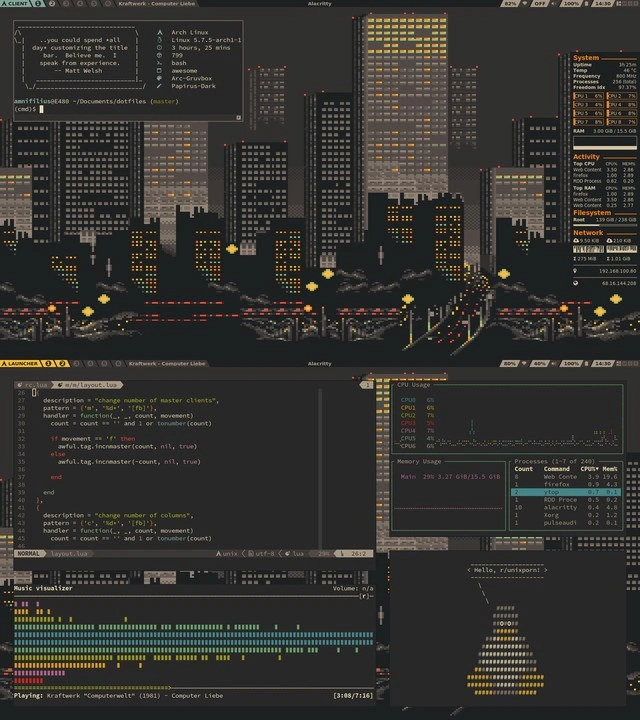
Now, look at all the terminals and info panels. In the top terminal, we see a program called neofetch displaying system info alongside a wide ANSI-art city skyline. Neofetch is a script that prints out your OS name, kernel version, uptime, number of packages, and more, often with an ASCII logo or image – it’s basically a way to say “Hey, check out my system!” It’s common on forums for showing off your setup (here it lists “Arch Linux”, kernel 6.2.5, 7h 55m uptime, 2083 packages, and details like the Arc-Gruvbox theme and Papirus Dark icons). That skyline isn’t a typical wallpaper; it’s actually artwork rendered in text (ANSI escape codes produce colored characters that form a picture). So instead of a normal image, they have a terminal window stretching across the top with pixelated skyscrapers drawn in characters – very old-school cool. Text art like this harks back to the BBS and early Unix days, which gives the setup a retro hacker vibe.

On that same top bar, there’s the output of cowsay: a goofy command that prints an ASCII art cow with a speech bubble containing any message you want. The message here is a quote by Matt Welch joking about spending all day on Arch Linux customization at the expense of real work. By making the cow “say” this, the user is joking at their own expense. It’s like them saying, “Yes, I know I’m overdoing it, haha.” This self-awareness is part of the humor – the person built this amazing environment and is the first to admit it might be a huge time sink.

On the right side of the screenshot, there’s a text-mode dashboard that looks like either htop or a fancier tool called bpytop (also known as btop). These are command-line system monitors. They show real-time stats for CPU usage (those bars and graphs per CPU core), memory usage, disk usage, and network activity. Essentially, the user can watch the System section as it updates live, almost like having a car’s dashboard gauges for their computer’s performance. Sysadmins often keep these open to see if anything is hogging resources. It’s both useful and, let’s face it, a bit hypnotic to watch if you love systems tuning. Having this visible all the time is a hallmark of a true Terminal Life enthusiast – they treat their desktop like a mission control panel. The joke here is that a person who is not even running heavy workloads might still constantly observe their system metrics, just because they can. It’s a form of digital tinkering: “Oooh, CPU core 3 spiked a bit, interesting…” even when nothing critical is happening.

In the lower half of the screen, we see multiple small terminal windows tiled neatly. One is running another instance of htop or similar, showing a process list (we can see columns like PID, CPU%, MEM% – that’s definitely htop output). Maybe the user wants one view per purpose: one for overall system graphs, one for detailed processes. Another window is running ncmpcpp, which is a text-based music player interface for MPD (Music Player Daemon). This is how the user is playing music (in this case, a song by Kraftwerk titled “Computer Liebe” from 1983). Ncmpcpp shows the playlist progress “[318/716]” and even has a music visualizer mode – those colored bars that bounce with the music at the bottom are essentially an equalizer display drawn in text. Playing a track called “Computer Love” on a tricked-out computer setup – that’s some geek humor and possibly a deliberate choice to fit the theme. It’s common for these hobbyist setups to integrate music playback into the terminal, because why use a flashy GUI music player when a cool CLI one looks better in a screenshot?

Finally, in the bottom-right, there’s a tiny window that says “Hello, /r/unixporn!” with an ASCII art image (described as a bottle shape made of characters). /r/unixporn is the name of a community (a subreddit on Reddit) where people share screenshots of their *nix (Unix-like OS) desktops, especially when they’ve customized them heavily. Despite the name, it’s all safe-for-work – the “porn” just means it’s eye-candy for Unix lovers. By printing that greeting in the terminal, the user is basically addressing fellow enthusiasts directly, saying “Hi, check out my new rice!” The ASCII bottle might be just a fun piece of art or a personal signature. ASCII art and dotfiles (configuration files) go hand-in-hand with this culture; people often include little art or messages in their terminal setup for flair. Dotfiles are those hidden config files (often beginning with a dot, like .bashrc or, in this case, perhaps the AwesomeWM config or an .nvimrc) that control the behavior and look of your system and applications. Many users put their dotfiles on GitHub to show off or to sync their setup across machines.

So, for a junior developer or someone new to this: what’s the big picture? This meme shows a hardcore command-line interface workflow. The person is running a minimal graphical environment (no Start menu or desktop icons in sight) and instead lives in terminals. They’ve customized the visuals not with wallpapers and mouse cursors, but with terminal colorschemes, ASCII art, and real-time text-based widgets. Every tool shown – Neovim for coding, htop/bpytop for monitoring, ncmpcpp for music, etc. – is keyboard-driven and highly configurable. This is the kind of setup you often see from system administrators or developers who are very comfortable with text UIs and want to maximize screen use and automation. It’s also, frankly, a hobby. Just like someone might spend weekends tuning a car or painting miniatures, Linux folks often spend countless hours tweaking their system (“ricing” it) to be uniquely theirs. It’s both practical (fast, no-frills, everything at your fingertips) and a form of self-expression. But as the quote hints, it’s easy to get so into it that you end up configuring your system more than actually using it for work. In summary, this screenshot is a perfect storm of Linux customization: an Arch Linux base (slim and customizable), a tiling window manager (flexible but requiring effort to configure), lots of terminals (favored by pros for efficiency), and custom art and themes (showing off personal style). It’s basically a digital control room that says, “I know my system inside-out, and I want it exactly my way” – which is both awesome and a little humorous when taken to this extreme.

Level 3: Procrastination by Configuration

“… you could spend all day customizing Arch Linux but have no time to get work done” – Matt Welch
For any seasoned developer or sysadmin, that tongue-in-cheek cowsay quote hits painfully close to home. This meme showcases an Arch Linux power-user’s dream desk: a meticulously riced desktop where every pixel and process is tuned to perfection. The humor comes from the almost absurd level of CLI customization on display and the self-aware acknowledgment that all this effort might be a form of procrastination. The user has essentially turned their workspace into a retro-futuristic command center – complete with an ANSI art city skyline banner, a live dashboard of system vitals, and even a terminal music visualizer dancing to Kraftwerk. It’s an impressive demonstration of technical prowess and aesthetic obsession, but the punchline is clear: when does any actual work happen in this digital cockpit?

At a deeper level, this meme is poking fun at the “BTW I use Arch” culture and the endless rabbit hole of tuning your development environment. Arch Linux is famously DIY – you start with a barebones system and add exactly what you want. For veteran developers, there’s a familiar trajectory here: you start optimizing your tools for productivity, but somewhere along the way it becomes productivity theater. Instead of writing code or fixing servers, you’re benchmarking fonts, tweaking color schemes, and scripting window layouts. The screenshot shows an AwesomeWM tiling window manager with custom Lua configs, multiple htop-style monitors, and a fully decked-out Neovim setup. It’s the kind of elaborate setup many of us built in our younger years, spending hours on dotfiles and obscure plugins in the name of efficiency (or bragging rights). The seasoned perspective recognizes the satire: all those 2,083 installed packages and custom scripts might make you feel like a 1337 hacker, but they can easily consume more time than they save.

Why is this so relatable among experienced devs? Because we’ve been there – chasing the perfect environment. The rice culture (a term for unapologetically customizing your desktop’s looks) promises ultimate personalization. You’ll hear justifications like “I’m streamlining my workflow” or “once I set this up, I’ll code so much faster”. In reality, each tweak leads to another: new Zsh shell prompts with fancy icons, Gruvbox color themes that must match across editor and terminal, tiling layouts that require writing Lua functions to adjust master/stack ratios. It’s a never-ending game of one-upmanship, often showcased on forums like r/unixporn where users share screenshots to outdo each other’s aesthetic. The meme’s author even greets “Hello, /r/unixporn!” in the screenshot, essentially saying: “Look at my masterpiece!” – and indeed it’s gorgeous in a nerdy way. But the Matt Welch quote in the corner lays bare the trade-off: all those late-night hours spent tuning AwesomeWM keybindings and crafting ASCII art startup messages might not move the project deadline any closer.

There’s also an implicit nod to the senior vs. junior mindset. A senior engineer viewing this might chuckle and recall the time they maintained a finely-honed vim config or an exotic window manager setup – until a critical production issue or a packed schedule forced them back to a vanilla setup that “just works.” Over-customization can backfire: every update risks breaking your carefully arranged castle of configs (especially on a rolling-release distro like Arch). We see a Kernel 6.2.5 and only ~8 hours of uptime – a hint that maybe a tweak or update required a reboot earlier that day (Arch users know the ritual of frequent updates). Seasoned ops folks have learned that when you’re firefighting an outage at 3 AM, a simple, familiar environment beats a beautifully customized one that might behave unpredictably. In other words, the experienced perspective on this meme is equal parts admiration and amused caution. We admire the skill and passion it takes to build such an immersive terminal-based world, but we also smirk because we know the trap: polishing your development environment can become an end in itself. It’s the classic engineering inside joke – “Works on my machine? Well, my machine is a bespoke work of art!” – impressive, but maybe a bit impractical when time is of the essence.

Description

Screenshot of a dark-themed tiling window-manager workspace on Arch Linux. Across the top, an Alacritty terminal shows a full-width ANSI pixel-art cityscape; in the corner a cowsay bubble reads “... you could spend all day customizing Arch Linux but have no time to get work done - Matt Welch”, and a neofetch panel lists: “Arch Linux”, “Kernel: 6.2.5-arch1-1”, “Uptime: 7h 55m”, “Packages: 2083”, “Shell: zsh”, “WM: awesome”, “Theme: Arc-Gruvbox”, “Icons: Papirus Dark”. To the right, a text-mode dashboard (bpytop/htop style) shows live CPU, memory, filesystem and network graphs. The lower half hosts several tiled terminals: Neovim editing a Lua file that changes master/column counts in awesome-wm, an htop graph of process load, an ncmpcpp music visualizer playing “Kraftwerk - Computer Liebe (1983) [318/716]”, and a small window printing an ASCII art bottle under the heading “Hello, /r/unixporn!”. The layout highlights heavy CLI workflow, dotfile tinkering, real-time monitoring and rice culture appreciated by power-users and system administrators
Comments

6
Anonymous ★ Top Pick I’ve spent six hours wiring Lua into awesome-wm so ⌘-Shift-Alt-P tiles Neovim under an ANSI skyline - by my ROI model the yak breaks even just before end-of-life for the kernel I compiled this morning
  1. Anonymous ★ Top Pick

    I’ve spent six hours wiring Lua into awesome-wm so ⌘-Shift-Alt-P tiles Neovim under an ANSI skyline - by my ROI model the yak breaks even just before end-of-life for the kernel I compiled this morning

  2. Anonymous

    When you've spent so long debugging production that your monitoring dashboard starts looking like the city you haven't seen since the last major incident

  3. Anonymous

    When your system monitoring dashboard is so over-engineered it renders an entire ASCII cityscape, you know you've achieved peak terminal rice. The buildings' lights are probably tied to CPU load - because why just display metrics when you can turn your infrastructure monitoring into cyberpunk art? This is what happens when a sysadmin discovers regex, tmux, and an unhealthy obsession with making htop look like Blade Runner. The real question: does the skyline flicker when you run `npm install`?

  4. Anonymous

    Terminal riced to perfection: zero merge conflicts, but resizes still trigger full outages

  5. Anonymous

    Vertical scaling works flawlessly in AwesomeWM: incmaster++ and throughput rises - shame it’s the only place in the org where capacity planning doesn’t require a steering committee

  6. Anonymous

    Stakeholder asked for horizontal scaling; I shipped it where I could guarantee zero regressions: AwesomeWM - Mod+h maps to awful.tag.incncol(1). Microservices still a monolith, but my terminals autoscale beautifully

Use J and K for navigation