
Skip to content
DevMeme
4623 of 7435
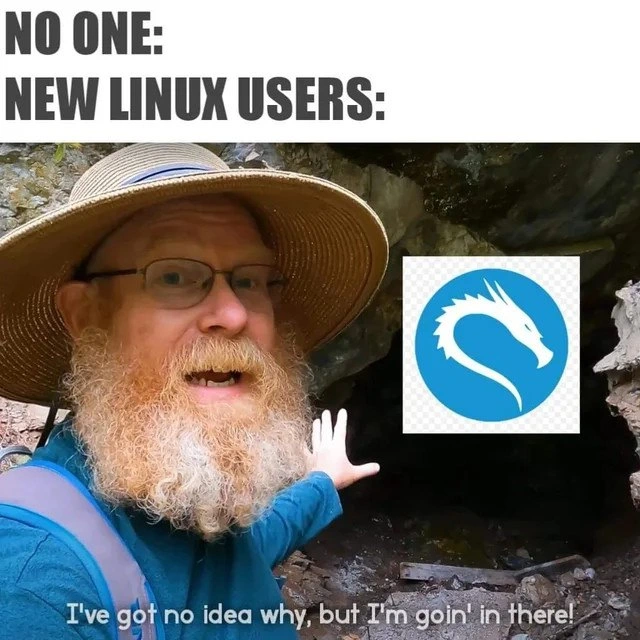
New Linux users diving headfirst into Kali's dark penetration-testing cave
OperatingSystems Post #5071, on Dec 8, 2022 in TG

New Linux users diving headfirst into Kali's dark penetration-testing cave

Why is this OperatingSystems meme funny?

Level 1: It Looks Cool

Think of it like a kid who just learned about bicycles and immediately wants to ride a motorcycle because it looks awesome. The kid has no idea how a motorcycle works or the risks involved, but it’s shiny and exciting, so they say, “I don’t know why, but I’m going for it!” This meme is the computer version of that. A newcomer hears about a super cool hacker program (Kali Linux) and sees its fierce dragon logo (so cool!). They don’t really know how to use it or what they’ll find inside, but it just looks and sounds amazing. So, like an explorer drawn to a mysterious cave just because it promises adventure, the new user jumps right in.

It’s funny because we can all recognize that feeling of curiosity and excitement overpowering caution. The new user doesn’t stop to think, “Hmm, maybe I should learn a little more first.” They just see something that looks cool and adventurous and say, “Why not?!” We laugh because it’s a harmless poke at that eager, innocent mindset – doing something big and complicated mostly because it looks cool, not because you’re ready for it. It’s an endearing kind of mistake, and who knows, maybe they’ll learn a lot from the adventure!

Level 2: Kali Linux 101

Let’s break down why this scenario is well-known in Linux circles. Linux comes in many flavors called distributions (distros) – each is essentially the same core operating system (the Linux kernel) packaged with different software and settings. There are beginner-friendly distros like Ubuntu or Linux Mint that prioritize ease of use, with helpful user interfaces and safe defaults. And then there’s Kali Linux – a distribution specially made for cybersecurity professionals and penetration testing (which means legally hacking into systems to find weaknesses). Kali is loaded with powerful security tools: for example, Nmap for scanning networks, Wireshark for sniffing data packets, and Metasploit for exploiting vulnerabilities. It’s like a Swiss-army knife for hackers and security auditors.

Now, the funny part is when new Linux users (think of someone who maybe just left Windows or macOS and is curious about this “open-source thing”) decide that Kali should be their very first Linux experience. This often happens because Kali has a sort of mystique around it – YouTube videos, hacking tutorials, or Hollywood movies show flashy terminals on Kali, so newbies go “Wow, that’s the one I need to be a hacker!” They might not realize Kali is intended for experts and is not optimized for day-to-day beginner use. For instance, Kali might not have certain convenience tools pre-installed or might assume you’re comfortable using the command-line interface (CLI) for almost everything. The CLI is that text-based interface where you type commands — super powerful, but a bit intimidating if you’ve only ever used graphical windows and mouse clicks.

The meme text “No ONE:” followed by nothing, and then “NEW LINUX USERS:” sets up a common joke format. It means nobody is suggesting this or asking for it, yet new users spontaneously do it anyway. In other words, without anyone telling them to, these beginners jump into Kali. It’s poking fun at how unprovoked and universal this behavior seems to be. No experienced person would recommend Kali as a starter OS (in fact, seasoned folks usually advise against it for newcomers), yet newbies still gravitate to it.

In the image, the bearded man in a sun-hat with a backpack looks like an adventurer stumbling upon a cave. The cave entrance is dark and a bit scary – that’s Kali, the unknown Linux distro full of complex tools. Over the cave’s mouth, the meme creator pasted the blue Kali Linux dragon logo. The dragon is a perfect emblem: it symbolizes something powerful and formidable guarding the cave. The man’s expression (excited, a bit nervous) and his hand gesturing inside as he says “I’ve got no idea why, but I’m goin’ in there!” captures the newbie’s mindset. They acknowledge they don’t fully understand what they’re about to do, but the intrigue of Kali is too strong. It’s a mix of curiosity, bravado, and lack of context.

For a junior developer or someone new to Linux, here’s what’s happening:

  • New Linux user – someone who just started exploring Linux – usually should start with an easy system to learn basic commands (ls to list files, cd to change directories, etc.).
  • Kali Linux – a challenging environment meant for security tasks, not for learning basics. It often runs with the user as root (administrator mode), meaning mistakes can be catastrophic (imagine deleting important files without the system saying “Are you sure?” – because as root, it assumes you know what you’re doing).
  • Penetration-testing cave – Kali’s “cave” of tools can be dark in the sense that if you don’t know how those tools work, you might as well be stumbling in the dark. Each tool might require understanding of networking, systems, or programming to use effectively.

The meme is relatable because many of us have experienced that reckless enthusiasm when learning something new in tech. Maybe you remember installing a super stripped-down version of Linux or typing in fancy hacking commands you found online, without fully knowing how they worked. The operating-system curiosity is a great thing – it drives learning – but the meme playfully warns that diving into the deepest end (Kali’s security toolkit) on day one is going to be confusing and maybe a little dangerous. It’s like jumping into an advanced cybersecurity exercise before learning how to navigate files or edit text in Linux. Fun? Possibly. Wise? Not really! 😂

Level 3: Into the Dragon's Den

This meme humorously captures a classic junior sysadmin mistake that seasoned Linux users know all too well. In the Linux world, Kali Linux is a specialized Debian-based distro packed with penetration testing and security tools. It's like the ultimate hacker's toolkit – preloaded with programs for sniffing networks, cracking passwords, and testing system defenses. The joke is that brand-new Linux users, with barely any command-line experience, often get lured by Kali’s “cool hacker” reputation. They dive headfirst into this dark cave of an operating system, running before they can crawl.

Why is this funny to experienced devs? Because Kali is not your typical beginner-friendly Linux distribution. It’s designed for professional cybersecurity work, often run as the root user (i.e., full system privileges) and tuned for offensive security tasks – not daily web browsing or homework. Newcomers impulsively installing Kali as their first Linux experience is an industry in-joke. We’ve all seen the forum posts: “Help, I installed Kali and nothing works!” or “How do I connect to WiFi in Kali?”. It’s analogous to learning to drive by hopping into a Formula 1 race car: theoretically possible, but highly impractical (and a little dangerous!).

The meme’s format itself – “No one: [...]; New Linux users: ‘I’m goin’ in!’” – exaggerates how unprompted and ill-advised this leap can be. No one is asking them to tackle advanced network security, but the new user is so fascinated by the idea of being a “1337 hacker” that they install Kali without understanding what they’re getting into. There’s a touch of “script kiddie” satire here: novices grabbing powerful hacking tools (nmap, Metasploit, Aircrack-ng) without fundamental Linux knowledge. Seasoned folks smirk because they know these newcomers often spend more time wrestling with basic system setup (or trying to exit vim editor 😜) than actually doing any real hacking.

The cave imagery in the meme is spot-on. The bearded explorer (our newbie) standing before a dark cave with the Kali dragon logo over it perfectly visualizes the scenario:

  • The cave represents Kali’s deep, complex environment – full of unknown commands and configuration twists.
  • The dragon (Kali’s logo) hints at danger and elite power lurking inside.
  • The explorer’s excited gesture and caption “I’ve got no idea why, but I’m goin’ in there!” sum up that mix of enthusiasm and ignorance. The new user has heard Kali is “the thing real hackers use”, so they charge in blind.

For senior engineers or pen-testers, the humor cuts close to home. They recall early days when they, or their interns, made the same reckless exploration – enabling all the security tools without knowing how to update a package repository or handle a simple sudo command. They know Kali’s rolling-release model can break things unexpectedly, and running as root means a novice can irreversibly nuke their system with one bad command. Yet, time and again, bright-eyed beginners go “full Kali” on day one. It’s an almost rite of passage in tech: OperatingSystem curiosity outrunning caution. We laugh because we’ve been that person, or mentored that person – boldly venturing into a Linux distro far outside our comfort zone purely because it sounded cool.

Description

Meme with a white header that reads, "NO ONE:" (nothing follows) and beneath it "NEW LINUX USERS:" in bold black capitals. The main image shows an outdoor scene: a bearded person wearing a wide-brimmed straw hat, teal long-sleeve shirt, and backpack stands at a rocky cave entrance, face intentionally obscured. Their left hand gestures toward the darkness. Over the cave mouth floats the blue-circle Kali Linux logo featuring a white stylized dragon. A subtitle along the bottom says, "I've got no idea why, but I'm goin' in there!" The humor plays on newcomers to Linux impulsively installing an advanced security distribution (Kali) despite lacking context - highlighting operating-system curiosity, command-line experimentation, and the allure of penetration-testing tools


Comments

23
Anonymous ★ Top Pick Watching a new hire dual-boot Kali on their daily driver and plug it straight into the prod VPN is the DevSecOps equivalent of spelunking with fireworks - sure, they’ll learn something, but so will the incident-response team
  1. Anonymous ★ Top Pick

    Watching a new hire dual-boot Kali on their daily driver and plug it straight into the prod VPN is the DevSecOps equivalent of spelunking with fireworks - sure, they’ll learn something, but so will the incident-response team

  2. Anonymous

    Twenty years later, they're still in there, maintaining a custom kernel they compiled in 2004 because switching distros would mean admitting the wiki didn't prepare them for systemd

  3. Anonymous

    Ah yes, the classic 'I installed Kali as my daily driver' starter pack. Nothing says 'I understand privilege escalation' quite like running every application as root because you haven't figured out sudo yet. It's the cybersecurity equivalent of buying a Formula 1 car before learning to drive stick - technically impressive hardware, but you're still going to stall it in the Starbucks parking lot while trying to crack your own WiFi password

  4. Anonymous

    Like proposing a monorepo refactor to a legacy COBOL team: zero clue on fallout, but the wiki's your parachute - if you RTFM first

  5. Anonymous

    Choosing Kali to learn Linux is the desktop equivalent of spinning up a public k8s cluster to learn YAML - sure, you’ll learn; the incident report writes itself

  6. Anonymous

    Rookies sprint into Kali like it’s a tunnel to root; the rest of us keep it in a disposable VM because the day DKMS can’t find your kernel headers, your Wi-Fi becomes air-gapped by accident

  7. @Jlerat 3y

    That's because of will of being mothers hackerman, when you have no idea how to grep logs

    1. @endisn16h 3y

      'of cource i do its just cat | grep'

      1. @chupasaurus 3y

        an obvious mistake: not using ripgrep in 2022

        1. @RiedleroD 3y

          an obvious mistake: thinking something is better just because it's newer

          1. @chupasaurus 3y

            It's not about being newer but faster while having more batteries included.

            1. @RiedleroD 3y

              I really doubt it's faster & it's also 5 times the size of grep

              1. @lord_nani 3y

                damn, how can a PC user find more than 15 kb of free memory in 2022

                1. @RiedleroD 3y

                  all I'm saying is that whatever ripgrep is, it's not better for all use-cases

                  1. @lord_nani 3y

                    I dunno, I use import file_tree, for file in file_tree

              2. @chupasaurus 3y

                It runs circles around GNU grep in pretty much every case. Even when you manually whitelist files which ripgrep does by default e.g. in git repos (the batteries, y'know). x2.5 the size (Debian Stable amd64) because you forgot to count libpcre

                1. @RiedleroD 3y

                  both grep and ripgrep depend on libpcre, so it shouldn't count towards package size

                  1. @chupasaurus 3y

                    https://packages.debian.org/bullseye/ripgrep 😁 PCRE2 is optional in ripgrep

                    1. @RiedleroD 3y

                      not on arch linux

  8. @VolodymyrMeInyk 3y

    cuz it’s free

  9. @unknwnOlg 3y

    Linux users after that be like:

  10. @areyoustupido 3y

    The real new linux users be like: Ubuntu, Mint, Zorin

    1. @scout_ca11sign 3y

      What is wrong tho

Use J and K for navigation
