Skip to content
DevMeme
275 of 7435
Network switch rejected until a lace doily makes it home-decor friendly
Networking Post #331, on Apr 24, 2019 in TG

Network switch rejected until a lace doily makes it home-decor friendly

Why is this Networking meme funny?

Level 1: Decorating the Internet Box

Imagine you have a magical box that gives you Wi-Fi or internet – let’s call it an “internet box.” This box might have a few little blinking lights and some wires coming out of it. Now, your grandma comes into the room, sees this box with all its lights and wires, and she frowns 😒. She doesn’t like how it looks sitting next to her pretty lamp and family photos. To her, it’s like seeing a toy left out in a clean living room – it just doesn’t fit the cozy style she loves.

So what does Grandma do? She grabs one of her pretty white lace cloths – you know, the kind with lots of swirly patterns and holes (something called a doily that she usually puts under flower vases 🍯🌸) – and drapes it over the internet box. Now when you look at the box, you don’t see an ugly black rectangle with blinking lights; instead, you see Grandma’s nice decorative lace. Grandma smiles 😇 because to her, the problem is solved: the box isn’t an eyesore anymore. It kind of blends in, almost like she gave the box a little fancy outfit so it wouldn’t mess up the room’s look.

But uh-oh! 😯 By covering the box, Grandma accidentally made a new problem. That box, like many electronic gadgets, gets a little warm when it’s working hard (just like you get hot when you run around). It has tiny vents or holes to let the heat out, kind of like how you might sweat to cool down. The lace cover is now blocking those holes a bit, meaning the hot air gets trapped. Imagine if you put a blanket over a warm fan or over a pot of soup – the heat would stay in and things would just get hotter and hotter. Pretty soon, the internet box might start feeling sick from the heat because it can’t “breathe” properly. It could slow down or stop working until it cools off. And those helpful little blinking lights that tell us the internet box is working? They’re hidden under the cloth now, so you can’t see if something’s wrong.

So in simple terms: Grandma made the box look nice, but also made it harder for the box to do its job. It’s funny because Grandma had good intentions (she just wanted the room to look lovely), but she didn’t realize that the box wasn’t like a regular piece of furniture that you can cover or decorate freely. It’s more like a little machine that needs to stay uncovered to work well. The people who understand how the box works (like maybe you, or any tech-savvy person) would giggle at this situation, because they know the box might misbehave under that doily. It’s a bit like if someone put a fancy rug over an air vent on the floor – sure the vent disappears from sight, but now the air can’t get out and the room won’t get cooled or heated properly.

In the end, the meme is showing a silly example of how trying to make something look prettier can accidentally cause problems. We laugh because Grandma’s solution is so cute and well-meaning, but also completely the opposite of what the poor “internet box” actually needed. It needed to stay cool and have its lights visible, but Grandma cared more about it matching her décor. It’s a playful reminder that sometimes, looks aren’t everything – especially for our important gadgets! And if your Grandma ever tries to cover your Wi-Fi router or game console with a doily, you might want to gently explain to her: “It may look nicer, Grandma, but my device can’t breathe under there!” 😂

Level 2: Pretty vs Practical

Let’s break down the joke for those who might not be familiar with the tech or terms here. In this meme, the black device you see is a network switch. A switch is kind of like a power strip, but for internet/network cables instead of electricity. Imagine you have a bunch of computers, game consoles, or other devices and you want them all to communicate with each other and share the same internet connection. Instead of connecting each device directly to your internet modem (which usually has limited ports), you plug all the Ethernet cables (those yellow cables with chunky clips on the ends, known as RJ-45 connectors) into this switch. The switch’s job is to direct network traffic: it’s the traffic cop making sure data from your PC finds its way to the printer or out to the internet, and vice versa, without collisions. The one in the picture has 48 ports, which is quite a lot – typically something you’d see in an office or a really tech-heavy home. Even the small yellow sticker and the faint “peta” logo hint it might be a specific brand or model (maybe a high-end unit). In short, this box is a critical piece of network hardware that keeps devices connected. ⚡️💾

Now, notice what’s on top of this switch in the bottom-right panel: that white patterned cloth. That’s a lace doily. A doily is a decorative mat, often handmade from crochet or lace, that your grandma might put on coffee tables, armrests, or under flower vases to make things look more elegant or to protect surfaces. It’s thin, lacy, and full of holes in a pretty pattern. In many homes (especially a more old-fashioned or cozy home), you’ll find doilies as part of the decor. They scream “grandma’s house” vibes. 🏡👵 So in the meme, grandma sees the plain switch and thinks, “Oh my, that looks industrial and ugly; let’s pretty it up!” She covers it with a doily to make it fit the rest of the home’s aesthetic.

Why is that funny or problematic? Well, a network switch isn’t like a coffee table or a decorative shelf – it’s a working electronic device. When electronics like this are running, they produce heat. If you’ve ever touched your laptop after playing a game or felt the back of a PlayStation or Xbox after a long session, you know they get warm. Electronics need to “breathe,” which is why they have ventilations slots or fans. Those little slits or holes on the top and sides of the switch are ventilation grilles. They let hot air out and cool air in, so that the components inside don’t overheat. Think of it like the gills on a fish or the vents on a car’s hood. Without them, the heat would stay trapped inside until – worst case – the device gets so hot it shuts itself off (or even breaks).

By placing a doily over the switch, grandma has effectively covered the ventilation holes. It might not seal them completely (the doily is lacy, so some air can pass, but certainly not as freely as before), but even partially blocking them can be bad. It’s a bit like if someone put a blanket over a heater or if you accidentally covered your laptop’s fan outlets with a pillow – after a while, things will get too hot. Network switches in particular can run pretty warm, especially if a lot of devices are connected and heavy data is flowing through those ports. They’re designed to stay within safe temperatures with unobstructed airflow. Throw a fancy cloth on top, and you’re asking for trouble. 🔥

Another issue: those blinking lights. On the front of the switch, above each cable port, there are usually tiny LEDs. They blink to show network activity or stay solid to indicate a link is up. There are also often indicator lights for things like power status, errors, or overheat warnings. These lights are super useful – imagine being able to tell at a glance if something’s connected or if a certain connection is experiencing issues. If you cover the switch, you cover the lights. It’s like taping over the “check engine” light on a car dashboard because it’s too bright – you won’t know if something’s wrong until it’s too late! In the meme, the doily likely hides all those status LEDs. So if one of the cables disconnects or if the switch is running hot, you might not notice the warning light under the lace.

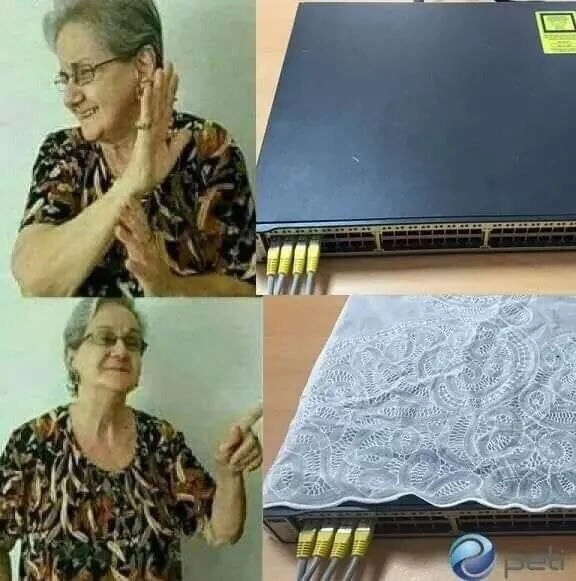
Now let’s consider why grandma might do this. From her perspective, this switch is just a big, black, ugly box with wires sticking out. It doesn’t match the curtains or the sofa, and maybe the blinking lights are annoying when she’s trying to relax in the evening. 😖 To her, covering it with a doily makes it fade into the background. Suddenly it looks like just another decor item – maybe even like a little side table or a fancy cover, who knows. The meme’s top-left panel (grandma disapproving) versus bottom-left panel (grandma happy) shows that transformation. Initially, she’s like “No, I don’t want that tech monstrosity visible!” After the “makeover,” she’s giving a proud “Yes, much better!” 👍

For someone newer to IT or just starting in networking, this highlights a real-world tension: practical function vs. appearance. In IT, we often prioritize function. We’d rather have messy wires or an ungainly device as long as it works reliably and safely. However, in regular home life (or even in office politics), appearance can matter a lot to people not involved in the technical side. It’s why consumer Wi-Fi routers nowadays come in slick designs or why some gadgets offer “stealth modes” with no bright LEDs. People want technology to blend in or at least not be distracting. This meme takes that idea to the extreme in a funny way.

Also, note the CableManagement aspect: those yellow cables plugged into the switch – they actually look relatively tidy here (all the same color and lined up in a row). In many home setups, you’d see a tangle of different cables. Perhaps whoever owns this switch tried to keep things neat with matching cables. But no amount of neat cabling was enough to satisfy grandma’s urge to hide the tech. 😂 It’s relatable if you’ve ever had someone nag you about “all those wires.” Sometimes beginners learn about cable management the hard way – after someone trips over a cable or unplugs something inadvertently. Here the “solution” to messy cables and an ugly box was just to cover EVERYTHING with a doily. Effective for looks, yes, but at the cost of good tech practice.

Let’s decode the meme format too: The images of the grandma doing a “stop” gesture then a “point and smile” gesture are actually a riff on a popular meme format where someone first rejects something, then approves something else. The most famous version of this is the Drake Hotline Bling meme (where Drake is shown disliking one thing and liking another in two panels). Here, instead of Drake, we have a grandma figure. She’s essentially playing the same role:

  • In the first panel, grandma is rejecting the plain network switch (she literally looks like she’s saying “No way, not in my house!”).
  • In the second, she’s delighted by the switch once it’s adorned with a lovely doily (now it’s “Yes, this is acceptable.”).

It’s a humorous depiction of how adding a superficial change (the doily) completely changes one person’s attitude, while to a techie the underlying device hasn’t changed – except it’s now stifled under cloth.

For someone new to tech, the take-home lesson (apart from the chuckle) might be: Always keep your hardware ventilated and accessible. If your computer or network gear is overheating or acting weird, check if its vents are blocked – maybe it’s dusty, or maybe, just maybe, someone covered it because they thought it was ugly! Also, communication is key. Perhaps the tech-savvy person could have explained to grandma: “This box needs to stay uncovered so that air can flow through it, otherwise it can break.” But then again, the absurdity is the point here – it’s funnier to imagine they went straight to the doily solution without any discussion.

In summary, at this level we see that the meme is highlighting a funny conflict: the desire to make technology look nice vs. the need for technology to function properly. It uses the extreme example of a grandma and a lace doily on a network switch to get the point across. Anyone who has tried to make their setup both functional and aesthetically pleasing can relate – sometimes you have to choose one over the other, and choosing looks over function can lead to trouble (or in this case, a good laugh for those in the know).

Level 3: Aesthetics vs Airflow

At first glance, every seasoned network geek and sysadmin can spot the aesthetics_over_functionality nightmare unfolding here. We have what looks like a standard 48-port network switch (that flat, black box with lots of Ethernet jacks), and someone has decided to slap a delicate lace doily on top of it to appease grandma’s interior design sensibilities. In the meme’s first panel, an older lady (our non-technical stakeholder, if you will) is giving a firm “Nope!” ✋ to the bare switch sitting out in the open. In the final panel, after the switch has been graciously accessorized with an intricate white doily, grandma is all smiles and thumbs up. The NetworkHumor here comes from the absurd trade-off: a piece of critical network hardware being treated like an ugly lamp that needs a frilly cover to blend into the living room decor.

From a SystemsAdministration perspective, this scenario is equal parts funny and horrifying. Every network engineer knows that switches and routers have ventilation grilles and sometimes internal fans for a very good reason. Those tiny holes along the top and sides of the switch? They’re exhaust vents to dissipate heat generated by the device’s processors and power supply. Covering them with anything — let alone a thick woven doily — is basically a ventilation_blocked event waiting to happen. It’s like putting a cozy sweater on a running server: sure, it might look adorable, but you’re going to cook the poor thing 😅. In the world of Hardware and network gear, obstructing airflow can lead to thermal throttling or even an emergency shutdown as the device struggles not to fry its circuits. A senior network admin sees that lacy cloth and immediately hears alarm bells (and maybe the switch’s fans revving up aggressively beneath it, trying desperately to breathe).

Now, why would anyone do something so blasphemous in terms of NetworkInfrastructureDesign? The meme nails a common clash between tech and non-tech folks: equipment vs. elegance. To the grandma (or generally, a house-proud family member), a bare-metal switch with blinking LEDs and a bunch of yellow patch_cables dangling out is an eyesore. It doesn’t matter that this “ugly black box” might be the very thing distributing internet to the TVs and tablets at home; what she sees is a piece of clutter ruining the feng shui of her living room. So in her mind, the solution is obvious: hide it or dress it up! And dress it up she did — with the most grandma-approved accessory imaginable. This is a classic case of “hide the tech in plain sight” taken to comical extremes. The result: a switch that’s technically online, but now wearing a doily like a fancy tea-table centerpiece. The grandma’s reaction images (reminiscent of the popular grandma_reaction_meme format used here, like an elderly twist on the Drake meme) perfectly capture that transformation from “Get that hideous gadget out of here!” to “Aw, now it’s cute and homely.”

Every sysadmin or network engineer who’s ever tried to maintain a home lab or just keep the Wi-Fi router in a central spot can relate. This meme hits on SysadminHumor because many of us have faced the “Can’t you put that away? It looks messy” conversation. It might have been a spouse asking to relocate the router from the living room (where it works best) to a closet (where signals go to die), or a roommate unplugging the “weird blinking box” to plug in a scented lamp instead. In corporate settings, it might be an office manager insisting the server rack would look nicer with a cabinet door (and inadvertently starving it of cooling airflow). In other words, this is SysadminLife distilled: the constant negotiation between reliability and appearance.

Let’s talk HardwareHumor specifics: that switch in the top-right panel is likely a high-end network_switch (possibly a Cisco Catalyst or something similar, given the 48 ports). It’s built to handle large amounts of network traffic, and it probably pushes a decent amount of wattage – meaning lots of heat to expel. Network gear like this typically lives in a ventilated rack or a cool closet, with plenty of space and maybe even fans and AC keeping it chill. Seeing it out on a desk with cables sprouting out is already a bit informal; seeing it smothered under a lacy mantle is downright sacrilegious to anyone who has racked a switch in a datacenter. You can almost visualize the CableManagement horror: perhaps the doily’s edges are flirting dangerously with the cable connectors, maybe even brushing the status indicator LEDs, casting weird shadows. Those front-panel LEDs are the lifeline for quick diagnostics – a seasoned admin can tell at a glance which ports are active, whether the switch has an alert (like an overheated warning LED – oh the irony here). By covering the entire top, the doily possibly even drapes over the front a bit, obscuring those blinking lights. It’s form literally obstructing function.

To put it in technologist terms, grandma just executed a layer-1 sabotage with a layer-8 motive. (In networking jokes, Layer 8 is the “user/political layer” on top of the 7-layer OSI model – basically the realm of human whims and errors. Here, the human factor of grandma’s aesthetic preference trumps the physics of cooling at OSI Layer 1, which is cabling and signals.) The humor is that this isn’t a software bug or a complex network issue – it’s an aesthetics_over_functionality issue, a people issue. The poor network switch is now at risk of a very decorative DoS attack – not Distributed Denial of Service, but rather a "Doily-on-Switch" denial of service. 😂 If that switch goes down because of overheating, the family might wonder why the internet keeps cutting out every evening. Meanwhile the sysadmin (or the resident tech-savvy family member) will have to carefully explain that “the lacy cover that made it look nice was effectively choking the device.” Good luck convincing grandma that removing her lovely touch is necessary!

This meme expertly blends Networking reality with a bit of domestic comedy. It exaggerates truth just enough to make us laugh. Sure, maybe most people wouldn’t actually put a full doily on a network switch… but it’s not far off from reality. Folks have put Wi-Fi routers in decorative boxes or wrapped cords in fancy sleeves to hide them. IT professionals have horror stories like, "I found a critical server covered by a pile of papers and a coat because someone thought the fan noise was annoying." Or "the cleaning lady unplugged the switch every night to plug in the vacuum, because blinking lights bothered her." The HardwareHumor here is very relatable: we laugh because we’ve either experienced it or can easily imagine it. It’s Aesthetics vs. Airflow, Decor vs. Data, Grandma vs. Gigabit Ethernet – and as any grizzled IT veteran will tell you, when push comes to shove, even the most advanced tech can be humbled by a well-intentioned human with a doily.

To highlight the two perspectives at play, consider this side-by-side:

Grandma’s Perspective (Non-tech) Sysadmin’s Perspective (Tech)
“That plain black box is ugly – an eyesore in my home!” 🤢 “This device is a 48-port gigabit switch, essential for our network.” 📦💻
“Maybe if we cover it with a nice lace cloth, it will blend in.” 🏡✨ “No! Don’t block the vents – you’re blocking airflow and hiding status LEDs!” 🚫🌀💡
Now it looks much prettier, problem solved! 😊👍 It’s going to overheat and crash… problem created 😱🔧

This contrast is exactly why the meme is hilarious to IT folks: it’s Aesthetic Comfort vs. Technical Functionality in a nutshell. The grandma effectively refactors the hardware setup to be home-decor friendly, unwittingly introducing a glaring design anti-pattern in hardware maintenance. And the sysadmin in us is thinking, “Sure, it’s home-decor friendly… until the network infrastructure goes down and you’re wondering why Netflix stopped working mid-Bake-Off.” In a professional Networking environment, nobody would dare place a frilly fabric over a switch (we’re more likely to be debating rack units and cable raceways). But in a home environment, all bets are off when a non-tech family member wants the gear to be invisible.

In summary, this meme tickles that part of the tech brain that deals with real-world absurdities. It’s a perfect little story of SysadminLife: the compromise between keeping the network running and keeping grandma happy. It captures a universal truth of IT: sometimes our hardest problems aren’t code or configs at all, but people who just don’t appreciate our precious blinking boxes. And as any battle-scarred sysadmin will tell you with a smirk, “Hardware fails, software has bugs, but grandma… grandma will decorate.”

Description

Four-panel meme. Top-left: an elderly woman with her face blurred raises her hand in a stop gesture, clearly disapproving. Top-right: a plain 48-port Ethernet switch on a desk, several yellow RJ-45 cables plugged in; a small yellow sticker and subtle "peta" logo are visible, but no other text. Bottom-left: the same woman now points approvingly. Bottom-right: the same switch, but its entire top surface is covered by an intricate white lace doily, partially obstructing the ventilation grilles while the yellow patch cables still hang out the front. Humor arises from the mismatch between network-hardware best practices (unobstructed airflow, visible status LEDs) and a non-technical person’s desire to make equipment blend into home décor. Sysadmins and network engineers will cringe at the airflow nightmare while chuckling at the relatable family pressure to ‘hide the ugly black box.’


Comments

7
Anonymous ★ Top Pick We just discovered Lace-Driven Architecture: satisfies the stakeholder’s “must match the curtains” requirement, throttles airflow on the core switch, and turns MTBF into “Minutes Till Burnt Fabric.”
  1. Anonymous ★ Top Pick

    We just discovered Lace-Driven Architecture: satisfies the stakeholder’s “must match the curtains” requirement, throttles airflow on the core switch, and turns MTBF into “Minutes Till Burnt Fabric.”

  2. Anonymous

    Finally, a load balancer that prevents 100% of DDoS attacks by making the entire rack invisible to the network operations team

  3. Anonymous

    Thermal throttling is just the switch's way of asking grandma for a thinner doily - at least it's the only layer 1 covering with 100% uptime since 1972

  4. Anonymous

    When your network operations center gets audited by grandma and she insists your $10K enterprise switch needs 'proper protection' from dust. At least now when the switch overheats and fails, you can honestly tell management it died of heatstroke under a decorative shroud - though explaining why your SLA breach smells faintly of mothballs might be trickier. The real question: does the lace provide adequate airflow for those PoE+ ports, or are we about to discover a new failure mode that Cisco never documented?

  5. Anonymous

    OSI Layer 8: Doily - where human aesthetics silently throttle your switch's STP convergence

  6. Anonymous

    Introducing Layer‑8 cooling: a lace doily over the ToR switch - perfect until the fans peg 100%, STP reconverges, and MTTR includes removing grandma’s air filter

  7. Anonymous

    Asked for a data center fabric; Facilities put a lace doily on the core switch - airflow died, aesthetics soared, and now we’re running Layer 2.5: the textile overlay

Use J and K for navigation