Skip to content
DevMeme
5091 of 7435
The Open Source Superiority Complex
OpenSource Post #5571, on Oct 11, 2023 in TG

The Open Source Superiority Complex

Why is this OpenSource meme funny?

Level 1: Mixed Puzzle Pieces

Imagine you and your friend each have a puzzle of the same picture, but from two different toy brands. You finish your puzzle and your friend finishes theirs. Both pictures should be identical – in theory. But when you try to combine your pieces with your friend’s, they don’t quite fit. Even though the picture is supposed to be the same, your puzzle pieces are cut differently than your friend’s. The result? Two completed puzzles that look almost alike, but if you mix them or compare closely, there are awkward gaps and mismatched edges. It’s not that either of you did the puzzle wrong – it’s just that the pieces were made differently.

This is like when one person writes a document in one program and another person opens it in a different program. Each one built the "picture" of the document using their own set of pieces. The content might be the same overall, but the little details don’t line up, so the final results aren’t exactly identical. The meme makes us chuckle because it shows someone proudly pointing out this difference – saying "our documents are not the same" – almost like bragging that they used a special set of puzzle pieces. The humor is that, in the end, both people were trying to make the same picture, yet they end up with two slightly different versions, each convinced their way is something special.

Level 2: File Format Friction

Let’s break down the issue in simpler terms. Microsoft Word is the most widely used word processor in offices and schools; its files end in .docx. LibreOffice Writer is a free, open-source alternative; its files typically end in .odt (short for OpenDocument Text). At first glance, a document is a document, right? You write text, add some headings or images, and save it. But if you've ever opened a .docx file in LibreOffice or an .odt in MS Word, you've probably seen things look "off." Maybe the font changed unexpectedly, the paragraphs broke weirdly, or an image isn't where it’s supposed to be. That confusion is a classic compatibility issue: the two programs use different languages to store the document, so they don't always understand each other perfectly.

Think of .docx and .odt as two languages that describe a document. Word speaks one language; LibreOffice speaks another. They talk about the same things (text, fonts, margins, tables) but with different grammar and accents. When you give a Word file to LibreOffice, LibreOffice does its best to "translate" Word’s language into its own. Likewise, Word will try to interpret an OpenDocument file if you open it there. But like any translation, some parts don’t come through cleanly. For example, Word might use a specific Microsoft-only font or a peculiar way to do a table border. LibreOffice might substitute a different font or handle that table border in a simpler way, leading to a slightly different look. Neither program is doing it "wrong" – they just have their own methods.

It also comes down to philosophy and history. Word’s format is proprietary (controlled by Microsoft) and became very complex over decades of adding features (plus weird hacks for backward compatibility). LibreOffice’s format came from the OpenSourceSoftware world, meant to be an open standard from day one. In practice, Word’s dominance meant everyone expected documents to look a certain way in Word. LibreOffice has improved a lot at reading/writing .docx, but some of Word’s secret sauce isn’t fully documented or doesn’t have an equivalent in LibreOffice. Meanwhile, Microsoft Word can technically open .odt files now, but it's not a priority for Microsoft, so an OpenDocument file might not render with pixel-perfect fidelity in Word either.

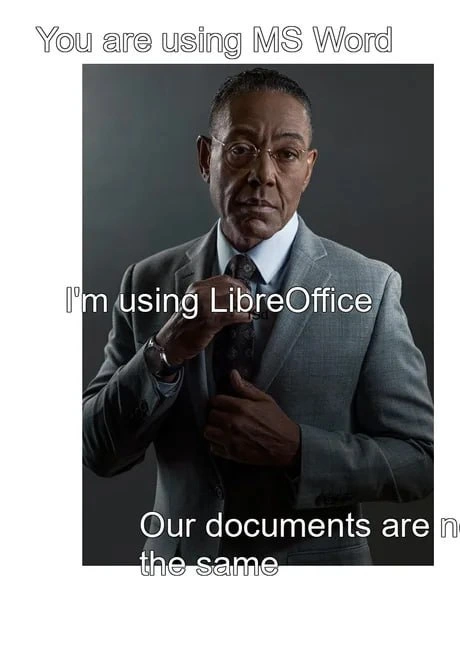
The meme text, “You are using MS Word. I’m using LibreOffice. Our documents are not the same.”, is a playful take on a popular meme template. Usually, "we are not the same" memes involve one person bragging that they do something in a superior or unique way. Here, the LibreOffice user is half-bragging – implying they're more tech-savvy or principled for avoiding Microsoft – but also confessing a headache: their document won’t look the same as the Word user's document. It’s funny because developers often run into this exact situation: two people think they did the same work (wrote a document), but when they share it, it’s a mini-disaster of misaligned text and messed-up layout.

For someone new to this, the takeaway is: using different tools for what should be the same task can cause friction. If you write your project report in LibreOffice but your manager opens it in Word, don't be surprised if they see odd formatting. Teams often avoid this problem by standardizing on one suite or by sharing documents in a neutral format like PDF (which locks in the layout but isn't meant for editing). In short, Word and LibreOffice are like two different playbooks for the same game – you can both get the job done, but expect some fumbles when you swap files.

Level 3: The Format Wars

This meme hits close to home for anyone who's battled document compatibility issues. It's referencing the classic "we are not the same" comparison format to highlight a tech truth: using MS Word vs. using LibreOffice leads to very different outcomes. The well-dressed man adjusting his tie exudes smug confidence, much like a developer who insists on an alternative toolchain. Here, it's the libre-minded engineer saying, "You might use MS Word, but I use LibreOffice. Our documents are not the same." That final line is both a play on the meme template and a literal complaint – the two files won't look identical, because Word's .docx format and LibreOffice's .odt format simply don't line up.

Microsoft Word saves documents as Office Open XML (.docx), while LibreOffice (and OpenOffice before it) champions the OpenDocument Text format (.odt). These are two distinct FileFormat standards that both describe text, styles, images, etc., but they do so in incompatible ways. Under the hood, a .docx file is a Zip archive full of XML following Microsoft's OOXML specification, whereas an .odt is a Zip of XML following the ODF spec. You’d think using XML-based standards would make them interoperable, but OOXML vs ODF might as well be different dialects. Each suite tries to interpret the other's format, often with imperfect results. LibreOffice devs have to reverse-engineer parts of the proprietary format, and Word only grudgingly supports ODF. The result? Even simple documents can get garbled in translation. (Fun fact: both OOXML and ODF are ISO standards now, but that didn't magically unify them. We ended up with two "standards" for the same thing — the classic joke: "The wonderful thing about standards is there are so many to choose from!")

Real-world effects of this formatting discrepancy include:

  • Styles & Fonts: Your carefully chosen font or style in LibreOffice might be substituted when opened in Word. Line spacing or margins can suddenly shift, as each program has its own default settings and rendering quirks.
  • Layouts & Images: That perfect table alignment or image placement can turn into a layout disaster. Text boxes move, bullet points lose indent levels – the content plays musical chairs when jumping between formats.
  • Advanced Features: Documents aren’t just text; they have things like tables of contents, tracked changes, or macros. A Word doc with complex Microsoft-specific features (say, a VBA macro or SmartArt diagram) may partially break in LibreOffice, which doesn’t support those proprietary bits. Conversely, Word might ignore LibreOffice-specific elements it doesn’t understand.
  • Version Oddities: Even using the same .docx, different versions of Word or other editors might render it slightly differently. One person's “it looks fine on my end” becomes another person's “why is this section on page 5 now?”.

For veteran devs, this is the documentation equivalent of “works on my machine”. Each program claims to support the other's format, but maintaining document compatibility is an endless game of catch-up. Many of us have learned the hard way that mixing office suites in a workflow leads to late-night formatting fixes or panicked conversions to PDF before a big meeting. The humor here comes from recognition: the LibreOffice user in the meme is flexing their open-source cred (adjusting that tie like a proud penguin), implicitly saying they're on a different level. But in practice, that pride comes at a cost — sharing files with colleagues using MicrosoftProducts turns into a hassle. It's a comical, slightly painful truth in software teams: you can write the most brilliant design doc, but if you used the "wrong" editor, our documents are definitely not the same.

Description

A classic 'We are not the same' meme featuring a photograph of actor Giancarlo Esposito, known for his role as the meticulous and calculating Gus Fring. He is dressed in a sharp grey suit, adjusting his tie with a calm, serious, and slightly condescending expression. The image is overlaid with white text in three parts. At the top, it says, 'You are using MS Word'. In the middle, 'I'm using LibreOffice'. And at the bottom, 'Our documents are not the same'. The humor is derived from the juxtaposition of a common, proprietary software (MS Word) with its free and open-source alternative (LibreOffice), framed as a mark of sophistication. For developers, this meme taps into the cultural pride associated with using open-source tools, often seen as a more principled or technically pure choice over mainstream, corporate-pushed products. The punchline also cleverly hints at the very real formatting and compatibility issues that often arise between the two
Comments

30
Anonymous ★ Top Pick Sure, our documents aren't the same. Mine is in a fully documented, open standard format. Yours is a binary blob that changes its schema every time your marketing department needs a new font
  1. Anonymous ★ Top Pick

    Sure, our documents aren't the same. Mine is in a fully documented, open standard format. Yours is a binary blob that changes its schema every time your marketing department needs a new font

  2. Anonymous

    Git just flagged a 9 MB diff because Word converted our ADR into XML confetti, LibreOffice reflowed it, and the merge conflict is now in Wingdings - document-driven chaos engineering at its finest

  3. Anonymous

    After 20 years in tech, I've learned that 'cross-platform compatible' is just industry speak for 'your carefully crafted document will look like it went through a blender, but at least it opens.' The real compatibility layer isn't XML or ODF - it's PDF and the resignation that nobody will ever edit it again

  4. Anonymous

    The eternal optimism of sending a LibreOffice document to a client and hoping the bullet points don't transform into abstract art. We've all learned the hard way that 'open standards' and 'actual interoperability' exist in parallel universes - one where your carefully crafted technical proposal renders perfectly, and the reality where your margins have achieved sentience and your fonts have been replaced by Comic Sans's distant cousin

  5. Anonymous

    Sending a DOCX from Word to LibreOffice is the desktop equivalent of integrating two “RESTful” services - both “compliant,” both in quirks mode, and your bullet points become an eventual consistency demo

  6. Anonymous

    Office suites and CAP theorem: pick two from Compatibility, Aesthetics, Proprietary - LibreOffice picks the wrong two

  7. Anonymous

    ODT↔DOCX is the worst API - same nouns, different semantics; after one round-trip, your page numbers implement eventual consistency

  8. @KentoSenjo 2y

    I have been using LibreOffice for a long time and have never encountered font curvature

    1. @prirai 2y

      Libreoffice actually makes better structured documents.

  9. no name 2y

    You should've used LaTeX

    1. @sylfn 2y

      only if it was not this slow

      1. @endisn16h 2y

        groff

      2. @mokurin000 2y

        typst

    2. @WaterCat73 2y

      It's awesome for equations, but heck as tedious for documents

      1. no name 2y

        it may be time consuming but at least output is consistent

        1. @WaterCat73 2y

          It'll be consistant for any program. Failures happen when converting formats

        2. @Assarbad 2y

          And beautiful

  10. @rubelem 2y

    Still waiting for someone rewrite TeX in Go/Rust 😂

    1. @Assarbad 2y

      There is such a project https://typst.app/

  11. @rubelem 2y

    (wish it was that simple)

  12. @Drvisor 2y

    Libre office creates documents in open formats whereas MS office wants you tobe addicted to constantly changing proprietary format. Support of open format is good for everyone except MS 😂

  13. @Assarbad 2y

    Same here. But I am keeping an eye on it. LuaLaTeX with TikZ and friends is my favorite still, though.

  14. @SamsonovAnton 2y

    To be more exact

  15. @phpzapecanus 2y

    Use Google docs instead

    1. @ilovethicktights 2y

      wordpad 😌

      1. @phpzapecanus 2y

        Notebook (navigate through this compiled byte code)

        1. @ilovethicktights 2y

          .class

          1. @phpzapecanus 2y

            .css

          2. @phpzapecanus 2y

            ascii encoded

  16. @ercolebellucci 2y

    write on notebook

Use J and K for navigation