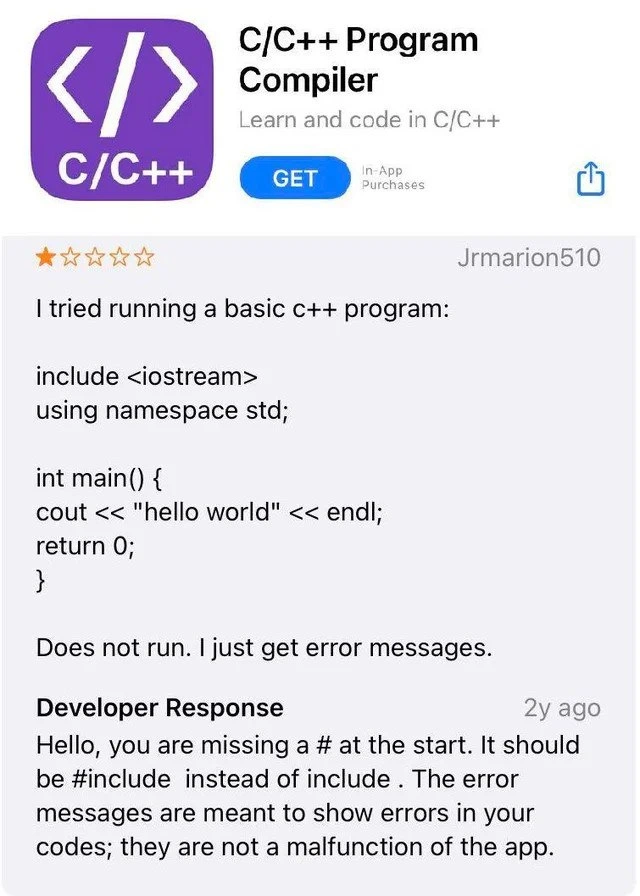
User blames the compiler for a classic syntax error
Why is this Juniors meme funny?
Level 1: Missing Ingredient
Imagine you’re baking a cake and you forget to add sugar. You mix the batter, bake it, and the cake comes out tasting awful. You might be tempted to say “This oven is terrible!” or give the recipe a one-star rating. But the oven and the recipe didn’t actually fail – the problem was that you left out a key ingredient. In this meme’s story, the beginner programmer is like the baker who forgot something essential. They wrote a recipe (a C++ program) to print “hello world,” but they forgot to include one special symbol (the # in #include) at the very start. That little # is like the sugar for the program – it’s needed to make everything work. When the program wouldn’t run, the user blamed the coding app (like blaming the oven), saying it “just gives error messages.” The developer then kindly explained that the app is fine; it’s just telling the user what ingredient is missing. In simple terms: the code cake didn’t rise because an ingredient was forgotten, not because the oven (the compiler app) was broken. Once you add that missing # (the sugar of the code recipe), the program will turn out just right – “Hello, world!” will print, and all will be sweet.
Level 2: Hello World Woes
Let’s break down what’s happening for a newer programmer. The user attempted to write the classic “Hello World” program in C++ – typically one of the first programs you learn. The code should look something like:
#include <iostream> // Include the iostream library for cout
using namespace std; // (Often used for convenience in simple programs)
int main() {
cout << "hello world" << endl; // Print "hello world" to the console
return 0; // End program with success
}
But the user’s version in the meme had a tiny typo: they wrote include <iostream> without the # at the beginning. In C++ (and C), #include is a preprocessor directive. That # symbol is crucial – it tells the compiler’s first pass (the preprocessor) to include the contents of the <iostream> library header into the program. The <iostream> header is where the definitions of std::cout and std::endl live. If you leave out the #, the line include <iostream> isn’t recognized as a special instruction. The compiler will treat include as if it were regular code or perhaps an unknown identifier. This immediately causes a syntax error because the compiler doesn’t know any variable or command named “include” that would make sense there. It’s as if the code suddenly started speaking gibberish. The compiler then throws up its hands and produces error messages describing the problem (usually pointing to the line with include and saying it’s not valid C++ syntax).
For a junior developer or someone learning to code, these compiler error messages can be confusing. They might see a bunch of red text or pop-ups complaining about something on line 1 and not realize it’s directing them to the missing #. In this case, the app was actually doing the right thing: it was showing helpful (if technical) feedback telling the user there’s a mistake in their code. This is a normal part of compiling code – the compiler checks the code and reports errors if the code violates the language’s rules. We call these Compiler Errors or Syntax Errors because they mean the code’s format or grammar is wrong. It’s similar to a spell-checker underline in a document: something is off and needs correction.
The user, unfortunately, interpreted these errors as the app “not working.” This is a common misunderstanding for beginners. If you’re new to C++ and you hit “Run” (which actually triggers a compile, then run), and you see error messages, it might feel like the program itself broke. But really, the program never even got to run – the compiler stopped it because it found a mistake that must be fixed first. The developer’s response in the review is basically a mini debugging lesson: “Hello, you are missing a # at the start. It should be #include instead of include.” They’re kindly saying, “Your code has a small error that you need to fix.” Once that # is added, the directive #include <iostream> will properly include the library, and the code can compile and then run, printing “hello world” as intended.
This situation is a textbook Debugging_Troubleshooting moment. The user had to identify why “I just get error messages.” The trick was to read those messages and spot the typo. Part of a developer’s early journey is learning to interpret what the compiler is telling you. C++ compilers are notoriously strict and won’t assume what you “meant” – you have to get the syntax exactly right. The upside is that once you correct the error, those same tools that halted your program will cheerfully compile and run it. In fact, encountering errors and fixing them is how everyone learns; it’s CodingMistakes and fixes on repeat. Over time, you discover that most errors, like this missing #, have clear solutions. The app wasn’t broken at all – it was doing exactly what a compiler should do. The one-star review, then, is a bit ironic: it’s blaming the C++ compiler app for catching a mistake that the user will be happy to know about once they understand it.
Also, notice the user_vs_dev_response dynamic: the user left a negative review, and the developer responded. It’s not every day you see a dev giving a syntax tip in an App Store reply! This shows the dev was paying attention and wanted to help the learner understand the problem. For a junior coder, the takeaway is: when you see an error message, it’s not a random glitch – it’s information. In this case, it was telling the user that #include was written incorrectly. The developer’s explanation reinforces an important lesson in C++ (and in programming in general): pay attention to details like punctuation and symbols. A missing {}, a missing ;, or here a missing # can stop a program from working. The solutions are usually straightforward once you spot them. And remember, the compiler isn’t your enemy – it’s more like a strict teacher. It might sound angry in red text, but it’s actually guiding you to the exact spot in your code that needs fixing. Learning to interpret those messages is a key part of the LearningToCodeJourney. So, next time a program “does not run,” instead of giving up (or leaving a one-star review 😅), check what the errors are telling you – the answer might be as simple as adding a single character!
Level 3: Preprocessor Pitfall
This meme pokes fun at a classic CompilerErrors scenario where a novice C++ coder blames the tool instead of their code. The user’s one-star App Store review laments that a simple hello_world_cpp program "does not run" and yields "just error messages." To an experienced developer, that line is a dead giveaway: the code didn't compile due to a SyntaxError, not an app malfunction. In the screenshot, the developer’s patient response explains the cause – the user forgot the # in the #include directive – highlighting a tiny preprocessor_directive_error that makes all the difference.
In C/C++, the #include <iostream> line isn’t just a friendly greeting to the compiler; it’s a command to the preprocessor. The # at the start tells the compiler, “Before you do anything else, pull in the code from this library (iostream) so we can use std::cout and friends.” Omitting the # is like casting a spell without the magic word – nothing happens except an incantation error. The compiler, being a strict logical machine, sees include <iostream> with no # and goes, “Huh? I don’t recognize this keyword ‘include’. What type is this? Is it a variable? An unholy template angle-bracket concoction?” It then spits out error messages (probably something cryptic like expected unqualified-id at that line). These errors are the compiler dutifully doing Debugging_Troubleshooting for your code, essentially saying: “I found something wrong here, please fix it.” But to a beginner, the red error text might as well be an alien language. They just see the program didn’t run and assume the C/C++ compiler app is broken.
The humor sinks in because every seasoned coder recognizes this pattern: a newbie writes a tiny program (often a Hello World), hits a compile error, and immediately suspects the IDE or compiler is at fault. It’s a rite-of-passage mix-up on the LearningToCodeJourney. We’ve all seen questions on forums like, “Why won’t my code run?” with the code attached – and often the answer is a missing semicolon, a misspelled keyword, or in this case a missing #. PEBKAC alert! (Problem Exists Between Keyboard And Chair) – though our enthusiastic support developer is too polite to say that outright. Instead, the dev’s response gently corrects the code: “It should be #include instead of include.” They even clarify that error messages are not a malfunction of the app but helpful feedback on the user’s code. That’s a professional yet slightly exasperated way of saying, “The compiler is doing exactly what it’s supposed to do – it’s CompilingCode and telling you about the mistake you made.”
For veteran developers, there’s an extra layer of amusement (and a pinch of secondhand frustration) seeing an app get a one_star_rating for accurately reporting user errors. It’s as if someone gave the fire alarm a bad review for making noise during a fire. 🔥🚨 The user_vs_dev_response dynamic here is comedy gold: the user publicly flails at the app, and the dev has to diplomatically play teacher in an App Store review reply. It’s a great reminder that in programming, small details (like a single # character) can make or break your code, and the compiler isn’t shy about pointing that out. The meme resonates with experienced folks because we’ve all been Jrmarion510 at some point, scratching our heads at a baffling error, only to realize we forgot a tiny but crucial detail. And we’ve possibly been on the other side too, explaining to someone that “No, the tool isn’t broken; you just need to fix your code.” This mix of frustration and empathy is what makes the meme both funny and painfully real in the world of software development.
Description
This image is a screenshot of a one-star review on an app store for an application named 'C/C++ Program Compiler'. A user, Jrmarion510, has posted a snippet of a basic C++ 'hello world' program, which contains a syntax error: the line 'include <iostream>' is missing the '#' prefix. The user complains, 'Does not run. I just get error messages.' Below the review, there is a patient 'Developer Response' from two years prior, which correctly points out the user's mistake: 'Hello, you are missing a # at the start. It should be #include instead of include . The error messages are meant to show errors in your codes; they are not a malfunction of the app.' The humor is derived from the user's misplaced blame, a situation highly relatable to experienced developers who often encounter bug reports that are actually user errors. It's a classic example of a beginner's mistake and the Dunning-Kruger effect in programming
Comments
14Comment deleted
Compilers are the ultimate code reviewers; they have zero patience for your feelings and a 100% success rate at finding your typos
One-starring the C++ compiler because you forgot the ‘#’ in #include is basically opening a Sev-0 on Kubernetes because your YAML isn’t indented - pure Layer-8 latency
After 20 years in the industry, you realize the most challenging bug to fix isn't in production code - it's convincing users that compiler error messages are features, not bugs. This is like leaving a 1-star review for grep because it 'keeps showing me lines with errors in them.'
The eternal struggle: a compiler that correctly identifies syntax errors gets a 1-star review because the error messages are 'working as intended.' This is the mobile development equivalent of a user reporting 'keyboard broken' when Caps Lock is on. The developer's patient response explaining that '#include' requires the '#' is a masterclass in technical support diplomacy - resisting the urge to reply with 'PEBKAC: Problem Exists Between Keyboard And Chair.' At least they didn't try to compile it with 'import <iostream>' or demand the app support 'include <iostream.h>' because 'that's how my 1998 Turbo C++ book showed it.'
Error messages as features? That's the kind of 'innovative' DX that makes senior devs nostalgic for edlin.exe
A one‑star because the compiler rejected 'include' without '#': the C++ version of filing a Sev‑1 that says, 'Monitoring is broken - it’s correctly reporting my bug.'
Review: “include <iostream>” doesn’t run. Support: “you forgot the #.” The future of C++ monetization - preprocessor as an in‑app purchase, modules on the enterprise tier
⭐️☆☆☆☆ Comment deleted
Imagine every error in your code being malfunction of the app Comment deleted
I bet it's that kind of person that has 20 avatars on telegram spelling stuff like "#CODE", "null", "void();" Comment deleted
Programming in python: print ('Hello World') Comment deleted
When StackOverflow is just not enough Comment deleted
Lmao Comment deleted
An app which blows your battery instead of raising an error Comment deleted