Skip to content
DevMeme
2662 of 7435
Mkdir Meets Its Own Purpose
CLI Post #2941, on Apr 10, 2021 in TG

Mkdir Meets Its Own Purpose

Why is this CLI meme funny?

Level 1: Build the Hallway First

This is like asking someone to put a bedroom at the end of a hallway, and they say they cannot because there is no hallway. You thought "make the bedroom" included making the path to it, but they needed you to say that part out loud. The computer is not confused; it is just being very picky.

Level 2: The -p Flag

mkdir is a UnixCommand used in Linux, macOS, and other Unix-like systems to create directories. A directory is what many desktop users call a folder. A path like /new/directory has multiple parts: / is the root of the filesystem, new is supposed to be a directory under root, and directory is supposed to be inside new.

The command in the image tries to create /new/directory, but if /new does not exist yet, plain mkdir fails. The fix is:

mkdir -p /new/directory

The -p option means "create parent directories too, if they are missing." This is common in scripts, deployment commands, and setup instructions. The meme is funny because the error message "No such file or directory" sounds absurd when the user is literally asking the command to create a directory.

Level 3: Parents Not Found

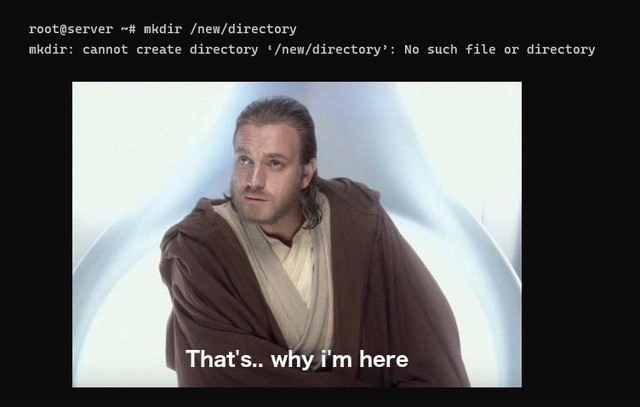
The terminal output shows the whole trap:

root@server ~# mkdir /new/directory
mkdir: cannot create directory '/new/directory': No such file or directory

Then Obi-Wan answers:

That's.. why i'm here

The joke is that mkdir means "make directory," yet the error says it cannot create the directory because a directory does not exist. The command is not refusing to create the final component, directory; it is refusing because the parent path /new is missing. Unix tools are precise in a way that is technically correct and emotionally unhelpful, which is the official house style of the command line.

The missing detail from the post caption is -p. Running mkdir -p /new/directory tells the tool to create parent directories as needed. Without -p, mkdir expects the parent directory to already exist and only creates the last path component. That behavior is deliberate: blindly creating arbitrary parent paths can hide typos, create unexpected filesystem trees, or paper over deployment mistakes. The tool makes you be explicit when you want recursive creation.

This is classic SystemsAdministration humor because it captures the gap between human intent and shell semantics. The human says, "make this path." The tool hears, "create one directory under an existing parent." The error message is accurate, but it sounds like a firefighter refusing to fight a fire because there is fire. Experienced developers have internalized the rule; they still get briefly annoyed because the phrasing feels like the command has forgotten its own job description.

Description

A black-background meme shows terminal output at the top: "root@server ~# mkdir /new/directory" followed by "mkdir: cannot create directory ‘/new/directory’: No such file or directory". Below the terminal text is an image of Obi-Wan Kenobi with the caption "That's.. why i'm here". The joke points at the slightly absurd error message from `mkdir` when intermediate parent directories do not exist, where the missing `-p` flag is the real technical detail.

Comments

8
Anonymous ★ Top Pick `mkdir` without `-p` is the coworker who agrees to build the penthouse, then refuses because nobody poured the lobby.
  1. Anonymous ★ Top Pick

    `mkdir` without `-p` is the coworker who agrees to build the penthouse, then refuses because nobody poured the lobby.

  2. @a_desant 5y

    Working from root Nice

    1. @Ra_zor 5y

      mkdir is some serious stuff, ya know

  3. Deleted Account 5y

    Of course! You can easily make a destructive typo like this: mkdir /new/folder && rm -rf --no-preserve-root /

  4. Deleted Account 5y

    I chose that one expressly

  5. Deleted Account 5y

    i ran it

  6. @f_i_v3 5y

    run with -p tag and everything will work

  7. Deleted Account 5y

    i gotta p

Use J and K for navigation