The Duality of the Developer: Public Genius, Private Googler
Why is this DevCommunities meme funny?
Level 1: Not-So-Magic After All
Imagine you have a friend who everyone thinks is a wizard at math. People say, “Wow, they’re so smart, they must do huge calculations in their head!” But then you peek at them one day and see them secretly pulling out a little math cheat-sheet to remind themselves how to do a simple addition. It’s kind of funny, right? They’re supposed to be the genius, yet they need help with something basic. This meme is joking about the same idea, but with a computer programmer. Everyone thinks a software engineer is like a high-tech magician, but really, even the “magician” has to look up the instructions sometimes.
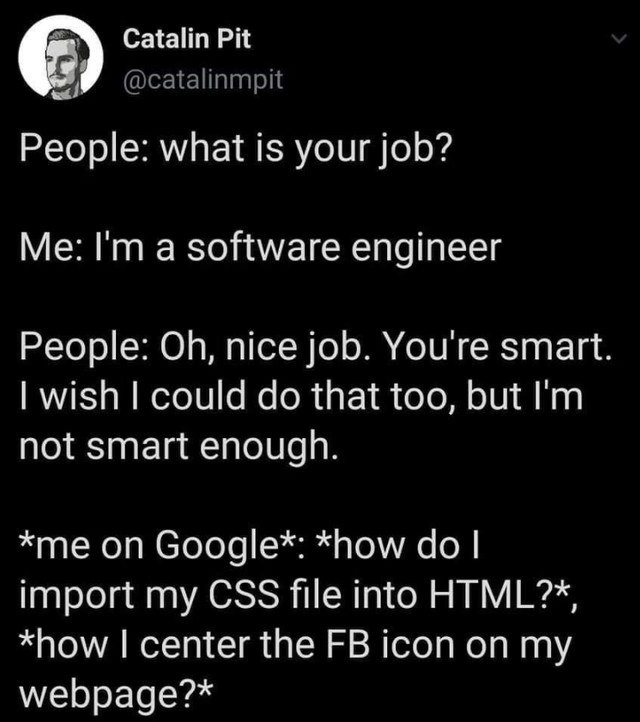
It’s like if your teacher, whom you consider super knowledgeable, quietly checks the teacher’s guide for the answer to an easy question. Or if a famous chef quickly Googles how to boil an egg because they forgot the timing. It doesn’t mean they’re bad at their job – it just shows they’re human. In the meme, the software engineer is doing something very human: using the internet to answer questions. They’re supposed to be “smart,” but here they are asking “How do I put my clothes on my doll?” (in computer terms, that’s “import my CSS into HTML”) or “How do I put this picture in the middle?” (that’s “center the FB icon”). It’s silly because we expect an expert to just know those things. The truth is, being good at something doesn’t mean you never need help or forget little steps. So the heart of the joke is: people think coders are genius wizards, but coders know they’re just regular folks who use Google like a manual. And realizing that can make anyone chuckle and feel a little more okay with needing help themselves.
Level 2: Frontend Struggles 101
Let’s break down the technical bits for newer developers. The meme talks about importing a CSS file into HTML and centering an icon on a webpage – these are fundamental front-end tasks. HTML (HyperText Markup Language) is the structure of a webpage – kind of like the bones of a skeleton. CSS (Cascading Style Sheets) is what makes the page look nice – it’s the skin and clothes that style those bones with colors, layouts, and fonts. To import a CSS file into an HTML file means linking the two so that the styles (CSS rules) are applied to the structure (HTML elements). Typically, in the <head> section of an HTML file, you might have a line like:
<head>
<!-- Link an external CSS file to apply styles -->
<link rel="stylesheet" type="text/css" href="styles.css">
</head>
This <link> tag is the correct answer to "How do I import my CSS file into HTML?". If you forget that snippet or the exact order of attributes (rel, type, href), don’t worry – it’s extremely common to look it up. In fact, many of us have searched “HTML link CSS” more times than we’d like to admit. It’s basically muscle memory to hit Google or StackOverflow when setting up a new web page’s styling!
Now, about "How do I center the FB icon on my webpage?". Centering elements in CSS has historically been a bit of a pain point. By “FB icon,” the tweet likely means a small Facebook logo on a page, maybe for a social media link. Centering could be horizontal (moving it to the middle of the page from left-right) or vertical (aligning it top-bottom) or both. For a long time, junior devs struggled with this because CSS didn’t have a straightforward “center” command for every scenario. Nowadays, modern CSS offers Flexbox and Grid, which make centering easier, but you still have to remember how to use them. For example, using Flexbox to center an element, you might write CSS rules like:
/* Centering an element using Flexbox */
.container {
display: flex;
justify-content: center; /* centers horizontally */
align-items: center; /* centers vertically */
}
If the Facebook icon is inside a container <div>, the above CSS would place it perfectly in the center of that container (both vertically and horizontally). But let’s say you just want to center an inline icon (like an <img> or an <i> with a Facebook icon class) within a line of text or within its parent element – a simpler method might be:
#facebook-icon {
display: block; /* make it behave like a block element */
margin: 0 auto; /* this auto-margins will center it horizontally */
}
This snippet makes the element a block (so it can take margins) and then gives it equal left and right auto margin, which is a common CSS trick for horizontal centering. If that looks a bit mysterious, don’t fret. The key point is: there are several ways to center things in CSS, and which one you use depends on the context. That’s exactly why even experienced developers sometimes “blank” on the right approach and quickly search for "CSS center element vertically and horizontally" or similar. The phrase “Centering in CSS” even became a light-hearted meme in developer circles because it was such a frequently asked question.
Now consider the social context the meme describes. People (non-developers) often react with “Oh, you must be really smart!” when you say you’re a software engineer. This is because they imagine coding as some arcane skill, perhaps picturing scenes from movies where genius hackers write code from memory at blazing speed. But the developer reality is quite different. Being a software engineer indeed requires logical thinking and problem-solving, but it doesn’t mean we’ve memorized the entire HTML/CSS specification or every function in every programming language. In practice, a huge part of a developer’s job is knowing how to learn on the fly and use resources. And the number one resource is often Google (which usually leads to helpful documentation or forums).
Googling basic things like syntax or specific “How do I do X?” is so common that it’s basically part of the development workflow. For newcomers, it might be surprising or even comforting to learn that even seniors Google stuff daily. If you’re a junior developer or just learning to code, you might feel embarrassed searching for something like “how to add a CSS file to my HTML.” But guess what? The rest of us have that exact browser history! It doesn’t mean you’re not good at coding; it means the field is vast, and you’re being resourceful. The meme taps into this shared experience: that mix of learning curve and imposter syndrome. Imposter Syndrome is a term for feeling like you’re not as competent as others think you are, and you’re worried you’ll be “found out” as a fraud. Many developers, even those with years of experience, still feel this way whenever they struggle with something “simple.” So when the meme’s author (Catalin) writes “me on Google: how do I import my CSS file… how do I center…?”, he’s illustrating that internal self-doubt humorously. It’s like he’s saying: “They call me smart, but if only they saw me flailing with this simple CSS, they might think again!”
In reality, frequently looking up things is just smart practice. The tech world changes rapidly; new frameworks, new best practices, and sometimes you just haven’t done a task in a while. Good developers know where to find answers. And while this meme focuses on frontend examples (HTML/CSS issues are a rite of passage in learning web dev), the sentiment spans across programming: e.g., a database admin might quickly search SQL syntax they don’t use often, or a machine learning engineer might copy a template for a neural network layer because it’s faster than writing from scratch. This is all part of the normal DeveloperExperience_DX. The meme falls under DeveloperHumor because it’s a light-hearted take on something very relatable in our industry – that moment when you alt-tab from a conversation where someone praised you, to a browser where you’re asking “dumb” questions. And nothing is more relatable to developers than relying on Google and feeling a bit silly about it.
Level 3: Google-Driven Development
At first glance, this meme hits on the classic perception vs. reality in software engineering. Outsiders often think being a software engineer means you’ve memorized every coding trick and language syntax. They assume we’re tech wizards conjuring algorithms from memory. In reality, even veteran developers find themselves doing “Google-driven development” on a daily basis. The tweet humorously reveals that behind the scenes, a seasoned engineer might be searching for basic frontend solutions like how to import a CSS file into an HTML page or how to center an icon with CSS. It’s a nod to the universal developer experience: no matter how “smart” others think you are, you often feel like you’re just one Google search away from being exposed as a fraud. This is the essence of impersonation in tech – the dreaded Imposter Syndrome.
The funny part for experienced devs is that everyone has been there. CSS, for all its simplicity as a style sheet language, has notoriously tricky aspects. Centering an element in CSS, especially vertically, was historically a running joke in web development (pre-Flexbox and Grid layouts, it required weird hacks). Many developers can relate to banging their head against a wall trying to remember if it’s margin: auto, text-align: center, or some Flexbox incantation that will finally center that pesky Facebook icon. The tweet chooses centering the FB icon as an example, which is a playful way to reference a common UI task (maybe placing a Facebook logo in a webpage) that can inexplicably consume a lot of time. Seasoned frontenders chuckle because they still sometimes forget the exact CSS magic needed.
What’s more, the meme underscores how reliant software development is on continuous learning and quick research. Best practices evolve, new frameworks emerge, and even basic HTML/CSS patterns can slip your mind if you haven’t used them in a while. Senior engineers often joke that their real skill isn’t knowing everything, but knowing how to search effectively. We’ve practically turned Stack Overflow and MDN documentation into extensions of our brains. The code might live in our repos, but the knowledge often lives on the internet. This shared secret – that even “smart” engineers constantly look up simple stuff – creates a camaraderie in the dev community. It demystifies the job: yes, we write complex systems and solve tough bugs, but we also blank on basic syntax after years in the game. That mix of high-level problem solving and low-level forgetfulness is exactly what makes this so relatable and hilarious to developers.
There’s also a subtle commentary on frontend struggles. Frontend engineering can be paradoxically hard in simple ways. The meme specifically calls out importing a CSS file into HTML, which for a beginner might mean figuring out the correct <link> tag in the HTML head. An experienced backend engineer who doesn’t do CSS daily might also catch themselves googling the exact attribute order or syntax for that tag. It’s a humbling reminder that no one retains 100% of details – we keep the concepts in our head, but for exact syntax, Google is our co-pilot. And that’s perfectly okay. In fact, the industry runs on this shared knowledge model: rather than every developer memorizing the entire W3C spec, we rely on documentation and community answers. This is so common that phrases like “Google-Fu” (skill in searching) or “Copy-Paste Programming” are tongue-in-cheek terms we use with pride (and a hint of irony).
Ultimately, this level of analysis appreciates the deeper humor: Imposter syndrome in tech is pervasive – even the professionals feel it. The meme exaggerates it by contrasting “People: You’re smart!” with the engineer internally panicking over the simplest of tasks. It’s funny because it’s true. No matter how advanced your career, you’ll still encounter moments of “Um… how do I do that again?” And each time you sneak off to Google it, you feel a mix of relief (thank goodness for StackOverflow) and silliness (shouldn’t I know this by now?). The genius of this tweet-format meme is how succinctly it captures that dual life of a developer: publicly a problem-solver, privately a frequent Googler. Every developer reading it nods along, maybe with a chuckle of recognition, because we’ve all had that exact browser tab open. It’s the collective experience of the RelatableDeveloperExperience that turns this from a mere confession into comedic gold.
Description
A screenshot of a tweet from user Catalin Pit (@catalinmpit) on a black background with white text. The tweet describes a common interaction: someone learns he is a software engineer and praises him as 'smart,' saying they could never do it. This public perception is then immediately contrasted with his internal reality, shown in asterisks: '*me on Google*: *how do I import my CSS file into HTML?*, *how I center the FB icon on my webpage?*'. The meme humorously captures the imposter syndrome prevalent in the tech industry. It highlights the vast difference between how non-technical people perceive software engineering - as a field of innate geniuses - and the day-to-day reality of developers, which involves constantly looking up even the most basic information. It's a deeply relatable joke for engineers at all levels, validating the fact that the key skill isn't knowing everything, but knowing how to find the answer

Comments
10Comment deleted
Senior engineer level is unlocked when your Google searches evolve from 'how to center a div' to 'under what specific chromium flag did the flexbox gap implementation change in Q3 2019?'
Twenty years architecting eventually consistent systems, and the only thing less predictable than a network partition is CSS agreeing to center one stupid icon
Twenty years in, and I still Google CSS syntax while architecting distributed systems that handle millions of requests - turns out knowing when to look something up IS the senior skill
After 15 years in the industry, I've learned that the difference between a junior and senior engineer isn't that seniors don't Google 'how to center a div' anymore - it's that seniors have that Stack Overflow link bookmarked, know exactly which answer from 2012 still works, and can confidently explain why CSS Grid solved this problem we all pretended flexbox fixed. The public thinks we're geniuses; we know we're just really good at remembering which incantation of 'margin: 0 auto' and 'text-align: center' applies to which scenario
I design multi-region consensus; CSS still wins the leader election when I try to center an icon - true senior skill is crafting the Google query
We've orchestrated distributed systems at petabyte scale, yet the true gatekeeper of 'software engineering genius' is remembering <link rel='stylesheet'> before the PM notices the unstyled site
We can run a canary across three regions, but centering a 16px SVG still requires a distributed system: 10 tabs of MDN achieving eventual consistency
They are not smart enough to Google things... Comment deleted
This is funny because it's true Comment deleted
It's pleasant to know that I'm not the only one, who googles such simple things 😅 Comment deleted