The Microsoft Interview and the UI Thread Paradox
Why is this Microsoft meme funny?
Level 1: Front Desk Overload
Imagine you’re at a store’s checkout counter, and there’s one cashier who also handles everything in the store. This cashier is like the app’s UI thread – they greet customers, ring up items, take payments, etc. Now, suppose the boss asks, “Where should we do a huge, time-consuming task like counting all the inventory or moving heavy boxes?” If the cashier tries to do that huge task right at the counter, all the shoppers waiting in line will be stuck doing nothing. The line won’t move because the only cashier is busy with something else. The smart answer is, “Certainly not at the checkout counter!” In other words, don’t make the one person who’s helping customers do the big backroom job; let someone in the back storeroom handle it, or do it when the shop is closed.
In the meme, the interview question is basically that scenario in tech terms. The candidate says the right thing – don’t do the heavy work on the main front counter (the main UI thread). That’s like saying, “I’ll have the heavy stuff done in the back so the front runs smoothly.” But instead of praising him, the interviewer gets mad and literally throws the poor guy out the door. It’s funny because it’s so silly and unexpected. The candidate did the responsible thing (avoiding a frozen, unresponsive app, just like avoiding a stuck line of customers), yet he gets in trouble as if he answered completely wrong. It’s a goofy cartoon way to show the idea: if you overload the one person (or one thread) who’s supposed to keep things running, everything stops – and in this joke, that good advice somehow gets him kicked out. The humor comes from the surprise and exaggeration, making us laugh at how ridiculous it would be to punish someone for giving the right answer.
Level 2: Avoiding the UI Freeze
Let’s break down what’s going on for those newer to these concepts. In most programs with a graphical user interface (GUI) – whether it’s a desktop app using Windows WPF/WinForms, an Android app, or even a web page – there is a Main UI thread. This is basically the one thread in charge of updating the screen and handling user input. Think of it as the main person in charge of UI Design chores: drawing buttons, opening menus, responding when you click or type. Now, a thread is like a worker that can do tasks in a program. The UI thread’s job is to keep the interface smooth and responsive.
Heavy processing tasks are things that take a lot of time or CPU work – for example, calculating millions of data points, processing a big image, or reading a huge file from disk. If you make the main UI thread do all that heavy lifting directly, it won’t be able to do its regular job of updating the screen and listening to clicks. The result? The application’s window might freeze up. You’ve probably encountered an unresponsive app where nothing updates and it might even say “Not Responding” – this is exactly what happens when the UI thread gets bogged down. In Windows applications, the system even puts a faded overlay on the window if the UI thread doesn’t process messages for more than a few seconds, signalling to the user that the app is hung. Not good!
That’s why a key threading best practice is: never perform long, heavy tasks on the UI thread. Instead, do those things asynchronously or on a background thread. Asynchronous programming (using things like async/await in C#, or promises in JavaScript) is a way to start a task and let it run “in the background,” while the main thread is free to keep the app snappy. For instance, in a .NET app, if you need to fetch data from a database or do a big calculation, you might use Task.Run(...) to run that code on a thread pool thread. That means the work happens on another thread behind the scenes. The UI thread can meanwhile update a loading spinner or remain interactive. When the background work is done, the app can then update the UI with the results. This way, the performance is smooth and the user isn’t stuck staring at a frozen window. This is essentially PerformanceOptimization 101 for front-end applications: keep the heavy lifting off the main thread.
So in the meme, the interviewer is basically asking if the candidate knows this. The candidate answers, “Certainly not on the Main UI thread.” In other words, he’s saying “I would never do heavy load and processing on the UI thread.” That implies he’d do it somewhere else (like a worker thread, or off the client app entirely). It’s a bit like being asked by a teacher, “Should you do your difficult homework during class while you’re supposed to be paying attention?” and the student replying, “Certainly not during class.” It’s a wise answer! Any junior developer who has accidentally frozen an app by loading a big file on the UI thread quickly learns why this answer matters.
Now, normally an interviewer – especially at a tech giant like Microsoft – would smile and say “Correct, you should use background threads or asynchronous methods for heavy tasks.” Microsoft’s own frameworks (like .NET and languages like C# with AsyncAwait) were built to help developers avoid exactly this problem. That’s why the comic is funny: instead of congratulations, the candidate gets a stone-faced glare. The following panels show the interviewer angrily typing (maybe writing a rejection email or summoning security) and then physically rejecting the candidate by tossing him out the door. It’s a parody of a ridiculous interview situation.
This kind of interview humor meme is common in developer circles: it highlights the anxiety that even if you know the right answer, an interview can go unexpectedly wrong. The “Microsoft” logo is there to set the stage (since Microsoft is famous for Windows and its UI frameworks), but of course, it’s an exaggeration – Microsoft wouldn’t actually throw a candidate out for advocating good programming practices! The “get away from here” sign in the cartoon office is just the cherry on top, emphasizing how over-the-top the rejection is. For a junior dev, the lesson underneath the joke is real: don’t block the UI thread if you want your app to stay responsive. The humor is in how the meme takes that lesson and turns it into a farcical interview scene. It’s a way of laughing at both programming pitfalls and the sometimes absurd feeling of job interviews.
Level 3: UI Thread Ultimatum
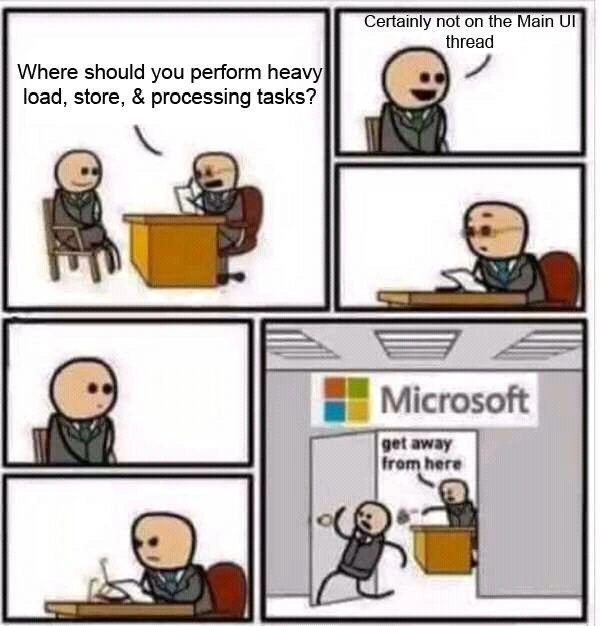
The meme drops us into a job interview scenario every seasoned developer can relate to, especially those who have wrestled with frontend performance and threading. In the first panel, a Microsoft interviewer asks the classic question:
Interviewer: "Where should you perform heavy load, store, & processing tasks?"
Candidate: "Certainly not on the Main UI thread."
Any experienced Windows or WPF developer immediately nods – that answer is spot on. Running heavy processing tasks on the main UI thread is a well-known cardinal sin in UI application design. In frameworks like WinForms/WPF, the UI runs on a single thread that continuously processes events (a message loop). If you clog this thread with intensive work (like crunching data or reading a huge file), the app’s interface freezes. You’ve probably seen an app turn ghost-white with a “(Not Responding)” title – that’s what happens when the UI thread is blocked. The candidate’s confident response “Certainly not on the Main UI thread” is threading best-practice in a nutshell. It’s the equivalent of saying “I will not freeze the app’s UI; I’ll do heavy work asynchronously or elsewhere.” Exactly what any developer advocate at Microsoft or any UI framework would want to hear, right?
But the humor kicks in through the next panels: the interviewer’s face falls into a deadpan stare. An awkward silence. Then, suddenly, the interviewer furiously types on his laptop and literally throws the candidate out of a Microsoft office window with a sign saying “get away from here.” Instead of praising the correct answer, the interviewer reacts like the candidate committed a taboo. It’s an absurd reversal that senior devs find hilarious because it parodies those nightmare interviews with ridiculously pedantic expectations. Maybe the interviewer expected an answer like “perform heavy processing on a background worker thread or an external service” – and the candidate only stated where not to do it. It’s poking fun at how sometimes giving the right answer in the wrong form can backfire in tech interviews. The Microsoft branding makes it juicier: Microsoft’s own development docs preach not blocking the UI thread (with patterns like async/await or Task.Run for AsynchronousProgramming). Yet here the fictional Microsoft interviewer yeets the poor dev for following that exact advice. It’s satire on corporate interview absurdity, exaggerating the fear that even when you know your stuff about PerformanceOptimization, an interviewer’s whims might still get you rejected.
On a technical level, every senior engineer recognizes the scenario being tested. Handling heavy workloads should be off the UI thread – often done via background threads, worker tasks, or messaging the work to a backend server. For example, in a C# app you might do:
// Bad Approach: blocks the UI thread, freezing the app until done
void OnSaveButtonClick(object sender, EventArgs e) {
SaveLargeFileSynchronously(); // heavy I/O on UI thread - UI will hang here
MessageBox.Show("File saved!"); // won't be reached until the above is done
}
// Good Approach: run heavy task asynchronously so UI stays responsive
async void OnSaveButtonClick(object sender, EventArgs e) {
// Kick off heavy work on a thread pool thread, freeing the UI thread
await Task.Run(() => SaveLargeFile());
MessageBox.Show("File saved!"); // runs on UI thread *after* background work completes
}
In the good approach above, Task.Run offloads SaveLargeFile() to a worker thread. The UI thread isn’t stuck waiting; it can still redraw the window or respond to a click. The magic is in await and C#’s async/await: it yields control until the background work completes, then automatically resumes on the UI thread to update the UI (thanks to the SynchronizationContext in WinForms/WPF). This is bread-and-butter Performance advice for any responsive desktop app or even web front-end (think of how heavy JavaScript blocking the main thread can freeze a webpage – same idea!). The candidate clearly knows this best practice.
So why the dramatic ejection? That’s the punchline. The meme exaggerates the worst-case pedantry: maybe the interviewer wanted the candidate to explicitly say “Use Azure cloud services for heavy processing” or was just power-tripping. It lampoons how InterviewHumor often highlights disconnects between what developers know to be correct and the silly hoops they sometimes jump through in interviews. The final panel with the Microsoft logo and “get away from here” sign is absurd – obviously, no real interviewer would throw someone out for nailing a question. But every dev who’s faced a puzzling interview outcome can chuckle (perhaps a bit darkly) at this over-the-top parody. It’s a mix of FrontendHumor and corporate satire: freezing the UI thread is so universally wrong that the only way to make a joke of it is to have an interviewer react opposite to expectations. The result is a memorable comic scenario that highlights how critical not blocking the UI is – and also how interviews can sometimes feel like a lose-lose game.
Description
A six-panel comic strip depicting a job interview. In the first panel, an interviewer asks the candidate, 'Where should you perform heavy load, store, & processing tasks?'. In the second panel, the candidate correctly and confidently replies, 'Certainly not on the Main UI thread'. The following three panels show the interviewer pausing, looking at his notes with a stern expression, creating a moment of tension. The final panel is the punchline: the interviewer is chasing the candidate out of an office with a prominent 'Microsoft' logo on the wall, yelling 'get away from here'. The humor is a satirical critique of a perceived historical tendency in Microsoft's older desktop frameworks (like WinForms) where blocking the UI thread was a common cause of frozen, unresponsive applications. The joke is that the candidate, despite giving the technically correct answer by modern standards, is rejected precisely because that best practice runs counter to the supposed 'Microsoft way' of the past. It's a relatable joke for senior developers who have dealt with the pain of unresponsive GUIs

Comments
7Comment deleted
He should have answered, 'On the UI thread, but wrapped in a try-catch block that just sets the cursor to a spinning wheel indefinitely.' He would've been hired on the spot
Told the Microsoft interviewer I’d push the heavy lifting into Task.Run and marshal UI updates via Dispatcher - turns out the “correct” answer was “hand it to Azure and finance will figure it out,” so I got a 308 Permanent Redirect straight to the parking lot
After 20 years of preaching async/await and background workers, Microsoft still ships apps that make the UI thread look like a single-core Pentium trying to mine Bitcoin while rendering 4K video - but at least their interview candidates know better
The real irony here is that Microsoft is throwing out someone for suggesting proper threading practices - meanwhile, every Windows user has experienced the dreaded 'Not Responding' dialog because some application decided the main UI thread was the perfect place to parse a 500MB XML file. It's like being rejected from a fire safety job by the company whose building is currently on fire. The candidate's answer is textbook correct: heavy I/O, computation, and data processing belong on background threads or in async operations to keep the UI responsive. But apparently, at Microsoft, acknowledging this fundamental principle of GUI programming is grounds for defenestration - which, given their history with Windows, is perhaps the most on-brand response possible
Main-thread I/O converts the Windows message pump into a backpressure seminar, otherwise known as the 'Not Responding' UX
MSFT's UI thread: one ring to rule them all, one freeze to bind them
At Microsoft, saying “never on the UI thread” gets you escorted out by COM’s STA and a couple of modal dialogs - SynchronizationContext will handle the deadlock paperwork