The Ultimate Technical Flex: Coding a Turing Machine in Excel
Why is this Interviews meme funny?
Level 1: LEGO Car That Runs
Imagine you’re in a contest where you have to build a small working car, and the judge says, “You can use any materials you want.” Most people would grab things like wood, metal, or maybe a model kit – normal stuff to build a car. But one clever kid says, “I’ll build mine out of LEGO bricks.” At first, the judge almost laughs – LEGOs are toys, not real building materials for a functioning car! It sounds silly, right? But then, piece by piece, the kid actually builds a LEGO car that works. The wheels turn, the car zooms forward, everything. The judge’s smile turns into pure astonishment. It’s funny and amazing at the same time, because nobody expected a toy to solve a real engineering challenge so well. In this meme’s story, the coding interviewer is like that judge and the candidate is like the kid with the LEGOs. The interviewer said “use any programming language” expecting something ordinary, but the candidate chose Excel – a tool people usually use for tables and numbers, not for writing serious programs. It was such an odd choice that it almost made the interviewer laugh. But then the candidate actually made it work, crafting a whole solution inside Excel. It’s the same kind of surprise and humor as the LEGO car: using an unexpected tool in a super clever way to solve a problem. Everyone finds it funny because the situation flips from “Haha, good luck with that!” to “Wait… wow, you actually did it!”. The heart of the joke is about being resourceful and thinking outside the box, turning something simple (like a spreadsheet, or LEGO) into a powerful way to solve a tough challenge.
Level 2: Spreadsheet Programming 101
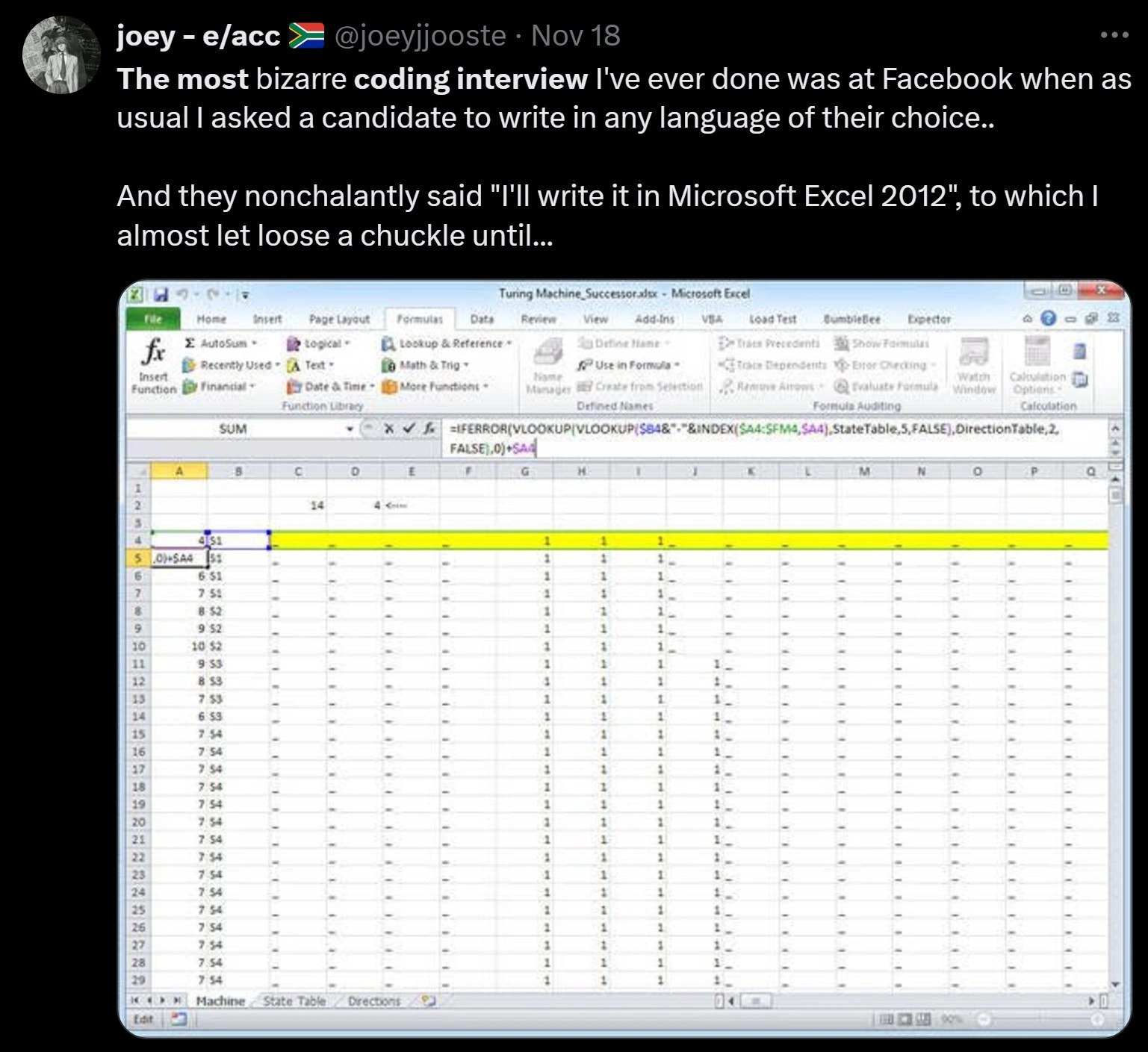
Let’s break down what’s happening in this meme in simple terms. A coding interview took place at Facebook, where an interviewer told the candidate they could write their solution in any programming language they felt comfortable with. Now, normally “any language” means any common programming language – like Python, Java, or C++ – something you’d type out in a code editor. But this candidate chose something totally unexpected: Microsoft Excel 2012. Yes, the spreadsheet program with cells (the little boxes) where people usually do budgets or lists. The meme shows a screenshot of Excel with a file named "Turing Machine_SuccessorState". Instead of typical code, the candidate is using Excel’s formula bar (that long input box at the top of Excel where you usually see things like =SUM(A1:A10)) to write a seriously complex formula. It’s full of Excel functions like IFERROR() and VLOOKUP(), nested inside each other. In Excel, formulas like that are the way you “program” logic. Each cell can contain a formula that calculates a value based on other cells. Here the candidate essentially turned Excel into their programming canvas, writing a formula that follows the rules of a Turing machine (which we’ll explain next) to solve whatever problem was asked.
So, what’s a Turing machine in simpler terms? It’s an old but important concept in computer science – basically a thought experiment for what a computer is. Imagine a really long strip of tape divided into squares (cells), and each square can hold a symbol like 0 or 1. There’s a little machine that can read one square at a time (that’s the tape head). This machine has a set of rules that tell it, “If you’re in this state and you see a 0, change it to a 1, or move one step to the right, or switch to a different state,” and so on. A “state” is just like the mode or situation the machine is in, kind of like how a calculator might be in “error state” or “ready state”. By reading symbols and writing new ones and moving around, this simple machine can actually do any calculation that any computer can, if you give it the right set of rules. It’s very low-level – real computers don’t work exactly like this, but they can be conceptually simplified to something like it. So when the meme says the candidate wrote "Turing Machine logic," it implies the interview problem likely needed some algorithm or step-by-step processing which the candidate chose to implement by simulating this theoretical machine’s behavior. It’s like they went back to the absolute fundamentals of computing to solve the problem – and did it inside Excel!
Now, Excel as a programming language is an unusual idea, but here’s how it works in this context. In Excel, you usually have cells identified by letters and numbers (like A1, B2, etc.). You can put numbers or text in them, or you can put formulas that reference other cells. For example, in cell C1 you might write =A1 + B1 to have it show the sum of whatever is in A1 and B1. Excel has a bunch of built-in functions to do more complex things. Two of the functions we see in the meme are VLOOKUP and IFERROR.
VLOOKUPstands for “vertical lookup”. It’s used to search for a value in the first column of a table and then return a value from the same row of another column you specify. Think of having a phone book in Excel: you canVLOOKUP("John Doe", phonebook_table, 3, FALSE)to find John Doe in the first column and get whatever is in the 3rd column of that same row (maybe John’s phone number). TheFALSEparameter just means “find an exact match”. In our meme’s case, the candidate crafted a lookup key by combining things (the$B4&":"&INDEX($A4:$F4...)part) – likely combining the current tape symbol and the current state into one string separated by a colon (like "0:A" meaning symbol 0 in state A). Then they search a State Table for that string to find what to do next. This is essentially how you’d use a lookup to decide something in place of anif. Instead of writing a ton ofIFformulas for each possible state and symbol, they letVLOOKUPfind the matching rule from a list. It’s a way to compress a complicated decision tree into a table and one formula.IFERROR(expression, value_if_error)is simpler: it just says “try to do this expression; if it causes an error, use this other value instead.” In Excel,VLOOKUPgives an error if it can’t find what you’re looking for. So by wrapping the lookup inIFERROR(..., 0), the candidate ensured that if the current state+symbol combo isn’t found (meaning there’s no defined rule for that combination), the formula will return0instead of an ugly error like#N/A. That0might be a signal, perhaps indicating the machine should stop (halt) or that the result is 0 for that step. In coding terms,IFERRORhere is acting like a default case or anelsethat handles “otherwise, do this.”
So, effectively, the candidate’s Excel sheet is doing this: It takes the current state of the machine and the current symbol on the tape, combines them to form a “key,” and looks up what the next step should be (i.e., what to write on the tape, which direction to move, and what the next state is) from a prepared table of rules. Then presumably it moves to the next cell (like moving the tape head) and repeats. The screenshot shows a row highlighted in yellow, with a lot of 1s and - signs in that row across columns B–Q. This likely represents the tape’s content at a certain step. Perhaps 1 stands for a symbol “1” and maybe a dash - represents a blank or 0 on the tape. The highlighted row (row 5) could be the current step of the Turing machine’s execution, where the machine is reading a particular cell (tape position) and the formula is determining what happens next. The text in column A of that row, 0|>5A, might be a shorthand the candidate used to indicate something like “Read 0, then write something, move > (right) and go to state 5A”. It’s not a standard notation we use every day, but given the context, it’s probably their way to label what’s going on at that step.
Now, why did this make the interviewer almost laugh, and why is it meme-worthy? In an interview, when you say "any language," you expect a programming language. Excel is usually not on that list – it’s a spreadsheet application! The idea of writing an algorithm in Excel is so unconventional that it sounds like a joke. People don’t list Excel under their coding skills typically (they might list it under office or data analysis skills). The interviewer admittedly nearly chuckled because it’s like if someone asked you to draw a picture and you pulled out an Etch A Sketch instead of a pencil – technically you can draw with it, but really? However, the candidate kept a straight face and actually started building the solution in Excel. This means they were extremely confident and skilled with Excel’s advanced features, enough to implement complex logic. That’s impressive. It’s also a little bit cheeky: perhaps the candidate wanted to stand out or show that they can solve problems in a creative way. Interviewers also realized that evaluating an Excel formula-based solution is non-trivial – the interviewer themselves might not be an Excel guru. So it put them in a funny spot: “I gave them a choice and they picked something I, the interviewer, am not fully prepared to grade!” The meme is relatable to anyone who’s been in tech interviews or given them, because it underscores how the unexpected can happen. Tech interviews have a bit of theater to them – candidates often stick to safe choices. Seeing someone break the norm (and succeed) is both hilarious and kind of awesome.
So in simpler summary: The candidate basically turned Excel into their coding environment and built a mini-computer simulation (the Turing machine logic) using spreadsheet formulas. They used things like VLOOKUP (to find what rule to apply) and IFERROR (to handle missing cases) as their tools – analogous to using if/else and loops in normal code. The interviewer was shocked because nobody expects Excel to be used as a coding language in such a high-profile interview. It’s a bizarre interview story because it’s true to the interviewer’s request (“use any language”) yet completely breaks the usual pattern. And crucially, it worked – making it a story of an interviewee literally Excel-ing in their task by using Microsoft Excel. It’s both a nerdy joke and a testament to thinking outside the box (or cell, in this case!).
Level 3: Excel-ling at Code
From a senior developer’s perspective, this story hits on the absurdity and brilliance of using Excel as a programming language in a serious interview. Coding interviews at places like Facebook are famously intense – candidates typically pick languages like Python, Java, or C++ to write algorithms on a whiteboard or laptop. When the interviewer said “any language of your choice,” they were likely expecting a mainstream language or at worst pseudo-code. So when the candidate casually replied with “I'll write it in Microsoft Excel 2012,” it’s no wonder the interviewer almost chuckled. Excel? Really? Most engineers think of Excel as a tool for accountants and project managers, not a place to implement algorithmic logic. It’s as if a candidate in a cooking contest said, “I’ll prepare my dish with a microwave from 1999” — you’d think they were joking or sabotaging themselves. But the punchline here is that the candidate was dead serious and actually delivered. The screenshot of the spreadsheet titled "Turing Machine_SuccessorState" reveals that the candidate wasn’t just doing some trivial sum or lookup; they encoded a full-blown state transition function (the core of a Turing machine or any complex algorithm) using Excel formulas. The interviewer’s chuckle probably turned into jaw-dropping silence as they watched a flurry of IF, INDEX, and VLOOKUP formulas accomplish what most of us would write with loops and if-statements in a normal programming language. It’s the ultimate unexpected language choice flex during a technical interview.
Why is this so funny (and impressive) to experienced devs? For one, it satirizes the idea that “any language” means any language. Interviewers usually have a certain set of languages in mind that they can comfortably evaluate. Excel formula code is definitely not on that list. Most interviewers wouldn’t even know how to debug or evaluate a complex nested Excel formula on the fly, which flips the script: the candidate sort of took control of the interview by forcing the problem into an exotic format. It’s a power move, albeit a quirky one. This resonates with veteran engineers who might have been on either side of wild interview scenarios. We’ve heard of candidates writing solutions in Haskell or Lisp to stand out, or even jokingly asking “Can I do this in pseudocode?” But Excel – that’s a new level of creative compliance with instructions. It highlights the clash between formal interviewing norms and real problem-solving creativity. Usually, interview problems are meant to test fundamental understanding (data structures, algorithms) independent of language. Here the candidate proved they understood the problem so fundamentally that they could implement it in a totally unconventional medium and still get it right. That’s both hilarious and admirable.
Additionally, the meme plays on the “Excel as the world’s most popular programming environment” trope. Seasoned devs know that outside the software engineering bubble, so much business logic and automation in the world is done via Excel by power users who’ve never written a line of Python. We joke that entire companies run on giant, shaky spreadsheets full of =VLOOKUP and =SUMIF formulas put together by finance or ops people. It’s technically coding, just without the fancy IDE. Seeing a software engineering candidate intentionally go down that path in a high-stakes interview is comically ironic. It reminds us of those times we had to untangle someone’s monstrous Excel workbook that essentially calculated something that could’ve been a 50-line program – Excel formulas layered like spaghetti code across sheets. The candidate in the meme basically did that on the spot. It’s both a nod to Excel’s underappreciated capabilities and a tongue-in-cheek reminder that good engineers can adapt to any tool. They turned an interview question into an opportunity to show off deep knowledge: not just of algorithms, but of how far Excel’s formula language can be pushed.
Let’s appreciate some technical details that senior folks would love here. The candidate used VLOOKUP in an inventive way. VLOOKUP in Excel is normally used to retrieve data from a table by matching a key in the first column. For example, =VLOOKUP("Alice", EmployeesTable, 3, FALSE) might find "Alice" in a list of employees and return her department from the 3rd column. In code terms, it’s like a dictionary lookup for a key’s value. In the screenshot’s formula, we see VLOOKUP($B4 & ":" & INDEX($A4:$F4, ...), StateTable, 5, FALSE). This suggests the candidate combined the current tape symbol and state (maybe $B4 was the symbol under the read head, and INDEX($A4:$F4, something) pulled the current state identifier from that row) into a single string like "Symbol:State" and then looked that up in a StateTable. Essentially, they built a key for the current situation of the Turing machine (current state + current symbol) and used it to fetch the rule that tells them what to do next (like write a new symbol, move left or right, and transition to a new state). This is exactly how you’d implement a state transition function in normal code: maybe using a map keyed by (state, symbol) pairs. The brilliance (and absurdity) is that they’re doing it with static tables and formulas. They even wrapped it in IFERROR(..., 0) to handle cases where a lookup might fail (meaning no rule exists for that combination, which could signal the machine should halt or that the input is invalid). That’s equivalent to saying “if there’s no transition defined for this state+symbol, stop or output a default”. So IFERROR here is like a catch-all else case. In a way, VLOOKUP is acting like an if/else ladder or a switch statement, and the Excel formula is the “code” that drives the process.
For an experienced engineer, it’s also hilarious how the interviewer’s expectation was subverted. The interviewer thought the hardest part would be evaluating the candidate’s algorithm and coding style – instead they had to wrap their head around a spreadsheet doing algorithmic magic. The tweet’s author (@joeyjjooste) writing “I almost let loose a chuckle until…” paints the picture: the interviewer nearly laughed thinking it was a joke, but had to hold that laugh as the candidate proceeded to actually solve the problem. You can imagine the room going from light-hearted to intensely focused as everyone realized Oh, this is actually working. This reversal taps into a common experience in tech: the moment you realize someone you underestimated has an ingenious solution. It’s cringe-funny for the interviewer (oops, nearly laughed at a valid approach) and satisfyingly funny for everyone else, because we love seeing the script flipped.
In sum, from the senior perspective, this meme humorously encapsulates innovation under pressure and the breadth of “coding” skills. It reminds us that a truly skilled problem-solver isn’t limited by language syntax – give them Excel, give them Minecraft’s redstone, give them punch cards, whatever – they’ll find a way. It also gives a nod to all those times we’ve seen ridiculously complex Excel sheets acting as programs in the wild. Excel programming might be a nightmare to maintain, but you can’t deny it gets the job done in countless offices every day. This interview story just takes that to an extreme, delightful conclusion: a candidate literally excelled at their coding test by using Excel. It’s a moment of geeky triumph that makes every seasoned coder both chuckle and slow-clap in respect.
Level 4: Spreadsheet Turing Tarpit
At the most theoretical level, this meme highlights Turing completeness emerging in an unlikely place: an Excel spreadsheet. In computer science theory, a system is Turing-complete if it can simulate a Turing machine, meaning it can compute anything that any other programmable computer can, given enough time and memory. A Turing machine is an abstract model of computation introduced by Alan Turing – imagine an infinite tape of symbols (like zeros and ones) and a head that moves left or right reading and writing symbols based on a set of rules (the state transitions). If you can encode those rules, the tape, and the moving head, you can in principle perform any computation. This candidate managed to encode exactly that logic inside Excel 2012, using nothing but formulas. It’s a startling demonstration of Excel’s hidden computational power.
Excel isn’t normally thought of as a programming environment, but under the hood it has a functional formula language. Each cell can contain formulas like =IF(A1 > 0, A1 * 2, 1) to express conditional logic and calculations. By cleverly linking cells and tables of data, you can simulate iterative processes – almost like unrolling a loop across spreadsheet rows. The meme’s screenshot shows a workbook with sheets labeled "Machine", "State Table", "Directions", suggesting a full state machine encoded in tables and formulas. The formula in the image begins with =IFERROR(VLOOKUP(VLOOKUP($B4&":"&INDEX($A4:$F4...), ...), 0). This nested formula is essentially performing a double lookup: it likely combines the current state and tape symbol (the $B4&":"&... part) as a key, then searches a StateTable for a matching rule. The outer IFERROR(..., 0) acts like a safety net – if no rule is found, output 0 (perhaps indicating a halting condition or default). In a traditional programming language, you’d implement a Turing machine’s transition function with a series of conditional statements or a lookup dictionary. Here, the candidate has done the equivalent using Excel’s VLOOKUP as a substitute for a big if/else or switch-case control flow. It’s a bit like using an abacus to simulate a CPU: painstaking but possible.
This Excel-based Turing machine is a prime example of a Turing tar pit, where “everything is possible but nothing of interest is easy.” Excel provides the primitive operations (like cell references, conditional IF logic, and table lookups) needed to simulate computation, but doing so is clunky and not at all straightforward – you’re wading through a tar pit of cell formulas. Yet, as the meme humorously shows, someone actually pulled it off in a high-pressure setting. Historically, computer scientists have proven many unexpected things to be Turing-complete: from Conway’s Game of Life (a grid of cells that follow simple rules) to esoteric “languages” like brainf*ck (with only 8 commands) and even certain card games or cellular automata. Spreadsheets with sufficiently advanced formulas belong on that list. Modern Excel versions even introduced a LAMBDA function, allowing recursive formulas – essentially turning Excel’s formula language into a full-fledged programming language. But back in Excel 2012, before such niceties, achieving this meant the candidate had to manually orchestrate the computation across cells and sheets. They treated the spreadsheet as the Turing machine’s tape and the formulas as the transition function. Each row might represent a step of the machine, each column a tape cell or state variable, and the highlighted row (row 5 in the image) could be the machine’s current step with the active cell marked in yellow. The symbols like 0|>5A in column A resemble an encoding of “read symbol 0, then > (move right), then go to state 5A” – a compact notation for one of the machine’s rules. By referencing such rules via VLOOKUP, the sheet calculates the successor state and writes it back into the tape representation. Essentially, Excel is computing the next move of the Turing machine, cell by cell.
Why is this so deeply intriguing? It showcases the universality of computation: any system with minimal capabilities (read/write, conditional logic, and the ability to chain operations) can emulate any other computing system. Excel’s grid of cells and formulas, typically used for budgets and charts, is theoretically capable of simulating the same logic that runs a Turing machine – and thus any algorithm – given enough cleverness. It blows the mind a bit, because we usually draw thick lines between “real programming” and “just a spreadsheet.” This candidate proved that Excel’s formula language, albeit a strange choice, is powerful enough for serious logic. It’s a case of theory meeting practice in the funniest way: a Facebook coding interview turning into a lesson on computational theory. The humor has a layer of awe: the absurdity of doing something so academically profound (writing a universal computation model) in something so mundane as Excel, and doing it live in an interview. For seasoned engineers and computer scientists, it’s both hilarious and impressive – akin to watching someone prove a theorem using only crayons and a napkin. The meme captures that high-level surprise: Excel unofficially joins the ranks of “programming languages” by demonstrating its Turing completeness in perhaps the most unexpected venue imaginable.
Description
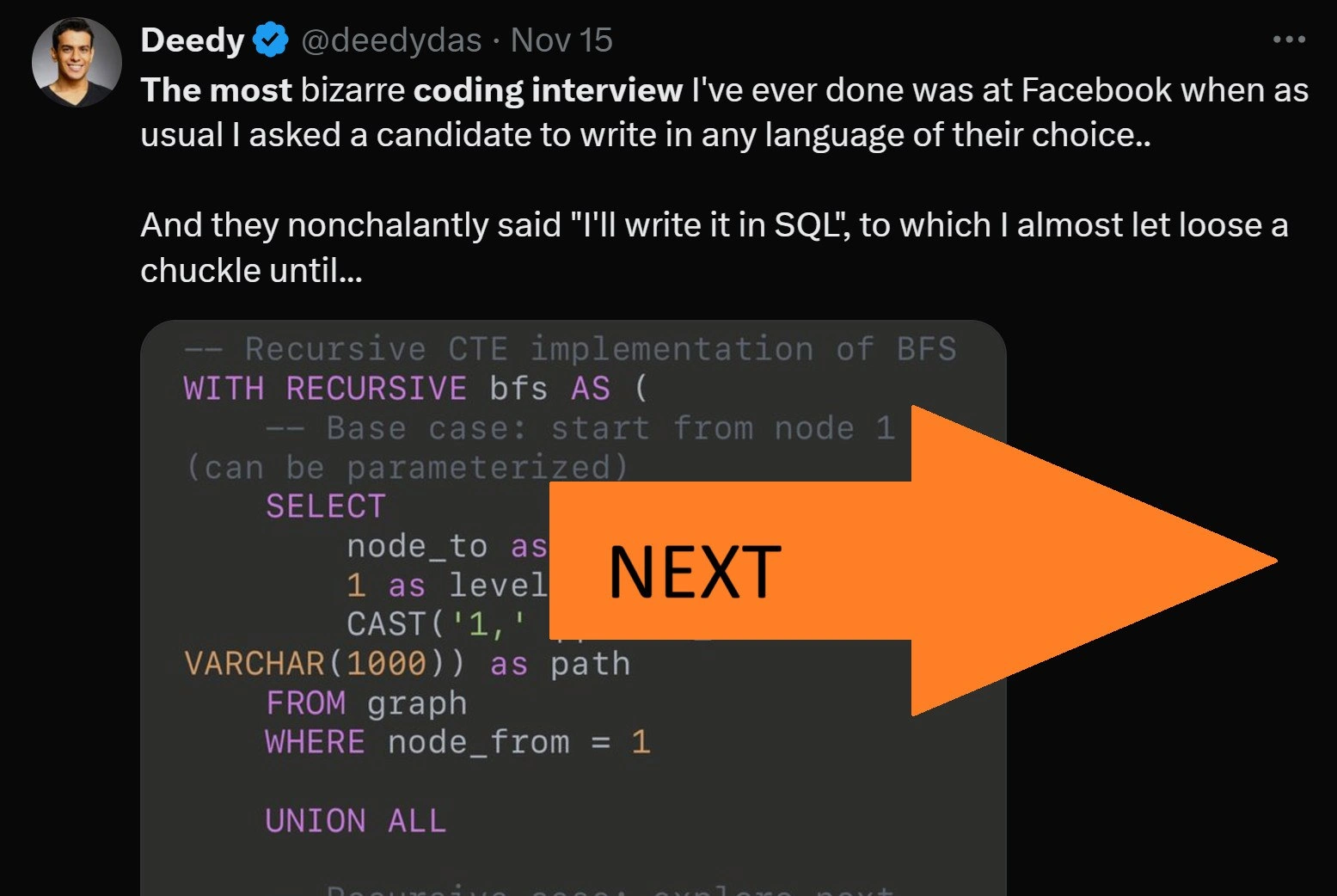
This image continues the 'bizarre coding interview' meme format with a screenshot of a tweet from user Joey (@joeyjjooste). The tweet reads: 'The most bizarre coding interview I've ever done was at Facebook when as usual I asked a candidate to write in any language of their choice.. And they nonchalantly said "I'll write it in Microsoft Excel 2012", to which I almost let loose a chuckle until...'. Below this text is a screenshot of a Microsoft Excel window. The file is named 'Turing Machine_Successor.xlsx' and the spreadsheet is filled with intricate formulas, including a visible one using IFERROR, VLOOKUP, and INDEX functions. The sheet tabs are labeled 'Machine', 'State Table', and 'Directions', indicating a complex computational model. The humor is aimed at a highly technical audience who understands that while Excel is not a conventional programming language, its formula engine is Turing-complete. Building a Turing Machine, a foundational concept of theoretical computer science, within Excel is a monumentally complex and impractical feat, making it an ultimate 'technical flex' that showcases deep knowledge of both CS theory and the unexpected capabilities of a common business tool
Comments
7Comment deleted
The candidate got the job, but their first performance review was just a series of #REF! errors and a circular dependency warning from HR
The minute he encoded the Turing machine with nested VLOOKUPs, my only architectural concern became: how do we get meaningful code reviews when Git diff thinks the entire .xlsx changed?
That candidate just proved Excel is Turing complete while simultaneously demonstrating why we need dependency injection frameworks for VLOOKUP chains
When the candidate said they'd implement a Turing machine in Excel, the interviewer thought they were joking - until they realized Excel formulas are Turing complete and this madlad actually built a state machine with nested VLOOKUPs. Suddenly 'any language of their choice' became a careful lesson in specification: next time, explicitly exclude spreadsheet software, or you'll spend the entire interview watching someone debug circular reference errors in what should have been a simple linked list traversal. At least they didn't choose PowerPoint animations
Offer any language and someone ships a VLOOKUP/IFERROR Turing machine - zero dependencies, instant CFO adoption, and better LTS than half your microservices
Excel as a Turing machine: infinite tape via infinite rows, state machine via nested IFs - proving Church-Turing with A1 notation, no lambda needed
Ask for any language and you’ll get Excel - Turing‑complete, PM‑compatible, and the only runtime where VLOOKUP doubles as dependency injection