Developer literally makes sense with a single 'make sense' command
Why is this CLI meme funny?
Level 1: Now it Makes Sense
Imagine you’re doing a puzzle and someone says, “Hey, make sure it makes sense.” In normal life, that means “be sure it’s understandable.” But instead of thinking really hard, you pull out a magic tool that can create things and you say, “Alright, I’ll literally make ‘Sense’.” Then poof! – you build a little toy or item and label it “Sense.” Now you can hold it up and proudly declare, “Look, I made Sense!” 😂 This meme is just like that, but with computer commands. The programmer used a special build command (make) to create a program file conveniently called “sense.” So in a cheeky literal way, they made “Sense.” It’s funny because our brains don’t expect the phrase “make sense” to be taken word-for-word. It’s a play on language: the developer turned an everyday expression into an actual action. In the end, we laugh because the confusing phrase suddenly has a simple, tangible result – the computer did exactly what it was told, and now it “makes sense”.
Level 2: Building sense
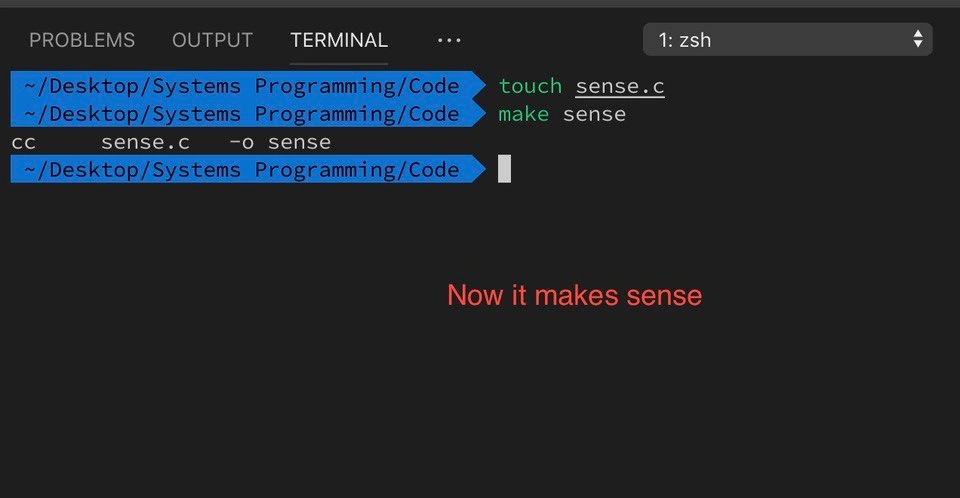
Let’s break down what’s happening in the meme in simpler terms. We’re looking at a screenshot of a terminal (the text-based interface where developers can type commands) inside Visual Studio Code with a dark theme. The developer is using a command-line interface (CLI) – specifically a Zsh shell – on their computer. In the prompt, the path ~/Desktop/Systems Programming/Code shows the current folder (directory) they’re in. This person executes two commands in sequence (the commands are in green text, and the results appear in white):
touch sense.c– Thetouchcommand creates a new empty file namedsense.c. In this context,.cis the file extension for C language source code. So after this command, there’s a blank C source file in the folder called “sense.c”. (If a file by that name already existed,touchwould just update its modified timestamp without changing its contents.)make sense– Themakecommand is a build automation tool that usually reads instructions from a “Makefile” on how to compile or build a program. Here, the developer passes “sense” as an argument, which tellsmake, “Please build the target named ‘sense’.” Since there’s no explicit Makefile shown,makeuses its default behavior: it sees a file namedsense.cand assumes you want to compile that into an executable program named “sense”. The terminal printscc sense.c -o sense, which is the actual compile command being run under the hood.ccis the C compiler (it’s converting the C code into a machine-language program),sense.cis the input file, and-o sensemeans “output the result as a file named sense.” Essentially, the computer just compiled an (empty) C program and produced an executable file called “sense”.
After these steps, the joke is spelled out by the red caption “Now it makes sense” appearing below. Why is this funny? In everyday language, saying “now it makes sense” means “now I understand”. But here, the developer made the computer literally “make” something called “sense.” It’s a play on words (a pun). The humor comes from using software building tools in an unexpected way: turning a common phrase into an actual series of commands. We have the compiler involved (since it compiled sense.c), and a build tool (make) orchestrating it, all to fulfill the instruction hidden in the phrase “make sense.” It’s also a lighthearted poke at the idea that code should be clear or make sense. Instead of improving the code, the developer just used the tools to create a program named "sense". In summary, the developer literally made “sense” with their computer, and that’s the entire gag!
For a newer developer or someone not familiar with C or make: think of make as a smart helper program that knows how to build other programs. Here it noticed the file sense.c and automatically did the compilation. The result is similar to running a compile command manually, but make figured it out for you. This behavior is part of what we call build automation – tools taking care of the steps needed to go from source code to a finished program. The fact that the tool’s name make can form a real English phrase with the file name “sense” is the source of the joke. It’s as if the computer was told in plain English to “make sense,” and it obediently did so by creating a file named “sense.”
Level 3: Literal Code Comedy
For seasoned developers, this meme lands as a clever blend of command-line literacy and nerdy wordplay. The phrase “Now it makes sense” is one we often use after untangling confusing code or finally understanding a tricky concept. Here, a developer has taken that idiom and given it a literal twist using real commands. They created a source file named sense.c (using the touch command) and then ran make sense, causing the build system to output a program literally called “sense.” The humor comes from the dual meaning: in everyday talk, “make sense” means to become clear or logical, but in a developer’s world, make is a tool to build software. Combine that with a file actually named “sense,” and you get a pun that compiles both figuratively and literally. It’s command-line comedy: only someone comfortable with the CLI (Command Line Interface) and C build processes would think to enact this joke.
The highlighted blue lines in the dark-themed VS Code integrated terminal show exactly what happened. This developer, presumably working in a zsh shell on a project in ~/Desktop/Systems Programming/Code, types touch sense.c. In Unix-like environments, touch is a simple command that creates an empty file (or updates the timestamp of an existing file). It’s often used by developers to quickly stub out new files or to trigger build systems by updating file modification times. Here, touch sense.c creates an empty C source file named “sense.c”. The next command, make sense, is where the magic (or rather Makefile magic) happens. Normally, make looks for a file named Makefile that contains instructions on how to build the project. But even without a custom Makefile, make has some built-in rules. One of those default behaviors is that if you ask it to build a target (in this case, a target named “sense”), it will see if there’s a correspondingly named source file like “sense.c”. If found, it assumes you want to compile that C source into an executable. This is exactly what occurred: make found sense.c, invoked the system C compiler (outputting the line cc sense.c -o sense as shown), and produced a binary file named sense.
To an experienced programmer, there are multiple layers of wit here. It showcases a deep familiarity with build systems and compilers: knowing that make can do that implicitly is a bit of arcane knowledge usually acquired when you’ve dealt with C/C++ projects or legacy build tooling. It’s the kind of thing a senior engineer might chuckle at and say, “Ha, I see what you did there.” The Build Process itself becomes part of the joke. We often joke in development that something “finally makes sense” after debugging — here the developer actually forces the issue by making “sense” out of code. It’s also a tongue-in-cheek commentary on the idea that code should make sense. The original post message even says “Your code should make sense #motivational”. As developers, we strive for code clarity and sense, but when faced with that platitude, this coder took a cheeky shortcut: if your code doesn’t make sense, just literally Make “sense”! It’s a playful reminder that sometimes we take metaphors very literally in tech (especially when there’s an opportunity for a pun).
There’s also an underlying nod to the history and simplicity of classic tools. make, one of the oldest build automation tools, operates on straightforward principles: file timestamps and rules. In an age of complex CI/CD pipelines and fancy build systems (Gradle, CMake, Bazel, etc.), make remains a humble yet powerful utility. Seasoned devs have used it to compile everything from small scripts to the Linux kernel. Seeing make do something so minimalistic – and in service of a joke – is oddly satisfying. It’s a bit of tech humor that also feels like an inside joke: if you know, you know. Everybody who’s struggled writing a Makefile or debugging a compile error can appreciate the comedic relief of a program that, by name alone, proclaims that things finally “make sense.”
Level 4: Synthesizing Sense from Source
At the deepest technical layer, this meme highlights the build automation and compiler internals that make the pun possible. The developer invokes the venerable make utility, which behind the scenes constructs a directed acyclic graph of dependencies and uses implicit rules to compile source code. In this case, the target is an executable named sense. When they typed make sense, make noticed a file named sense.c in the current directory and applied its built-in C compilation rule. By default, make assumes that a target with no explicit recipe but with a matching .c file can be built by compiling that source. Under the hood, it expanded to a command:
# make's implicit rule for building an executable from a C source
%: %.c
$(CC) $(CFLAGS) $< -o $@
Here, $< represents the prerequisite (in this case sense.c) and $@ is the target (sense). This rule is part of make’s arsenal of default patterns. It means “to build X from X.c, run the C compiler”. The output cc sense.c -o sense in the terminal is make dutifully invoking the C compiler (cc is traditionally the default C compiler driver, often aliasing to GCC or Clang) to produce a binary. The compiler goes through its typical phases even for such a trivial file: preprocessing (not much to do here), parsing the C code into an AST, possibly optimizing (though an empty program has little to optimize), assembling machine code, and linking. The humorous twist is that the source file sense.c likely contains the bare minimum (perhaps just an empty main function returning 0). Assuming it does, the compiler will still generate a valid executable. In a normal scenario, an empty C file with no main would cause a linker error (no entry point), but the meme implicitly suggests there’s at least a stub of a program so that the build succeeds. The end result is an actual program named sense. In essence, the build system literally synthesized “sense” from source code.
That phrase “make sense” usually lives in the realm of human understanding, but here it’s achieved through computational means. It’s a delightful play on words enabled by decades-old tools: Make (created in 1976 as one of the earliest build automation tools) knows how to take a .c file and produce an executable, the compiler knows how to translate C source into machine code, and the operating system knows how to mark the output as an executable file. All these systems collaborate so that with two brief commands, we have literally made something called “sense.” The deep irony tickles those familiar with C programming and build processes: it connects the abstract idea of code making sense (having coherent semantics) with the concrete action of generating a program file. The pun leverages the fact that, in programming, words like make, touch, and sense can intersect between everyday language and technical commands. The rigorous logic of build systems and compilers has aligned perfectly with an English phrase, resulting in a joke where the compiler’s semantic analysis and linking steps physically produce what language learners only figuratively achieve – meaning.
Description
Dark-themed VS Code integrated terminal labelled “TERMINAL” (shell selector shows “1: zsh”). Three prompt lines - currently selected and highlighted blue - show the path “~/Desktop/Systems Programming/Code”, then green commands: “touch sense.c” followed by “make sense”. The build tool responds with “cc sense.c -o sense”, confirming compilation of the newly created C source into an executable named “sense”. Centered beneath the terminal, large red caption text states “Now it makes sense”, turning the output into a pun. The meme plays on command-line literacy, Makefile workflows, and C compilation to joke that invoking ‘make’ has quite literally “made sense”
Comments
6Comment deleted
In our monorepo, `make sense` drags in 143 circular dependencies, links fine, and still produces undefined behavior - accurately mirroring the roadmap review
After 20 years in this industry, I've finally found the only build target that consistently delivers what it promises - unlike our sprint commitments
The beautiful irony here is that 'make sense' actually worked on the first try - a rarity that would make any systems programmer suspicious. In reality, you'd typically spend three hours debugging why your Makefile can't find the compiler, another two arguing about whether to use CMake instead, and finally resort to just running gcc directly like this anyway. But hey, at least the pun landed perfectly, which is more than we can say for most build systems
When leadership says “please make sense,” I just check in sense.c - GNU Make’s $@ and $< handle the rest, no Makefile or meeting required
In systems programming, sense isn't inherited - it's strictly 'touch' to create
GNU Make can build sense from a C file with no Makefile; shame it still can’t build requirements from a Jira epic