
Skip to content
DevMeme
2090 of 7435
When social media invades your last sacred space: the terminal
CLI Post #2335, on Nov 19, 2020 in TG

When social media invades your last sacred space: the terminal

Why is this CLI meme funny?

Level 1: Stories Everywhere

Imagine you have a very simple work desk where you do your homework every day. It’s always organized the same way – plain paper, pencils, no distractions. Now picture coming to that desk one day and finding a row of bright, blinking picture book circles propped up at the top of your work area. Each circle has a friend’s face on it with neon lights around it, showing they have a new fun story to tell you. It would be pretty surprising, right? You’d think, “Hey, I’m just here to do my work, why are these colorful story circles here?” It’s a bit silly and out-of-place, which is exactly why it’s funny. The meme takes a serious tool (like a no-nonsense notebook or, in this case, a coding screen) and suddenly gives it a silly twist (making it look like a social media app with stories). It’s like finding comic strips inside a math textbook – unexpected and playful. The joke is that even in a space where you wouldn’t expect fun social features, they’ve popped up everywhere. So the serious thing isn’t so serious for a moment, and that surprise makes us laugh.

Level 2: Shell Gets Social

Let’s break down why seeing “Stories” in a terminal window is so amusing to developers. First, the CLI (Command Line Interface) is the text-based environment where programmers type commands. Picture the black (or dark-themed) screen with some white or green text – that’s the terminal. You might have seen it as a window with just lines of text and a blinking cursor (the ~$ in the image is an example of a prompt, indicating the shell is ready for your input). Developers use the CLI to run programs, manage files, and do all sorts of tasks by typing commands instead of clicking buttons. It’s valued for being minimalist and efficient. The design is usually very simple: no buttons (aside from the window controls), no images, just monospaced text. This simplicity is a big part of good Developer Experience (DX) for those who love working in the terminal – fewer distractions, more focus on getting things done.

Now, Instagram Stories are a feature from a popular social media app (Instagram) where people share pictures or short videos that disappear after 24 hours. In Instagram, you see these as a row of circular profile pictures at the top of your feed, each with a bright colored ring (often a pink-orange gradient) around it if that person has a new story for you to view. If you tap one, you see their content. It’s a very graphical, visual concept, completely the opposite of a text-only interface. Stories are all about quick, eye-catching updates, often with filters, stickers, or neon colors to grab your attention. They’re a prime example of a flashy UI trend meant to increase user engagement on social platforms.

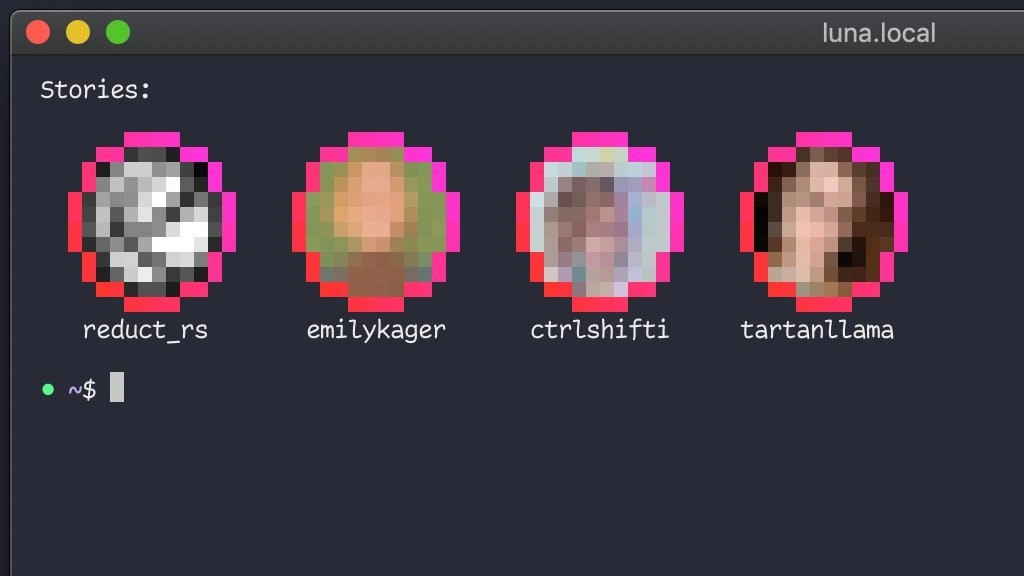
So this meme takes those two very different worlds – the serious, text-only terminal and the flashy, image-driven social media stories – and mashes them together. The image literally shows an ASCII/monospace rendition of Instagram’s story UI inside a terminal window. The line Stories: in the terminal, followed by those four pixelated circular avatars with neon-pink outlines, is styled exactly like Instagram’s interface. Each avatar has a handle (username) under it, just like you’d see names under Instagram story icons. Interestingly, the handles listed (reduct_rs, emilykager, ctrlshifti, tartanllama) are actually usernames of real developers or tech community members. By using those, the meme stays within the developer theme – instead of celebrities or friends, it’s as if your fellow programmers have posted “terminal stories.”

Seeing pixelated_avatars in a terminal is funny because terminals traditionally can’t display high-quality images – they deal in text characters. Some advanced terminals can show images, but often they appear pixelated or low-res (like what we see here) because it’s a hacky addition to a system that expects text. The neon pink rings around the avatars are a direct reference to the Instagram story circle design, which immediately tells us, “hey, these are new stories!” In a normal terminal, the only circles you might see are perhaps the colored dots on the window’s title bar (which on Mac are red, yellow, green for close/minimize/maximize). Here, suddenly we have bright pink circles in the content area – that’s totally unusual.

The term feature creep is important: it means adding more and more features to software, often unnecessary ones, just because they’re trendy or someone thought it would be cool. It often starts with good intentions (“wouldn’t it be nice if our app also did X?”) but can get out of hand, making the software overly complicated or cluttered. This meme is a perfect illustration of feature creep taken to a silly extreme. The command line is probably the last place you’d expect to see social-media style UX elements. By joking that even your terminal prompt has “Stories” now, it’s commenting on how no place is safe from trendy features – not even tools meant for engineers. It’s like saying, “Well, they put stories everywhere else, and now look, even my coding terminal has them.” Developers find this funny because it’s a relatable poke at both the prevalence of social media features and the sanctity of their development tools. Many devs have experienced their favorite tools getting more complicated over time due to such added features, so this joke hits close to home.

For a newer developer (or someone just learning), it helps to know that a terminal prompt (the ~$ part) is normally very clean. Many programmers even customize their prompt with colors or information (like showing the current directory, or the name of their git branch) to enhance their workflow. But those customizations are still textual or symbolic – for example, a green dot might be used as a symbol indicating the last command succeeded. In the meme’s image, that little green dot before the ~$ could be a stylized prompt symbol (some themes use a dot or fancy glyph instead of the default $). It might also humorously mimic the “online” status indicator used in chat apps (see how messaging apps show a green dot next to a user’s avatar to mean they’re active). Here it is in a terminal, which is humorous because a shell doesn’t really have the concept of being “online” or “offline” in the social sense – you’re either at the keyboard or not. It’s another way the meme merges the social media metaphor with the developer’s world.

So why is this combination so funny to us? Think of it this way: The CLI is like a plain-old toolbox – reliable, no-frills. Social media stories are like colorful stickers or flashing notifications – fun, but a bit distracting. When you imagine opening your toolbox (terminal) to fix something in your code and finding it plastered with neon stickers of your friends’ latest updates, it’s just absurd. It also pokes fun at ourselves as developers: we often jest that we “live in the terminal.” This meme takes that literally – if we spend all our time in the terminal, well, maybe it should also become our social hub! It’s a playful jab at how work and life can blend in tech. And underlying the humor, there’s a gentle critique: maybe software products are overdoing it by adding so many social/engagement features everywhere.

In context, DeveloperExperience_DX is about making tools pleasant and efficient for developers. A UI element like “stories in the terminal” would likely be considered bad DX because it’s distracting and not useful for coding – it’s purely decorative and novel. This is why the idea is funny: it’s so against the purpose of a terminal that it highlights how silly feature creep can be. Even without knowing all the terms, you can laugh at the visual: A stark coding window suddenly looks like a social app. It’s a classic case of “two things that do not belong together” – and that clash is the joke.

To put it simply, the meme is saying: Look how crazy it would be if our coder tools started behaving like Instagram. It's a cli_ui_mashup that makes you chuckle and maybe groan a little. After all, most of us use the terminal to escape the noise of graphical interfaces – it’s ironic to have that noise come find us in our safe text-only haven.

Level 3: Social Shellshock

At first glance, this meme is a tongue-in-cheek case of feature creep invading the last bastion of minimalism: the command line. In late 2020, every product manager and their dog wanted to bolt on Instagram-style stories to their app – from corporate chat tools to professional networks – so why not the developer’s CLI (Command Line Interface) too? The image shows a Mac terminal window (luna.local) where the usual austere prompt has been transformed into a mini social feed. Neon-pink rings encircle pixelated profile avatars labeled reduct_rs, emilykager, ctrlshifti, and tartanllama, mimicking the exact UI of Instagram Stories. It's as if your bash prompt decided to follow your favorite dev influencers and display their "stories" before you can type a command. This collision of a terminal UI with a flashy social media convention is hilarious because it’s so absurdly out-of-place – it’s like seeing a Linux kernel log pop up with "LOL 😜 new filters available!"

On a technical level, integrating images into a terminal prompt is both remarkable and ridiculous. Historically, terminals are all text – monospaced characters, ASCII art at most – designed for efficiency and clarity. The Developer Experience (DX) of a shell depends on its simplicity and predictability. Introducing graphical story badges into a CLI prompt tosses decades of CLIDesign philosophy out the window. Yet, modern terminal emulators (like iTerm2 or Kitty) do support rendering images with special escape sequences. That’s how those pixelated avatars could technically appear: the prompt could be executing an invisible command to fetch profile pictures and display them as low-res bitmaps. The neon pink rings are a dead ringer for Instagram’s UI, signaling new content in each “story.” The fact that they’re pixelated nods to the absurdity of showing images in a medium that was never meant for them – it’s both a clever visual gag and a geeky detail (terminals don’t have the high-def rendering of a web browser, hence the chunky pixels).

This mashup also satirizes how Developer Tools aren’t immune to trend-chasing. We’ve seen terminals get more feature-rich for convenience – think fancy prompts showing git branch names, or plugins that add weather forecasts and emoji. But social_media_in_terminal is a whole new level. The meme screams “even my shell prompt has stories now – is nothing sacred!?” Developers often pride themselves on the timeless, distraction-free nature of the CLI. It's a tool where ls lists files and grep finds text, not where you check if @emilykager posted a cute cat video. By humorously pasting a social feed into the terminal, the meme exaggerates a real concern: feature creep can strike anywhere. If terminals followed the path of mobile apps, perhaps your .bashrc would soon require monthly design updates and an A/B tested UI overhaul.

From a senior dev perspective, there’s an extra layer of wry humor: we’ve seen legitimate attempts to make the terminal more “user-friendly” or visually appealing, sometimes to the chagrin of seasoned users. This can evoke the same eye-roll as when Slack introduced a Stories-like feature or when an IDE pops up a "news feed." The subtext is that the push for engagement and flashy UX from consumer software is encroaching on productivity tools. It's a bit of a nightmare scenario – imagine important shell output scrolling off the screen because someone’s vacation photo story played in your prompt. FeatureCreep++ indeed. A grizzled Unix veteran might jokingly lament, “I survived modal editing and kernel panics, but I wasn’t prepared for my shell to have FOMO.”

To really drive home the satire, consider how the meme labels the terminal window luna.local (a Mac default style, complete with the red-yellow-green traffic-light buttons). It’s a familiar, authentic detail anchoring the scene in a real developer’s setup – meaning yes, this could be happening on your machine right now. The prompt shows a green dot before ~$, reminiscent of an online status indicator. Is the shell “online” now too? Perhaps that dot playfully stands in for a live status or “new story available” notifier, riffing on how social apps indicate presence. Everything about this scenario is a playful paradox: the TerminalLife we know (with its spartan green-and-black aesthetic and terse text) colliding with the attention-grabbing design of a social feed. It highlights an inside joke among developers: our tools and workflows, usually safe from mainstream UX fads, might not be as safe as we think.

In essence, this meme is a TerminalHumor cocktail of “what if our developer tools adopted the quirks of social media?” The result is equal parts hilarious and horrifying. By featuring real developer handles and giving them neon story circles, it conjures a parallel universe where devs share bite-sized updates via shell, and you check your terminal for the latest gossip before running git pull. The senior dev audience laughs (perhaps a bit nervously) because it hits close to home – we’ve all seen needless features bolted onto otherwise perfectly good tools. The absurdity is backed by a kernel of truth about tech culture: if something is trendy, sooner or later someone will try to shoehorn it in where it doesn’t belong. And if even the sacred CLI isn’t off-limits, what is?

PM Brainstorm: “Our research shows developers spend 8+ hours in the terminal. How do we boost engagement there? 👀 Stories in CLI! Think about it – .bash_profile but make it social!”

In summary, this meme’s humor operates on multiple levels for the experienced crowd: it’s a wry commentary on DX versus UX trends, a nod to the history (and sanctity) of the CLI, and a satire of software bloat. It playfully warns: no environment is safe from a cli_ui_mashup. Today it’s Instagram-style stories in your prompt; tomorrow, who knows – maybe vim will prompt you to "Like and Subscribe" before quitting. 👻 (Pardon the ghost emoji, we’re clearly living in a haunted timeline for tech.)

Description

A screenshot of a customized terminal window with a dark background and a window title 'luna.local'. The command prompt shows a green dot, a tilde, a dollar sign, and a cursor ('~ $ |'), indicating an idle state in the home directory. Above the prompt, a section labeled 'Stories:' displays four circular, heavily pixelated profile pictures, each outlined with a bright pink and red border, mimicking the look of social media 'stories'. Below each avatar is a username in a monospace font: 'reduct_rs', 'emilykager', 'ctrlshifti', and 'tartanllama'. This image is a humorous take on developer tooling, showcasing a custom command-line interface (CLI) tool that brings a quintessential social media feature into the traditionally text-only, work-focused environment of the terminal. The joke is appreciated by developers who value creative and unconventional CLI tools and enjoy the irony of social media features appearing in their primary workspace
Comments

7
Anonymous ★ Top Pick I finally customized my terminal to show who pushed to main. It's just like Instagram Stories, but every story is a horror story
  1. Anonymous ★ Top Pick

    I finally customized my terminal to show who pushed to main. It's just like Instagram Stories, but every story is a horror story

  2. Anonymous

    zsh used to cold-start in 30 ms - now it blocks on a GraphQL query so I can watch `tartanllama`’s shell story. Feature creep just breached the air-gap

  3. Anonymous

    Finally, a social network where "It works on my machine" is literally the only way anyone can see your stories

  4. Anonymous

    When your product manager asks for 'Instagram Stories integration' but you're a backend engineer who only knows curl and grep - so you build it in the terminal where it belongs. Bonus points: the avatars are already optimized for bandwidth at 64x64 pixels, and the entire UI fits in a single stdout buffer. Ship it to prod

  5. Anonymous

    Dev stories in TUI: zero JS bundle, infinite scroll via tmux splits - peak context-switch optimization

  6. Anonymous

    Finally, a social client with sane dependencies: SSH, ncurses, and dotfiles - stories expire after 24 hours or when logrotate runs, whichever comes first

  7. Anonymous

    Instagram Stories in the terminal: because if it doesn’t work over SSH, it isn’t real - and for once the 24h TTL applies to gossip instead of our logs

Use J and K for navigation


