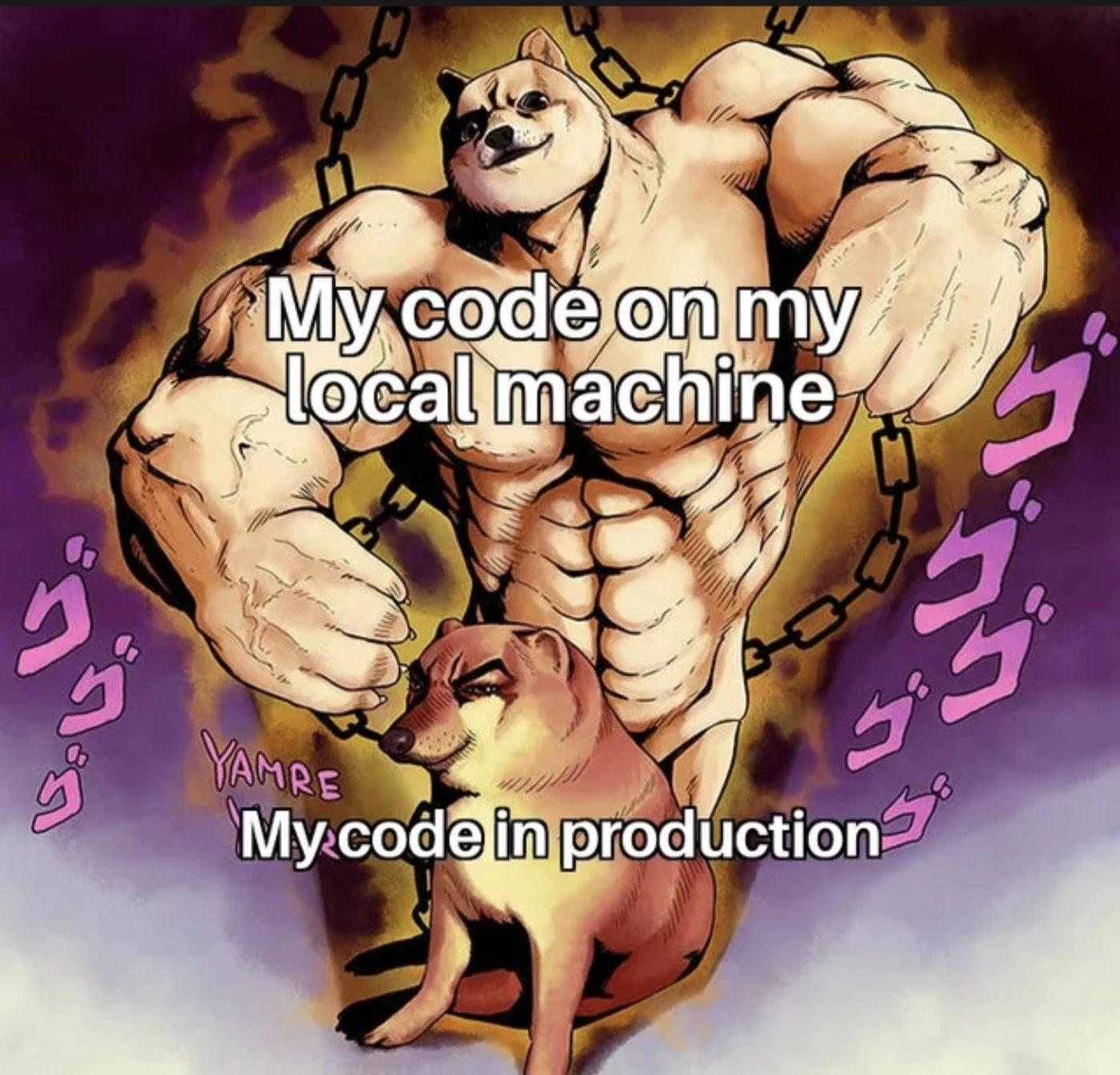
Localhost God vs. Production Chihuahua
Why is this Production meme funny?
Level 1: Strong at Home, Weak Outside
Imagine a kid who is a champion at solving a puzzle in their own room, where everything is familiar – they feel like the strongest, smartest hero at home. But when they go to a big competition in a new place, suddenly the kid gets nervous and the same puzzle feels much harder to solve. They go from a little superhero at home to a shy underdog on stage. That’s what’s happening in this joke. We all find it funny because we expect the “hero” (the code) to be just as strong everywhere, but in the big outside world (the production environment), it turns out to be much weaker. The huge, muscular dog at home becomes a small, timid dog in public – a silly and dramatic way to show the big difference. It’s basically saying: sometimes something that seems super powerful in a comfortable place turns out to be pretty frail in a tougher spot. And that surprise is the punchline – it makes us laugh because we’ve all seen a boastful big dog act meek when it’s out of its element.
Level 2: Works on My Machine
This meme highlights a common newbie surprise in software development: “It works on my machine!” What does that mean? “My machine” is just the developer’s own computer – their personal laptop or desktop where they write and test code. When they say it “works” there, they mean the program runs perfectly in that familiar, controlled environment. Production, on the other hand, is the real-world environment where the application is deployed for actual users – typically a server or a cloud platform running the app for everyone to use. Deploying or releasing to production (the process called deployment) is like moving your code from your cozy home turf to a public arena.
Now, why would code behave differently in these two places? Often, it’s because the environments are not exactly the same. Think of the environment as everything that surrounds your code: the operating system, the software installed, the configuration settings, hardware specs, and even data. On your local machine, you might have set things up just right (sometimes without realizing it): perhaps you installed a database, set certain environment variables (special settings like passwords or URLs that the app reads from the OS), or you have certain versions of libraries that your app needs. In production, if any of those pieces are missing or different, the app can break or behave poorly. This mismatch is what we call an environment discrepancy – essentially a difference between the two setups.
For example, imagine you wrote a small web app that reads a file from C:\data\file.txt on a Windows laptop. It works fine for you (you do have that file there). You deploy it to a Linux server (where file paths look like /data/file.txt, and the C:\ drive concept doesn’t exist) – suddenly, the app crashes because it can’t find C:\data\file.txt (that path makes no sense on Linux). Another common example: your code might need an **API key** (like a password to use a service). You kept this key in an environment variable on your computer called API_KEY, so locally the code finds API_KEY and runs. On production, if the API_KEY isn’t set up, the code will fail with an error like “Missing API_KEY”. In both cases, on your machine everything was fine, but in production, something was different. That’s the joke: developers sometimes adamantly say, “But it worked on my machine!” – implying the code is perfect, it must be the production environment’s fault! In truth, the code wasn’t as portable or robust as we thought.
Let’s break down some terms:
- Production bug: a bug (error in the software) that shows up in the production environment. These are the nasty ones, because they affect real users. Often, they didn’t show up during development or testing. In our meme, the “code in production” being a weak little doge means it has bugs or problems it didn’t seem to have on the developer’s computer.
- Deployment pain points: this phrase refers to the common challenges (pain points) faced when releasing software to production. “Works on my machine” is a classic deployment pain point – it highlights the challenge of making sure the code runs everywhere, not just on one computer. Other pain points include things like migrating databases, handling more traffic, or configuring servers – but environment mismatch is one of the big ones.
- “Buff vs small” meme format: The image uses a popular meme style where a very muscular character (buff Doge) is contrasted with a small or weaker character (often Cheems, a cute Shiba Inu dog). It’s an Internet meme way of saying “X is strong/impressive, Y is weak/disappointing”. Here, “X” is “my code on my local machine” and “Y” is “my code in production”. Visually, it’s exaggerating how proud we feel about our code in dev (huge muscles!) versus how it actually performs in production (tiny and kind of sad). The purple dramatic text in the background 「ゴゴゴ」 is actually a fun detail from JoJo’s Bizarre Adventure (a famous anime) where those symbols indicate something menacing is afoot – in the meme they add an over-the-top dramatic flair to our super-strong code on the left. In contrast, the small dog on the right looks unimpressed, which is exactly how a server or user might look at our code when it’s not working as expected.
- “Works on my machine” as humor: Among developers, this phrase is an inside joke. It’s code for “I did my part (I ran it on my PC), so if it fails elsewhere, not my fault!” Of course, that’s not a good attitude in professional settings – we have to ensure it works on other machines too – but it’s jokingly used to deflect blame when a bug is found in production. There are even coffee mugs and T-shirts with “Works on my machine” printed on them, poking fun at this very common scenario. It’s part of DeveloperMemes culture to tease ourselves about these slip-ups.
In summary, for a junior developer or someone new: this meme is highlighting the importance of testing your software in an environment similar to where it will actually run. It’s not enough that code runs on your personal computer; you need to consider production conditions. That’s why teams have testing servers, staging environments, and use tools like Docker – to reduce differences between “my machine” and the real world. When you see that buff dog and little dog, just think of a hero at home turning into a weakling out in the world. It’s a funny reminder to always be cautious: if someone says “it works on my machine,” the seasoned folks might roll their eyes and say, “Well, let’s make sure it works on the production machine too.”
Level 3: Local Hero, Production Zero
On a senior developer’s radar, this meme hits a nerve: your code might be a champ on your dev box, but a chump in production. The image captures it perfectly: a hyper-muscular Doge (the buff Shiba Inu) labeled “My code on my local machine” stands triumphant, while a small unimpressed Shiba (Cheems) labeled “My code in production” sits at his feet. It’s a comedic take on Developer Expectations vs Reality. We’ve all lived this: you confidently run your app locally, all tests green, performance blazing – it’s buff, invincible. Then you deploy, and it falls flat on its face, turning into that small doge – underpowered, maybe even broken. The humor comes from that stark environment discrepancy: the difference between a development environment where you unknowingly coddled your code, and the unforgiving production environment that exposes every weakness.
Why does the mighty code become meek in production? A grizzled engineer will rattle off a litany of reasons:
- Hidden Dependencies: Perhaps you installed something locally (a library, a tool, a font, an OS package) and forgot to declare it. On your machine, of course it works – you have that dependency. In production, it’s missing, and your once-buff code throws a tantrum. (Ever run
pip install numpylocally but forgot to add it to requirements? Deployed code then says “Module not found” – oops.) - Configuration Drift: “Works on my machine” often means “my machine’s config is unique”. Maybe your local
.envfile or environment variables are perfectly tuned, but the production config is different. A classic: your code calls an API atlocalhost(because you have a local test server) yet in production it’s supposed to call a real URL – if that’s not changed, production is now pointing to nowhere. The buff code suddenly can’t reach its protein shakes. - Missing Resources: Did you hardcode a file path that exists on your PC? Use a database that’s on your laptop? In production, those resources might not be there or have different paths & permissions. The result: ProductionIssues galore. The code flexes locally because it’s in its home gym with all the equipment; in production, it’s like finding the gym locked – our muscular code can’t even warm up.
- Version and Environment Differences: Your machine might be running Node.js 14, but production is on 12. Or your laptop is case-insensitive (Windows/macOS) so
Data.csv==data.csv, but the Linux server in production disagrees – suddenly the file isn’t found. Small version mismatches or OS differences can break things in surprising ways. This leads to the head-scratcher “but it never crashed for me!” – yeah, because you never ran it under those exact conditions. - Scale & Timing: Many bugs hide until scale exposes them. Locally, you have one user (you), so the code (like the buff dog) doesn’t experience stress. In production, thousands of users hit at once – thread scheduling, memory usage, network latency all behave differently. Suddenly race conditions and memory leaks appear. The code that bench-pressed 1 request/second now collapses under real load. Bugs surface that simply don’t manifest with a light dumbbell at home.
In essence, the meme is poking fun at a classic Deployment pain point: environment mismatch. There’s a well-worn joke in DevOps circles – “Works on my machine!… so let’s ship your machine to production.” In fact, this exact pain gave rise to containerization. Tools like Docker aim to package your application with all its dependencies into an image, to eliminate the "works on my machine" problem. If you deploy the same container that you ran locally, theoretically your buff code stays buff. And indeed, containerization and Infrastructure as Code have greatly reduced incidents of configuration drift. But even Docker can’t save you from all demons – e.g., if production’s environment variables differ or the data volume is beyond what you tested, you’re still in for a surprise. The meme’s chains in the background (a shout-out to the JoJo anime style with those ominous 「ゴゴゴ」 glyphs) are like the unseen shackles of environment: on your local machine, the chains are loose, barely felt; in production, they tighten and restrain your once free-roaming code.
Every experienced developer has that scarred memory of the first time their app failed spectacularly in production despite working flawlessly in dev. It’s practically a rite of passage (often involving a 3 AM emergency call). The meme resonates because it’s both hilarious and painfully true – a piece of DeveloperHumor that anyone who’s deployed code can immediately relate to. The buff Doge exudes confidence – just like a developer doing a demo on their laptop: “See? Blazing fast, no errors at all.” The little Doge is the code running on the production server, looking up helplessly as users (or logs) ask, “Why are you so slow? Why are you erroring out?” That contrast is the dev’s ego deflating in real-time.
Organizationally, this highlights why staging environments and thorough testing are so critical. Good teams simulate production as closely as possible before the big deploy. But even with best practices, something can slip through. There’s always one more obscure setting or an untested edge case. As a senior dev might quip, “No code survives first contact with production.” The meme’s exaggerated art style (a clear JoJo’s Bizarre Adventure reference in aesthetics) mirrors our mental image: on our turf we feel like Jotaro Kujo with a Stand (invincible!), but in production we’re more like a sidekick character out of his depth.
In summary, the big dog vs small dog format captures the developer’s overconfidence meeting reality. It’s a humorous humility lesson. The next time you hear “It works on my machine!”, remember the buff Doge and Cheems – and maybe double-check that your deployment scripts, configs, and dependencies are truly in order. Otherwise, your mighty code might turn into a meek pup when it matters most.
Level 4: The Parity Paradox
At the theoretical limit, code should be deterministic: given the same input, it produces the same output anywhere. Yet "works on my machine" versus failing in production exposes a dev/prod parity problem. In an ideal world, a program’s behavior would be like a pure function f(x) = y regardless of whether it's on your laptop or a cloud server. But real software isn’t pure math – it's entangled with environment state and hidden inputs. The parity paradox is that we strive to make development and production identical, but small unseen differences inevitably creep in. Consider all the variables outside your code’s explicit logic: operating system, library versions, environment variables, network latency, filesystem nuances, user load, hardware architecture – each one can diverge between your local environment and the production environment, introducing chaotic complexity.
This is reminiscent of a non-deterministic system: even if your code is logically sound, its behavior emerges from the combination of code + environment. A classic example in distributed systems theory is that tiny timing differences or message ordering can lead to different outcomes – similarly, a timing-dependent bug (a race condition) might never appear on a single-user dev machine but surface under real multi-user production load. Academically, you could compare it to Schrödinger’s cat or a Heisenbug: the code’s correctness is in a superposition of states – it seems correct (alive) in dev, but turns out broken (dead) in prod once you open the box and observe it. Formal methods and rigorous testing attempt to prove software will behave the same everywhere, but in practice it’s computationally infeasible to account for every environment variable. This is why tools like containers and virtualization exist: they attempt to freeze the environment into a reproducible image, bringing us closer to the deterministic ideal. Even so, absolute parity remains an elusive goal – a sort of halting problem for DevOps. As long as there are subtle differences (a config file here, a minor library update there), the harsh production reality will sometimes deviate from the developer’s cozy simulation. The meme brilliantly exaggerates this reality: our code can feel like a world-beating champion under controlled conditions, but theoretical limits (and Murphy’s Law) guarantee that true production consistency is a hard problem hiding behind a muscular facade.
Description
This is a two-panel meme using the 'Swole Doge vs. Cheems' format. The top panel features a large, muscular, and powerful-looking Shiba Inu (Swole Doge) with a confident expression, set against a dramatic, purple, anime-style background with Japanese characters that signify a menacing aura (from the series JoJo's Bizarre Adventure). White text over this character reads, 'My code on my local machine'. Below, the second panel shows a small, weak, and anxious-looking Shiba Inu (Cheems) sitting pathetically. The text over this character reads, 'My code in production'. The meme visually exaggerates the stark contrast between how robust and perfect code appears to be in a controlled local development environment versus how fragile and bug-ridden it can become in the complex, unpredictable production environment. This is a classic visual representation of the 'it works on my machine' problem, a universally understood frustration for developers. The humor resonates with experienced engineers who are deeply familiar with the subtle and infuriating differences between local and production setups, such as environment variables, network latency, data volume, and underlying infrastructure, which can cause perfectly good code to fail unexpectedly after deployment

Comments
7Comment deleted
That feeling when your containerized god-tier app on your M2 Mac can't even bind to the right port in the production Kubernetes cluster
On my 64 GB laptop the service is a SIMD-pumped demigod; in prod it’s a 256 MiB k8s pod behind three sidecars, quietly waiting for GC like a bored Shiba
After 20 years in this industry, I've learned that 'works on my machine' is just another way of saying 'I haven't discovered which of our 47 environment variables, 3 load balancers, and that one legacy MongoDB replica set with the weird timeout are about to humble me.'
Ah yes, the classic 'works on my machine' phenomenon - where your code is a perfectly optimized, multi-threaded beast on localhost with its 64GB RAM, NVMe SSD, and zero network latency, but becomes a whimpering mess in production when it meets the reality of shared resources, actual network conditions, cold starts, and that one environment variable you forgot to set. It's the software equivalent of a gym selfie versus running a marathon: impressive in controlled conditions, humbling in the real world. Senior engineers know this gap isn't just about hardware - it's about the dozens of subtle differences between environments that no amount of Docker containers can fully eliminate, from DNS resolution timing to filesystem behavior to that mysterious load balancer timeout that only triggers under actual user load
Local: 100% test coverage. Prod: 100% edge case discovery service
Local Hercules, prod chihuahua - amazing what DNS, IAM, cold caches, and a feature flag in the wrong region can do
Nothing humbles an architect like discovering your “stateless microservice” only worked locally because the state was a stray SQLite file in /tmp