
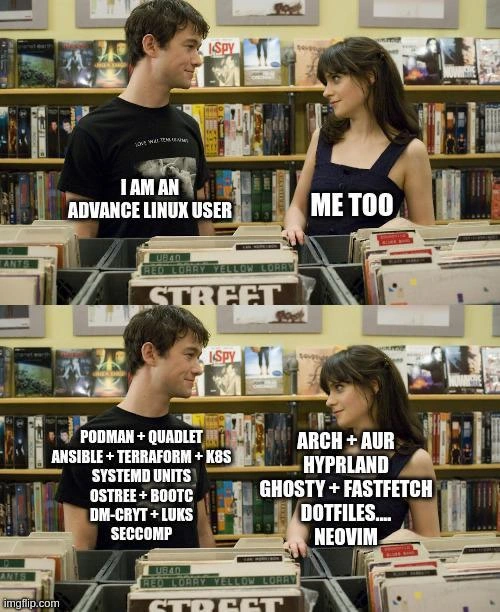
Two Types of 'Advanced Linux User' -- Infra Engineer vs Rice Enthusiast
Why is this OperatingSystems meme funny?
Level 1: Two Kinds of Experts
Imagine two people who both say, “I’m a really skilled driver,” and they meet thinking, “Hey great, we’re both into driving!” But one of them is a Formula 1 racecar driver and the other is a long-haul truck driver. They’re both absolutely experts at driving, but one spends his days zipping around race tracks at 200 mph, and the other spends hers piloting a huge eighteen-wheeler across the country. If they start talking shop, one will be chatting about aerodynamic wing adjustments and fastest lap times, while the other will be talking about engine torque for heavy loads and handling a truck on mountain roads. You can see how even though it’s all “driving,” their daily experiences and skills are totally different. That’s exactly what’s happening in this meme, but with Linux instead of cars. Both people proudly call themselves “advanced Linux users.” Yet for one, being advanced means running big complex systems (like managing lots of servers and using special security and container tools), and for the other, being advanced means customizing every little detail of her personal computer (like choosing a special version of Linux and making it look and work in a unique way). It’s funny because they thought they were the same kind of fan, but it turns out they’re experts in completely different “Linux worlds.” It’s like they share a hobby on paper, but in practice they wouldn’t know where to begin with each other’s projects. The humor comes from that surprise: Oh, we were talking about two totally different things even though we used the same words!
Level 2: Decoding the Jargon
Let’s break down what each person in the meme is actually talking about, in case all those combined terms sound like alphabet soup. The guy’s list is full of DevOps and system engineering tools:
- Podman – This is a container engine, similar to Docker. Containers are like lightweight mini-virtual machines that package an application with everything it needs to run. Docker made them popular; Podman is a newer alternative that doesn’t require a always-running daemon and plays nicely with rootless mode (letting regular users run containers safely). In short, Podman lets him run apps in isolation so they don’t mess up the whole system – great for deploying services.
- Quadlet – Not as commonly known, this is a helper for Podman that allows writing systemd unit files (
.servicefiles) to manage containers easily. systemd is the program that boots up Linux and starts all the background services (called daemons). By using Quadlet, he can treat a container like a service that starts on boot or can be controlled with standard commands. It simplifies bridging the container world with the OS’s startup system. Essentially, Quadlet = easier container setups that integrate with the OS. - Ansible + Terraform + K8s – These three are like the holy trinity of modern DevOps automation:
- Ansible is a configuration management tool. Using simple playbooks (YAML files with steps), it can configure servers: install packages, edit config files, restart services – all automatically and repeatably. Think of it as scripting the setup of a machine, but in a cleaner, more structured way than a raw shell script.
- Terraform is about infrastructure as code. Instead of clicking around a cloud provider’s UI to create servers or databases, you write a config (in a language called HCL) that describes what infrastructure you want (e.g., “2 servers of this type, 1 load balancer, 1 database”). Terraform then talks to the cloud (or other providers) to create or update those resources to match your description. It’s how you programmatically manage data centers.
- K8s stands for Kubernetes, which is a platform for running and coordinating containers across many machines. If Podman is for running one or a few containers on one machine, Kubernetes is for running hundreds of containers across dozens of machines, handling load-balancing, self-healing (restarting crashed containers), scaling up and down, etc. It’s like an operating system for the cloud, ensuring your apps are always running as you declared.
- Systemd units – systemd is the init system in most modern Linux distributions (it’s the first process with PID 1). A unit file in systemd is basically a configuration file that tells systemd how to manage a service or task. For example, you could have a unit file to start a web server automatically on boot, or a timer unit to run backups every night. When he says he uses systemd units, it implies he writes custom service files, perhaps to run his own scripts or containers at startup. It’s a more advanced way to manage your system’s behavior beyond the defaults.
- OSTree + BootC – These are quite advanced and specific. OSTree is a tool for managing operating system versions. You can think of it as a git-like repository for your whole OS. Instead of installing updates file by file, OSTree swaps the entire filesystem to a new version (while keeping the old version available to roll back). This ensures updates are atomic – either fully applied or not at all – which is great for stability. It’s used in immutable Linux distros (ones that don’t expect you to tinker with system files often), like Fedora Silverblue or some IoT systems. BootC is a newer companion tool presumably dealing with Bootloader and Container (hence Boot “C”). It manages booting into these OSTree images or even booting container images directly. In essence, BootC makes it easier to handle multiple installed OS versions and switch between them at boot, which complements OSTree’s approach of having multiple versioned trees of the OS. If that sounds complicated, it is! Only an advanced user interested in atomic upgrades and immutable systems would toy with OSTree/BootC – it’s definitely not everyday Ubuntu stuff.
- dm-crypt + LUKS – These relate to disk encryption. When you want to secure the data on a drive so that no one can read it without a password, you use encryption. dm-crypt is the Linux kernel’s built-in method to encrypt entire disk partitions. It operates at a low level (device-mapper level), encrypting and decrypting data on the fly as it’s written or read from disk. LUKS is the standard layer on top that handles things like managing encryption keys and passphrases. Essentially, LUKS provides a convenient format so you can have multiple key slots, and some metadata to identify the encrypted volume. When he says he uses dm-crypt + LUKS, imagine that when his system starts, he has to enter a passphrase to unlock his hard drive. If someone stole his drive, everything on it would be gibberish without that key. It’s a very security-conscious setup, common for servers with sensitive data or personal laptops of privacy-minded folks.
- seccomp – Short for Secure Computing Mode, this is a Linux kernel feature to restrict system calls. System calls are how programs ask the kernel to do things (like open a file, send data over the network, etc.). Seccomp allows a program to start in a sort of sandbox where only a minimal set of system calls are permitted. If the program tries to call anything outside that set, it gets blocked or killed. Docker/Podman and Kubernetes often use seccomp profiles to limit what containerized applications can do (for example, a web server in a container probably doesn’t need to call low-level hardware functions or mount filesystems, so why allow it?). By mentioning seccomp, he indicates he’s diving deep into locking down his software. This is beyond what a normal user does; it’s a technique typically used in high-security environments or when running untrusted code, to mitigates the damage if something goes rogue.
So his side is all about containers, automation, system services, OS management, encryption, and sandboxing. In other words, the toolkit of someone treating their machines like a pro sysadmin or DevOps engineer would. He’s managing complexity by using these tools – possibly at work or maybe even at home if he’s running a home server or a lab. It’s not the usual desktop stuff; these are the kind of terms you encounter setting up servers, not playing video games or browsing the web.
Now, the woman’s list is a different flavor of advanced: focused on a custom user experience and bleeding-edge software on a personal machine. Let’s decode her side:
- Arch + AUR – Arch Linux is a popular distribution among enthusiasts. It’s lightweight, fast, and minimal by design. After installation, you get just a basic shell of a system and you add on only what you need. The joke “Arch, BTW” comes from how proud Arch users are of running it. It’s considered advanced because the user is responsible for a lot: partitioning the disk, selecting and installing every package for a working system, editing configuration files by hand, etc. Arch doesn’t hold your hand with graphical installers or big wizards; you rely on an excellent online manual (the Arch Wiki) and your own skill. Once installed, Arch is rolling release, meaning it constantly updates to the latest version of software packages – no fixed version numbers or long-term support guarantees. That means you get new features (and bugs) as they come out. It’s great for having up-to-date software, but it demands that the user be alert and able to fix issues when an update breaks something.
- AUR (Arch User Repository) is a huge part of the Arch ecosystem. It’s an unofficial repository where the community shares build scripts for software that might not be in the official Arch repositories. Let’s say there’s a cool new app not packaged by Arch maintainers – chances are someone wrote an AUR script for it. Using AUR involves reading a recipe (a text file that automates downloading source code and compiling it or grabbing a prebuilt package) and letting a helper tool build and install it. Arch users love it because practically anything can be installed via AUR, from rare utilities to the absolute bleeding-edge git versions of programs. However, it’s also “use at your own risk” – the scripts are user-contributed. An advanced Arch user knows to inspect these to ensure they’re not malicious and to troubleshoot if a build fails. In sum, AUR is like an app store run by the community, requiring a bit more trust and savvy.
- Hyprland – This is a modern window manager for Linux, specifically a Wayland compositor with a focus on customization and eye candy. Traditional Linux desktops (like GNOME, KDE) handle window management for you (moving, resizing, minimizing, etc.) in a fixed way. But advanced users sometimes prefer tiling window managers that auto-arrange windows (tile them) and allow control via keyboard for efficiency. Hyprland is one of the new kids on the block in this area, supporting cool animations and effects under Wayland (the newer graphics subsystem replacing X11). Wayland itself is modernizing Linux graphics: it allows smooth effects and better security, but it’s still evolving. Hyprland is kind of cutting-edge – not something you’d typically find in an out-of-the-box distro. By using Hyprland, she’s effectively saying “I want my desktop exactly my way, no bloated desktop environment, just a neat, scriptable, efficient interface with pretty visuals.” It’s definitely advanced-user territory to configure; one would edit config files to define how windows should behave, which key does what, what themes to use, etc.
- Ghosty + Fastfetch – These relate to the terminal and system info displays. Fastfetch is a program that quickly gathers system information (like OS name, kernel version, uptime, RAM usage, etc.) and prints it alongside a nice ASCII art logo of your distribution. It’s mostly for show – people often put the output of fastfetch/neofetch in screenshots to flaunt their setup. It’s called “fast” because it’s optimized in C++, making it quicker than the original Bash script versions. Ghosty (perhaps spelled Ghostty in tags) sounds like either a customized terminal emulator or a particular theme. There’s a chance it’s referencing a spooky theme (maybe a Halloween-inspired prompt or a translucent “ghost-like” terminal window). The specifics aren’t widely known, which itself is the point: these are niche enthusiast tools. She’s clearly into making her command line experience both informative and good-looking. So when she opens her terminal, maybe it says “Welcome, Arch user!” with ghost icons, and lists her system stats in stylized text thanks to Ghosty + Fastfetch. It’s the kind of flourish that doesn’t improve functionality much, but it showcases personality and passion for the platform.
- Dotfiles… – In Linux (and macOS) lingo, a dotfile is any config file that starts with a dot (like
~/.something). These files control settings for your shell, editor, and many programs. Advanced users often curate their dotfiles carefully. For example, she might have a finely tuned~/.bashrcor~/.zshrc(shell configuration) that sets up aliases, prompt colors, and handy shortcuts every time she opens a terminal. Or a~/.vimrc/~/.config/nvim/init.vimfor her Neovim settings (to define how her editor looks and behaves). When the meme shows “DOTFILES….” on her side, it implies she has so many custom config files that it’s a whole project in itself. In fact, people often store their dotfiles in a Git repository so they can sync their environment across multiple machines – it’s practically a badge of the Linux geek to have a public dotfiles repo on GitHub. This means she’s not using default settings for much of anything; she’s tweaking and personalizing every aspect she can, from the color of the prompt to the shortcuts in her window manager. - Neovim – This is a modern take on the classic Vim editor. Vim is a revered text editor among programmers and power users, known for its efficiency (although it has a notoriously steep learning curve due to its modal nature – you switch between modes to insert text or issue commands). Neovim forked Vim to improve and modernize it. It supports plugins written in Lua (a programming language), better integration with other tools (like the Language Server Protocol for smarter code editing features), and asynchronous operations (so plugins don’t freeze the editor). If she’s using Neovim, she’s likely editing config files or code in a highly customized environment. She might have dozens of plugins: one for fuzzy finding files, one for Git integration, a beautiful color scheme, maybe a plugin turning her editor into a Markdown previewer, you name it. Mastering Neovim means she’s fluent in keyboard shortcuts and has tailored the editor exactly to her liking – which is definitely an advanced user trait because most people would stick to simpler editors or an IDE.
In summary, his jargon vs her jargon showcases two different toolchains: one for building and maintaining infrastructure, and one for building and maintaining a personalized system. The guy’s tools (Podman, Kubernetes, Ansible, etc.) are typically used in companies or server environments. They solve problems like “How do we deploy this app reliably to 100 servers?” or “How do I make sure my system is secure and up-to-date without manual intervention?”. The girl’s tools (Arch’s AUR, Hyprland, dotfiles, Neovim) are used by individuals to answer questions like “How can I make my desktop look and work exactly the way I want?” or “What’s the coolest, most efficient setup I can achieve for myself?”. Both sets require plenty of learning and experience to use effectively – hence both are “advanced” in their own right.
For a newcomer to Linux or IT, some of those terms might be completely unfamiliar. Think of it this way: if Linux was a playground, the guy is showing off the industrial-grade jungle gym he built with automation and safety features (and maybe a lock on the gate), whereas the girl is showing off the custom skateboard she assembled along with the tricks she can do on it. Both took time and skill to get good at! The meme is funny once you know these terms because you recognize that neither of these users is “lying” about being advanced – they just climbed different mountains under the banner of Linux. If you’re new to Linux, you typically start on neither of those extremes: you might use a friendly distro like Ubuntu or Fedora with default settings. These two have journeyed far from the defaults, one into the realm of DevOps engineering, the other into the realm of Linux customization. The meme exaggerates for effect, but it’s grounded in a real phenomenon: “advanced Linux user” means a lot of things depending on which community you ask. Now that we’ve decoded the jargon, the punchline – that they meant very different things – shines through even for those who didn’t recognize the terms at first.
Level 3: Styling vs Scaling
In plainer terms, this meme humorously contrasts two very different breeds of “advanced” Linux enthusiasts. Both characters proclaim “I am an advanced Linux user” and initially seem to bond over that title, much like two music lovers finding out they dig the same band. But then comes the reveal: their definitions of advanced diverge completely. On the guy’s side, we have what you might call the DevOps/SRE powerhouse – his Linux mastery is all about running services at scale, automation, and hardened security. On the gal’s side, we get the Linux customization guru – her expertise shines in tweaking and personalizing a single system to the nth degree. It’s a bit like meeting at a conference and realizing “Oh, we both love Linux!” but one of you loves it for hosting enterprise applications in the cloud, while the other loves it for the perfect home desktop setup. The meme uses the record store scene from 500 Days of Summer to set this up as a cheeky dialogue: two people thinking they’re on the same wavelength, until they start dropping their favorite buzzwords and realize the wavelength splits in two.
Anyone who’s been around the tech community, especially at meetups or hallway tracks of conferences, has likely seen this exact dynamic play out. Picture a DevOps engineer in a Kubernetes t-shirt swapping stories with a self-proclaimed Arch Linux fanatic. At first, they’re excited – “You use Linux? Me too!”. But as soon as one starts talking about Jenkins pipelines or Terraform modules and the other brings up their custom tiling window manager and anime-themed desktop wallpaper, there’s this friendly, awkward realization: their day-to-day “Linux lives” have almost no overlap. It’s funny because it’s so true in our industry. Linux is everywhere, but not all Linux users use it the same way. The guy’s list of tools reads like a production environment résumé: containers, orchestration, configuration management, encryption… things you’d find running in a data center or powering a website with millions of users. In contrast, her list reads like the changelog of a “r/unixporn” post (that’s the online showcase for beautiful Linux desktops) or the README of a dotfiles repo on GitHub. She’s mentioning things that make fellow hobbyists go “Wow, your desktop is so riced (customized)!” rather than “Wow, how did you achieve five-nines uptime?”.
The humor here also pokes at a mild culture clash. The DevOps crowd prides itself on stability, automation, and not manually futzing with systems – if something can be defined in code and repeated across 100 servers, it’s done. There’s an unofficial motto: automate yourself out of a job, meaning you script everything so nothing requires personal heroics. In his world, cattle, not pets is the guiding principle – treat each machine as replaceable. That’s why he invests in things like Ansible and Terraform: one defines what a server should be, the other provisions those servers consistently on, say, AWS or another cloud. Even Kubernetes is an extension of that philosophy to applications – you declare “I need X copies of this app running” and Kubernetes makes it so, even if individual instances (containers) die or move. It’s all about scaling up and redundancy. An “advanced user” in this realm plans for failure, uses infrastructure-as-code, deals with YAML or HCL configurations daily, and probably has battle scars from midnight outages. His bragging rights might include things like “I manage a 50-node cluster” or “I implemented full CI/CD with blue-green deployments”. When he says “advanced Linux user,” he’s thinking of mastering the art of keeping complex systems running smoothly. He’s likely the kind of person who mentions SLAs, config drift, container registries, and kernel tunables in casual conversation. And yes, he probably has opinions on Docker vs Podman and why rootless containers are the future for security. This is the archetype of the engineer who might half-jokingly say “Works on my Kubernetes cluster!” as a twist on the classic “Works on my machine.” It’s advanced in an infrastructural sense – big Linux, we might say.
Meanwhile, the desktop enthusiast crowd measures advancement very differently. Here, being advanced means you’ve ditched the defaults and crafted a one-of-a-kind environment. The meme’s female character uses Arch Linux, which immediately signals to insiders: this person built their system from scratch and isn’t afraid of the command line. Installing Arch is infamously involved (you start from a command prompt and assemble your OS piece by piece following the Arch Wiki). People who go through that love to mention it – hence the community joke “I use Arch, BTW” (By The Way). It’s not just flexing for ego’s sake (okay, maybe a little); it’s also a way of bonding with those who know how much effort that entails. Once you’ve got Arch, you’re in a constant love-hate with cutting-edge software: you get the latest updates daily, which is exciting but also a recipe for breakage. Only a seasoned tinkerer finds that fun rather than frustrating. So an advanced user here is someone who has probably fixed their graphics driver at 2 AM after an update, or rolled back a package from the Arch archives because the new version broke their config. They trade war stories like “my X server broke after last update, had to chroot from USB to fix it” the way an SRE talks about recovering from a database outage. It’s a different battlefield.
Look at her lineup: Hyprland (a modern, flashy window manager) suggests she doesn’t even use a standard desktop environment like GNOME or KDE. She’s likely tiling windows, scripting her shortcuts, and rendering cool drop-shadows or blurs – essentially her desktop looks nothing like the stock Linux experience. Using Hyprland on Wayland today is bleeding-edge; it’s akin to running beta software as your daily driver. Only an advanced user has both the patience and knowledge to pull that off comfortably. Then Ghosty + Fastfetch – this is pure eye-candy and pride. Fastfetch will display something like a stylized logo of Arch and system stats (CPU, GPU, memory, uptime) in the terminal. People often post screenshots of their terminals with these fetch tools as a brag (“see, I run Arch and have only 2GB of RAM usage with all this fancy setup”). If Ghosty is what it sounds like, it’s probably a custom terminal theme/extension – a whimsical detail that shows how deep she’s into this culture of personalization. Dotfiles… Neovim… these mean she spends a ton of time in text editors and config files, shaping her environment exactly how she wants. It’s a hallmark of a long-time Linux hobbyist: you accumulate a collection of shell scripts, custom prompts, dozens of tweaks in ~/.config or ~/.vimrc, and you’re in a never-ending quest for the perfect workflow. One could say her measure of success is efficiency and aesthetic combined – how fast and pleasant can she make her computing experience. She might be the type who opens her laptop to a sci-fi themed desktop with a rainbow ASCII art in the terminal, where every keybinding is optimized to her habits. It’s like having a super customized sports car (while our guy is more about managing a fleet of robust trucks, to use an analogy).
The comedic contrast is that both of these people would indeed call themselves “advanced Linux users” to outsiders, yet if you swap their laptops, each might feel lost. Imagine our Terraform-and-Podman expert sitting down at her Arch machine: no Docker, maybe no Chrome (she could be using some minimal browser), the Caps Lock key is remapped to Escape (common Vim user move), and nothing is familiar because it’s all custom. He’d be like, “How do I even open a terminal or launch an application on this thing?” (tiling WMs often have zero on-screen guidance). Conversely, give the Arch-ricer a corporate server setup: she logs in and finds a heavily locked-down environment where she can’t even use neovim because only vi is installed and seccomp policies are blocking half the fun stuff. She might say, “This system’s so vanilla and restricted, it’s boring!” Each would have to face the other’s learning curve despite both being “advanced” in their usual realm. That scenario is both funny and telling – specialization in tech can be so narrow that expertise doesn’t always translate across subdomains.
Seasoned engineers appreciate this humor because they’ve likely met both types of people. There’s the colleague who runs Arch on their work laptop and has a custom prompt with their git branch in neon colors, and there’s the colleague whose idea of fun is maintaining a home lab with Proxmox, Kubernetes, and a bunch of blinking Raspberry Pis. Both will get along talking about Linux basics (they can commiserate over things like “NVIDIA drivers, am I right?” or a shared dislike of Windows), but soon enough their conversations veer into territory completely foreign to the other. The meme nails this with the two blocks of text. His block is enterprise tech stack buzzwords; hers is the customization tech stack. It’s funny because in the tech community, “advanced user” is often thrown around, but what exactly one is advanced in can be comically disjoint. It’s a gentle jab at our tendency to assume common ground just because we use the same operating system. Linux is a HUGE tent: from the cloud server admin to the RGB-backlit Arch gamer, we’re all under that tent.
Another wink in the meme is the spelling: he says “I am an advance Linux user” (missing the “d” in advanced). Possibly an intentional little joke by the meme creator – the guy is so “1337” (leet, i.e., elite) he doesn’t even use proper grammar 😜. Or it could just be the meme font messing up – but let’s assume it’s part of the charm. It accentuates that these two might be a bit too eager to claim expertise. Both of them are kind of peacocking in front of each other. We often encounter folks who proudly label themselves advanced users. What this meme suggests is: okay, but advanced in what way? It’s not diminishing either skill set; it’s just chuckling at the contrast. In practice, these two stereotypical users actually need each other in the ecosystem. The DevOps-types develop and maintain the infrastructure and core services that the desktop-tweakers rely on (say, the AUR is hosted on servers, which someone has to run). And the enthusiasts create community knowledge and tools that feed back into the broader Linux culture (for instance, many improvements in user experience or new tools get pioneered by hobbyists and later adopted by distros or even enterprise tools). But when they meet, each is a bit out of their element hearing the other’s jargon. It’s as if two experts are trading baseball cards, but one’s talking about pitchers and ERAs while the other is talking about rare card designs and print runs – they’re both into baseball cards, just completely different aspects of it.
So, on an industry level, the meme underscores a reality: “Linux” isn’t a single skill – it’s an ecosystem of roles. An SRE (Site Reliability Engineer) managing Linux servers has a very different skill profile from a power user customizing Arch at home, yet both might wear the badge of Linux expertise proudly. In fact, bring them to a Linux convention and you’ll have one giving a talk on container security best practices and the other running a workshop on mastering Vim shortcuts. Both talks would be solid, but attendees might be shocked at how little overlap there is. That’s where the hilarity lies: it’s almost absurd that two people can claim the same identity (“advanced Linux user”) and yet when you dig into it, you find yourself in two completely different conversations. Every seasoned developer or admin has learned not to assume too much when someone says they’re “good with Linux” – this meme is basically the visual punchline to that lesson.
Level 4: Cattle vs Pets
At the deepest level, this meme highlights a fundamental split in Linux philosophy: immutable, automated infrastructure vs. artisanal, personalized computing. In DevOps circles, there’s a famous concept of “cattle vs pets”. Servers are treated like cattle – numbered, identical, and disposable – rather than pets with unique names and hand-fed care. The guy’s toolkit screams cattle mentality: he uses Podman containers and orchestrates them with Kubernetes (k8s), meaning his applications live in isolated, reproducible environments that can be started or destroyed at will. Under the hood, Podman and Kubernetes rely on kernel features like cgroups (to limit resources per container) and namespaces (to give each container its own process list, network stack, etc.). These are low-level Linux primitives originally described in research papers on operating system design – all so that each container feels like its own mini-system.
He even mentions Quadlet, a niche tool that integrates Podman containers with systemd (the init system) by treating container definitions as first-class systemd units. This hints at a bleeding-edge setup: with Quadlet, he writes tiny .container unit files that systemd can launch at boot, effectively blending container orchestration into the OS startup sequence. It’s a clever marriage of new container tech with the old PID 1 guardian (systemd). The inclusion of OSTree and BootC goes further down the rabbit hole of immutable operating systems. OSTree is essentially “Git for entire filesystems” – an academically-informed approach to upgrade an OS by atomically switching file system trees rather than incrementally installing packages. It stores snapshots of the OS (commits of a sort) that you can roll back if an update fails, much like version control for your OS state. BootC is an emerging tool (championed by systemd’s developers) that coordinates how the system boots into these OSTree images, making sure the bootloader and kernel play nicely with atomic upgrades. The very presence of OSTree+BootC implies he might be running something like Fedora Silverblue (a container-friendly immutable Linux), showcasing a cutting-edge declarative OS where even the base system is managed like a container image. This is advanced in a deeply technical sense: it’s applying computer science concepts of atomicity and content-addressed storage to one’s operating system.
And then there’s security hardening: he lists dm-crypt + LUKS and seccomp. These aren’t shiny tools; they’re low-level defenses. dm-crypt is the Linux kernel’s transparent disk encryption subsystem (via the device-mapper), and LUKS (Linux Unified Key Setup) is the standard format to handle encryption keys and passphrases for disk volumes. Together, LUKS on dm-crypt means his entire drive is encrypted at rest using strong cryptographic primitives (typically AES encryption with a multi-round key derivation – heavy math under the hood to keep data safe). This choice reflects an engineer mindful of threats like data theft and compliance requirements: even if someone steals his server or laptop, they can’t read the data without the key. Meanwhile, seccomp (Secure Computing Mode) delves into kernel-level sandboxing. It uses a BPF (Berkeley Packet Filter) based mechanism to let processes say “hey kernel, if I (or any child process) attempt to call a disallowed system call, just kill or block it.” Essentially, seccomp is a form of syscall whitelisting – an almost microkernel-esque security idea of minimizing what a process is allowed to do, reducing the attack surface. This shows he’s so “advanced” that he’s operating at the level of syscalls and kernel boundaries, setting up safeguards most desktop users never think about. In an academic light, seccomp and container isolation tie back to principles of least privilege and isolation that appear in research on operating systems and virtualization. It’s a practical implementation of theorem-like guarantees: if a container doesn’t need access to mount or ptrace syscalls, seccomp can enforce that, making certain exploits theoretically impossible regardless of buggy code inside.
Now contrast that with the woman’s side, which represents the pet approach – a handcrafted, bespoke Linux environment lovingly customized over time. She runs Arch Linux, a distribution whose philosophy is ultimate customizability and minimalism. Arch is a rolling-release distro (no fixed versions, continuous updates) that demands you, the user, assemble your system from the ground up. There’s a saying, “BTW, I use Arch,” poking fun at how Arch users love to brag – because running Arch is like an extreme sport of Linux. It’s not about enterprise automation; it’s about personal mastery. Arch’s AUR (Arch User Repository) is a communal bazaar of shell scripts (PKGBUILD files) that automate building software from source or unconventional packages. From a compsci perspective, the AUR is a fascinating decentralized model of software distribution: rather than official binaries, you get recipes and build locally. It’s an open-source Darwinism – popular packages get community-maintained scripts, and users are expected to read them (yes, read the code) before trusting them. This is advanced in the sense of deep personal involvement: you learn how packages compile, what dependencies they need... essentially you become the package maintainer for yourself. There’s a cultural and historical angle here too: in the early Unix days, being an advanced user meant you compiled a lot from source. Arch keeps that tradition alive, just with some tooling to automate it, and AUR is the epitome of “teach users to fish rather than giving them a fish.”
Her environment is all about user-space innovation and aesthetics. Hyprland is a new Wayland compositor (Wayland being the modern replacement for the X11 window system). This touches on the evolution of display server theory: X11, dating from the 1980s, allowed network-transparent GUIs but has many legacy constraints. Wayland, designed with a simpler core, pushes responsibilities to the compositor and clients, resulting in smoother graphics and better security (each app can’t snoop on others as easily). Hyprland specifically is a tiling window manager on Wayland that caters to the “ricing” community (ricing is Linux slang for elaborate theming and customization, as one might soup-up a “rice rocket” car). It supports fancy effects, scriptability, and ultra-custom layout control. The academic part here is the principle of extensibility in UI design: Hyprland provides hooks and configuration that let a power user create a unique workflow – an approach similar to how Emacs (in text editing theory) provided endless extensibility, or how window managers historically allowed scripting (like awesomeWM with Lua). Running Hyprland means she’s embracing the cutting edge of GUI tech: Wayland’s efficient pipeline (direct rendering via EGL, avoiding round-trips to a display server) and a community-driven experiment in what a desktop can be. It’s a living example of the open-source innovation pipeline: new ideas in how we interact with computers are prototyped by enthusiasts long before they’re mainstream.
Her mention of “Ghosty + Fastfetch” hints at terminal aesthetic flair. Fastfetch is a lightweight, fast replacement for the classic neofetch script – which itself prints out system info alongside an ASCII distro logo. Fastfetch uses C++ to rapidly gather system stats and display that “Look, I’m running Arch with this cool Rice” splash in the terminal. It’s an optimization of an entirely non-essential, but fun, task. That in itself reflects the different priorities: performance and polish even for something that just prints text art. Ghosty (likely referring to a “Ghost Theme” for the terminal or a modded terminal called ghostty) is all about the look and feel – possibly semi-transparent windows, spooky-themed color schemes, or a custom prompt that displays a little ghost icon. There’s a subtle intersection with computer graphics here: terminal emulators with transparency or special effects leverage modern GPU features (OpenGL or Vulkan) to composite the terminal over backgrounds. It’s the opposite end of the Linux spectrum from heavy kernel tweaks – it’s leveraging GPU shaders to make your command line sexy. One could draw a parallel to how modern UI toolkits separate drawing layers for effects, or how theme engines override default rendering. These are not trivial things either: creating a custom terminal or theme often involves understanding ANSI escape codes or even modifying source code of open-source projects. It’s a deep dive into user interface plumbing – just as technical in its own way (ever tried writing a terminal emulator or customizing one at the source level? It’s a rabbit hole of encoding, font rendering, and OS interfacing).
And of course, dotfiles and Neovim – these anchor her side in the hacker artisan tradition. Dotfiles (files beginning with . in Unix are hidden config files) are essentially the blueprints of her personalized system. She’s treating her OS like a craft project, carefully curating configuration for her shell, editor, and apps. This is akin to self-documenting one’s environment configuration. There’s even a quasi-formal practice of version-controlling dotfiles (often on GitHub) and using symlinks or bootstrapping scripts to apply them on a new machine – itself an automation technique, but at the user-app level. It reflects principles of reproducibility and sharing: many advanced users post dotfiles so others can learn (just as researchers publish code or methods). Neovim, a modern refactoring of the venerable Vim editor, is a powerhouse for customization. Vim’s modal editing paradigm comes from decades-old ideas in text editing (going back to ed and the early days of Unix). Neovim carries that forward with an eye on extensibility: an entire API for plugins in Lua, asynchronous job control, language server protocol integration – it’s a case study in maintaining the core idea (efficient text editing via modes and commands) while expanding architecture for modern needs. Using Neovim to its full potential is almost like a programmer’s rite of passage; it requires learning a DSL (Vimscript or Lua) to configure it. In theoretical terms, one could liken mastering Neovim to mastering a domain-specific programming language for text editing – very meta and brain-bending, if you think about it.
Why is all this funny? Because both of these individuals legitimately qualify as “advanced Linux users,” yet their expertise branches in completely different directions of the computing universe. One exploits kernel-level capabilities, infrastructure-as-code principles, and formal DevOps practices – aligning with industry-level distributed systems and OS theory. The other dives into user-level customization, open-source GUI innovation, and personal workflow optimization – aligning with the hacker ethic of tinkering and mastering one’s tools. It’s almost like two dialects of the same language. Each is highly specialized; each pushes Linux to its limits – but one pushes outward to large-scale deployments and stateless automation, while the other pushes inward to personalized perfection on a single machine. Fundamentally, it’s a convergence of the two extremes of Linux’s flexibility. Linux can run a global web service or be a canvas for a digital art piece (your desktop). As a result, “advanced user” has orthogonal meanings: kernel namespaces vs. dotfiles, YAML manifests for cloud clusters vs. theme configs for neovim. No wonder when these two start comparing notes, they might as well be speaking entirely different niche languages of tech. The meme nails this absurdity born out of breadth: under the big tent of Linux, you can have DevOps cowboys and desktop ricing artists both proudly say, “Yep, I’m a power user,” each with a totally straight face – and both be absolutely correct.
Description
A four-panel meme using scenes from the movie '500 Days of Summer' showing a man and woman browsing records in a store. Top panels: both say they are 'advanced Linux users' -- man says 'I AM AN ADVANCE LINUX USER', woman responds 'ME TOO'. Bottom panels reveal their vastly different definitions: the man lists infrastructure and DevOps tools (PODMAN + QUADLET, ANSIBLE + TERRAFORM + K8S, SYSTEMD UNITS, OSTREE + BOOTC, DM-CRYT + LUKS, SECCOMP) while the woman lists desktop rice/customization tools (ARCH + AUR, HYPRLAND, GHOSTY + FASTFETCH, DOTFILES...., NEOVIM). The imgflip watermark is visible
Comments
21Comment deleted
One deploys immutable infrastructure at scale; the other spent 47 hours making their terminal transparent with rounded corners. Both will mass-report you on Reddit for calling Ubuntu a real distro
One of these advanced users spends their day ensuring immutable infrastructure can scale to millions of users. The other spends their day ensuring the terminal's transparency perfectly matches their wallpaper's color palette. Both will tell you the other is doing it wrong
One dev’s ‘advanced Linux’ is rootless containers and Seccomp; the other’s is a color-coordinated Hyprland rice that crashes before you can say pacman -Syu
The real advanced Linux user is the one who stopped distro-hopping after realizing Ubuntu LTS with vanilla GNOME gets actual work done
When two advanced Linux users meet, they don't exchange pleasantries - they exchange their entire infrastructure stack as a mating call
Left debugs seccomp denials after Quadlet respawns a Podman service; right tunes Hyprland opacity. Both are advanced - only one pages you at 3 a.m
Advanced Linux users don't swipe right - they grep for AUR compatibility and commit dotfiles forever
They would have a beautiful, bearded baby Comment deleted
I'm sorry, but its biologically impossible Comment deleted
why Comment deleted
Men cannot give birth Comment deleted
skill issue Comment deleted
Mpreg Comment deleted
Surely not with that attitude Comment deleted
Then what is this? 🫃 Comment deleted
Nix? Comment deleted
And you know who isn’t? Me! So I don’t get it Comment deleted
One is about server administration, the other is about desktop Comment deleted
WSL 😎 Comment deleted
Both of these are equally valid though Comment deleted
This is way truer than one might think Comment deleted


