
Skip to content
DevMeme
5559 of 7435
The Art of Linux 'Ricing', Taken Literally
OperatingSystems Post #6101, on Jul 10, 2024 in TG

The Art of Linux 'Ricing', Taken Literally

Why is this OperatingSystems meme funny?

Level 1: Magic Rewind Button

Imagine you have a telephone with a redial button that instantly calls your friend without you having to dial their number again. You use that redial button every day because it’s easier than memorizing the phone number. In fact, you press it so much that the word “redial” on the button fades away to nothing. Now picture that one day the button stops working – uh-oh! You never learned the number, and suddenly you feel totally lost because your shortcut vanished. This meme is joking about a similar idea but with computers. Linux users have a special “repeat” key (the Up Arrow on their keyboard) that brings back the last thing they told the computer to do. They press it again and again, so much that the little arrow symbol on the key gets completely worn off. It’s funny because if that key ever breaks, those users would freeze up, not sure what to do next – just like someone who relied too much on a redial button and forgot how to dial normally. In simple terms, the joke says: these folks hit the repeat button so often, they’ve literally worn it out!

Level 2: Scrolling Through History

Let’s break down why that Up Arrow key is so important for command-line users. In a Linux terminal (or any Unix-like CLI), you typically interact with the system by typing text commands into a shell (common shells are bash and zsh). Every command you run gets saved in a list called your command history. Pressing the Up Arrow on your keyboard while in the shell prompts will retrieve the previous command you entered; pressing it again goes one step further back in history, and so on. It’s like a quick “scroll back” through everything you’ve done recently. The Down Arrow does the opposite (moving forward in history if you’ve gone up too far). This feature exists to improve developer efficiency: instead of retyping a long command or remembering all the options you used, you can just press up and bam! the old command appears, ready to be run again or edited.

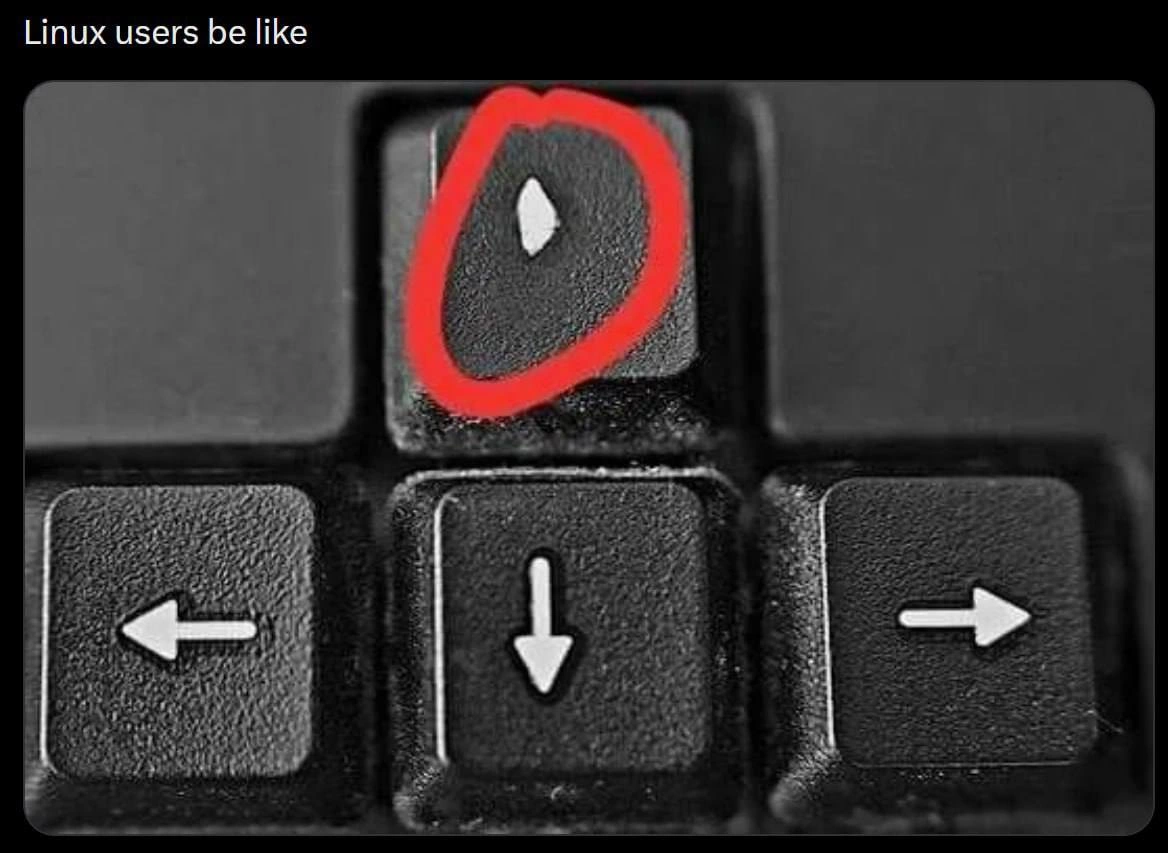
Now, the meme’s image shows a close-up of a keyboard’s arrow keys. The up-arrow key is circled in red and its white arrow symbol is almost completely rubbed off. In contrast, the left, down, and right arrow keys around it still have their symbols clearly visible. This tells a little story: the user has been pressing that Up Arrow way more than any other arrow key. Over time, constant pressing can wear out the printing on a keycap (or even the key’s spring mechanism). So physically, this keyboard has evidence of heavy use on one specific key. It’s a funny visual for developers because it immediately screams “this person uses the shell a LOT.”

The text at the top, “Linux users be like,” is internet slang for “This is how Linux users behave.” It implies that this habit of abusing the Up Arrow is characteristic of people who use Linux or Unix systems regularly. Why Linux specifically? Because Linux folks are known for doing many tasks through the terminal instead of graphical interfaces. It’s a big part of UnixCulture and developer life: mastering command-line shortcuts and KeyboardShortcuts to get things done faster. And indeed, one of the first tricks you learn in the terminal is that you don’t have to retype commands – the history feature (often accessed via Up Arrow) has your back. It becomes second nature quickly. This is where MuscleMemory kicks in: you might unconsciously hit Up Arrow the moment you think “I want to run that again.” Muscle memory means you’ve done something so often, your fingers do it automatically without needing to think each time.

So the humor here is partly just DeveloperHumor – a relatable joke about daily workflow. Instead of, say, carefully writing down commands or remembering them, many devs lean on the convenience of retrieving them from history. It’s relatable because pretty much anyone who has spent time in a shell has done this. We’ve all hammered Up Arrow to cycle through a dozen past commands looking for that one deployment command or database query we ran before. It’s practically a reflex in terminal life. There’s even a well-known alternative shortcut !! in Bash that reruns the last command, and history commands to list or search past entries (like typing history | grep install to find the last install command). But those require a bit more thought; simply pressing the Up key is effortless.

The phrase “single point of failure” normally describes a critical part of a system which, if it fails, brings the whole system down. For example, if a website’s only database server crashes, the site goes offline – that database was a single point of failure. In the context of this meme, they’re joking that the Up Arrow key has become that crucial linchpin for the individual developer. The person’s entire workflow (their way of working) depends on that one key always working. If it stops functioning (say the key breaks or the PC isn’t registering it), the joke is that the user would be stuck or significantly slowed down. It’s obviously an exaggeration – a skilled user could still type commands manually – but it sure would feel crippling if you’ve come to rely on that key for speed. This is why the caption says “the real single point of failure.” It’s poking fun at how something as small as a keyboard arrow can feel as mission-critical to a Linux power-user as a major component in a large system.

Finally, this meme touches on DeveloperExperience_DX in a subtle way. A good developer experience often means having tools that make repetitive tasks easier. The shell’s history feature is a great DX improvement – it saves time and keystrokes. But the flip side is developers might lean on it a bit too much. It’s “addictive” in the sense that once you get used to it, you rarely plan ahead for repeating tasks any other way. It’s all fun and games until you open a brand-new terminal window (with an empty history) or your one trusty key stops working! Then you suddenly realize how reliant you were on that convenience. The worn-out up arrow in the image is a comical reminder: perhaps it’s time to give that key a rest, or map another shortcut as backup!

Level 3: Up Arrow–Driven Development

The single point of failure in this meme isn’t a server or database – it’s a keyboard key. That thick red circle around the faded Up Arrow is basically a badge of honor in the Linux world. Experienced developers practically live in the CLI (Command-Line Interface), bouncing between terminals, and their MuscleMemory for repeating commands is legendary. Instead of retyping a complex command or digging through documentation, they just smash the Up Arrow to scroll back through their shell history and rerun whatever worked last time. Over years of this habit, the Up Arrow keycap’s printed arrow can literally wear off to a blank smudge, as shown in the image. It’s a physical testament to countless hours in Bash or Zsh and endless SSH sessions via tmux. The meme caption “Linux users be like” playfully surrenders: Yes, we abuse the history buffer so much, we’ve erased the evidence.

From a senior developer’s perspective, this joke hits on both UnixCulture and engineering irony. We’re always taught to avoid Single Points of Failure (SPOF) in our systems – to have redundancy for servers, databases, networks – yet here we are with a workflow that hinges on one humble key. If that Up Arrow fails (crumbles, sticks, or just stops registering), our productivity tanks. Imagine frantically needing to redeploy a service at 3 AM and your beloved history key is dead – suddenly you’re stuck recalling a 3-line kubectl command from memory. It’s funny because it’s true: many of us treat the shell’s history as an external brain. Why memorize or script the perfect find . -type f -mtime -1 -exec tar -rf backup.tar {} \; command when you can just hit ▲ until it appears? The history buffer becomes a substitute for documentation or automation. As the meme notes, the “history is faster than typing — or documentation”. In other words, the fastest way to repeat a command is often to dig it out of your past, not your notes.

There’s real shared experience (and a bit of shame) behind that faded arrow key. It’s the RelatableDeveloperExperience of spending long days in a terminal: you figure out a tricky command once, then run it on 10 different servers by pressing Up Arrow and Enter each time. Or you compile code, get an error, tweak one thing in your editor, then Up Arrow to run the compile again. Rinse and repeat, hour after hour. The left, down, and right arrow keys? They hardly see any action compared to the mighty “previous command” key, hence they’re still crisp on the keyboard. This one key becomes critical infrastructure for a power user. In reliability terms, it’s a peripheral single point of failure – if it breaks, you’re effectively locked out of your quickest workflow. Seasoned devs might chuckle and nod, thinking of their own faded keycaps or worn-out keyboard switches after years of terminal life. It’s a form of geek pride (and a little embarrassment): “I’ve hit the Up Arrow so many times I nearly DOSed my keyboard!”

The humor also hides a gentle poke at our habits. We know good practice would be to script recurring tasks, use aliases, or at least copy important commands somewhere safe. There are even smarter history tools: e.g. Ctrl+R reverse search in Bash, or drop-in replacements like the fish shell that suggest commands from history as you type. But let’s be honest – when you’re deep in the zone, finger on the arrow key, it’s just too easy to tap Up, Up, Up until that golden command reappears. We’ve all gone on an arrow_key_wearout rampage instead of doing things “properly.” Over time, this convenience can backfire. Relying on ephemeral shell memory means if you lose your session (or that key!), you might not recall the exact incantation you need. In a way, the worn key is a war story: it says “this person has been in the trenches of the terminal.” It’s hilarious and a bit cautionary at the same time. After all, even the best TerminalCommands shortcut can become a crutch. The meme exaggerates it to a physical level: our beloved Up Arrow could literally become the failure point. And of course, a salty sysadmin might joke: “Time to add Up-Arrow Key to the redundancy plan or carry a spare keyboard in the data center!” 🚀

Description

A close-up, black-and-white image of a keyboard's arrow keys, with the text 'Linux users be like' displayed at the top. The 'up arrow' key is circled in red, and sitting on it is a single, small, white grain of rice. This meme is a clever and literal visual pun on the term 'ricing,' which, in the Linux and open-source communities, refers to the process of heavily customizing a desktop environment's user interface for aesthetic or functional purposes. The joke contrasts the technical, often complex act of software customization with the simple, absurd act of placing literal rice on a keyboard. It's a niche, inside joke that resonates deeply with experienced Linux users who are familiar with the community's slang and obsession with personalization


Comments

31
Anonymous ★ Top Pick Some people think 'ricing' is about compiling a custom kernel and patching dwm for a 2% performance gain. The true enlightened know it's about achieving the perfect aesthetic balance between your keycaps and your choice of grain
  1. Anonymous ★ Top Pick

    Some people think 'ricing' is about compiling a custom kernel and patching dwm for a 2% performance gain. The true enlightened know it's about achieving the perfect aesthetic balance between your keycaps and your choice of grain

  2. Anonymous

    In our threat model, the only critical resource without redundancy isn’t the database - it’s the up-arrow key holding our entire runbook in ~/.bash_history

  3. Anonymous

    After 15 years of explaining to junior devs why hjkl is superior, you realize the real productivity gain wasn't the 50ms saved per navigation, but the 500ms of compile time you get to blame on not reaching for the arrow keys

  4. Anonymous

    The worn up-arrow key is the physical manifestation of every Linux user's relationship with `history | grep` - we know it exists, we know it's more efficient, but there's something deeply satisfying about mashing that up arrow 47 times to find the `docker-compose` command we ran three days ago. It's not laziness, it's *muscle memory optimization*. Meanwhile, that pristine down arrow sits there judging us, completely unaware that in the terminal, time only moves backward

  5. Anonymous

    Linux keyboards evolve: the down arrow achieves asymptotic frictionlessness after a decade of 'less +F' tail-chasing

  6. Anonymous

    Our MTTR proxy is microns of ABS missing from the ↑ key - every sudo !! shaved off another incident

  7. Anonymous

    On my Linux box the arrow cluster is decorative - navigation lives in hjkl, up arrow is just reverse‑i‑search bait, and the rest got remapped to tmux panes and i3 workspaces

  8. @Diotost 2y

    history | grep part-of-command

    1. @maggelia 2y

      Ctrl+r

      1. @desrevereman 2y

        shell completion

    2. @AmindaEU 2y

      I keep forgetting that and just grep .zsh_history The fluff is wrong with me?

  9. @azizhakberdiev 2y

    it is always more efficient to search for the command 50 lines above rather than typing 5 characters

    1. @dsmagikswsa 2y

      I don't get this... any examples?

      1. @azizhakberdiev 2y

        you're about to type a command, but you remember typing it earlier and you start vigorously searching through for it, thinking it is recent enough (it isn't) for example clear or smth

        1. @dsmagikswsa 2y

          I see... thanks

        2. @Le_o_R 2y

          Clear -> Ctrl+L

  10. @azizhakberdiev 2y

    I use arch btw

  11. @Sp1cyP3pp3r 2y

    I don't get it

  12. @Sp1cyP3pp3r 2y

    (explain)

    1. @ZgGPuo8dZef58K6hxxGVj3Z2 2y

      Pressing up in terminal pastes the previous command

  13. @azizhakberdiev 2y

    I didn't know. Have to try this, arrow is never a good idea

    1. @dsmagikswsa 2y

      I think vim user will map ctrl + j/k to arrow up/down

      1. @desrevereman 2y

        zsh works with ESC+jk by default I think

        1. @dsmagikswsa 2y

          Damn Idk thanks

  14. @akiyiwen 2y

    for fish like shell it's ->

  15. @akiyiwen 2y

    I use arch btw

  16. Mario 2y

    Not with a backlit keyboard

  17. @heito_r 2y

    fzf

  18. @Le_o_R 2y

    Idk if it's built into zsh or I'm using an addon, but that's the behaviour of my terminal.

  19. @pixelsex 2y

    it's "k" key acktually. this comment is sponsored by Vim gang.

  20. Deleted Account 2y

    C-p

Use J and K for navigation
