
Skip to content
DevMeme
6632 of 7435
Using Linux Like an Adult via SSH from a MacBook
OperatingSystems Post #7266, on Oct 13, 2025 in TG

Using Linux Like an Adult via SSH from a MacBook

Why is this OperatingSystems meme funny?

Level 1: Best of Both Worlds

Imagine you have one super powerful toy that’s a bit hard to handle and another very comfortable toy that’s easy and fun. What this developer is doing is like playing with the powerful toy using the comfortable toy as a controller. In simple terms, he’s got a big strong robot (that’s Linux, the powerful computer brain) sitting in the garage, and he’s using a friendly remote control (that’s the MacBook) while relaxing on the couch. He’s basically saying, “I enjoy the power of the big robot, but I control it from my comfy spot.” It’s funny because he brags about using the big fancy thing “like an adult,” meaning he found a clever way to enjoy it without any inconvenience. So he gets the best of both worlds – all the strength of the powerful machine and all the ease of the fancy laptop – and that little boast makes everyone who understands it grin.

Level 2: Mac Outside, Linux Inside

Let’s break down what’s happening in simpler terms. Linux is an operating system (like Windows or macOS) that developers and servers often use. It’s known for being super reliable on servers and very customizable. macOS is the operating system that runs on Apple’s MacBook laptops – it’s user-friendly and polished. In this meme, a developer is proudly saying they use Linux, but here’s the catch: they are using it through their MacBook. This means their MacBook isn’t actually running Linux directly; instead, the Mac is a window or door into a Linux system that’s running somewhere else (it could be a physical server in a rack, a powerful PC at home, or even a cloud VM online). The way they access that Linux system is via SSH, which stands for Secure Shell. SSH is basically a command-line tool that lets you remote-control another computer securely. Think of it like opening a text-only remote desktop, but instead of a full graphical screen, you get a terminal (a text prompt where you type commands).

So when he says, “Via ssh from a MacBook,” he means: “I open my Mac’s Terminal app, connect to a Linux machine using SSH, and then I’m effectively using Linux through that connection.” All the commands he types are actually running on the Linux machine, and the Mac is just showing the results. It’s similar to logging into a website, but all you see is text and you can run commands as if you were sitting at the Linux computer.

Why do this? Well, senior developers (people who’ve been coding for a long time) often love Linux’s power and scriptability, but they also appreciate the convenience of a MacBook. Apple’s laptops are known for good hardware (great battery life, high-quality trackpad, crisp screen) and macOS has a lot of daily-use software and a nice interface. On the other hand, Linux can sometimes be tricky on laptops – for instance, getting all the hardware (Wi-Fi, graphics, etc.) to work perfectly can require fiddling. Plus, some software that companies use might only be available for Windows or Mac. So a lot of experienced devs carry MacBooks but still run their code on Linux either in the cloud or on a server. By doing so, they get the best of both worlds: use Mac for what it’s good at (a smooth desktop experience) and use Linux for what it’s good at (running server programs, writing scripts, dealing with other Linux servers).

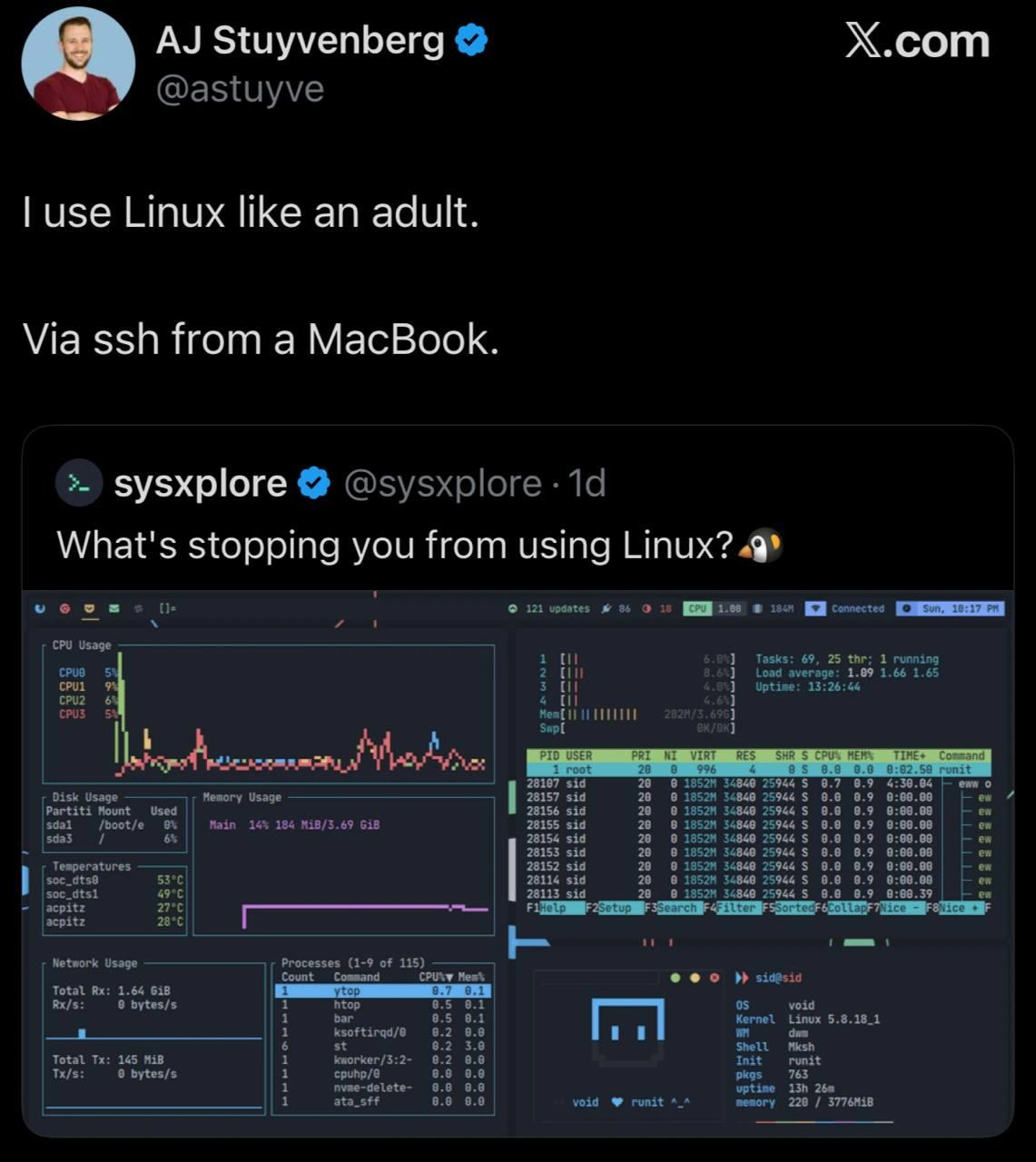
The screenshot in the meme shows a terminal with a bunch of colorful graphs and stats. That’s a real CLI tool (Command-Line Interface tool) running on Linux that monitors system performance. It’s like a text-based dashboard showing CPU usage, memory usage, disk space, network speed, and a list of running processes (the tasks/programs on the machine). One popular tool that looks like that is called htop (an interactive process viewer, sort of an advanced Task Manager in text form) or newer ones like btop. The key is: the Mac isn’t generating those graphs itself; the Mac’s terminal is just displaying data from the Linux machine. The Linux machine is doing the heavy work (measuring CPU, etc.), and then sending the numbers and characters to the Mac terminal to draw those nifty bars and charts in text. Because this is all just text and simple characters, it works fast even over the internet – you don’t need a fancy graphics protocol.

This approach – using a headless Linux system (meaning Linux running without any graphical desktop) and connecting to it remotely – is common in professional environments. For example, web servers don’t have monitors and keyboards attached; admins just SSH into them to configure things. Here, the dev is basically treating his personal Linux environment as a mini-server that he remotely controls. He might have a dedicated Linux box (maybe a desktop tower at home or a cloud server) nicknamed something like “penguin-server”, and from his MacBook terminal he would do:

# From the Mac terminal, connecting to the remote Linux machine
MacBook:~ user$ ssh jane@penguin-server
jane@penguin-server:~$    _   _   _  

Once logged in, the prompt changes to show he’s now operating on penguin-server (which runs Linux). Now he can run Linux-only commands, compile code in a Linux environment, or use tools that behave exactly like on a production Linux server. If he runs uname -a (a command to identify the OS), it would output “Linux …”. It’s as if inside the Mac, a door opens and behind it is a full Linux system ready to go. And when he’s done, he types exit and closes that connection, and he’s back to his Mac environment.

For a junior developer or someone new to this, a few key terms to know: SSH is the secure connection method (it uses encryption so that what you type can’t be snooped easily). Terminal or CLI is this text-only interface where you type commands. Linux server usually means a machine running Linux without a graphical interface, often used for hosting websites, databases, etc. MacBook here is the hardware and macOS is the software on it. So the person basically uses the MacBook as a comfortable portal to interact with the Linux server.

Another reason seniors do this is consistency: if your app will eventually run on Linux servers in the cloud, developing or testing on an actual Linux environment (even if accessed via Mac) can prevent those “works on my machine” bugs. macOS is similar to Linux but not identical – it has a different kernel and some different default tools. For instance, the default ls or grep on macOS are the BSD versions, which have slightly different options than the GNU versions on Linux. A newbie might not notice, but a seasoned dev knows these subtle differences. By remoting into a Linux box, they avoid any surprises and ensure they’re using the exact environment their code will run on in production. It’s a clever workaround to make sure there are no "Well, it worked on my Mac..." issues.

In summary, the guy in the meme is basically saying: I do use Linux, but I don’t actually install it on my main laptop. I keep it in a safer place and tap into it when needed. It’s a bit like a power move among developers – showing that you know how to run a remote Linux box and are comfortable in pure command-line means you’ve got some solid tech chops. And he phrases it humorously as the “adult” way, implying maybe the more “childish” way was to nuke your laptop OS and install Linux everywhere, causing yourself headaches. Instead, he’s found a smarter, possibly lazier (in a good way) method. This mix of practicality, clever setup, and a dash of smug humor is what makes other devs chuckle and nod. After all, many of them have an expensive MacBook on their desk and a bunch of SSH sessions open – it’s an inside joke about our daily reality in tech.

Level 3: Truce in the OS Wars

At the core, this meme pokes fun at the long-standing platform wars between operating systems. We have a senior developer openly admitting that, yes, they use Linux (often portrayed as the hardcore hacker’s OS) but – plot twist – they do so from a MacBook. It's a wink to all the industry veterans who have lived through countless debates of Linux vs macOS vs Windows. Rather than taking sides, this engineer has brokered a personal truce: use macOS for what it’s great at (a reliable, user-friendly laptop experience) and use Linux for what it’s great at (flexible server-side computing, scripting, and that beloved command-line interface). The tweet reply “I use Linux like an adult. Via ssh from a MacBook.” perfectly lampoons the youthful idealism of going “all Linux, all the time.” Seasoned devs often start out as enthusiastic Linux evangelists (dual-booting their laptop, endlessly tweaking desktop environments, bragging about tiling window managers), but over the years they get burned by some practical headaches. This meme captures that journey in one witty one-liner.

So what does stop people from using Linux as their main daily driver? Senior engineers know the laundry list by heart:

  • Hardware hassles: Ever spent a day chasing GPU drivers or fixing Wi-Fi on a Linux laptop? Our “adult” dev certainly has, and decided life’s too short for guinea-pigging hardware support. Apple’s MacBooks are prized for “just working” out of the box – from the Retina display to multi-touch trackpad gestures – whereas Linux on the same hardware might require troubleshooting or compromises (no MagSafe driver issues on a Mac!).
  • Polished ecosystem: macOS offers polish and commercial software support (think Photoshop, Office suite, or that one corporate VPN client that only runs on Windows/Mac). For many devs, a MacBook lets them seamlessly do video calls, graphics work, or use proprietary tools that Linux often lacks. It’s the comfortable daily living environment. Meanwhile, Linux excels in the server room or data center – it's lean, it’s open-source, and it’s what most production systems run on. By SSH-ing in, the dev can interact with a real Linux environment (with GNU libraries, case-sensitive filesystem, /proc and all) to build or test their code exactly like it will run in production, all while still having Spotify and a web browser working nicely on macOS.
  • Unix underpinnings: Notably, macOS itself is a Unix (POSIX-compliant) OS, so for a developer it feels familiar under the hood. You get a Terminal with zsh/bash, SSH client, and many Unix commands already installed. Thus, using macOS as the host and Linux as the guest is relatively frictionless – they speak the same Unixy language. It’s a far cry from, say, using Windows and having to install a compatibility layer or WSL to get Linux-like behavior. For a senior dev, opening a terminal on Mac and typing ssh mylinuxserver is second nature. They probably have it aliased, keyed with SSH keys for passwordless login, maybe even with fancy terminal color schemes – as the screenshot’s eye-candy shows.
  • Experience & Pragmatism: The phrase "like an adult" drips with tongue-in-cheek superiority. It implies that a mature developer chooses their battles. Instead of zealously insisting on running Linux on their primary laptop and potentially struggling with every minor update, they keep Linux in its ideal habitat (the server/VM, where it’s rock solid and headless) and use macOS as the stable ground to stand on. This approach is born from real-world scars: perhaps a kernel update broke their GUI right before a big presentation one day, or suspend/resume never worked quite right on their Linux notebook, or they simply got tired of missing out on some MacBook perk (hi, AirDrop and FaceTime). Over years, engineers realize that productivity > ideology. If using both OSes in tandem makes life easier, so be it. That’s the senior dev energy radiating from the meme – the confidence to use whatever tools get the job done, even if it means teasing the younger idealists in the process.
  • Headless Linux = Fewer Distractions: Many veterans actually prefer working in a terminal-only environment for certain tasks. A headless Linux server (no graphical interface) means you focus purely on CLI tools. Look at that embedded terminal dashboard: it’s showing system status in real-time with minimal resource usage. Tools like htop, iftop, or the fancy dashboard shown (which might be a modern TUI system monitor) give you granular control and info. There’s a nerdy satisfaction in managing a system through text-only interfaces; it feels powerful and efficient. Using SSH, a dev can administer that Linux box from anywhere – their MacBook at a coffee shop or their iPad in an airport – all with the same terminal-centric workflow. It’s a bit of elite feeling: “I don’t even need a GUI to manage my machines.” That resonates with senior dev humor: flexing deep tech skills subtly.

The meme’s humor is really about self-awareness in the tech community. The @sysxplore tweet asks, “What’s stopping you from using Linux? 🐧” – a question often posed by die-hard Linux advocates. The expectation is answers like "Photoshop isn’t on Linux" or "I need MS Office" or "gaming". But AJ Stuyvenberg’s witty retort flips it: nothing is stopping him, he is using Linux – just not in the stereotypical way. It’s a gentle jab at the almost religious fervor of OS debates. The senior dev in the meme isn’t picking a fight; they’ve effectively opted out of the war by using a bit of technical jiu-jitsu, combining strengths of each platform. To other experienced devs, this feels spot on: how many times have we seen a colleague with a shiny MacBook Pro that’s mostly running terminals, Vim/Emacs, and SSH windows to remote servers? It’s practically a trope in startups and IT departments.

By framing it as “like an adult,” the meme adds a layer of comedic snark. It’s as if the senior dev is saying: I’ve grown up – I no longer dual-boot my laptop or brag about rice-ing my Arch Linux desktop at the cost of a weekend. Instead, I quietly spin up a Linux server (or VM) and use it with zero drama. That confidence, efficiency, and a dash of sarcasm (“I use Linux properly, kiddo”) makes seasoned techies smirk in recognition. It highlights a shared understanding: at the end of the day, tools are a means to an end, and the real pros bend them to their will, even if it means running an OS inside another OS. We’re laughing because we either do this now, or we know someone who does – it’s a clever life-hack hiding in plain sight.

Level 4: Return of the Terminal

In a twist of computing history, developers are rediscovering the power of remote terminals – it's like the mainframe era reborn on modern hardware. Here our senior dev proudly proclaims they run Linux "like an adult" by tunneling in via SSH from their MacBook. This hints at a deep architectural insight: rather than wrestling with Linux on a laptop (with all its driver quirks and GUI overhead), they treat the Mac as a slick thin client and the Linux box as a beefy headless server. Under the hood, this setup channels the classic client-server model: the MacBook is effectively just an interface (running a Terminal app) sending keystrokes to and displaying text from a powerful Linux machine elsewhere. It's a pragmatic embrace of the Unix client/server philosophy that dates back to timesharing systems – a "the network is the computer" approach in 2025.

From an OS architecture perspective, this strategy takes advantage of both worlds. macOS (built on the Darwin kernel with a BSD/Mach heritage) delivers a polished desktop experience on Apple hardware, while the remote Linux (with its monolithic Linux kernel) provides a pure, customizable Unix environment for heavy-duty development. Instead of trying to make one machine do it all, the dev is decoupling concerns: the local Mac handles GUI, trackpad, and battery life gracefully, whereas Linux on a server (or VM) handles compilation, deployment, or running that neon-lit terminal dashboard at full tilt. This separation can even sidestep low-level incompatibilities — for example, an ARM-based MacBook can SSH into an x86_64 Linux server, bypassing architecture woes when building for production. It's a bit like running a virtual machine or container, but over the network and often on more powerful hardware.

Crucially, SSH (Secure Shell) itself is a piece of mature tech enabling this “responsible” Linux usage. SSH establishes an encrypted tunnel between the two systems, using cryptographic handshakes (like RSA/ECDSA keys and symmetric ciphers under the hood) to ensure that all those terminal commands and rainbow-colored stats are transmitted securely. The overhead is minimal – mostly just text and delta updates for that terminal UI – so it feels almost as responsive as using a local shell. The result is a responsive remote desktop without the desktop: our dev might be editing code in Vim or monitoring processes with htop on a machine thousands of miles away, all through a little secure pipe. They could even be using X11 forwarding or SSH port tunneling to run specific apps through the Mac if they wanted, but in this meme the focus is on the hardcore CLI dashboard (probably something like bpytop or glances, given those neon graphs).

This "Linux via SSH" workflow also leans on classic Unix tools for persistence and multitasking. A senior engineer will often pair SSH with terminal multiplexers like tmux or screen. These tools let them start long-running processes or monitoring sessions on the Linux server and detach safely. Even if the SSH connection drops or the MacBook goes to sleep, the processes keep churning away on the server. Later, they reconnect (tmux attach) and it’s like they never left – uptime ticking away, tasks still running. That little detail in the screenshot (e.g. Uptime: 13 days, 22 hours) is the kind of statistic a veteran admin takes pride in; it’s a sign their remote Linux box is stable and always ready, unlike a laptop that might reboot or hibernate. Essentially, the MacBook becomes a fancy graphical terminal, while the Linux system does the heavy lifting continuously in the background. This division of labor isn’t just convenient – it’s rooted in the Unix philosophy of doing one thing well (Mac for interface; Linux for computation). POSIX standards make this possible: both macOS and Linux share common Unix-like DNA, so commands and scripts behave predictably across them. The senior dev has orchestrated a personal hybrid cloud: a reliable UI on top of raw Linux power accessed through a 30+ year-old protocol. It’s a high-tech homage to the past and future alike, where old-school remote shell habits meet modern Mac ergonomics. The humor, of course, comes from this seriously sophisticated setup being described with a deadpan bravado – "like an adult," as if using Linux any other way would be child’s play.

Description

A screenshot from X.com showing a post by AJ Stuyvenberg (@astuyve) saying 'I use Linux like an adult. Via ssh from a MacBook.' This is a quote-tweet of @sysxplore asking 'What's stopping you from using Linux?' with a screenshot of a Linux desktop showing htop, vtop, system monitors, neofetch output (Void Linux, kernel 5.8.18_1, Mksh shell, runit init, 763 packages, 3776MiB memory). The humor is in the pragmatic approach: using macOS for daily desktop needs but SSH-ing into Linux servers for actual work, which is the reality for most senior developers and SREs

Comments

38
Anonymous ★ Top Pick The year of the Linux desktop finally arrived -- it's just running inside an iTerm2 window on a $3000 MacBook Pro
  1. Anonymous ★ Top Pick

    The year of the Linux desktop finally arrived -- it's just running inside an iTerm2 window on a $3000 MacBook Pro

  2. Anonymous

    Eventually every architect discovers that the most stable Linux distro is “ssh user@prod” running in iTerm2

  3. Anonymous

    The eternal developer paradox: spending years evangelizing Linux superiority while secretly appreciating that macOS 'just works' for daily driving, then SSH-ing into real servers where package managers actually matter and nobody judges your desktop environment choices

  4. Anonymous

    The ultimate flex isn't running Linux on bare metal with a perfectly riced desktop - it's having the operational maturity to SSH into your headless servers from whatever machine actually has working WiFi drivers. Because nothing says 'senior engineer' quite like choosing reliability over aesthetics, even if it means your daily driver is the OS you spent your twenties complaining about

  5. Anonymous

    My MacBook is just a $TERM with a hinge; the real OS lives past port 22

  6. Anonymous

    Real adults SSH into Linux servers from macOS - because desktop environments are for juniors chasing Wayland segfaults

  7. Anonymous

    After enough years curating dotfiles, you discover the most stable window manager is ssh + tmux - trackpad drivers courtesy of Cupertino, uptime courtesy of the datacenter

  8. dev_meme 9mo

    same, I don't know any laptop model which would run Linux with no issues (the most common one I guess is discharging on hold)

    1. @RiedleroD 9mo

      huh? my IdeaPad 5 Pro works flawlessly. my previous laptop (don't remember, but it was a really cheap shitty one) worked perfectly too

      1. dev_meme 9mo

        so if you close the lid at 20:00 with 60%, what will the battery percent be when you open it back at 10:00 next day?

        1. @RiedleroD 9mo

          idk I always keep mine charging overnight. it never lost more than 5 percent while being carried in my backpack for a few hours though

          1. @RiedleroD 9mo

            normally this is something you configure yourself, since some hardware doesn't like going to sleep (windows broke my PCs optical drive because it went to sleep during ripping), but my laptop specifically has a trigger to go to sleep on lid close in firmware. I think most laptops don't do that, but idk

            1. @RiedleroD 9mo

              to be fair, this was windows 7. but still

        2. @H3R3T1C 9mo

          this is not a Linux problem, is a vendor problem... Mac can handle every chip that run their own firmware and controll it because their own it..... Linux needs to handle 1000 differents brands of chips and reverse engineering things 'cause vendors dont give any information to Linux. But easy, try to run MacOS on "not Mac" hardware and see if the battery long same?

          1. @RiedleroD 9mo

            I mean I guess variety is part of the problem, sure.

            1. @RiedleroD 9mo

              …not being sarcastic here, there's genuinely truth in this

          2. dev_meme 9mo

            why would I do that lol? I am evaluating the product that I use and not the sources of the problems. I don't like a lot about macos too, e.g. the animations for 1sec+ that I can't disable, so I wish their was a replacement

            1. @H3R3T1C 9mo

              dont forget the "Can't show the password fields hehehe"

    2. @Algoinde 9mo

      framework

      1. @TheFloofyFloof 9mo

        But framework bad because they sponsored hypeland

        1. @Algoinde 9mo

          don't they send laptops to distros/projects to test on

        2. @sylfn 9mo

          they are also achively promoting dhh's omarchy

          1. @H3R3T1C 9mo

            I hate DHH as person.... but is a software genius really..... I have a point, if (as example of people) create a vacine that remove cancer from people... do you will apply to a person with cancer??? or not apply because was created by DHH?

            1. @Algoinde 9mo

              bro compared arch dotfiles to cancer cure

              1. @H3R3T1C 9mo

                but is a point right?

        3. @Assamite 8mo

          I never get the fucking community Going crazy over just sponsoring because of political compass gives us a lot about how doomed the communities have become

    3. @coolestFreak31 8mo

      Arch + Hyprland runs amazing on my chinabook with 4050

  9. @VaisovD 9mo

    I use wsl, and it's really handy

  10. @H3R3T1C 9mo

    summary.... attack and cancel the person, not the software

    1. @Algoinde 9mo

      sometimes the software and the person are the same brand to cancel the person is to forcefully transfer development ownership, which kills the project most of the time (and if the person refuses, nothing can be done except boycotting)

      1. @H3R3T1C 9mo

        is this the case with hyprland?

  11. @H3R3T1C 9mo

    it's like attack hyprland... hyprland is a great DM, much better than others on wayland ecosystem.... is a great software? yes, varxy is a great person??? I dont think so

    1. @RiedleroD 9mo

      I'm sure people have made forks already. similar to how prism launcher grew from polymc, for example

  12. @H3R3T1C 9mo

    is hyprland a DM or a software focused on attack person for their race or ???

  13. @H3R3T1C 9mo

    So anyone will buy a Mercedes Benz right?

  14. @H3R3T1C 9mo

    Don't get me wrong, I would take people like DHH or varxy and give them three slaps to refresh their brains.

    1. @Algoinde 9mo

      it's the "separate the art from the artist"

      1. @H3R3T1C 9mo

        when the "art" not reflect the idea of the artist of course....

Use J and K for navigation


