
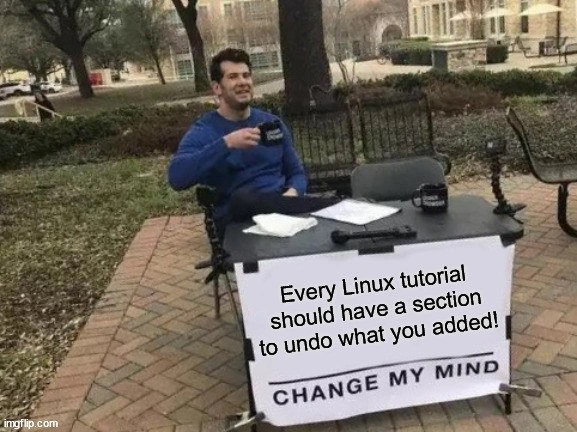
Every Linux guide needs rollback instructions - prove this table meme author wrong
Why is this CLI meme funny?
Level 1: No Undo Button
Imagine you’re drawing a picture with a permanent marker instead of a pencil. The teacher shows you step-by-step how to make the drawing. You follow along and add all these bold lines. But then you realize you made a mistake, or you decide you don’t like the drawing. Uh-oh – there’s no eraser for marker ink! The teacher never told you how to fix or undo any stroke if you mess up. You’d probably feel nervous or frustrated, right? You might even think it’s a bit funny (and annoying) that the lesson didn’t mention what to do if things go wrong. That’s exactly the feeling behind this meme. It’s saying when we follow instructions on the computer (like drawing with marker lines on a system), we want to know how to erase or undo those changes if needed. It makes us laugh because it’s so obvious – of course we’d want an “undo” – yet often the instructions don’t include that part. The meme joke is basically: “They always tell you how to do stuff, but never how to undo it – isn’t that silly?” Just like having a big red “Do” button without a “Undo” button next to it. It’s funny and true, and that’s why everyone who’s been in that situation kind of chuckles and agrees!
Level 2: Rollbacks for Rookies
So what’s going on here? Let’s break down the tech lingo. Linux is an operating system, and a Linux tutorial usually means a guide that tells you how to do something on a Linux system. Often these guides involve using the CLI (Command Line Interface) – basically typing text commands into a terminal instead of clicking buttons. For example, a tutorial might say “to install newSoftware, open the terminal and type sudo apt install newSoftware.” That command would download and install a program. Great. But what if you decide you don’t want that program later, or something went wrong after installing it? Many tutorials forget to tell you how to undo the steps — in this case, how to uninstall the program or revert any changes made. This meme’s text is claiming that “Every Linux tutorial should have a section to undo what you added!” In plainer terms, whenever a guide tells you to add or change something (like installing software, editing a configuration file, creating a user account, etc.), it should also tell you how to remove those changes if you need to. The bottom text “CHANGE MY MIND” is a popular meme phrase basically saying “I firmly believe this, convince me I’m wrong.” Here it’s used humorously, because the statement is so sensible to anyone who’s been burned by a bad tutorial that it’s hard to argue against.
Why does this matter? Imagine you’re new to shell scripting or Linux and you follow an online guide step-by-step. You might use a bunch of shell commands you don’t fully understand yet. For instance, a tutorial on setting up a web server might have you do:
sudo apt update
sudo apt install nginx
echo "Hello" > /var/www/html/index.html
These commands update your package list, install a web server called nginx, and then put the text "Hello" into a webpage file. So far so good. But what if later you decide you don’t want Nginx, or the tutorial was just for practice on your personal machine? How do you undo all that? The tutorial likely didn’t say. The undo steps here would be things like:
sudo apt remove nginx # Uninstall the nginx package
sudo rm /var/www/html/index.html # Delete the file created (if not needed)
Plus maybe disable any service that was started. If you’re a newcomer (a rookie), you might not know those removal commands offhand. That’s why the person in the meme demands that tutorials include an "undo" or rollback section. “Rollback” in tech means reversing changes or returning to a previous state. In programming and systems, it’s like hitting a rewind button on the actions you just did.
This meme targets a common documentation gap: a lot of guides focus only on how to set something up, not how to cleanly tear it down. It’s playing on DocumentationHumor – essentially joking about the frustrating experiences people have had due to incomplete docs. If you’ve ever followed a how-to article and then thought “Okay, I did it… now how do I undo it?!”, this meme speaks to you. It’s especially relevant in SysAdmin (system administrator) tasks. A SysAdmin manages computers/servers, and they often try things out. Good sysadmins know you should always have a backup or some plan if you need to revert changes, but when you’re learning, you might just follow instructions blindly.
For example, say a tutorial tells a beginner how to add a new user account on Linux with sudo useradd alice. If later that user isn’t needed, the newbie might scratch their head not knowing the counter-command (sudo userdel alice would remove the user). Without guidance, they might leave unnecessary stuff on the system or, worse, try random commands to undo it and break something else. This can lead to confusion or even a broken setup. So the meme is basically advocating: Please include the removal steps in the same guide. It’s a bit like a recipe that tells you how to bake a cake, but doesn’t tell you how to clean the kitchen afterwards – if you’re new to baking, you’d be lost with a big mess on your hands and no instructions! Everyone from junior developers to hobbyists has felt that panic of not knowing how to reverse a command they just ran. That’s why this meme hits home for so many people learning the command line. It’s saying “We need safety nets and clear cleanup instructions in those guides,” in a lighthearted but pointed way.
Level 3: Backup or Backfire
This meme nails a painful truth every seasoned sysadmin and developer discovers sooner or later. It’s presented in the classic "Change My Mind" format – a guy at a table challenging everyone with the sign “Every Linux tutorial should have a section to undo what you added!” The humor works because it’s undeniably true: documentation for Linux CLI tasks often shows you how to set something up, but totally forgets to tell you how to clean up or revert those changes. Experienced folks will smirk (or cringe) remembering times they followed some Linux tutorial or Stack Overflow answer that said “just run these 5 commands” to enable a feature. Sure, it works… until it doesn’t, or until you no longer need that change. Then you’re stuck thinking, “Okay, I added all this stuff — now how the heck do I remove it without breaking anything?” It’s a running joke in Systems Administration circles and definitely a SysAdminPainPoint: guides cheerfully lead you down the installation rabbit hole but leave you stranded at the bottom.
Consider a scenario a senior engineer knows too well: you’re tuning a server following a blog tutorial. Step 1, add a PPA and install a custom package. Step 2, tweak a kernel parameter by editing a config file. Step 3, open a firewall port for that new service. Fast forward — the solution didn’t work as expected, or you realize it’s causing issues. Now the fun begins: removing that custom package might leave orphaned dependencies, you’ve lost track of which line you added to sysctl.conf, and that firewall hole is still gaping open. The tutorial didn’t include any removal or rollback steps. Been there, fixed that at 3 AM. 😩
This is exactly why the meme’s demand feels so justified. It’s pointing at the documentation gap with sardonic flair. The guy behind the table is basically every grizzled sysadmin internally screaming, “Please, for the love of Tux, include uninstall or revert instructions in your docs!” The Command Line Interface (CLI) is powerful, but it’s unforgiving. Unlike a GUI app that might have an “Undo” option, when you run sudo rm -rf /badidea or pop open a config and add lines, there’s no prompt saying “Changes will be saved. Continue?” You just do it and hope you remember how to undo it if needed. Senior devs have learned to mitigate this risk. They’ll take backups of config files (e.g., cp /etc/important.conf /etc/important.conf.bak) before editing, or use version control in /etc (with tools like etckeeper). In a professional setting, they might test changes in a VM or container first, essentially a dry run in a safe environment. Why? Because they’ve been burned by tutorials that omit rollback steps. It’s practically an industry folk tale: “Works on my machine” often hides “...and I have no idea how to undo it on yours.”
The shared laughter here comes from recognition. We’ve all seen those breezy blog posts: “To enable X, just run these commands… Congrats, you’re done!” They never mention how to disable X if it goes haywire. The meme hyperbolically demands every tutorial include an Undo section, and honestly, that’s not a bad idea! When you’re a sysadmin maintaining critical servers, having clear rollback steps isn’t just convenience – it’s survival. Imagine a rookie admin adding a bunch of firewall rules from an online guide. Later, something breaks, and they need to remove what they did. If the guide or docs provided a cleanup section, it would save them from frantic StackOverflow searches or diffing configs against a working server. Without it, you often see desperate forum posts: “I followed this tutorial, now how do I undo these changes?!” The meme gets a knowing chuckle because every experienced person has either asked that question or answered it for someone.
It also slyly points out a documentation anti-pattern: focusing on the happy path (getting set up) and ignoring the sad path (when you need to revert or remove). In the real world, not every change is permanent or successful. You might just be testing something out. A senior engineer reading a tutorial will actively think, “How do I roll this back if I don’t like the outcome?” If the tutorial doesn’t say, that’s a red flag. The DocumentationHumor in this meme is that we’re essentially begging for completeness and caution in guides – something that shouldn’t be controversial at all. The “Change My Mind” format is tongue-in-cheek because who is going to argue against having rollback instructions? Virtually no one. (If they do, they probably haven’t been on call during a production incident caused by a stray tutorial command...). The sign might as well say, “Leaving out undo steps is bad documentation – fight me.” Everyone just nods because it’s an IT truth.
Ultimately, the meme resonates on an almost emotional level with tech folks. It’s funny because it’s true, and a bit absurd that we even have to say it. It highlights a bit of collective frustration: we’ve all cleaned up a mess left by incomplete docs. The veteran admins laugh a little cynically, remembering the nights of combing through shell history to undo changes. The juniors laugh nervously, maybe recalling the time they had to re-install their OS because they couldn’t unravel what a tutorial did. It’s a shared catharsis – we joke about it so we don’t cry about it. And maybe, just maybe, someone writing a tutorial sees this meme and thinks, “Hmm, perhaps I should include those removal steps next time.” Change our minds? Unlikely.
Level 4: ACID Not Included
Ever notice how the Linux command-line is essentially a one-way street? There’s no built-in transaction or global undo mechanism when you execute shell commands. In database theory we have ACID properties (ensuring operations are Atomic, Consistent, Isolated, Durable), which guarantee you can roll back a failed transaction. But when you’re fiddling with /etc/ configs or running sudo commands, you’re operating outside any transactional safety net. Each apt install or echo >> permanently alters system state without an automatic ledger of changes to revert. The shell proudly executes exactly what you tell it—side effects and all—with no native concept of inverse operations. Unless you manually logged every file you touched or you’re running on a fancy snapshotting filesystem (shout-out to ZFS/Btrfs snapshots or LVM), reverting a sequence of shell commands is a complex, error-prone manual process. In theoretical terms, most shell operations aren’t invertible functions; they’re more like painting with permanent ink. Historically, Unix assumed you knew what you were doing (the famous “Unix philosophy” of simple tools with great power— and great responsibility). The idea of a ubiquitous “Ctrl+Z” for system changes never made it into design because it’s incredibly hard to generalize: the OS would have to record every file bit before and after, every package dependency state, every daemon’s config pre-tweak. Some modern systems like NixOS/Guix actually embrace a declarative, versioned approach—treating system configuration as code so you can roll back to previous states reliably. But for the majority of Linux systems, once you run those tutorial commands, you’ve effectively committed your changes with no easy atomic commit/rollback structure. It’s a fundamental computing truth that makes this meme so poignant: the command line gives you immense freedom to modify your system, but with that comes the reality that undoing changes is not a simple matter of pressing an “Undo” button. Unless you planned ahead with backups or container sandboxes, you’re left solving the inverse problem by hand—often a far harder problem. This underlying lack of transactional safety in everyday system operations is the deep-cut truth fueling the joke.
Description
A classic “Change My Mind” meme in an outdoor campus setting shows a person in a blue sweater, face intentionally blurred, sitting behind a folding table while sipping from a black mug. The table has another mug, a microphone, and scattered papers, and a large white banner taped to the front. Visible text on the banner reads: “Every Linux tutorial should have a section to undo what you added!” followed by the standard bold line “CHANGE MY MIND.” The scene humorously calls out how many Linux command-line tutorials cover installs or edits but omit the equally important rollback steps, a pain point for sysadmins and anyone learning shell scripting. The meme highlights the need for better documentation practices and safe experimentation on production machines

Comments
24Comment deleted
When a Linux tutorial ends with ‘sudo nano /etc/whatever.conf’ and no rollback step, congrats - you’ve just launched Distributed Configuration Drift as a Service
The real Linux learning curve isn't mastering sed and awk - it's discovering three years later that your system still has that experimental kernel parameter from a 2021 blog post that's been causing mysterious performance issues, but you can't remember which of the seventeen config files you modified or whether it was a systemd override, a modprobe option, or something you compiled into initramfs
Every senior engineer knows the real Linux tutorial structure: Step 1-10 for setup, Step 11 is 'now you have a working system,' and the mysteriously absent Step 12 is 'how to unfuck everything when you realize this conflicts with your existing setup.' Bonus points if the tutorial was written in 2015 and half the packages are deprecated, leaving you archaeologically excavating /etc/ at 2 AM trying to remember which config file you touched before everything stopped working
Linux tutorials: idempotent additions only if you're scripting Ansible playbooks; otherwise, enjoy your bespoke config apocalypse
Any Linux tutorial without a rollback is just a snowflake-server adoption form
Any Linux tutorial without a teardown isn’t a guide - it’s a snowflake server factory; at least make the steps idempotent
haha Comment deleted
Except "Undo" for "Undo" section, which is "Redo" Comment deleted
Anyone have memes about task manager Comment deleted
Send me... Comment deleted
Use etckeeper ... Comment deleted
Just reinstall linux, what's the problem? Comment deleted
Totally Comment deleted
don't care im gay Comment deleted
me too Comment deleted
yoooooooo Comment deleted
i like dix Comment deleted
i like men so much you can't even imagine Comment deleted
wait Comment deleted
it makes sense now Comment deleted
yesh, being f*cked by the compiler everyday Comment deleted
please don't say msvc please don't say msvc please don't say msvc Comment deleted
guix package --roll-back Comment deleted
Yes Comment deleted

