The Developer's Desktop as a meticulously Crafted Software Project
Why is this DeveloperExperience DX meme funny?
Level 1: Posters on the Wall
Imagine you have a friend who loves a particular cartoon or style so much that they decorate everything they own with it. They put posters on their bedroom wall of their favorite anime characters, use notebooks and stickers with those characters, and even choose their backpack in that theme. It doesn’t necessarily help them study harder or run faster, but it makes them really happy whenever they see it.
This meme is like that, but for a computer. The person has made their computer’s working screen look super personal and cool, especially if you like anime. The background of the screen is a pretty anime scene, the little windows where they type (the terminals) and where they write code are all colored to match that scene, and even the text style and icons are customized. They even changed how their music player looks so it fits the whole vibe! It’s the same idea as decorating your room or notebook with your favorite things: it turns a normal workspace into something unique and fun.
The funny part is thinking about how much time it probably took to do all of this. It’s as if a student spent hours organizing their pencils, stickers, and desk just to get the perfect look before actually doing any homework. We find it amusing and cool because it shows passion and personality. The person is not just using their computer to code; they’re also expressing who they are (an anime fan, a creative soul) through how everything looks. Even if you don’t understand the coding bits, you can see it’s a very “them” kind of setup. It’s like saying, “This is my world, and I’ve decorated it exactly how I want.” That feeling of seeing someone’s character shine through in their workspace is both charming and a little humorous, just like walking into a friend’s room that’s decked out in all their favorite things.
Level 2: Customizing All The Things
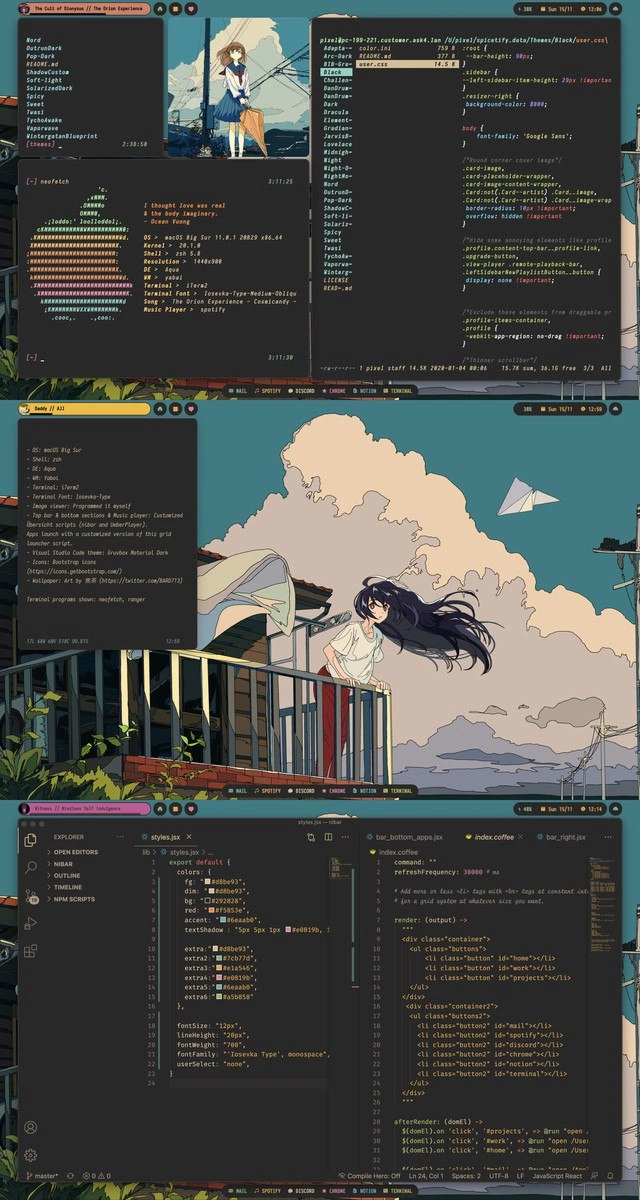
At this level, let’s break down what’s happening in the meme for someone with some programming context. The image is essentially a brag post of a customized developer setup, mixing command-line tools, code, and anime art to create a personal theme. The key idea is that this developer has personalized nearly every aspect of their workflow:
Operating System and CLI: They’re using macOS Big Sur (an Apple operating system) but making it look unique. In the terminal windows, you can see a program called
neofetchin action.neofetchis a command-line tool that displays system information alongside an ASCII art logo (in this case, the classic multi-colored Apple logo). It’s a popular way for developers to show off their OS, hardware, and theme in screenshots. The text below the logo lists things like OS version, machine model (MacBookPro16,1), shell (zsh– the Z Shell, which is the program that processes commands you type in terminal), screen resolution, CPU, GPU, and memory. It even shows “Music Player: spotify” and likely the current song playing. So, the developer has configured their terminal to pull info from Spotify, meaning when a song is playing,neofetchor some script displays the song title or lyrics. This makes the terminal feel alive and in sync with what they’re listening to. It’s a fun customization (imagine your command line greeting you with your current track each time!).Terminal Windows and Tools: The screenshot shows multiple terminal windows. The top-left terminal lists directories (folders) like
Word,Pornography,Renders,roadcat,Vaporwave,Videorentaltempprint. This is essentially the output of a file listing command (similar to runninglsor perhapsexafor a more fancy listing). exa is an alternative to the classiclscommand that adds modern features like icons, colors, and better default formatting. The presence of these particular folder names is a bit humorous or eyebrow-raising (“Pornography” in a dev screenshot definitely catches the eye), possibly included as a tongue-in-cheek detail. The CLI (Command Line Interface) theme continues with mention of ranger, which is a text-based file manager that you can use in the terminal to browse files in a visual way (it often shows a columnar view and lets you navigate directories with arrow keys). So this developer likely usesrangerto quickly navigate files without leaving the keyboard, andexato list files with style. They’re clearly very comfortable in the terminal life – that means preferring text commands and terminal programs over graphical file browsers or apps for many tasks.Shell and Dotfiles: The shell, as mentioned, is zsh. On modern macOS, zsh is the default shell (it replaced the older bash). Developers often customize their shell prompt and behavior via startup configuration files (often called “dotfiles” because the filenames start with a dot, e.g.,
~/.zshrc). The custom window title “The Cult of Bisyss // The Orion Experience” (as seen at the top of the terminal window frame) and the inclusion of song lyrics in the terminal output suggests this person has heavily customized their shell prompt or is using a multiplexer like tmux with custom titles. It’s not uncommon for enthusiasts to program their prompt to display dynamic info like git branch, temperature, or as here, current music track. These configurations require writing scripts or using community frameworks (like Oh-My-Zsh or custom shell scripts). It’s a bit advanced, but essentially it’s done by editing text files that the shell reads when it starts. The meme doesn’t explicitly show the dotfile, but everything we see (fancy prompt, special output, custom colors) implies a meticulously tuned zsh configuration.Visual Theme (“Rice”): The term “ricing” is often used (especially in Linux communities) to describe customizing the look of your desktop environment (colors, layout, widgets, etc.). Even though this is macOS, the user has applied a ricing mindset: they chose a specific anime wallpaper and matched their terminal and editor color schemes to it. The wallpaper visible (the anime girl on a balcony with a paper airplane) sets a serene, artful mood. The terminals have a muted teal/green tint and possibly some transparency, so that the background image peeks through. All the text is styled in a consistent color scheme – for example, in the code editor, the chosen accent color is a kind of neon purple (#8E5FEC) and the background is a very dark bluish color (#060520), very similar to the dark areas of the wallpaper sky. This kind of coordination is deliberate: the developer likely picked colors from the wallpaper to use in the terminal and VS Code theme. It’s all about the aesthetic coherence. For someone new to this, think of it as matching your phone’s wallpaper with your phone case and icon colors – here it’s terminals and code editor matching the desktop background.
Font Choices: Another detail: the font used everywhere (terminal and code) is Iosevka (“Iosevka Type” as referenced). This is a programmer-friendly font. Unlike default fonts, Iosevka is monospaced (all characters are the same width, which is standard for coding to keep columns aligned) and it’s particularly known for being very clean and for having lots of stylistic options (you can choose different shapes for characters when you build the font). Many developers switch to fonts like Iosevka, Fira Code, or JetBrains Mono because they find them more readable or just more visually pleasing for code compared to say, Times New Roman or even Courier. So choosing Iosevka means this person cares about the look of their text as much as the content. It’s a subtle but important part of the customization: every piece of text in those screenshots is rendered in that chosen font, making the whole setup feel unique.
Editor (VS Code) and Code Shown: In the bottom panel, we see Visual Studio Code, a very popular code editor. It’s in a dark theme (dark themes are loved in programming both for style and because they’re easier on the eyes in long coding sessions). The left file
styles.jsxlikely contains a JavaScript module exporting a style configuration. You can see an object with properties likebg,accent,fontSize,fontFamily– that looks like a theme or styling object for a React application or some UI. This suggests the developer is also working on a project where they custom-code styles (the project itself might be an app or a personal site). The values (#060520 for bg, #8E5FEC for accent, etc.) match the theme colors we see in the environment, which implies the dev might be coding something to visually integrate with their desktop theme (talk about dedication!). However, it could also be coincidence or just the same user’s taste carrying into their work.The right side
bair_bottom_apps.jsxandindex.coffeeare interesting. JSX (the.jsxfile) is typically used with React (a JavaScript library for building user interfaces). JSX lets you write HTML-like syntax in JavaScript, which React then renders as UI components. Sobair_bottom_apps.jsxmight be a React component file — maybe something to render a bottom bar of apps (by the name, could it be a custom dock or toolbar?). Meanwhile,index.coffeesuggests a file written in CoffeeScript. CoffeeScript is a language that transpiles (converts) to JavaScript, offering a more concise syntax. It was pretty popular about a decade ago for making JavaScript coding less verbose, but nowadays most people just use modern JavaScript (ES6+) or TypeScript. The presence of CoffeeScript here indicates either the project has some legacy parts, or the dev just happens to like it for quick scripting. The content “jQuery click handlers” means that inside that CoffeeScript file, they’re using jQuery. jQuery is a classic JavaScript library that simplifies DOM manipulation and event handling (things like$('.button').on('click', function() { ... })to run code when you click a button). If you look closely, the code probably has CoffeeScript shorthand for jQuery, like$('.class-button').click -> ...(CoffeeScript uses->to define an anonymous function).So why is this mixture notable? For a junior dev or someone new: React (with JSX) and jQuery don’t usually go together in new projects. React tends to manage UI state and events in its own way, without needing jQuery. If they coexist, it might mean the project was started with jQuery and then parts of it are being incrementally updated to React, or the developer is repurposing some old code. It’s a bit like finding a modern electric car that still has a carburetor under the hood — unusual and a sign of transition. This isn’t directly the humor of the meme, but it’s a neat detail about the dev’s world: they are comfortable across different generations of web tech.
Spotify theming via CSS: You might notice in the top-right terminal, they were editing a file called
user.cssinside a path that includes something likespicetifyandThemes/Black. This strongly suggests they are using Spicetify, which is a toolkit to customize Spotify’s desktop application. Spotify’s app is essentially a web technology (Electron) under the hood, so Spicetify allows users to inject custom CSS (and even JavaScript) to change how Spotify looks and behaves. The lines shown (“background-color: #000”, “font-family: 'Google Sans' !important”) indicate they’re forcing Spotify’s background to pure black (instead of the default grey/dark gray) and changing the interface font to Google’s sans-serif typeface. The!importantsyntax in CSS means “override anything else and really apply this style.” So, this person has likely applied a “Black” themed skin to Spotify and is tweaking it. For a newcomer: think of it as putting a skin on your music player—like changing its colors and fonts just to match the rest of your computer theme. It doesn’t alter how Spotify plays music, just how it looks. This is a rather advanced and totally cosmetic tweak, which shows how far they’re willing to go for consistency. It’s a fun part of the meme because it’s uncommon; not many people know you can reskin the Spotify app.Overall Developer Experience (DX): The phrase Developer Experience means the quality of the tools and setup a dev uses every day. Here, the developer has built an environment that sparks joy for them. They have all their favorite tools (terminal file managers, custom commands, code editor) set up just right and the visual vibe (colors, fonts, wallpaper) that makes them happy or inspired. For example, an anime fan might feel more comfortable or motivated seeing art they love on their workspace and using a style that reflects their personality. There’s also a practical side: dark themes reduce eye strain, clear fonts reduce reading mistakes, and those CLI tools (
exa,ranger) can be more efficient or informative than their default counterparts. So it’s not all just looks—some of these customizations likely improve workflow.Community and Culture: This kind of screenshot collage is commonly shared in developer communities as a way to inspire others or just show off creativity. There’s even a subreddit called
r/unixporn(despite the name, it’s safe-for-work) dedicated to sharing “riced” *nix (Unix-like) setups. While macOS is not Linux, Mac terminals share a lot with Unix, and Mac power-users adopt similar techniques for customization. The term “rice” itself is community slang for this visual customization; people rate each other’s rice, exchange dotfiles (configuration files), and learn new tricks (like usingneofetchor spicetify). So part of the humor/joy here is that this image is like a trophy of that subculture. It’s relatable to developers who have maybe spent a weekend tweaking their VS Code theme or adding an anime ASCII art to their Bash welcome message. There’s a bit of lighthearted self-irony: we know this level of detail isn’t necessary to code, but it’s a fun way to blend our hobbies with our work.
To sum up, what’s happening is the developer has customized everything in their development environment:
- The terminal (with special commands and ASCII art via neofetch, and replacement tools like exa and ranger for a cooler experience).
- The shell (zsh with likely fancy configurations, maybe showing song lyrics or other info).
- The desktop (anime artwork wallpaper and probably custom terminal color scheme to match).
- The music player (Spotify app reskinned using custom CSS).
- The code editor (VS Code with a matching dark theme and perhaps custom color settings).
- Even the code they write is influenced by style (they have a code file specifically for UI style constants, ensuring their app’s colors are in harmony).
For a junior developer or someone just starting out, this meme is a peek into how deeply you can tailor your working environment as a programmer. It’s like seeing a highly customized gaming PC setup if you’re used to a basic laptop. There’s an element of admiration (“Wow, I didn’t know you could change all that!”) and also a bit of amused skepticism (“Did doing all that actually help you code better, or was it mostly for fun/bragging?”). The truth is, it’s a mix of both. Developers often find joy in these tweaks, and a joyful developer can be more productive. But there’s definitely a point where it’s just about personal expression. This meme celebrates that extravagance with an anime twist—saying, essentially, “Look how cool and personalized my coding world is!” and invites others to appreciate the artistry and maybe laugh at how over-the-top it can get.
Level 3: Terminally Aesthetic
This meme is a showcase of developer environment bling taken to an extreme—an anime-themed, highly customized macOS setup that would make any r/unixporn enthusiast proud. An experienced developer immediately recognizes the telltale signs of “ricing” (the art of obsessively customizing your desktop’s look-and-feel). It’s all here: a retro rainbow Apple logo from neofetch flexing Mac specs, multiple iTerm2 terminal panes arranged just so, a slick dark VS Code theme, and of course an anime wallpaper tying it all together. The humor (and admiration) comes from the sheer commitment: this dev hasn’t just installed a few plugins; they’ve themed everything down to the Spotify player’s CSS.
In the top panel, the left terminal window shows a directory listing with quirky folder names (yes, they left Pornography and Vaporwave in plain sight—perhaps as an edgy in-joke). A seasoned dev chuckles at this bold nonchalance; it’s the digital equivalent of a prank in a conference presentation, daring you to comment. The center panel features an anime schoolgirl under power lines, likely rendered right inside a terminal using a tool or displayed as a background image — a pure aesthetic flex. The right terminal is editing a user.css file (with the micro editor, no less) for a Spotify theme, containing rules like background-color: #000 and font-family: 'Google Sans' !important;. This means the developer is using a tool (likely Spicetify) to inject custom CSS into Spotify’s UI. A senior developer knows how fiddly this can be: every Spotify update could break your theme, but for this dev, maintaining that all-black, Google-font Spotify look is worth it. It’s both hilarious and impressive — a mix of frontend hacking and pure vanity.
The neofetch output in the bottom-left of that top panel is the hallmark of bragging rights among enthusiasts. It prints out the OS (macOS Big Sur 11.7), hardware (i9 CPU, Radeon Pro GPU, a whopping 32GB RAM), and even the current song. In fact, the ASCII art Apple logo in rainbow colors nods to the old-school Apple logo, blending retro geekery with modern toolkits. The quote below it (“I thought love was real / But the dopamine imaginary”) appears to be a personalized touch — possibly lyrics from The Orion Experience’s “Cult of Dionysus,” which tie into the music theme (the window title “The Cult of Dionysus // The Orion Experience” confirms it). A veteran dev grins at this integration: hooking your music player to display track info or quotes in your terminal prompt is peak power-user move. It’s showing that the dev’s dotfiles (shell config) are tweaked to broadcast mood and personality as you work.
Moving to the middle panel, we see a gorgeous widescreen anime art (a woman on a balcony with a paper airplane) as the desktop background. Overlaid is a semi-transparent terminal titled “bobby // hi” listing out the setup details (almost like the dev is helpfully annotating the screenshot for us). It mentions things like the font (“Iosevka Type”), which is a programmer font known for its clean design and highly customizable styles. Using Iosevka is a telltale sign of a font connoisseur—this isn’t your out-of-the-box Monaco or Consolas, but a carefully chosen typeface to match the vibe. The overlay likely also lists tools (neofetch, exa, ranger) and the terminal/OS info, basically giving the spec sheet of this “race car” of a dev environment. To a seasoned dev, this is a familiar ritual: when you spend weeks tuning your environment, you want people to know exactly what’s under the hood. It’s akin to showing off custom car mods at a show, except with dotfiles and theme configs.
Finally, the bottom panel zooms in on Visual Studio Code with multiple files open, demonstrating that the aesthetic isn’t just skin-deep — it extends into the code itself. The VS Code theme is dark (of course), likely a custom or tweaked Material Dark or similar theme with matching accent colors. In the left tab (styles.jsx), we see a JavaScript object defining a color scheme: a background color #060520 (a nearly black midnight blue), an accent #8E5FEC (a neon purple), and a stylish monospace font Iosevka Type. This matches the terminal and wallpaper palette, showing how consistent the theming is across CLI and editor. On the right, there’s a bair_bottom_apps.jsx and an index.coffee file open. The .jsx suggests React or some frontend component code (JSX is used with React to write UI elements in JavaScript), while the .coffee indicates CoffeeScript, a older language that compiles to JavaScript, often used with jQuery in the past. Seeing jQuery-style $() and click handlers in index.coffee next to a React JSX file is a bit of a time warp for senior devs: it’s like two generations of frontend tech in one project. This could mean the dev is modernizing an old codebase or just happily mixing tools. It’s both funny and nostalgic: imagine writing hip React components for one part of an app while still having a CoffeeScript file with $('.button').click(...) for something else. A senior engineer might recall doing something similar during the transitional years around 2015, so it’s a nod to lived experience.
The overall developer experience (DX) on display is an ode to personalization. It’s a well-known fact that many devs (especially those who love Linux or spend a lot of time in terminal) treat their setup like a canvas. They script and tweak until every window, prompt, and pixel reflects their taste. The joke is partly that this might be overkill—hours sunk into tweaking config files instead of writing the next feature. But it’s also relatable: a pretty environment can make the grind of coding feel more enjoyable. In an industry where everything is about efficiency and utilitarian design, injecting some anime-fueled style is a guilty pleasure. A seasoned dev might jokingly ask, “Does all this theming make the code run faster?” knowing the answer is no, but also understanding that morale and personal joy are an underrated productivity boost. After all, when your IDE looks like a cyberpunk anime scene and even your music player matches your terminal, sitting down to code at 2 AM feels just a bit more epic. This meme perfectly captures that intersection of serious skill and whimsical nerdiness: it’s funny because the developer isn’t just coding – they’re cosplaying as a 1337 hacker anime protagonist in their own workspace. And honestly, every senior dev knows that feel.
Description
A three-panel collage showcasing a highly customized desktop environment on macOS Big Sur, a practice known as 'ricing'. The overall aesthetic is unified by a pastel-colored anime wallpaper featuring a girl on a balcony. The top panel displays several terminal windows, one running 'neofetch' to show system specs (macOS, zsh, iTerm2), and another editing a CSS file. The middle panel highlights the wallpaper and a semi-transparent window listing the customization tools used, including the 'Yabai' tiling window manager, 'Übersicht' for widgets, and a 'Gruvbox Material Dark' VS Code theme. The bottom panel shows a Visual Studio Code window with open files like 'styles.jsx' and 'index.coffee', revealing that the user is actively coding their own desktop UI components. This image appeals to senior developers by celebrating the deep, technical effort invested in personalizing their digital workspace. It's not just about aesthetics; it's about treating one's own environment as a complex software project to be perfected, using sophisticated tools like tiling window managers and custom scripts to optimize workflow and express personal style
Comments
7Comment deleted
The final boss of yak shaving is when you start writing custom JSX components for your desktop UI just so you can be 2% more efficient at avoiding the actual work you're supposed to do
Nothing accelerates delivery like a 32 GB MacBook maxed out on tiled iTerm panes, VS Code, and a hand-rolled Spotify.css - because aligning Iosevka ligatures with the anime skyline is clearly our real velocity blocker
The three stages of explaining your development environment to management: first they see the terminals, then they notice the IDE, and finally they discover your wallpaper choices and suddenly the conversation shifts to "company culture fit."
When you spend more time ricing your Linux desktop and perfecting your neofetch config than actually writing code, but at least your terminal looks absolutely gorgeous while displaying that 'command not found' error. The real productivity metric isn't lines of code shipped - it's how many strangers on r/unixporn upvote your aesthetic anime-themed workspace setup
Neovim config: 5k LOC, zero bugs. Production monolith: 500k LOC, eternal tech debt
We basically built a distributed system to show the clock: yabai orchestrates, skhd is the message bus, Übersicht runs CoffeeScript microservices, and VS Code deploys the configs while product still waits on a button color
Retro: we shipped color-token parity across tmux, zsh, VS Code, and neofetch - vibes at 99.99% SLO; login still 500s, but at least the CoffeeScript stack trace matches the palette