Getting a Root Shell on Everything is The Real Endgame
Why is this EmbeddedSystems meme funny?
Level 1: Toy Thinks It’s a PC
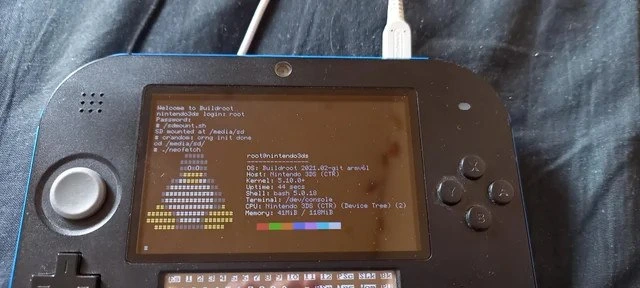
Imagine you have a little Nintendo game machine – the kind you normally use to play Mario or Pokémon – and you decide to turn it into a mini computer. That’s exactly what’s happening here! It’s like taking a toy and teaching it to do “grown-up” computer things. Normally, when you turn on your game device, you see colorful menus and game icons. But in this picture, when they turned it on, it shows a black screen with a lot of text, kind of like the Matrix code or what hackers’ screens look like in movies.
Why is this funny or cool? Think of it this way: it’s as if someone taught their Nintendo to speak a new language – the language of computers – just to see if it could. It’s a bit like having a Game Boy suddenly start acting like a desktop PC, showing system information instead of a game. The person who did this basically unlocked the toy’s secret potential. They put a special version of Linux (that’s a computer operating system, like Windows or macOS, but often used by techies) onto the device. That’s why you see words like “CPU” and “Memory” on the screen – the device is listing its computer parts and stats, almost like bragging, “Hey, look at me, I’m a Linux computer now!”
Now, picture someone taking apart a RC car and rebuilding it so that it can drive like a real car (only in tiny form). It’s not something you do because it’s practical – it’s more for the challenge and the wow factor. Similarly, here someone took a gaming gadget and made it run a whole operating system just for the joy of experimentation. It’s playful and a little silly: you don’t necessarily need your Nintendo 2DS to check its own memory and processor info, but doing it feels like a fun achievement.
The humorous part is also how it mixes two worlds: the kid-friendly world of Nintendo and the nerdy world of programming. It’s unexpected – kind of like if your teddy bear suddenly started reciting the encyclopedia. For a non-technical person, the screen full of text would be gibberish, but for the one who did it (and their techy friends), it’s super exciting. They’re essentially saying, “See, I made this thing do something completely different and geeky!”
So, in very simple terms: this meme is funny because someone turned a handheld game toy into a tiny computer, and they’re proudly showing the proof. It’s the surprise of seeing a familiar fun device do an unfamiliarly serious task. It makes tech folks smile and say, “Haha, of course they did that!” – because if something has a computer inside, sooner or later, a curious person will try to tinker with it. This 2DS now thinks it’s a full-fledged PC, displaying its specs on-screen, and that’s both adorable and awesome in a geeky way.
Level 2: Hacking a Handheld
Let’s break down what’s going on here in simpler terms, and connect it to things a junior developer or enthusiast might know. We have a Nintendo 2DS, which is a version of the Nintendo 3DS handheld game console. Normally, when you turn on a 2DS, you get Nintendo’s home menu, you play games, etc. It’s a closed system – you can’t usually access a normal “desktop” or run generic programs on it. But in this image, someone has hacked the handheld to run a completely different operating system: Linux. More specifically, a custom Linux-based system built with a tool called Buildroot. On the screen, we see a terminal (command line interface) just like you’d see on a regular Linux PC when you drop to text mode. For context, Linux is an operating system kernel that, with the right supporting software, can run on almost anything – it’s the same family of software running your Android phone, many Wi-Fi routers, Raspberry Pi boards, etc. Here, it’s running on a gaming device not originally intended to support it.
Buildroot is mentioned because that’s how they made this possible. In simple terms, Buildroot is like a kit or a recipe that helps you create a small, customized Linux system for gadgets and embedded devices. Think of it as a magic bakery for operating systems: you tell it what ingredients (features) you need and for what kind of device (the target CPU/architecture), and it will bake you an entire filesystem image – containing the Linux kernel and basic programs – that you can then put on your device. If you’ve heard of something like Yocto or OpenWRT, Buildroot is in that family – popular among developers who work with embedded systems. Instead of installing a big OS like Ubuntu (which wouldn’t even run on a 2DS due to resource limits), you build just the essentials. In the photo, the person likely used Buildroot on their PC to compile everything for the 2DS’s ARM processor, then loaded it onto the 2DS (probably via the SD card or internal storage) and booted it up.
Now, the 2DS has an ARM11 processor (part of the ARM family, which is very common in mobile devices). ARM CPUs are different from the Intel or AMD x86 CPUs you find in most laptops/desktops – which means you can’t run PC programs on an ARM device unless you recompile them for ARM. That’s exactly what was done here: cross-compiling software. Cross-compiling means using one machine (say, your laptop) to build programs that will run on another machine with a different brain (the 2DS’s ARM chip). Buildroot set up a cross-compiler so that all the Linux components were built into ARM-compatible binaries. The person doing this had to configure Buildroot with the right toolchain (compiler tools for ARM) and enable things like a login prompt on the 2DS screen, possibly drivers for the screen and SD card.
When the image boots, the first thing you see on the 2DS screen is the text: “welcome to Buildroot” and a login prompt nintendo3ds login:. This means Linux successfully started up on the device and is now asking for a username. They type root (the default superuser/administrator account in Linux), press Enter, then likely enter a password (maybe they set a root password, or maybe it’s blank/auto-login). Once logged in as root, they have full control – this is equivalent to being the admin. Getting “root access” on a device like this is the goal of most hacks, because it means you’re not restricted; you can do anything – install programs, modify the system, etc. Usually consoles don’t allow that (it’s like being locked out of the system internals), so getting root is a big achievement.
Right after logging in, we see some commands being run:
# mount -o remount,rw /
This command remounts the root filesystem in read-write mode. Why? Often, when you boot an embedded Linux from a prepared image, it might mount as read-only to protect the file system (or because it was made that way to be safe). To make changes, like adding new files or editing configs, you need it to be writeable. So the hacker is making sure they can tweak things live by re-mounting it with rw (read-write). This indicates they really are in tinkering mode, adjusting the live system. After that, they run neofetch.
Now, Neofetch is a popular command-line tool that simply displays system information alongside an ASCII art logo of the distribution. It’s purely cosmetic/fun – not necessary at all for function. People run it to showcase their system setup. Here it displays an ASCII art that looks like a blue-white arch (the logo of Arch Linux). It’s a bit funny since the OS is Buildroot, not Arch, but maybe neofetch defaulted to that art or they configured it. In the info it prints out:
OS: Buildroot 2021.02.2 armv6l– so the operating system is our custom Buildroot Linux, version 2021.02.2, andarmv6ltells us the architecture (ARM v6, little-endian).Host: Nintendo 3DS (CTR)– it recognizes the hardware as a Nintendo 3DS (CTR is the internal model name). Essentially, it knows it’s running on a 3DS/2DS platform.Kernel: 5.10.x– the Linux kernel version is 5.10-something, which is quite modern (this was around 2021, and 5.10 is a long-term support kernel from that era).Shell: bash 5.1– the shell (command interpreter) is Bash version 5.1, meaning a full bash shell is available.Resolution: 400x240– that’s the screen resolution it’s using. The 2DS’s top screen is 400x240 (note: the original 3DS has an effective 800x240 because of the 3D effect, but each eye sees 400). So it’s likely using the top screen for output.CPU: ARM11 MPCore– confirms the CPU type inside the 2DS.Memory: 61MiB / 128MiB– shows the current memory usage vs total. So the system has 128 MB of RAM, and 61 MB are currently used.
All this info basically says: “Yes, this little game device is now running a standard Linux system.”
For a junior developer, it might help to compare this to something like a Raspberry Pi project. The first-gen Raspberry Pi also had 256MB (later 512MB) of RAM and an ARM11 CPU, and people ran Linux on that – often a stripped-down distro. The difference is, the Raspberry Pi was made to run Linux easily and had official support, whereas the 2DS is not. So what’s impressive here is the hacker did all the legwork that a vendor would normally do: they built a kernel for it, configured drivers, and made a working system largely from scratch.
Think about some key terms and what they mean in approachable language:
- Operating System: The main software that manages the hardware and lets you run other programs. Here, Linux is the operating system installed on the 2DS (replacing the normal Nintendo system while it runs).
- Embedded System: A device that has a computer inside it dedicated to specific tasks (often with limited resources). The 2DS is an embedded system designed for gaming. Running Linux on it repurposes it into a more general computing device, at least experimentally.
- Low-level programming: This refers to programming that deals closely with the hardware. In this project, low-level programming is involved in writing things like device drivers or bootloader code – the kind of code that interacts directly with chips and memory. The person who did this likely had to dabble in low-level stuff to get, say, the screen working or the buttons responding in Linux.
- ARM: A type of CPU architecture common in phones, tablets, and consoles. The code running on an ARM CPU is different from code on an x86 PC, which is why everything had to be recompiled.
- Root (superuser): The all-powerful user account in Unix/Linux systems. If you’re root, you can do anything on the system. Getting root access on the 2DS means the hacker owns the system. It’s akin to being the administrator on Windows, but even a bit more, since Linux root can even modify the kernel and system files freely.
- Terminal/CLI (Command Line Interface): The text-based interface you see on the screen, where you type commands. Developers often use this interface (especially on servers or when initially setting up systems) because it’s very powerful and doesn’t require a GUI, which is perfect for a device that might not easily support a graphical desktop. On that little 2DS screen, a terminal is what we see – white or colored text on black background, no mouse pointer, just text input and output.
Now, how did they actually get Linux onto the device? This part might resonate if you’ve done something like install a custom ROM on an Android phone or “jailbreak” an iPhone or console. You usually need to find a way to run unauthorized code on the device – that could be through a known vulnerability (glitching the 2DS via a game exploit or special cartridge that runs code), or through hardware modification. For the 3DS family, the homebrew community discovered ways to run custom firmware (like, by putting certain files on the SD card and performing specific steps in the official software, you could exploit the system into running your code). Once you have a custom firmware (like Luma3DS or others), you can then replace or chain-load into something like Linux. In practice, the person might have used the 3DS’s bootrom hack (as discussed above) to directly load the Linux kernel from an SD card.
So, step by step in plainer terms:
- Unlock the 2DS – e.g., install a homebrew launcher or exploit so it can run unofficial software.
- Prepare Linux – use Buildroot on a computer to compile a tailor-made Linux kernel and minimal filesystem for the 2DS’s hardware.
- Put Linux on the device – likely copying the Linux kernel and filesystem image to the SD card (or internal memory) in a way the new bootloader can find.
- Boot it up – using whatever hack allows it, boot the 2DS into Linux instead of the normal system.
- Interact via terminal – since there’s no touchscreen keyboard by default and no USB keyboard support out of the box, the hacker might log in through a serial connection or network. But it looks like they got output on the screen and possibly could input via some method (maybe they used the 2DS’s Wi-Fi to SSH from their PC into it, which is common in headless setups, or they could have rigged a USB OTG hack – though the 3DS doesn’t have native USB host, so less likely).
The physical USB cable we see could simply be for power (perhaps they are powering the 2DS from a PC’s USB port during this experiment so it doesn’t run out of battery while tinkering). On the 2DS, the charging port isn’t a standard USB, but hackers sometimes do hardware mods or use an adapter. Or that cable might connect to some debug board or capture device. It’s hard to tell, but the presence of a cable is a classic sight in DIY projects – the device is often tethered to something during development (either serial console or power or JTAG debug, etc.).
For a junior dev interested in operating systems or hardware, this meme is equal parts inspiring and amusing. It’s inspiring because it shows that with knowledge and perseverance, you can take a closed gadget and make it your own. It’s like turning a locked toy into an open playground. If you’ve ever messed with Arduino or Raspberry Pi, this is that spirit taken to the next level – doing it on a device not meant for it. It’s amusing because, from an outsider’s perspective, it seems almost pointless: you took a fun game machine and now it’s showing a bunch of text. But we know that text is proof of a successful hack. It’s the badge of honor.
Also, if you’ve been around Linux nerds, you know that ASCII art logos and system info are a bit of a prideful display. People customize their terminals to show these things off. Seeing an Arch Linux logo on a Nintendo device is a humorous mashup of worlds. Arch Linux is known for being for power users who often install their OS from scratch – similarly, this person essentially built an OS from scratch for the 2DS. It’s a flex, basically. They’re saying “Check it out, I’ve got a full Linux running here, and here are all the nerdy details, in rainbow colors no less!”
In summary, this image shows a clever techie turning a handheld gaming console into a tiny Linux computer. They used an embedded Linux build process (Buildroot) to get a suitable OS onto it, had to overcome the console’s locked-down nature to boot their code, and ended up with a working terminal on the device. For any budding developer or hacker, it’s a peek into what determination and knowledge can do: hardware is malleable, and sometimes the challenge is the reward. The humor comes from the sheer novelty of it – it’s like seeing a Ferrari pulling a plow on a farm; it’s off-label use in the extreme. Except here, the Ferrari (2DS) got a new engine (Linux) inside. And naturally, the first thing our hacker does with their new Linux toy is adorn it with a nerdy banner (neofetch). It’s heartwarming in a very geeky way.
Level 3: Gaming the System
Why is this image so deliciously geeky to experienced developers? It’s because it captures a perfect storm of developer curiosity, clever hacking, and a bit of tongue-in-cheek humor. We have a Nintendo 2DS – a device literally built for gaming – now running a full Linux environment and proudly showing off system stats with neofetch. This is a classic example of “gaming the system”: both literally (it’s a game system) and figuratively (the hacker is bending the system’s rules to their own ends). Seasoned engineers recognize the mix of ingenuity and playfulness here. After all, who hasn’t daydreamed of repurposing their gadgets to do more than the manufacturer intended?
One thing that makes this scenario funny to insiders is the universality of the impulse. Give a developer any device with a chip in it and, sooner or later, they’ll ask: “Can it run Linux?” It’s almost a running joke in tech communities. From WiFi routers to smart toasters, and yes, handheld game consoles, the challenge is irresistible. The meme even nods to “the universal developer urge to get a root shell and run neofetch on every possible device.” In other words, if it has a processor, somebody out there is trying to get a root prompt on it just for the satisfaction (and bragging rights) of saying they did. Senior devs seeing this will likely chuckle and think, “Ah, someone got another one!” It’s like collecting badges in an unwritten geek contest: Game Console – check. Smart Fridge – check. Coffee Maker – check. Every device conquered by Linux is a little victory for tinkerer-kind.
The text on the 2DS’s screen reads “nintendo3ds login: root”. That line alone carries so much subtext for an experienced developer. Root login on a Nintendo device?! It’s the ultimate I do what I want statement. Remember, these consoles are usually locked down tight. The manufacturer (Nintendo) never intended users to poke around the internals of the system. By seeing a login prompt for user “root”, we immediately know: this person has jailbroken or hacked the handheld to such an extent that they have full administrative control over it. For an onlooker who’s been through similar tech escapades, it triggers memories: maybe of jailbreaking the first iPhone to install unauthorized apps, or unlocking the bootloader of an Android phone, or installing custom firmware on a router. It’s that same spirit of freedom – taking control of hardware you “own” in the fullest sense.
Now, once you have that root shell, what do you do? If you’re a dyed-in-the-wool Linux geek, the answer often is: run neofetch and screenshot it. Neofetch is a harmless vanity tool; it prints out a bunch of system information (OS name, kernel version, CPU, memory, etc.) next to a pretty ASCII art logo (in this case the art looks like the Arch Linux logo, which is a bit of an inside joke itself, since Arch is known as the hacker’s DIY distro, but here the OS is actually Buildroot). The reason neofetch is run is not to solve any technical problem – it’s purely to show off the environment in a single aesthetic snapshot. Essentially, neofetch is the hacker equivalent of a victory pose. So the humor is also in the contrast: after all those incredibly complex steps to port Linux to the device, the end result presented is a color-coded text art and system summary. It’s like climbing a mountain and planting a flag – except the flag is ASCII art. For experienced devs, especially those active on forums or subreddits like r/unixporn or r/linuxmasterrace, this is super recognizable. Whenever someone posts “I installed Linux on XYZ weird device”, inevitably the screenshot is their neofetch output. We’re all in on that joke.
Let’s not miss the details in that neofetch output, either – they are gold for anyone who’s been around Linux and hardware:
- OS: Buildroot 2021.02.2 armv6l – This tells us they rolled their own minimalist Linux. A senior dev nods here: using Buildroot instead of a full-fat distro suggests they know what they’re doing. It had to be Buildroot or Yocto or similar, because standard Ubuntu or Arch Linux ARM images aren’t just going to support the 3DS out of the box (and would be too heavy). Seeing that specific version (2021.02.2) also tells us the timeframe and that they likely grabbed a recent Buildroot release, perhaps to get a newer kernel.
- Host: Nintendo 3DS (CTR) – This line induces a grin. The system identifies itself as a Nintendo 3DS (CTR is the model designation). It means that whoever compiled this likely put in a custom definition for the machine. It’s confirmation that “Yes, I taught Linux about this unique device.” Seniors see that and imagine the process: editing config files, maybe adding a device descriptor so the OS reports the proper name. It’s both technical and cheeky – rubbing it in that “this isn’t a generic dev board; it's a 3DS!”
- Kernel: 5.10.x – Impressive, that’s a modern LTS kernel. The joke here for the initiated might be that the 3DS’s official OS kernel (Nintendo’s proprietary system) is nowhere near that modern or open. So in a sense, this old device might now be running a newer and more up-to-date kernel than it ever did under official firmware. It’s as if putting Linux “upgraded” its brain behind the scenes. There’s also an implied effort: porting to a 5.10 kernel means the dev didn’t settle for an old 3.x kernel that might have been floating around; they got it working on a recent release, which can be non-trivial.
- Shell: bash 5.1 – Bash is the Bourne Again SHell, a familiar friend to developers. Seeing that version just tells us it’s current. To a senior dev, nothing too crazy there, but it confirms we have a normal GNU/Linux userland environment. This isn’t some tiny limited shell; it’s the real bash, meaning they have enough storage and memory to include it. Nice.
- Resolution: 400x240 – Haha, that’s a quirky line. Developers who know the 3DS will recognize it: that’s the native resolution of the top screen (or bottom, but top 3DS screen in 2D mode is effectively 400x240 visible to each eye). It’s a far cry from any modern display – it’s like a postage stamp by today’s standards. The humor here is imagining using a terminal on such a small, low-res screen. The text must be tiny! It underscores how impractical this “computer” is for real work – it’s all for the hack. Also, it hints that only one of the screens is being used (the 2DS still has two screens, but maybe Linux is only using one). For the experienced, it raises questions like: did they manage dual-screen? Probably not yet – one step at a time! We can relate: in a complex project, maybe only the primary display is supported initially.
- CPU: ARM11 MPCore – That confirms the hardware. It’s interesting because an ARM11 is something you’d find in 2006-era smartphones or early Raspberry Pis. Any dev who’s worked with Raspberry Pi might recall that the very first Pi was ARM11 and how limited it was. The Pi community had to use special builds of software because ARMv6 doesn’t support some newer instruction sets. So seeing ARM11 MPCore here, the senior thinks: “Ah, they even got the CPU info showing – neat.” It also implicitly says: “Don’t expect to play 4K video on this thing!” It’s a modest CPU, which makes the feat cooler but also clearly not done for performance.
- Memory: 61MiB / 128MiB – This line will get a chuckle and perhaps a nostalgic head-shake. 128MB of RAM – that’s it. The fact that the system is using 61MB probably means it’s booted with maybe half the RAM free (which is actually pretty decent given a modern kernel might take ~20-30MB, plus some services). To an old-timer, 128MB might recall the late 90s or early 2000s era of PCs. It’s tiny today – Google Chrome tabs regularly eat more. Running any contemporary OS in that is an accomplishment. So it’s both impressive and comedic: the entire OS is fitting in memory that, by modern standards, is microscopic. We grin because we know some serious stripping-down (and possibly swapping off features) had to happen. It’s likely using a very lightweight setup (no GUI, of course) just to keep within that limit. It’s the opposite of bloat – it’s a lean, mean Linux machine now.
Beyond the raw data, the whole vibe of the photo resonates with those in the know. The 2DS is splayed out with a cable attached, sitting on a desk or maybe someone’s lap. It has that “work-in-progress” aura. Any engineer who’s debugged hardware recognizes the scene: device open (maybe the back cover was off earlier), weird cables (USB cable, possibly repurposed for serial or just for continuous power), and that triumphant screen showing a login. There’s almost a smell-of-solder implied, even if we can’t see inside. It reminds seasoned devs of their own hardware hacking nights: maybe bringing up a development board for the first time, seeing the first successful boot log scroll by after many failed attempts. It’s equal parts nostalgia and second-hand pride. We know that behind this simple image are probably hours or weeks of effort – cross-compiling kernels, testing different boot flags, dealing with cryptic error messages like “kernel panic – unable to mount root fs” at 2 AM, digging through forums or mailing lists for hints, maybe even writing a patch or two. There’s an unspoken camaraderie in that struggle. So when we see the final neofetch output, we’re not just laughing at the concept, we’re also kind of celebrating with the person: They did it; they got the darn thing working!.
And of course, there’s irony not to be missed: The Nintendo 2DS is meant to play Pokémon or Mario Kart, with colorful graphics and fun sounds. Yet here it is, in a state that any non-programmer would find utterly boring or scary – just a black screen with white text, asking for login and printing technical info. It’s the antithesis of user-friendly. A veteran developer finds humor in that contrast. It’s as if we took something joyful and plug-and-play, and deliberately made it complex and nerdy, just because we could. It’s almost a parody of ourselves: developers can turn even a toy into a computer terminal and consider that awesome. It highlights the ethos of engineering for its own sake. There’s a saying in tech, “because why not?”, that often underpins these projects. Senior engineers know that feeling intimately – sometimes you do a project not for profit, not for practicality, but purely for the elegance of the hack.
In terms of industry patterns, this also touches on the idea of repurposing hardware. Companies might end-of-life a product or lock it to certain software, but the community loves to give it a second life. Experienced folks recall how Sony’s PlayStation 3 originally allowed Linux installation (OtherOS feature) and then removed it, leading enthusiasts to hack it back in. Or how the discontinued Nintendo Wii got homebrew channel and even Linux ports. It’s almost a cat-and-mouse through tech history: manufacturers lock things down; hackers open them up. Each time, the community’s shared knowledge deepens – someone writes a new exploit, another writes a driver for an undocumented peripheral, etc. Over time, this sort of collective reverse engineering has even influenced professional realms (like the popularity of Linux in IoT devices – under the hood, many off-the-shelf “smart” gadgets run Linux or something similar because it proved so flexible and people demonstrated it works everywhere).
Summing up the senior perspective: this meme is funny because it’s so relatable to the developer/hacker mindset. It condenses a journey of hard technical challenges into one proud snapshot. It satirizes (lightly) the fact that after doing something very difficult (porting Linux to a new device), the first thing we do is something trivial (run neofetch, basically an electronic “look what I did!”). It also celebrates the victory over a closed platform. Every line on that screen is a small triumph (root access, modern kernel, etc.). “Gaming the system” never looked so literal – we took a gaming device and gamed its system. For those in the know, it’s equal parts impressive and amusing, a reminder that with enough dedication (and coffee), a clever coder can make anything run Linux and will absolutely show you an ASCII logo to prove it.
Level 4: Boot to Root
At this deepest level, we’re peering into the low-level magic that made running Linux on a Nintendo 2DS possible. The phrase “Boot to Root” here isn’t just a rhyme – it describes the journey from powering on the device (the boot process) all the way to getting a root shell (administrator access in Linux). This handheld wasn’t designed with Linux in mind, so achieving a Linux boot on it is a tour de force of embedded systems engineering and operating systems know-how.
Let’s talk about the boot process on a locked-down console. The Nintendo 2DS (technically part of the 3DS family, internally code-named CTR) has a proprietary boot ROM and firmware designed to load Nintendo’s own OS. To replace that with Linux, hackers must break into or bypass the normal boot chain. This often involves a custom bootloader or exploit at a very fundamental level of the hardware. In the 3DS modding world, tools like Boot9Strap (named after the 3DS BootROM) were created to gain control early in the boot sequence. By leveraging such exploits, a developer can make the device load a small Linux kernel instead of the Nintendo OS. It’s like performing surgery on the console’s brain: the Boot ROM (a tiny program burned into the device that normally only ever loads Nintendo code) gets tricked or supplemented so it will load our code. Once that’s done, the Linux kernel can be booted. In this case, we see Linux kernel 5.10.x running – a relatively modern kernel. This implies the hacker either found or wrote a Board Support Package (BSP) for the 2DS, which tells the kernel how to interact with the unique hardware (screens, buttons, etc.). The mention of “Device Tree (2)” in the Neofetch output hints that a Device Tree blob is being used. Device Tree is a data structure that the Linux kernel uses on ARM and other platforms to understand the hardware layout (memory addresses, device controllers). In essence, the developer had to describe the 2DS’s hardware to the kernel, so that Linux knows, for example, “there’s a frame buffer display at this address” or “the ARM11 CPU controls these peripherals.” Writing or tweaking a device tree (or even writing drivers) is deep low-level programming – it’s configuring how the Linux kernel talks to the silicon.
Now consider the hardware itself. The Nintendo 2DS/3DS runs on an ARM11 MPCore CPU, an older ARMv6 architecture dual-core processor (the same family used by the original Raspberry Pi). ARM11 is a 32-bit processor with a relatively simple pipeline and no fancy out-of-order execution, running at a few hundred MHz. It’s much less powerful than modern smartphone chips, and it has some quirks (for example, ARMv6 lacks the atomic instruction support of ARMv7, which can complicate porting multi-threaded programs or newer libraries that assume ARMv7+). Despite that, Linux has historically run on similar or even weaker CPUs (Linux was ported to ARM way back for early PDAs and devices), so the kernel can support ARMv6. The developer likely had to configure and compile the kernel with the right options (disabling unnecessary features, enabling support for the ARM11 and any on-chip hardware like the SD card interface, buttons, I2C for the joystick perhaps, etc.). In the Buildroot configuration, they would have chosen the ARM1176JZF-S (a specific ARM11 core) and fine-tuned kernel drivers. They also needed to ensure the memory layout is correct – the 2DS reportedly has 128MB of RAM, and Neofetch confirms Memory: 128MiB with ~61MiB in use. On such a device, every megabyte counts. Developers often use a uClibc or musl C library (smaller than glibc) and busybox (an all-in-one small binary providing common Linux commands) to keep the footprint tiny. Buildroot by default often uses BusyBox to provide essentials like bash, ls, mount in a single lightweight package. The mount -o remount,rw / command we see on screen is a classic embedded Linux move: often the root filesystem is initially mounted read-only (to protect flash memory or because it was loaded from a compressed image), so if you want to tinker (like edit files or install something), you remount it as read-write. The fact that the developer is doing this suggests the root filesystem might be on an SD card or internal flash that they want to modify on the fly. It’s a hint that we are truly in a hacker’s playground – they’ve dropped into a root shell (nintendo3ds login: root) and are actively adjusting the system.
The Buildroot part is fascinating on its own. Buildroot is essentially a framework to cross-compile an entire Linux system for an embedded target. Cross-compiling means compiling software on one machine (usually a powerful PC) to run on another (the 2DS’s ARM chip) because the target device either can’t compile it itself or it would be painfully slow to do so. Buildroot sets up a cross-compilation toolchain (with an ARM GCC compiler, etc.) and uses configuration (much like how you configure a Linux kernel with menuconfig) to let you select packages and features. It then builds everything – the toolchain, the Linux kernel, the basic Linux userland programs – into an image that can be put on the device. The developer likely had to specify custom patches or settings in Buildroot to accommodate the 2DS’s peculiarities (like, does the 2DS use a serial console? If not, maybe they set up the bottom screen or the Wi-Fi as a console interface?). The presence of the USB cable in the image suggests they might be using it for power or possibly for a serial gadget interface (common in development: using USB as a virtual serial port to log in from a PC). If it’s just power, then maybe they rely on the 2DS’s Wi-Fi and a network login (ssh) to actually type commands. Alternatively, the hacker could have repurposed the 3DS’s Wi-Fi or even written a USB driver to get a keyboard working through the port – but that’s speculative. What’s evident is that the developer achieved a working terminal on the device’s screen itself (because we see the text on the 2DS screen). That implies a video driver or frame buffer was initialized by the kernel. Perhaps the Linux kernel is using a simple frame buffer to draw text to the top LCD (400x240 resolution as listed). 400x240 is a quirky resolution (the 3DS’s top screen in 2D mode) – this means the kernel or userland configured the console to use that screen. They might not have 3D or GPU acceleration (the 3DS’s PICA200 GPU is proprietary, so likely only basic output is done), but at least one screen is working as a display and showing the console. It’s remarkable because writing a frame buffer driver could involve understanding the 3DS LCD controller or piggybacking off the existing system’s knowledge via the device tree. Similarly, to get input, maybe they mapped the 2DS buttons to key events – so pressing A/B/X/Y could send keyboard letters, or maybe they had an on-screen keyboard via the touch screen. Each of those interfacing tasks veers into true kernel/OS internals and hardware programming: scanning memory-mapped I/O for button states, toggling the right voltage to turn on a backlight, etc. It’s low-level programming at its finest, bending hardware to our will through C code and kernel drivers.
One can’t talk deep tech without acknowledging how Linux’s design makes this hack feasible. Linux is a monolithic kernel but highly configurable. It has a long history on ARM. Over decades, contributors have abstracted hardware support so that adding a new device is often about providing a description (Device Tree) and writing only the drivers needed if an existing one won’t do. The 3DS, being a custom handheld, didn’t come with official Linux support, but nothing in physics prevents it – the CPU is standard enough and Linux can be taught about the rest. This hack is a testament to the portability of Linux. It’s also a nod to the relentless creativity of open-source and homebrew communities: they will reverse-engineer documentation or write code from scratch to get Linux working. Historically, enthusiasts have gotten Linux running on game consoles (Sony’s PlayStations, Microsoft’s Xbox, even the Nintendo DS to a tiny extent), graphing calculators, routers, you name it. Each time, they confront fundamental constraints like CPU differences (endianness, word size, instruction sets), memory limits (Linux with no swap on 128MB means being very careful with memory management), and device access (no documentation? time to break out the logic analyzer and study signals!).
A fun theoretical aside: the ARM11 in the 3DS runs in a different privilege level when running Nintendo’s firmware (with certain security features enabled). To run Linux, hackers likely had to jump the CPU into a full privileged mode (ARM’s Supervisor mode) where the Linux kernel can control everything. This involves disabling or circumventing any hypervisors or security co-processors the 3DS had. It’s almost like getting root access not just in software, but in the hardware itself. They had to convince the machine to trust their code. Cryptographic boot signatures may have been defeated or bypassed via exploit. This interplay of hardware trust and software is deep security/OS theory territory – it’s about breaking the chain of trust that the manufacturer put in place.
All these deep technical feats culminate in something both profound and a little humorous: a tiny game console proudly proclaiming itself as a Buildroot Linux system with “OS: Buildroot 2021.02.2 armv6l” and an ASCII art logo on its low-res screen. It’s profound because it demonstrates mastery of systems engineering; it’s humorous because, ultimately, the hacker’s reward is seeing a familiar neofetch output on a very unfamiliar device. It’s the kind of cutting-edge tinkering that would make hardware and kernel developers grin and perhaps recall academic principles of computer architecture – from CPU modes to device memory mapping – all applied in a very hands-on way. In short, “Boot to Root” on a 2DS required harnessing theoretical knowledge and practical skill to fundamentally change what the device’s hardware does when it powers on, turning a locked gaming gadget into a versatile little Linux box.
Description
A close-up photograph of a blue Nintendo 2DS handheld game console, but instead of a game, its screen displays a Linux command-line interface. The terminal shows the output of the 'neofetch' command, a popular CLI tool for displaying system information. The text confirms that a custom-built Linux distribution, 'Buildroot', is running on the device. Key system details are listed, such as 'Host: Nintendo 3DS (CTR)', 'Kernel: 5.10.0+', and 'Memory: 41MiB / 118MiB'. This image is a prime example of the 'homebrew' and hardware hacking community's spirit, where engineers and enthusiasts port operating systems to hardware that was never intended to run them. For experienced developers, this resonates as a fun, challenging feat of embedded systems engineering, pushing the boundaries of a closed, resource-constrained device just for the sake of it. The extremely limited RAM highlights the technical skill required to get a modern kernel running
Comments
7Comment deleted
Sure, your app runs in a 16GB Kubernetes pod, but can you compile a kernel for a device with less memory than a single Chrome tab?
Ported Buildroot to a Nintendo 2DS: cold boot to root prompt in 5 s, 61 MiB RSS - meanwhile our “stateless” sidecar in prod claims it needs 4 GB just to say 200 OK; guess the real handheld toy is our infra budget
The same engineer who spent three weeks getting Linux to run on a GamePad is now explaining to the CTO why the production Kubernetes cluster is still running on Ubuntu 18.04
When your 3DS has better uptime than your production Kubernetes cluster and you realize the real 'embedded systems experience' was the friends we made along the way to getting neofetch running on a device with 128MB of RAM
Buildroot on a 3DS - the device tree fits in 128MB, meanwhile our dependency tree back at work needs a Kubernetes cluster just to render the same ASCII art
Two weekends of Buildroot, DTB spelunking, and framebuffer hacks just to run neofetch on a 3DS - peak embedded ‘hello world’
Firmware updates for amateurs; real devs run rolling-release Arch on hardware with less RAM than a 90s pager