
Linux User Permissions in Real Life
Why is this CLI meme funny?
Level 1: Computer Says "No"
Imagine you’re playing a game of tag with your friends, and when you go to tag someone, a robotic hall monitor suddenly appears and shouts, “You do not have permission to tag this person!” It would be so over-the-top and out of place that you’d probably laugh. That’s basically what’s going on in this meme. The computer used very strict language that, by pure chance, sounds like it’s telling the person, “No, you’re not allowed to touch a woman.” Of course, the computer doesn’t actually know about people or touching in real life — it was just trying to say “I can’t make that file for you.” But the way it phrased it came out all wrong (or rather, hilariously right!).
It’s funny because it mixes a normal life idea with a computer’s serious tone. Think of a strict teacher or parent saying “No, don’t touch that!” but imagine it’s your computer saying it about something totally normal, like giving someone a hug. The poor Linux user in the joke is basically getting scolded by their machine in a very technical way. The humor is that unexpected crossover: a computer error message ends up sounding like a goofy life rule. So even if you don’t know Linux, you can giggle at the idea of a computer sternly declaring, “Permission denied!” for something human and harmless. It’s a playful reminder that sometimes our gadgets speak a language of their own — and every now and then, that language accidentally cracks a joke.
Level 2: Terminal Talk for Newbies
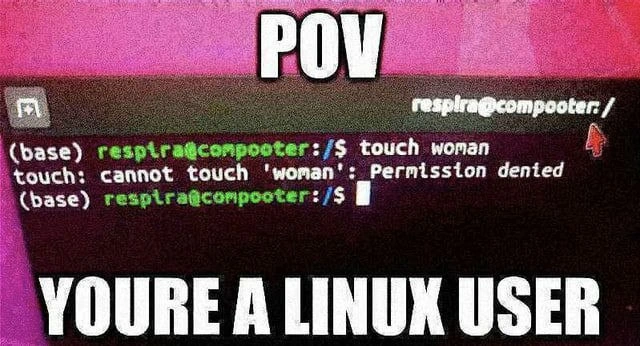
Let’s break down what’s happening in this meme step by step. We’re looking at a Linux terminal window — basically the text-based interface where you type commands to control a computer. (For context, Linux is an operating system, like Windows or macOS. It’s popular among developers and tech enthusiasts, and they often use the terminal in Linux to type text commands rather than clicking icons.) The big white text at the top and bottom of the image ("POV" at the top, and "YOU’RE A LINUX USER" at the bottom) is there to set up the scenario. POV stands for "point of view." So the meme is saying: from your point of view as a Linux user, this is what you see. In other words, it’s pretending that you are the person at the computer.
Now, inside the terminal window (the black screen area), we see a command prompt that says (base) respira@compooter:/$. This prompt has a few parts: (base) likely indicates the user is in a Python "base" environment (this detail isn’t super important to the joke, it’s just part of the user’s setup), respira is the username of the person, compooter is the computer’s name (notice the fun spelling, like a goofy way to say "computer"), and /$ indicates the current directory. Specifically, /$ means the user is in the root directory of the system — think of it like being at the top of the hard drive, not inside any specific folder.
The user then types the command: touch woman. In Linux (and other Unix-like systems), touch is a command that creates a new empty file with the given name, or if that file already exists, it updates the file’s timestamp (the recorded date of last modification) to the current time. The important part here is that touch is a computer term — it doesn’t literally mean touching something with your hands. The word "woman" following it is intended to be the filename. So, if we interpret it in plain technical terms, touch woman means "create an empty file named 'woman' in the current directory."
After the user hits Enter, the terminal responds with an error message:
(base) respira@compooter:/$ touch woman
touch: cannot touch 'woman': Permission denied
This output is the computer’s way of saying “I can’t do that – you don’t have permission.”
Why would the system say "Permission denied"? This comes down to file permissions and user roles. Linux, like many operating systems, has a security model that decides which users can access or modify which files. Every file and folder has permission settings (who can read it, who can write to it, who can run it, etc.). Regular user accounts are typically not allowed to make changes in certain important areas of the system. The root directory / is one of those areas — it’s like the foundation of the whole system’s file structure, and by default only the administrator (the root user in Linux terms) has full access there. In our case, respira is a normal user, not the all-powerful root user. So when they try to create a new file directly under /, the system’s protective rules kick in. It’s analogous to trying to put a file in the C:\ drive on a Windows PC without admin rights — the system will prevent you. Linux sees that respira doesn’t have write permission in / and so it refuses the touch command’s request. The error message "Permission denied" is generic and simply means “you are not allowed to do this.” It’s a very common error for developers to encounter if they forget about permissions. (In real life, the solution would be to run the command with elevated privileges via sudo — which temporarily lets you act as an admin — or to create the file in a directory where respira does have permission, like /home/respira/ which is the user’s own folder.)
Now, here’s why this ends up being humor and not just a normal error. Look at the phrasing of that error line: cannot touch 'woman': Permission denied. The computer intended this to mean “I can’t create that file named 'woman' because you don’t have the rights.” But if you read that in a non-computer way, it sounds like a very authoritative statement: “Cannot touch woman, permission denied.” It’s as if the computer is sternly telling the user they are not allowed to touch a woman! This is completely accidental from the computer’s perspective — it has no idea what a "woman" is beyond a string of characters for a file name. However, to us humans, especially those who spend a lot of time with computers, this error message comes off like a perfectly deadpan joke. It plays into the stereotype (all in good fun) that a dedicated Linux user or programmer might be better with computers than with people. The meme essentially imagines the computer delivering a sick burn to the user: “Sorry, pal, even your computer says you have no permission to be near a woman.” It’s a playful mix-up between computer language and real life language.
So, in summary, the meme shows a little terminal mishap (a permission error on a touch command) and turns it into a joke about the user’s social life. The reason it’s funny is that the computer’s message unintentionally sounds like something you might hear as a harsh life rule. It’s as if the machine is making a witty remark, when in reality it’s just following the rules of the operating system. Developer and terminal humor often comes from these quirky overlaps — turning dry system output into a comedic one-liner. Once you know what touch means and why "Permission denied" is showing up, you can see how the whole thing is a lighthearted poke at a Linux lover’s expense. Don’t worry, it’s the kind of joke developers proudly laugh at themselves about!
Level 3: No Root, No Touch
For an experienced developer, this meme lands on a couple of familiar themes at once. First, there’s the everyday CLI frustration: nearly everyone who works with Linux has seen that dreaded Permission denied error. It's practically a rite of passage when living in the terminal. Maybe you tried editing a config file in /etc without sudo, or attempted to save something in a system folder — boom, the system stops you with a terse refusal. We’ve all had that moment of confusion followed by the "oh right... permissions!" facepalm. So when we see the output touch: cannot touch 'woman': Permission denied in the screenshot, it immediately clicks as a classic scenario. The OS is doing its strict guardian thing. Any seasoned dev knows that if you’re not root (the superuser), you’re going to hit walls in certain parts of the filesystem. Typically the fix is straightforward (rerun the command with elevated privileges via sudo, or adjust the file’s permissions with chmod/chown), but the meme doesn’t bother with any of that. The error itself is being highlighted as the joke.
Secondly, the meme layers a cheeky social stereotype on top of the tech. The caption “POV: You’re a Linux user” frames this as a point-of-view gag — as if you are looking through the eyes of a hardcore terminal dweller. And apparently, that worldview involves seeing even personal life through a console window! The command touch woman being interpreted as an attempt to physically touch a woman plays on a classic geek trope: the idea that some developers (especially the ultra-nerdy Linux/command-line enthusiasts) might have more interaction with code and computers than with people. It’s a self-deprecating bit of developer humor. The meme tongue-in-cheek implies that if you live in the command line, your social life might be... let’s say, read-only. So when the terminal responds with "Permission denied," it lands like the universe joking, “Access to women is denied for you, pal.” It’s absurd, a little bit painful, and very funny to those of us who get the reference. We recognize that the computer isn’t really talking about dating, but our geek brains can’t help but see the double meaning and laugh.
What makes this extra amusing for developers is that it’s an inside joke you can only set up if you know your tools. Someone had to think, “What command and error combo would sound like a nerdy burn?” and of course, a Linux user immediately thinks of the trusty touch command and the ubiquitous "Permission denied" message. It’s a perfect marriage of tech and humor: a normal file operation error turned into a punchline about a Linux user stereotype. The format being a POV meme just adds to the relatability. It says, “This is what it’s like to be a Linux user,” and delivers the gag that being that Linux user means even your computer is roasting you about not having a love life. It’s funny because it rings true in a caricatured way — many of us have jokingly lamented that we spend more time fixing servers or tinkering in the shell than going on dates. The meme takes that common joke and literally prints it out on a terminal screen. For a lot of us, it’s a laugh of recognition: we’ve battled permissions errors and we’ve heard the stereotypes, and here they are rolled into one hilarious error message.
Level 4: The Root of Denial
At the deepest technical level, this meme highlights how Linux enforces its file permission model through the kernel. The command touch woman is invoking a fundamental system call to create or update a file. When you run touch on a Unix-like OS, it calls a system function (like the open() syscall with a flag such as O_CREAT) to either create a new file or update the timestamp of an existing file named "woman". Now, Linux is a multi-user Operating System with a concept of user privileges and file access rights. In the screenshot, the working directory is / (the root of the filesystem), which is a protected location. The kernel checks, "Does this process’s user (here, respira) have the rights to create a file here?" Each directory in Linux has a set of permission bits (rwx for owner, group, and others) and an owner user ID. The root directory / is typically owned by the root user (UID 0) and has permissions drwxr-xr-x (in octal, 755), which means only the owner (root) can create or modify files there; other users have read/execute access only. So when respira (a regular user with no superuser privileges) attempts to “touch” a new file in /, the kernel’s access control logic kicks in. It finds that writing to this directory is not allowed for this user. Deep down in the code, the kernel returns an error code (specifically EACCES or EPERM from <errno.h>, indicating "permission denied") in response to the file creation attempt. The user-space touch program receives that and prints the familiar error message: “cannot touch 'woman': Permission denied”.
This behavior stems from design principles established in early Unix. From the beginning, Unix-like systems had to enforce strict separation between user actions to maintain security on multi-user machines. The classic owner/group/other permission model (and the concept of a superuser) was introduced by pioneers like Ken Thompson and Dennis Ritchie in the 1970s and still governs Linux today. The approach is elegantly simple and robust: if you don’t own the file or directory (and lack sufficient permissions), the kernel will simply refuse your request. In this case, that rule prevents a normal user from modifying the top-level system directory. The result is what we see: a seemingly snarky terminal output telling the user “Permission denied” when they try to manipulate something they shouldn’t.
Even the choice of the word “touch” has historical roots. It’s a standard Unix utility whose name metaphorically means "update the file’s timestamp," as if you’re lightly touching the file to mark the time. In the computer’s world, it’s literal and technical, but in plain English it sounds figurative. That dual meaning sets the stage for the joke. Under the hood, though, nothing magical is happening — just straightforward OS mechanics. The touch command issues a system call; the kernel checks the file permissions; the operation is disallowed due to lack of privilege; and an error code is returned. The humor arises because those perfectly logical system mechanics inadvertently produced a message that reads like a dry, literal statement about human interaction. In essence, a fundamental security feature (Linux’s permission system) is the unseen straight man in this joke, delivering a punchline via an error message simply by doing its job.
Description
A low-quality, heavily saturated photo of a computer screen displaying a Linux terminal. The image has large, white, impactful text at the top reading "POV" and at the bottom reading "YOURE A LINUX USER". The terminal prompt is "(base) respira@compooter:/$", followed by the command "touch woman". The system's response on the next line is "touch: cannot touch 'woman': Permission denied". The joke is a double entendre, playing on the 'touch' command in Unix/Linux, which is used to create or update files, and the common English meaning of the word. The humor comes from the self-deprecating stereotype of a Linux user being unable to interact with women, framed as a file system permission issue
Comments
41Comment deleted
Some juniors think 'sudo touch grass' will solve their problems. Seniors know the real issue is that 'grass' is a symlink to '/dev/null'
Seasoned lesson: when ‘touch woman’ throws Permission denied, it’s not file perms - it’s SELinux enforcing HR policy, and no amount of sudo will relabel that context
Even with sudo privileges and 777 permissions, some access violations can't be resolved with chmod - though at least the error message is consistent across all distributions
The real tragedy here isn't the permission denied error - it's that after 20 years of Linux administration, your first instinct was still to try 'sudo touch woman' before realizing that's not how any of this works. Some problems can't be solved with elevated privileges, and no amount of chmod 777 will fix your dating life. At least your file system permissions are properly configured
Linux: "touch: Permission denied" - the OS politely reminding you least privilege is working; your workaround is sudo, not pretending chmod 777 is architecture
If your love life requires sudo, you’re operating in the wrong directory - least privilege applies offline too
Linux permissions: the ultimate cockblock since kernel 1.0, enforcing least privilege even in hypotheticals
btw i use arch but at what cost... Comment deleted
You get a large wiki for your OS and lightweight system from the start to build efficient system using handy package manager. buUUTTT! You're cursed to say "I use arch btw" every time it's possible Comment deleted
btw i use arch Comment deleted
I use gentoo man Comment deleted
i usually use arch btw Comment deleted
Just what I said Comment deleted
just don't touch woman at root, touch woman at home Comment deleted
doas touch woman Comment deleted
rapists b like Comment deleted
femenists b laik groupmems -g wheel -d men Comment deleted
btw my system won't boot tomorrow Comment deleted
bcos of novideo Comment deleted
why exactly it wont boot up? Comment deleted
it will boot with a black screen because nvidia drivers are fucking retarded Comment deleted
and i will have to rollback my kernel Comment deleted
again Comment deleted
god damn novideo Comment deleted
sadly currently just using manjaro because main pc be broken Comment deleted
manjaro is based Comment deleted
on arch Comment deleted
but, you do not get to say "i use arch btw" if they mean manjaro Comment deleted
you get to say only what neofetch tells, that's the rule Comment deleted
but tbh thats why im using it on my current secondary system Comment deleted
bubliki Comment deleted
sudo touch woman Comment deleted
No im doctor. The_rapist. Comment deleted
sudo touch women And yes I am in sudoers file Comment deleted
cd home touch wife Comment deleted
cannot touch 'woman': permission denied Comment deleted
you need to cd ~ ; touch woman Comment deleted
I dont think so Comment deleted
operation failed successfully Comment deleted
Uhh Comment deleted
~$ touch woman || killall woman Comment deleted


