Pushing Gingerbread in a Wheelchair: Maintaining Ancient Android Versions in Modern Apps
Why is this LegacySystems meme funny?
Level 1: Racing with an Injured Friend
Imagine you’re in a big relay race at school, and one of your team members is an old friend who got hurt and has to use a wheelchair. Everyone else is running fast with fresh legs, but your team can’t run at full speed because you’re pushing your hurt friend’s wheelchair to make sure they stay with the group. You want to be kind and not leave them behind, but it definitely makes the race harder and slower for your team. In the end, you’re doing two things at once: racing forward and taking care of your injured friend so they don’t fall out. It’s a bit funny to picture, because a race is meant for running, yet here you are rolling along carefully. That’s what this meme is like: the cookie man in the wheelchair is the hurt friend, and the developers are the ones pushing. It’s sweet that we’re helping the old cookie keep up, but it also means we can’t go as fast as we’d like. The picture is funny because it shows how carrying something old and broken in a fast new world can look a little ridiculous, even though we do it to be helpful.
Level 2: Backward Compatibility Basics
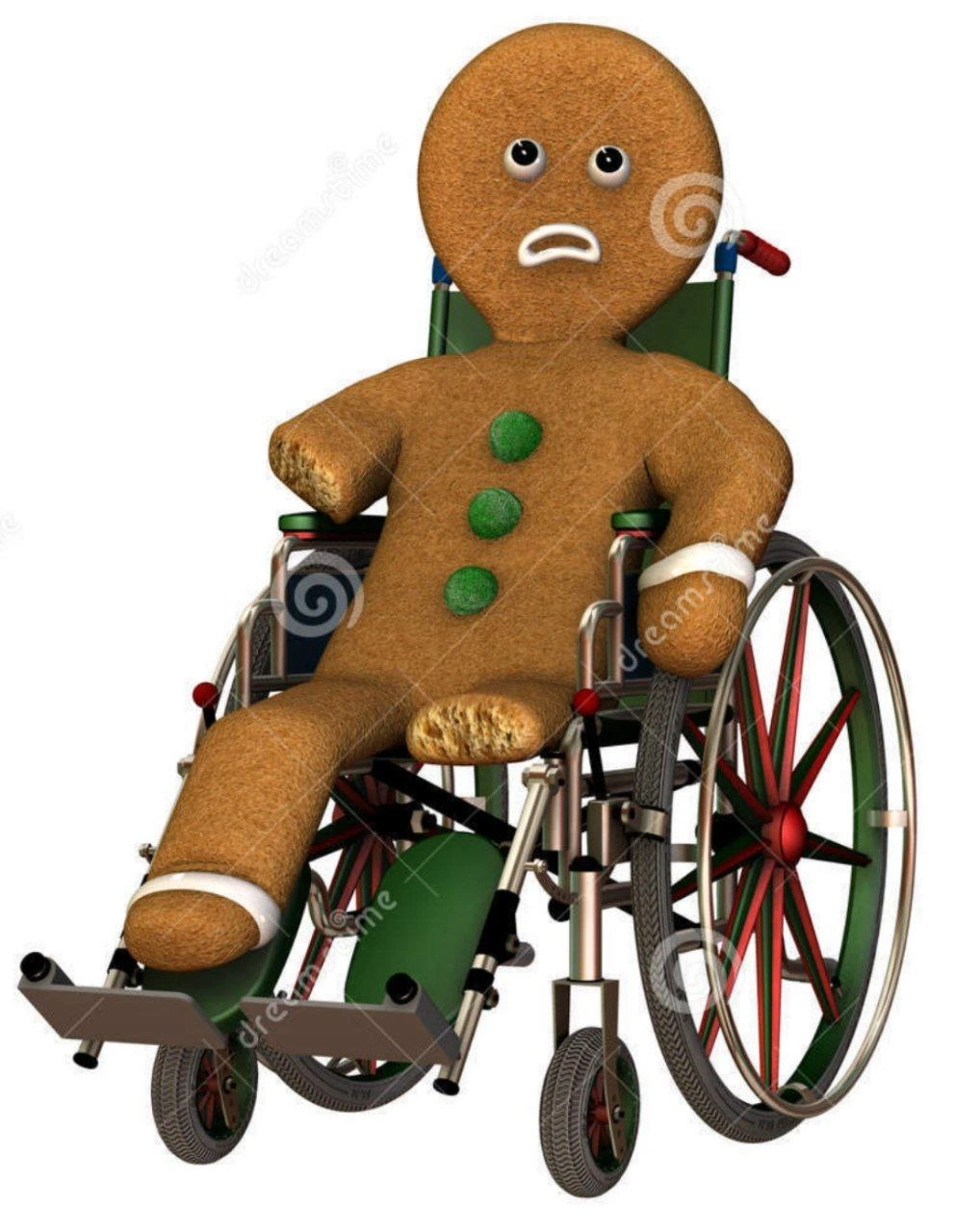
Let’s break down the meme for those newer to mobile development. The gingerbread man in the wheelchair isn’t just a random cookie – it represents Android 2.3, nicknamed "Gingerbread." Android versions used to be named after desserts (Cupcake, Donut, Éclair, Froyo, Gingerbread, Ice Cream Sandwich, …). Gingerbread (released in 2010) is a very old version of the Android operating system. In tech terms, it’s a legacy OS: outdated and largely replaced by newer versions. Yet, in some projects, developers still maintain backward compatibility with it – meaning they write their apps to support old Android versions so people with ancient phones can still run the app.
Now, supporting Gingerbread today is tough. Think of Android Gingerbread as a phone operating system that’s missing many features we take for granted now. For example, Gingerbread doesn’t have modern UI elements or the latest security improvements. Backward compatibility means the app’s code has to check: "Am I running on an old Gingerbread phone or a new phone? If it’s old, do things the old way." This is why the gingerbread cookie looks broken (missing a leg piece, bandaged arm) – it symbolizes an OS that’s incomplete or fragile by today’s standards. The wheelchair shows it can’t keep up on its own; developers have to push it along with special code and fixes.
In Android development, you specify the oldest Android version your app supports using a setting called minSdkVersion. For instance, if an app has minSdkVersion = 9, that corresponds to Android 2.3 Gingerbread. Here’s what that looks like in a project configuration:
android {
defaultConfig {
applicationId "com.example.ancientapp"
minSdkVersion 9 // Android 2.3 (Gingerbread) support
targetSdkVersion 33 // Targeting a modern Android (e.g., Android 13)
}
}
In the above snippet, minSdkVersion 9 promises that the app will run on API level 9 (Gingerbread) and above. The targetSdkVersion 33 is a modern Android version (Android 13 in 2023), which shows how far apart our oldest supported version is from the newest features we aim to use. This wide gap creates a challenge: the app must include code paths for both the old behavior and new behavior.
For a junior developer, this usually means learning about classes like Build.VERSION.SDK_INT and constants like Build.VERSION_CODES.GINGERBREAD or checking if/else around new APIs. It also means possibly using support libraries (now part of Android Jetpack/AndroidX) which are special libraries Google provides to help older Android versions run newer features. For example, if Gingerbread doesn’t have a certain UI component, a support library might offer a compatible version of it. But using these can make the app heavier and more complex.
Technical debt is another key term: it’s like hardware or code debt that accumulates when you delay updating old systems. Continuing to support Gingerbread is a form of technical debt because you’re investing time to keep something outdated working instead of using that effort to improve or use modern solutions. As time goes on, this debt “interest” compounds: the code gets more convoluted, new team members find it hard to understand why there are weird workarounds, and testing becomes a nightmare (imagine having to test your app on a 13-year-old phone model!). This is what we call maintenance pain – the extra workload and headaches from maintaining such legacy technology.
So, in simpler terms: The meme highlights a common LegacySystemsAndModernization dilemma. On one hand, modernizing an app means dropping old baggage (like not supporting Gingerbread anymore). On the other hand, legacy support might be required by the business, so developers are stuck supporting an old OS long past its prime. Legacy codebases often contain sections that say “// TODO: Remove Gingerbread hack when we drop support.” Everyone’s waiting for the day they can delete that code and finally let the old cookie retire. Until then, engineers have to be extra careful – one wrong move and the old Android version might break (just like a fragile cookie crumbling).
Even visually, the meme’s details each have meaning: the gingerbread man’s sad, resigned face = how devs feel dealing with outdated OS problems; the bandage = quick fixes and patches applied over time to keep Gingerbread alive; the missing chunk = features that just don’t work on that OS (we had to disable or remove parts of our app for Gingerbread devices). The wheelchair’s wheels and frame = the support structure developers add (like compatibility libraries, conditional code, extended QA testing) to keep things rolling.
For a newcomer in Android development, encountering something like “we need to support Android 2.3” is surprising – it’s like being asked to make your brand new game run on a 15-year-old computer. But it happens! This meme is the dev community’s way of venting and laughing about it. Backward compatibility is important to understand because it affects how you write code: you always consider the lowest common denominator device. Some companies eventually say “we now require at least Android 6.0” (which is much newer), freeing themselves from the oldest burdens. But until that decision is made, engineers might have to do crazy things to keep the app working everywhere. It’s a balancing act between modernization and legacy support. The gingerbread-in-wheelchair image captures that balancing act in one absurd, funny visual: a broken cookie being heroically wheeled along in a race it has no business competing in, purely because we refuse to leave it behind.
Level 3: Tech Debt on Wheels
In the image, an Android Gingerbread cookie sits battered in a wheelchair – a hilariously bleak metaphor for dragging along an ancient OS version in a modern mobile app codebase. This hits home for senior developers who’ve lived through the Android 2.3 Gingerbread era (circa 2010) and are still dealing with its ghost in current projects. Why is this funny? Because it’s painfully true: supporting such a legacy system is like pushing a crumbling relic around while trying to sprint with the latest tech.
Android Gingerbread (API level 9) is so old in mobile terms that it’s practically held together with digital duct tape – missing modern features and security updates (hence the cookie’s missing leg chunk and bandaged arm). Yet, some teams must maintain backward compatibility for it, due to business requirements or a few users stuck on antique devices. The wheelchair signifies that Gingerbread can’t "walk" on its own in today’s environment; developers have to write extra support code to wheel it along. This is technical debt incarnate: every new feature requires special-case hacks or compatibility shims for the old OS, slowing development to a crawl. Modern Android MobileDev has evolved lightyears past Gingerbread (we’re talking multi-camera APIs, modern UI frameworks, Kotlin coroutines...), but if your app’s minSdkVersion is 9, you’re effectively chained to 2010.
Picture a legacy codebase where half the code is if (version < 11) doOldWay(); else doModernWay(); – it’s brittle and hard to maintain. The humor comes from shared maintenance pain: seasoned Android devs remember wrestling with NullPointerExceptions on Gingerbread’s Dalvik runtime or implementing LegacyTech workarounds for features that newer APIs handle elegantly. It’s absurd and frustrating: you’re using a state-of-the-art smartphone camera and Android 13 features, but your app still has to accommodate a gingerbread cookie on life support.
Consider real scenarios: you want to use a modern Jetpack library or Material Design component, but that requires API 21+ – Gingerbread doesn’t support it, so you either skip the shiny new thing or bundle bulky support libraries to mimic it. The result? A bloated app and extra QA on decade-old emulators. Every release meeting, the team begs, “Can we drop Gingerbread support now?” and management replies, “Not yet, we have 0.5% users still on it” – hence the unspoken trauma behind the meme. It satirizes how backward compatibility obligations turn into a running joke: the app’s cutting-edge features are effectively wheelchair-bound by an OS so outdated it’s barely functional.
From an architectural perspective, this is an anti-pattern in modernization: instead of refactoring or sunsetting old platform support, the team keeps piling new code on top of old. Over years, that creates a Jenga-tower of hacks (one brittle cookie). The wheelchair highlights how LegacySystems impose a burden on progress – you can push forward, but slowly and carefully, lest the whole thing crumble. Indeed, supporting old Android versions often introduces bugs that only occur on that OS, leading to late-night “why is this crashing on Gingerbread?” debugging sessions (usually at 3 AM, when that one Gingerbread user decides to log in).
Organizational dynamics also play a role: maybe a big client’s employees still use Gingerbread-era devices, or a PM is sentimentally attached to not leaving any user behind (“No cookie left behind!”). The result is a kind of legacy mobile support purgatory. Developers carry the technical debt of that decision, often feeling like they’re pushing a wheelchair up a hill while others ride jetpacks. It’s funny in a dark way – we laugh so we don’t cry. The meme perfectly encapsulates the absurdity of balancing modernization and LegacyTech: a gingerbread cookie (the LegacyCodebase from 2010) being wheeled around in 2023’s apps. It’s a shared industry joke that even as Android and hardware race ahead, somewhere out there a team is still writing try-catch for Gingerbread quirks, essentially performing minSdk necromancy to keep an OS on life support.
To illustrate how this happens in code, imagine an Android app that wants to use a fancy API introduced in Honeycomb (Android 3.0). The code might look like:
if (Build.VERSION.SDK_INT >= Build.VERSION_CODES.HONEYCOMB) {
// Use modern API for newer Android versions
startFancyAnimation();
} else {
// Gingerbread and older: use a fallback or skip feature
legacyFallbackAnimation();
}
This conditional logic is the equivalent of checking if our "gingerbread man" can walk. On newer versions, we sprint; on Gingerbread, we gently push the wheelchair with a simplified experience. Over dozens of such conditions, the maintenance pain grows: testing every code path, ensuring the broken cookie doesn’t crumble with each update. The humor hides a real sigh: supporting Gingerbread today is like coding with one hand tied behind your back – you do it only because you must (and you might joke about needing a therapist afterward). The meme’s dark comedic edge resonates because it’s the culmination of a shared war story in Android development: “Remember Gingerbread? It’s 2023, and we’re still pushing that darn cookie around.”
Description
The image is a 3-D stock illustration showing a brown gingerbread-man cookie seated in a green and red manual wheelchair. The cookie figure has three green gumdrop buttons, a missing chunk from one leg, and a white bandage wrapped around one arm; the wheelchair’s metal frame, spoked wheels, and footrests are fully detailed. Repeated diagonal white "dreamstime" watermarks are visible across the entire image - no other text is present. In developer-meme context, the broken gingerbread represents Android 2.3 "Gingerbread," symbolizing the fragile, outdated mobile OS versions many teams must still support for backward compatibility. The wheelchair metaphor highlights the technical debt, maintenance pain, and legacy-system burden imposed on modern mobile development cycles

Comments
6Comment deleted
Every time the CI wheels out our Gingerbread build, I’m reminded we’ve got Kubernetes autoscaling the backend while the Android app still honors minSdk = 9 for the CEO’s 2012 barcode scanner
That COBOL system from 1987 that processes 80% of your transactions but nobody wants to touch because the last person who understood it retired in 2015
When your microservice finally limps back online after that 3 AM production incident, but the post-mortem reveals it was a race condition that's been lurking in the codebase since the initial commit. The wheelchair isn't temporary - it's now part of the architecture diagram, and the bandages are just strategic circuit breakers we'll 'refactor later.'
Legal disabled cookies; Marketing kept the personalization OKRs - now our session state looks like this, courtesy of Safari ITP and third‑party deprecation
Cross-domain SSO after SameSite and ITP: the session cookie is technically there - practically just crumbs in the logs
Gingerbread Man after 20 years: can't outrun technical debt forever