The smug satisfaction of a risky kubectl apply
Why is this DevOps SRE meme funny?
Level 1: Big Red Button
Imagine you have a big red button that will clean up your entire room automatically. It’s supposed to throw away all the stuff that’s not in its place. Sounds useful, right? But here’s the catch: if you accidentally forgot to put one of your favorite toys on the shelf (where it’s “supposed” to be), pressing this button will throw that toy out forever along with the trash! 😨 You’d be pretty scared to press that button, wouldn’t you? You’d probably squeeze your eyes shut, cover your ears, and hope nothing bad happens when you do press it.
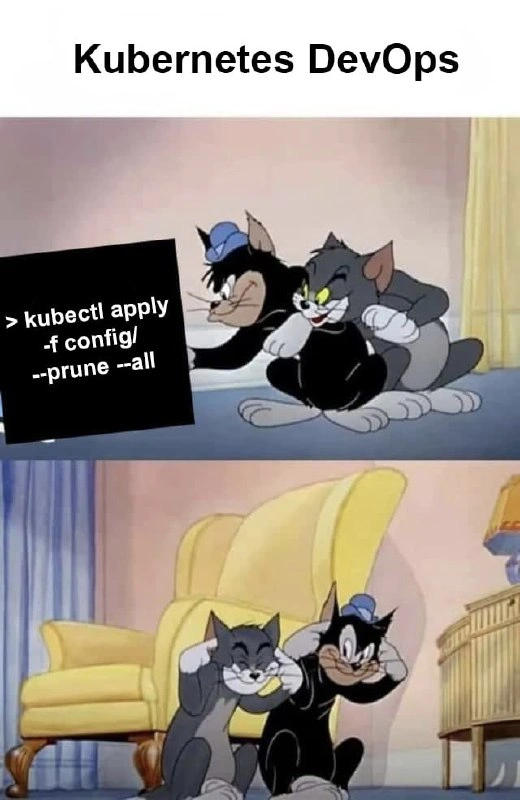
In the picture, the two cartoon cats are doing exactly that — covering their ears and scrunching up their faces, like someone just lit a huge firework or is about to set off a big boom. They’re bracing themselves, just like you would before pressing our imaginary clean-up button. In real life, computer engineers sometimes have to press “enter” on a command that’s a bit like that big red button. It will clean up a lot of computer stuff at once, and if they made a mistake, it could delete something important (kind of like throwing out your favorite toy by accident). That’s why it’s both funny and scary: funny because it’s a cartoon showing how we all feel inside at that moment, and scary because everyone really hopes they didn’t mess up. The joke is basically saying: “This is the moment just before we find out if everything is okay… or if we’re in big trouble!”
Level 2: Prune Paranoia
Let’s break down what’s happening for those newer to Kubernetes or just starting their DevOps journey. Kubernetes is a system that runs software in containers (small packaged applications) across many machines (a cluster). To control Kubernetes, you use a command-line tool called kubectl (Kubernetes Control). The meme shows a kubectl command and two cartoon cats (Tom and another from Tom & Jerry) covering their ears like something loud is about to happen – that’s the DevOps engineers preparing for a potentially disastrous deployment.
Here’s the command in the spotlight:
kubectl apply -f config/ --prune --all
What do each of those parts mean?
kubectl apply: This is how you deploy or update resources in a cluster using config files (usually YAML manifests). It tells Kubernetes to try to make reality match what your files describe.-f config/: The-fflag means “from file/directory.” Here,config/is a directory containing a bunch of YAML config files (manifests) that define things like Deployments, Services, ConfigMaps, etc. Essentially, it’s saying “apply everything in theconfig/folder.”--prune: This flag says “and if you find things in the cluster that are not in these files, delete them.” It’s a clean-up option. Imagine you previously had 10 services running, and yourconfig/now only defines 8 — with--prune, Kubernetes will delete the 2 leftover services that aren’t described in the files. It’s meant to keep the cluster tidy, removing old stuff that’s no longer needed.--all: This is the scary part.--alltypically broadens the scope. In this context, it means no exceptions – apply and prune across all resources (usually all namespaces or all object kinds you have permission to manage). In other words, “I really do mean everything, not just a subset.” It’s like saying “take the gloves off and clean house everywhere.”
Now, why are those cartoon cats so scared? Because running this command on a live production cluster is the digital equivalent of using a powerful vacuum cleaner in a messy room: it will suck up everything not nailed down (not defined in the config files). If the DevOps engineer forgot to include a important piece in those config files, that piece will get sucked up (read: deleted). For example, if there’s a database Pod or a critical microservice running that for some reason isn’t represented in the config/ manifests, --prune will notice it’s “not in the list” and Kubernetes will remove it. 😱
For a junior developer or someone new to DevOps/SRE, this is a lesson in deployment risks. The meme humorously captures the anxiety of pushing changes to a system that can dramatically affect live applications. In DevOps culture, we joke about these things to cope with the stress. That’s why this falls under DevOpsHumor and OpsHumor: it’s making light of a very real fear. Even if you’re careful, running a broad prune command feels like cutting the red wire on a bomb – you sweat a little! New engineers learn quickly that with great power (like full cluster admin rights and wildcard prune commands) comes great responsibility. Before running such commands, you double-check your YAML files, maybe run kubectl diff to see what changes are coming, and ensure you’re on the correct cluster context (so you don’t run this on the wrong cluster by mistake – another nightmare scenario).
The Tom & Jerry characters are a perfect analogy: Tom (grey cat) and Butch (black cat) are covering their ears, bracing for an explosion. In a real DevOps scenario, you might see two engineers side by side at a terminal saying “Alright, here goes nothing…” and then hitting Enter on kubectl apply ... --prune. They might not literally cover their ears, but they do mentally brace for a possible “BOOM” – which could be anything from alarms going off in monitoring, lots of red errors scrolling by, or coworkers yelling “the site is down!” This image is funny because it exaggerates that moment of tension in a familiar cartoon way, but it’s honestly not far from how it feels internally.
So for those learning: Kubernetes is powerful, and its CLI (kubectl) gives you a lot of control – but with commands like these, you have to be very careful. It’s a classic case of deployment jitters: even if you did everything right, you can’t help that tiny knot in your stomach when you run it. The meme takes a lighthearted jab at this common DevOps pain point – that mix of confidence and sheer terror right before you deploy changes that could prune (remove) a bunch of resources. In short, always know exactly what you’re telling Kubernetes to do, and maybe keep a cartoonishly large pair of earmuffs handy for moral support! 🎧🐱
Level 3: One Flag to Prune Them All
At a senior DevOps level, this meme hits like a panic button we’ve all hovered over. That **kubectl apply -f config/ --prune --all** command is basically the nuclear option of Kubernetes deployments. It tells Kubernetes: “Apply everything in my config directory, and delete anything in the cluster that isn’t described there.” It’s powerful for cleaning up old resources, but it’s also terrifying — one stray omission in those YAML files and you might accidentally wipe out a crucial service. The cartoon of Tom & Jerry’s Tom and his buddy bracing with paws over ears perfectly captures how an SRE feels executing this command: you hit Enter, then literally cringe and wait, half-expecting half your cluster to vanish in a puff of smoke. This is classic DevOps humor intertwined with genuine deployment risk: it’s funny because it’s true. Every experienced Kubernetes engineer has that “hold your breath” moment when running a high-stakes CLI command in production, especially one with the ominous --prune flag.
Why so much anxiety? Because in the world of Kubernetes (the container orchestration platform running your microservices), kubectl apply is usually a safe, idempotent way to apply changes. But adding --prune --all transforms it into a cluster-wide cleanup script. It’s like a combine harvester: it’ll cut down all the crops not explicitly marked to keep. That’s great when your config is 100% complete and up-to-date (as in a perfect GitOps setup), but in reality, configs drift or someone created a hotfix resource manually. The fear is real: you could unknowingly delete a running Pod, a critical Service, or an entire Namespace because it wasn’t listed in your config directory. There’s an almost superstitious ritual around these operations – double-check the manifests, triple-check the context (kubectl config get-contexts to ensure you’re on the right cluster!), maybe run a --dry-run if available, warn the team on Slack, and only then execute. Even then, you’ll see seasoned DevOps folks literally covering their ears or eyes, just like those cartoon cats, waiting for either nothing to happen (best case) or all hell to break loose (worst case).
This image nails an inside joke of Ops life: the cluster_wipe_fear is both comedic and traumatic. We chuckle because we’ve all seen someone hit the wrong command and poof – goodbye, production (cue 3 AM on-call alarms and a very long night). The prune_flag in Kubernetes is infamously known for causing “creative” outages when misused; it’s a DevOps pain point that separates the cautious pros from the overly brave. In a perfect world, everything not in code should be pruned – that’s the ideal of declarative infrastructure – but in practice, there’s always that one resource you forgot to commit. The meme’s humor is how accurately it depicts that mix of courage and fear: two DevOps/SRE engineers as Tom & Butch, basically hugging each other, eyes shut tight, expecting an explosion when they run a bold command in a live cluster. It’s absurd and relatable – a split-second of cartoonish terror that every Kubernetes veteran knows too well. After all, nothing says “OpsHumor” like laughing at the deployments that almost blew up in our faces.
Description
A two-panel meme based on the 'Tom and Jerry' cartoon, captioned 'Kubernetes DevOps.' In the top panel, the characters Tom and Butch are seen conspiring with mischievous grins, looking at a terminal command: '> kubectl apply -f config/ --prune --all'. In the bottom panel, both characters are pointing to their heads with a smug, self-satisfied 'big brain' expression, as if they've just executed a brilliant plan. The meme humorously captures the feeling of a DevOps engineer after running a powerful and potentially destructive Kubernetes command. The '--prune --all' flag directs kubectl to delete any resources not defined in the local configuration files, which is a powerful way to enforce a declarative state but extremely risky. One small mistake can wipe out critical components. The joke resonates with experienced engineers who understand the fine line between genius automation and catastrophic failure, and the hubris that often accompanies wielding such powerful tools

Comments
8Comment deleted
Using `kubectl apply --prune` is the closest a DevOps engineer gets to telling the cluster, 'Anything not on my list, you're dead to me.' It's a real test of whether your Git repo or your memory is more reliable
kubectl apply -f config/ --prune --all: the express lane for finding out which microservice never made it into Git and whose DR playbook was just tribal lore
The --prune flag: turning declarative infrastructure into declarative unemployment since someone forgot to check what wasn't in version control. Nothing says 'senior engineer' quite like explaining to the CTO why half the production cluster vanished because you thought cleanup would be 'idempotent'
This is the Kubernetes equivalent of 'rm -rf /' with sudo privileges - technically it works as documented, but the --prune --all combo is basically asking kubectl to play God with your entire cluster. The meme perfectly captures that moment when a junior DevOps engineer discovers a 'powerful' command that seems to solve all their problems, not realizing they're about to prune every resource not explicitly defined in their config directory across ALL namespaces. It's the kind of command that makes senior SREs wake up in cold sweats, because somewhere, someone is definitely running this in production right now without understanding that 'prune' means 'delete anything not in this manifest' and '--all' means 'yes, I want to affect every namespace, including kube-system.' The satisfied grins in the second panel represent that brief moment of blissful ignorance before the PagerDuty alerts start flooding in
kubectl apply --prune: Deleting the drama so reconciliation can make enemies into eternal podmates
If your GitOps plan is kubectl apply --prune --all, you didn’t reconcile drift - you built a distributed rm -rf with RBAC as comfort food
Kubernetes DevOps: close your eyes, run “kubectl apply -f config/ --prune --all,” call it GitOps, and pray the blast radius stops at the namespace
Hahhahah Comment deleted