Skip to content
DevMeme
4295 of 7435
When the Client Has a 'Small' Last-Minute Idea
Stakeholders Clients Post #4693, on Jul 26, 2022 in TG

When the Client Has a 'Small' Last-Minute Idea

Why is this Stakeholders Clients meme funny?

Level 1: Feeding the Baby

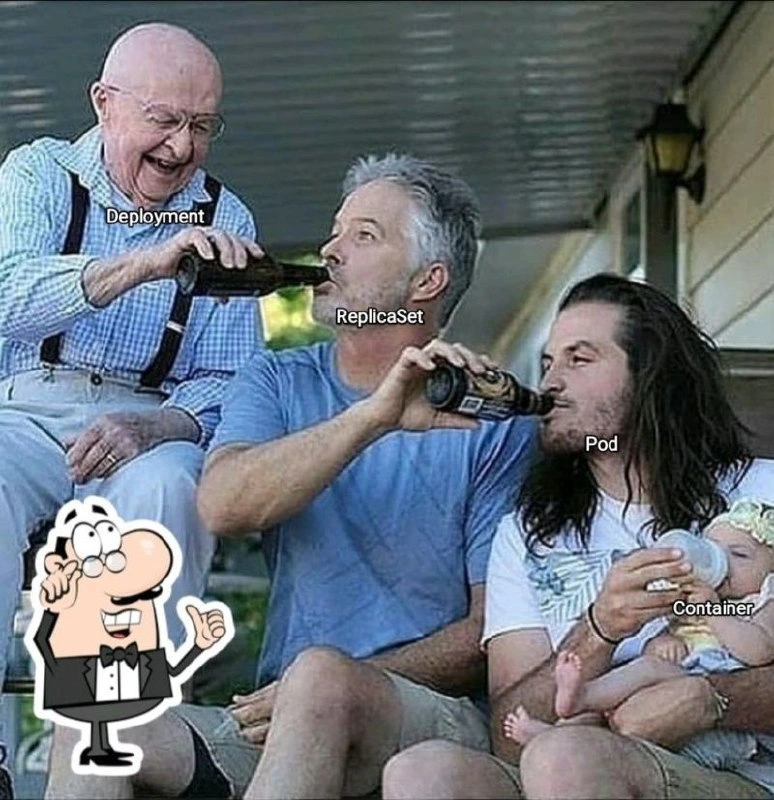
Imagine a family where the great-grandpa decides something, the grandpa carries it out, the dad passes it along, and the little baby gets the result. In the picture, an older grandpa is pouring a drink into his son’s bottle, who then pours it into the next young man’s bottle, who finally fills the baby’s bottle. It’s a funny scene because, well, you’d never actually give a baby a beer! But it shows how instructions or goods can pass down a chain of people. The grandpa represents the top boss giving out what’s needed, and the baby at the end is the one who actually drinks it. In very simple terms, this is like how Kubernetes works to run apps: the big boss (Deployment) tells a helper (ReplicaSet) to make some workers (Pods) ready, and those workers carry the actual tool (Container) that does the job. The meme is taking a complicated computer idea and showing it as a silly family moment. Even if you don’t know the tech words, it’s amusing because you see an entire line of family members helping to feed the baby in a ridiculously roundabout way. The emotional core is that everyone in the chain is needed to get the job done, but it’s portrayed in a wacky, playful way (with grandpa laughing joyfully as he gives the baby a “forbidden” treat!). Basically, the picture says: sometimes in tech, getting something simple done involves a whole family of helpers - and isn’t that both crazy and funny?

Level 2: Kubernetes Family Tree

Let’s break down the Kubernetes pieces in this meme’s "family tree," in simpler terms. Kubernetes is a system for running software in containers across many machines, and it uses different object types to manage everything. Here are the key players, as depicted in the meme:

  • Deployment (Grandpa with the beer): In Kubernetes, a Deployment is like the project manager for your application. You tell it how many copies of your app you want and what version (container image) to run. The Deployment automatically takes care of creating or removing the lower-level objects to match what you asked for. Think of it as the big boss in this family hierarchy. In the picture, the grandpa labeled "Deployment" is at the top of the chain, happily pouring out beer. That beer represents instructions or desired state (for example, "I want 3 pods running my app").

  • ReplicaSet (Dad receiving beer): The ReplicaSet is the next in line – basically the Deployment’s child. Its specific job is to keep the right number of Pods running at all times. If a Pod (which we’ll get to next) dies or disappears, the ReplicaSet notices and will spawn a new one, like a responsible parent making sure there are always the correct number of kids present. In older Kubernetes, there was something called a ReplicationController that did this, but ReplicaSet is the newer version (with more features like selective updates). In the meme, the middle-aged man labeled "ReplicaSet" is literally getting “fed” by the Deployment. That signifies the Deployment hands off the job of maintaining replicas to the ReplicaSet. The grin on his face could be the recognition that he’s got his orders (or beer!) and is passing them on.

  • Pod (Long-haired younger adult): A Pod in Kubernetes is the smallest deployable unit - basically a wrapper around your container (or containers) that includes some environment details. If we continue the family analogy, the Pod is like the child of the ReplicaSet. The ReplicaSet creates Pods according to the Deployment’s instructions. Each Pod usually contains one main container (though it can host some helper sidecar containers too). In the meme, the guy labeled "Pod" is the one actually pouring into the baby’s bottle. That shows how the Pod is directly responsible for hosting the Container and giving it what it needs (CPU, memory, networking – represented whimsically as beer 🍺). The Pod ensures the container has a running environment. If the container (baby) finishes the bottle or drops it (i.e., the container exits or crashes), the Pod can restart the container (like mixing a new bottle of formula… or beer, in this silly scenario).

  • Container (Baby with the bottle): The Container is where your application code lives and runs. This is the bottom of the hierarchy – the Container is like the baby of the family, completely taken care of by the others. In real tech terms, a container is a lightweight runtime instance of an application (often a Docker container image) isolated from other apps. Kubernetes is all about containerization, meaning it manages these containers for you. In the picture, the baby’s milk bottle has the word "Container" on it (the baby itself might not have a label, but we can imagine the baby is the app container enjoying the drink). So the Pod (parent) holds and feeds the Container. The Container gets “fed” what it needs (compute resources and configuration) by the Pod. The humor, of course, is that in the meme it’s beer being fed to a baby — obviously not something you’d do in real life, which makes the image absurd and funny. But technically, it’s showing a pod_hierarchy_meme: each generation passes something down.

In practice, this is exactly how deploying an application works in Kubernetes. You might write a YAML file for a Deployment (Grandpa) specifying, say, 5 replicas of your web server container. When you apply that config, Kubernetes creates a ReplicaSet (Dad) behind the scenes. That ReplicaSet then creates 5 Pods (the kids), each containing your web server container (the baby doing the actual work of serving requests). If one Container crashes, its Pod will try to restart it; if the whole Pod fails (say the node it was on went down), the ReplicaSet will notice the Pod is gone and create a new Pod in its place; and if you decide to update the app to a new version, the Deployment will orchestrate that by creating a new ReplicaSet for the new version and phasing out the old one. It’s like a well-oiled family operation! Each piece has a role: Deployments handle high-level rollout strategy, ReplicaSets handle maintaining the count, Pods provide the runtime environment, and Containers run the actual application.

This meme hits home for many in the DevOps culture because it visualizes these abstract relationships in a fun, relatable way. It’s basically saying “here’s the Kubernetes object hierarchy in plain view.” The use of a family beer bottle meme template adds a layer of silliness — typically, these memes show an irresponsible chain (like adults handing beer to a baby indirectly) to highlight some chain reaction or hierarchy. In Kubernetes, the chain is perfectly valid and by design (though newcomers often ask, “why so many layers?!”). So, the meme is simultaneously educating (if you know what the labels mean) and making you laugh at the over-engineered feeling of it all. After all, it’s a bit comical that to keep a simple app running, we have an entity to manage an entity to manage an entity… to manage the thing that actually does the work! But that’s the price of powerful orchestration. Kubernetes users chuckle because they’ve been there: deploying a "hello world" and then explaining why Kubernetes created all these extra objects for it. This image is a perfect shorthand for that explanation.

For a quick visual summary of the hierarchy, consider this tree of Kubernetes resources (parent → child):

Deployment
└── ReplicaSet
    └── Pod
        └── Container

Each arrow “└──” means "creates and manages" – the higher object ensures the existence of the lower object. Just like in the meme: Deployment (grandpa) gives life (beer) to ReplicaSet (dad), which gives life to Pod (son), which finally nourishes the Container (baby). In Kubernetes terms, if you delete the Deployment, the ReplicaSet will go away, and then its Pods and then the Containers will terminate – the whole family chain is dependent on the top-level decision-maker. Understanding this kubernetes_object_hierarchy is crucial when working with Kubernetes, and the meme humorously burns it into your memory.

Level 3: Trickle-Down Orchestration

At the highest level, this meme is poking fun at the Kubernetes object hierarchy using a goofy family beer-feeding scene. In Kubernetes (a container orchestration platform beloved and cursed in DevOps/SRE circles), a Deployment manages a ReplicaSet, which in turn manages Pods, and each Pod encapsulates one or more Containers. This chain of command is exactly what the image illustrates: the grandpa labeled "Deployment" pours beer into the dad labeled "ReplicaSet," who pours into the long-haired son labeled "Pod," who finally feeds the baby’s bottle labeled "Container." It’s a literal trickle-down of beer analogous to the trickle-down of instructions and resources in Kubernetes.

Why is this funny to experienced engineers? Because it captures the absurd complexity of Kubernetes in a single relatable visual. In real Kubernetes use, you don’t run a container directly; you declare a Deployment (grandpa) which spawns a ReplicaSet (dad) which then ensures Pods (son) are running the container (baby). The meme exaggerates this DevOps humor: a baby getting beer from grandpa via two intermediaries is as over-engineered (and comically inappropriate) as it sounds – much like running a simple app via three layers of YAML definitions. Seasoned developers recognize the DevOps pain point being mocked: “Why do we need so many layers just to run a container?!” Yet, they also know each layer has a purpose. The Deployment (the elder) is responsible for high-level decisions — how many replicas should exist, when to update, etc. The ReplicaSet (middle generation) dutifully maintains the desired number of Pod replicas, like a parent making sure the kids show up to school. The Pod (young adult) is the immediate environment that holds the container, the actual running application (the baby that ultimately receives everything).

This cascade is Kubernetes’ way of ensuring reliability and easy updates. For example, when you update a Deployment (say, new version of the app), it parents a new ReplicaSet for the updated Pods while phasing out the old one – a bit like a grandparent deciding it’s time for a new batch of grandkids 😄. The humor is that all this is hidden behind what you might think is a simple action (“run my app container”), but under the hood grandpa, dad, and junior are all involved! It’s a perfect kubernetes_object_hierarchy gag. As an insider joke, some engineers might even reference the classic Xzibit meme: “Yo dawg, I heard you like containers, so I put your Container in a Pod in a ReplicaSet in a Deployment, so you can deploy while you deploy.” In other words, the meme lands because it visualizes Kubernetes’ multi-tiered orchestration with a ridiculous beer-passing family metaphor. It resonates with anyone who’s had to explain a Deployment vs. a Pod on a whiteboard. The casual porch setting – beers in hand, everyone laughing – mirrors how DevOps culture often uses lighthearted, irreverent imagery (like feeding beer to a baby 😜) to cope with the very formal complexity of our systems. This is a DevOpsHumor gem that both educates and entertains: it’s funny because it’s true. The Deployment really does “feed” the ReplicaSet with configuration (e.g., desired replica count), which feeds the Pods by creating them, which in turn feed the Containers the environment and resources to run. Kubernetes is basically one big happy (if dysfunctional) family of resources, and this meme paints that picture literally.

Description

This meme uses the four-panel 'Gru's Plan' format to illustrate the fragility of project planning in the face of client feedback. In the first three panels, Gru is confidently presenting his plan on a flip chart: 1. 'Finish the project on time.' 2. 'Meet all the original requirements.' 3. 'Deploy smoothly.' The final panel shows Gru looking back at the chart in confusion and dismay, with the text on the chart now reading: 'The client makes a 'small' change to the core architecture the day before deployment.' This meme is a humorous and painful depiction of a common software development nightmare: last-minute, scope-creeping changes from stakeholders that jeopardize the entire project. It's highly relatable to any developer who has had to deal with the chaos and stress of eleventh-hour requirement changes
Comments

8
Anonymous ★ Top Pick The 'small' last-minute change is the client's version of a git push --force to the project timeline
  1. Anonymous ★ Top Pick

    The 'small' last-minute change is the client's version of a git push --force to the project timeline

  2. Anonymous

    If you don’t set --revision-history-limit, Grandpa Deployment keeps spawning new ReplicaSet uncles at every rollback, and the baby Container’s drinking nothing but legacy logs

  3. Anonymous

    This is exactly how Kubernetes resources flow: immutable, cascading, and by the time it reaches the container, you're not sure if it's the original config or something that got fermented along the way through three layers of YAML templating

  4. Anonymous

    This perfectly captures the Kubernetes abstraction stack: Deployment creates ReplicaSets, ReplicaSets manage Pods, Pods run Containers - each layer dutifully passing responsibility down the chain like a multi-generational game of telephone, except when you finally debug why your container won't start, you realize the issue was in the Deployment spec three layers up. At least the baby (container) is blissfully unaware of the YAML hell that brought it into existence

  5. Anonymous

    Finally, a ReplicaSet enforcing exactly one Pod per generation - no HPA drama, just eternal uptime vibes

  6. Anonymous

    Declarative parenting in Kubernetes: ask Deployment for one child, ReplicaSet clones three, Pod bottle‑feeds the containers, and a 3 a.m. CPU spike convinces HPA to scale

  7. Anonymous

    Kubernetes in one sentence: never feed the container - mutate spec.template on the Deployment and let controllers trickle it down while ReplicaSets keep the rollback scrapbook

  8. @Vlasoov 3y

    Great explanation

Use J and K for navigation