jQuery: The Heavy-Duty Solution for a Lightweight Problem
Why is this Frontend meme funny?
Level 1: Big Truck, Small Banana
Imagine you have one small banana you want to move across the room. Instead of just picking it up and walking it over, someone tells you to bring in a gigantic semi-truck, load the banana onto it, and drive it to the other side of the room. That sounds pretty silly, right? You’d probably laugh and say, “Why don’t I just carry it myself?”
That’s exactly why this picture is funny. The big truck stands for a huge, heavy tool (a bunch of extra code), and the little banana stands for a tiny job that needs to be done. It’s a joke about using something way too large and complicated to do something really simple. Even a kid can tell you: if you only have one banana to move, you definitely don’t need a giant truck – you can just use your hands! In the same way, when coding, you don’t always need a giant special tool to do a small easy task. The humor makes us smile because it’s so obviously over-the-top, and it reminds us to use just the right amount of effort (and tools) for the job, nothing excessive.
Level 2: Vanilla JS to the Rescue
Let’s break down the joke in simpler terms. The developer in the comic just wants to move a banana from point A to point B – which represents moving something on a web page from one place to another. In web development, moving a “banana” could mean moving an HTML element or changing some content on the page using JavaScript (the programming language that makes web pages interactive). The suggestion to “use a semi-trailer truck” labeled jQuery means someone is advising to use the entire jQuery library (a big set of pre-written JavaScript code) to do this little task. Using jQuery here is like using a huge truck to carry a single banana: overkill.
So what is jQuery? It’s a very popular JavaScript library that was especially common in the 2008–2015 era of web development. jQuery provides convenient functions to do things like select page elements, move them around, change their style, and handle events, all with simpler syntax. For example, with jQuery you might move an element by writing something like:
// Using jQuery to move an element with id "banana" inside an element with id "targetB"
$('#banana').appendTo('#targetB');
Here $('#banana') finds the element that has id “banana” (the # is a selector, just like in CSS), and .appendTo('#targetB') moves that banana element into another element with id “targetB” (point B). It’s pretty straightforward if jQuery is available. But to use jQuery, you must include the entire jQuery file on your page first (often via a <script> tag or an npm package). That file might be tens of thousands of lines of code offering all sorts of features – a big truck full of tools.
Now, what about Vanilla JavaScript (vanilla means “plain” or no extra flavor)? In plain JavaScript, you don’t actually need jQuery for this simple task! The web platform itself lets you do it with just a little code. For instance, you can move an element to a new parent container like this in modern JS:
// Vanilla JavaScript: moving an element from A to B
const banana = document.getElementById('banana'); // find the banana element
const targetB = document.getElementById('targetB'); // find the destination element (B)
targetB.appendChild(banana); // move banana into B
This does the same thing as the jQuery example: it takes the banana element and appends it to the element at point B. No big library needed – these are built-in DOM methods (getElementById and appendChild) that come with the browser. In other words, you can move the banana with just your hands (a small script) instead of using a commercial trucking service.
The meme is pointing out the humor in how some developers will immediately pull in a big dependency like jQuery without thinking. It’s like having a habit: “Need to do X? Okay, load jQuery, then do it.” This might happen because jQuery was taught as a quick solution in many tutorials, so newer devs learned “always include jQuery” by default. But blindly adding dependencies has downsides. Each dependency (external library or framework you add) makes your project heavier and a bit more complex to manage. Web pages have to download that extra code, which can make them load slower, especially on mobile devices or slow networks. If you keep adding libraries for every little thing, you get what’s known as dependency bloat – too much extra code for not enough benefit – and you might even encounter dependency hell (a situation where managing all those libraries and their versions becomes a nightmare).
In modern front-end development, a big part of Developer Experience (DX) is learning when you really need a library and when a native solution will do. jQuery itself isn’t bad – it’s actually very powerful and still useful in some cases – but the joke here is: maybe don’t drive the big jQuery truck if you only have one banana to move. A lightweight approach (just a few lines of JavaScript) can get the job done with less overhead. The banana metaphor makes this concept super clear: anyone can see it’s silly to use a giant truck to do a person’s job of carrying one banana. Likewise, it’s a bit silly to import a whole mini-framework like jQuery just to perform one simple DOM manipulation that the browser can handle on its own. The lesson for junior developers: think about the simplest tool that fits the task. Sometimes plain JS (no libraries) is perfectly enough – and it keeps your page lean and efficient.
Level 3: Bloat by the Truckload
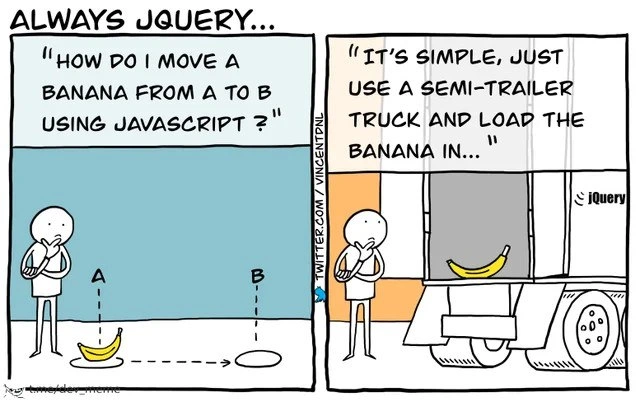
In this meme, a front-end developer contemplates a tiny task – moving a banana from point A to point B on a webpage. The question “How do I move a banana from A to B using JavaScript?” is met with an absurd answer: “It’s simple, just use a semi-trailer truck and load the banana in…” accompanied by a gigantic semi-truck labeled jQuery carrying that lone banana. This hilarious visual metaphor critiques the all-too-common habit of pulling in a heavyweight JavaScript library for a trivial job. It’s highlighting frontend dependency bloat – the tendency to add large dependencies (like the entire jQuery library) even when native, lightweight solutions exist.
jQuery was once the king of the front-end world, a nearly universal solution for DOM manipulation, styling, and AJAX calls. Years ago, if you asked on Stack Overflow how to move an element or animate a small thing on a page, the top answer was often “Just use jQuery!” – much like automatically reaching for a semi-truck whenever you face any transport problem. Veteran developers remember that era: jQuery simplified a lot of cross-browser headaches with a uniform API. The developer experience (DX) was great – you could select an element with $('#banana') and call .animate() or .appendTo() in one go. In a time when raw Vanilla JS was clunkier and browsers were inconsistent, this big truck made sense to reliably carry our bananas.
But the meme humorously reminds us that times have changed. Modern browsers have standardized and the native JavaScript DOM APIs got much better (query selectors, classList, etc.), so the “big rig” approach can be overkill now. Loading the entire jQuery library – tens of kilobytes of minified code – just to move one element is like driving an 18-wheeler to deliver a single piece of fruit. It’s a textbook overkill dependency. All that extra weight (code that isn’t needed for this simple task) must be downloaded and run by the browser, potentially slowing down the page. In real projects, such frontend_dependency_bloat adds up: multiple heavy libraries for small tasks can make web apps sluggish and unreasonably large. It also complicates dependency management – every additional framework or library is another thing to keep updated and conflict-free. Seasoned devs chuckle (or maybe cringe) because they’ve seen pages where a dozen trucks’ worth of JavaScript libraries are buzzing around, when a few lines of plain code would do.
This meme strikes a chord because it parodies an old mindset. It gently ribs those of us who reflexively reach for jQuery (or any big framework) out of habit. It’s a senior engineer’s inside joke about “always using jQuery” being the easy answer that isn’t always the right answer. The banana here is a metaphor for a tiny DOM element or simple piece of data, and the semi-truck is the massive toolkit we sometimes deploy without thinking. The humor comes from the obvious mismatch in scale: heavy library, small task. It’s a nudge to remember that sometimes the lighter solution — a simple loop, a little document.querySelector, a bit of plain JavaScript — can elegantly carry the banana without needing a whole freight truck. In other words, consider just picking up the banana yourself before calling in the convoy. 🚚🍌
Description
This is a two-panel comic titled 'ALWAYS JQUERY...'. In the first panel, a stick figure character is pondering the question, 'HOW DO I MOVE A BANANA FROM A TO B USING JAVASCRIPT?'. Below the text, a banana is shown at position 'A' with a dotted arrow pointing to an empty spot at position 'B'. In the second panel, the same character receives the answer: 'IT'S SIMPLE, JUST USE A SEMI-TRAILER TRUCK AND LOAD THE BANANA IN...'. This panel depicts a massive semi-trailer truck, which has a small jQuery logo on its side, with the single banana sitting inside its vast, empty cargo space. The comic humorously criticizes the practice of using the large and powerful jQuery library for simple tasks that could be handled with a few lines of native, or 'vanilla,' JavaScript. It uses the metaphor of a semi-truck for a banana to illustrate the unnecessary overhead and dependency bloat, a sentiment deeply familiar to experienced developers who have seen the web evolve beyond the era where jQuery was a near-necessity

Comments
7Comment deleted
The best part is when you check the bill of lading and discover the semi-truck also requires three pilot cars and a police escort, otherwise known as jQuery UI, a validation plugin, and a deprecated animation library
Pulling in jQuery to shift one DOM node is the JavaScript equivalent of spinning up a Kubernetes cluster to run `mv banana A B` - the fruit moves, but now your bundle needs a trucking license and 47 CVE patches
Remember when we loaded 90KB of jQuery just to toggle a class, then spent three sprints optimizing bundle size? Now we load 200KB of React to do the same thing, but at least we can blame it on 'component architecture'
This perfectly captures the 2010s web development zeitgeist: 'Need to toggle a class? Better import 30KB of minified jQuery.' Meanwhile, modern browsers have had querySelector, classList, and fetch for years - but we're still loading the semi-trailer out of habit. The real kicker? That banana probably has more dependencies than the truck itself, and half of them are deprecated npm packages maintained by a single developer who hasn't committed since 2016
If your plan to move DOM from A to B is “add jQuery,” you’ve turned a three‑line querySelector/appendChild into a freight operation - bundle, parse, and Lighthouse penalties included
jQuery: Because vanilla JS's appendChild was too pedestrian for hauling DOM elements cross-panel
Needed to move one DOM banana from A to B; we pulled in jQuery - now the banana ships with IE6 support, 200KB of nostalgia, and a quarterly CVE review