Skip to content
DevMeme
5269 of 7435
Asking what's in the box reveals the Jenkins-on-Kubernetes pain you feared
BuildSystems CICD Post #5778, on Jan 4, 2024 in TG

Asking what's in the box reveals the Jenkins-on-Kubernetes pain you feared

Why is this BuildSystems CICD meme funny?

Level 1: Square Peg in a Round Hole

Trying to run Jenkins on Kubernetes is like trying to shove a big square block into a small round hole – it just doesn’t fit well, and you’ll only hurt yourself trying. Imagine you have a toy box where everything is supposed to be round and easy to move, but you throw in a heavy, boxy object that doesn’t belong. Suddenly the toy box gets jammed and nothing works right. The meme is funny because everyone watching knows it’s a bad idea from the start, so when the “secret” inside the box turns out to be that wrong-shaped piece (Jenkins on K8s), it perfectly explains why our poor character is shouting in pain.

Level 2: Stateful vs Stateless Showdown

Imagine a build server that likes to keep everything in its own room, and a container platform that keeps redecorating that room every day. That’s Jenkins on Kubernetes in a nutshell. Jenkins is a popular tool for CI/CD (Continuous Integration/Continuous Delivery) – it automates building, testing, and deploying code. It’s been around for a long time (originally called Hudson) and wasn’t born in the cloud era. Jenkins runs as a single server application (often called the Jenkins "master" node) that stores all its data (jobs, plugin info, build histories) on a disk. In tech terms, Jenkins is stateful – it remembers things on the filesystem and expects that data to be there next time it runs.

Now enter Kubernetes (K8s for short), which is all about running apps in containers at scale. Kubernetes treats each instance of an app (called a pod) as disposable. Need to update the app? Kill the old pod, start a new one. Need more copies? Spin up pods, then remove them when done. This works great for stateless web services where nothing important is kept inside the container (they rely on external databases or storage). But Jenkins doesn’t work that way – it keeps lots of important info inside its container. If a Jenkins pod goes down or is replaced, all that info would vanish unless we take special steps. That’s where a Persistent Volume comes in: basically an external storage disk that we attach to the Jenkins pod for all its data. Setting up a persistent volume is critical whenever you deploy Jenkins on K8s; otherwise, every time the Jenkins container restarts, it’s like a fresh install with no memory of past jobs (yikes).

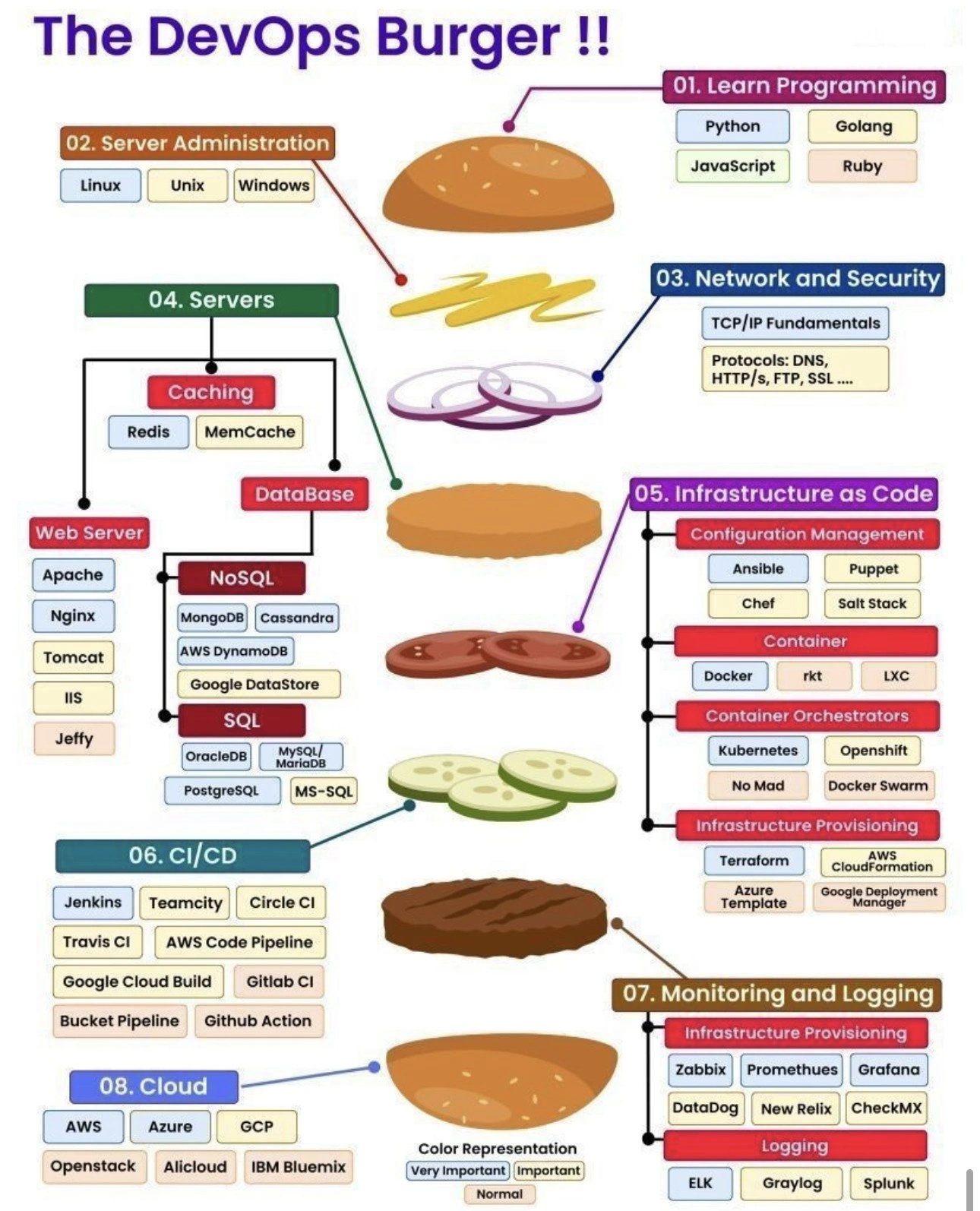
The meme references a scene from Dune (a famous sci-fi book/movie) where a character endures terrible pain by sticking his hand in a mystical box. Here, the joke is that the “pain” inside the box is actually “Jenkins on Kubernetes.” Why would that be painful? Because running Jenkins in a Kubernetes cluster tends to be fragile and frustrating if not done very carefully. For one, Jenkins has a huge ecosystem of plugins – small add-ons that provide extra features (like connecting to Git, triggering builds, sending notifications, etc.). Many teams have dozens of these plugins enabled. When you run Jenkins on a regular server, it starts up once and those plugins stay loaded. But on Kubernetes, if the Jenkins pod restarts (which can happen often – e.g., after an update or if the cluster moves it), all those plugins have to reload. If one plugin fails to download or isn’t compatible with the Jenkins version in your container, your CI system might not come back up correctly. It’s easy to end up in “plugin dependency hell” where a pipeline breaks because a plugin didn’t initialize properly after a restart.

Another headache is handling ongoing builds when Jenkins is containerized. Normally, Jenkins can run jobs for a long time (like building a huge project or running lots of tests) and you avoid restarting it during that. In Kubernetes, however, pods might get killed or rescheduled for reasons outside your control (like node maintenance or scaling events). If a Jenkins pod is running a critical build and Kubernetes decides to reschedule the pod, that build will abruptly stop and fail. All the logs and progress that were only in memory could be lost. It’s similar to yanking the power cord out of a running server—never a graceful situation. So you have to configure Jenkins on K8s very carefully to minimize these disruptions (for example, by using a StatefulSet instead of a regular Deployment, which ensures the pod comes back with the same name and volume, or by tuning Kubernetes not to evict that pod easily).

The “what’s in the box?” moment in the meme is funny to developers because they know the answer is something dreaded. Jenkins on Kubernetes has a bit of a reputation. It sounds like a great idea at first (put your CI/CD server in the same modern infrastructure as your apps!), but many who’ve tried it encountered lots of issues. It’s not that it’s impossible – plenty of teams run Jenkins in containers today – but it often requires a lot of tweaking: mounting volumes, managing plugins carefully, and sometimes deploying it with specialized Kubernetes templates (like a Helm chart configured for Jenkins) or other custom setup tools to handle its unique needs. Even then, things like upgrading Jenkins to a new version become nerve-wracking, because a tiny misconfiguration in the Kubernetes setup can lead to big problems (like all your builds failing).

In summary, Jenkins is a big, stateful application and Kubernetes is a system designed for flexible, stateless microservices. Putting the two together is doable but can be very painful if you don't know all the tricks. The meme jokingly compares that pain to a sci-fi test of courage. Developers laugh (or groan) at it because they either have felt that pain first-hand or have heard horror stories. It's a classic DevOps cautionary tale: just because you can containerize something, doesn't mean it will be easy or fun.

Level 3: The Gom Jabbar of CI/CD

In Dune's Gom Jabbar test, the victim endures searing pain in a box or faces instant death—a pretty apt analogy for running Jenkins on Kubernetes. Jenkins, a venerable CI/CD workhorse, is a famously stateful, plugin-heavy beast. Kubernetes, on the other hand, thrives on ephemeral, stateless pods. Combine them, and you’ve basically created a DevOps torture device. This meme nails that truth by casting Jenkins-on-K8s as the hidden agony inside the box.

As any battle-worn DevOps/SRE will tell you, deploying Jenkins in a K8s cluster is the ultimate pain test. The white-knuckled text “Remove your hand from the box and die” translates to our world as: “Give up on this cluster experiment and your CI pipeline dies.” In other words, once you containerize Jenkins, you’re committed—backing out improperly can nuke your entire build system (like pulling your hand out too soon and getting the Gom Jabbar poison needle). When the protagonist nervously asks “What’s in the box?”, the answer “Jenkins on Kubernetes” lands like a punchline and a gut-punch simultaneously. Every engineer who’s tried this lets out a pained laugh: of course it’s Jenkins on K8s—that’s exactly the kind of pain we feared.

Why is it so painful? Jenkins wasn’t built for the cattle herd mentality of cloud orchestration; it’s more of a cherished (and needy) pet. On Kubernetes, pods are treated like disposable units—you kill one, spin up another, no big deal. But Jenkins is stateful: it hoards crucial data in its $JENKINS_HOME directory (job configs, build logs, plugin data, credentials). That state must survive any pod restart, which drags in the headache of persistent volumes (PV). So now you’re wrangling with Kubernetes storage classes, volume claims, and StatefulSet deployments to keep Jenkins’s data intact. Miss a setting in the Helm chart, or if that PV fails to mount after a crash, Jenkins comes up blank—plugin overload errors, missing jobs, and panicked developers asking why all their pipelines vanished. That sinking feeling when you realize an ephemeral pod wiped out your CI history? It’s pure Gom Jabbar-level agony for an SRE.

Speaking of plugins: Jenkins is infamous for its plugin ecosystem (there’s a plugin for everything—and often, 5 variations of it). Running a plugin-heavy Jenkins in a container means you have to either bake all those into your image or let Jenkins auto-install them at startup. Auto-install can turn into a slow-motion nightmare: every time the pod spins up, it redownloads 50 plugins, and if one update breaks compatibility, enjoy your new crash loop. It’s like each plugin is a nerve in that pain box, amplifying the burn. Upgrading Jenkins itself in Kubernetes is another trial by fire. That “Helm Chart Hell” is real—tuning dozens of parameters (Java heap sizes, agent launch methods, PVC configs) feels like chanting incantations to appease the pipeline gods. And when something inevitably fails, you’re combing through logs with stack traces as cryptic as any Bene Gesserit prophecy.

Let’s not forget the build pipelines themselves. On a stable VM, a Jenkins master might run for months; on K8s, pods can be evicted or restarted for innocuous reasons (node updates, autoscaling, an overzealous liveness probe). Picture a critical deployment pipeline running tests for an hour. Now imagine the cluster decides to reschedule the Jenkins pod halfway through. Poof – the pod is terminated, the pipeline dies, and your artifact is left half-published. Kubernetes cheerily brings up a new Jenkins container, but that new instance has to pick up the pieces (if it even can). Any in-memory data is gone, queued jobs are lost. You’ve basically simulated pulling your hand out mid-test: an abrupt end, followed by the “death” of that pipeline run. The brittleness of such pipelines on K8s makes veterans grimace because they’ve lived that failure — likely at 3 AM, with an angry #DevOps channel blowing up.

The humor (and horror) in the meme comes from recognition. Jenkins on Kubernetes is practically a rite of passage in some orgs — a well-intentioned move towards modernization that often devolves into a cluster_admin_nightmare. The bottom-right frame of the meme (Paul screaming in pain) is every engineer after wrestling with YAML configs and errant CrashLoopBackOff errors for hours. The veiled figure declaring the threat is like that architect or tech lead insisting “we containerize our CI” without fully grasping the consequences. And the protagonist’s terrified expression? That’s the poor DevOps engineer internally screaming, “Why did we put Jenkins (our critical BuildSystem) on a Kubernetes cluster?!” as they feel the hot sting of failing builds and 2 AM pager alerts.

In short, this meme resonates on a darkly comic level: it dramatizes the almost ritual suffering an engineer endures when trying to fit Jenkins’s legacy square peg into Kubernetes’s cloud-native round hole. It’s a test of patience, skill, and sheer willpower – a CI/CD Gom Jabbar – where only those who can withstand the configuration pain (and maybe do some Bene Gesserit-level incantations in YAML) will emerge with a working pipeline. Everyone else? Dead (inside), from removing their hand too early.

Description

Four dark, cinematic frames parody the Dune ‘pain box’ scene. 1) Top-left: a robed arm is thrust into an ornate, moss-green cube while white subtitle text reads “Remove your hand from the box and die.” 2) Top-right: the young protagonist, hand poised near his neck, replies in a second subtitle line “What’s in the box?”. 3) Bottom-left: a veiled figure stares menacingly; bold caption text at the bottom says “Jenkins on Kubernetes”. 4) Bottom-right: the protagonist grimaces in pain, still gripping the box unseen. The meme equates the legendary agony test with the real-world struggle of running stateful, plugin-heavy Jenkins inside an ephemeral Kubernetes cluster - highlighting DevOps headaches around persistent volumes, pod restarts, and brittle build pipelines
Comments

17
Anonymous ★ Top Pick Jenkins on Kubernetes is the Gom Jabbar of CI: endure RWX PVC quirks, 150 legacy plugins, and liveness-probe Russian roulette until the build finishes, and only then are you deemed human
  1. Anonymous ★ Top Pick

    Jenkins on Kubernetes is the Gom Jabbar of CI: endure RWX PVC quirks, 150 legacy plugins, and liveness-probe Russian roulette until the build finishes, and only then are you deemed human

  2. Anonymous

    After 15 years of wrestling with Jenkins configurations, you realize the real Gom Jabbar test isn't enduring pain in a box - it's maintaining a Jenkins cluster on Kubernetes while your PVCs randomly detach, your plugins conflict across pod restarts, and someone asks why you didn't just use GitHub Actions

  3. Anonymous

    The Gom Jabbar test measures your ability to overcome instinct and endure pain - much like convincing your CTO that running Jenkins on Kubernetes is technically possible but spiritually devastating. Sure, you *can* mount 47 PersistentVolumes for plugin state, wrestle with Java heap dumps in containerized environments, and debug why your build agents keep getting OOMKilled, but at what cost to your sanity? The Bene Gesserit would call it 'the test of human awareness and endurance.' We call it 'Friday's production incident.' The real horror isn't the pain - it's knowing that GitLab CI or GitHub Actions could have saved you from this Groovy-scripted nightmare, but the organization chose 'stability' over 'not wanting to scream into the void at 3 AM.'

  4. Anonymous

    Jenkins on Kubernetes: where the agents are ephemeral, the PVC is forever, and every plugin upgrade is a Gom Jabbar test of your RBAC

  5. Anonymous

    Jenkins on K8s: the box where your StatefulSet lives forever in CrashLoopBackOff, mourning its unmounted PVC

  6. Anonymous

    Jenkins on Kubernetes: ephemeral agents, stateful master, privileged DinD, and your “immutable infrastructure” mounting an NFS share like it’s 2009

  7. @boombick 2y

    I'm not a huge jenkins fan, but this shit https://jenkins-x.io/ works normally

    1. @chupasaurus 2y

      It was meant to eventually replace ye olde Jenkins

  8. @Algoinde 2y

    proposal: delete the kick messages too (log them though)

  9. @sylfn 2y

    done

    1. @AmindaEU 2y

      🐾

  10. @callofvoid0 2y

    wtf

  11. @allenvox 2y

    ok guys i fucked up

  12. @allenvox 2y

    i just missclicked on this shitty cs 1.6 votekick system and got messed up

  13. @V0W4N 2y

    brother who the fuck thought that clicking on slash commands should immediately send one from you

    1. @AmindaEU 2y

      @Durov?

      1. @V0W4N 2y

        fair enough

Use J and K for navigation