Skip to content
DevMeme
1850 of 7435
JavaScript's Unique Interpretation of 'Sorting'
Languages Post #2058, on Sep 17, 2020 in TG

JavaScript's Unique Interpretation of 'Sorting'

Why is this Languages meme funny?

Level 1: Sorted Like Words

Imagine you have a bunch of number cards and you ask a friend to sort them, but your friend doesn’t sort them by size — instead, they sort them as if the numbers were words in a dictionary. So, they compare the first digit just like comparing the first letter of a word. In this system, the number 100000 would be put near 1 (because both start with the digit "1"), and 21 would come later (because it starts with "2"). The outcome would look pretty weird if you expected them to be ordered by actual size! You’d have a list like 1, 100000, 21, 30, 4, which obviously isn’t smallest-to-biggest in value. This is exactly what’s happening in the meme. The newbie developer expected the numbers to be sorted by size, but JavaScript sorted them by the first digit (essentially like alphabetizing words). The humor comes from that mix-up — JavaScript acted like a mischievous friend who followed the letter of the instruction (“sort these”) but not the spirit of what the person really wanted. It’s funny because we can all imagine the look of confusion on someone’s face when their sorted numbers come out in this wacky order, and the meme’s image of a grinning Leonardo DiCaprio is basically JavaScript saying, “Cheers, gotcha!”

Level 2: Alphabetical, Not Numerical

For those newer to coding or JavaScript, let's break down what's going on. In JavaScript, arrays have a method called Array.prototype.sort(). If you call myArray.sort() without any parameters, JavaScript will sort the array as if all the items are strings, even if they are numbers. This is why this meme is funny to developers: a list of numbers might end up in a very strange order that doesn’t make numeric sense. It’s an array_sort_default_behavior that surprises many people.

In the meme, the text at the top says:

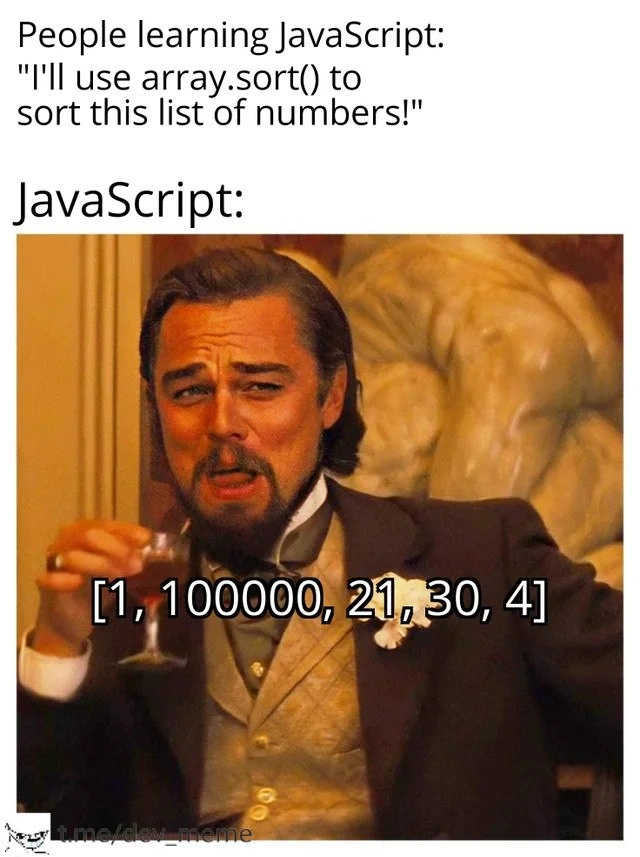
People learning JavaScript: "I'll use array.sort() to sort this list of numbers!"

The expectation here is that a list of numbers, say [1, 4, 21, 30, 100000], will come out sorted numerically as [1, 4, 21, 30, 100000]. Numerically, 100000 is obviously the largest number and 1 is the smallest. But then the meme shows "JavaScript:" followed by Leonardo DiCaprio’s smirking face and a weirdly ordered array [1, 100000, 21, 30, 4]. This is exactly how JavaScript sorted that list alphabetically: it treated the numbers like words and ordered them as if comparing dictionary entries. The number 100000 comes right after 1 because when you compare the strings "100000" and "21", the character "1" (in "100000") is "less than" the character "2" (in "21"). It’s as if JavaScript is saying, "Hey, '100000' starts with '1' and '21' starts with '2'. Since '1' comes before '2' in alphabetical order, '100000' should come before '21'!" This behavior often feels like a bug to beginners, but it's actually an intended quirk of the language's design (a true LanguageGotcha).

Let's see a concrete example in code. Suppose we have an array of numbers:

const numbers = [1, 21, 4, 30, 100000];
numbers.sort();
console.log(numbers); // Output might be: [1, 100000, 21, 30, 4]

Instead of sorting by actual numeric value, JavaScript converted each number to a string behind the scenes and sorted by comparing those strings character by character. Here's the sorted order it produced:

  • "1" (just "1")
  • "100000" (starts with "1" followed by other characters)
  • "21" (starts with "2")
  • "30" (starts with "3")
  • "4" (starts with "4")

So, after numbers.sort(), we got [1, 100000, 21, 30, 4]. This looks completely wrong if you meant to sort by size! To sort numerically, you need to provide a comparator function – basically a little helper that tells sort how to compare two values. In JavaScript, a common comparator for numbers is (a, b) => a - b (which will result in a positive or negative number depending on which comes first). Using a comparator overrides the default alphabetical behavior:

numbers.sort((a, b) => a - b);
console.log(numbers); // Output: [1, 4, 21, 30, 100000]

Now the array is sorted by actual numeric value, as one would intuitively expect. The difference was that we explicitly told JavaScript how to compare the numbers. Without that callback, JavaScript was essentially guessing and chose alphabetical order.

The Leonardo DiCaprio image (often used in developer memes) perfectly captures JavaScript's cheeky attitude here. It's as if the language is smugly sipping a glass of wine, amused that the newcomer assumed .sort() would just know to sort numbers by magnitude. The meme is poking fun at how JavaScript can sometimes behave in unexpected ways, especially if you’re coming from other languages. In many other programming languages (like Python or Java or C#), sorting numbers “just works” in numeric order by default. But in JavaScript, this LanguageQuirk means you have to be a bit more careful. New developers quickly learn that if they forget to pass in that compare function for numbers, they’ll end up with an array order that makes them go "Huh?!" and then scramble to Google what's going on. It’s a learning moment: the kind of bug you encounter once, and then never forget the fix for the rest of your career.

Level 3: Comparators or Chaos

At the senior developer level, this meme highlights a classic JavaScript language quirk that even experienced devs remember tripping over early on. The humor comes from a well-known pitfall: calling array.sort() on a list of numbers without a custom comparator results in lexicographic ordering rather than numeric. In plain terms, JavaScript sorts values as strings by default. This produces seemingly nonsensical results like the array in the meme: [1, 100000, 21, 30, 4]. For veterans, this scenario is a knowing chuckle at countless bug hunt sessions where the root cause was “the sort function is sorting strings, not numbers.” It's a language gotcha so prevalent that it’s practically a rite of passage in JavaScript programming.

Why does this happen? According to the ECMAScript spec, if no compare function is provided, each element is converted to a string and sorted in ascending order based on Unicode code points. In our case, that means "100000" comes before "21" because the string "1" (the first character of "100000") is considered smaller than the string "2" (the first character of "21"). Essentially, "100000" < "21" lexicographically, since "1" has a lower code point value than "2". The result is a lexicographic_sort_issue: numerically larger numbers can appear earlier in the array simply because their first digit is lexicographically "smaller". Seasoned developers immediately recognize this pattern; it's the kind of bug that has you scratching your head until you remember that sneaky default behavior. It’s a prime example of JavaScript’s dynamic typing and design history leading to “WAT?!” moments in code.

There’s an underlying historical context to this behavior. JavaScript arrays are not typed — they can hold numbers, strings, objects, anything. The designers of the language chose a simple default: convert everything to strings and sort alphabetically. That decision avoids trying to guess the developer’s intent (e.g., how do you sort a mixed array of numbers and words?), but it comes at the cost of surprising bugs for those assuming numeric sorting. Once this behavior was in the spec, changing it would break existing code relying on lexicographic ordering. So, despite the javascript_sort_pitfall being well-known, it persists to this day. Seasoned devs have internalized the mantra: “Always provide a comparator for numeric sorts.” If you forget, JavaScript’s gonna laugh in your face with a smug DiCaprio grin and a jumbled array as if to say, “You should’ve read the fine print of the docs!”

The meme nails the dynamic: Newcomer innocently uses a built-in function, expecting sensible behavior, while JavaScript (personified by Leonardo DiCaprio’s gleefully smug expression from Django Unchained) serves up chaos. It's poking fun at how JavaScript sometimes feels like a trickster. Veteran developers bond over this shared gotcha because we’ve all seen it (or caused it) before. Many of us have reviewed code where a colleague confidently wrote myArray.sort(); and ended up sorting IDs, prices, or ages as if they were strings. The ensuing bug might be harmlessly funny (like mis-ordered leaderboard scores) or downright dangerous (imagine sorting transaction amounts lexicographically!). This disparity between expectation and reality is an industry in-joke: we laugh because we learned the hard way that default in JavaScript can mean "do something very literal that you probably didn't want." It’s the “LanguageQuirks” category at its finest, and a gentle reminder that in programming, assuming defaults can lead you straight into debugging purgatory.

Description

This meme uses the popular 'Laughing Leo' format, featuring a smug-looking Leonardo DiCaprio from the film 'Django Unchained' holding a drink. The meme is divided into two parts. The top text reads: 'People learning JavaScript: "I'll use array.sort() to sort this list of numbers!"'. Below this, the text 'JavaScript:' introduces the punchline. The image of Leonardo DiCaprio has an array overlaid on it: '[1, 100000, 21, 30, 4]'. A small watermark for 't.me/dev_meme' is visible at the bottom. The humor stems from a classic JavaScript quirk where the default `Array.prototype.sort()` method sorts elements lexicographically (as strings) rather than numerically. This results in '100000' coming before '21' because the character '1' precedes '2'. For experienced developers, this is a rite of passage and a well-known 'gotcha' that highlights the language's often counter-intuitive behavior and the importance of providing a custom comparator function (`(a, b) => a - b`) for numerical sorting

Comments

7
Anonymous ★ Top Pick The JavaScript `sort()` method is a great interview question. It efficiently sorts candidates into two buckets: those who have been burned by it, and those who are about to be
  1. Anonymous ★ Top Pick

    The JavaScript `sort()` method is a great interview question. It efficiently sorts candidates into two buckets: those who have been burned by it, and those who are about to be

  2. Anonymous

    Array.sort() with no comparator is ECMAScript’s built-in chaos monkey - behaves in unit tests, then lexicographically reorders your revenue numbers at 2 a.m

  3. Anonymous

    Twenty years later, we're still explaining to junior devs why their sort comparator needs to be `(a, b) => a - b`, right after we finish explaining why `0.1 + 0.2 !== 0.3` and just before the inevitable "wait, why is typeof null 'object'?" conversation

  4. Anonymous

    Ah yes, the classic JavaScript initiation ritual: discovering that array.sort() treats numbers like strings because 'consistency' means everything becomes a string eventually. It's the language's way of teaching you that explicit is better than implicit - usually right after you've deployed to production and your pagination shows page 100000 before page 2. At least it's consistently inconsistent, which is more than we can say for the 47 different ways to define a function

  5. Anonymous

    JavaScript’s Array.sort: stable since ES2019; numeric only if you remember a comparator - otherwise 100000 beats 21 on spelling

  6. Anonymous

    JS array.sort(): where 1000000 humbly precedes 21, a timeless reminder that your metrics dashboard prefers poetry over arithmetic

  7. Anonymous

    Per ES262, sort() compares ToString results - skip the comparator and your “top spenders” dashboard will confidently slot 100000 between 1 and 21; ship (a,b)=>a-b and an ESLint rule

Use J and K for navigation