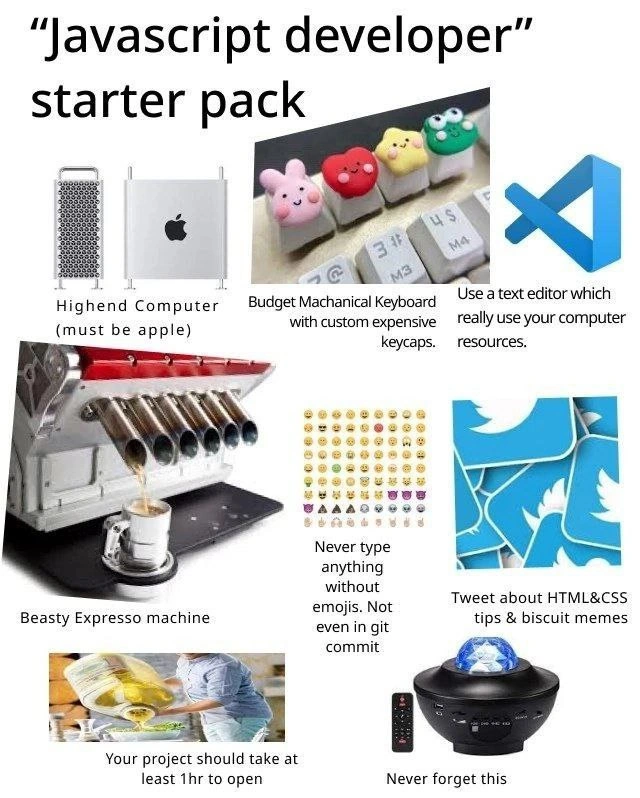
The Quintessential JavaScript Developer Starter Pack
Why is this DevCommunities meme funny?
Level 1: Homework with a Supercomputer
Imagine you have a simple homework assignment to do, but you turn it into a huge production. First, you insist on using the most powerful computer in the world to do it – like using a NASA supercomputer just to write a short essay. Then, you get a fancy keyboard with colorful cartoon animal keys, because it’s more fun to type when each key looks special. Before you start, you drink a big cup of strong coffee to get energized (even though it’s just homework, you act like you need to stay awake for a big mission!). As you write, after every sentence you add a bunch of smiley faces and other emojis 😊😂👍 – kind of like decorating your answers with stickers for no real reason. And while doing all this, you keep taking breaks to post on social media about little study tips you “discovered” and share funny little cookie jokes with your friends. In the end, what should have been a quick, simple task became an over-the-top ritual with lots of fancy and extra things involved. It’s funny because the person is using so much high-end gear and doing so many flamboyant things just to do something basic – it’s like watching someone use a rocket ship to go pick up groceries down the street! The contrast between the simple task and the extreme way they go about it is what makes it humorous and lighthearted.
Level 2: Modern Front-End Essentials
Let’s break down each part of this JavaScript developer “starter pack” in simple terms, and see what it means in the real world of modern front-end development:
High-End Apple Computer (Must be Apple): The meme suggests that a true JavaScript/Frontend developer must have a top-notch Apple computer, typically a Mac. In reality, many web developers do prefer Macs or MacBooks (Apple’s laptops). Why? Macs run macOS, which is built on a Unix-like foundation (similar to Linux). That makes it easy to use developer tools and command-line programs that also run on Linux servers. It’s kind of a sweet spot between a user-friendly interface and a powerful developer environment. Plus, Apple hardware has a bit of a status appeal in tech – it’s sleek, it’s what you often see at conferences, and historically it was great for design and mobile app development (you need a Mac to build iPhone apps, for instance). So over time, having a shiny MacBook became a norm in developer culture, especially in startups and front-end circles. The meme exaggerates this by showing really high-end models (the Mac Pro tower, etc.), implying our dev isn’t settling for anything but the most powerful (and expensive) machine. The truth is, you don’t need a supercomputer to write JavaScript – even a mid-range laptop would do – but using a maxed-out Mac has become a stereotype for serious devs, partly for practical reasons and partly as a cultural thing.
Mechanical Keyboard with Custom Keycaps: Developers spend a lot of time typing, so the keyboard is an almost sacred tool. A mechanical keyboard is one that uses individual mechanical switches under each key. These switches give a satisfying tactile feedback and often a nice clicky (or “thocky”) sound. Many developers love this because it can feel more responsive and solid than the flatter, mushy keys on cheap office keyboards or laptop keyboards. Now, the meme specifically mentions a “budget” mechanical keyboard with custom expensive keycaps. Keycaps are the pieces of plastic on top of the keys that have the letters or symbols. Custom keycaps can be bought or even handcrafted in countless designs – from colorful themes to cute little characters (like those animal faces in the image). People collect and swap them to personalize their keyboard. It’s a fun hobby. The joke here is that the keyboard itself might be affordable, but the developer has splurged on these fancy keycaps, which can actually be quite pricey per key! Imagine paying $40 for a single artisan keycap that looks like a Pokémon – some folks do that. 😅 This reflects the modern front-end developer’s penchant for making their workspace uniquely theirs. Functionally, the mechanical keyboard helps with typing comfort and speed. Aesthetically, the custom keycaps are just for joy. So, this starter pack item is saying: our JavaScript dev not only codes, but does so in style, with a clicky keyboard decked out in cute or cool-looking keys.
A Resource-Hungry Text Editor (VS Code): The blue logo shown is for Visual Studio Code (VS Code), which is a very popular text editor/IDE (Integrated Development Environment) for coding. When the meme says “Use a text editor which really uses your computer resources,” it’s playfully jabbing at VS Code’s one downside: it can be heavy on system resources. VS Code is built with Electron, meaning it's essentially running a web application under the hood. While this allows great features (like a built-in debugger, extensions, and working almost like a Chrome browser tab for coding), it also means it can use a lot of memory (RAM) and CPU, especially if you have many extensions or large projects open. So the meme implies that a JavaScript dev will ironically choose an editor that demands that beefy computer. 😆 In everyday terms, VS Code is the app where the developer writes and edits their code. It’s loved because it’s user-friendly, has a ton of plugins (for example, to auto-format code, highlight syntax, integrate with Git, etc.), and is free. The “really use your computer resources” is a sarcastic way of saying it’s not a lightweight program – it will make even a powerful computer work hard. Many devs joke that VS Code’s performance is the reason they “need” an expensive machine. This starter pack assumes our dev won’t be caught using something plain like Notepad – they’ll be in VS Code with perhaps a dozen extensions running, pushing that high-end hardware to its limits while editing files. It’s a common scenario in front-end development due to the complexity of the tooling we use nowadays.
Beastly Espresso Machine (Coffee Fueled Coding): Developers and coffee go together like peanut butter and jelly. The meme shows a beastly espresso machine, the kind with multiple spouts that can make several espresso shots at once. This represents the developer’s love (or dependence) on coffee. In many tech offices, you’ll actually find pretty advanced coffee setups – sometimes an espresso machine, or at least a top-notch coffee maker with all the beans and grinders. Coding can be mentally exhausting, and caffeine is the go-to pick-me-up. The phrase “Beasty Espresso machine” is just humorous wording to say it’s a monstrous, powerful coffee maker. For our JavaScript dev, having strong coffee on tap is considered essential. Early morning coding session? Coffee. Late-night debugging? Coffee. Got stuck on a problem? Take a coffee break. It’s practically a running joke that software runs on coffee as much as on code. So in this starter pack, alongside the fancy computer and keyboard, there’s also the fuel: lots and lots of espresso. It highlights that part of the developer experience is keeping yourself caffeinated and alert. Even the misspelling “Expresso” might be intentionally funny – any coffee enthusiast dev will smirk at that, since it’s actually spelled Espresso (derived from Italian). In short, this item is saying a modern dev likely has a caffeine habit and might even invest in a high-end coffee machine either at home or they benefit from one at work. It’s as much a part of the stereotypical dev life as writing code is.
Emojis in Everything (Even Git Commits): The next item shows a grid of emoji icons and says “Never type anything without emojis. Not even in git commit.” This points to a cultural habit among many younger developers or just within casual dev team cultures: using emoji to spice up communication. Emojis are those little icons (smileys, icons like 🔥👍😂, etc.) that add emotion or flair to text. Traditionally, programming and especially things like commit messages (the notes recorded when you save changes in source code management tools like Git) were very dry and professional. But now, it’s not unusual to see commit messages with an emoji or two. For example, someone might write a commit message like Add new login feature 🚀 or Fix typo in README 😂. There’s even a concept called gitmoji, which provides a standardized list of emojis for different types of commits (like using 🐛 for a bug fix or 📖 for documentation changes). The meme exaggerates by saying “never type anything without emojis” – no one literally adds an emoji to every single line of text they type, but it sure can feel like it when you look at some chat channels or social media posts by devs! In our JavaScript dev’s world, every commit, every message has to have that extra sprinkle of expressiveness. This reflects a broader shift in developer communication: things have gotten more informal and playful. Using emojis can help convey tone in text-based communication – for instance, adding a 😊 can show you’re happy about a merge, or a 😢 might show a bug made you sad. In Git commit histories, they’re mostly just for fun or quick visual categorization. For a newcomer, it might be surprising: You mean we put smiley faces in serious code stuff? But yes, sometimes we do! It’s part of making the coding process feel more human and less dry. So the starter pack is telling us our stereotypical JS dev has fully embraced this — they might even have a rule of thumb to include a 😀 or 🤖 in everything from Slack messages to commit logs. It’s funny and a bit silly, which is exactly why it’s a meme item.
Tweeting HTML & CSS Tips and Biscuit Memes: The starter pack includes an image reminiscent of the Twitter logo (in fact, it looks torn up or shredded) with the text “Tweet about HTML & CSS tips & biscuit memes.” This points to the idea that our dev is very active on Twitter, specifically within the developer community there. A lot of modern developers, especially front-end folks, use Twitter to share knowledge, hot tips, and of course, memes. “HTML & CSS tips” likely refers to those bite-sized tips or tricks for building webpages that you often see in tweets. For example, a dev might tweet “Pro tip: Use position: sticky for navbars that stay at the top! #HTML #CSS #webdev”. These are helpful for beginners and also help the tweeter gain a following and reputation. It’s almost become a trend or even a joking matter that some devs tweet very basic tips — things that have been known for ages — but present them like revelations (because for some followers, they are new). The meme couples that with “biscuit memes,” which injects some random silliness. Possibly it’s referencing that they tweet memes about cookies/biscuits (maybe a pun since in web dev, we have HTTP cookies — small data files — which in British English are called biscuits). Or it could be just an example of the lighthearted, sometimes totally off-topic humor they post (“biscuits” being totally unrelated to coding, showing the humorous side). In essence, this item means our JavaScript dev spends a lot of time on dev social media, sharing knowledge and jokes. Dev communities on Twitter are quite vibrant – you’ll often see the same people sharing tips, commenting on the latest JavaScript framework, or posting a meme about the struggle of centering a div. By including this in the starter kit, the meme acknowledges that being a modern dev isn’t just about writing code; it’s also about being part of the online conversation and culture around coding. From a junior perspective: don’t be surprised if you see your peers or role models on Twitter constantly talking about coding tricks and posting goofy memes – it’s a normal mix in the front-end world.
Projects that Take Ages to Start: One panel says “Your project should take at least 1hr to open” and shows a huge yellow liquid being poured (which gives a sense of something very slow or heavy). This is making fun of how bloated and slow-starting some JavaScript projects can be. When they say “take at least 1hr to open,” think about when you download a project’s code and try to run it on your machine. In an ideal world, you open the project and it runs instantly. But often in modern dev, especially with complex frontend frameworks or big node.js based projects, there are setup steps that take a while. For example: installing dependencies (which could be hundreds of npm packages), compiling code (if it’s written in something like TypeScript or uses JSX, it needs to be converted to plain JS), bundling the files together, etc. If you have a slower computer or the project is huge, this can feel like forever. The meme intentionally says “1 hour” as an exaggeration, but it’s true that sometimes you click “npm start” and then… you wait. Maybe not an hour, but long enough to go grab a coffee (hence, again, that fancy espresso machine comes in handy!). For a junior dev just encountering this, it’s highlighting a reality: don’t be alarmed if a big web project isn’t as snappy as, say, opening a small Python script. There’s often a lot going on under the hood. The meme finds humor in this because, on the face of it, it seems ridiculous — why should a simple web app (like a to-do list or a small company website) require so many steps and such powerful hardware to just run locally? And yet, it’s often the case due to the layers of tools we use now. So, the starter pack basically mandates that our dev’s project is not a quick little thing; it’s a monstrosity that tests patience and arguably justifies having that high-end computer. It’s a wink to how far the standard dev environment has come (or bloated) in recent years.
“Never forget this” Star Projector Gadget: The final item is a bit quirky – a small black gadget that projects stars, captioned “Never forget this.” This one might leave you scratching your head, but it’s likely there to represent the fun/whimsical side of a developer’s workspace. Many programmers like to decorate their desks or offices with nerdy, cosmic, or just cool-looking paraphernalia. For example, having a galaxy projector that displays a starry night on your ceiling, or the classic lava lamp, or LED RGB lighting behind your monitor. It adds personality and sometimes even relaxation to the coding environment. The phrase “Never forget this” could imply that no starter kit is complete without a little something to remind you to relax or inspire awe (like looking at stars). It might also be a nod to some specific inside joke or just a non-sequitur thrown in for absurdity (starter pack memes often include one totally random item for comedic effect). If we interpret it straightforwardly: maybe it’s saying “Don’t forget to include a cool gimmick gadget in your setup.” Our JavaScript dev might use this star projector to make late-night coding sessions more pleasant, casting a soothing cosmos on the walls. Or perhaps it’s referencing a famous combination of tech and fun – for instance, some tech offices actually use lava lamps for generating random numbers (that’s a real thing at Cloudflare, a tech company, though they use lava lamps not star projectors, but close enough in spirit!). For a newcomer, the takeaway is that developer culture often includes these playful elements. We’re not all just about screens and text – we like to make our environment enjoyable. Whether it’s toys, gadgets, or flashy lights, having something quirky at your desk is almost part of the dev lifestyle. So this item completes the starter pack by adding that sense of “and finally, top it off with something fun and uniquely you.”
All together, the “Modern Front-End Essentials” as depicted are: a powerful Apple computer to run heavy development tools, a mechanical keyboard to type happily, a popular editor (VS Code) that might slow down lesser machines, plenty of coffee to drink, emoji-filled communication habits, an active Twitter/meme presence, large complex projects that require patience (and power) to start, and a dash of personal geeky flair in the workspace. Each of these has a real-world counterpart that many developers, especially in JavaScript and front-end, will nod at. As a newcomer, you might not need all these things (certainly not the expensive ones!), but you’ll surely encounter them in developer communities. And now you’ll recognize the humor when someone jokes about their code editor using more RAM than the app they’re building, or about adding five emoji to a commit message. It’s all part of the modern web developer experience – a mix of high-tech, high-productivity, and high-spirited fun.
Level 3: Hype-Driven Development
This “JavaScript developer starter pack” meme resonates with experienced devs because it’s so on-point about modern frontend culture. Every piece of the collage is a well-known stereotype taken to the extreme, and behind each stereotype there’s a story that senior developers recognize (often with a mix of amusement and mild exasperation). Let’s unpack why these specific items are both funny and familiar:
1. The Must-Be-Apple High-End Computer: The meme insists on a high-end Apple machine (it even shows the Mac Pro tower and an older Power Mac). This pokes fun at the unwritten rule in many dev circles that serious developers use Macs. Walk into any hip startup or attend a front-end conference, and you’ll see a sea of glowing Apple logos. It’s not just about brand prestige (though there’s some of that); historically, macOS provides a Unix-like environment that web developers love. You get a native Terminal, UNIX tools, and compatibility with Linux-like workflows out of the box, which is great for things like running local servers, using Git, or installing packages. Plus, designers and devs often work closely, and design tools (and the cool factor) have long favored Mac. So over time an image emerged of the JavaScript/Frontend developer who wouldn’t be caught dead using a chunky Windows laptop – of course they have a sleek Mac, maybe even specced out to the max. The funny part is the overkill: a Mac Pro (Apple’s top-of-the-line workstation) is total overkill for writing HTML, CSS, and JavaScript. You don’t need a 28-core beast with 256GB of RAM to center a <div> – but the stereotype has our dev using one anyway. It’s a gentle jab at how Developer Experience sometimes turns into luxury indulgence. Seasoned devs recall times when 2GB of RAM was plenty to code in Notepad++, so seeing a web dev demand the latest M2 MacBook just to run a local webserver and Chrome can be hilariously disproportionate.
2. The Mechanical Keyboard & Custom Keycaps: Ah yes, the clackity-clack of a mechanical keyboard – practically the official soundtrack of coding these days. This part of the starter pack riffs on the mechanical keyboard obsession in developer communities. If you’ve been around programmers, you know many of us can talk your ear off about Cherry MX switches versus Kailh switches, or the travel distance of keys, or the satisfying “thock” sound of a well-lubed switch. It’s a hobby that blends engineering and personal expression. The meme specifically says “Budget Mechanical Keyboard with custom expensive keycaps,” which is spot on: a lot of devs will grab a relatively affordable mechanical keyboard, then splurge on ridiculously pricey artisan keycaps or keycap sets. We’re talking keycaps that look like little cats, dogs, or Pokémon, or beautifully crafted resin art – sometimes costing more than the keyboard itself! It’s funny because it’s a mix of frugality and extravagance: save money on the board, blow it on the flair. Experienced devs chuckle because half their team probably has a similar setup – a $70 keyboard with $150 worth of novelties on top, each keycap lovingly selected. Why do devs do this? Well, we do spend a lot of time at the keyboard – might as well make it enjoyable. It’s a form of personalization in an otherwise digital, intangible job. But from the outside (and to cynical veterans), it looks like we’re playing with expensive toys. The humor is in the contrast: serious coding happening on a keyboard adorned with cute piglet and frog keycaps. It’s the quintessential developer dichotomy of practical nerdiness meets childlike fandom.
3. VS Code – The Resource Devourer: “Use a text editor which really use your computer resources.” That line drips with irony. It’s referencing Visual Studio Code, by far the most popular code editor among web developers right now. VS Code is loved for its sleek interface and rich plugin ecosystem – and notorious for not exactly being light on memory. The meme joke is that this editor will gladly eat up as much RAM and CPU as you can give it. Why? Because under the hood, VS Code is an Electron app, which means it’s essentially a web app (HTML, JavaScript, CSS) running on a desktop, powered by the same engine that runs Chrome. It’s a bit like using a rocket ship to go grocery shopping: super powerful engine for a mundane task. A senior dev reading that caption will likely smirk and think, “Yep, my editor is basically a Chrome tab that sometimes makes my fans spin.” We’ve all seen the jokes about having Chrome with 100 tabs vs. VS Code with 1 project – sometimes there’s not much difference in RAM usage. The phrase “really use your computer resources” is a playful euphemism; in reality it hogs resources. This ties back to the high-end Apple hardware: perhaps you need that 32GB of RAM to handle your editor, Chrome, Slack (another Electron app), and your local web server all at once! The experienced folks know alternative editors (Vim, Sublime, old-school VS without Code, etc.) are much more lightweight. But these days, convenience wins. So the meme is lovingly roasting the fact that modern devs willingly run a heavyweight editor to write lightweight code. It’s absurd if you step back: editing a JavaScript file triggers as much CPU activity as playing a 3D game did 15 years ago. That absurdity is prime humor material in dev circles.
4. The “Beasty Espresso Machine”: Caffeine and code have a legendary love affair. This part of the starter pack exaggerates the caffeine dependence of developers. We see a multi-head industrial espresso machine, the kind you’d find in a busy café, labeled in meme-speak as a “Beasty Expresso machine.” (Yes, they wrote Expresso with an “x” – cue the collective gasps of coffee purists. Perhaps the misspelling is part of the joke, as any self-respecting coffee geek dev will hasten to correct you to Espresso. But we digress.) The idea here is that our stereotypical JavaScript dev doesn’t just sip coffee – they consume it in high-octane, industrial quantities. Maybe they have a cafe-quality machine at home, pulling perfect shots of espresso to fuel coding sessions that stretch past midnight. It’s poking fun at how programmers almost treat coffee as fuel or rocket propellant for the brain. We’ve all been there: you have a tough bug to fix or an app to deploy, so you down another double-shot Americano and keep going. The “starter pack” implying a massive espresso machine is humorous hyperbole – nobody really needs a machine that makes 8 espresso shots at once in their home office, but it sure paints the picture of a coder who’s wired 24/7. Veteran developers chuckle at this because coffee culture is indeed huge in tech. From the outside, it’s quirky: we’re essentially ingesting a mild stimulant to debug CSS. Inside the community, though, asking “Is the coffee machine working?” is as vital as asking “Is the build passing?” The meme nails it: a coffee-fueled coding life is part of the lore.
5. Emojis Everywhere (even in Git commits): Now this is where some old-school devs either laugh or groan (or both). “Never type anything without emojis. Not even in git commit.” The image shows a sheet of diverse emoji icons, and the caption suggests that our archetypal JavaScript dev peppers every written communication with emoji – including the commit messages for their source code. A commit message is traditionally a succinct description of a code change, recorded in version control (Git). It might say something like “Fix login bug” or “Add user profile page.” In the new-school way, though, it might say “Fix login bug 🐛✨” or “Add user profile page 🙌🤩”. Yes, emoji commits are a thing! In fact, there’s a whole gitmoji standard out there mapping types of changes to specific emoji (e.g., :sparkles: for new features, :bug: for bug fixes, :truck: for moving/renaming things – it’s both useful and amusing). So the meme exaggerates a bit (“never type anything without emojis” – even we emoji enthusiasts write normal text sometimes!), but it’s riffing on a real trend: developers, especially in the more informal corners of frontend and open-source, often include emoji in commit messages, pull request descriptions, Slack messages, documentation, you name it. Why do they do it? For one, it adds personality and emotion to otherwise dry text. It can also serve as a quick visual indicator (a package update commit starting with a 🔼 Up arrow, for instance). But mostly, it’s cultural. It’s the same reason we might put 🙂 in an email to ensure the tone reads friendly – except commit histories were traditionally very stoic. Seeing a serious code repo where every other commit has a 🎉 party popper or a 😂 is a bit absurd, which is why it’s funny. Seasoned devs laugh because it highlights a generational (or at least cultural) shift – compare a Linux kernel commit log (super strict, formal) to a modern web app commit log (“Added OAuth support 🚀🔥”). Neither is right or wrong, but the stark contrast is comedic. The meme is effectively saying: this stereotypical JavaScript dev is so extra that they can’t even write a commit without an emoji flourish. It’s self-aware humor from within the dev community: we know it’s a tad ridiculous, and that’s why we love to joke about it. (Meanwhile, a grumpy veteran might mutter that those emojis in commit messages will confuse git log output in the terminal… but hey, let them have their fun! 😜)
6. Tweeting HTML/CSS Tips & “Biscuit Memes”: Developer Twitter – now that’s a whole world unto itself. The meme calls out the habit of tweeting incessantly, especially about HTML/CSS tricks and random memes (specifically “biscuit memes,” which is hilariously specific and random). This is a nod to how many modern devs build their DevCommunity presence on Twitter. It’s extremely common to see tweets like “💡 TIL: You can center a div by setting display: flex and align-items: center; justify-content: center; – game changer! 😎 #CSS #WebDev” followed by a hundred likes. Experienced devs chuckle because those HTML & CSS “tips” are often either very basic or rehashed knowledge – the kind of stuff you figure out by year 2 of coding. Yet, they’re tweeted as hot new insights, and people eat it up, especially newcomers. It’s a bit of a cycle: to grow an audience, some devs tweet daily tips, no matter how small, and sprinkle in memes to keep things lively. Hence the “biscuit memes” — maybe it’s referencing a particular running joke (in some locales, cookies are called biscuits, so perhaps memes about web cookies/🍪 turned into literal biscuit jokes?). Or it could just be a random funny example of the kind of off-topic humor devs on Twitter engage in (everyone loves a good snack meme, after all). The broader theme is the always-online developer persona: coding all day and tweeting all evening. They share screenshots of their code, opinions on the latest framework, and yes, cute memes, to build clout or just blow off steam. To a senior engineer who maybe remembers the days of learning via thick books and offline documentation, the idea of constantly broadcasting bite-sized tips on social media is both foreign and amusing. It’s like a meta game: spending almost as much time curating one’s developer brand online as actually coding. The meme skewers that lightly: our JavaScript dev is apparently obligated to keep the content coming – useful HTML/CSS tricks and silly jokes – as if Twitter engagement is part of the job. The shredded Twitter bird images imply the person practically lives on Twitter (tweeting so much that even the Twitter logo itself is falling apart!). It’s an affectionate jab at the Dev Communities culture on Twitter, where even minor CSS discoveries get a 🚀 emoji and a mini-celebration in a tweet thread.
7. The 1-Hour Project Startup (Electron apps and heavy builds): We touched on this in the deep dive, but from a practical senior perspective, this part of the meme is painfully relatable. Modern JavaScript projects (especially full-stack or large frontend apps) can be incredibly heavy. There’s the build toolchain (bundlers, transpilers, linters), huge frameworks, polyfills, and mountains of npm packages. The meme’s statement, “Your project should take at least 1hr to open,” humorously echoes every time you’ve pulled the latest code, hit npm install, and then watched your screen as dozens of progress bars and log lines scroll by for minutes on end. Maybe it’s not literally an hour (though in nightmarish cases with big monorepos or slow network it might approach that!), but it feels like it when you’re itching to start coding. The image of that huge yellow liquid being poured might be implying a slow, viscous process – like waiting for molasses to flow. This is where the cynicism of experienced devs really kicks in: we remember simpler times, but we also recall how we ourselves have added layer upon layer to projects until the startup time bloated. It’s a shared pain point turned joke. The meme suggests that if your JavaScript project doesn’t make you enough coffee to finish your cup while it initializes, are you really doing it right? It’s funny because it’s true – a lot of us have developed an instinct to use that build time to refill coffee (hence needing that beastly espresso machine!). Also, think about how this ties back to needing a high-end computer: those with older or weaker machines genuinely suffer when a heavy Node-based development server is chunking along. The starter pack says: just cut the crap and get a monster computer, because you know your web project is going to be an absolute unit of a workload. It’s poking fun at the fact that building a simple web app in 2023 often involves more compute power than launching a space mission did in the ’60s. And we, the developers, kind of just accept this absurdity as normal – which is ripe for satire.
8. “Never forget this” (Star Projector Gadget): The final image in the collage is a bit of a wildcard – a small black star-projector device with the caption “Never forget this.” This likely represents the cherry on top of our stereotype sundae: a quirky, perhaps totally unnecessary gadget that our JavaScript dev must have. Why a star projector? Well, it could be referencing the common sight of developers adorning their workspace with funky items: RGB LED strips, lava lamps, faux galaxy projectors that cast moving stars on the ceiling, you name it. It’s all about creating that cool vibe in your coding cave. Maybe this particular item is a nod to a popular gadget among the tech crowd for mood lighting. Or it’s just absurd for the sake of humor – a reminder that after you’ve assembled all this expensive, overpowered, over-accessorized setup, you should also chill under the fake starlight and ponder life (or debug why your React app is still not compiling after an hour 😅). The “Never forget this” text could imply it’s an essential part of the starter pack, or it might be a subtle inside joke. There’s a chance it hints at something like the famous Cloudflare wall of lava lamps (used as an entropy source for random number generation) – but a star projector isn’t exactly that, so more likely it’s just making sure we don’t forget to include some whimsical gadget in the mix. Senior devs reading this might recall their own or colleagues’ desk setups: one has a Plasma globe, another has a LEGO Millennium Falcon, another has a rotating galaxy light. It’s all part of that Silicon Valley aesthetic where work and play blend. So this “Never forget this” gadget rounds out the meme by saying: beyond all the serious expensive stuff, don’t forget to be a nerdy kid at heart. It resonates because most of us do have our little office toys and rituals (maybe not a star projector specifically, but certainly something that outsiders might label as nerdy decoration).
Pulling it all together, the meme paints a picture of a frontend/web developer archetype that the community recognizes. It’s the coffee-guzzling, Mac-toting, VSCode-opening, emoji-slinging, Twitter-scrolling coder who’s always adopting the latest shiny tool or trend – essentially, someone doing hype-driven development. The humor lands so well because it’s a gentle roast of behaviors many of us are guilty of, at least in part. It’s not truly mean-spirited; it’s more of an affectionate self-parody by developers, for developers. We see ourselves or our teammates in these exaggerated items and think, “Haha, it me.” The veteran engineer chuckles at the excess and remembers when things were simpler, while the newer dev laughs because, dang, they actually do recognize these habits in themselves. It creates a bit of camaraderie — we’re all in on the joke of how ridiculous our modern coding life can appear. After all, it’s healthy to step back now and then and realize that writing code that runs in a browser somehow turned into this whole lifestyle. The JavaScript ecosystem in particular has a reputation for moving fast and being full of trending fads (framework of the month, anyone?), and this meme encapsulates that vibe in a single “starter pack.” In summary, the senior perspective finds the meme funny because it’s a truth pill coated in candy: it satirizes real developments in our field, reminding us how far things have spiraled (for better or worse) and letting us laugh at the absurdity of it all.
Level 4: Abstraction Black Hole
At the deepest technical level, this meme highlights the cost of abstraction in modern web development. The JavaScript ecosystem has embraced ultra-convenient tools and cross-platform frameworks that, ironically, consume enormous resources. Take Visual Studio Code as an example – it's built on Electron, meaning it packages a full Chromium browser and Node.js runtime just to edit text. Every time you fire up VS Code or a similar Electron app, you're essentially launching a mini Chrome browser. This architecture offers great Developer Experience (DX) (easy extensibility, familiar web tech), but it comes with a hefty performance tax. Running a text editor shouldn’t ordinarily require a workstation-class machine, yet here we are: a simple editor can eat up multiple gigabytes of RAM, especially once you load all those fancy extensions and language servers. It’s a classic illustration of Wirth’s Law (software gets slower as hardware gets faster) colliding with Moore’s Law (hardware keeps getting more powerful). We’ve got insanely powerful Macs on our desks, so developers tend to write “good enough” tools that soak up all that power – a sort of vacuum that expands to fill the available memory and CPU (much like a black hole gobbling up everything around it).
The “Your project should take at least 1hr to open” panel is a tongue-in-cheek reference to how massive typical JavaScript projects have become. Modern frontend frameworks and build tools come with thousands of dependencies (the infamous node_modules folder can balloon into a miniature universe of packages). Initializing such a project – running npm install and then starting a development server – can involve compiling hundreds of modules, transpiling code (often from TypeScript or next-gen JS down to browser-friendly JS), bundling assets with tools like Webpack, and more. These layers of abstraction make a developer’s life easier (you can write in cutting-edge JS or JSX, and the tooling handles making it work in all browsers), but the trade-off is that launching “Hello World!” in a big enterprise frontend might spin up processes that peg every core of your shiny 28‑core Mac Pro. The meme exaggerates with “1 hour to open,” but any seasoned dev who’s waited on a gigantic webpack build or a slow npm start after adding one too many plugins will chuckle at the grain of truth. The Apple Mac Pro shown – a high-end computer with top specs – underlines this point: we use ridiculously powerful hardware to develop programs that ultimately run in a browser. We’re essentially using a sledgehammer to crack a nut, because our nutcracker is written in JavaScript and requires a Chrome runtime 😅. It’s the paradox of modern coding: incredibly fast machines enabling software bloat, which then necessitates incredibly fast machines. In theoretical terms, the layers of abstraction (virtual machines, interpreters, high-level languages, massive frameworks) have a cumulative performance overhead. Yet, thanks to modern hardware, we usually don’t notice – until a meme like this reminds us by pushing the scenario to the extreme.
Even the mechanical keyboard bit hints at an underlying tech principle: it’s about optimizing the one part of coding that isn’t abstracted – the human interface. Mechanical key switches give tactile feedback, potentially reducing typing errors and fatigue. In a way, it’s a real performance boost (for the coder’s fingers) among all the virtual performance hits elsewhere. Meanwhile, the custom keycaps (like those cute animal ones in the image) are pure aesthetic flair – they don’t improve keystrokes per second, but they demonstrate how developers pour effort into customizing their environment. It’s a physical-world analogy to how we heavily customize our software tooling (themes, plugins, linters, you name it) often at the cost of more CPU cycles. All these choices reflect an overarching philosophy: developer time and comfort are more scarce (and thus more valued) than machine time. So we gladly trade machine efficiency for human convenience. This meme’s humor comes from illustrating that trade-off taken to cartoonish proportions – like a black hole of abstraction and bells-and-whistles pulling in all the computing power around it. It’s a reminder (with a smirk) that under the hood, someone eventually pays for those slick high-level conveniences – and in this case, that someone is your maxed-out Mac’s CPU fan spinning like crazy.
Description
A 'starter pack' meme that satirizes the stereotypes associated with modern JavaScript developers. The image is titled '"Javascript developer" starter pack' and displays a grid of nine items. These include: a high-end Apple computer (Mac Pro), a mechanical keyboard with expensive custom keycaps, the Visual Studio Code editor icon described as resource-intensive, a large espresso machine, a grid of emojis with a caption about using them everywhere including git commits, the Twitter logo for tweeting tips, an image of someone pouring excessive oil symbolizing a project that takes an hour to open, and a galaxy projector lamp. The meme humorously critiques the perceived culture around JavaScript development, focusing on expensive aesthetics, resource-heavy tools, and specific lifestyle choices, contrasting with the actual work of programming
Comments
39Comment deleted
The JavaScript starter pack is missing one key item: a second monitor dedicated entirely to the webpack build progress bar
Nothing like a $12k Mac Pro, $300 novelty keycaps, and VS Code reserving 32 GB just to lint a five-line CSS tweak - plenty of time to pull a third espresso and live-tweet the CI queue with 🦄🔥 emojis before the dev server finally hot-reloads
The same developer who spent $6k on their setup will spend 3 hours arguing why a 2KB library is too heavy for production
The real JavaScript developer starter pack is missing the most critical component: a second monitor dedicated solely to displaying 'npm install' progress bars, Stack Overflow tabs for debugging webpack configs, and a terminal window showing your React app's 47-second hot reload cycle. The espresso machine isn't for productivity - it's for staying awake during the nightly ritual of updating dependencies that inevitably break your entire build pipeline at 2 AM
JS starter pack: Premium Mac for npm installs that benchmark slower than your legacy mainframe, but hey, those custom keycaps make 'yarn add lodash' feel artisanal
When the project open step outlasts a schema migration, npm is reconciling semver ranges, compiling optional native modules (hi, bcrypt), and running postinstall scripts - just so Electron can syntax-highlight the emoji in your commit
JS dev starter pack: Mac Pro to run an Electron editor, cafe-grade espresso to survive npm install, and emoji-only commits - so when the monorepo needs an hour to boot and a transitive dep goes rogue, the incident report still looks ✨
I'm java script developer and this is literally my setup Comment deleted
I need an explanation for "Never forget this" Comment deleted
I saw this meme few years ago here and had the same question iirc someone told " it might be a night lamp(I don't remember the name but that was something like that,you turn the lights out and turn this thing on and some light map is drawn on the ceiling of your room) like the patterns that gobos make " Comment deleted
exactly this Comment deleted
okay but why JS devs need it (or have it), what's the meme Comment deleted
the plastic thing in the middle spins and there's a light shining through it from the bottom, creating a light pattern on the ceiling. usually they play some kind of music too. Comment deleted
I am senior js-dev and only coffee and apple (private, on work I use windows). Comment deleted
like these gobo light mapping Comment deleted
What's bad about VS code? Comment deleted
Built on top of web technologies IIRC Electron So it's also chromium based, and therefore, a resource hog Comment deleted
Tho, I'd think "Resource hoe" is most correct in this case. Comment deleted
VS Code may run on Electron, but it's so efficient, it makes other IDEs look like they're still loading their splash screens. For example Eclipse: it's the IDE where you not only have time to make coffee, but also to grow the coffee beans. Comment deleted
Yeah, true if you compare to the most bloated IDEs It's really lightweight for an IDE, and resourceful at that Comment deleted
what the fuck are you on, I want some of that shit Comment deleted
open kate and tell me that's slower Comment deleted
with a knife? Comment deleted
what? Comment deleted
open Kate (as person) with knife Comment deleted
ah no please don't do that Comment deleted
i wont Comment deleted
phew! but yes, it'd most likely be faster than opening vscode Comment deleted
hmmmm Comment deleted
That awkward moment when I read your comment as "open Kate and tell me what's slower" at first. 🙄 Comment deleted
Aren’t those for rust enthusiast? Comment deleted
Expresso Comment deleted
Python is a Bash for running libraries written in C, C++, and Fortran. Comment deleted
true but I'd rather my editor didn't use a third of my avaliable RAM. that's already java's job Comment deleted
16 but that was just a guess earlier, I don't have vscode installed rn Comment deleted
sublime is good too, yeah Comment deleted
…the minecraft launcher? Comment deleted
I was just about to post this lol Comment deleted
it opens a terminal as a child process and tracks its activity. But isn't it the same thing that most IDE do as well? Comment deleted