The Justification for IT Sarcasm
Why is this DevOps SRE meme funny?
Level 1: Is It Turned On?
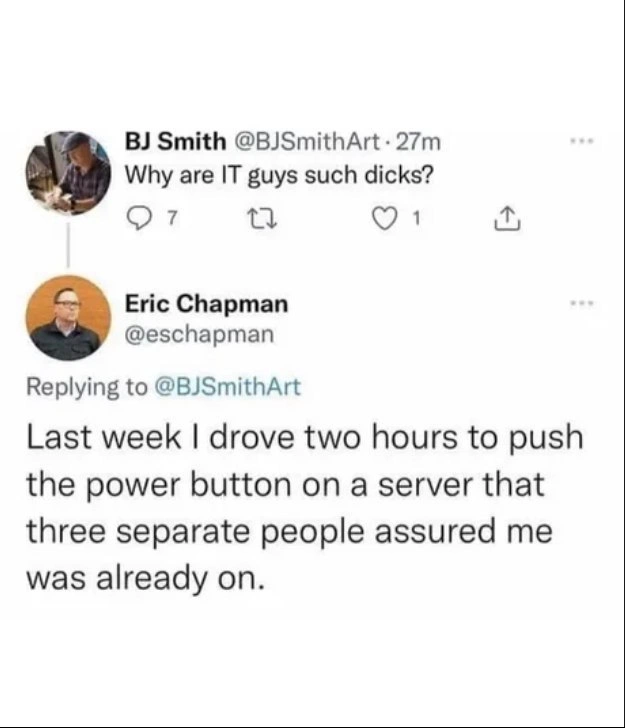
Think about when your TV won’t turn on and you call someone for help, only to realize the TV wasn’t plugged in or the power switch was off. That’s exactly what this meme is about, just with a computer server. In the picture, someone asks why IT support people can be so grumpy. The IT person answers with a story: he had to drive a very long distance (two hours!) just to press the “ON” button on a computer that everyone claimed was already turned on. In everyday terms, it’s like driving all the way to Grandma’s house because she said her lamp wasn’t working, and when you get there you find out the lamp was never plugged into the wall. You’d probably feel a bit irritated, right?
So the joke here is simple: the IT guy had to do something ridiculously basic – turn on a machine – because others didn’t do it or lied about it. It’s funny because it’s such a silly, avoidable problem, and it shows why the IT person might be in a bad mood. After spending hours traveling for a fix that a simple push of a button solved, who wouldn’t be a little cranky? In short, check the power first – you’ll save everyone a lot of trouble, and keep your IT friends in a much better mood!
Level 2: Two Hours, One Button
This meme shows a Twitter exchange that illustrates a classic SysadminPainPoints story in simple terms. A Twitter user (@BJSmithArt) asks, “Why are IT guys such dicks?” – basically complaining that IT support people often seem rude or impatient. Another user, presumably an IT professional named Eric (@eschapman), replies with a real-life example to answer that question. He says: “Last week I drove two hours to push the power button on a server that three separate people assured me was already on.”
Let’s break down that scenario. System administrators (sysadmins for short) are people responsible for keeping servers and other computer systems running. A server is a powerful computer (often in a data center or server room) that provides important services – for example, it might host a website, run a company’s database, or handle email. When a server goes down (stops working), it can cause big problems (ProductionIssues) for a business. Many sysadmins take turns being on-call, meaning they have to be available at odd hours (nights, weekends) to fix urgent issues. That’s why we see tags like OnCallHumor and OnCall_ProductionIssues – because being on-call leads to some crazy work stories.
In Eric’s case, an important server wasn’t working. Remote checks likely showed it was unresponsive (no network ping, no remote access). This server was not in the same location as Eric – maybe it was at a branch office or a co-location data center far away – so to fix it, he had to physically go there (physical_server_visit). He literally spent two hours driving, which is a significant trip. And what was the magical fix after all that effort? He pressed the power button on the machine to turn it on. That’s it! The server wasn’t broken or complicatedly misconfigured; it was simply powered off.
Here’s why that’s both funny and aggravating: Before making someone drive two hours, you’d expect that the folks at the site would perform basic troubleshooting steps. The number one basic check for any device that won’t respond is “Is it powered on?” According to Eric, three different people told him, “Yes, the server is on.” They assured him of this, as if they or someone else had already checked. It turns out they were wrong – either nobody actually pressed the power button, or they thought it was on when it wasn’t (perhaps a misunderstanding like a monitor was on but not the computer, or a light on the power strip fooled them). This kind of mistake is often lovingly referred to in IT as user error or PEBKAC – meaning the real issue was a human mistake, not a hardware or software fault. In simple terms, the problem was that someone goofed up. And because of that goof-up, a skilled IT person wasted hours on the road performing a task that a child could do: pushing a button marked “ON”.
So how does this explain IT folks’ prickly attitude? Imagine being in Eric’s shoes. You’re responsible for critical systems. When something breaks, everyone looks to you to save the day. You ask the team on-site the obvious questions: “Is it plugged in? Is it turned on?” They say, “Yes, of course!” If you can’t access the server remotely and all signals point to it being down despite those assurances, you have no choice but to travel there. Upon arrival, you discover that the fundamental thing was not done – the server was never actually powered on. It’s like being a firefighter called out for a big blaze, only to find someone’s fireplace was just empty and cold – the “fire” was that they never lit it. There’s relief that it’s an easy fix, but also frustration at the wild goose chase.
This is a well-known SysadminHumor scenario because it happens more often than you’d think. Many IT professionals have stories of ridiculously simple fixes: plugging in a cable, turning on a switch, replacing batteries – fixes that the user could have done, or said they did but didn’t. Over time, after being pulled away from family dinners or waking up at 2 AM for these kinds of trivial issues, an IT person’s patience wears thin. They might become brusque or sound annoyed when a user calls with a problem, because in the back of their mind they’re thinking, “Did you actually do the obvious thing first, or am I going to discover another silly oversight?”
In summary, the Twitter reply in the meme is both a funny story and an explanation. It’s funny in a facepalm way – the solution was so simple it’s absurd that it required a two-hour trip. And it explains that why_it_guys_are_rude tag: when IT workers seem grumpy or short-tempered, sometimes it’s because they’ve dealt with many exasperating situations like this. They don’t hate helping people; they’re just tired of situations where a lack of common sense creates extra work (and long drives!). The meme falls under SystemsAdministration and Hardware humor because it involves a physical server and the very down-to-earth task of turning on a machine. The takeaway for a junior developer or anyone new is: always check the basics (power, cables, switches) before escalating an issue — you might save a colleague a long drive and save yourself some embarrassment!
Level 3: Out-of-Band Outrage
The meme captures a painfully real Sysadmin scenario: an on-call engineer drives two hours to a remote server room only to perform the most basic power_button_fix – pressing the power button – because others on site failed at basic troubleshooting steps. The punchline is delivered via a Twitter reply: after being asked “Why are IT guys such dicks?”, the sysadmin retorts with an incident from last week: “I drove two hours to push the power button on a server that three separate people assured me was already on.” This single sentence is a master class in SysadminHumor and frustration. It’s a near-sacred trope in SystemsAdministration and OnCall_ProductionIssues circles: the user error so egregious (server literally off) that it justifies every ounce of attitude.
From a senior engineer’s perspective, the humor here is darkly cathartic. It’s a perfect storm of SysadminPainPoints: remote ProductionIssues compounded by misinformation and human error. Three different people — likely non-IT staff or junior techs — swore “Yes, of course the server is on!” Perhaps they saw a glowing monitor light or misread a status LED. Maybe nobody actually crawled under the rack to check the power cable or press the front-panel ON switch. The cynical veteran in every sysadmin suspects exactly this kind of oversight whenever someone claims “It’s definitely not a power issue.” We have a saying for it: PEBKAC (Problem Exists Between Keyboard And Chair), also known as a “layer 8 problem” in the OSI model — meaning the real bug was the human in front of the machine. In this case, the server wasn’t even powered on. It’s the ultimate facepalm moment that transforms a critical outage into a tragicomic farce.
Why does this resonate with experienced ops folks? Because we’ve all been there. It’s 3 AM, the monitoring system is screaming that Server42 is down hard, and nothing responds. You double-check: Did someone trip over a cable? Did the UPS die? You ask the onsite contact to confirm the server’s status. They insist everything is powered. Deep down, you’re not convinced — trust but verify becomes “trust no one until you see the power LED yourself.” In modern data centers, you’d invoke out-of-band management tools like IPMI, HP iLO, or Dell iDRAC to query and control power status remotely. Ideally, you should be able to run something like:
# Query the server's power state via the Baseboard Management Controller (BMC)
$ ipmitool chassis power status
Chassis Power is off
# Attempt to power it on remotely
$ ipmitool chassis power on
Error: Unable to establish IPMI session
# No dice – looks like remote management isn’t responding. Time for a road trip.
In a perfect world, that ipmitool command would have saved the day. But in the gritty reality of Hardware and legacy systems, either the server lacks lights-out management, the network to the BMC is misconfigured, or the feature was never set up (common in cash-strapped IT departments). So what’s left? physical_server_visit – a good old-fashioned car ride. You grab your keys and drive two hours just to do what a $0.05 line of code could have done if only someone had clicked the right toggle in the BIOS or the remote PDU was configured. This is the kind of OnCallHumor that isn’t really ha-ha funny until much later. At the time, it’s infuriating: a two-hour commute for a two-second fix.
By the time our sysadmin arrives at the server rack, he finds the machine as cold and dark as his sense of humor at that point. One press of the power button and fans start whirring, disks spinning – the server springs to life instantly. Problem solved. There’s no complex root cause like a kernel panic or a network partition. It was simply off. The three people who “assured” him it was on? Either incompetent, misinformed, or too scared to admit they hadn’t actually checked. UserError in its purest form. This is the kind of incident that erodes an IT professional’s faith in humanity, one false assurance at a time.
Now the opening question, “Why are IT guys such dicks?”, starts to answer itself. After a physical layer fiasco like this, when the frustrated engineer returns (likely well past midnight if it was an emergency), they’re expected to be cheerful and polite on Monday’s call? Fat chance. The attitude isn’t because IT folks start out rude; it’s battle-earned snark. When you routinely rescue users from self-inflicted techno-predicaments — especially ones that steal your personal time — your bedside manner tends to suffer. It’s a defense mechanism against burnout and sheer exasperation.
The humor here has an edge of truth that senior techs find both hilarious and painful. It’s a shared war story. The tweet’s author, Eric Chapman, achieves in one reply what could have been a 500-word rant: he uses a single absurd anecdote to justify the entire stereotype of grumpy IT personnel. And honestly, it’s hard to argue with him. As a senior admin reading this, you can practically taste the stale coffee and feel the highway miles. It’s a mix of “I can’t believe that happened” and “I absolutely can believe it because it happened to me in ’09.” This meme perfectly encapsulates why_it_guys_are_rude: not because they hate helping people, but because occasionally the help required is a ridiculous trek to flip an obvious switch that others pretended to flip. In short, it’s gallows humor for the on-call and a cautionary tale about always verifying the basics. The next time someone gripes about surly IT staff, well, now you have a two-hour, one-button story to explain the attitude.
Description
This image is a screenshot of a Twitter conversation that serves as a perfect comedic exchange. The initial tweet is from a user named BJ Smith, who asks, 'Why are IT guys such dicks?'. Below it is a reply from Eric Chapman that reads, 'Last week I drove two hours to push the power button on a server that three separate people assured me was already on.' The reply provides a concise, powerful, and deeply relatable anecdote that explains the cynicism often found in IT and operations roles. For senior engineers and SREs, this isn't just a joke; it's a shared trauma. It represents the countless hours wasted on 'user error' and the frustration of dealing with problems that could have been solved with the most basic troubleshooting, justifying the 'trust but verify' mindset that can be perceived as abrasive
Comments
8Comment deleted
Three separate people confirmed it was 'on'. In enterprise terms, that's what we call a quorum for being completely and utterly wrong
“Finance vetoed the $250 iDRAC license, so last night I drove 180 miles to be the ‘human API’ that toggles the power button - apparently my index finger now bills at triple overtime.”
The real reason IT professionals seem grumpy isn't the technology - it's the quantum superposition where a server exists in both 'definitely powered on' and 'actually off' states until an IT person observes it directly, collapsing the waveform with a two-hour commute and a single button press
When three people confirm the server is on but you still drive two hours to press the power button, you've just experienced the fundamental theorem of operations: trust is inversely proportional to the square of the distance from the metal. This is why seasoned ops engineers always have IPMI/iLO/iDRAC bookmarked - because 'the server is on' and 'the server is actually on' exist in different quantum states until directly observed by someone who knows what a POST screen looks like
We had quorum that the server was “on”; physics returned 0 - two-hour drive to commit the one-bit write
Blameless postmortem: root cause was layer 8 - three verbal health checks; mitigation is buying IPMI so the next RPC isn’t a two-hour drive to the power button
Eventual consistency fails hard when the power cord's unplugged - strong consistency demands a sysadmin's physical quorum
yup Comment deleted