Skip to content
DevMeme
573 of 7435
A Support Group for the Trauma of Supporting IE11
LegacySystems Post #656, on Sep 10, 2019 in TG

A Support Group for the Trauma of Supporting IE11

Why is this LegacySystems meme funny?

Level 1: Stuck in the Past

Imagine you and your friends usually play with the newest, coolest toys, but one day your teacher says you must all play a game using an old toy that barely works. It’s dusty, a bit broken, and most kids have thrown it away by now. You try to use it, but it’s frustrating – the buttons stick and it doesn’t do all the fun tricks modern toys do. You feel upset and left behind, like “Why do I have to deal with this old thing?” Now, picture someone friendly coming over and saying, “Hey, I also have to use that old toy. Let’s team up and figure it out together. You’re not the only one.” You’d feel a little better, right? You’d share tips to make the old toy work and at least you could laugh about it together.

That’s exactly what this meme is about, but with computer stuff. Developers have shiny new tools and code, but some of them are forced to make their stuff work on a really old web browser (IE11) – kind of like that old toy. It makes their job hard and frustrating. The meme jokes that those developers should start a support group (like a club) to help each other and not feel alone. The line “You’re not alone” is there to comfort anyone going through this struggle. In simple terms, it’s funny because it’s true – sometimes in technology, people still have to use outdated things, and it feels good to know others have the same problem and can understand what you’re going through.

Level 2: Old Browser, New Headaches

This meme centers on the challenges of coding for an old web browser (IE11) while using modern web development tools. Internet Explorer 11 (IE11) is a web browser released by Microsoft in 2013. It’s the last version of the once-dominant Internet Explorer line. By 2019, IE11 was already discontinued for consumer use (Microsoft had introduced a new browser called Edge) and lagged far behind other browsers in features. Yet, some developers still had to make sure their websites and apps looked and worked right on IE11. That’s a tough job because IE11 doesn’t understand a lot of new web technologies that today’s code uses.

A quick overview of the problem:

  • Browser compatibility is the term for making a website work on different browsers (Chrome, Firefox, Safari, IE, etc.). Each browser can interpret HTML/CSS/JS a bit differently. IE11, being old, often interprets things very differently or not at all for modern features.
  • Modern JavaScript (the programming language running in webpages) has evolved. Newer browsers support ES6/ES2015+ features like arrow functions (()=>), Promise objects for async tasks, let/const for variables, and so on. IE11 recognizes only older JavaScript (ES5 era). So if a developer writes modern JS, IE11 will throw errors because it doesn't know those instructions. To solve this, developers use transpilers (like Babel) that automatically convert modern JS code into equivalent older code that IE11 can run. For instance, an ES6 class or arrow function gets transformed into a plain old function. This extra step is specifically to satisfy IE11.
  • Similarly, modern CSS (styles for webpages) includes features like Flexbox and CSS Grid for layout, and CSS custom properties (variables). IE11 has limited or no support for some of these. For example, CSS Grid is only partially supported in IE11 with a special outdated syntax (developers have to write weird -ms- prefixed rules as a fallback). Polyfills come into play here too: a polyfill is like a little add-on script that mimics a missing feature. For example, there are polyfills that try to make an older browser behave as if it had CSS Grid or Promise support. It’s like teaching an old dog new tricks via a small training guide each time the page loads.
  • Legacy support means supporting old systems or software that are still in use. IE11 is exactly that: a legacy browser. Some companies, especially big enterprises or government agencies, still had IE11 as their default browser in 2019 because their internal tools were built for it. As a junior developer, you might wonder “why not just tell those users to upgrade their browser?” Often it’s not that simple: maybe the users don’t have permission to install a new browser, or the old web app only works in IE11 due to quirky integrations like ActiveX or old SharePoint sites. So, the development team has no choice but to keep things working on that browser.

The tweet captures the frustration and isolation a developer can feel in this situation. If you’re a newer developer, imagine learning all the cool, new web tech – and then being told: “Make sure it also works on this 6-year-old browser that doesn’t support half of it.” It’s daunting. You end up spending a ton of time writing workarounds: maybe you add special case code like if (browserIsIE11) { ... } or include extra files for IE11 users. You likely have to test your site in IE11 manually, which can be tricky because its developer tools and error messages are much less helpful than Chrome’s. A lot of juniors have their first shock when they see a webpage that looked great in Chrome fall apart in IE11. For example, maybe your nice flexbox layout suddenly becomes a jumbled column, or your fancy ES6 code just stops executing with a cryptic error. That’s when you learn what a polyfill is, or you learn to tweak the build settings to generate an IE11-friendly bundle.

So why a “support group”? In everyday terms, support groups are for people dealing with a difficult common problem (like quitting an addiction or coping with stress) where sharing experiences helps. Here, the difficult problem is IE11 compatibility. The meme suggests that writing code for IE11 is so frustrating that developers need to vent and console each other about it. It’s a form of tech humor that’s very relatable: many in Web Development have felt this pain. The tweet saying "You’re not alone." is both funny and reassuring – it means if you’re stuck wrestling with IE11 issues, take heart that lots of other developers are in the same boat, sharing your pain. In the Frontend community, that’s a common bond: almost a rite of passage to curse IE at least once!

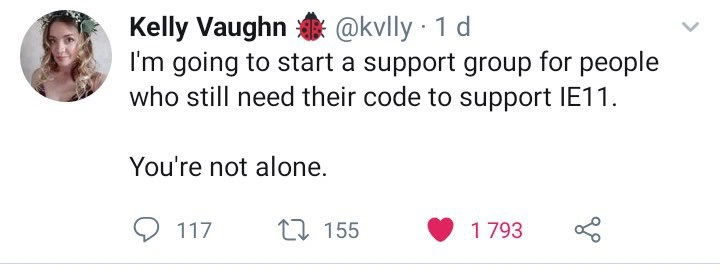
Visually, the meme is a screenshot of a tweet, complete with the reply/retweet/like counts. Those high numbers show the tweet went a bit viral among developers. The fact it’s presented in a tweet format also tells us this is a widespread sentiment – not just an isolated grumble in a private chat, but something people publicly agree on. In summary, for a junior dev: this meme is saying “Supporting IE11 is a notorious headache in web development, and if you have to do it, you might feel miserable – but lots of us have been there, so we get it.” It teaches the reality that sometimes cutting-edge tech has to be dumbed down for older systems, and that can be a frustrating part of the job.

Level 3: IE11 Survivors Club

The tweet in this meme offers group therapy for developers forced to maintain Internet Explorer 11 (IE11) support. It’s half joke, half cry for help. Why? Because supporting IE11 in modern web development is a notorious pain that senior front-end devs know all too well. Imagine a circle of battle-scarred programmers confessing: “Hi, I’m Alex, and I still have to support IE11,” followed by sympathetic groans. The humor lands because it’s alarmingly relatable – so many developers have suffered through quirky IE11 bugs and workarounds that the idea of a “support group” feels apt. The tweet’s stats (117 replies, 155 retweets, 1,793 likes) show a chorus of “Right there with you!” from fellow devs. In the world of Frontend and LegacySystems, this is basically a veterans’ meetup.

Technically, IE11 (released 2013) is the last of the Internet Explorer line – a browser stuck in time. By 2019, Chrome, Firefox, and even Microsoft’s new Edge (with Chromium engine) far surpassed IE11 in supporting modern web standards. But some enterprises and users refused to move on, meaning developers couldn’t move on either. The meme highlights that lingering requirement: even as the world is using <canvas> graphics, ES6+ JavaScript, and fancy CSS3, a subset of developers must ensure their code still runs on a browser that doesn’t know about those advancements. It’s like having to code for a little time capsule from the past, every day. No wonder maintaining IE11 compatibility feels like a form of penance that many hoped they’d escaped.

From a senior dev perspective, the absurdity lies in how much extra work and technical debt IE11 imposes. We’re talking about adding dozens of polyfills (small code shims that add missing features to older browsers) and using transpilers like Babel to convert cutting-edge JS back into 2012 dialect. A modern React app or Vue app typically ships an additional bundle just for IE11, full of backwards-compatibility code. For example, if you use a trendy ES2015 feature like Promise or async/await, you must include a Promise polyfill for IE11, because otherwise it’s game over – IE11 will simply throw an error and break. The same goes for many conveniences: Arrow functions ()=>? Nope, IE11 thinks that’s gibberish. let and const? Not understood without transpilation to var. Fancy CSS like CSS Variables or the newest Grid spec? Forget it – IE11 either doesn’t support them or implements an archaic draft version with weird syntax. Developers end up writing double or triple code paths: one for modern browsers, and one grim path for IE. For instance:

/* Modern browsers use this standard CSS Grid: */  
.container {  
  display: grid;  
  grid-template-columns: 1fr 1fr 1fr;  
}  

/* But for IE11’s outdated Grid spec, you might add: */  
.container {  
  display: -ms-grid; /* IE11 uses its own prefixed Grid */  
  -ms-grid-columns: (1fr)[3]; /* IE11's way to specify 3 columns */  
}

Here the code has to include an IE-specific hack (-ms-grid) alongside the normal display: grid. This doubling of effort is everywhere when supporting IE11. It’s the same story with JavaScript: you might write modern code and then run a build step to transpile it down to old-school JS that IE11’s ancient JScript engine can execute. The end result is a heavier, more convoluted codebase – all to accommodate a browser with ~5% (or less) user share by 2019. It’s a classic example of the 80-20 rule in reverse: 80% of the headaches for maybe 5% of the users.

Now, why do devs still do it if it’s so painful? That’s part of the dark humor. Often it’s not a choice – it’s a business requirement. Enterprise and LegacyTech scenarios are notorious: maybe a big client or an internal corporate app only works on IE11 (perhaps due to old SharePoint portals or ActiveX controls or simply bureaucratic inertia). Some organizations standardized on IE years ago and never approved anything else. As a result, dev teams are told “our product must run on IE11 until further notice.” If you’re a senior developer, you’ve either faced this or know someone who has. It’s tragicomic because all industry best practices say “drop support for IE, it’s outdated!” – yet the reality is you get that one VP or government office insisting on using IE11 in 2019, and that one VP might be paying the bills. So devs grumble and comply. It’s a tech anti-pattern playing out at a large scale: hanging onto deprecated software (IE11) and forcing new technology to bend backwards to stay compatible.

The support group idea also resonates on a human level. Working around IE11’s quirks can be frustrating to the point of questioning your sanity. Seasoned devs swap horror stories: CSS flexbox misbehaving only in IE11, the dev tools in IE11 being primitive compared to Chrome’s, or that one time an IE11 bug fix managed to break something in Chrome (the butterfly effect of polyfills). There’s a shared trauma: many of us have pulled late-nighters not to implement a new feature, but simply to make the existing feature not crash IE11. It’s programming purgatory: you’re not building the future, you’re babysitting the past. The tweet’s "You're not alone." nails the emotional aspect — it acknowledges the loneliness a dev might feel being stuck supporting an obsolete browser while the community at large has moved on to fancy new tools. Knowing that others are in the same boat is oddly comforting (misery loves company, after all).

In summary, the meme is funny to experienced developers because it hyperbolically treats “supporting IE11” as an affliction one needs a recovery group for. It pokes at the gulf between modern web development and the annoying reality of LegacySupport. The subtext is: “We thought we’d left IE behind, but it still haunts us – and if you’re haunted too, let’s commiserate.” For a cynical veteran, this is both hilarious and painfully true. We laugh, perhaps a bit bitterly, because we’ve been there – we have the scars from debugging IE’s peculiarities. The tweet’s author putting a 🐞 (ladybug) emoji by her name is strangely appropriate: supporting IE11 often feels like chasing down endless bugs. So yes, sign us up for that support group – refreshments and tissues provided, polyfills optional. You’re not alone.

Description

This image is a screenshot of a tweet from user Kelly Vaughn (@kvlly). The tweet reads, 'I'm going to start a support group for people who still need their code to support IE11. You're not alone.' The profile picture shows a woman with blonde, curly hair. Below the text, the tweet shows engagement metrics: 117 comments, 155 retweets, and 1,793 likes. The humor comes from the shared and well-known frustration among web developers who have to ensure their modern websites and applications work on Internet Explorer 11. IE11 is infamous for its poor support of modern web standards (like CSS Grid or modern JavaScript), requiring developers to spend significant extra time on workarounds, polyfills, and bug fixes. The idea of a 'support group' perfectly captures the feeling of a shared struggle against an obsolete technology that refuses to disappear, especially in enterprise environments

Comments

7
Anonymous ★ Top Pick My therapist told me to confront the things that haunt me. So, I opened the IE11 debugger, and now she has a therapist
  1. Anonymous ★ Top Pick

    My therapist told me to confront the things that haunt me. So, I opened the IE11 debugger, and now she has a therapist

  2. Anonymous

    Nothing screams “enterprise client” like the CI pipeline’s final step: transpile ES2022 into dial-up-era JavaScript so the lone IE11 kiosk in Accounting can load our micro-frontend monolith

  3. Anonymous

    The first rule of IE11 Support Group is you don't talk about flexbox. The second rule is you DEFINITELY don't talk about CSS Grid

  4. Anonymous

    Starting a support group for IE11 developers is noble, but the real challenge will be getting everyone to show up at the same time - half will still be waiting for their polyfills to load, and the other half will be stuck debugging why their CSS Grid fallback broke the entire layout in a browser that Microsoft itself abandoned years ago

  5. Anonymous

    Our boldest OKR this year is deleting 'ie 11' from browserslist without triggering a procurement escalation

  6. Anonymous

    IE11 support: where enterprise compliance turns modern JS into eternal ES5 penance

  7. Anonymous

    IE11: the only stakeholder that turns microfrontends into one bloated ES5 bundle and your architecture diagram into a Babel config

Use J and K for navigation