
A Developer's Guide to Being Ignored
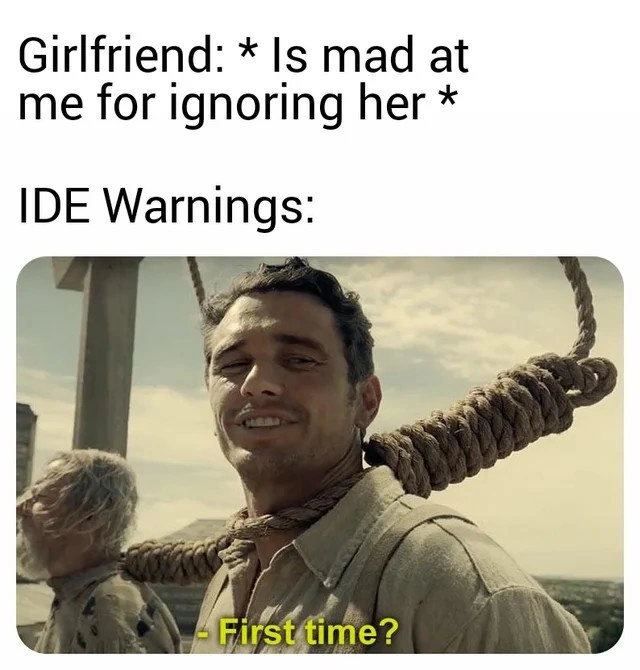
Why is this IDEs Editors meme funny?
Level 1: Ignoring Mom’s Warnings
Imagine your mom tells you, “Don’t forget to wear your coat, it’s cold outside!” That’s a warning. If you ignore her and go out without a coat, you might start shivering or even catch a cold. Later, when you’re sneezing, your mom might give you a small smile and say, “First time not listening and getting sick, huh?” She’s not happy you’re sick, but she did warn you! This meme is just like that: the computer’s coding tool tried to warn the programmer about something wrong in the code, but the programmer didn’t listen. Just like a mom or a friend saying “I told you so,” the computer warning is joking, “Oh, you ignored me and now have a problem? First time?” It’s funny because we all know we should listen to good advice – whether it’s a person who cares about us or a computer program warning us – and when we don’t, the little “I warned you!” moment both teaches us a lesson and makes us smile.
Level 2: Yellow Flags in Code
An IDE (Integrated Development Environment) is a programmer’s main tool for writing code – think of it as a smart word-processor for coding. Popular IDEs like Visual Studio Code, IntelliJ IDEA, or Eclipse not only let you write text, but also understand your code and give helpful feedback. One big way they help is by showing warnings. An IDE warning is like a gentle tap on the shoulder saying, “Hey, something in your code looks odd – maybe check this.” These are usually shown with yellow underlines, ⚠️ icons, or lightbulb suggestions. They’re not as severe as errors (errors are shown in red and will stop your code from running), but they indicate potential problems or bad practices.
For example, imagine you write some code and never use a variable you created. The IDE might highlight it and say, “Warning: variable ‘x’ is assigned a value but never used.” It’s not an error – your program can still run with an unused variable – but it’s probably a mistake or at least unnecessary. Here’s a tiny example:
int answer = 42; // Warning: The value of 'answer' is never used
System.out.println("All done!");
In the code above, the IDE would likely show a warning on the answer variable because we never actually use it. It’s hinting that you either forgot to use answer or you don’t need that line at all. Ignoring this might not crash your program, but it’s poor CodeQuality to leave junk like that lying around. It could confuse other developers or indicate you intended to do something but missed it.
Now, why is the meme funny? It’s comparing two situations:
- You ignored your girlfriend, and now she’s mad at you. (Relationship no-no that many people find themselves guilty of at least once.)
- You (the developer) habitually ignore IDE warnings, and the warnings reply with “First time?” meaning this is nothing new for us.
The IDE warnings are personified (given a human voice) in the meme. They’re depicted as a cowboy-ish character with a noose around his neck, from a movie scene, saying “First time?”. In internet slang, saying “First time?” like this is a cheeky way to tell someone that what they’re experiencing is actually pretty common. It’s like when a new programmer panics about crashing a program and an experienced dev chuckles, “Crashed the app, huh? First time?” indicating it happens to everyone. Here, the warnings are the experienced ones: they’ve been ignored by programmers thousands of times. So when the girlfriend is upset about being ignored for the first time, the warnings joke that this is just routine in the coding world.
In real coding practice, constantly ignoring warnings is not a good habit. Those warnings often point to things that can become bugs or make the code harder to maintain – in other words, they affect overall code quality. Over time, ignoring many small warnings can lead to what developers call technical debt. That’s a term for the accumulated consequences of quick-and-dirty decisions in code. It’s like taking shortcuts that you’ll eventually have to fix or “pay back” later. Each ignored warning is a tiny shortcut or something not cleaned up. One or two might be okay, but if you have dozens or hundreds, your codebase starts to get messy or risky.
A common early-career experience is seeing a bunch of compiler or linter warnings and asking a senior, “Should I worry about these?” Often, the answer is “Yes, fix what you can.” But sometimes, if you’re unfortunate, the answer you get is “Oh, those? Everyone ignores them, they’ve always been there.” :grimacing: That attitude can be confusing for a newcomer. Shouldn’t we fix them? Why would we knowingly leave warnings in the code? The truth is, it’s better to fix warnings, but deadlines, lack of knowledge, or sheer volume of warnings can lead teams to ignore them “just for now.” The meme brings this out in a humorous way. The warnings are basically saying to the developer, “Now you know how we feel when you ignore us!” It’s a playful reminder that ignoring someone (or something) that’s trying to help you – whether it’s your partner or your code editor – can backfire.
To make it more concrete:
- IDE Warning: a message from your coding tool about a possible issue (not stopping the code from running, but important to consider). e.g. “Possible null pointer access” or “Deprecated method, use XYZ instead.”
- Ignoring the warning: you see the message but do nothing about it, maybe because the program still works or you don’t understand the warning.
- Consequence: later, the thing the warning hinted at might cause a real error or bug. For example, “possible null pointer” warning if ignored might later result in an actual NullPointerException crashing the program when that situation occurs for real. The IDE tried to save you from that, much like a friend giving advice.
- Girlfriend vs IDE parallel: Just as a partner might feel bad and problems arise if you ignore them, your code can “feel bad” (break or cause problems) if you keep ignoring what it’s telling you.
The categories here are IDEs_Editors (because it’s about tools like IDEs and their warnings) and CodeQuality (because those warnings are directly related to writing clean, reliable code). As a junior developer, it’s good to get into the habit of paying attention to these warnings. Think of them as the spellcheck or grammar check for coding. Just like a red underline in Word means you spelled something wrong, a yellow underline in code means you might have made a mistake or could improve something. It’s not always critical, but it’s usually worth looking at. The meme jokingly personifies these “grammar-check of code” messages as a character who’s used to being ignored, to the point he finds it funny when someone is shocked at the reaction to being ignored.
In summary for this level: The meme uses humor to teach a little lesson – don’t ignore warnings, in life or in code. Experienced devs have learned that lesson the hard way, and the IDE warnings in the meme are portrayed as having a laugh about it. As a newer coder, if you pay attention to those warnings early, you’ll write better code and avoid some painful “I told you so” moments later on.
Level 3: Gallows of Technical Debt
This meme hits seasoned developers right in the code quality feels with some literal gallows humor. The top text sets up a relatable scenario: "Girlfriend is mad at me for ignoring her." We’ve all been in trouble for tuning someone out. But then the meme pivots: IDE warnings chiming in with James Franco’s smirking face on the gallows saying “First time?” – a reference to a famous scene from The Ballad of Buster Scruggs. In that darkly comic scene, a veteran outlaw (with a noose around his neck) sees a newbie panicking and drawls “First time?” The meme repurposes this as the IDE warnings talking to the developer: the warnings are the grizzled veteran who’s been “ignored” by programmers countless times, and the girlfriend is the newcomer experiencing this neglect for the first time. It’s a clever crossover between developer humor and pop culture, implying that compilers and static analyzers are long-suffering observers of our bad habits. The IDE warnings have been metaphorically “hung out to dry” so often that they just give a wry smile when someone is facing the consequences of ignoring important signals.
On a technical level, this highlights a classic CodeQuality issue: constantly choosing to ignore those yellow flags and squiggly underlines in your code editor. Every experienced engineer has seen codebases where the number of warnings resembles a high score rather than something to be fixed. 0 errors, 237 warnings? Ship it! :wink: Those warnings can be about anything: an unused variable, a deprecated function, a possible null pointer dereference, or a type cast that might fail. Newcomers (and harried old-timers under deadline pressure) often think, “Hey, it compiles and runs, so what’s the big deal? The build is green, let’s deploy.” This mindset is how technical debt accrues silently. Each ignored warning is like adding one more brick to a rickety wall. The wall doesn’t collapse today, but each brick makes it shakier. In production, at 3 AM months later, something crashes or misbehaves and you discover the root cause was flagged by an IDE warning ages ago. It’s the coding equivalent of ignoring the check-engine light until the car breaks down on the highway.
Remember that many warnings start as “annoyances” but can end up as full-blown bugs:
- Unused variable: Maybe it’s harmless, or maybe you forgot to use it in a crucial calculation – now your output’s wrong.
- Deprecated API: It works today, but in the next library update it’s gone. Surprise, now you’re firefighting an urgent upgrade.
- Possible null dereference: 99 times out of 100, that variable isn’t null… until that one time it is, crashing your app.
- Unchecked return value: The function could fail and return an error, which you ignored. Now your data didn’t save and nobody handled the error.
- Performance warning: “This algorithm is $O(n^3)$,” the analyzer whispers. You ignore it on small tests, then in production it slows to a crawl with real data.
Each of these warnings is the IDE trying to save you from future pain. Seasoned devs have learned (often the hard way) that today’s warning is tomorrow’s incident report. The meme is funny because the IDE warnings are basically saying to the developer, “Oh, your girlfriend is upset you ignored her? Ha! First time dealing with fallout from ignoring something important, huh? We’ve been enduring your neglect for years.” It’s a tongue-in-cheek way of giving developers a guilty conscience about all those times we’ve seen ⚠️ icons in our editor and thought “meh, later.”
There’s also an undercurrent of shared trauma here. In many companies, people treat constant warnings as background noise. The code still runs, the tests (hopefully) pass, so warnings get backlog’d indefinitely. Over time, that pile of ignored warnings becomes a mountain of technical debt. When something finally breaks, managers ask, “How did this happen? Weren’t there signs?” Well yes, there were literally compiler warnings for months! But by then it’s too late or too costly to easily fix. The meme’s dark humor resonates because practically every developer has either inherited a codebase with hundreds of warnings or contributed to one. It’s a bit of “we’re all guilty” humor. The IDE warnings saying “First time?” also poke fun at the developer’s personal life in comparison: You managed to anger your girlfriend by ignoring her, and you’re surprised? Buddy, try ignoring your compiler every day – we know a thing or two about the cold shoulder! It anthropomorphizes the IDE as a wisecracking friend who has seen this scenario play out again and again.
From a software engineering best-practice perspective, this meme underscores why many teams adopt a zero-warning policy. Some projects treat warnings as errors (-Werror flag or equivalent), forcing developers to deal with them before code can even merge. This is like the IDE saying “I won’t let you ignore me.” But not all teams are that strict – especially on legacy projects, you might have dozens of legacy warnings that everyone is afraid to touch. Fixing one might break something else, or it’s just too much work for too little immediate benefit. So the warnings remain, eagerly flashing like a car’s service light that everyone pretends not to see. IDEs and editors (like Visual Studio, IntelliJ, Eclipse, VS Code) do their part by highlighting issues in real-time. Modern IDEs have become quite smart – they integrate static analysis and linters so they’ll underline a suspicious piece of code as you write it. But the developer still has to choose to heed or ignore that advice. There’s even a trope that junior devs initially panic seeing warnings (“Oh no, what did I do wrong?!”) whereas senior devs might be jaded (“Ugh, 50 warnings… but none of them are critical. We can push to prod.”). That inversion is part of the joke here: the IDE warnings are cast as the weary seniors, and the developer is the naive one surprised that ignoring something led to trouble.
Finally, let’s appreciate the layered humor: The meme uses a scene about literally being hanged (a life-or-death situation) to joke about code warnings. This exaggeration is what makes it funny and not just preachy. It’s saying, yes, ignoring compiler warnings isn’t going to literally kill you, but metaphorically it can come back to “hang” your project. It’s an absurd juxtaposition that lands because there’s a kernel of truth in it. Anyone who’s spent a late night debugging a production issue that was flagged by a warning knows that mix of regret and dark laughter – you think, “the tools tried to tell me, and I still messed up.” That’s the laugh-through-the-pain moment this meme channels. In summary (for this level): ignoring IDE warnings is an age-old rite of passage in programming, and this meme wryly reminds us that the warnings have been there, suffering in silence, far longer than our loved ones have. First time ignoring things and facing consequences? The warnings have one word for us: “Noose-ance.” (Sorry, couldn’t resist a pun – the veteran in the noose making a nuisance pun fits too well.) The grim smile of the IDE says: “Get used to it, kid. Listen to your warnings – in code and in life – or you’ll end up swinging sooner or later.”
Description
This meme uses the 'First Time?' template from the film 'The Ballad of Buster Scruggs,' featuring a smiling James Franco with a noose around his neck. The top text sets up a scenario: 'Girlfriend: * Is mad at me for ignoring her *'. Below this, the text 'IDE Warnings:' serves as the setup for the punchline delivered by the image. The character in the image, representing the IDE warnings, looks at the 'girlfriend' with amusement and asks, '- First time?'. The joke personifies IDE warnings as a long-suffering entity, completely accustomed to being ignored by the developer. The humor lies in the comparison, suggesting that the developer's habit of ignoring automated warnings is so ingrained that a partner's frustration is nothing new. It's a relatable commentary on developer 'code blindness' to warnings and the tendency to dismiss them as noise until they escalate into actual errors

Comments
14Comment deleted
An IDE warning is just a suggestion. A girlfriend's warning is a suggestion... to update your resume and find a new place to live
When you finally enable -Werror on the 10-year-old monolith and Jenkins chokes on 9,876 warnings, every one of them leans in and whispers, “First time?”
After 15 years in the industry, you learn that IDE warnings are like production monitoring alerts - they only matter when the CEO notices the outage, just like relationship warnings only matter when she changes the Netflix password
The real tragedy isn't the noose - it's that we've all been that smiling developer who's ignored so many IDE warnings that we've achieved a zen-like acceptance of our fate. We suppress warnings with @SuppressWarnings, we disable linters with inline comments, we commit with --no-verify, and then act surprised when production burns. The 'First time?' isn't just about ignoring warnings; it's about the entire industry's collective muscle memory of clicking 'Dismiss' on every yellow squiggle, treating static analysis like spam email, until that one ignored null pointer warning takes down the payment service at 3 AM on Black Friday
Enable -Werror for one sprint and watch the org declare a breaking change - apparently the only stable API we maintain is ignoring yellow squiggles
IDE warnings: the loyal sidekick outlasting spouses, patiently waiting for that mythical refactor sprint
А что это за фильм? Comment deleted
The Ballad of Buster Scruggs Comment deleted
всегда думал, что это из первого сезона Westworld Comment deleted
Я думал из пиратов Карибского моря :) Мама всегда говорила что я особенный Comment deleted
Спасибо Comment deleted
Хорошо :) Comment deleted
The Ballad of Buster Scruggs (2018) • Movie 2h13min ⭐️7.3 IMDB Directors: Ethan Coen, Joel Coen Actors: Tim Blake Nelson, Willie Watson, Clancy Brown, Danny McCarthy Genres: 🤣 Comedy, 🎭 Drama, 🎶 Musical, Mystery, 💕 Romance, 🌵 Western The Ballad of Buster Scruggs is a movie starring Tim Blake Nelson, Willie Watson, and Clancy Brown. Six tales of life and violence in the Old West, following a singing gunslinger, a bank robber, a traveling impresario, an elderly... Comment deleted
Я только что проверил Comment deleted

