Skip to content
DevMeme
3856 of 7435
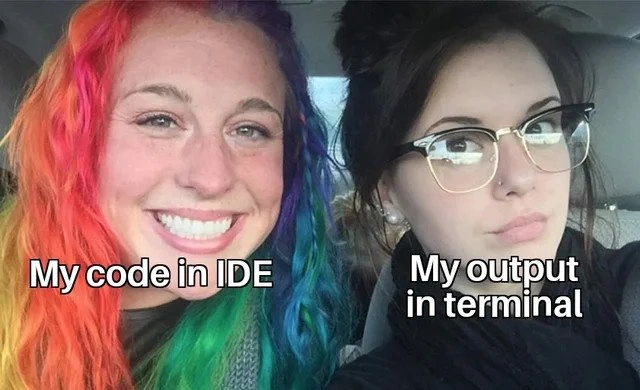
Colorful code versus monochrome terminal output - expectation vs reality meme
CLI Post #4199, on Feb 11, 2022 in TG

Colorful code versus monochrome terminal output - expectation vs reality meme

Why is this CLI meme funny?

Level 1: Rainbow Picture vs Black-and-White Printout

Imagine you draw a beautiful rainbow with bright crayons on a piece of paper – it’s super colorful and you’re proud of it. Now suppose you put that drawing into a copy machine that only uses black ink. The copy that comes out would be all black-and-white, with none of the pretty colors of your original drawing. That’s exactly the feeling of this meme. The left person’s rainbow hair is like the colorful drawing (our fancy-looking code), and the right person’s plain dark hair is like the black-and-white copy (the plain output we see in the terminal). It’s funny because you’d expect something as colorful as the rainbow drawing to also come out colorful, but instead it turns out dull. In the same way, a programmer might expect their nicely written, color-highlighted code to show a clear and nice result, but the computer just gives a plain monochrome text result. The meme makes us laugh because we recognize that little disappointment: “I made it so pretty, why does it look so plain when I actually use it?”

Level 2: IDE Glamor vs. Terminal Reality

Let’s break down the joke in simpler terms. On the left is “My code in IDE.” An IDE (Integrated Development Environment) is a software application developers use to write code. Popular IDEs or code editors (like VS Code, IntelliJ, or PyCharm) have features like syntax highlighting, which means they display code in different colors and styles. For example, in your code: keywords (like if, for, function) might appear in bold blue, strings (text in quotes) in green, and comments in gray. These colors make the code easier to read and understand, almost like giving it a rainbow-themed makeover. So when a developer says their code looks like the person with rainbow hair, they mean their source code in the editor is colorful, well-organized, and looking good. It’s exciting to see because the code’s structure is clear — each color tells you something (one color for commands, another for text, etc.). This is a big part of developer experience: a nicely highlighted, formatted code in an IDE makes a programmer feel comfortable and even proud while coding.

On the right is “My output in terminal.” The terminal (or CLI, Command Line Interface) is where your program runs and shows its results or messages. Think of it as a plain text screen – usually just white or light gray text on a black background (or sometimes black text on white). By default, the terminal doesn’t know anything about the structure of your code. It only displays exactly what the program outputs, in the one basic font color. So, if your program prints "Hello World", it will just appear as white text saying Hello World in the terminal. No fancy colors or bold highlights – just plain text. Often, when we run a program to debug (find mistakes) or to see if it works, we rely on the output in the terminal. And many new developers expect that output to be as nicely formatted as the code they wrote, but it usually isn’t. This mismatch can be startling or funny: your code was organized and pretty, but the console output can be bland or even messy.

For example, imagine you wrote a program that should output a list of student scores. In your IDE, the code for this might look great with different colors for loops, variables, etc. But when you actually run it in the terminal, the list of scores might just appear as one long line of numbers, or the formatting could be off (maybe all scrunched together or with awkward spaces). If there’s a mistake, the terminal might show an error message or a stack trace (a dump of functions that were running) all in plain text. That output can look intimidating: walls of white text, no highlighting to tell you what’s what. This is a common debugging_troubleshooting moment: you have to carefully read that plain output to figure out what went wrong. Developers often joke about this because the contrast is so common – it’s practically a rite of passage to discover that “works in my head (or looks good in my editor)” doesn’t always mean “nice output on screen.” In short, the left side of the meme (rainbow hair/code) is the expectation of clarity and style, and the right side (plain hair/output) is the reality of the command line output: straightforward, un-styled, and sometimes not what you hoped for.

Level 3: Chromatic Code, Monochrome CLI

In the left half of this meme, we see rainbow-dyed hair and a big grin labeled “My code in IDE”. It’s a perfect metaphor for how our source code looks inside a modern editor: vibrant, orderly, and full of life. Thanks to syntax highlighting, keywords might be blue, strings green, comments gray – our code is literally rainbow-colored. That bright hair isn’t just a fashion statement; it represents the pride and excitement of writing code that looks great in an IDE (Integrated Development Environment). Many developers spend time choosing a fancy color theme (from eye-searing neon to professional dark modes like Solarized or Dracula) to make their code aesthetically pleasing. In the editor, everything is laid out just right and each token is colour-coded. Developer Experience (DX) at its finest: your code feels under control and even a bit glamorous. We’ve all had that moment admiring a nicely formatted function, thinking “wow, this is some beautiful code”. The left side’s huge smile nails that feeling of expectation – confidence that if the code is this polished, the output will be awesome too.

Then reality hits – the right half of the meme shows the monochrome truth: plain dark hair, serious face, captioned “My output in terminal”. When you actually run that beautifully highlighted code on the CLI (Command Line Interface), the program’s output is as dull and flat as that dark hair. By default, a terminal won’t display colorful keywords or structured formatting; it just spits out raw text. All those dozens of hues in your IDE collapse into the single color of your terminal’s font (usually an unfriendly off-white or gray on black). If you were expecting rainbow printouts, tough luck – the CLI is often like an old black-and-white TV showing your blockbuster code. This expectation vs reality contrast is a classic DeveloperHumor scenario: no matter how fabulous your code looks during development, the computer only cares about running instructions, not preserving your color-coded style. The result can feel like a letdown – we joke that our code had more colors than a unicorn**✱**, yet the console output has zero flair.

Beyond the visuals, this meme hits on DebuggingFrustration every coder knows. We’ve all written what we thought was a clean, well-structured piece of code, only to run it and face unreadable gibberish or a wall of text in the terminal. Sometimes the output is “dull” simply because it’s unformatted (e.g. one long line of JSON with no line breaks or indentation). Other times it’s literally broken – like when printing binary data or special characters that turn into weird symbols in the console. Ever see \x00\x1B[37m clutter in your terminal? That’s your program sending ANSI escape codes or non-printable bytes, which the terminal may interpret incorrectly, resulting in funky output. It’s like carefully styling your code with bright highlights, but forgetting to style what the code produces. The humor is that the developer’s expectation of a neat output is betrayed by reality: the terminal output can be ugly, unformatted, or monotonous. The right-side person’s mildly annoyed expression says it all: “Seriously? I wrote gorgeous code for this output?”

From a seasoned developer’s perspective, this discrepancy is both funny and painfully true. We put effort into code quality and readability (for good reason – maintainable code is crucial), yet the actual program output often gets minimal beautification. Unless you explicitly program color or formatting, the terminal won’t do it for you. In large systems, teams might build fancy logging frameworks to pretty-print debug info or use dashboards – attempts to bring some of that IDE-like clarity to runtime data. But in everyday scripting and troubleshooting, we’re usually stuck with plain text logs scrolling by. The meme exaggerates it with rainbow vs black hair, but it’s grounded in reality: fancy DeveloperExperience_DX on the left, spartan TerminalLife on the right. It highlights a kind of developer cognitive dissonance: the code is our well-organized world (we even make it look like a rainbow garden), but the runtime is the wild untamed world (text just dumps out with no styling, sometimes chaotic). This contrast is exactly why the meme resonates. It’s an expectation_vs_reality we’ve all experienced after hitting “Run”. The laugh comes with a tiny wince of recognition – oh, how many times have we proudly run a program only to see a bland or borked output and go “...well that’s not as pretty as I hoped.”

✱ Fun Fact: Some terminals can display colors if you output ANSI color codes. For example, adding \033[35m in a string might print the text in magenta. But if you’ve ever seen a raw log that contained those escape codes without proper interpretation, it’s like the terminal burped up a hairball of [33m characters – not exactly the rainbow you wanted!

Description

The image is a two-person selfie taken inside a car. The person on the left sports vividly rainbow-dyed hair; white text near their shoulder reads “My”. The person on the right has dark, almost black hair tied in a loose bun, and over their torso appears the caption “My output in terminal”. Both faces are blurred. The visual gag contrasts the bright, carefully styled look of source code in an editor with the dull, often broken or unreadable text that actually prints when that code runs in a command-line interface, capturing a familiar debugging frustration for developers

Comments

14
Anonymous ★ Top Pick I spent more time tuning my editor’s rainbow-parens than the actual algorithm - then `docker logs | grep ERROR` reminded me the prod TTY only supports two colors: gray and panic
  1. Anonymous ★ Top Pick

    I spent more time tuning my editor’s rainbow-parens than the actual algorithm - then `docker logs | grep ERROR` reminded me the prod TTY only supports two colors: gray and panic

  2. Anonymous

    The IDE's semantic highlighting makes every function look like it has a clear purpose, but in production they're all just returning undefined with different levels of confidence

  3. Anonymous

    Twenty plugins to make the editor gorgeous, zero to make the program correct - priorities, like the linter config, are well-formatted

  4. Anonymous

    The IDE is that overly supportive friend who tells you your code looks amazing with its syntax highlighting, autocomplete, and zero compiler warnings - right up until you hit 'run' and the terminal becomes the brutally honest colleague who points out that your 'elegant solution' just segfaulted, leaked memory, and somehow managed to corrupt the database. It's the difference between 'compiles cleanly' and 'actually works in production,' a gap that has humbled even the most senior engineers who've learned that green checkmarks in the IDE are just the beginning of the debugging journey

  5. Anonymous

    You spend hours tuning ANSI palettes, then pipe to less without -R and the logs go full goth - turns out TTY detection is the real design system

  6. Anonymous

    Syntax highlighting: the IDE's benevolent gaslighting before the terminal drops the 'undefined is not a function' mic drop

  7. Anonymous

    Years of rainbow types and abstractions in the IDE, flattened to one grayscale string in the terminal - everything is stringly typed at the finish line

  8. @grey_five_9 4y

    Use lolcat then

    1. @RiedleroD 4y

      wanted to install lolcat rn, but there's 15 extra dependencies, and I'm not gonna do that.

      1. @arpanetus 4y

        if only rip austrian emperors could hear that...

        1. @RiedleroD 4y

          ?

  9. dev_meme 4y

    Let's go

  10. @f3rr0us 4y

    [Serious] use bat instead of cat

  11. @eclypze 4y

    code and output in emacs

Use J and K for navigation