
Skip to content
DevMeme
3151 of 7435
IDE features vs. ingrained programmer habits
IDEs Editors Post #3471, on Jul 29, 2021 in TG

IDE features vs. ingrained programmer habits

Why is this IDEs Editors meme funny?

Level 1: Stuck in Our Ways

Imagine a toy company invents a super fancy robot toy with lots of cool lights and sounds, expecting kids to love it. But when they hand it out, the kids end up playing with the simple cardboard box the toy came in instead. Why? Because the box is familiar and fun in its own way. The engineers who made the high-tech toy just shrug and say, “Yeah, we kind of saw that coming.” In a way, those engineers are big kids at heart themselves, so they guessed the children might ignore the complicated new toy and play with something simple. The joke here is that people (whether they’re kids or grown-up programmers) often stick with what they know and find comfortable, even when a new and improved option is right in front of them. It’s funny because it’s true: we sometimes keep doing things the usual way simply because that’s what feels natural to us, no matter what fancy new tool we’re given.

Level 2: Fancy Tools, Old Tricks

Let's break down what’s happening in simpler terms. IDE stands for Integrated Development Environment – basically a powerful coding application that programmers use to write, run, and debug code. In the comic’s story, a manager at an IDE company suggests adding a new feature to their software. But the developers immediately push back. Why? Because the last time they added a couple of big improvements, hardly anyone changed their behavior to use them as intended.

One of those past improvements was auto-save – meaning the IDE automatically saves your work every few seconds or whenever you pause typing, so you don’t have to remember to hit save. Normally, without auto-save, you’d click “Save” or press Ctrl+S (the common “save file” shortcut on Windows/Linux, or Cmd+S on Mac) frequently to make sure your code is saved to disk. A lot of programmers do this compulsively to avoid losing work. It’s such a common habit that even with auto-save available, users kept on pressing Ctrl+S out of muscle memory. In other words, the auto-save feature didn’t change their behavior much – people were still manually saving their files just like they always did, because that’s what they were used to.

The other feature the team had added was an integrated debugger. A debugger is a built-in tool that lets you run your program in a special mode so you can pause the action and inspect what’s happening inside the code. For example, you can set a breakpoint (like a little stop sign) on a line of your code. When the program runs and hits that line, it will freeze right there. At that point, you can look at the values of your variables, see which function you’re in, and move through the code one step at a time. This helps you debug by finding exactly where things go wrong or what values are different from what you expect. It’s super handy because you don’t have to guess what's happening — the debugger shows you the state of the program live. However, using a debugger means taking time to set those breakpoints and run the program in that special mode, which some people might find a bit complex if they’ve never done it.

What the developers noticed is that, even with a great debugger available in the IDE, many programmers still prefer print debugging. Print debugging means using simple print statements or log statements in your code to follow what’s going on. Instead of pausing the program, a programmer might do something like:

# Example of print debugging in Python:
print(f"Debug: x is {x}")

They insert lines like the above into the code to print out the value of x (or whatever they want to check) at that point. Then they run the program normally and watch the output in the console or log. If the message “Debug: x is 7” appears, they learn what x was at that moment. These printouts act like breadcrumbs that show the path the program took and the state of important variables. It’s a very direct way to debug because you don’t need to use any extra interface or tool — you just run the code and look at the text output. The downside is that you have to modify your code (adding those print lines, then later removing or commenting them out), and it’s not as powerful as a debugger for complex problems. But for many developers, especially when a bug is relatively simple, this method feels quick and straightforward. It’s often the first method new programmers learn to debug (just print out the variable and see what it is), so it becomes a comfort zone.

So, in plain language, the last time this IDE team added features that were supposed to make coding easier (auto-save to save your files for you, and a debugger to help find bugs more easily), the users of that IDE didn’t really change how they worked. They still manually saved their files and printed out values to debug, just like they did before those features existed.

Now the manager is asking for yet another new feature. The development team basically responds, “Why should we bother, if people aren’t even using the last features we added?” They point out, humorously, that after adding auto-save and a debugger, users still spammed Ctrl+S and filled their code with print statements. When the manager asks how the team knows people do that, one developer answers, “We are programmers.” In other words, the folks building the IDE are programmers themselves, and they have the same habits and tendencies. They don’t need to look up usage statistics to guess what’s happening — they just think about how they use the IDE and realize they do the exact same things. It’s a cheeky way of saying, “Our users are programmers, and hey, so are we. We know what they’re like, because we’re like that too!”

For someone new to coding, the joke here is showing the gap between having a tool and actually using it. Developers sometimes have these great tools at their disposal but stick with the methods they’re comfortable with. If you’ve ever worked on a document in an app that auto-saves but still found yourself pressing the save button out of habit, you get the idea. Or if you’ve written console.log or print in your code to see what’s going on, instead of using a debugger, you’re doing the same thing the comic is talking about (don’t worry, almost every programmer does this at some point!). The humor comes from the developers in the story effectively saying, “We know people won’t use this new feature because, to be honest, we wouldn’t use it either.” It’s a lighthearted reminder that people stick to their old ways, and even the experts and tool-makers are guilty of that. The team of programmers is essentially admitting that fancy new features won’t magically change habits overnight. They know this because they see it in themselves, which is why they jokingly refuse to add another feature that might end up being ignored just like the last ones.

Level 3: Old Habits Die Hard-coded

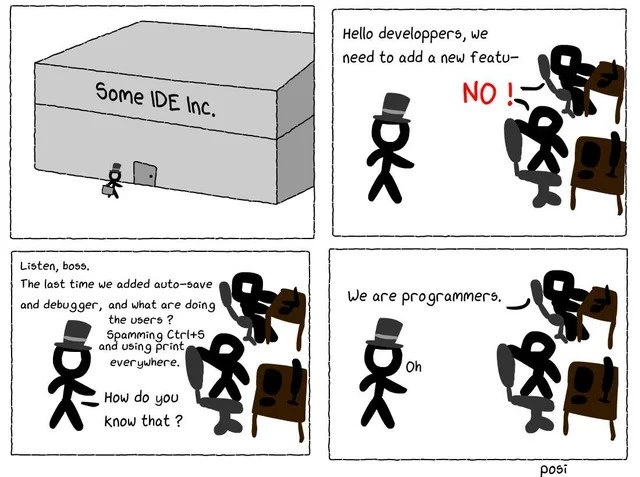
Inside the halls of “Some IDE Inc.”, we're witnessing the classic manager vs devs showdown. The top-hatted boss strides in asking for another shiny IDE feature to be added, but he's immediately met with a resounding “NO!” from the development team. Why such immediate pushback and new feature resistance? The team learned their lesson last time: they poured effort into adding an auto-save capability and an integrated debugger to improve the IDE’s developer experience (DX), but how did users respond? By continuing to do things the old way – spamming Ctrl+S (manual save) every few minutes and relying on print debugging instead of those fancy breakpoints. In other words, the very developers who build the tool know that their user base (fellow programmers) often ignores new bells and whistles. When the manager asks incredulously, “How do you know they ignore it?”, the dev’s deadpan answer says it all: “We are programmers.” 😏

This punchline hits home for any experienced coder. It's a tongue-in-cheek admission that the developers themselves exhibit the same habits as their users. It’s like they’re saying, “Trust us, we know these developers because we are them.” This is a prime example of DeveloperHumor that gets a laugh (and a groan) because it’s so true. The humor comes from that ironic gap between available tools and actual behavior. You can build the most advanced tooling in the world, but sometimes developers behave in comically stubborn ways. It’s an insider developer in-joke: we demand powerful IDEs and features, yet often stick to the simple tricks we’ve used for years. The scene sets up an IDE feature request scenario turned on its head: management wants more features to keep up with competition or user demands, but the devs push back with a reality check about habit-driven usage.

Let’s unpack the habits being satirized here:

  • Auto-save vs. Ctrl+S muscle memory: Auto-save is supposed to continuously protect you from losing work by saving your code file automatically. But decades of conditioning have taught programmers to hit Ctrl+S after every other change. It’s practically a reflex — a safety ritual carried over from the days when an IDE crash or power outage could wipe out hours of unsaved progress. This instinct is a case of Ctrl+S muscle memory, and it's incredibly strong. Many of us still don’t quite trust any editor to save reliably on its own. (Hands up if you’ve caught yourself pressing Ctrl+S in Google Docs, even though it auto-saves everything. 🙋) The comic exaggerates this: even when auto-save was built in, the users kept manually smashing “Save” as if nothing changed. The dev team knows this, because they do it too! Auto-save was meant to improve productivity and DeveloperExperience, yet the actual behavior didn’t budge an inch.

  • Interactive Debugger vs. print statements: Modern IDEs come with sophisticated debuggers. These let you set breakpoints (pause points in code), run the program step-by-step, and inspect variables at runtime. In theory, this should make fixing bugs a breeze compared to combing through console output. But here’s the kicker: countless developers still default to print debugging. That’s when you scatter printf(), cout << or console.log() lines in your code to dump out variable values or trace execution, then run the program and read those printouts. It’s quick, language-agnostic, and requires no special setup — basically the lowest common denominator of debugging. For many, it’s the trusty flashlight instead of the high-tech X-ray goggles. This habit is so widespread that it’s practically a running joke: “When in doubt, print it out.” Even with a robust visual debugger at their fingertips, developers might think, “Eh, I’ll just add a couple of prints to see what’s going on.” Why? Because it’s often faster for small problems, and it doesn’t require learning the debugger’s interface or switching context. In fact, printing to debug is one of the oldest tricks in the book – it dates back to the earliest days of programming, long before fancy IDEs existed. Many of us had our first encounter with debugging by using print statements, so it becomes a comfortable default. As a result, that shiny new debugger feature might sit underused while the console logs scroll by. It’s a DebuggingFrustration paradox: the tool built specifically to make debugging easier is ignored in favor of an age-old method.

The comedic reality is that developers (the users) can be stubborn creatures of habit. The dev team in the comic knows that adding yet another feature might not change anything if it doesn’t align with how programmers actually work day-to-day. They essentially predicted their own feature’s flop by introspection. It’s a bit meta: the devs are users of their own IDE, so they’re relying on that insider perspective (often called “dogfooding” when a team uses its own product) to judge how useful a new addition will be. No need for a big user survey when you can just look at your own behavior and go, “Yeah... I’d probably ignore this new feature too.” The manager’s baffled “Oh” in the final panel is him realizing that the devs have a point grounded in real experience. He didn’t expect the devs_are_users angle — that the creators themselves are admitting, “We don’t use these features, and neither will our users.”

To sum it up, the IDE team delivered solutions to common developer problems, but the community responded with a collective shrug and stuck to familiar methods:

Feature Built Problem It Solves Actual Behavior of Users
Auto-save (automatic file saving) Prevent losing code if you forget to save or if the IDE crashes Developers still hit Ctrl+S every few minutes out of habit (ingrained reflex)
Integrated Debugger (breakpoints & step-through) Make debugging easier by pausing code and inspecting state live Developers keep using print statements (e.g. console.log) everywhere to debug, instead of using the debugger

Every seasoned dev can recall a situation where a team built some elaborate new tool or workflow that nobody ended up adopting because the old way was “good enough.” Here it’s exactly that scenario. The joke lands because it’s both absurd and completely believable: of course developers asked for an advanced debugger... and then kept doing println debugging anyway! And who would know better than the IDE’s own programmers themselves? The comic is poking fun at how improving a tool on paper doesn’t always translate to real changes in behavior. It highlights a truth in the world of IDEs & Editors and developer tools: old habits die hard — or in this case, remain hard-coded into our daily routine.

Description

A four-panel comic strip about developers at an IDE company. In the first panel, a boss figure wearing a top hat approaches a large building labeled 'Some IDE Inc.'. In the second, he proposes a new feature to his team of stick-figure developers, saying, 'Hello developers, we need to add a new featu-', but is immediately cut off by the developers shouting 'NO!'. In the third panel, a developer explains their reluctance: 'Listen, boss. The last time we added auto-save and debugger, and what are doing the users? Spamming Ctrl+S and using print everywhere.' The boss asks, 'How do you know that?'. In the final panel, the developer simply states, 'We are programmers,' to which the boss replies with an understanding 'Oh.' A small watermark in the bottom right corner says 'posi'. The comic humorously points out that even when provided with advanced tools, developers often stick to their old habits. The punchline reveals that the IDE developers know this because, as programmers themselves, they share the same stubborn behaviors, highlighting a classic case of knowing your user base all too well because you are the user


Comments

11
Anonymous ★ Top Pick We spent a year building a sophisticated, multi-threaded, non-blocking debugger, and our users just turned it into the world's most expensive and over-engineered wrapper for console.log
  1. Anonymous ★ Top Pick

    We spent a year building a sophisticated, multi-threaded, non-blocking debugger, and our users just turned it into the world's most expensive and over-engineered wrapper for console.log

  2. Anonymous

    We can embed an AI time-travel debugger in the IDE if you want, but the veterans will still muscle-memory Ctrl-S between keystrokes and scatter printf(); because in every reorg, the only debugger that survives is grep

  3. Anonymous

    After 20 years in the industry, I still hit Ctrl+S after every line change in an IDE with auto-save, and my debugging toolkit remains 90% console.log, 9% prayer, and 1% actual debugger - because the moment you set up those breakpoints is when the bug decides to become Heisenberg-compliant

  4. Anonymous

    The IDE team spent six months implementing auto-save with conflict resolution, real-time collaboration, and cloud sync - only to discover through telemetry that 94% of users still hammer Ctrl+S every 30 seconds like they're playing a rhythm game. Meanwhile, the integrated debugger with conditional breakpoints and watch expressions sits unused while console.log() and print() statements proliferate like microservices at a startup. The programmers know this because they *are* the users, and no amount of tooling will override decades of trust issues with computers

  5. Anonymous

    IDE ships auto‑save and one‑click debugger; adoption stays flat because Ctrl+S is idempotent and printf is the only observability that never deadlocks a thread or attaches to the wrong PID in a container

  6. Anonymous

    You can ship autosave and a time-traveling debugger, but you can't deprecate 20 years of muscle memory; Ctrl+S and printf are LTS

  7. Anonymous

    IDE devs unveil auto-save: 'Ctrl+S is a standard, not a prayer' - browsers have been gatekeeping that UX since Netscape

  8. @beton_kruglosu_totchno 4y

    cannot relate to that

    1. @Box_of_the_Fox 4y

      Neither can I xd

  9. @saidov 4y

    debugger;

  10. @misesOnWheels 4y

    out product is original and better than competitors i saw a feature in other product and i want to also have it

Use J and K for navigation
