Skip to content
DevMeme
4702 of 7435
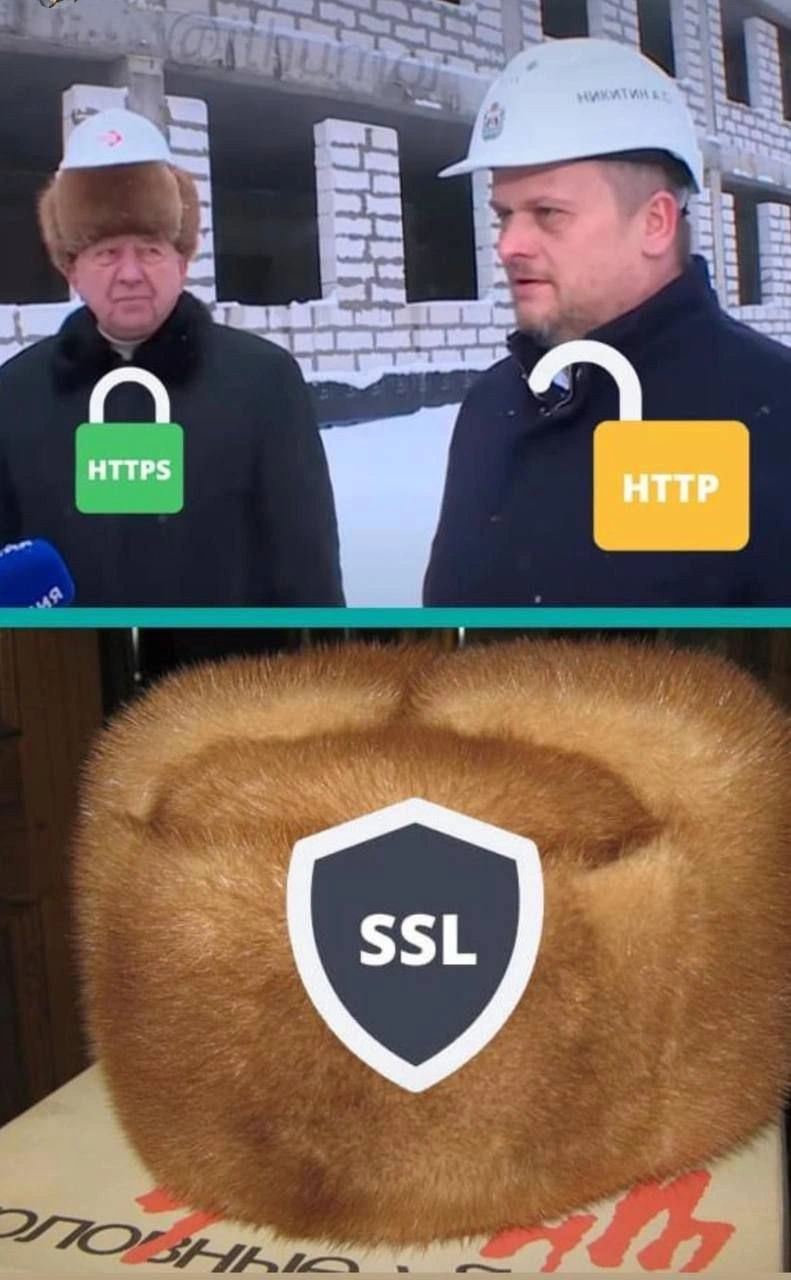
HTTPS flaunts its lock while SSL hides inside a fuzzy winter hat
Security Post #5152, on Apr 25, 2023 in TG

HTTPS flaunts its lock while SSL hides inside a fuzzy winter hat

Why is this Security meme funny?

Level 1: Hard Hat vs Warm Hat

Imagine you and your friend are at a construction site in the snow. Your friend is wearing a strong hard helmet on his head to stay safe. It even has a big lock drawn on it to show it’s super secure. You, on the other hand, are just wearing a regular winter hat – it’s fuzzy and warm, but it’s not going to protect you if a brick falls on your head. In this story, the helmet with the lock is like using HTTPS on a website – it keeps you safe from danger by locking out eavesdroppers. The plain winter hat is like the old idea of SSL – it makes you feel a bit better than nothing because it’s called “secure,” but by itself it wouldn’t stop real trouble. The meme is funny because it shows a guy proudly wearing his security helmet (that’s HTTPS, the proper protection) and another guy with basically no protection (that’s HTTP, not secure at all). Then it shows a big furry hat labeled SSL hiding underneath, which is like saying: some people still wear this comfy old thing for security, even though the real protection comes from the hard helmet on top. In simple terms, it’s joking that calling something “SSL” is just an old, cozy habit – what really keeps you safe on the web is the locked helmet of HTTPS.

Level 2: The S is for Safety

Let’s break down the basics behind this meme. HTTP stands for HyperText Transfer Protocol, which is the standard way web browsers communicate with web servers to fetch pages, images, and so on. However, HTTP by itself is not secure – any data sent over HTTP can be viewed or intercepted by others (like sending a letter without an envelope). When you log into a website or submit sensitive information over plain HTTP, it’s like shouting your secrets in a crowded room. HTTPS, on the other hand, is the secure version of this protocol – the extra “S” literally stands for Secure. When you see https:// at the start of a URL (and usually a little lock 🔒 icon in the browser’s address bar), it means that the communication between your browser and the website is encrypted. Encrypted means the data is scrambled into gobbledygook using cryptographic keys so that even if someone sniffs the network traffic, they can’t understand it. It’s like putting your message in a locked box that only the recipient has the key for. In practice, HTTPS ensures that when you enter your password or credit card on a site, nobody else can eavesdrop or tamper with that information as it travels across the internet. In modern browsers, an open padlock or a “Not Secure” warning appears for HTTP sites, while a closed padlock (used to be green in many browsers) appears for HTTPS sites. The top panel of the meme riffs on this: one construction worker is labeled HTTPS with a closed lock (secure), and the other is HTTP with an open lock (not secure). It’s a quick visual way to say “this one is safe, that one isn’t.”

Now, what about SSL and that fuzzy hat in the bottom panel? SSL stands for Secure Sockets Layer. It was an early technology that provided encryption for web traffic – essentially the original way to do what HTTPS does. Think of SSL as the older version of the security method. Over time, SSL was improved and succeeded by something called TLS (Transport Layer Security). TLS is what all modern HTTPS connections use under the hood. However, the term “SSL” stuck around informally. Many people (and even software interfaces) still say “SSL” when they really mean “TLS”. For example, you might hear someone talk about an “SSL certificate” or enabling “SSL” on a website – what they’re actually doing is enabling TLS encryption, but it’s common to use the old name out of habit. It’s similar to how folks might refer to any cola as "Coke" even if it’s a different brand – in tech, we sometimes use the old name generally for the sake of familiarity.

In the meme, SSL is depicted as a shield icon on a warm fur hat. Why a hat? This is a playful metaphor. In a cold environment (like the snowy construction site in the image), a fuzzy hat keeps you warm and comfortable, but it’s not hard protective gear. By contrast, a hard construction helmet is what actually protects you from serious danger (like something falling on your head). So the meme is comparing SSL to a warm hat – it gives you a good feeling (the idea of security), but it’s not the core protection anymore – and comparing HTTPS/TLS to a hard-lock helmet – the real, visible protection. Developers who see this will think: SSL is that old comfy term we use, but TLS (what makes HTTPS secure) is the real hard hat doing the work. The meme is tagged with https_vs_http and security_layer_joke because it literally shows the two protocols (HTTP vs HTTPS) and makes a joke about the layers (an SSL hat under a helmet) in a security context. It’s also classic TechMemes material because it turns a learning point (use HTTPS, not HTTP; know that TLS replaced SSL) into something visual and funny.

To put it simply for a junior dev or someone new to this: if you’re building a website and someone says “make sure you have SSL,” they mean you should serve it over HTTPS. That involves obtaining an SSL/TLS certificate (a digital certificate issued by a Certificate Authority that your server uses to prove its identity) and configuring your web server to use HTTPS. Once that’s done, users visiting your site will see the lock icon, and their browsers will use TLS behind the scenes to encrypt all the HTTP requests and responses. So HTTP vs HTTPS is like unsecured vs secured, and SSL vs TLS is basically old name vs new name for the security protocol that provides that encryption. The meme is funny to developers because it visually reminds us of this confusion: the secure protocol (HTTPS/TLS) is proudly displayed (the padlock on the helmet), whereas the old term SSL is kind of hiding inside the hat — present, remembered, but not what you see on the surface. It’s a lighthearted nod to anyone who’s ever had to explain, “Yes, we need to enable SSL – which is actually TLS – to get the site padlock.” In the world of WebDev and WebSecurity, that’s a very common conversation, hence why this meme gets a knowing laugh.

For clarity on the key points:

  • HTTP – The basic web protocol for transferring data. Not encrypted. (Think of it like sending a postcard where anyone can read the message.)
  • HTTPS – The secure version of HTTP. Uses encryption (TLS) so that data is private and authenticated. (Think of this like sending a sealed, locked letter that only the recipient can open.)
  • SSL – An older technology name for the encryption system. It’s been replaced by TLS, but people often use "SSL" to mean any form of HTTP encryption. (It’s the comfy old hat: nice and warm, but outdated as actual protection.)
  • TLS – The current technology that does the heavy lifting for HTTPS encryption. It’s what your browser and server actually use nowadays when you see that lock icon. (This is the strong helmet under which HTTPS operates, even if we casually call it SSL.)

So, when you look at the meme: the left guy with HTTPS + 🔒 is the website that’s properly secured with TLS, the right guy with HTTP + (unlocked padlock) is the site that’s unsecure, and the bottom fur SSL hat is a cheeky reminder of the old-school term hiding within modern security conversations.

Level 3: Old Hat, New Lock

This meme hits home for seasoned developers because it mixes serious web security practices with a bit of self-aware humor. On the left, we have "HTTPS" proudly sporting a green locked padlock — the universal symbol for a secure website. On the right, "HTTP" sulks with an open padlock icon, the very picture of insecurity. Every developer who’s deployed a website knows that feeling: getting that coveted lock icon to appear after configuring SSL/TLS feels like a small victory. It’s essentially a stamp of approval saying “your site’s traffic is encrypted and safe from prying eyes.” Meanwhile, in the bottom panel, we see a cozy fur hat labeled "SSL" with a shield emblem, hiding like it’s shy or outdated. This absurd combination is poking fun at a long-standing confusion in tech terminology — many of us still say “SSL” when we really mean TLS. Calling today’s HTTPS encryption “SSL” is an old habit that just won’t die, kind of like wearing an old familiar hat even when you have a new helmet for actual protection.

Why is that funny to an experienced dev? Because it’s so true. We’ve all encountered the veteran engineer or legacy system documentation that proudly proclaims “now with SSL!” even though true SSL (versions 2.0/3.0) was deprecated ages ago. The industry pattern here is one of terminology lagging behind reality. Libraries, tools, and humans all perpetuate the misnomer: for example, you still configure HTTPS in Apache or Nginx using directives under a module literally named mod_ssl, and use commands like openssl. The result: newbies hear seniors talk about "SSL certificates" and assume SSL must be some separate thing, when in fact it’s just the old name for the same basic security layer. This meme visualizes that disconnect: HTTPS (the thing you actually use) is out in the open, while SSL is this fuzzy thing tucked away, a security blanket developers keep referencing because it makes them feel comfortable (or because that’s what the config knob is called). It’s the security layer joke at play — we’re layering a warm nostalgic term under our modern security hat.

There’s also a bit of satire about security theater here. The padlock icon is often taken as an absolute guarantee of safety, but in truth it just means your connection is encrypted and the certificate is valid – you could be securely talking to a malicious site and still see a padlock. Experienced folks know a lock icon doesn’t solve everything (you can have perfectly padlocked phishing sites). On the flip side, some organizations still run internal sites on plain HTTP (open padlock) with the reasoning “it’s fine, it’s just internal,” causing senior security engineers to facepalm. And then there’s the scenario every web dev dreads: “Why is the padlock not showing as green?!” – cue the hunt for mixed content or an expired cert. We laugh at the meme because we’ve lived that tension. HTTPS is represented as the guy with proper gear proudly visible, and HTTP as the guy clearly exposed to the cold (and all the dangers of the wild internet). SSL, the fur hat, symbolizes something from a bygone era that some of us still cling to: it might add comfort, but it’s not visibly doing the heavy lifting.

The historical context makes this extra amusing. Back in the late ’90s, SSL was the pioneering protocol that introduced encrypted web traffic, courtesy of Netscape. By the early 2000s, the torch was passed to TLS, but the name “SSL” stuck around like an old nickname. It’s analogous to how people still say “dial” a phone number even though no phone has a rotary dial anymore. This meme’s furry "SSL" hat is literally an old hat, highlighting that SSL is an old concept now mostly kept around in name. Seasoned devs chuckle because they recall real incidents of this confusion: for example, a project kickoff meeting where a manager insisted “Make sure to install SSL on the server,” and the team lead had to clarify “We will enable TLS 1.3, don’t worry – and yes, that includes getting an SSL certificate.” Everyone understands what’s meant, even if the terminology is technically wrong. It’s a running joke in DeveloperHumor circles that if you correct someone with “Actually, it’s called TLS now,” you might get labeled pedantic – so most of us just let "SSL" slide in conversation and memes.

Ultimately, “HTTPS flaunts its lock while SSL hides in a fuzzy hat” is a tongue-in-cheek way to say: Modern web security is visible and proudly advertised (locks everywhere!), while the older SSL is hidden, essentially obsolete, but we still remember it fondly. It’s a gentle ribbing of those who conflate the terms, as well as a nod to the fact that, under the hood of that shiny lock icon, the thing keeping you warm is no longer the old SSL at all. WebDev folks who handle certificates and WebSecurity configs daily will recognize the layers of meaning: the literal layer (hat under helmet) and the protocol layer. We find it funny because it’s a moment of “I see what you did there” – combining a visual gag with a tech inside-joke about protocols. It’s the kind of TechHumor that confirms you’re part of the club if you get why the hat labeled SSL is both comforting and ironically unnecessary for the lock to do its job.

Dev: "We need to put SSL on our new site so it’s secure."
Security Eng: "TLS is what we’ll actually use, but yep, I’ll get you a certificate."
Dev: "Cool, as long as I see that lock icon, I’m happy."

Level 4: Padlocks, Protocols, and PKI

Under that friendly green HTTPS padlock icon lies an intricate web of cryptography and trust infrastructure. When your browser shows a closed-lock icon, it's signaling that a TLS (Transport Layer Security) handshake has successfully established a secure channel. During this handshake, your computer and the server perform a complex cryptographic ceremony: they agree on which encryption algorithms to use (the cipher suite), swap cryptographic keys using protocols like ECDHE (Elliptic Curve Diffie-Hellman Ephemeral) for forward secrecy, and verify a digital certificate. That certificate is part of the PKI (Public Key Infrastructure) – a global hierarchy of Certificate Authorities (CAs) that vouch for the identity of websites. The browser checks that the server’s certificate was signed by a trusted CA and is valid for the website’s domain. Only if everything checks out does the browser light up that padlock, indicating that the HTTP connection is now encapsulated inside an encrypted TLS tunnel.

It’s worth noting that SSL (Secure Sockets Layer) is the older name for this encryption layer. SSL 3.0 was essentially the precursor to TLS 1.0 – in fact, TLS 1.0 was often thought of as “SSL 3.1” under the hood. Over the decades, weaknesses were found in early SSL versions (e.g. the infamous POODLE attack on SSL 3.0’s padding), so the industry moved on to TLS 1.2 and now TLS 1.3, which boast stronger encryption and a more secure handshake. Modern TLS uses robust symmetric ciphers (like AES) for the actual data encryption and asymmetric cryptography (RSA or ECC) for the key exchange and authentication. The math here is intense: large prime numbers, modular arithmetic, and one-way functions that would take longer than the age of the universe to brute-force. So when HTTPS flaunts its lock, it’s backed by very real mathematical rigor ensuring confidentiality and integrity of your data in transit.

The networking behind that padlock happens at the transport layer, but it has ripple effects all the way up the stack. For instance, HTTP over TLS typically runs on port 443 instead of 80, and the TLS handshake adds a few extra round trips before the actual web content flows. In practice, this overhead has been minimized with innovations like TLS false start and TLS 1.3’s streamlined handshake. But older protocols like SSL/TLS 1.0 were more chatty and had known flaws — kind of like wearing an old, worn-out security blanket under your armor. The meme’s juxtaposition of a fuzzy winter hat labeled "SSL" under a modern hard hat suits this perfectly: SSL was once state-of-the-art protection for web traffic, but by today’s standards it’s an outdated layer — retired to the museum of WebSecurity history. Yet its name lives on, ingrained in config file names, library names (OpenSSL, anyone?), and in the habits of developers who still talk about "SSL certificates" long after the protocol itself was supplanted by TLS.

In summary, that green HTTPS lock icon isn’t just a cute UI symbol – it represents a successful execution of a gauntlet of security checks and cryptographic feats. It tells us that our data is locked up with strong encryption (so eavesdroppers are kept out) and that we’re talking to the genuine site (verified by certificate). The meme cleverness lies in the contrast: HTTPS wears the visible badge of modern cryptography (the padlock), while SSL is portrayed as a hidden fuzzy hat – an almost nostalgic layer providing emotional comfort but no real additional strength. After all, in the Security world, true protection comes from robust up-to-date protocols, not just the remembered warmth of earlier ones.

Description

The meme is split into two horizontal panels. Top panel: two construction workers in hard hats stand at a snowy construction site, their faces blurred for anonymity. Over the left person is a green closed-padlock icon labeled “HTTPS”, while over the right person is a yellow open-padlock icon labeled “HTTP”, visually echoing browser security indicators. Bottom panel: a plush, circular fur hat sits on a box; centered on the hat is a shield icon containing the text “SSL”. The visual joke contrasts the obvious ‘locked’ security of HTTPS with the outdated, comfort-blanket notion of SSL, poking fun at developers who conflate SSL with modern TLS and at superficial understandings of web transport security

Comments

17
Anonymous ★ Top Pick Rolling out TLS 1.3 with HSTS and OCSP stapling, then hearing the VP boast we just “turned on SSL” - I feel like that furry hat: warm, obsolete, yet somehow still on the roadmap
  1. Anonymous ★ Top Pick

    Rolling out TLS 1.3 with HSTS and OCSP stapling, then hearing the VP boast we just “turned on SSL” - I feel like that furry hat: warm, obsolete, yet somehow still on the roadmap

  2. Anonymous

    The real warmth isn't from the fur hat - it's from knowing your SSL certificate won't expire on a Friday afternoon while you're already three beers into happy hour, triggering a cascade of monitoring alerts and angry customer emails about 'Your connection is not private' warnings

  3. Anonymous

    This perfectly captures the awkward conversation every senior engineer has had: explaining to stakeholders that 'SSL certificates' actually use TLS, HTTPS is the application protocol, and SSL 3.0 was deprecated in 2015. But sure, let's keep calling them SSL certs because changing terminology would require updating 10,000 internal wiki pages and retraining the entire organization. At least the padlock icons make management feel secure, even if they're still running TLS 1.0 in production

  4. Anonymous

    Enterprise security: HTTPS at the edge for the green lock, HTTP behind the LB, and a warm hat labeled “SSL” to pass the audit

  5. Anonymous

    Nothing says “we’re secure” like a press photo with padlock icons and an “SSL” hat - meanwhile the wire negotiates TLS 1.3, HSTS isn’t enabled, OCSP isn’t stapled, and half the assets still load over http

  6. Anonymous

    HTTP's the coat keeping connections intact; SSL's the ushanka warding off MITM chills - until cert expiry turns prod into a freezer burn

  7. @iolebedev 3y

    This is a wrong metaphor: (1) It is HTTP inside SSL, SSL is a wrapper. On this picture SSL is inside, which is wrong. (2) Choosing from a helm and a hat - its the hat that gives protection, so they are both protected. The hat is more like GRPC inside HTTPS...

    1. @kitbot256 3y

      Could it be they are really seeking protection from cold weather? ;)

      1. @iolebedev 3y

        Yes. My point was that using SSL as a metaphor here is wrong. Cold weather is the bare meaning as it is.

  8. @doodguy1991 3y

    "But I'm not a rapper"

  9. @x24R3 3y

    SSL

    1. @RiedleroD 3y

      ok send your login data via http and we'll see how quickly that alufoil hat becomes relevant

      1. @x24R3 3y

        Calm down, i think that the hat which hides your thoughts perfectly depicts encryption

        1. @RiedleroD 3y

          I was joking around alufoil hats are usually used as a depiction of something that gives the illusion of safety though

          1. @x24R3 3y

            Nah, they are real

          2. @callofvoid0 3y

            Don't they absorb microvawes?

  10. @ZgGPuo8dZef58K6hxxGVj3Z2 3y

    var handler = new HttpClientHandler(); handler.ServerCertificateCustomValidationCallback = (sender, cert, chain, sslPolicyErrors) => true; var client = new HttpClient(handler); var response = await client.GetAsync("https://bank.gov.us");

Use J and K for navigation