HTMX's Simplicity vs. React Server Components' Existential Complexity
Why is this Frameworks meme funny?
Level 1: Walking vs. Circus Tricks
Imagine you have a simple task: you want to give your friend a note.
In the first scenario, you just walk across a straight path (like a sidewalk) to your friend’s house and hand them the note. Easy-peasy. You took a direct route, delivered the message, and you’re done. This is like the HTMX approach: just go directly and do the thing in a simple way. In web terms, it’s like the browser just asks the server for what it needs and the server hands it back ready-to-use, straightforward like a direct walk.
In the second scenario, instead of walking the note over, you decide to put on a full circus show to deliver that note. You get acrobats, clowns, a fire truck ladder, ropes hanging from the ceiling — the whole works. Maybe one acrobat grabs the note, swings to the next, another clown juggles it, a firefighter on a ladder truck lifts it higher, then another acrobat finally drops it at your friend’s place. 😅 In the end, the note gets delivered, but wow, that was a lot of unnecessary flips and tricks! This is like the React Server Components approach: the job (updating the web page) gets done, but it went through a huge elaborate process with many steps and people involved, almost like a circus performance, to make it happen.
The meme is funny because it’s saying building some websites has become way more complicated than it perhaps needs to be. It’s comparing a simple solution (just walk and do it) to a very complicated solution (do it with a circus). Everyone can understand that walking a straight line is much simpler than doing acrobatics. So even if you don’t know the tech terms, you can laugh at the idea: “Why would you do all that crazy stuff when you could just walk over and get it done?!”
In real life, we often face choices like this: Do something the plain, simple way, or do it in a super fancy, convoluted way. The comic exaggerates the fancy way to a ridiculous degree (a circus!) to make the point clear. It’s poking fun at how some modern web techniques, like certain fancy web frameworks, might feel overly complicated.
So on a very basic level, the humor comes from that contrast: simple vs. unnecessarily complex. It reminds us of a common wisdom: sometimes the straightforward path is just fine, and turning a task into a circus might not be worth it. Developers find this especially relatable because in our work, we constantly have to decide between keeping things simple or adding lots of fancy layers – and it’s all too easy to end up accidentally choosing the “circus” when the “sidewalk” would have done the job.
Level 2: Sidewalk vs. Tightrope
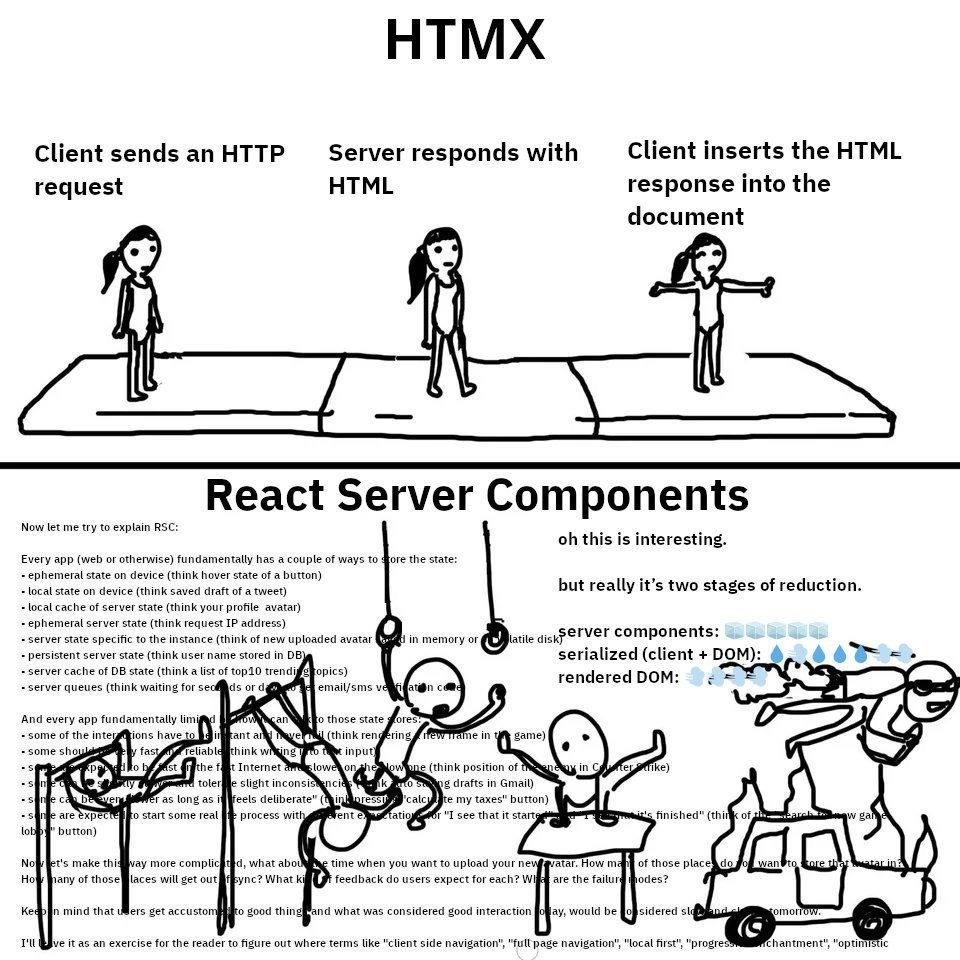
Let’s break down what’s happening in this meme in more straightforward terms. It’s comparing two ways to make interactive websites:
First, HTMX (HTML over the wire): In the top panel, labeled “HTMX,” we see a very simple sequence:
- Client sends an HTTP request – “Client” here means your web browser (like Chrome, Firefox, etc.) on your computer or phone. When you click a button or link, the browser can send a request to a server. HTTP is the protocol used for the web – basically the language browsers and servers use to talk. It’s like saying, “Hey server, I need something (maybe some new data or a page).”
- Server responds with HTML – The server (which is just another computer somewhere) receives that request, does whatever logic is needed (maybe fetch some data from a database, process something), and then sends back a response. In this case the response is HTML, which is the standard format of web pages. HTML is the stuff that browsers know how to render into the pages you see. So the server basically says, “Here is the new piece of page you asked for, already formatted as HTML.”
- Client inserts the HTML response into the document – The browser takes that HTML it got and just puts it into the current page. This could mean it replaces a part of the page with the new HTML snippet (for example, updating a list or a paragraph with new content). Essentially, the browser’s job is easy here: just display what the server gave it. The stick figures walking in a line on a solid ground (the sidewalk) illustrate how straightforward and stable this process is – one step after another on a well-defined path.
HTMX is a library that makes this kind of interaction easy to implement. Instead of writing a bunch of JavaScript to fetch and update things, a developer can simply add an hx-get or hx-post attribute to an element, pointing it to a server URL, and HTMX will handle the clicking, requesting, and swapping in of the HTML automatically. It’s simplicity itself: you click something, your browser gets some ready-made HTML from the server, and drops it into the page. No complex client-side logic or state management is required in the browser because the server does the heavy lifting (it prepares the content). This approach is sometimes called “HTML over the wire” because what travels over the network is HTML (the final UI), not raw data or JSON. Think of it like ordering a finished dish from a restaurant: you ask for a pizza and the kitchen/server gives you a fully cooked pizza, ready to eat. You don’t cook it yourself – you just enjoy it.
Second, React Server Components (RSC): The bottom panel is labeled “React Server Components” and it looks crazy complicated – that’s intentional. React is a popular JavaScript framework for building user interfaces. Normally, React apps are loaded into the browser and then run on the client side (in your browser). In a classic React app (sometimes called a Single Page Application or SPA), after the initial page load, most interactions (clicks, form entries) are handled by JavaScript in the browser which updates the UI without reloading the page. The browser might fetch some data from the server (often as JSON), but then the browser’s JavaScript takes that data and decides how to update the HTML on screen. This gives a smooth, app-like feel (no full page refresh flicker), but it means the browser is doing more work, and the developer has to manage a lot of stuff in JavaScript: the current state of the UI, the fetched data, etc. Over time, React has added tools to also render on the server (for initial load, etc.), which is where things like Server-Side Rendering (SSR) and Server Components come in.
React Server Components is an advanced feature where some React components run on the server. Imagine splitting your UI into two kinds of pieces:
- Server components: These pieces execute on the server. They can directly fetch from the database or do server-y things (which normal client-side React can’t do because the browser doesn’t have direct DB access). They produce some output (not fully rendered HTML, but something like a description of UI).
- Client components: These pieces execute in the browser (client). They handle interactivity (like button clicks, dropdowns, etc.) and need to be sent to the browser as JavaScript code so they can run there.
Using RSC means when the browser needs to update the UI, it might ask the server to run some of these server components. The server will send down the result which is then used by the client components to update what you see. It’s kind of like the browser saying, “Hey server, you take care of this part of the UI logic and tell me the result, I’ll handle the rest.” This can reduce how much JavaScript we send to the browser and let the server do heavy lifting (servers are generally more powerful than your phone, for example). However, coordinating this is tricky. The screenshot text listing ephemeral state, local state, caches, etc., is basically listing all the different places data can live in this system:
- On the browser side (device) you have temporary UI state (like a hover effect or a form you haven’t saved yet) and more lasting local state (like something stored in the browser memory or local storage).
- On the server side, you might have data that exists only for one request (like info calculated on the fly) or data that lives longer on that server (like a file stored on disk temporarily or some in-memory cache), and of course data that lives permanently in a database (like user profiles).
- Additionally, both the browser and server might keep cached copies of data to speed things up (the browser might cache an avatar image so it doesn’t refetch it; the server might cache database results to reuse them for many users).
All these different states and caches need to work together. For example, if you updated your profile picture, the new picture is persistent server state (in the database), but the browser might still have the old picture in its local cache. So part of the app’s complexity is figuring out, “Hey, that cache is stale, fetch the new data!” React’s ecosystem has tools and patterns for this (like cache invalidation, useEffect hooks, etc.), but as you can imagine, it’s a lot to keep track of. That’s where the humor is: the comic shows the React approach as a wild circus with many performers synchronizing, implying how a developer must juggle many concerns at once.
The bold lines “two stages of reduction” and “serialized (client + DOM) → rendered DOM” refer to how React with RSC doesn’t just produce HTML in one go. It first produces a serialized representation of the UI (basically a data structure that describes what the UI should be, something lighter than full HTML, often some JSON or React-specific format). Then the client receives that and reconstructs the actual DOM (Document Object Model, which is basically the live HTML elements tree that the browser renders) and attaches any needed interactivity to it. Think of it as React sending an architectural blueprint from the server, which the browser then uses to build or update the actual house (the web page) and wire up the electricity (interactive event handlers) where needed. It’s not a simple “here’s the final product” like the HTMX case; it’s more like “here are assembly instructions and some parts, now client, you assemble this and connect it to the existing stuff.”
No surprise, that’s complex! The stick figures doing crazy stunts – swinging from ropes, doing handstands, driving a firetruck ladder – are a visual metaphor for all these processes happening when using React Server Components. Each stunt or performer could represent a part of the system doing its job: one might be fetching data, another updating local state, another merging server data with client interface, another handling an optimistic UI update, etc. It looks chaotic because, from an outside perspective, it is a lot of things to manage for something seemingly simple.
The meme caption, “When your UI choice is sidewalk walking or full-on circus acrobatics,” sums it up. HTMX = sidewalk walking: reliable, straightforward, no frills. React Server Components = circus acrobatics: impressive and potentially powerful, but definitely complicated and requiring great coordination (and maybe a safety net).
For a junior developer, the takeaway is: there are different ways to build dynamic websites. One way (HTMX/HTML-over-the-wire) keeps things simple by doing most stuff on the server and sending ready-to-display HTML to the client. Another way (React with RSC) pushes the frontier of client-server interaction by splitting responsibilities, which can improve performance in some cases but introduces a lot of complexity. It’s a trade-off. The meme humorously exaggerates just how complex the modern approach can get, to the point that it feels like a circus. Developers find it funny because we often encounter this in our work – sometimes a solution or new tool is so elaborate, you step back and think “All this… just to show some data on a webpage?” It’s a relatable moment of realizing how deep the rabbit hole of frontend architecture has become.
Level 3: Three-Ring Architecture Circus
For the experienced developer, this meme draws a sharp (and humorous) contrast between two extremes of front-end architecture: a minimalistic “HTML-over-the-wire” approach (exemplified by HTMX) and the elaborate modern React Server Components (RSC) approach. In the first panel labeled HTMX, we see a straightforward sequence: “Client sends an HTTP request” → “Server responds with HTML” → “Client inserts the HTML response into the document.” That’s it. It’s a simple one-two-three process, as linear and reliable as walking down a sidewalk. No extra JavaScript bundlers, no multi-step hydration process, no labyrinthine state management. This simplicity harkens back to how traditional server-rendered web apps work (think classic PHP, Ruby on Rails, or any server-side MVC framework): the browser asks for updated content, the server returns a ready-to-render snippet of HTML, and the browser just drops it into place. Minimal framework magic involved. HTMX essentially allows modern developers to use this classic pattern in a sleek way – by adding special attributes to HTML elements, the browser can fetch and swap in HTML fragments on the fly (via AJAX under the hood), so you get interactivity without a mountain of client-side JavaScript. It’s simple, even elegant in its minimalism. Importantly, there’s basically one source of truth – the server generates the stateful HTML, and the client just displays it. Fewer moving parts, fewer things to break. It’s the opposite of overengineering.
Now, look at the second panel, titled React Server Components. The meme goes full “circus acrobatics” here, and for good reason. React is a powerful front-end library that gained fame through its component-based architecture and ability to create rich, interactive UIs in the browser. But over the years, it’s grown into an entire ecosystem (and yes, a bit of a beast). React Server Components (RSC) is one of the newer, advanced features in React’s arsenal (introduced around React 18), aiming to improve performance by splitting work between the server and client. The idea is that some components can run on the server (fetching data, rendering to a lightweight format) and then ship the result to the client, where it’s combined with interactive client-side components. In theory, this gives you the best of both worlds: server-side rendering (for quick initial load and SEO) and a dynamic single-page app feel. But… in practice it means your application’s state is now scattered across multiple layers and lifecycles.
The text in the RSC panel (which looks like a snippet from someone desperately trying to explain RSC in a blog or talk) lists a whole bunch of state categories:
- Ephemeral state on device – e.g. the hover state of a button or a transient UI highlight. This is UI state that isn’t saved anywhere; it just lives in the browser’s memory and often resets if you refresh the page. It’s like a juggler tossing a ball in the air – if you look away for a second, it’s gone.
- Local state on device – e.g. the saved draft of a tweet you’re typing, or form input values. This might persist for a while in the browser (maybe until you close the tab). React hooks like
useStatemanage this kind of state on the client. It’s akin to a clown balancing on a ball: manageable locally, but the server doesn’t automatically know about it until you send it over. - Local cache of server state – e.g. your profile avatar or other data the client got from the server and is caching so it doesn’t fetch it again immediately. Think of this as the browser remembering things temporarily (maybe using in-memory variables or something like React Query’s cache). This is like a safety net under the trapeze: it catches data so the app can quickly reuse it without another round trip, but it might become “stale” if the server’s version changes and the client hasn’t gotten the memo.
- Ephemeral server state – e.g. the request’s IP address or data that only exists while processing a single request on the server. Once the server replies, this state evaporates. It’s very short-lived, like a quick stunt in the circus that’s over in a flash.
- Server state specific to the instance – e.g. something stored in memory or temporary disk on the server that isn’t persisted globally. Imagine you uploaded an avatar image and it’s stored on one server’s temp folder for now. If that server restarts or if you hit a different server in a cluster, poof, it’s gone. This is like a trapeze artist who’s only there for one show – if you come back tomorrow (or hit another server), you might not see them again.
- Persistent server state – e.g. your username stored in a database. This is the durable stuff that outlives requests – the foundation of the circus tent, the part that doesn’t vanish when the show ends. Databases, redis caches, files on disk – the classic backend state that is supposed to stick around reliably.
- Server cache of DB state – e.g. a list of top 10 trending topics cached in memory, or results of expensive queries cached to improve performance. Many real-world apps have a caching layer (like Redis or in-memory caches) so they don’t hammer the database constantly. It’s another layer where data might live. Picture a ringmaster keeping a cheat-sheet of the show lineup so he doesn’t query the booking ledger every time – faster, but if the main ledger (DB) updates, that cheat-sheet might be outdated until refreshed.
And there may be even more layers (the snippet likely had more text beyond what we see). All these layers of state mean a React app (especially with RSC) has to manage “who has the latest truth?” at all times. The bold text fragments like “oh this is interesting”, “two stages of reduction”, “server components:”, “serialized (client + DOM):”, “rendered DOM:” are hinting at how React’s rendering process itself is multi-stage. Specifically, React Server Components involve:
- Rendering components on the server into a serialized format (often a special kind of JSON or text) that represents what the UI should be.
- Then on the client, taking that serialized output and turning it into actual DOM (the interactive web page elements), grafting it into a live React tree. This often involves hydration – a process where the client takes over a piece of UI that was rendered by the server and makes it interactive (wire up event handlers, etc). It’s essentially React saying “thanks for the HTML, I’ll take it from here.”
All of that is a lot of machinery. The meme humorously depicts the React approach as a chaotic circus: stick figures on ropes, doing handstands, spraying water, driving a fire truck ladder – a bunch of coordinated stunts going on in parallel. This visual gag represents how complex and convoluted the React Server Components workflow can feel compared to the calm, straightforward line of three people in the HTMX panel. It’s the “full-on circus acrobatics” to accomplish what HTMX did with a simple walk.
Why do we have this circus? In real-world terms, it’s because modern web applications chased richer interactivity and performance. Users expect snappy UIs – no full page reload flicker every time you click something. React (and SPAs) gave us that by moving logic to the client. But purely client-side apps have downsides: large JS bundles, slow initial loads, and SEO problems (search engines had trouble with JS-heavy pages historically). So the industry swung the pendulum back a bit: “Let’s do some work on the server again to send down HTML quickly” – hence things like Server-Side Rendering (SSR) and now React Server Components. However, this hybrid approach introduced lots of moving parts: deciding which component runs where, how to share data between server and client, how to keep UI state consistent, and how to cache efficiently at each level to avoid lag. Each of those bullet points in the RSC panel is a stateful thing a developer or framework must think about so the app doesn’t break or show stale data. It’s no wonder many devs feel framework fatigue – keeping up with all these concepts (client navigation vs server navigation, hydration, optimistic updates, caches, etc.) can feel overwhelming. The Modern Tech Stack sometimes looks like an over-engineered circus when all you wanted was to show some updated text on a button click.
The meme nails a relatable developer experience: choosing between a simple solution that just works (HTMX’s motto could be “send HTML, get HTML, be happy”) and a complex solution that in theory offers more power or efficiency but might leave you tangled in ropes. Every seasoned dev has encountered a situation where a solution became far more convoluted than necessary – this comic captures that feeling perfectly. We laugh (or maybe groan) because we’ve been there: sometimes you look at a new framework’s docs (like the dense RSC explanation) and it might as well be a circus act, while part of you wonders, “Couldn’t we do this in one tenth the code with just server-rendered HTML?” It’s the classic engineering trade-off: simplicity vs. flexibility/power, and here the pendulum swing toward “power” produced a lot of complexity.
In summary, the “HTMX” panel shows the straightforward path of handling dynamic content with minimal client-side trickery – akin to just walking down a sidewalk to reach your destination. The “React Server Components” panel, by contrast, satirizes the mounting complexity of a popular framework’s latest feature – akin to organizing a multi-act circus performance just to do a trick. The juxtaposition is hilarious to developers because it rings true: sometimes our industry’s solutions really do feel like a circus when compared to the simple alternatives. It’s a pointed commentary on how frontend architecture has evolved (or devolved, depending on your view).
Level 4: Highwire State Complexity
At the most fundamental level, this meme illustrates the inherent complexity of distributed state in web applications. React's Server Components approach turns a simple problem (render some updated UI) into a multi-layer data choreography. This isn’t just accidental – it stems from fundamental computer science trade-offs. When state is spread across the client (browser) and server (remote backend), keeping everything in sync becomes a highwire act worthy of a circus performance. In distributed systems theory, if you maintain two copies of data (one on the browser, one on the server), you’ve introduced a consistency problem reminiscent of a mini cache-coherency or even a CAP theorem dilemma (consistency vs. responsiveness in this case).
React’s Server Components pipeline is essentially trying to juggle multiple levels of application state, similar to how a CPU juggles multiple levels of cache (device state, server state, DB state, caches… each like L1, L2, L3 caches of your application’s data). Just as hardware caches need coherency protocols to stay consistent, a complex framework has to coordinate all these state “layers” with data fetching, revalidation, and synchronization logic. HTMX, by contrast, sticks to the simplest possible model: the browser asks for updated HTML and the server gives it, eliminating distributed state in the UI. This aligns with the old HATEOAS principle from Roy Fielding’s REST: drive state through hypermedia (links/forms) rather than bespoke client logic. The result? Fewer moving parts, less to go wrong.
From a software architecture perspective, the HTMX approach embraces Occam’s Razor: do not multiply entities beyond necessity. The React approach, particularly with RSC, multiplies entities (ephemeral state, caches, serialization stages) in pursuit of performance and developer flexibility – classic accidental complexity layered on top of the web’s essential behavior. In theory, all these layers exist to solve real constraints (network latency, slow devices, the desire for instantaneous UI updates), but they create an architecture where the overall system’s state is so fragmented that understanding or proving its correctness can feel like solving a puzzle in a research paper. It’s the “Turing Tar Pit” of front-end design: you can build anything in it, but woe unto you when you try to understand exactly what’s happening. The meme’s joke is that to deliver a web page update, React’s approach effectively invokes advanced concepts (like partial hydration, serialization of component trees, and cross-tier state management) – the kind of stuff that could fill chapters in a distributed systems or compilers textbook – whereas HTMX uses the straightforward request/response model that’s as old as the web itself.
In short, the “circus acrobatics” in the React panel isn’t just comedic exaggeration – it’s hinting at real computer science complexity under the hood: multi-phase rendering pipelines (the “two stages of reduction”), state bifurcation between client and server (ephemeral vs persistent, cache vs source of truth), and the non-trivial machinery needed to keep a modern reactive UI consistent and fast. Seasoned engineers recognize this as the price of trying to make web apps behave as seamlessly as desktop apps: you introduce layers upon layers of sophisticated caching and state logic. The punchline is that sometimes these elaborate contraptions feel like using a Rube Goldberg machine (or a full circus troupe) to accomplish what could be a simple task – and every additional moving part is another potential point of failure at 3 AM.
Description
This is a two-panel comparison meme that contrasts the perceived simplicity of HTMX with the perceived complexity of React Server Components (RSC). The top panel, labeled 'HTMX,' uses a simple three-frame comic strip to illustrate its process: 1. 'Client sends an HTTP request,' 2. 'Server responds with HTML,' and 3. 'Client inserts the HTML response into the document.' The visuals are clean, with simple stick figures on a linear path. The bottom panel, labeled 'React Server Components,' is a chaotic, surreal, and densely packed illustration. It's filled with an overwhelming wall of text that begins, 'Now let me try to explain RSC:' and lists numerous, complex types of application state (ephemeral, local, persistent, server cache, etc.). The accompanying imagery is frantic, showing stick figures entangled in bizarre contraptions, being sprayed with water (labeled 'rendered DOM'), and driving a car, all meant to represent the convoluted nature of RSC's architecture. The meme humorously critiques RSC as being over-engineered and difficult to grasp, while positioning HTMX as a refreshingly straightforward alternative in the world of web development
Comments
36Comment deleted
Explaining HTMX takes one sentence. Explaining React Server Components requires a ten-part blog series, a PhD in distributed systems, and a support group for the engineers who have to maintain it
HTMX is basically cURL with a DOM patch, while RSC feels like you accidentally rebuilt CORBA in JSX just to toggle a CSS class
After 15 years of progressively enhancing JavaScript frameworks to handle server-side rendering, we've finally innovated our way back to... sending HTML over the wire. The only difference is now we need a PhD in distributed systems to understand the hydration boundaries
When your framework's explanation requires a PhD thesis and hand-drawn stick figures to convey the mounting existential dread, while the alternative is literally 'server sends HTML, browser shows it' - maybe we've overcomplicated the web. RSC advocates will spend 20 minutes explaining why their two-stage reduction with serialized component trees is actually simpler than a POST request, and honestly, watching them try is the real entertainment value here
HTMX ships markup; RSC ships markup after crossing a serialization boundary, streaming pipeline, hydration ritual, and two caches - because a button click shouldn’t happen until the architecture diagram does
HTMX: POST -> innerHTML; RSC: Flight payload -> streaming shell -> hydrate client boundaries -> debate cache ownership - all to render the same dropdown
HTMX: Server owns state, browser renders happy. React: State's an exercise left to the reader - client cache, server serializer, or dev's nightmares?
Despite React being the front-end equivalent of PHP, and Redux being significantly worse, the first approach is only suitable for certain student tasks. Comment deleted
Use Dioxus instead - full stack in pure Rust for all 5 platforms Comment deleted
and horribly wrong rendering in terminal and DOM reimplementation Comment deleted
I yearn to bring back the Web 2.0 times, when the best web designers could do were some fancy shapes and pastel colors, yet the websites only took a couple of seconds to load even on single core 6W Atom Z CPUs Comment deleted
One can still achieve it. Use vanilla JS (or with absolute minimum foreign libraries if needed), no JS framework of any kind. Use custom written clean HTML. And you're done! Comment deleted
see, you've perfectly described the issue nobody does that anymore Comment deleted
Billions of CPU cycles wasted on processing and rendering shite... Comment deleted
It's not even shite, it's just bad code written in unfairly popular (bc they have an absurdly low barrier of entry) frameworks, that haven't been refactored and optimized since initial public release some 5-10 years ago, and are themselves written in fucking Python in the best case scenario to begin with Comment deleted
I know a multiple cases of huge performance gains happening just from adding index to table... Damn active model... Add index and boom, suddenly queries are orders of magnitude faster. And docs & examples don't show nor tell would-be-devs that this shite ain't gonna optimize itself. Comment deleted
I think, most if not all actually talented software/hardware engineers heavily suffer from teacher paradox syndrome. It's very easy to gloss over a very minor, but important thing, when explaining something you find extremely simple to somebody who doesn't understand the principle. And it's even hard to come up with a simple enough and understandable explaination in the first place. Using any kind of math makes things infinitely less understandable. And that's on top of the fact modern code monkeys don't get taught to think in algorithms. I'm a relatively inexperienced project manager (bachelors major in production plant management, minor in cellular biology, lmao) with some rudimentary C# skills that i use for personal applied automation, yet somehow i know more about how software works than like 90% of CS bachelor juniors coming in. What the actual fuck? Comment deleted
And you will spend 3x-10x more time to achieve the same (or even worse) results, encountering countless bugs and lacking cross-platform/cross-browser compatibility. The days when everyone used only IE at a 1920x1080 resolution are long gone. For a school pet project, pure JavaScript will suffice. However, for anything more significant, you've already lost. Comment deleted
Bro, don’t even start trying to defend js web-frameworks Comment deleted
Oh, I'm not defending frameworks - they already create better-performing code than 99% of developers can with vanilla JS for any real project. Even if vanilla fans drop cross-browser and cross-platform support. It's like old "I'll code it in ASM." Comment deleted
”Honey, it’s time for your 40kb simple dropdown script loading” yeah, seems pretty better-performing Comment deleted
Sorry, I'm too busy doing another absolutely useless 64k asm demo. Comment deleted
Maybe 3x but not more. Supporting old shit is not needed anyway. And your misconception about IE as most used browser in fhd era only shows how young and inexperienced you really are 😉 Comment deleted
During 2000-2007, IE dominated the browser market with > 80% share and half of this time even > 90%, being the most advanced option available. While W3C was just beginning to discuss new standards, IE was already implementing these features. Comment deleted
https://gs.statcounter.com/screen-resolution-stats/desktop/worldwide/2010 I told you you have no idea about resolution used in IE era Comment deleted
But I agree that it was most likely 1024x768. I've already started to forget the exact details. The point was the dominance of one desktop resolution. Comment deleted
So what's the problem anyway? responsive design is easy. Css media queries are very cool, so what's the point? Comment deleted
I'd rather have Web1.0, if that. Kthnxbye. https://drewdevault.com/2020/03/18/Reckless-limitless-scope.html Comment deleted
Nobody use Redux anymore Comment deleted
GOD! I have faith! You've heard my prayers and cleansed the world of this scourge of absurdity! The previous ones were XML/XSLT. These two were able to reduce both server and client to mere rocks. Comment deleted
TBF I would have preferred XHTML over what we got with HTML5. But that's a such low bar that it's detectable only with a scanning electron microscope. Comment deleted
done Comment deleted
I can understand Svelte or anything written not in javascript, because it at the very least TRIES to optimise what you’re doing Comment deleted
A good dev will be able to create very well performing stuff in pretty much everything. A bad dev, while kinda-sorta able to stick together something from copy-pasted examples and stack-overflow (and chatgpt) answers, won't be able to create anything without the nice framework :) Comment deleted
Also - in ye olde days, jquery was a godsend because have fun trying to do stuff cross-browser. Now, vanilla js is great because you can do everything pretty much on point. And yet jquery is still being used. Comment deleted
Exactly. I showed you the link where even in the 2010 the 1920x1080 is less than 5%. You can imagine that 3 years earlier it was even less. Comment deleted