Skip to content
DevMeme
5131 of 7435
A Halloween Warning for Web Developers
WebDev Post #5615, on Nov 1, 2023 in TG

A Halloween Warning for Web Developers

Why is this WebDev meme funny?

Level 1: Trick-or-Error

Imagine you open a chocolate bar on Halloween night and instead of candy, there’s a big warning note inside. Not a warning about poison or anything normal, but a nerdy computer error! 🤖💻 The joke here is mixing a Halloween trick-or-treat scenario with a programmer’s everyday problem. Normally, parents tell kids to have their candy checked for anything dangerous (like something sharp hidden inside). In this meme, the “danger” found is an error message from a web browser – something that only troubles a web developer. It’s funny because it’s so unexpected: candy is supposed to be sweet and harmless, and a CORS error is a technical glitch that has nothing to do with candy at all. For a regular person, finding a computer error in a chocolate bar is absurd. But for a developer, seeing that big red error text is scary in a different way – it means something isn’t working with their website. So the meme is basically a silly Halloween story: instead of a monster or razor blade, a programmer’s worst nightmare (a broken web request) was lurking in the candy. It makes us laugh because it shows how geeks sometimes can’t stop thinking about code, even in spooky candy scenarios! 🍬🚫👻

Level 2: Localhost vs Localhost

At its core, this joke is about a web dev stumbling over CORS during local development. CORS stands for Cross-Origin Resource Sharing. It’s a mechanism that allows a web page from one origin (a combination of scheme, domain, and port) to request resources from a different origin only if the server says it’s okay. Browsers enforce the Same Origin Policy by default: a page loaded from one origin cannot fetch data from another origin unless explicit permission is given. Here, http://localhost:8080 (perhaps a React dev server or other frontend) is trying to talk to http://localhost:5000 (maybe a backend API). Even though they’re both localhost, the different port numbers make them different origins in the browser’s eyes. It’s like having the same house address but on different streets – close, but not the same place. The browser, acting as a strict gatekeeper, says: “Hold on, 8080 is not the same as 5000. I need permission or I’m blocking this.”

So when the front-end JavaScript tries to fetch or XHR data from the back-end, the browser sends a preflight request (an HTTP OPTIONS call) behind the scenes. This is basically asking the server, “Hey, do you allow a page from http://localhost:8080 to access you?” The server is expected to reply with an Access-Control-Allow-Origin header (among others) if it’s cool with that. In our meme scenario, the server’s response did not include that header (the error literally says it’s not present). That’s a bit like the server forgetting to hand out the hall pass. Without the proper header, the browser refuses to deliver the data to the front-end and instead throws a big red error message in the BrowserDevTools console. The error shown in the candy bar text — “has been blocked by CORS” and “the ‘Access-Control-Allow-Origin’ header is not present on the requested resource” — is exactly what a developer sees when this happens. It’s the browser essentially saying “No treat for you, this resource isn’t sharing.”

For a junior developer, the first encounter with CORS can be confusing and scary. Why is my seemingly correct AJAX call not working? Why is the error mentioning “localhost” when both ends are on my machine? This is a rite-of-passage in WebDevelopment: learning that even localhost on different ports are considered strangers to each other. The fix is usually straightforward once you know it — configure your back-end to send the right CORS headers (for example, Access-Control-Allow-Origin: http://localhost:8080 or use a wildcard * in development) or use a proxy so that the request appears same-origin. But until you realize that, you might be scratching your head. The meme humorously frames this common frontend/backend hiccup as a Halloween hazard. The top text warns parents to inspect candy, and the “danger” found is comically technical: a CORS misconfiguration. It’s relatable because developers often joke that their mindset overwrites normal life — here a dev is more worried about a missing HTTP header than, say, poison in the candy. The image of a Snickers bar containing a snippet of error message brings that absurd idea to life. It’s both a tech lesson and a joke: always check what’s inside, whether it’s your kid’s candy or your API responses! 🎃

Level 3: Preflight Fright

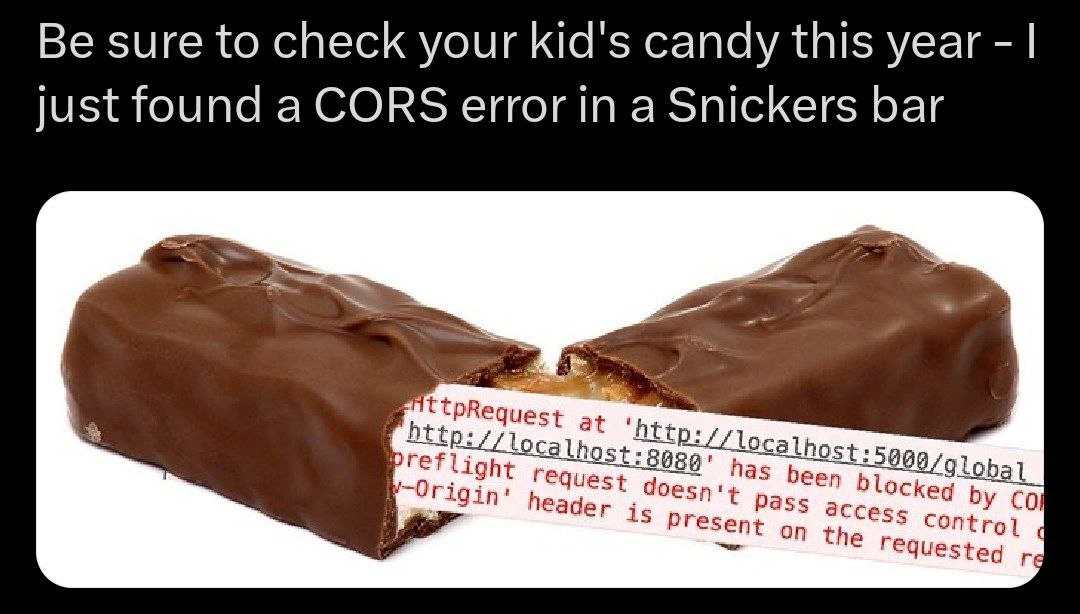
"Be sure to check your kid's candy this year – I just found a CORS error in a Snickers bar."

This meme mashes up Halloween safety folklore with a dreaded Cross-Origin Resource Sharing (CORS) fiasco that only web developers truly fear. In the image, a Snickers bar is split open and instead of gooey nougat, it reveals an ominous red browser console error message. The text shows a failed HTTP request from http://localhost:8080 to http://localhost:5000 blocked by CORS — basically a frontend-backend handshake fail. The punchline is that a CORS error is hiding inside candy, as if it were a dangerous razor blade. For seasoned web developers, just seeing “has been blocked by CORS” triggers flashbacks of day-ruining debugging sessions. The meme’s top caption parodies the classic Halloween warning (“check your kid’s candy”) by swapping in a developer nightmare: an errant cross-origin request. It’s hilarious because it mixes mundane Halloween advice with an inside joke about API integration gone wrong. Senior engineers recognize the specific details instantly: two different localhost ports (8080 vs 5000) means the browser’s Same Origin Policy is in full effect, denying the treat. The missing Access-Control-Allow-Origin header is like the absent golden ticket that would’ve granted access. And the mention of a “preflight request” not passing means the browser’s initial CORS check (OPTIONS request) got a scary “nope”. In other words, the preflight failed—truly a BrowserSecurity fright! Even the error text is partially cut off by the chocolate edges, mimicking how console errors often truncate vital info until you dig deeper. It’s a perfect DeveloperHumor nugget: if you’ve been in the CORS trenches, you can taste the irony of biting into something sweet only to find a bitter HTTP error inside. 🍫🚫

Description

A meme that humorously combines a common Halloween PSA with a frustrating web development error. The top text reads, 'Be sure to check your kid's candy this year - I just found a CORS error in a Snickers bar'. Below the text is an image of a Snickers bar broken in half. A snippet of a red-text error message, typical of a browser's developer console, is photoshopped into the caramel and nougat filling. The visible text of the error includes 'HttpRequest at 'http://localhost:8080' has been blocked by CO[RS policy]' and 'preflight request doesn't pass access control [check]'. The joke lies in the absurdity of finding a Cross-Origin Resource Sharing (CORS) error - a common and often infuriating issue for web developers - in a candy bar. It's a highly relatable pun for anyone who has spent hours debugging why their frontend application can't communicate with a backend API due to browser security policies
Comments

7
Anonymous ★ Top Pick I tried to fix the candy, but the OPTIONS request on the nougat kept failing, and the server wouldn't respond with the Access-Control-Allow-Chocolate header
  1. Anonymous ★ Top Pick

    I tried to fix the candy, but the OPTIONS request on the nougat kept failing, and the server wouldn't respond with the Access-Control-Allow-Chocolate header

  2. Anonymous

    Some parents look for razor blades - senior devs just grep for Access-Control-Allow-Snickers: *

  3. Anonymous

    After 20 years in this industry, the scariest thing I've encountered isn't legacy code or production outages - it's explaining to product why their "quick iframe embed" needs three weeks of CORS configuration across seventeen microservices

  4. Anonymous

    Every senior engineer knows that CORS errors are the Halloween candy corn of web development - nobody wants them, they show up uninvited every year, and explaining why they exist to stakeholders is somehow more painful than the error itself. The real horror isn't finding CORS in your Snickers; it's explaining to your PM why 'just disable CORS' isn't a production-ready solution, even though it works perfectly on your machine

  5. Anonymous

    Nothing says Halloween like discovering your API gateway drops OPTIONS and the browser refuses to trick‑or‑treat from localhost:8080 to :5000

  6. Anonymous

    At scale we preach Zero Trust; my browser enforces it locally - no trick-or-treating from localhost:8080 to localhost:5000 without an Access-Control-Allow-Origin permission slip

  7. Anonymous

    The ultimate preflight check: even candy bars reject localhost OPTIONS without wildcards

Use J and K for navigation